

User experience (UX) design is all about making products, services, and systems that people genuinely enjoy using. It’s not just about aesthetics—how something looks. It's about how it feels and how it works from the user's point of view.
The real goal is to solve someone's problem in a way that feels completely natural and satisfying.
Understanding User Experience Without the Jargon
Think about your favorite coffee shop for a minute. The experience isn't just about the coffee itself, right? It's the whole package: the easy-to-read menu, the cozy chairs, the barista who remembers your order, and how simple it is to pay. That seamless, positive feeling is exactly what UX design aims to create, just in a digital space.
UX is like the invisible hand guiding you through an app or a website. When it's done right, you don’t even notice it. You just get things done—booking a flight, buying groceries, or connecting with friends—without a hint of frustration.
The Real-World Impact of Good and Bad UX
The gap between good and bad UX is huge. It can mean the difference between a happy, loyal customer and one who gets frustrated and clicks away to a competitor. Good UX feels like it knows what you need before you do, while bad UX just throws up roadblocks.
This is especially critical in the online world. Following solid ecommerce user experience best practices can make or break a business, directly impacting sales and whether customers stick around.
"User experience encompasses all aspects of the end-user’s interaction with the company, its services, and its products." — Don Norman, Cognitive Scientist & User Experience Pioneer
That quote from the man who coined the term says it all: every single interaction matters. A well-designed product feels like a helpful conversation. A poorly designed one feels like you're constantly fighting it, trying to guess what to do next.
Good UX vs Bad UX A Quick Comparison
To put it in simple terms, let's look at how these two approaches feel in the real world. This table breaks down the difference between a product designed for you and one that feels like an obstacle course.
| Aspect | Good UX (Intuitive & Helpful) | Bad UX (Confusing & Frustrating) |
|---|---|---|
| First Impression | Welcoming and easy to understand. You immediately know what to do. | Overwhelming or unclear. You're not sure where to start. |
| Task Completion | You achieve your goal quickly and without thinking too much about the process. | Simple tasks require multiple steps, leading to errors and abandonment. |
| Emotional Response | You feel confident, satisfied, and in control. The experience is pleasant. | You feel annoyed, stupid, or stressed. The experience is a chore. |
| Long-Term Effect | You trust the brand and are likely to return and recommend it to others. | You avoid the product and may share your negative experience with others. |
As you can see, the impact goes way beyond the screen. Good UX builds trust and loyalty, while bad UX actively drives people away.
The History and Evolution of UX Design
https://www.youtube.com/embed/zKK1I2n53pk
To really get what UX design is all about, it helps to look at where it came from. The core idea—making things work better for people—isn't some new concept cooked up in the internet age. Its principles have been with us for thousands of years, long before anyone ever plugged in a computer.
The journey starts in some pretty unexpected places. Take Feng Shui, the ancient Chinese practice of arranging a space to improve the flow and harmony for the people in it. Dating back to around 4000 BC, it was one of the earliest attempts to design an environment around human well-being. That’s not so different from what we do today when we design an app to feel intuitive and harmonious for its users.
From Ancient Principles to Modern Industry
Fast forward a few thousand years to ancient Greece, around 500 BC. Thinkers there were already exploring ergonomics, which is basically the science of making things fit the human body and mind. This was one of the first formal efforts to make tools and objects more efficient and comfortable for people—a goal that every UX designer shares today.
By the 20th century, these ideas started finding their way into factories and workshops. Engineers began to think seriously about the human side of making things. One of the most important figures in this shift was industrial designer Henry Dreyfuss.
"When the point of contact between the product and the people becomes a point of friction, then the industrial designer has failed. On the other hand, if people are made safer, more comfortable, more eager to purchase, more efficient—or just plain happier—by contact with the product, then the designer has succeeded." — Henry Dreyfuss, Designing for People (1955)
Dreyfuss’s whole philosophy, which he detailed in his book Designing for People, was simple: products should be designed around people to make their lives easier, safer, and better. He was laying the foundation for what we now call user experience.
The Digital Revolution and the Birth of a Discipline
Then came the personal computer in the 1980s. This changed everything. Suddenly, technology wasn't just for specialists in labs; it was for everyone. This shift made "user-friendly" a make-or-break quality for any product.
This is when the term "user experience" officially entered the scene. In the 1990s, cognitive psychologist Don Norman joined Apple to work on their human-centered design. He came up with the term to describe everything that makes up a person's interaction with a system—the hardware, the software, the interface, even the help desk.
The field has exploded since then. What started with a few thousand people in the 80s has grown to an estimated one million practitioners today. And it’s not stopping—that number is projected to hit 100 million by 2050. You can explore more of this timeline in this great overview of UX evolution.
From arranging rooms in ancient China to designing the apps on our phones, the history of UX is really a story about better understanding people. It shows that, at its core, UX has always been about one powerful idea: putting people first.
The Core Principles of Great UX Design
A great user experience never happens by accident. It’s the direct result of deliberate, thoughtful decisions guided by a handful of core principles. Think of these ideas as a designer's compass, making sure the final product isn't just a set of features, but something genuinely helpful and even pleasant to use.
If you really want to understand "what is user experience design," getting a grip on these principles is essential. They are the "why" behind every design choice, the building blocks that turn a clunky, confusing tool into one that feels intuitive and effortless.
Putting the User Front and Center
The absolute most important idea in UX is user-centered design. This philosophy dictates that every single decision—from the layout of a screen to the color of a button—must be made with the user's needs, goals, and limitations at the forefront. It’s about designing for people, not just building something and handing it over.
A designer who truly gets this doesn't start by asking, "What cool features can we build?" Instead, they ask, "What problem are our users trying to solve?" That simple shift in perspective is what separates forgettable products from truly exceptional ones.
Empathy is at the heart of design. Without the understanding of what others see, feel, and experience, design is a pointless task. — Tim Brown, Chair of IDEO
This empathetic approach is key. It ensures the final product feels like a helpful partner guiding the user, not a frustrating roadblock they have to fight against.
The Pillars of Effective Design
Beyond just having a user-first mindset, a few key pillars support every strong user experience. Each one tackles a different part of the user's interaction, and when they all work together, they create a journey that feels seamless and positive. To see how these ideas come to life, it’s worth exploring some foundational 10 User Experience Design Best Practices.
Here are the essential principles you'll find in any well-designed product:
- Usability: How easily can people accomplish their goals? Think of a streaming service with a prominent search bar and simple category filters. That’s high usability—you can find a movie in seconds with minimal fuss.
- Accessibility: Can people with a wide range of abilities use the product? For a banking app, this means including features like high-contrast text, screen reader compatibility, and clear navigation so everyone can manage their money.
- Utility: Does the product actually solve a real problem? A weather app that only shows the temperature for one city has pretty low utility. A great one gives you forecasts, radar maps, and severe weather alerts. It's genuinely useful.
- Desirability: Does using the product create a positive emotional response? This goes beyond pure function. It’s about the branding, the aesthetics, and the overall feeling that makes someone want to come back and use it again.
These pillars don't exist in a vacuum; they support each other. A product can be incredibly useful, but if it's impossible to navigate (low usability), it's a failure. Likewise, a beautiful app (desirable) that isn't accessible falls far short of its potential.
Consistency and Simplicity in Action
Two final principles—consistency and simplicity—act as the glue holding everything together.
Consistency means that similar elements look and behave in a predictable way. For example, the little trash can icon almost universally means "delete," no matter what app you're in. This consistency lowers the user's mental workload because they don't have to relearn how things work on every new screen.
Simplicity is all about cutting out the noise. It’s not just about a minimalist aesthetic; it’s about making the path to a user's goal as straight as possible. A simple design gets rid of distractions and presents only what's necessary, guiding the user's focus where it needs to be.
Walking Through the UX Design Process
Knowing the theory is great, but putting it into practice is where UX design really comes to life. The process isn't a straight line from A to B. It’s much more like a chef refining a new recipe—a cycle of tasting, tweaking, and trying again until you get it just right.
This problem-solving framework breaks a massive challenge into smaller, manageable stages. Each step logically builds on the last, ensuring the final product isn't a shot in the dark but a solution built specifically around what real people actually need.
Think of it as a loop, not a line. Designers constantly move from understanding users to building, testing, and then looping back to refine their work based on what they learn.
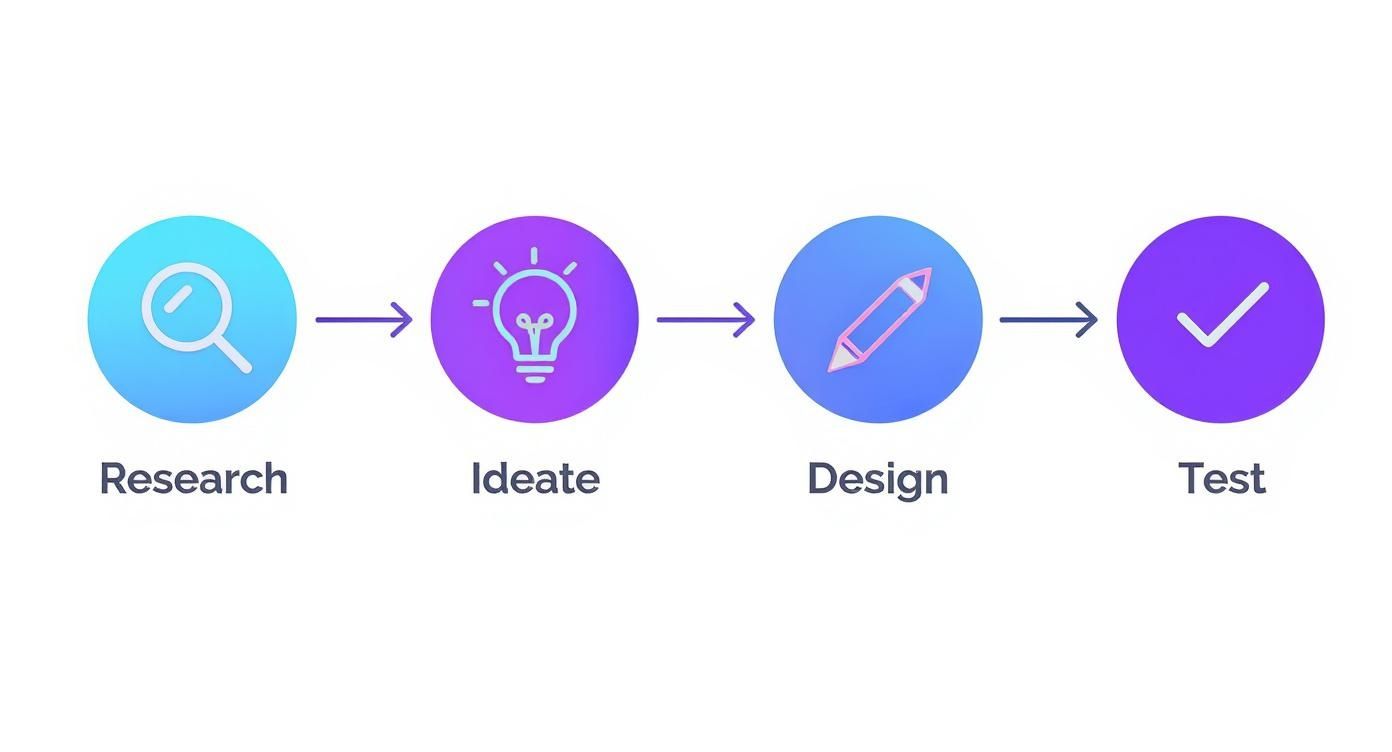
This iterative nature is the core of modern product design. You don't just launch it and hope for the best; you listen, learn, and improve.
Stage 1: User Research
It all begins with empathy. Before a single line is sketched or a button is designed, you have to get inside the heads of your users. The whole point of this research phase is to deeply understand their problems, what drives them, and where their current frustrations lie.
To do this, designers use a mix of methods:
- User Interviews: These are straightforward, one-on-one conversations to hear people describe their experiences in their own words.
- Surveys: This is how you gather data from a much larger group to spot wider trends or validate what you heard in interviews.
- Persona Creation: You then create fictional characters based on all that research. These "personas" represent your key user groups and keep the team focused on who they're designing for.
This deep dive ensures you're not just building on assumptions. It provides a solid foundation of evidence that will guide every single decision you make down the road.
Stage 2: Ideation and Information Architecture
With a clear picture of the user and the problem, it's time to switch gears and start brainstorming solutions. The ideation phase is a creative free-for-all where the goal is to generate as many ideas as possible, no matter how wild they seem. Techniques like sketching and group workshops get the creative juices flowing.
Once a promising idea emerges, the team has to figure out how to structure everything. This is called Information Architecture (IA). It’s like drawing up the blueprint for a house before you start building, making sure every room is easy to find and the layout makes sense. A solid IA is the backbone of any intuitive app or website.
"If we want users to like our software, we should design it to behave like a likable person: respectful, generous, and helpful." — Alan Cooper, Software Designer and Programmer
Alan Cooper’s quote nails it. The goal of this phase is to organize your ideas into a structure that feels helpful and respectful of the user’s time.
Stage 3: Design and Prototyping
This is where the abstract ideas finally start to look and feel like a real product. The process usually moves from rough sketches to polished, interactive models.
- Wireframes: These are the bare-bones layouts. Think simple black-and-white diagrams that focus only on structure and function, without any distracting colors or styles.
- Prototypes: Next come interactive mockups that you can actually click through. They look and feel like the final product, allowing the team to test the flow and user journey.
Designers rely on a variety of digital tools to bring these visuals to life and ensure everything is pixel-perfect, from exploring design tools like a REM converter to using industry-standard software.
Stage 4: Testing and Iteration
Finally, it’s time to put the design in front of real people. Usability testing involves watching actual users try to complete tasks with your prototype. Do they get confused? Can they find what they’re looking for?
The feedback you gather here is pure gold. It shines a light on hidden flaws and opportunities you'd never see on your own—all before a single line of code is written.
This feedback isn't about passing or failing; it's about learning. The insights go straight back to the design team, who use them to refine and improve the product. It’s a loop: design, test, learn, and repeat until the experience is as seamless and effective as it can be. If you're curious about the specifics, you can dive deeper into the various usability testing techniques that experts use to get these crucial insights.
How Great UX Drives Business Growth

So far, we’ve covered the what and how of user experience design. But let's get down to what really matters for any business: what’s the payoff? Investing in UX isn't just about making things look pretty—it's a direct investment in your bottom line.
Great UX is the bridge between a happy user and a healthy business. It delivers tangible, measurable results that show up in your revenue, customer satisfaction scores, and brand reputation.
When people genuinely enjoy using your product, they stick around. This is where the magic happens, turning casual visitors into loyal customers who will choose you over the competition, time and time again.
Boosting Conversions and Sales
One of the most immediate effects of solid UX is a jump in your conversion rates. Picture an online store with a clunky, confusing checkout process. It’s a guaranteed recipe for abandoned carts. Every moment of friction is a reason for a potential customer to walk away.
Now, imagine a checkout that’s smooth and intuitive. It saves their info, presents clear shipping options, and feels secure. That seamless experience removes barriers, making it incredibly easy for customers to finish their purchase. This isn't just theory; it’s a proven way to directly drive more sales.
A well-designed user interface could raise your website’s conversion rate by up to 200%, and a better UX design could boost conversion rates up to 400%.
This principle holds true for any goal, not just e-commerce. Whether you want users to sign up for a newsletter, book a demo, or download an app, a user-friendly path will always outperform a frustrating one. By clearing the obstacles, you pave a smooth road for users to become customers. If you want to dive deeper, we have more strategies to increase your ecommerce conversion rate in our guide.
Reducing Costs and Building Loyalty
Beyond just bringing in more money, a focus on UX is also a powerful way to cut costs. When a product is easy to use, people have fewer questions and run into fewer problems. Simple as that.
This directly translates to fewer customer support tickets. When users can find what they need on their own, you spend less time and money on support staff and resources. A great user experience is your first line of defense against customer frustration.
The long-term benefits are even more powerful. Happy customers become loyal customers. In fact, a staggering 88% of online consumers are less likely to return to a site after a bad experience. A positive, frictionless interaction builds trust and makes people feel good about your brand, which keeps them coming back.
The Financial Impact of UX
The numbers backing up UX are impossible to ignore. A bad user experience isn't just annoying; it's incredibly expensive. A landmark report from the Nielsen Norman Group noted that poor usability could cost businesses up to $2 billion a year in lost sales and productivity.
On the flip side, the return on investment (ROI) for UX is massive. Studies have shown that every $1 invested in user experience can return between $100 and $16,000. It’s crystal clear that UX is not a "nice-to-have" expense—it's a core strategic investment that fuels growth, builds loyalty, and gives you a serious competitive edge.
Common Questions About User Experience Design
As you start digging into the world of UX, a few questions always seem to pop up. It's a field with its share of overlapping terms and unique career paths, so it's completely normal to have some lingering uncertainties.
This section is all about tackling those frequently asked questions head-on. We’ll give you clear, simple answers to help you tell the difference between related jobs, understand what a career in UX actually looks like, and nail down a few key concepts. The goal is to clear up any confusion and give you a much sharper picture of this exciting field.
Is UX Design the Same as UI Design?
This is, without a doubt, the most common point of confusion. And for good reason—the two are deeply connected, but they are absolutely not the same thing.
Think of it like building a house.
UX (User Experience) design is the architect's blueprint. It’s all about the fundamental structure, flow, and function. The UX designer figures out how many rooms there are, how they connect, and whether the layout actually makes sense for the family who will live there. They are focused on the entire experience of moving through and living in the house.
On the other hand, UI (User Interface) design is the interior designer. They’re the ones choosing the paint colors, the furniture, the light fixtures, and the doorknobs. Their focus is on the look and feel of every single surface you touch and see.
A house can have a brilliant blueprint (great UX) but awful interior design (bad UI), making it a miserable place to be. Conversely, a beautifully decorated house with a confusing, nonsensical layout is just as frustrating. You need both to work together perfectly to create a home people love.
To make this even clearer, let’s break down their key differences.
UX Design vs UI Design Key Differences
A lot of the confusion between UX and UI comes from not knowing where one role ends and the other begins. This table should clear things up by showing what each discipline really focuses on.
| Aspect | UX Design (The Experience) | UI Design (The Interface) |
|---|---|---|
| Main Focus | The overall feeling and usability of the user's journey to solve a problem. | The look, feel, and interactivity of the product's visual elements. |
| Primary Goal | To make the product logical, efficient, and meaningful to use. | To make the interface aesthetically pleasing, visually consistent, and interactive. |
| Key Questions | How can we make this task easier? What are the user's pain points? | What color should this button be? How should this menu animate? |
| Core Skills | Research, prototyping, information architecture, user testing, empathy. | Graphic design, typography, color theory, layout, interaction design. |
| Deliverables | Wireframes, user personas, journey maps, interactive prototypes. | Style guides, mockups, design systems, individual screen layouts. |
In short, UX is all about the why and the how of the experience, while UI is focused on the what and the where of the visuals.
Do UX Designers Need to Know How to Code?
The short answer: No, UX designers aren't required to be programmers. Their primary job is to research, strategize, and design the user's journey, which is a completely different skillset from writing code. Most design teams have dedicated developers who handle all the technical implementation.
However, having a basic grasp of coding concepts (like HTML, CSS, and maybe a little JavaScript) is a huge advantage. It helps in a few really important ways:
- Better Collaboration: When you understand the basics of what's possible with code, you can talk to developers on their level.
- More Realistic Designs: Knowing the technical limitations helps you create designs that are practical and can actually be built, saving everyone a lot of time and frustration.
- Stronger Problem-Solving: A foundational knowledge of code can help you contribute to technical discussions and come up with more creative, workable solutions.
Think of it like a film director. They don't need to be a special effects artist, but they benefit immensely from understanding what the VFX team can and cannot do.
What Does a Typical Day Look Like for a UX Designer?
There's rarely a "typical" day for a UX designer, since their tasks change so much depending on where they are in a project. That said, their work almost always revolves around a few core activities.
"How do I explain what I do at a party? The short version is that I say I humanize technology." — Fred Beecher, Director of UX, The Nerdery
This quote perfectly captures the essence of the role. A day in the life might involve:
- Conducting User Research: This could be anything from interviewing users to understand their needs, sending out surveys, or analyzing data to find pain points.
- Collaborating with Teams: UX designers are communicators, first and foremost. They spend a lot of time in meetings with product managers, developers, and other stakeholders to align on goals and present their design concepts.
- Creating Design Deliverables: This is the hands-on design work. They might be sketching wireframes, building interactive prototypes in tools like Figma, or mapping out user flows.
- Testing and Iterating: A big part of the job is conducting usability tests, which means watching real users interact with their designs to gather feedback and find areas for improvement.
Ultimately, a UX designer's job is to be the advocate for the user, making sure the final product isn't just functional, but also intuitive and genuinely enjoyable to use.
At E-commerce Dev Group, we believe that a superior user experience is the foundation of a successful online store. Our expert Shopify designers and developers specialize in creating intuitive, high-converting websites that turn visitors into loyal customers. If you're ready to elevate your e-commerce presence, partner with us to build an online experience that truly performs. https://scaleshopify.com
