

In the fast-paced world of e-commerce development, speed and accuracy are everything. While robust code is essential, it's only half the battle. The other half? Clear, accessible, and actionable documentation. Poor documentation leads to slower onboarding, repeated questions, and costly mistakes, directly impacting your bottom line. It's the silent project killer that drains resources and stifles growth. When your team spends more time searching for answers than building solutions, you lose your competitive edge.
This guide moves beyond generic advice to provide a concrete framework for creating documentation that empowers your team. We will explore eight essential technical documentation best practices, tailored specifically for e-commerce development teams, to help you build a single source of truth. Implementing these strategies will accelerate projects, reduce friction, and allow your team to focus on innovation instead of deciphering outdated instructions.
These aren't just tips; they are foundational strategies for building more efficient and scalable development workflows. By the end of this article, you will have a clear roadmap to transform your documentation from a neglected afterthought into one of your most valuable operational assets. Let’s dive into how you can make your documentation work for you.
1. Know Your Audience
Understanding who will read your documentation is the single most important factor in its success. This foundational step involves creating a clear picture of your users' technical skills, job roles, and what they need to accomplish. For an e-commerce development team, your audience isn't a single group; it’s a spectrum that includes junior developers needing step-by-step API guides, senior architects looking for system-level diagrams, and even project managers who need high-level overviews.
This is one of the most crucial technical documentation best practices because it dictates the language, structure, and depth of your content. Without a clear audience definition, you risk writing documentation that is too complex for beginners or too simplistic for experts, rendering it useless for both.
Defining Your User Hierarchy
A practical approach is to segment your audience into distinct personas. For example, a "New Frontend Developer" persona needs tutorials on integrating with your storefront API, while a "Backend Systems Administrator" persona requires detailed guides on server configuration and security protocols.
Key Insight: Don't write one-size-fits-all documentation. Tailor content to specific user personas and their goals. This ensures every reader finds immediate value and can solve their problem efficiently.
The infographic below shows how to structure this audience-first approach, starting with broad personas and drilling down into specific user journeys.
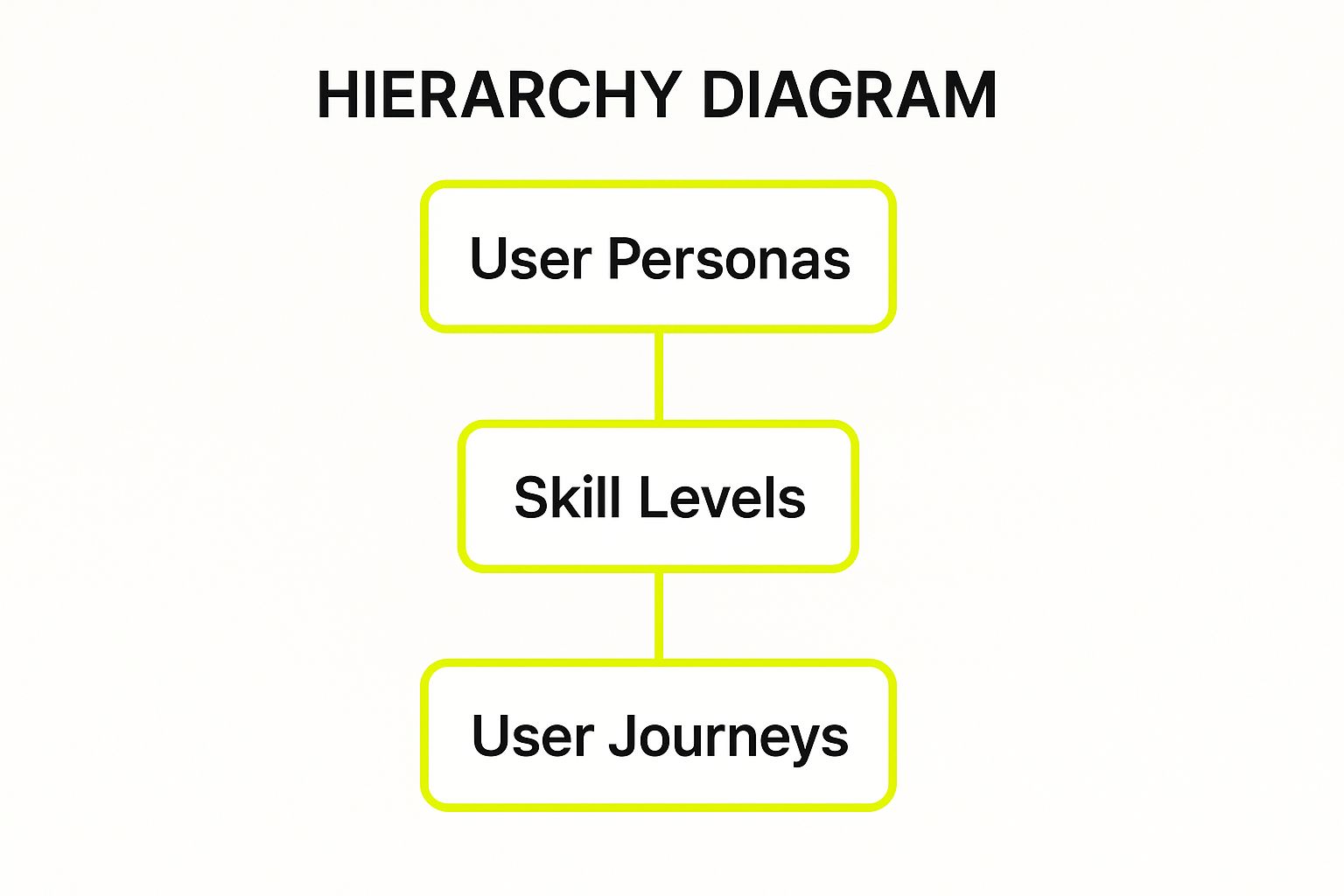
This hierarchy demonstrates how defining user personas allows you to map content directly to skill levels and anticipated tasks.
Actionable Tips for Implementation
- Create User Personas: Develop detailed profiles for key user types, including their role, goals, and technical expertise.
- Segment Content: Use clear labels like "Beginner" or "Advanced" at the start of documents. Amazon AWS does this effectively by offering distinct learning paths for different roles.
- Gather Feedback: Use surveys and analytics to see which pages are most visited and where users drop off. This data reveals what your audience truly needs.
2. Maintain Clear Structure and Organization
A logical and predictable structure is the backbone of usable documentation. It enables users to find information quickly, understand relationships between different topics, and build a mental model of your system. For an e-commerce platform, this means an intuitive layout where API references, theming guides, and app development tutorials are exactly where a developer expects to find them.
This is a fundamental technical documentation best practices because poor organization leads directly to user frustration. If a developer can't find the endpoint they need within seconds, they'll abandon the docs and resort to trial-and-error, wasting valuable time and potentially introducing bugs.
Designing an Intuitive Information Architecture
Effective organization starts with a clear hierarchy. For example, GitLab successfully categorizes its vast documentation into three main pillars: User docs, Admin docs, and Developer docs. This top-level sorting immediately directs different user personas to the content most relevant to their needs, preventing information overload.
Key Insight: Don’t force users to learn your internal team structure. Organize documentation around their tasks and goals. The architecture should feel intuitive to an outsider, not just to the people who built the product.
To effectively maintain a clear structure from the start, utilizing a pre-built framework, such as a Notion Help Center template, can provide a solid foundation for organizing your content logically.
Actionable Tips for Implementation
- Follow the "Inverted Pyramid": Place the most critical information, like a quick-start guide or a summary, at the very top of the page.
- Limit Heading Depth: Keep your content hierarchy shallow, using a maximum of 3-4 heading levels (H1, H2, H3, H4) to prevent overwhelming complexity.
- Implement the "Three-Click Rule": A user should be able to find any piece of information within three clicks from the homepage. This forces you to create efficient navigation paths.
- Use Breadcrumbs: Always show users where they are within the documentation hierarchy. This simple navigation aid provides context and makes it easy to move up to broader topics.
3. Use Clear, Concise Language
Writing in plain, straightforward language is fundamental to making technical concepts accessible without sacrificing accuracy. For an e-commerce platform, this means explaining complex API endpoints or theme customizations in a way that developers can quickly understand and implement. The goal is to eliminate ambiguity and respect the reader's time, ensuring they can find solutions without deciphering dense prose.

This is one of the most effective technical documentation best practices because clarity directly impacts developer productivity and reduces support tickets. When documentation is simple, developers can build faster and with fewer errors. For example, Mailchimp's content style guide champions a conversational and clear tone, making its developer resources feel approachable and easy to follow.
The Principle of 'Less is More'
Effective documentation values brevity. It involves using active voice, short sentences, and common words while avoiding unnecessary jargon. When a technical term is essential, it must be defined immediately. This isn't about "dumbing down" content; it's about communicating efficiently. The focus should be on getting the developer from problem to solution as quickly as possible.
Key Insight: Your documentation is a tool, not a novel. Prioritize clarity over cleverness. If you can say something in five words instead of ten, do it. Every extra word is a potential point of confusion.
This principle ensures that both junior developers and seasoned experts can consume the information with minimal cognitive load, making the documentation universally useful.
Actionable Tips for Implementation
- Use Readability Tools: Run your text through tools like the Hemingway Editor to check for a low reading grade level and eliminate complex sentences.
- Read It Aloud: If you stumble over a sentence when reading it, your audience will too. This simple test helps identify awkward phrasing and overly long sentences.
- Create a Terminology Glossary: Maintain a central glossary or database of approved terms to ensure consistency across all documentation, which is crucial for a cohesive user experience.
- Define Acronyms on First Use: Never assume your reader knows what an acronym stands for. For instance, define "PIM" as "Product Information Management" the first time it appears.
- Replace Complex Words: Swap out multi-syllable words for simpler alternatives. For example, use "use" instead of "utilize" and "to" instead of "in order to."
4. Incorporate Visual Elements
Words can explain a process, but a well-placed visual can make it instantly understandable. Incorporating elements like diagrams, screenshots, flowcharts, and even short videos is essential for creating comprehensive technical documentation. For an e-commerce platform, this could mean an architecture diagram showing how a new microservice interacts with the checkout process or an annotated screenshot guiding a merchant through a complex backend configuration.

This is one of the most effective technical documentation best practices because visuals cater to different learning styles and convey complex relationships far more efficiently than text alone. They bridge the gap between abstract concepts and practical application, which is crucial for developers and administrators trying to solve a problem quickly. A single flowchart can clarify a multi-step API workflow that would otherwise require pages of text.
Choosing the Right Visual for the Job
The key is to use visuals that add value, not just decoration. For instance, a system architect benefits from a high-level AWS architecture diagram, while a junior developer needs a step-by-step GIF showing how to use a specific CLI command. The Kubernetes documentation excels at this by using detailed diagrams to explain its intricate cluster components, making the system less intimidating.
Key Insight: Visuals should serve a specific purpose. Use screenshots for UI-heavy tasks, diagrams for system architecture, and videos for dynamic processes. The goal is to reduce cognitive load and accelerate comprehension.
This strategic use of visuals is also central to creating an intuitive user experience, a core principle detailed in guides to the best ecommerce website design. The video below further explores how visual aids can simplify complex technical topics.
Actionable Tips for Implementation
- Use Consistent Tooling: Employ tools like Lucidchart or Mermaid to ensure all diagrams share a consistent style.
- Annotate Everything: Add arrows, boxes, and brief text labels to screenshots and diagrams to guide the user's attention.
- Prioritize Accessibility: Always include descriptive alt text for images to support screen readers and improve SEO.
- Optimize File Sizes: Compress images to ensure your documentation pages load quickly without sacrificing visual clarity.
5. Keep Documentation Current and Version-Controlled
Outdated documentation is worse than no documentation at all. It misleads developers, breaks trust, and leads to critical errors, especially in a fast-moving e-commerce environment where API endpoints and platform features are constantly evolving. Implementing a systematic process for updating and versioning your documentation ensures it remains a reliable source of truth.
This is one of the most essential technical documentation best practices because it directly impacts developer productivity and system stability. Stale information causes confusion and forces developers to waste time reverse-engineering code, eroding confidence in your platform. A robust versioning strategy, like that used by Laravel, allows users to easily switch between documentation for different product releases.

Implementing a Docs-as-Code Workflow
The most effective way to manage documentation is to treat it like source code. Storing documentation in a Git repository alongside the application code allows for a seamless, collaborative update process. Every code change that impacts functionality can be accompanied by a corresponding documentation pull request, making updates an integral part of the development lifecycle.
Key Insight: Integrate documentation updates into your "Definition of Done" for every feature or bug fix. This ensures documentation never falls out of sync with your product and builds a culture of ownership among developers.
This approach transforms documentation from a burdensome afterthought into a living, version-controlled asset that evolves with your e-commerce platform.
Actionable Tips for Implementation
- Adopt Docs-as-Code: Store documentation in Markdown files within your project's Git repository.
- Automate Updates: Use CI/CD pipelines to automatically build and deploy your documentation site whenever a change is merged into the main branch.
- Integrate with QA: Make documentation review a mandatory step in your quality assurance process, similar to code review. You can learn more about how this fits into a broader strategy by reviewing these quality assurance best practices.
- Use Clear Versioning: Add a version switcher to your documentation site, allowing users to select the specific version of the product they are using. Python’s documentation is a prime example of this.
6. Provide Practical Examples and Use Cases
Abstract concepts and feature descriptions are not enough; developers need to see your technology in action. Providing concrete examples and real-world use cases transforms theoretical knowledge into practical, actionable steps. This means including complete code samples, sample API requests with responses, and step-by-step tutorials that mirror actual problems an e-commerce development team would face.
This is a non-negotiable entry in our list of technical documentation best practices because examples bridge the gap between knowing what a feature does and knowing how to implement it. For an e-commerce platform, a vague description of a "discount API endpoint" is far less valuable than a complete, runnable code block showing how to apply a "20% off seasonal" coupon to a shopping cart.
From Theory to Tangible Implementation
The goal is to show, not just tell. Instead of explaining a concept, demonstrate it with code that can be copied, pasted, and tested. For instance, Stripe’s API documentation excels here by providing full integration examples in multiple languages, allowing developers to immediately test API calls. Similarly, React’s documentation includes interactive CodeSandbox examples that users can edit and experiment with directly in the browser.
Key Insight: Examples should be complete, tested, and immediately usable. Avoid pseudocode or oversimplified illustrations like
fooandbar. Use realistic data and scenarios that resonate with your users' goals, such as processing an order or updating inventory.
Showing users the expected output or result is just as important as the input. This lets them verify their implementation is working correctly and helps them debug if it's not.
Actionable Tips for Implementation
- Test All Code Examples: Ensure every snippet runs flawlessly. Outdated or broken code destroys trust and creates immense user frustration.
- Provide Expected Output: Show what a successful API response or function return should look like so users can confirm their work.
- Create a "Cookbook" Section: Build a library of recipes or common patterns that solve frequent problems, like "How to Implement a Flash Sale" or "How to Handle Multi-Currency Checkouts."
- Show Common Error Scenarios: Include examples of what can go wrong and provide clear instructions on how to troubleshoot and resolve those errors.
7. Enable Easy Search and Navigation
Users rarely read technical documentation cover-to-cover; they jump in with a specific problem to solve. Your documentation's success hinges on how quickly they can find the exact answer they need. Implementing robust search and intuitive navigation transforms your docs from a static library into a dynamic, searchable knowledge base. For an e-commerce platform, this means a developer can instantly find an API endpoint for inventory management instead of getting lost in unrelated guides.
This is a critical component of technical documentation best practices because poor discoverability makes even the best-written content useless. If users can't find information, it might as well not exist. The goal is to minimize friction between a user's question and their answer.
Designing for Discoverability
Effective navigation goes beyond a simple search bar. It involves creating multiple, logical pathways to information, such as a clear table of contents, contextual cross-links between related articles, and logical content categories. For example, documentation for a payment gateway API should link directly to articles on handling refunds and chargebacks.
Key Insight: Treat your documentation like an application where the user experience is paramount. Your primary UI elements are search, navigation menus, and hyperlinks. Optimize them relentlessly to reduce user effort.
Many top-tier documentation sites use specialized tools to enhance this experience. Algolia DocSearch, for instance, provides fast, typo-tolerant search for countless open-source projects, while MDN Web Docs features a comprehensive search that includes syntax examples directly in the results. For an e-commerce platform, optimizing your documentation's site search can significantly improve developer productivity.
Actionable Tips for Implementation
- Implement Smart Search: Use a search tool that highlights keywords in results, offers "did you mean?" suggestions for misspellings, and indexes synonyms (e.g., 'delete' and 'remove').
- Build Multiple Navigation Paths: Include breadcrumbs, a persistent sidebar with a table of contents, and a sitemap or index to cater to different user habits.
- Analyze Search Queries: Regularly review search analytics to identify what users are looking for but can't find. Use this data to fill content gaps or improve keyword indexing.
8. Implement Feedback Mechanisms and Continuous Improvement
Technical documentation is not a static asset; it's a living resource that should evolve alongside your product and your users' needs. Great documentation is built on a foundation of user feedback and data-driven iteration, turning it from a monologue into a dialogue. For an e-commerce platform, this means creating clear channels for developers and administrators to report issues, ask questions, and suggest improvements directly within the documentation they are using.
This is one of the most vital technical documentation best practices because it transforms your docs from a cost center into a self-improving asset that reduces support tickets and accelerates user onboarding. Without a feedback loop, documentation quickly becomes outdated, inaccurate, and irrelevant, frustrating users and eroding trust in your platform.
Creating a Living Documentation System
The core idea is to treat your documentation like a product, with its own lifecycle of feedback, iteration, and improvement. This means embedding simple, low-friction ways for users to provide input. For example, a developer struggling with a payment gateway API guide should be able to flag a confusing step or suggest a code snippet correction directly on that page.
Key Insight: Your users are your best quality assurance team. By making it easy for them to provide feedback, you crowdsource the maintenance and improvement of your documentation, ensuring it stays accurate and useful over time.
This approach creates a virtuous cycle: better documentation leads to more successful users, who in turn provide more insightful feedback, leading to even better documentation.
Actionable Tips for Implementation
- Embed Feedback Tools: Add simple widgets like star ratings, "Was this page helpful?" buttons, or comment forms to every page. Netlify excels at this with its prominent "Edit this page on GitHub" link.
- Monitor Support Tickets: Analyze support requests to identify common questions or points of confusion. These are clear indicators of gaps or unclear sections in your documentation.
- Establish a Triage Process: Create a clear workflow for reviewing, prioritizing, and acting on feedback. Acknowledge submissions publicly to show you are listening and encourage more participation.
- Conduct Regular Audits: Schedule periodic reviews (quarterly or bi-annually) to proactively find and fix outdated information, broken links, and redundant content.
Technical Documentation Best Practices Comparison
| Item | Implementation Complexity 🔄 | Resource Requirements ⚡ | Expected Outcomes 📊 | Ideal Use Cases 💡 | Key Advantages ⭐ |
|---|---|---|---|---|---|
| Know Your Audience | Medium – requires upfront research | Moderate – user analysis and surveys | Higher user satisfaction; reduced support tickets | Tailoring docs by audience segments | Increases relevance; improves adoption; better prioritization |
| Maintain Clear Structure and Organization | Medium-High – needs planning and maintenance | Moderate – design and style guides | Improved findability and readability | Large, complex documentation sets | Reduces search time; supports scalability; improves SEO |
| Use Clear, Concise Language | Low-Medium – requires writing discipline | Low – focus on content style | Better comprehension; reduced support needs | All documentation aiming for clarity | Makes docs accessible; reduces misunderstandings |
| Incorporate Visual Elements | High – creation and upkeep of visuals | High – design tools and expertise | Enhanced understanding of complex concepts | Complex processes, system architecture | Improves comprehension; appeals to diverse learning styles |
| Keep Documentation Current and Version-Controlled | High – integration with product lifecycle | Moderate-High – tools and processes | Maintained accuracy and user trust | Products with frequent releases | Prevents errors; supports collaboration; audit trails |
| Provide Practical Examples and Use Cases | Medium – requires testing and updates | Moderate – example development | Faster user onboarding; reduced misunderstandings | API docs; tutorials; code-heavy documentation | Demonstrates best practices; boosts confidence |
| Enable Easy Search and Navigation | Medium-High – technical implementation | Moderate – search systems | Quicker information retrieval; improved user satisfaction | Large documentation sets with diverse content | Reduces frustration; enables content discovery |
| Implement Feedback Mechanisms and Continuous Improvement | Medium – requires setup and processes | Moderate – feedback tools and analysis | Continuous improvement; higher doc relevance | All user-focused documentation | Identifies gaps; builds community; increases ROI |
Turning Documentation from a Chore into a Competitive Advantage
We’ve journeyed through eight fundamental technical documentation best practices, each a vital pillar in constructing a more efficient, scalable, and successful e-commerce operation. From truly understanding your audience and establishing a logical structure to embracing clear language and powerful visuals, the core message is simple: clarity is king. Documentation is not a passive repository of information; it's an active, dynamic tool that empowers your team.
Implementing these principles transforms how your team collaborates. When you maintain up-to-date, version-controlled documents filled with practical examples, you eliminate guesswork and reduce friction. Developers spend less time deciphering legacy code or asking repetitive questions, and more time building features that drive revenue. For an e-commerce brand, this translates directly into faster bug fixes, smoother launches for new marketing campaigns, and a more stable, reliable online store.
Your Action Plan for Documentation Excellence
Feeling overwhelmed? Don't be. The path to great documentation is a marathon, not a sprint. The key is to start small and build momentum. Here’s how you can begin transforming your approach today:
- Start with One Priority: Choose just one or two practices from this list to implement this week. Is your navigation a mess? Focus on improving searchability. Is your content outdated? Schedule a documentation audit.
- Establish a "Documentation Champion": Appoint someone on your team to lead the charge. This person can advocate for best practices, facilitate feedback sessions, and ensure that documentation remains a priority.
- Integrate into Your Workflow: Make documentation a non-negotiable step in your development lifecycle. Just as you wouldn't ship code without testing, don't consider a feature complete until its documentation is written and reviewed.
By systematically applying these technical documentation best practices, you create a powerful flywheel effect. Better documentation leads to faster onboarding for new team members. Faster onboarding means your team can scale more effectively. A more effective team builds and maintains a better product, which ultimately leads to a more successful business. To truly turn documentation from a chore into a competitive advantage, mastering essential code documentation best practices is crucial, as it ensures the foundational layer of your technical knowledge is just as clear and accessible. This isn't just about writing things down; it's about building a culture of clarity and shared understanding that becomes a cornerstone of your competitive edge.
Ready to build an e-commerce platform supported by clear processes and expert development? The team at E-commerce Dev Group specializes in creating scalable, high-performance Shopify Plus solutions where best practices, including robust documentation, are built-in from day one. Contact E-commerce Dev Group to see how we can help you build a store that's as efficient behind the scenes as it is impressive to your customers.
