


Let's reframe how you think about your ecommerce store's search bar. It’s not just a technical feature; it's your best salesperson, always on duty. This is your direct connection to shoppers who know what they want and are ready to buy. A truly effective ecommerce site search doesn't just find things—it guides these high-intent customers right to checkout, making a massive difference in your sales and their satisfaction.
Why Your Search Bar Is Your Best Salesperson

Picture a shopper walking into a huge, sprawling department store. If they're left to wander the aisles alone, they'll likely get frustrated and walk right back out. But what if a sharp, friendly sales associate greets them at the door and asks, "What can I help you find today?" Their entire experience changes. The associate listens, understands what they’re looking for (even if the description is a bit vague), and walks them straight to the perfect item.
That's exactly what your site search should be doing. It turns a potentially confusing browsing session into a focused, efficient buying mission. People who use your search bar aren't just window shopping; they have a specific need and are actively trying to hand you their money.
The High Stakes of Site Search
When a customer types into that little box, they're giving you a golden ticket. They are literally telling you, in their own words, what they want to purchase. The data on this is crystal clear and frankly, staggering.
As many as 30% of ecommerce visitors will use the search bar, and those visitors are 2 to 3 times more likely to convert. In fact, conversion rates from site search can be up to 50% higher than your site's overall average.
That huge gap underscores a critical truth: improving your site search isn't just a minor technical tweak; it's a core business strategy. Some brands have seen their conversion rates jump by as much as 43% simply by improving their search functionality. You can find more stats on the power of search in this guide to ecommerce conversion rates.
It’s Time for a New Perspective on Search
For far too long, merchants have treated site search as a simple checkbox—a basic utility that just needs to exist. This is a costly oversight. A bad search experience, one that spits out irrelevant results or a frustrating "no results found" page, is the digital equivalent of telling your most motivated customer, "Sorry, can't help you," and pointing them toward your competitor's front door.
On the flip side, a fantastic search experience creates a ripple effect of positive outcomes for your business:
- Higher Conversions: This is the most obvious win. You’re creating the shortest possible path from "I want" to "I bought."
- Increased Average Order Value (AOV): A smart search tool can do more than just find products; it can suggest complementary items or premium upgrades, encouraging bigger carts.
- Happier Customers: A seamless, successful search builds trust and makes people feel good about shopping with you. That’s how you earn repeat business.
- Priceless Customer Insights: Every search query is a piece of raw, unfiltered data. It tells you what your customers are looking for, revealing market trends and gaps in your own product catalog.
In this guide, we're going to stop thinking of the search bar as a simple box and start treating it like the powerful sales engine it truly is. We'll dive into the features, best practices, and strategies you need to transform your site search into a machine that drives revenue.
From Basic Function to Seamless Experience

Think about the last time you used a major search engine. You expect instant, smart answers, right? Your customers bring that exact same expectation to your online store. That's why your ecommerce site search can't just be a basic function; it needs to be a seamless, intuitive experience.
A great search feels less like rummaging through a database and more like chatting with a helpful store associate. It understands what you mean, even if you don’t say it perfectly. If you ask a librarian for a book but flub the title, they don't just give you a blank stare. They figure out what you're after and point you to the right shelf. Your site search needs to do the same, guiding shoppers toward a purchase without any friction.
This whole experience is built on a handful of core features that work together to make the journey feel natural.
Predicting Customer Intent with Autocomplete
One of the first things customers notice is autocomplete, often called predictive search. The moment a shopper starts typing, a dropdown list should pop up with suggestions for products, categories, or popular searches. This does a lot more than just save a few keystrokes.
- It guides the shopper: Autocomplete shows customers what you actually have in stock, helping them build a successful search from the get-go.
- It cuts down on errors: By suggesting correctly spelled terms, you minimize the risk of a typo leading to a frustrating dead end.
- It speeds everything up: Customers can spot what they want and jump straight to a product page, shortening the path to a sale.
This immediate feedback loop makes your search feel smart and responsive, showing the customer you're already on the same page.
A truly effective search experience moves beyond simple keyword matching to understanding context and intent. Modern systems do this by leaning on powerful semantic search capabilities, which help interpret the meaning behind a user's query, not just the words themselves.
Forgiving Human Error with Typo Tolerance
Let's be real—mistakes happen. People are tapping away on tiny phone screens or might just be unsure how to spell a brand or product name. A search bar that can't handle a simple typo is a recipe for frustration.
For example, a search for "capuccino maker" or "blak lether jacket" should never result in a "no results" page. A solid search engine instantly recognizes these common misspellings and serves up the results for "cappuccino maker" or "black leather jacket." This is a fundamental part of a user-friendly site search, and it’s a simple fix that prevents countless customers from giving up and leaving.
Turning "No Results" into an Opportunity
The "zero results" page is one of the biggest conversion killers in ecommerce. It's the online equivalent of a customer asking for help and getting a shoulder shrug in return. In fact, a staggering up to 72% of sites fail to meet customer search expectations, often by dropping them on these dead-end pages.
But this page doesn't have to be a failure. You can turn it into a valuable touchpoint that keeps the shopper engaged and on your site.
Instead of showing a blank page, try this:
- Suggest alternative searches: Offer clickable links to similar terms or broader categories that might be relevant.
- Display your top sellers: Showcase popular products to grab their attention and maybe spark a new idea.
- Provide a way to get help: Make it easy to find your contact info or a link to customer support.
By transforming a point of friction into a moment of guidance, you can rescue a sale that was about to be lost and leave the customer with a much better impression of your brand. Features like autocomplete, typo tolerance, and smart "no results" pages are the essential building blocks for a search that actually helps people buy.
Essential Features for a High-Converting Search
Once you've got a solid search foundation, it's time to add the features that turn a simple tool into a genuine sales driver. Think of it like this: a basic car will get you from point A to B, no problem. But add GPS, a smoother suspension, and a more powerful engine, and the entire journey becomes faster, easier, and a lot more enjoyable. The right search features do the same for your customers—they give them speed, control, and the confidence to buy.
These aren't just flashy bells and whistles. They are proven tools that solve real customer problems and guide them straight to checkout. Adding even a few of these can put you miles ahead of the competition by creating a shopping experience that just works.
This image breaks down just how much of an impact basic optimizations like autocomplete and filters can have on your store's performance.
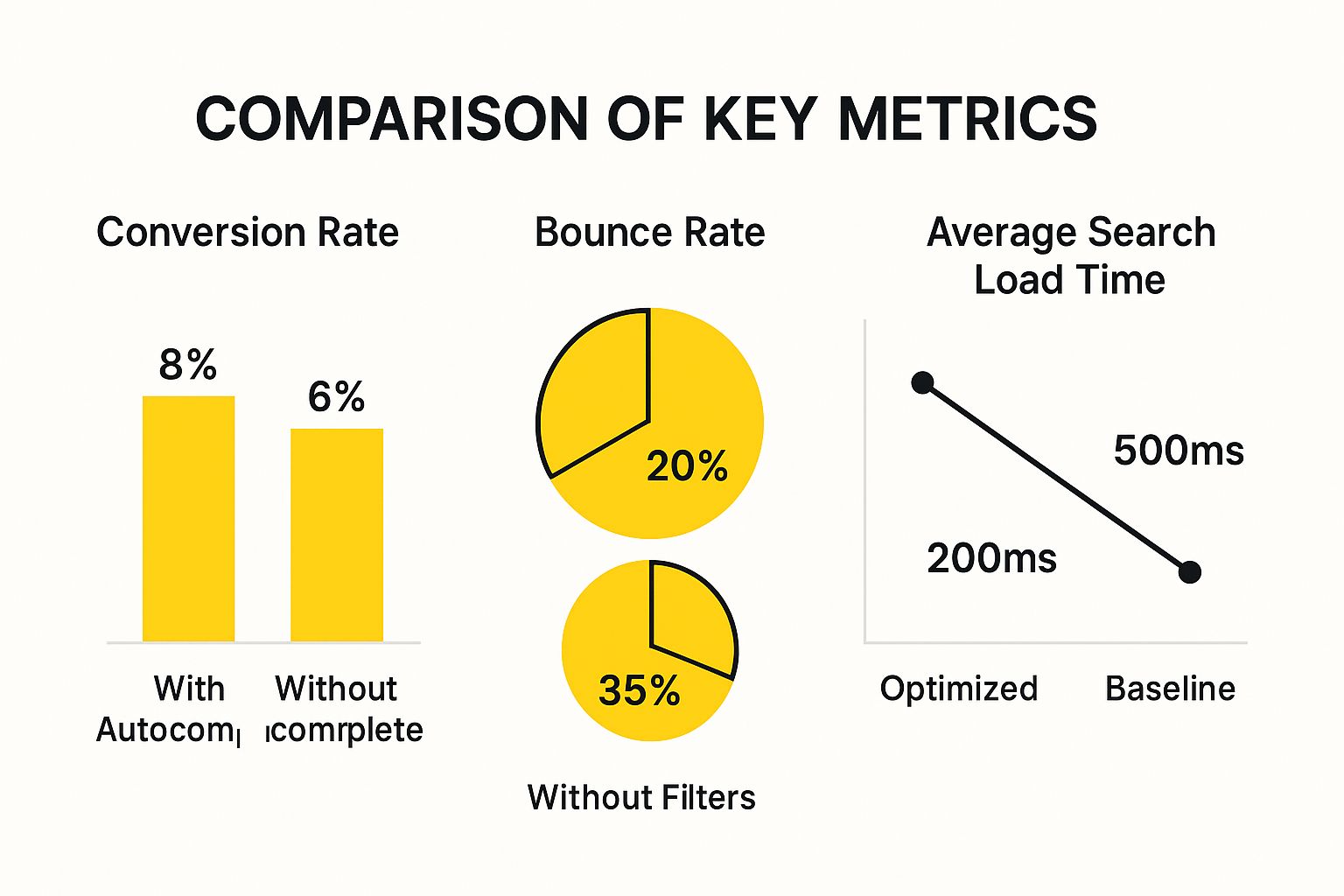
As you can see, even small functional tweaks lead to big wins in conversion rates and lower bounce rates, proving their direct impact on your bottom line.
To give you a clearer picture, let's break down the features that make the biggest difference. Some are absolute must-haves for any modern store, while others are advanced tools that can give you a serious competitive edge.
Essential vs. Advanced Search Feature Comparison
| Feature Type | Feature Name | Primary Benefit for Shoppers |
|---|---|---|
| Essential | Autocomplete | Suggests products and terms as they type, speeding up the search process. |
| Essential | Typo Tolerance | Finds the right products even when the search term is misspelled. |
| Essential | Filters & Facets | Allows users to narrow down results by attributes like size, color, and price. |
| Advanced | Natural Language Processing | Understands conversational queries (e.g., "blue shirts under $50"). |
| Advanced | Visual Search | Lets shoppers find products by uploading an image. |
| Advanced | Personalized Results | Shows results based on a user's past browsing and purchase history. |
Getting the essentials right is your first priority. But as you grow, layering in the advanced features is what creates a truly standout, personalized experience that keeps customers coming back.
Empowering Shoppers with Filters and Facets
Imagine a customer lands on your site and searches for "women's jeans." If that query dumps hundreds—or even thousands—of products on them with no way to sort through the noise, they're gone. It's overwhelming. This is exactly why dynamic filtering and faceted search are mission-critical.
These tools let shoppers slice and dice their search results based on specific attributes that matter to them, like:
- Size and Color: The absolute basics for apparel and many other product categories.
- Price Range: Helps budget-conscious shoppers instantly find what they can afford.
- Brand: Perfect for loyal customers who already know what they're looking for.
- Ratings and Reviews: Builds trust by letting users see only your top-rated products.
Faceted search is the smart system that shows shoppers not just the filters, but also how many products fall under each option (e.g., "Blue (87)," "Red (42)"). It gives them a clear map of your catalog, helping them make smarter choices. For any store with more than a handful of products, a good filtering system is non-negotiable.
The Rise of Visual and Voice Search
The way people use technology is always changing, and search is right there with it. Two of the biggest shifts we're seeing are the move toward visual and voice search, driven by modern, mobile-first shopping habits.
Visual search is a game-changer. It lets someone upload a photo to find a similar product. Say a shopper sees a chair they love on Instagram; they can snap a picture and use it to find that exact chair—or a very close match—on your store. It’s the ultimate tool for the "I'll know it when I see it" customer.
At the same time, voice search is exploding thanks to assistants like Siri and Alexa. Shoppers are getting used to saying things like, "Find me a waterproof hiking backpack under $100." Making sure your site can understand these natural, conversational queries is key to winning over this growing group of buyers.
A well-implemented search shouldn't just present a list of products; it should actively merchandise them. This practice, known as 'searchandising,' blends search results with strategic promotions to maximize revenue.
Merchandising Within Your Search Results
This brings us to searchandising—the art of strategically controlling what shoppers see in their search results to highlight specific products or promotions. Think of it like a grocery store placing its high-margin items at eye level. You're not tricking anyone; you're simply guiding them toward great deals and popular products.
With searchandising, you can get really creative:
- Promote Banners: Someone searches for "jacket"? Hit them with a banner for your "20% Off All Jackets" sale right at the top.
- Boost Specific Products: Pin your best-selling or highest-margin product to the top of the results for a relevant search.
- Create Redirects: If someone searches for "returns," don't show them a "no results" page. Send them directly to your return policy page instead.
This turns your search bar from a simple finder into a powerful marketing tool. How you present your products and promotions can be the final nudge a customer needs. For those on platforms like Shopify, getting these visual elements right is critical, and you can dive deeper into effective presentation with Shopify theme customization.
Best Practices for Search Implementation
Having powerful search features is one thing, but how you put them to work is what truly counts. A great ecommerce site search isn't just about the underlying tech; it's about making that technology feel completely natural for your customers. When it's done right, the implementation is invisible—it just works, guiding shoppers to what they want without them ever having to think about it.
Think of it like designing the layout of a physical store. You want the main aisles to be obvious, wide, and well-lit so people can find their way around effortlessly. Your site search is that main aisle.
Design for Visibility and Accessibility
First things first: your search bar needs to be front and center on every single page. Shoppers have been trained by giants like Amazon to look for it in the header, usually at the top-center or top-right. This isn't the place to get creative. Stick with what people expect.
Make the search box itself big enough to see and click easily. It should have a clear magnifying glass icon and helpful placeholder text like "What are you looking for?" or "Search products…". This isn't just about looks; it's about usability. A tiny, hard-to-find search link is a recipe for frustration, especially on mobile, where every pixel matters.
Speaking of mobile, your search experience there has to be flawless. The search bar should be right there, no scrolling or menu-tapping required. With so much shopping happening on phones, a clunky mobile search is a direct hit to your bottom line.
Prioritize Blazing-Fast Speed
In e-commerce, speed is everything. It’s not a feature; it's a fundamental expectation. Modern shoppers expect instant gratification. The second they start typing, autocomplete suggestions should pop up, and when they hit enter, the results page needs to load in a flash.
Any delay, even a slight one, introduces friction. It makes your whole site feel slow and unreliable. We all know the stats: even a one-second delay can cause conversion rates to plummet. This is precisely why a high-performance search engine isn't a "nice-to-have"—it's a necessity.
The single most frustrating experience for a shopper is typing in a search query only to be met with a blank "zero results" page. It’s a dead end and a massive conversion killer. You should always show something, even if it’s just related items or your bestsellers.
Harness the Power of Search Analytics
Your site search is a direct line into the minds of your customers. Every single query is a nugget of pure gold—first-party data that tells you exactly what people want, in their own words. Paying attention to this data is one of the smartest things you can do to grow your business.
To get started, track these key metrics:
- Top Search Queries: What are people looking for most often? This reveals product demand and helps you plan your inventory and promotions.
- Queries with No Results: This is a goldmine. If dozens of people are searching for a product you don't carry, it might be time to start stocking it.
- Search Click-Through Rate (CTR): Are people clicking on the products you show them? A low CTR is a huge red flag that your search results aren't relevant enough.
By checking in on these analytics regularly, you can make informed decisions. For example, if you see a popular search term is coming up empty, you can set up a synonym to point those shoppers to the right products. That one simple fix can repair a broken customer journey and capture revenue you were otherwise losing. This data doesn't just improve your search; it can guide your entire business strategy.
Measuring the ROI of Your Search Investment

Investing in advanced ecommerce site search feels like the right move, but how do you actually prove it's making you money? You need a clear, data-driven way to show that your investment is generating a real return. Without the numbers, upgrading your search is just a hopeful expense. With them, it becomes a calculated, revenue-boosting strategy.
The trick is to stop guessing and start tracking specific metrics that tie search performance directly to your bottom line. This lets you build a powerful business case, showing stakeholders exactly what a better search experience is worth. By quantifying the impact, you can easily justify your current spending and make a strong argument for future improvements.
Identifying Your Core Search KPIs
To measure your return on investment, you need to zero in on Key Performance Indicators (KPIs) that directly reflect user behavior and, ultimately, revenue. These metrics tell the story of how well your search is converting high-intent shoppers into paying customers.
Here are the most critical KPIs to watch:
- Search Conversion Rate: This is the gold standard. It tells you the percentage of search sessions that end in a purchase, creating a direct line between finding a product and buying it.
- Average Order Value (AOV) from Search: How does the AOV of customers who use search compare to those who don't? A higher AOV from search users is a great sign that your search is effectively upselling or cross-selling relevant products.
- Search Usage Rate: What percentage of your visitors even use the search bar? If this number is going up, it means customers see it as a valuable and reliable tool for finding what they need.
- Search Exit Rate: This one tracks how many users give up and leave your site right after seeing a search results page. A high exit rate is a massive red flag, pointing to irrelevant results or a frustrating experience.
To track these KPIs, you'll need to set up your analytics to isolate and compare the behavior of search users against everyone else. This is the key to proving the direct financial impact of your search tool.
Quantifying the Cost of a Poor Search Experience
The case for a better search tool gets even more compelling when you calculate what a bad one is costing you. This isn't just a theoretical problem; it’s a tangible loss of revenue, every single day.
The scale of this problem is staggering. Online retailers in the United States alone are estimated to lose $300 billion annually because of subpar search experiences. With about 72% of ecommerce sites failing to meet basic search expectations, there's a huge opportunity for businesses that get it right. You can explore more on these ecommerce search findings on Mailmodo.com.
To truly grasp the impact, you need a mix of quantitative data from analytics and qualitative feedback from your actual users. A great way to get this feedback is to measure the effectiveness of your site search with targeted customer surveys.
When you combine hard numbers with direct customer feedback, you build an undeniable case. For example, you can calculate the potential revenue lift from just a 1% bump in your search conversion rate or a 5% drop in the search exit rate. This data-backed approach shifts the conversation from "we should improve our search" to "investing in search will generate an estimated X dollars in new revenue." These performance gains are often linked to your store's overall speed, a key part of our guide on Shopify performance optimization.
How to Choose the Right Site Search Solution
Picking the right ecommerce site search solution is a big deal. Think of it like choosing the engine for your car—it determines your speed, efficiency, and whether your customers have a smooth ride or a bumpy one. The market is packed with options, and the "best" choice really comes down to your business's size and where you're headed.
The first step is understanding the three main tiers of search technology. Each one is built for a different kind of business, from a brand-new startup to a massive enterprise.
Evaluating Your Core Options
You'll likely land in one of these three categories. Be honest about where your business is today and where you see it in a few years.
- Native Platform Search: This is the default search that comes with platforms like Shopify or BigCommerce. It's a decent starting point—it works and it's free—but it often lacks the smarts, speed, and advanced features a growing store needs.
- Third-Party Apps and Plugins: This is the sweet spot for most growing businesses. These solutions are usually a breeze to install, pack powerful features like AI-powered results and deep analytics, and come with a predictable monthly cost.
- Enterprise-Level Engines: These are the custom-built, high-octane search solutions for major retailers. They deliver maximum power and flexibility but come with a hefty price tag and require a development team to get them up and running.
A Framework for Your Decision
Don't just pick a tool that looks cool. Use a simple framework to figure out what you actually need. Scalability is a huge one. A solution that handles 100 products just fine might completely fall apart when you hit 10,000 SKUs.
If you’re planning on moving platforms, you also need to think about compatibility. Our guide on Shopify store migration touches on this, emphasizing how crucial it is to make sure your essential tools will work on your new setup.
Ease of implementation is another key factor. Do you have developers on standby for a complex integration, or do you need a plug-and-play tool you can set up yourself in an afternoon? Finally, look at the customization and AI features. A great search tool should let you tweak rankings, promote certain products, and learn from user behavior to get smarter over time.
Even though 43% of retail website visitors go straight to the search bar, there’s a shocking gap in strategy. Only 48% of businesses think good search impacts customer retention, and just 64% of site managers have a real plan to improve it. This shows a huge disconnect between what customers do and what businesses prioritize. You can learn more from these in-depth ecommerce statistics.
This data proves that investing in your search isn't just a tech upgrade. It's a strategic move that can put you miles ahead of the competition.
By taking the time to evaluate your options carefully, you'll find a solution that not only fixes today's headaches but also grows right alongside your business. The goal is to turn your search bar from a simple box into a true engine for growth.
Frequently Asked Questions About Site Search
If you're thinking about upgrading your store's search function, you probably have a few practical questions. Getting these sorted out is the best way to make a smart decision for your business. Let's walk through some of the most common ones we hear from store owners.
How Much Does a Good Site Search Cost?
The price tag for a solid site search can really vary. It all boils down to your store's size, how many products you have, and how much traffic you get.
Here’s a rough idea of what to expect:
- Native Platform Search: This is the search that comes built-in with platforms like Shopify or BigCommerce. It’s essentially free with your plan, but the functionality is pretty basic.
- Third-Party Apps: For stores that are starting to grow, these are the sweet spot. Costs can run from $20 to several hundred dollars a month, usually based on how many products you list or how many searches people perform.
- Enterprise Solutions: For the big players with huge catalogs and complex needs, these custom-built solutions can cost thousands per month. They offer maximum power and control.
The best way to think about it isn't just the cost, but the return. A search tool that boosts your conversion rate by even a tiny amount will often pay for itself and then some.
Can I Improve My Site Search Without a Developer?
Yes, absolutely. Most of the popular third-party search apps are built for regular business owners, not developers. You can usually install and set them up yourself through a user-friendly dashboard—no coding required.
That said, if you need deep customizations or you're running on a completely custom-built ecommerce platform, you'll likely need a developer to help get everything connected and running smoothly.
What Is the Role of AI in Modern Site Search?
AI has completely changed the game for site search. It's what turns a basic search box into a smart shopping assistant that actually understands what your customers want.
AI is the magic behind Natural Language Processing (NLP). It lets the search engine understand conversational phrases like "blue shirts under $50" instead of just looking for exact keywords. It also personalizes results based on what a shopper has looked at before and figures out synonyms automatically so nobody hits a dead end.
On top of that, AI is what makes "searchandising" possible, allowing you to strategically show products that are most likely to sell for any given search. It's always learning from user behavior to make the results better and better.
How Quickly Should I See Results After Improving My Search?
You'll spot changes in how people use your site almost right away. Metrics like a lower search exit rate or a higher number of people using the search bar in the first place should pop up quickly.
As for the numbers that really matter—like a higher conversion rate from search and a bigger average order value—you'll typically see those take shape within a few weeks to a month. That gives you enough time to gather solid data and see the real impact.
Ready to transform your search bar into your best salesperson? E-commerce Dev Group offers expert Shopify development and optimization services to implement a high-converting search solution that drives real revenue. Learn more about our Shopify services.
