


Learning how to track business expenses is about so much more than just stuffing receipts in a shoebox for tax season. It’s about painting a crystal-clear financial picture that informs every single decision you make for your business.
At its core, the process is simple: keep business and personal finances separate, pick a tracking method you'll actually stick with (whether that's software or a good old-fashioned spreadsheet), and be diligent about categorizing every transaction. This simple discipline turns a mess of numbers into powerful insights that fuel real growth.
Why Smart Expense Tracking Is a Game Changer

Let's be honest, tracking expenses can feel like a total chore. When you're juggling inventory, marketing, and customer service, it's the first thing that gets pushed to the bottom of the list.
But treating expense tracking as an afterthought is what separates a business that just survives from one that truly thrives. This isn't just about a bigger tax refund; it's about making smarter, data-backed decisions every single day.
Proper expense management is your secret weapon for boosting profits and building a business that lasts. If you want to dive deeper into creating a solid system from scratch, this comprehensive guide on how to track business expenses is a great place to start.
Moving Beyond Guesswork
Without a clear view of where your money is going, you’re flying blind. It's as simple as that.
Think about your ad spend. Meticulously tracking what you spend on each channel can show you which campaigns are actually bringing in sales versus just getting clicks. You might find out your TikTok ads are crushing it while your Google Ads are just eating up your budget. That's a clear signal to shift your spending for a much bigger impact.
The same goes for your shipping supplies. Monitoring those costs tells you exactly when it's time to hunt for a new vendor or try to negotiate a better deal. These little tweaks, all informed by real data, add up to huge savings over the year.
Smart expense tracking gives you the clarity to manage cash flow, plug financial leaks, and build a resilient business that can handle whatever comes its way.
The Modern Challenge of Expense Management
Keeping track of business expenses is getting more complicated, not less. Looking ahead to 2025, things like remote teams, unpredictable inflation, and new regulations make precise financial oversight non-negotiable.
Consider this: global business travel spending is expected to hit $1.57 trillion. That's a staggering amount of money for companies to manage. It's no surprise that 71% of finance leaders admit they struggle to prevent fraud and stay compliant when using outdated, manual systems. An old spreadsheet just doesn't cut it anymore. This really drives home the need for a modern, reliable tracking system to keep your business on solid ground.
Choosing Your Expense Tracking Toolkit
When you're first starting out, how you track business expenses often boils down to a simple choice: a spreadsheet or dedicated software. For a brand-new side hustle with just a handful of transactions each month, an organized spreadsheet can do the trick. It’s free, you already know how to use it, and it gets the basic job done.
But as your Shopify store starts to gain momentum, that tipping point arrives faster than you think. Suddenly, that simple spreadsheet becomes a time-suck, and the risk of a copy-paste error throwing off your numbers is all too real. If you find yourself spending more than a few hours a month on manual data entry or can't get a clear, quick look at your finances, it's definitely time for an upgrade.
This image really highlights the difference between sticking with manual methods and moving to a proper software solution.
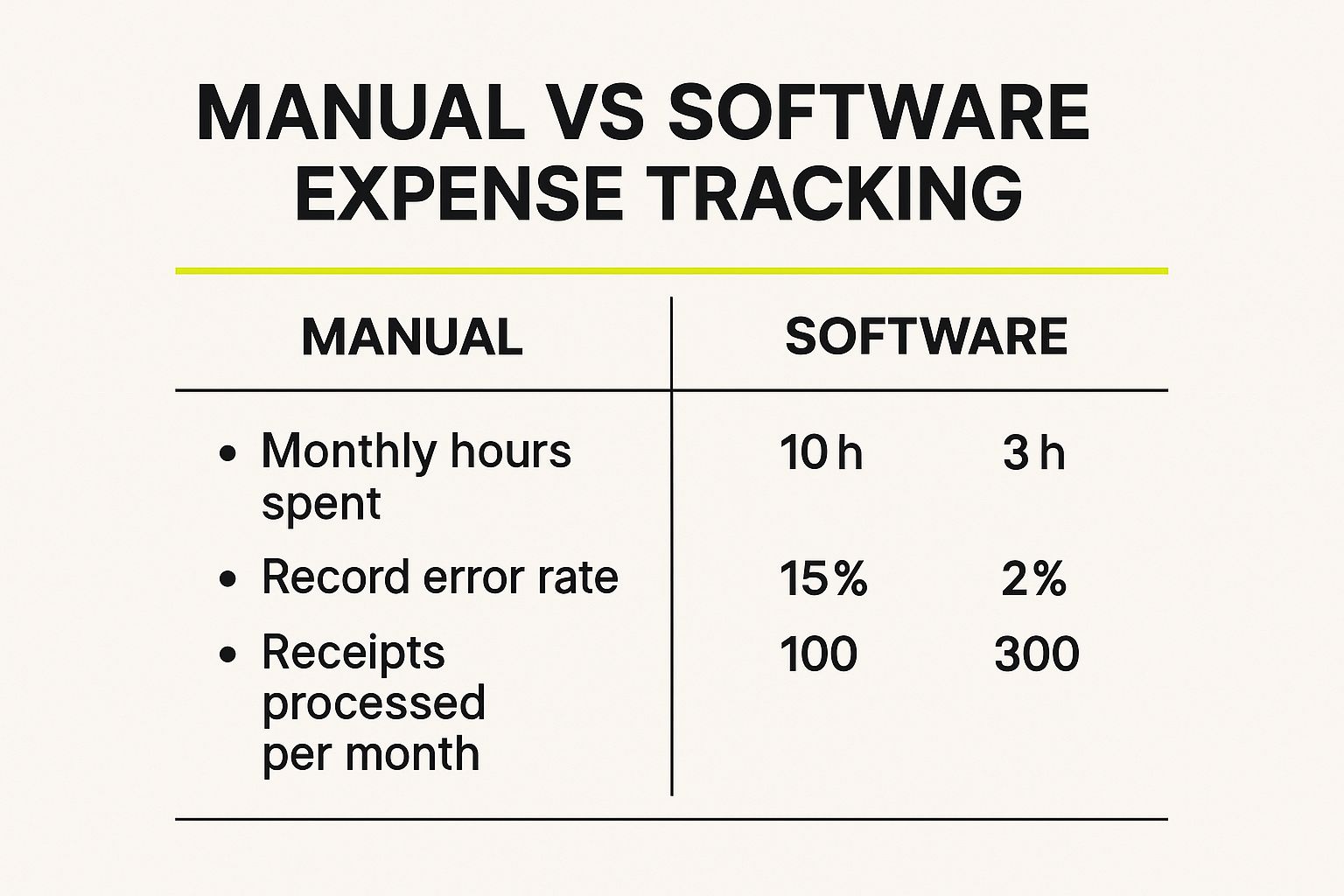
It’s pretty clear—software doesn't just save you a ton of time. It also cuts down on costly mistakes and can easily handle the transaction volume that comes with a growing business.
Selecting Software Built for E-commerce
Once you're ready to make the leap, don't just grab the first accounting tool you see. As a Shopify merchant, you have very specific needs. You’re dealing with inventory, multiple sales channels, and various payment gateways, and your software needs to keep up.
There are a few key features you absolutely want to look for:
- Seamless Shopify Integration: This is a deal-breaker. Your tool needs to automatically pull in sales, refunds, and transaction fees. Without it, you'll never get a truly accurate picture of your store's profitability.
- Inventory Cost Tracking (COGS): To know your real profit margins, you have to track the Cost of Goods Sold. A good tool makes this simple, so you can see exactly how much you’re making on every single product.
- Multi-Currency Support: If you're selling to customers around the world, your software has to handle transactions in different currencies without turning your books into a tangled mess.
Technology has completely changed how businesses manage their money. For instance, 54% of expense reports are now submitted through mobile devices. This shift toward real-time tracking means you can snap a photo of a receipt on your phone and log it instantly, which massively reduces the old-school delays and data entry mistakes.
Comparison of Top Expense Tracking Software
For Shopify merchants, a few platforms tend to be the go-to options. They're all excellent, but each one shines in slightly different areas. When you're looking for a modern financial setup, it's worth exploring different cloud accounting solutions to see what fits best.
Here’s a quick breakdown to help you compare the top players.
| Software | Key Features for E-commerce | Pricing Model | Best For |
|---|---|---|---|
| QuickBooks Online | Robust inventory management, strong reporting, and vast third-party app integrations. | Subscription | Businesses needing detailed financial reports and scalability. |
| Xero | User-friendly interface, excellent bank reconciliation, and unlimited users on all plans. | Subscription | Growing stores that value collaboration and ease of use. |
| FreshBooks | Simple invoicing and expense tracking with a focus on service-based features. | Subscription | Merchants who also offer services or need simple, clean bookkeeping. |
Ultimately, choosing the right software comes down to finding the tool that fits your unique business needs and budget.
The best tool is the one you’ll actually use consistently. Choose a platform that feels intuitive for your workflow and provides the specific e-commerce features you need to get clear financial insights and make smarter business decisions.
Organizing Your Expenses for Clear Insights

Just having a shoebox full of receipts—digital or physical—won't cut it. A massive, unsorted list of transactions is just noise. It doesn’t tell you anything useful about where your money is actually going or how to make smarter decisions. The real power comes from sorting every single dollar you spend into logical, well-defined categories.
This all starts with what accountants call a Chart of Accounts. It sounds intimidating, but it's really just the official list of all your expense categories. Think of it like creating a set of digital folders for your money. Instead of one giant, messy "Business Spending" folder, you'll have specific ones that tell a much clearer story about your financial health.
When you organize your spending this way, you stop being a bookkeeper and start being a strategist. A well-structured system becomes your financial dashboard, showing you exactly what’s working and what’s not.
Creating Your Core E-commerce Categories
For any online store, a few expense categories are absolutely essential. These are the pillars of your financial reporting, giving you that high-level snapshot of your operational costs. Let's ditch the vague labels and get specific with categories that actually mean something for an e-commerce business.
You should always start with these fundamental buckets:
- Cost of Goods Sold (COGS): This is purely the direct cost of the products you sell. Think inventory purchases and the shipping fees to get that inventory to your warehouse.
- Marketing and Advertising: Every penny spent to get customers in the door. This covers your ad spend, influencer payments, affiliate commissions—all of it.
- Software and Subscriptions: Your monthly Shopify plan, your email marketing tool, design apps, and any other recurring software that keeps the business running.
- Shipping and Fulfillment: These are the costs to get your products out to your customers. We're talking packaging, postage, and fees from any third-party logistics (3PL) partners.
- Payment Processing Fees: That small but mighty percentage that platforms like Shopify Payments or PayPal take from every single sale.
Nailing these basics is the first real step. It creates a solid foundation for understanding your core profitability and what it truly costs to keep the lights on.
Using Sub-Categories for Deeper Insights
Once you have your main categories locked in, the real magic begins with sub-categories. This is where you get granular, and it’s how you start answering the truly important questions about your business. A single, monolithic "Marketing" category, for instance, is practically useless.
Breaking down your expenses is how you turn data into strategy. You can’t optimize what you can’t measure, and detailed categorization is the bedrock of accurate measurement.
Instead of one big marketing bucket, try breaking it down like this:
- Marketing and Advertising
- Facebook and Instagram Ads
- Google Ads
- TikTok Campaigns
- Influencer Marketing
- Email Marketing Software
Suddenly, you can see at a glance whether your influencer campaigns are driving a better return than your Google Ads. This detailed view is what allows you to confidently shift your budget and double down on what works. It's insights like these that directly impact your most important ecommerce performance metrics and help you make the data-driven decisions that actually grow your business.
Building an Automated Expense Workflow
Let's be honest: manual data entry is a soul-crushing time-suck. No one starts an ecommerce business because they love typing numbers into spreadsheets. An automated expense workflow isn't some fancy luxury—it's a core system that buys back your time, cuts down on costly mistakes, and gives you a live look at your company's financial pulse.
The idea is to build a "set it and forget it" process where the tech does all the heavy lifting. It's about getting your tools to work for you, so you can focus on growing your business.
Connecting Your Financial Accounts
First things first, you need to connect your dedicated business bank account and credit cards directly to your accounting software. This is the foundation of the entire system. Don't skip this.
Once you link them, your software automatically pulls in transactions as they clear. That charge for new mailers from Uline or your monthly Shopify subscription payment? It shows up in your expense log almost instantly. You'll never have to manually type in dates, amounts, or merchant names again. What you get is a real-time, constantly updated view of where your money is going.
By linking your bank accounts directly to your software, you create a single source of truth for your finances. This automated feed isn't just a nice-to-have; it's the only way to guarantee your expense records are complete and accurate from the get-go.
Using Receipt Scanning to Ditch the Paper
We've all been there—a shoebox full of faded, crinkled receipts. It’s a nightmare. The good news is that modern receipt scanning apps, which are often built right into accounting software like QuickBooks or Xero, make paper receipts obsolete.
These apps use optical character recognition (OCR) to read a photo of a receipt, pulling out the important details like the vendor, date, and total. You can snap a picture of a receipt for a new office chair right at the store, and the app digitizes it on the spot. This creates a permanent, searchable, and IRS-compliant digital copy of every purchase, neatly attached to its matching transaction.
Setting Up Rules to Automate Your Categories
Here’s where the real magic happens. You can teach your software how to categorize your expenses for you by setting up "rules." This is where you'll save hours of tedious clicking and sorting every single month.
Think about all your recurring, predictable costs. You can create rules for them. For instance:
- Any transaction with "Shopify" in the description? Automatically tag it as Software & Subscriptions.
- A payment to "Uline"? Send it straight to Shipping & Fulfillment.
- A charge from "Google Ads"? That goes into Marketing & Advertising.
Setting this up ensures everything is categorized consistently and accurately. Once your rules are in place, they just work. The software sorts the vast majority of your daily expenses in the background without you having to lift a finger. For a deeper look at connecting your core business systems, our guide on Shopify integration with ERP systems shows how this kind of automation can tie your entire operation together.
The move toward these smarter financial tools is only getting bigger. The global market for digital expense management is exploding, and it's expected to be worth billions by 2030 as more businesses embrace automation. By building your automated workflow now, you're not just saving a few hours—you're getting your financial house in order for the future. You can read more about these emerging trends in expense management on primesourcex.com.
The Power of a Weekly Financial Check-In

Automating your expense workflow is a huge win, but don’t fall into the "set it and forget it" trap. Technology is a fantastic assistant, but it still needs a manager—and that's you. A final human check is what makes your financial system truly reliable.
This is where the habit of reconciliation comes in. It’s a simple but vital process: you’re just matching up the transactions in your accounting software with your official bank and credit card statements. Think of it as your final quality control step. Software is usually accurate, but it can occasionally misread a transaction or apply an old rule where it shouldn't.
Making Reconciliation a Painless Habit
This doesn't have to be a chore that you dread. Honestly, one of the best things you can do for your business is to block out just 30 minutes a week for a financial check-in. This small, consistent ritual is your best defense against sneaky errors, unexpected fees, and even potential fraud.
When you sit down for your weekly review, just run through this quick checklist for your recent transactions:
- Check the Dates: Does the transaction date in your software line up with your bank statement?
- Verify the Amounts: Are the numbers an exact match? This is how you catch duplicate charges or simple typos.
- Confirm the Categories: Did your automation put everything in the right place? A quick scan is all it takes to make sure your marketing spend didn't get filed under office supplies.
This regular check-in does more than just keep your books clean. Week after week, it builds your financial confidence and gives you a much deeper gut feeling for your business’s cash flow.
Your weekly financial review guarantees that the data you use for big decisions is 100% accurate. You can't steer the ship if you can't trust your map.
This small habit turns your financial records from a boring necessity into a real strategic advantage. When you know your numbers are solid, you can make smarter, faster decisions that actually drive growth. The insights you get from clean, reconciled data are the bedrock for understanding what's really going on inside your Shopify analytics dashboard and other reports. It’s a small investment of time with a massive payoff.
Answering Your Top Expense Tracking Questions
When you're running an online store, a few common questions about tracking expenses always seem to pop up. Getting the answers right isn't just about good bookkeeping; it's about understanding your store's real financial health and making tax time a whole lot easier. Let's dig into some of the questions I hear most often.
How Often Should I Actually Reconcile My Expenses?
The best approach is a simple, two-step rhythm. First, you need to capture expenses the moment they happen. A receipt scanning app on your phone is a lifesaver for this—snap a picture of a receipt, and you're done. No more shoeboxes full of faded paper.
Then, you need to sit down and actually review everything. Block out a little time weekly to go through the week's spending and make sure it’s all categorized correctly. This small habit prevents a chaotic month-end pile-up and lets you catch weird charges or spending trends right away. If you can't manage weekly, a full reconciliation is non-negotiable at the end of every month before you close your books.
What's The Real Difference Between COGS And Operating Expenses?
Getting this wrong is one of the quickest ways to misunderstand your own profitability. It's a critical distinction for any e-commerce business.
Here's the simplest way to think about it:
- Cost of Goods Sold (COGS) are the direct costs of the products you sell. This is what you paid for the inventory itself, plus any freight or shipping costs to get that inventory to your warehouse.
- Operating Expenses (OpEx) are all the other costs of keeping the lights on. Think marketing ads, your Shopify subscription, software tools, and even the boxes you use to ship orders.
You absolutely have to separate COGS from OpEx. It's the only way to calculate your gross profit margin and see how much you’re actually making from the products you sell.
Can I Just Use My Personal Bank Account For Business?
I’m going to be blunt: don’t do it. It might feel simpler when you're just starting out, but mixing your personal and business finances is a bookkeeping nightmare waiting to happen. It makes calculating your profit nearly impossible and creates a huge mess for your accountant (or you) at tax time.
Even more seriously, it can create legal problems. If your business is an LLC or corporation, co-mingling funds can "pierce the corporate veil," which means your personal assets—like your house or car—could be at risk if the business gets sued. Open a dedicated business bank account and a business credit card from day one. It's the cleanest, safest way to run your finances.
What Common Expenses Do Store Owners Forget To Track?
It’s the little things that get you. Small, forgotten expenses can add up fast and silently chip away at your profit margin. I've seen countless store owners overlook some majorly deductible costs.
Keep an eye out for these commonly missed expenses:
- Payment Processing Fees: That small slice taken by Shopify Payments, PayPal, or Stripe on every single transaction can easily amount to thousands of dollars over a year.
- Monthly App Subscriptions: That cool SEO app, your email marketing platform, the graphic design software—they're all business expenses.
- Business Education: Did you buy an online course about Facebook ads or an e-book on copywriting? Those are deductible.
- Bank and Account Fees: Don't let those monthly service fees or wire transfer costs slide.
Tracking these details isn't just about getting a clearer financial picture; it can directly lower your taxable income.
Ready to stop wrestling with spreadsheets and build a Shopify store that's optimized for growth from the ground up? The team at E-commerce Dev Group specializes in creating powerful, scalable e-commerce solutions. Learn how we can help you build a better online business today.
