


To truly get user testing right, you need to set clear goals, find people who actually represent your customers, watch them perform specific tasks, and then dig into their feedback to find those golden nuggets of insight. It’s a process that pulls you out of the world of guesswork and gives you hard evidence of what works—and what really doesn’t—on your site before you sink a ton of money into development.
Why User Testing Is Your Secret Weapon
Let’s be honest, the best products are built on understanding, not just a founder's "gut feeling." As a Shopify merchant, you’re probably obsessed with metrics like conversion rates and abandoned carts. But what’s the story behind those numbers? Why did someone really ditch their cart at the last second? What about your navigation menu sent them running?
User testing is what connects the dots between your analytics data and actual human behavior. It’s the single most powerful tool you have for making sure your ideas will land before you waste time and money building them out.
The Real Cost of Skipping User Feedback
Ignoring what your users have to say isn't just a missed opportunity—it's a direct hit to your revenue. When shoppers get frustrated, they don't bother sending you a polite email with suggestions. They just leave. And they probably won't come back.
In fact, a staggering 60% of consumers will abandon their purchase simply because of a bad website experience. Think about that lost revenue. You’d never launch a new ad campaign without a strategy, right? So why would you launch a new site feature without knowing if people can even figure out how to use it?
By watching real people interact with your store, you’ll uncover all the hidden friction points that your analytics dashboards can't show you. Maybe that "Add to Cart" button is nearly impossible to tap on a phone, or your shipping policy is buried and confusing. These seemingly small hiccups are often the very roadblocks that are killing your conversions.
Gaining a True Competitive Advantage
To really make user testing your secret weapon, you have to understand the principles of usability testing. This isn’t about focus groups where you ask people if they like your new design. It’s about giving them realistic tasks—like "find a pair of black jeans in your size and add them to your cart"—and just observing. You watch where they succeed, and more importantly, where they stumble.
Every single session is a goldmine of insights that helps you:
- Validate ideas early on. Test a rough prototype before a single line of code is written. This ensures you're building something people actually want.
- Slash expensive rework. It is infinitely cheaper to fix a design flaw in a mockup than it is to rebuild a live feature that’s bombing.
- Build real customer loyalty. When your site is genuinely easy and intuitive to use, customers feel confident in their purchase and are far more likely to become repeat buyers. For more on this, our guide on ecommerce user experience best practices shows how seamless design builds that critical trust.
The market gets it. The usability testing tools market is projected to explode from $1.51 billion to $10.41 billion by 2034. That incredible growth isn't just a trend; it's proof that businesses are finally getting serious about user-centric design to keep customers happy.
"User testing transforms product development from a high-stakes guessing game into a series of small, informed bets. You stop asking, 'Will this work?' and start discovering how it will work best for your customers."
At the end of the day, user testing forces a shift in your thinking. You move from what you think your customers want to what they actually need. This empathy-driven approach doesn’t just help you build a better website; it helps you build stronger relationships and a more resilient business. It’s not just another task on your to-do list—it’s your most reliable path to growth.
You can't get meaningful feedback from user testing by just winging it. If you go in without a solid plan, you'll end up with a pile of vague comments you can't do anything with. The real magic happens before the test even starts—this prep work is what turns random opinions into game-changing insights for your Shopify store.
First things first: you need a crystal-clear objective. You can't test your entire website in one go, so narrow your focus. What’s the single biggest question you need an answer to right now? Are you trying to figure out why your cart abandonment is through the roof? Or maybe you want to see if customers can actually figure out that new "build-a-box" feature before you sink a ton of money into developing it.
My two cents: Your objective should be a specific question, not a broad goal. Don't say, "Improve the website." Instead, ask, "Why aren't people using our new product filter on category pages?" A sharp focus gets you actionable results.
Once you know what you’re trying to learn, you can start building out the rest of your plan.
Each step naturally builds on the one before it, making sure your entire test is aligned with your core objective.
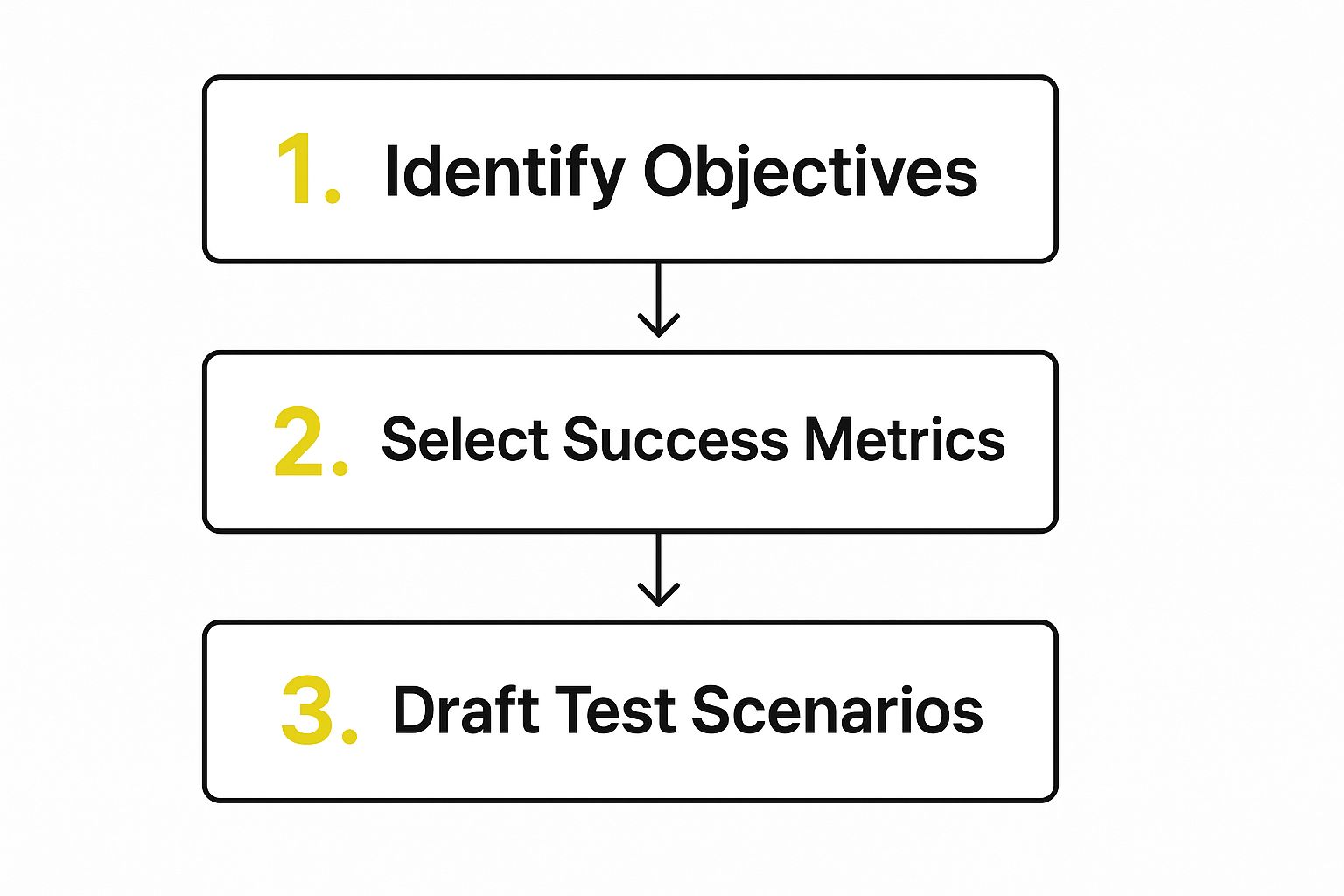
Following this flow ensures the scenarios you create will directly test the goals you’ve set, which is how you get feedback that actually matters.
Creating Realistic User Scenarios
A user scenario is just a short story that gives your test participant a goal. It adds a bit of context and makes the whole thing feel like a real shopping trip instead of a sterile lab experiment. Honestly, good scenarios are the heart of good user testing.
Think about a common task someone would do on your site. For example, instead of just telling them to "Find a t-shirt," frame it as a story:
- Scenario Example: "Imagine you're looking for a gift for your friend's birthday next week. You know they love vintage-style clothing and their favorite color is blue. Your task is to find a t-shirt you think they'd like, add it to the cart in a size medium, and go through the checkout until the point where you would enter payment details."
See the difference? This gives the user a clear mission that mirrors a real-life situation. It also lets you test several things at once—site navigation, product filters, the add-to-cart flow—all in one smooth, natural task. To get a better handle on these user flows, check out our guide on how to build an ecommerce customer journey map.
Writing a Natural and Unbiased Test Script
Your script is your roadmap for the session, but it shouldn't sound like you're reading from a teleprompter. You're aiming for a comfortable, conversational vibe that helps the participant relax and give you their honest, unfiltered thoughts.
I like to break my script down into three simple parts:
- Welcome and Warm-Up: Kick things off by thanking them. The most important thing here is to remind them there are no right or wrong answers—you're testing the site, not them. I usually ask a few easy, open-ended questions like, "So, what kinds of things do you normally shop for online?" just to break the ice and get them talking.
- The Actual Tasks: This is the meat of the test. Give them one scenario at a time. Use neutral prompts like, "What are your first impressions of this page?" or "Talk me through how you'd find…" You have to be careful not to ask leading questions that hint at a "correct" answer.
- The Wrap-Up: Once the tasks are done, ask for their overall take. Questions like, "What was the most frustrating part of that?" or "If you had a magic wand and could change one thing on this site, what would it be?" can pull out some incredibly powerful final thoughts.
Getting this process down is what separates the pros from the amateurs. It’s a structured approach that’s becoming standard across the industry—so much so that the user research and testing software market is expected to balloon to over $102 billion by 2034. You can see more data on this trend in this detailed market forecast.
Finding People Who Tell You the Truth
Your test plan could be a work of art, but it’s completely useless if you're talking to the wrong people. The insights you gather are only as good as the participants you recruit. The goal isn't just to fill seats; it's to find people who genuinely represent your target audience and are willing to give you their honest, unfiltered thoughts.
This is the part where many Shopify merchants get hung up, thinking they need a massive budget or a dedicated research team. The good news? You don't. You just have to be smart about where you look and how you ask.
Where to Find Your Ideal Testers
Finding the right participants is always a balancing act between cost, speed, and quality. There are a few different avenues you can explore, and honestly, a mix-and-match approach often yields the best results.
1. Your Existing Customer Base
This is often the easiest place to start. A simple email to your list or a post on your social channels asking for volunteers can work wonders, especially if you have an engaged community.
- The upside? These are real customers. They already know your brand, which makes their feedback incredibly relevant. Plus, they're often happy to help for a small incentive or even just early access to a new feature.
- The catch? You have to watch out for "positivity bias." Fans of your brand might hold back on criticism because they already like you. You’ll need to work a little harder to make them feel comfortable being brutally honest.
2. Specialized Recruiting Platforms
Services like UserTesting, User Interviews, or Respondent are built for this. They have huge pools of people ready to participate, and you can filter them by demographics, online habits, and specific interests.
- The upside? It’s fast. You can find qualified people in a matter of hours, and the platform handles all the annoying admin work like scheduling and payments.
- The catch? This is your most expensive option. You’re not just paying the participant; you're also paying a platform fee, and those costs can add up.
3. Social Media and Online Communities
Think about where your ideal customers hang out online. If you sell high-end coffee gear, a subreddit for espresso fanatics is a goldmine. Look for relevant groups on Reddit, Facebook, or niche forums.
- The upside? This is a great way to find people who are genuinely passionate and knowledgeable about your niche. It’s also incredibly cost-effective.
- The catch? It can be a bit of a grind. You have to be respectful of community rules and avoid coming across as spammy. The quality can also be a mixed bag, which is why a solid screener is non-negotiable.
Crafting a Screener That Actually Works
A screener survey is your gatekeeper. It's a short questionnaire designed to weed out anyone who doesn't fit your ideal customer profile before you waste time and money on a session with them.
Keep it brief. No one wants to fill out a 20-minute survey just for a chance to participate.
Your screener should quickly confirm a few key things:
- Demographics: Only ask for what's truly relevant, like age or location.
- Behavioral Habits: Focus on past actions, not future plans. "How many times have you bought clothes online in the last six months?" is a much better question than "How often do you plan to shop online?"
- Tech-Savviness: If your test involves a clunky prototype, you need to make sure your participants can handle it.
My favorite pro tip: Always include one open-ended question, something like, "Describe your last online shopping experience in a few sentences." This is a secret weapon for spotting thoughtful, articulate people and filtering out those just clicking buttons for a quick payout.
You Don't Need Dozens of Testers (Really)
One of the biggest myths in user testing is that you need a huge sample size to get good data. For the kind of qualitative testing we're talking about—where you're digging into the why behind people's actions—you can uncover the most critical problems with a surprisingly small group.
Research from the legendary Nielsen Norman Group famously showed that testing with just five users will uncover about 85% of the usability problems on a website.
The goal here isn't to get a statistically significant result; it's to find the major roadblocks that are costing you sales. You'll start seeing the same patterns pop up over and over again. After the third person gets stuck on the same checkout button, you know you've found a problem worth fixing.
So, don't let the thought of recruiting 50 people paralyze you. Start with five. It's a manageable and affordable number that will give you more than enough actionable feedback to make a real difference.
Running Sessions That Uncover Real Insights

This is the moment of truth. All that planning and recruiting comes down to sitting down with a real person and watching them interact with your store. It’s both an art and a science—creating a space where a stranger feels comfortable enough to think out loud and be brutally honest.
The goal here is simple: observe natural behavior. You aren't there to sell them on your brand or defend a design choice. Your job is to listen, watch, and gently guide them, unlocking the kind of raw feedback that analytics reports just can't provide.
Moderating Without Leading the Witness
The most common mistake I see people make is accidentally giving the user the answer. When someone struggles to find the cart or a product filter, our instinct is to jump in and help. You have to fight that urge. That exact moment of confusion is pure gold.
Instead of saying, "Click the 'Checkout' button up there," try asking a more open-ended question. Something like, "What are you looking for right now?" or "Talk me through what you're thinking." This prompts them to explain their mental model, which is where you’ll find out if your site's navigation is actually as intuitive as you thought.
Expert Tip: Learn to love the awkward silence. When a user pauses, don't rush to fill the void. Let them sit with it. That’s when they’re really processing what’s in front of them, and their next words are often the most valuable.
Practical Logistics for Remote and In-Person Sessions
Whether you’re in the same room or connecting online, the core principles don't change, but the setup certainly does. Remote testing is typically the go-to for Shopify merchants because it’s so much more flexible and cost-effective.
Essential Tools for a Smooth Session:
- Video Conferencing: You need a solid platform like Zoom or Google Meet that allows for easy screen sharing and recording. Always, always hit record. You'll catch things on the second viewing that you missed live.
- Collaborative Note-Taking: It’s almost impossible to moderate and take detailed notes at the same time. Have a teammate join the call as a dedicated note-taker using a shared tool like Google Docs or Notion.
- Recording Consent: This is non-negotiable. Before you start, get clear verbal and written consent to record the session. It's a simple step that builds trust.
For remote tests, always start with a quick tech check to make sure their mic is clear and they know how to share their screen. If you’re doing it in person, find a quiet space where you won’t be interrupted.
Handling Common Session Hiccups
Things will go wrong. Tech will fail. Some participants will be incredibly chatty, while others will give you one-word answers. Being prepared for these moments is what separates a good moderator from a great one.
If you get a quiet participant, use gentle prompts to draw them out. Asking, "What's going through your mind right now?" works wonders. If someone gets completely sidetracked, you can politely steer them back with, "That's really helpful feedback! For our next task, let's try to…"
While these moderated sessions are fantastic for deep insights, it's worth noting the broader industry trends. Many teams are leaning into more automated and continuous testing. In fact, some research shows that around 30% of developers prefer automated methods for speed, and 54% now use DevOps practices that build testing directly into their workflow. If you're curious about the bigger picture, you can find more details in the latest software testing statistics.
No matter your method, the fundamental skill is the same: creating a space for honest feedback. Master the art of moderation, and every session will deliver the actionable insights you need to build a better e-commerce experience.
Turning Feedback into Your Product Roadmap
So, you've wrapped up your user testing sessions. You've got recordings, pages of notes, and a head full of observations. This is where the magic happens. Gathering feedback is just the start; turning that raw data into a smart, prioritized action plan is what will truly move the needle for your store.
It’s easy to feel buried under a mountain of qualitative feedback. The key is to stop looking at individual comments and start hunting for patterns. You're not just collecting opinions—you're looking for recurring themes and shared frustrations that point to a bigger issue on your site.
Finding Themes with Affinity Mapping
One of the best ways to make sense of all this information is a simple but powerful technique called affinity mapping. Think of it as organizing a bunch of digital sticky notes. The goal is to cluster individual comments and observations from different users into groups based on a common idea.
You can do this the old-fashioned way with actual sticky notes on a wall or use a digital whiteboard tool like Miro or Trello.
Here’s how it works:
- Pull Out Key Observations: Comb through your notes and recordings. For every distinct comment, pain point, or moment of hesitation, write it down on a separate "note." Things like: "User couldn't find the shipping policy," or "Was surprised by the tax calculation at checkout."
- Start Grouping Similar Notes: Begin moving related notes together. You'll quickly see clusters form. Maybe a few notes all touch on "Shipping Cost Confusion," while another group is clearly about "Mobile Navigation Problems."
- Name Your Themes: Once you have your clusters, give each one a clear, descriptive name. These themes are your big takeaways.
This exercise is incredibly revealing. When four out of five testers get stuck at the exact same point in your checkout, you've officially moved from anecdotal feedback to hard evidence.
Prioritizing What to Fix First
After mapping everything out, you’ll have a clear list of problems. But let's be realistic—you can't tackle everything at once. You need a simple way to separate the minor annoyances from the critical, revenue-killing roadblocks.
A straightforward method is to score each issue on two simple factors:
- Impact: How badly does this problem derail a user from completing their goal (like, you know, buying something)?
- Frequency: How many of your testers actually ran into this specific problem?
This creates a natural hierarchy. A high-impact problem that tripped up almost every user? That’s a code-red, all-hands-on-deck priority. A low-impact issue that only one person mentioned can probably go on the back burner.
Prioritization isn’t about fixing the easiest things first. It’s about tackling what will deliver the most value to your customers and, in turn, your bottom line. A tiny tweak to a high-impact problem often yields a far bigger return than a massive overhaul of a low-impact one.
For any Shopify merchant, this process is the bedrock of real growth. The insights from user testing are a direct pipeline into your strategy for website conversion optimization, turning subjective feedback into measurable improvements for your store.
To make this even clearer, I use a simple framework to help categorize feedback and decide where to focus our energy first.
Prioritizing User Feedback for Maximum Impact
| Priority Level | Description | Example for an E-commerce Site |
|---|---|---|
| P1 – Critical | A major roadblock preventing users from completing a purchase. High impact, high frequency. | "The 'Add to Cart' button is unresponsive on mobile Safari, blocking all sales from those users." |
| P2 – High | Creates significant friction or confusion, likely causing users to abandon their session. | "Shipping costs are only revealed on the final checkout step, causing frequent cart abandonment." |
| P3 – Medium | A frustrating but not deal-breaking issue that harms the user experience. | "Product filter options are confusing, making it hard for users to narrow down their search." |
| P4 – Low | A minor annoyance or cosmetic issue with minimal impact on the core user journey. | "The 'About Us' page has a typo in the second paragraph." |
This table isn't just a to-do list; it's a strategic guide. It helps the whole team align on what matters most, ensuring your development resources are spent where they'll make the biggest difference.
Presenting Your Findings to Get Buy-In
The final piece of the puzzle is packaging your insights in a way that sparks action. A 20-page report is a great way to ensure nobody reads your findings. Instead, aim for a concise, compelling summary that focuses on solutions.
Your summary should hit these three key points:
- The Top 3-5 Themes: What were the biggest problems you uncovered? Lead with these.
- Show, Don't Just Tell: Back up your points with powerful evidence. A direct quote or, even better, a short video clip of a user struggling is far more persuasive than a bullet point.
- Recommend a Path Forward: For each issue, propose a clear, actionable solution.
Instead of saying, "Users found the checkout confusing," try this: "Four of our five testers were confused by the shipping options. We recommend simplifying the layout to show a single, clear shipping cost much earlier in the process."
This approach reframes problems as opportunities, making it easy for your whole team to see the path forward and get excited about making improvements.
Common User Testing Questions Answered

If you're just getting started with user testing, you’ve probably got a few questions. That's completely normal. It’s a field with its own jargon and plenty of conflicting advice, but getting the basics right is actually pretty straightforward. Let’s clear up some of the most common questions I hear from merchants.
How Many Users Do I Really Need for a Test?
This is easily the biggest myth out there—that you need a massive group of testers for the results to mean anything. For the kind of testing most e-commerce stores need, the opposite is true. You can get incredible insights from just a handful of people.
The magic number is five. Research famously showed that with just five users, you'll uncover about 85% of the usability problems on your website.
Why so few? Because you’ll start seeing the same issues over and over again. After you've watched three different people get tripped up by your confusing checkout process, you don't need a fourth or fifth person to tell you it's broken. You've found a problem worth fixing.
- For most Shopify stores, five users are perfect for testing a specific flow, like finding a product or completing a purchase. It's fast, affordable, and gives you a clear to-do list.
- You might need more if your store serves very different customer types, like retail shoppers and wholesale buyers. In that case, you'd want to test five people from each group to see how their experiences differ.
Moderated vs. Unmoderated Testing: Which Is Right for Me?
This really boils down to what you want to learn. Both are incredibly useful, but they solve different problems.
Moderated testing is a live, one-on-one session where you guide a participant through your site, usually over a video call. Think of it as a guided conversation. This is your go-to method when you need to understand the why behind someone's actions, explore complex tasks, or get feedback on a new design concept.
Unmoderated testing, on the other hand, is when you give users a set of tasks to complete on their own. They record their screen and thoughts as they go, and you watch the videos later. This approach is much faster and cheaper, making it perfect for validating simple flows or getting quick feedback on a recent site change.
| Testing Type | Best For | Key Advantage |
|---|---|---|
| Moderated | Digging into the "why," testing prototypes, and understanding complex user journeys. | You get rich, deep insights and can ask follow-up questions on the fly. |
| Unmoderated | Validating simple flows, getting quick feedback, and testing with more people. | It's all about speed, scale, and a lower cost per participant. |
How Much Should I Pay Participants?
Getting this right is critical. If you don't offer a fair incentive, you'll struggle to find good participants, or you'll get people who are just rushing through to get paid.
A solid starting point for most consumer-facing tests is about $1 per minute. So for a 60-minute moderated session, you should plan to offer a $60 gift card or direct payment.
This isn't set in stone, though. You should adjust your rate based on:
- The time commitment: A quick 15-minute test doesn't require the same incentive as a 90-minute deep dive.
- How specific your audience is: If you need to recruit a very niche group (say, professional architects who buy from your store), you'll need to pay a premium for their time and expertise.
- What you can offer: For your loyal customers, you might be able to offer store credit, a deep discount, or early access to a new product line instead of cash.
What Do I Do When a User Gets Stuck?
It's going to happen. Someone will hit a dead end on your site and look to you for help. Your first instinct will be to jump in and show them the way.
Don't do it.
That moment of confusion is pure gold. It's not a failure of the test; it's the entire point of the test! When a user gets stuck, you're seeing firsthand where their expectations don't match your site's design.
Instead of giving them the answer, lean in and ask open-ended questions to understand what’s going on in their head:
- "What were you expecting to happen there?"
- "Can you talk me through what you're thinking right now?"
- "If you had to guess, where would you click next?"
Probing like this turns user frustration into your most valuable feedback. If you want more ideas on how to phrase these questions, this is a great resource with 150+ open-ended questions examples.
