

Picking your Shopify theme feels a lot like choosing the location for a physical store. It's not just about the paint color on the walls; it’s about the very foundation of how your customers will interact with you. Get it right, and you create an experience that builds trust and guides shoppers effortlessly from the "window" to the checkout.
Why Your Theme Is a Business Decision, Not Just a Design Choice
It's easy to get caught up in how a theme looks. But the real magic happens under the hood. The right theme is the architecture of your online business, directly impacting your sales, search engine ranking, and how people perceive your brand.
Think about it: a stunningly beautiful storefront with a confusing layout or painfully slow-loading pages will send potential customers running. It doesn't matter how amazing your products are if the shopping experience itself is a headache. This is where you need to shift your mindset from just design to a strategic business decision.
The best themes don't just look good; they work for you, supporting your business goals and making the path to purchase as smooth as possible.
The Financial Impact of a Great Theme
A theme’s performance has a very real, measurable effect on your revenue. While Shopify offers over 100 free and paid options, they are not all created equal. You’ll see the free Dawn theme on 25.2% of stores because it’s clean and fast right out of the box. But performance can vary wildly.
While the average Shopify store converts at about 1.4%, the top 10% of stores hit conversion rates above 4.7%. That massive difference often comes down to a superior theme and a meticulously crafted user experience.
Your theme isn't just a pretty face for your store; it's a powerful conversion tool. Every single element, from the navigation menu down to the checkout button, is either helping or hurting your ability to make a sale. A high-performing theme removes friction and gives visitors the confidence they need to become paying customers.
Aligning Your Theme With Your Brand and Operations
Choosing a theme is also an operational decision that should fit how you run your business. A brand with a single, standout product has completely different needs than a store juggling thousands of items across dozens of categories.
A well-chosen theme can actually simplify your day-to-day work. It can make inventory easier to manage, help customers discover new products, and even reduce your reliance on expensive third-party apps for features that should have been built-in from the start.
To make sure you're treating this like a true business decision, you need to dig deeper than the demo store. Do your homework and understand what makes certain themes outperform others by exploring lists of the best converting Shopify themes. This kind of research helps you look past the initial "wow" factor and focus on the features that will genuinely grow your business.
Before you pull the trigger on any theme, make sure it nails these three pillars:
- The Customer Journey: Is it dead simple for a visitor to find what they want, add it to their cart, and complete their purchase?
- Brand Alignment: Does the theme's look and feel match your brand's personality?
- Performance: Is it built for speed? A lightweight theme that loads quickly on both mobile and desktop is non-negotiable.
Ultimately, your goal is to find the perfect fit without the guesswork—a theme that works as hard for your business as you do.
Key Decision Factors at a Glance
To simplify the process, here's a quick rundown of the most important factors to keep in mind. Think of this as your cheat sheet for evaluating potential themes.
| Factor | Why It Matters | Quick Tip |
|---|---|---|
| Mobile-First Design | Over 70% of e-commerce sales happen on mobile. If your site isn't flawless on a phone, you're losing money. | Always test the theme's demo on your own phone before you even consider it. |
| Page Speed | Slow-loading pages kill conversions. Even a one-second delay can significantly increase bounce rates. | Look for themes labeled "Online Store 2.0" as they are built on Shopify's newer, faster architecture. |
| Built-in Features | Relying on too many apps can slow your site down and increase monthly costs. | Make a list of your "must-have" features (e.g., mega menus, color swatches) and find a theme that includes them. |
| Brand Alignment | The theme's style should feel like a natural extension of your brand, not something you're fighting against. | Don't just look at the demo with its perfect photos. Imagine it with your logo, colors, and product images. |
Choosing the right theme is one of the most impactful decisions you'll make for your store. By focusing on these key areas, you'll be well on your way to building a powerful and profitable online presence.
Start by Defining Your Store's Unique Needs
Before you even think about browsing the Shopify Theme Store, the most critical work you'll do happens away from the screen. It’s tempting to jump right in, but diving into a sea of beautiful themes without a clear plan is a surefire way to pick something that looks amazing but doesn't actually help you sell.
Think of this first step as creating a blueprint for your online store. It's a practical checklist that will anchor your search and keep you focused. A great theme choice always starts with knowing what you need, which prevents you from getting distracted by flashy demos that aren't a good fit for your business.
Map Out Your Brand Personality and Catalog Size
First things first, who are you as a brand? Are you a sleek, modern tech company that needs a clean, minimalist design? Or are you a rustic, handmade goods shop that thrives on warmth and texture? Your theme should feel like a natural extension of your brand identity, not something you have to awkwardly cram your products into.
Next, be realistic about your inventory. A store selling ten handcrafted ceramics has completely different needs than one managing hundreds of t-shirts with multiple sizes and colors. A small catalog often shines with a theme that uses big, bold imagery to tell a story. A large inventory, on the other hand, demands powerful navigation and filtering to keep customers from getting lost.
I've seen it time and again: a theme built for a massive catalog makes a single-product store feel empty and unprofessional. On the flip side, a theme focused on storytelling can make a big inventory a nightmare to browse. Matching your theme to your catalog size is one of the most practical decisions you'll make.
This simple bit of clarity saves you from choosing a theme that's a poor structural fit. For instance, a theme with a huge "mega menu" is fantastic for a store with 50+ product categories, but it's just overkill for a shop with only three.
Define Your Ideal Customer Journey
Now, it’s time to walk in your customer's shoes. How do you want people to move through your store, from the moment they land on your homepage to the second they complete a purchase? Mapping this out reveals the exact features you can't live without.
Picture someone arriving at your site. What's the very first action you want them to take? Should they be captivated by a lifestyle photo, immediately start browsing a collection, or use a prominent search bar? The goal is to make their entire journey, from discovery to checkout, feel completely seamless.
Think about the key moments in their experience:
- Discovery: How will they find what they're looking for? Will it be through featured collections, advanced search filters, or curated lookbooks?
- Evaluation: What do they need to see to feel confident buying from you? This could be high-resolution images, detailed product descriptions, customer reviews, or size guides.
- Purchase: Is the "Add to Cart" button always visible? Is the checkout process straightforward and quick?
Understanding this flow helps you pinpoint non-negotiable features. If you sell apparel, for example, things like color swatches and a quick-view option aren't just nice extras—they're essential for a good customer experience.
Create Your Feature Checklist
With your brand, catalog, and customer journey figured out, you can build a concrete checklist. This simple exercise is the best way I know to compare themes objectively and is a crucial part of learning how to choose a Shopify theme that actually grows your business.
Just create two columns: "Must-Haves" and "Nice-to-Haves."
| Must-Haves (Non-Negotiable) | Nice-to-Haves (Bonuses) |
|---|---|
| Advanced product filtering by size and color | A "Shop the Look" section |
| A mega menu for large navigation | In-cart upselling recommendations |
| A mobile-first, responsive design | Built-in video support on product pages |
| Quick-view functionality for products | A countdown timer for sales events |
| Customer testimonials section on product pages | An integrated Instagram feed |
This checklist is now your compass. As you look at different themes, you can instantly rule out any that don't meet your "Must-Have" criteria. It transforms your decision from an emotional one ("This one looks so cool!") to a logical one ("This has 80% of our must-haves and will save us money on extra apps.").
Doing this foundational work ensures you aren't just picking a pretty design; you're choosing a real operational partner for your business. It sets you up to find a theme that not only looks professional but actively helps you sell more.
Putting Customer Experience and Design First

Alright, you've got your business needs nailed down. Now, let’s pivot to what your customer actually sees and feels. The best designs are the ones you don't even notice—they just work, making shopping feel easy and natural.
This is where you have to put on your customer hat and really evaluate a theme's user experience (UX). A beautiful theme that’s a nightmare to navigate is just as damaging as an ugly one. You're looking for a layout that showcases your products and guides people to the checkout with zero friction.
Adopt a Mobile-First Mindset
Let's be clear: thinking mobile-first isn't just a good idea anymore; it's the only way to operate. The vast majority of your traffic will likely come from people browsing on their phones. If that experience is clumsy, you’re losing sales before you even get started.
When you're checking out theme demos, forget the desktop version for a minute. Grab your phone and try to shop.
- Can you easily open and tap through the navigation menu?
- Are the "Add to Cart" buttons big, bold, and impossible to miss?
- Do you have to pinch and zoom to read product descriptions?
- Is the search bar right there when you need it?
Running this simple, hands-on test will tell you more about a theme's real-world performance than any bulleted feature list ever will. It's also worth understanding the technical differences in how sites adjust to screens. You can dig into https://scaleshopify.com/2025/07/27/adaptive-vs-responsive-design/ to see how each approach impacts the user experience.
A theme might look stunning on a 27-inch monitor, but if it feels cramped and broken on a phone, it's a terrible business decision. Your mobile site isn't a miniature version of your desktop site; it is your site.
Analyze Layouts and Visual Hierarchy
Different products call for different storefronts. A high-fashion brand needs a theme that supports big, beautiful, edge-to-edge imagery to create a magazine-like feel. On the other hand, a store selling industrial hardware needs a layout that puts clear navigation and technical specs front and center.
Pay attention to how a theme organizes information. This is called visual hierarchy—the art of arranging things to show what’s most important. A well-designed theme does this intuitively, drawing your customer’s eye exactly where it needs to go.
Look at themes from top developers like Out of the Sandbox, which are used by roughly 32% of leading Shopify sites. Their themes are popular for a reason: they combine clean, effective design with speed. It’s a powerful lesson that successful stores always prioritize a strong visual foundation.
Put the Demo Store to the Test
Every theme demo is set up to look flawless, with perfect professional photos and slick marketing copy. Your job is to see past the pretty pictures and stress-test the bones of the theme.
When you open a demo, don't just browse. Try to break it.
- Navigate Like a Lost Customer: Click through every single category and filter. Do the menus make sense? Do you ever get stuck or wonder where you are?
- Hammer the Search Bar: Search for specific products and general terms. How are the results? Does it handle a typo, or does it just give up and show a "no results" page?
- Fill Up the Cart: Add a few items, view the cart, and start the checkout process. Is every step obvious and seamless?
This kind of active testing will expose a theme's flaws in minutes. If a demo makes these simple actions feel like a chore, you can bet your customers will feel the same way—and they'll just leave.
Ultimately, these design choices are what turn visitors into buyers. It's a key part of Ecommerce Conversion Rate Optimisation. Your theme isn't just a design; it's the engine that powers your sales.
Uncovering a Theme's Built-In Superpowers
A theme packed with the right features can save you a ton of money on app fees and, just as importantly, keep your site incredibly fast. Every third-party app you bolt on adds more code, and that extra code can really bog down your store's loading times. That’s why you need to dig deep into a theme's native functionality before you commit.
Think of it like buying a car. You could get the base model and then spend a small fortune on aftermarket parts—a better stereo, heated seats, a navigation system. Or, you could just buy the higher trim level that has all of that built-in, perfectly integrated, and under warranty. A feature-rich theme is that fully-loaded model.
Must-Have Features to Look For
When you're sizing up a theme, you're doing more than just looking at how pretty it is; you're auditing its core capabilities. Some features are so essential for a good online shopping experience that having them built-in is a massive win.
Here are a few "superpowers" to look for right out of the box:
- Mega Menus: If you have a big inventory, a simple dropdown menu isn't going to cut it. A mega menu lets you show columns of links, images, and even promotions, helping customers navigate your entire catalog with ease.
- Advanced Product Filtering: Letting customers filter products by size, color, brand, or price is non-negotiable today. A theme with powerful, built-in filtering (sometimes called "faceted search") means you won't need a pricey app for it.
- Quick View Pop-ups: This is a classic. It lets shoppers see product details and add an item to their cart without ever leaving the collection page. It’s a simple feature that reduces clicks and can seriously bump up your conversion rate.
- Color Swatches: For any store selling products with color options, like apparel or home decor, clickable swatches are far better than a dropdown list. They give customers a quick visual overview of what's available.
For example, think about a furniture store. A theme with a built-in "Shop the Look" feature is a game-changer. They can show off a beautifully styled room and make every single item—the sofa, the lamp, the rug—shoppable right from that one image. Trying to hack that together with a bunch of apps is often a clunky, expensive mess.
Built-in Theme Features vs. Third-Party Apps
It's a constant balancing act: should you rely on the theme's built-in tools or grab a dedicated app? The theme handles the basics well, but sometimes you need the power and specialization of an app. Here’s a quick comparison to help you decide.
| Functionality | Best with Built-in Feature | Best with a Dedicated App | Consideration |
|---|---|---|---|
| Product Reviews | Basic star ratings and simple text reviews. Perfect for getting started. | When you need photo/video reviews, Q&A sections, and automated review requests. | Dedicated apps like Yotpo or Judge.me offer much deeper social proof features. |
| Product Filtering | Standard filtering by price, brand, and basic tags. | Complex filtering with multi-select options, dynamic facets, and specific variant logic. | Built-in filters are fast but can be limited. Apps offer more power but add to your monthly bill. |
| Email Pop-ups | A simple "subscribe to our newsletter" pop-up. | When you need advanced targeting, A/B testing, and multi-step forms. | Specialized apps like Klaviyo offer sophisticated marketing automation that a theme can't match. |
| Mega Menus | Creating organized, multi-column dropdowns for large catalogs. | When you want to embed dynamic content like "new arrivals" or "bestsellers" directly in the menu. | Most modern premium themes have excellent built-in mega menus that are more than enough. |
Ultimately, a good theme gets you most of the way there, and you bring in apps for the specialized jobs that drive real business growth.
App Compatibility and Future-Proofing
Even the most loaded theme can't do it all. You're still going to need apps for things like your email marketing, loyalty program, or complex shipping rules. The trick is making sure your theme is a team player and works well within the broader Shopify ecosystem.
Stick with themes from reputable developers who push out regular updates. This is crucial for keeping up with Shopify's own platform changes. Before you buy, spend some time reading recent reviews. If you see multiple merchants complaining that a theme broke after a Shopify update or clashes with popular apps, that's a huge red flag. Run the other way.
This chart drives home exactly why a fast, feature-rich mobile experience is so critical.
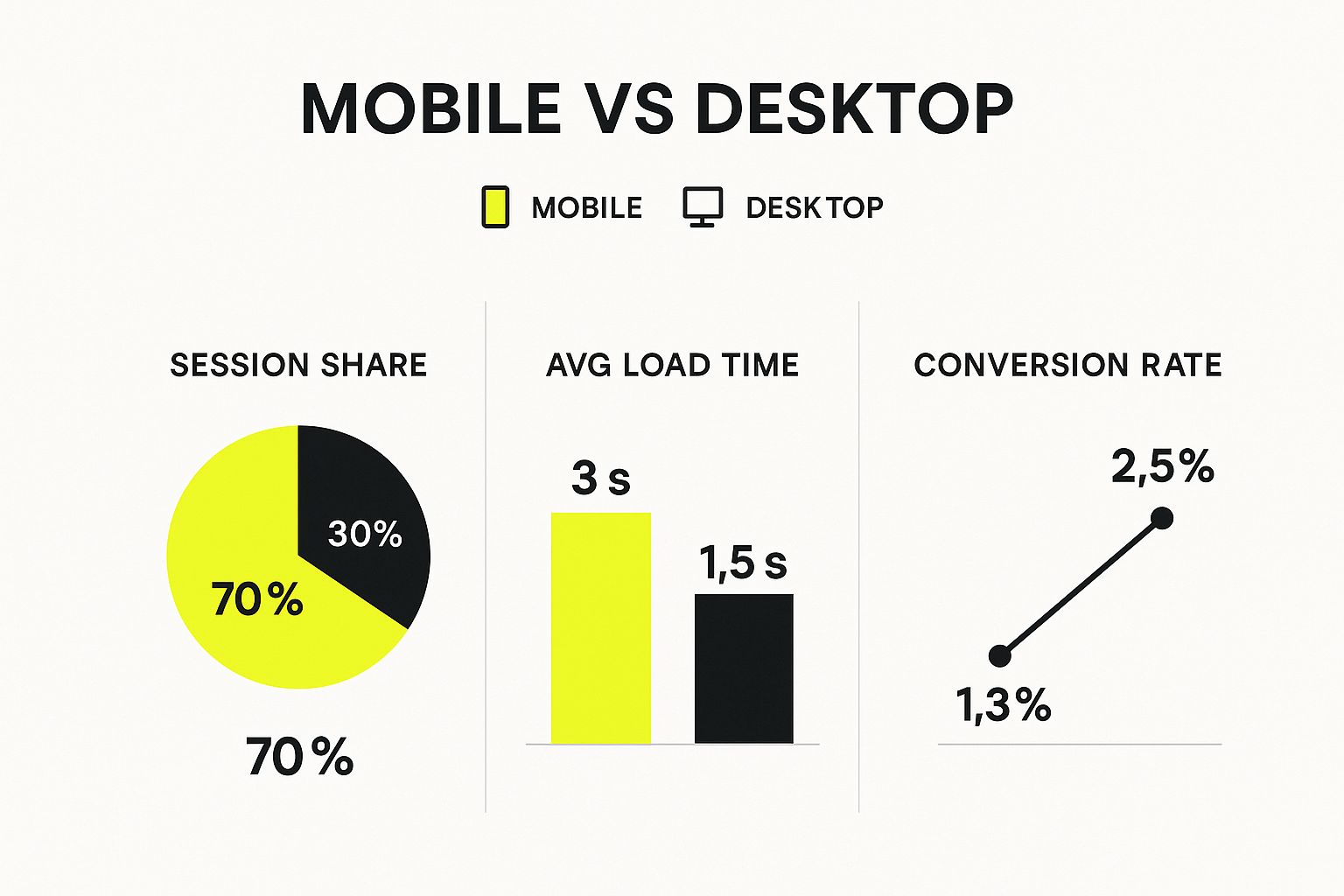
The data is clear: most of your traffic is on mobile, but those users have less patience and convert at a lower rate. This makes a seamless and complete mobile theme an absolute must-have.
Choosing a theme with strong built-in functionality is one of the most effective ways to improve your site's performance. You're reducing "code bloat" from the start, giving your store a solid, speedy foundation that both customers and search engines will love.
When you’re learning how to choose a Shopify theme, your main goal is to find one that handles 80% of what you need right out of the box. This strategy keeps your reliance on third-party apps to a minimum, which keeps your monthly costs down and ensures your store stays fast and reliable as you grow. It's a smart move that will pay for itself many times over.
Making Speed and SEO Your Top Priorities

Let's be blunt: a slow-loading store is an empty store. In e-commerce, performance isn't just a techy detail—it's a core feature that directly fuels your sales and your Google ranking. A gorgeous design is worthless if your pages take an eternity to load. Frustrated customers don't wait around; they just leave.
So, when you're figuring out how to choose a Shopify theme, speed is non-negotiable. Every second of delay chips away at your conversion rate and erodes customer trust.
How to Test Drive a Theme's Performance
The good news is you don't have to buy a theme to see how fast it runs. You can get real, hard data in a few minutes, for free. This simple check takes all the guesswork out of the equation and makes sure you’re building your store on a solid foundation.
Here’s my go-to method for checking any theme’s performance before I even think about buying it:
- Find the Demo Store: Head over to the Shopify Theme Store, pick a theme you like, and hit the "View demo store" button. This loads up a fully functional preview.
- Grab the URL: Copy the entire web address from your browser.
- Run a Speed Test: Go to Google PageSpeed Insights and paste the demo store's URL into the box. Click "Analyze."
The report gives you a performance score for both mobile and desktop, showing you exactly what a real user would experience. Now, a demo store is a clean, idealized version of a website. Even so, if a theme scores poorly here, that's a massive red flag.
A high score on a demo doesn't guarantee your site will be lightning-fast, but a low score almost certainly means it will be sluggish once you add your own content, images, and apps. Look for themes that score well right out of the box.
What Actually Makes a Theme SEO-Friendly?
Beyond just raw speed, a well-built theme gives you a serious leg up with search engine optimization (SEO). While Shopify handles a lot of the technical backend stuff, your theme controls the crucial on-page elements that Google looks at to understand and rank your site.
An SEO-friendly theme is all about clean code and smart structure. It includes things like:
- Proper Heading Hierarchy: Using H1 tags for main page titles and H2/H3 tags for subheadings in a logical order. This helps search engines understand your content's structure.
- Structured Data Support: Built-in support for schema markup, which helps Google display rich product details like price and reviews right in the search results.
- Flawless Mobile Experience: The design must look and work perfectly on all devices. This isn't a "nice-to-have" anymore; it's a major ranking factor.
Choosing a theme optimized for speed and SEO is one of the smartest business moves you can make. The Shopify ecosystem is massive, powering over 4.6 million active websites, so the competition is fierce. In fact, research from Yaguara.co shows that of the 1 million most-trafficked sites on the internet, 23% are built on Shopify. High-volume businesses depend on themes that perform flawlessly under pressure.
A fast, well-coded theme doesn't just improve your odds of ranking higher. It creates a better shopping experience, which leads directly to more sales. For more practical advice, check out our guide on how to improve Shopify site speed.
Common Questions About Choosing a Shopify Theme
Even after you've done all the research, a few questions always seem to come up right before you pull the trigger on a theme. Let's tackle the most common ones I hear from merchants.
Should I Choose a Free or Paid Shopify Theme?
This is the classic debate, isn't it? The truth is, there’s no single right answer—only what’s right for your business right now.
Free themes, like Shopify's own Dawn, are genuinely fantastic for getting a new store off the ground. They're fast, secure, and fully supported by Shopify, giving you a solid, professional-looking foundation without spending a dime.
But here’s the catch: their simplicity is also their biggest limitation. Free themes just don't have the same level of built-in features or design flexibility. This is where paid themes, which usually run between $180 to $350, become a smart investment. You're not just paying for a different look; you're buying powerful, built-in functionality.
Think about it this way: if your "must-have" list includes things like a mega menu, advanced product filtering, and color swatches, a paid theme with those features baked in could save you from needing three separate monthly app subscriptions. Suddenly, that one-time theme cost looks a lot more reasonable.
My advice? Start with a free theme if it ticks most of your essential boxes. But if you find yourself needing features that free themes just don't offer, investing in a premium theme from day one will save you a ton of time, money, and headaches down the road.
How Can I Test a Theme's Speed Before Buying?
This is a crucial step, and thankfully, it’s pretty easy to do. For any theme you're seriously considering, go to its page in the Shopify Theme Store and click "View demo store." This opens up a live, working version of the theme.
Now, copy the URL of that demo store. Take that URL over to a free tool like Google PageSpeed Insights and paste it in. In seconds, you'll get a real-world performance score for both mobile and desktop.
Keep in mind, a demo store is a best-case scenario. If a theme scores poorly even in its own demo, that's a massive red flag. It probably means the code is bloated or just not optimized well. While you're at it, spend a few minutes reading the most recent reviews—other merchants are your best source for brutally honest feedback on a theme's real-world performance.
Can I Change My Shopify Theme Later On?
Yes, absolutely. This is one of the best things about Shopify. You can swap your theme anytime without losing any of your core data like products, customers, or orders.
You can even install a new theme and customize it completely in the background while your current store keeps running. Your live site stays exactly as it is until you're happy with the new look and hit the "Publish" button.
The only thing to remember is that settings and content specific to your old theme—think custom homepage sections or code snippets you added—won't magically transfer over. You’ll have to set those up again in the new theme. It's totally doable, but picking the right theme from the start saves you from a lot of rework. Making the right choice also helps improve your traffic from paid channels, a topic we explore in our guide on PPC for e-commerce.
What Is the Single Most Important Factor in a Theme?
Everyone gets hung up on the aesthetics, but from years of experience, I can tell you the most critical factor is the mobile user experience. It’s not even close.
The majority of your traffic and a huge chunk of your sales will come from smartphones. If your store is clunky, slow, or hard to navigate on a small screen, you are actively turning customers away.
Right behind that is speed. Site performance directly impacts everything from your conversion rate to your SEO rankings. A gorgeous theme that's slow and frustrating on a phone will cost you sales, period. Always put a fast, mobile-first experience ahead of bells and whistles that don't actually help your customer.
At E-commerce Dev Group, we specialize in transforming your vision into a high-performing Shopify store. From theme customization to performance optimization, our expert team is here to help you build an online presence that not only looks incredible but also drives results. Ready to elevate your e-commerce game? Visit us at https://scaleshopify.com to learn how we can help you succeed.
