

To get your Shopify site running faster, you really need to zero in on a few key areas: your images, the apps you've installed, and the theme you're using. These are the usual suspects behind performance issues, and tackling them can make a huge, noticeable difference in your loading times. That means a better experience for your customers and, ultimately, more sales.
Why a Faster Shopify Store Matters More Than Ever
Your store's speed is more than just a number on a report—it's a core part of your brand's health and a make-or-break factor for success. In the world of e-commerce, every single millisecond truly counts. A slow site is frustrating, and it's often the first impression a potential customer has of your business. If they have to wait, they'll likely leave, maybe even before they've had a chance to see how great your products are.
This isn't just a theory; the link between speed and sales is real and affects everything from a customer's journey to how you show up on Google. For example, a delay of just a few seconds can send conversion rates tumbling by up to 7%. For a deeper dive into how speed impacts revenue, this detailed analysis on Shopify speed optimization from meetdomaine.com is well worth a read.
The Tangible Costs of a Slow Store
A slow website quietly eats away at your profits and chips away at your brand's reputation. Let's look at what's really happening in the background:
- Sinking Conversion Rates: Online shoppers today don't have much patience. If your checkout process lags or a product page hangs, they're gone. They'll just click away and find what they need from a competitor.
- Sky-High Bounce Rates: When a page takes too long to load, visitors often hit the "back" button and return to their search results. A high bounce rate is a red flag to Google, signaling that your site isn't delivering a good user experience.
- Damaged SEO Performance: Google's algorithms have a clear preference for fast websites. A slow store will have a tough time ranking high in search results, which means less organic traffic and fewer new customers finding you. You can check your site's performance using Google's own tools.
Here’s a snapshot of what you might see when you run a site through Google PageSpeed Insights.
This kind of report gives you a clear, actionable list of what's holding your site back. To really understand the financial side of things, it’s helpful to explore expert insights on how dedicated website speed optimisation for conversions directly ties into more sales.
A fast website isn't a luxury; it's a fundamental requirement for building a trustworthy and profitable e-commerce brand. It tells your customers you value their time and solidifies your credibility in a crowded marketplace.
If you're already seeing some of these issues, our guide on how to fix a slow Shopify website is a fantastic starting point for making immediate improvements. At the end of the day, investing time into improving your Shopify site speed is one of the best things you can do for your business.
Optimizing Your Images And Media Files

Let's be honest: high-resolution images and slick videos are what sell products. But they're also almost always the biggest culprits behind a slow-loading store. These large media files bloat your page weight, leaving customers staring at a blank screen while everything loads.
The secret isn't getting rid of your beautiful visuals. It's about being smarter with optimization. You're looking for that sweet spot between visual punch and zippy performance. That stunning hero banner might look incredible, but if it adds three seconds to your load time, it's doing more harm than good. Getting your media in shape is one of the most powerful things you can do to improve your Shopify site speed.
Choose The Right File Format
Not all image formats are built the same. Picking the right one can slash your file sizes without anyone noticing a difference in quality. For a long time, JPEG was king, but newer formats are much more efficient.
Here's a quick rundown:
- WebP: This should be your go-to format. WebP images are often 25-35% smaller than JPEGs at a comparable quality. While Shopify automatically serves WebP images when a browser supports it, uploading them pre-optimized gives you total control.
- JPEG: A reliable workhorse for product photos and any image with lots of colors and gradients. It strikes a good balance between quality and file size.
- PNG: Save this one for when you absolutely need a transparent background—think logos or specific graphic overlays. PNGs are usually much larger than JPEGs, so keep them away from your product photos.
Think of it this way: a 500KB JPEG product shot could shrink to 350KB or less as a WebP. That's a significant saving multiplied across every visitor and every page they view.
Compress And Resize Your Images
Before a single image file touches your Shopify admin, it needs to be compressed and sized appropriately. One of the most common mistakes I see is store owners uploading a massive 4000×4000 pixel image and using it for a tiny thumbnail. This needlessly slows everything down.
Pro Tip: Never, ever rely on your theme's code (CSS) to resize an image for you. Even if the picture looks smaller on the storefront, the customer's browser still has to download the original, full-sized file first. Always resize your images to the exact dimensions they'll be displayed at before you upload.
Consider the image's purpose. A full-width banner might need to be 1920 pixels wide. But a product photo on a collection page? That might only be 400 pixels wide. Get into the habit of resizing first.
You can use a great free tool like TinyPNG or grab an app from the Shopify App Store to automate compression and resizing. Making this a non-negotiable step in your workflow is fundamental to improving Shopify site speed.
Implement Lazy Loading For Media
Lazy loading is a clever trick that tells a browser not to load images or videos until a user is about to scroll them into view. This makes the initial page load feel lightning-fast because the browser only has to worry about the content that's visible "above the fold."
The good news is that most modern Shopify themes, including the default Dawn theme, already have lazy loading built right in. Just double-check your theme settings to make sure it's switched on. By loading media only when necessary, you dramatically cut down the initial data load and boost core speed metrics like Largest Contentful Paint (LCP). This lets your customers get to the good stuff—shopping—instead of waiting for every last image to download.
Conducting a Smart Shopify App Audit
It’s so easy to get caught up in the excitement of the Shopify App Store. A new feature here, a cool integration there… before you know it, you've got a dozen or more apps running. The problem is, each one adds its own code—JavaScript and CSS files—that has to load every single time someone visits your site.
Over time, this creates a "code bloat" that can seriously bog down your store's performance. Think of your store like a race car. Every app you add is extra weight. A few accessories are fine, but eventually, all that extra baggage starts to kill your speed. That app you installed for a flash sale last year? It might just be dead weight now, slowing down every page for every customer.
Identifying Performance-Heavy Apps
So, how do you figure out which apps are the culprits? Guessing won't cut it. You need to get your hands dirty and look at the data.
A great place to start is your browser's Developer Tools. Just right-click on your site, hit "Inspect," and head to the "Network" tab. This will show you every single file your page is loading. You can filter by JavaScript (.js) or CSS (.css) and look for file names that sound like the apps you have installed. If you see one app loading several large files, you've found a prime suspect.
Shopify's own Web Performance dashboard in your admin panel can also be a goldmine. It often points directly to apps that are negatively impacting your speed score, giving you a clear list of what to investigate first.
One thing I always look for is "ghost code." This is leftover code from apps you've already uninstalled. It's surprisingly common for these scripts to stick around, pointlessly slowing things down. A thorough audit means hunting these down, too.
The App Triage Checklist
Once you've got a list of potential problem apps, it's time to play judge, jury, and executioner. For every single app on your list, you need to ask some tough questions.
- Is this app essential? And I mean truly essential. Does it directly make you money or solve a major customer pain point? Or is it just a nice-to-have?
- What's the real ROI? If you have a review or pop-up app, dive into your analytics. Is it actually driving the sales or sign-ups you thought it was? The numbers don't lie.
- Is there a lighter-weight alternative? Maybe a single, heavy app can be swapped for a more focused one that does the one thing you need without all the extra code.
- Can my theme do this already? Modern Shopify themes, especially on Online Store 2.0, have a ton of built-in functionality. You might find you can get rid of an app for mega menus, color swatches, or product filters just by enabling a feature in your theme customizer.
Walking through this process methodically helps you trim the fat. Deleting even a couple of heavy, unnecessary apps can give you an immediate and very satisfying boost in site speed, which your customers will definitely appreciate.
Choosing a Fast and Lightweight Shopify Theme
Think of your Shopify theme as the foundation of a house. If the foundation is weak and poorly constructed, everything you build on top of it will be unstable. The same is true for your store's performance. A bloated theme, packed with unnecessary features and messy code, will always put a drag on your load times, no matter what other fixes you try.
If you're serious about improving your Shopify site speed, starting with a lightweight theme is non-negotiable. The best themes are built with a "less is more" philosophy, focusing on clean code and a fantastic mobile-first experience. This means they only load what's absolutely necessary, so shoppers on their phones aren't stuck downloading huge files meant for a desktop computer.
How to Spot a Performance-Focused Theme
It's easy to get distracted by a theme's flashy design, but you've got to look under the hood. The fastest themes are built for speed from the very beginning, and that usually means they use minimal, efficient JavaScript. All those extra scripts for fancy animations or pop-ups you'll probably never use just add weight and slow things down.
Here’s a great little trick I always use: test a theme before you install it. Head over to the theme's live demo store, grab its URL, and plug it into Google PageSpeed Insights. This tool gives you an honest, real-world performance score. If the demo store itself is slow, you can bet your store will be too once you've added your own products, images, and apps.
Your theme choice sets the speed ceiling for your entire store. A slow theme will limit your potential from day one, while a fast theme gives you a strong foundation to build upon.
Free vs. Paid Themes: The Speed Trade-Off
A question I hear all the time is whether free themes can really compete with paid ones on speed. The answer is a definite yes—and sometimes, they’re even faster.
Shopify's own free themes, like the popular Dawn theme, are engineered with performance as a top priority. They're built on the modern Online Store 2.0 architecture, which means they have leaner code and are rigorously tested to meet current speed standards. They make a fantastic, speedy starting point for any store.
Paid themes often try to justify their price tag with a mountain of built-in features and customization options. While this sounds great, it can quickly lead to code bloat. A premium theme loaded with dozens of features you don’t actually need can undo all your hard work to improve Shopify site speed.
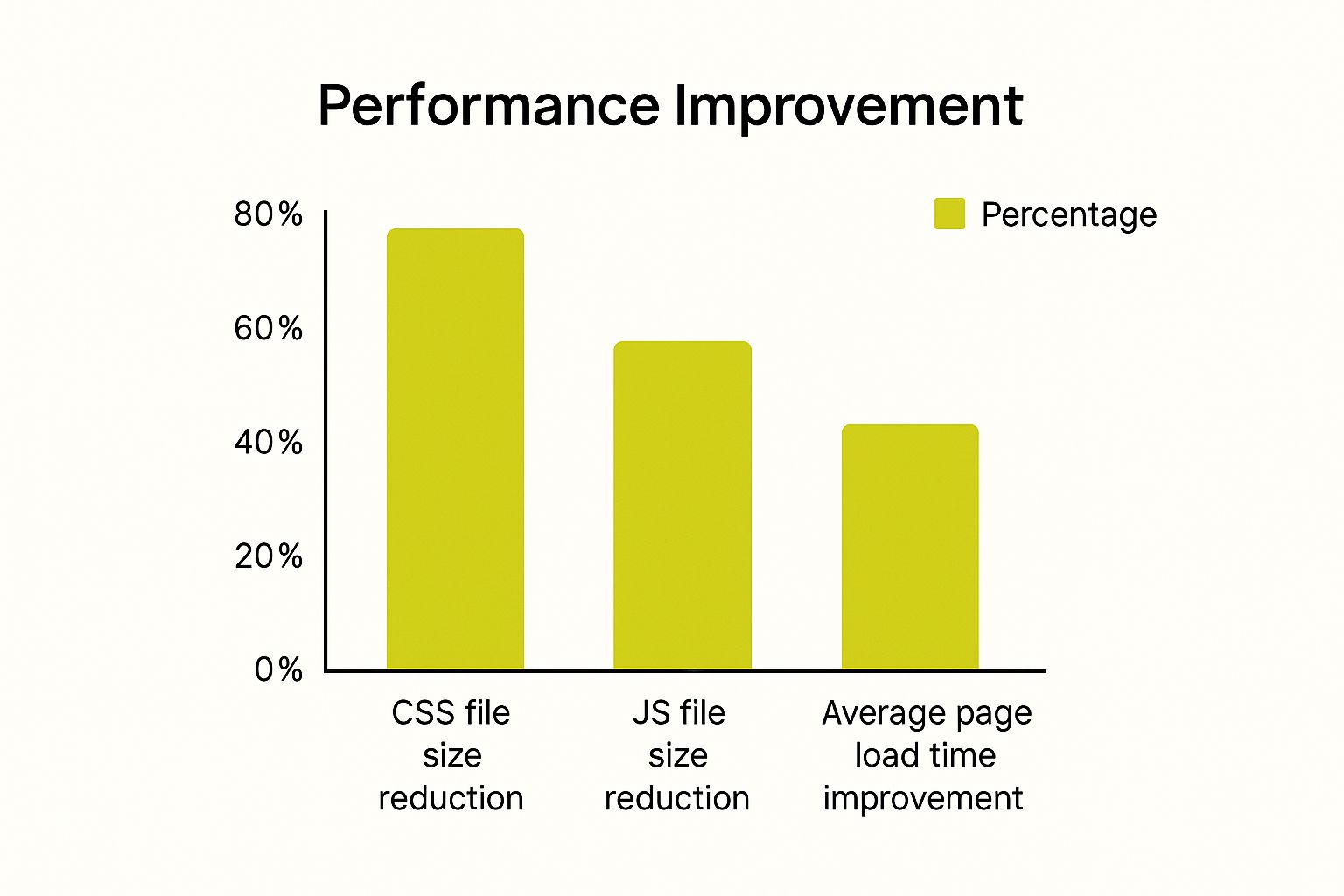
As you can see, trimming down that heavy code makes a huge difference. By choosing a lean, efficient theme, you can see load times improve by as much as 1.8 times compared to slower competitors.
When picking a theme, it's crucial to understand what makes one faster than another. The table below breaks down some key differences you'll find between high-performance themes and their slower counterparts.
Shopify Theme Speed Factors Comparison
| Factor | High-Performance Theme | Low-Performance Theme |
|---|---|---|
| Code Base | Minimal, clean, and well-documented. | Bloated with unused JavaScript and CSS. |
| JavaScript | Loads scripts efficiently, often deferred. | Heavy reliance on multiple, render-blocking scripts. |
| Mobile Experience | Designed mobile-first, not just mobile-responsive. | Desktop design that is simply scaled down for mobile. |
| Built-in Features | Core functionalities only; encourages app use for extras. | Tries to be an all-in-one solution, adding weight. |
| Image Handling | Built-in lazy loading and responsive image sizes. | Loads all images at once, regardless of screen size. |
Ultimately, the best choice isn't about price but about your specific needs. Don't fall into the trap of thinking "paid" automatically means "faster." Always prioritize a theme that delivers the core functionality you need without weighing you down with extras. A simpler, faster theme is always a better choice for your customers—and your conversion rates.
To keep your store in top shape, constantly monitor its speed using tools like Google PageSpeed Insights and Shopify's own Web Performance dashboard. For a deeper dive into this topic, check out this excellent Shopify speed optimization guide on trackbee.io.
Using Shopify’s Built-In Performance Tools

When it comes to improving your site speed, you don't have to guess what's working and what isn't. Shopify actually gives you a powerful set of tools right in your admin panel that takes the guesswork out of the entire process.
Think of it as your performance command center. It gives you real data so you can spot problems and measure your progress as you make changes. The main tool you'll be using is the Web Performance dashboard. This is your go-to spot for understanding how your store really performs for actual visitors.
Decoding Your Web Performance Dashboard
Head into your Shopify admin, and you'll find the dashboard waiting for you. The first thing you'll see is your store's speed score, which Shopify bases on Google's Core Web Vitals. It's a great way to get a quick snapshot of your site's health and see how you stack up against other stores in your niche.
Here’s what that dashboard looks like, showing your speed score and its trend over time.
This timeline is one of its most valuable features. It directly shows you the impact of your work. Did you just compress a bunch of images or remove an old app? Check the dashboard. If that score starts climbing, you know you're on the right track.
Below the main score, the dashboard breaks down the three Core Web Vitals:
- Largest Contentful Paint (LCP): This measures how fast the most important content on your page loads. A good LCP means visitors see what they're looking for almost instantly.
- Interaction to Next Paint (INP): This tracks how quickly your page responds when someone clicks a button or interacts with an element. A low INP score keeps the experience smooth and prevents frustration.
- Cumulative Layout Shift (CLS): This checks for visual stability. A good CLS score means page elements don't jump around as they load, which can be incredibly annoying for users.
By keeping an eye on these specific metrics, you're not just chasing an arbitrary number—you're making tangible improvements to the shopping experience for every single person who lands on your site.
Leveraging Shopify's Global Infrastructure
One of the big reasons Shopify stores can be so fast is the incredible infrastructure powering them. Every store, including yours, automatically benefits from a world-class Content Delivery Network (CDN) from Cloudflare.
This network is a game-changer. It stores copies of your site's content on servers all over the world. So, when a customer from Japan visits your store, your images are delivered from a nearby server in Asia, not all the way from North America. This simple difference slashes load times and makes your site feel snappy, no matter where your audience is.
This built-in advantage is huge. On average, Shopify stores load in just 1.2 seconds, while stores on other platforms lag behind at 2.17 seconds. You're already starting from a great place.
By using the Web Performance dashboard to guide your tweaks, you're fine-tuning an already powerful machine. If you want to dive deeper, you can explore more about Shopify's impressive speed capabilities on their blog.
For more hands-on advice on putting these insights to work, check out our guide to optimize your Shopify speed.
Answering Your Top Shopify Speed Questions
It's completely normal to have questions even after you've started making improvements. Let's walk through some of the most common things we hear from store owners, so you can keep your optimization efforts moving in the right direction.
So many merchants get hung up on a perfect score, but it’s important to look at the bigger picture. Your real goal is a better user experience that leads to more sales, not just a high number on a report.
How Much Does My Shopify Speed Score Really Matter?
Think of your Shopify speed score as a helpful diagnostic tool, not the final exam. Obsessing over hitting a perfect 100 can be a distraction. What truly matters is your customers' real-world experience and your Core Web Vitals.
A store with a slightly lower score that feels lightning-fast and converts customers is infinitely better than a "perfect" site that feels clunky and loses sales. Use the score to pinpoint major problems—like a rogue app or massive images—instead of treating the number itself as the ultimate prize.
Your speed score is a guide, not a grade. Focus on how fast your site feels to a real person. A snappy site with a score of 85 will always beat a clunky one with a 95.
At the end of the day, a fast site is just one piece of the puzzle. To see how speed works hand-in-hand with other crucial elements, check out our guide on Shopify conversion rate optimization.
Can Custom Code Or Theme Edits Slow Down My Store?
Absolutely. Every bit of custom HTML, CSS, or JavaScript added to your theme has the potential to affect performance. This is especially true if the code is poorly written or comes from a third-party source that wasn't built with speed in mind.
For example, that cool new custom slider or a third-party tracking script might seem like a small addition. But if it's not coded efficiently, it can dramatically slow down how quickly your page loads for visitors.
Here’s a good rule of thumb:
- Test Before and After: Always run a speed test before and after you add any new code.
- Regular Audits: Periodically review your custom code. Is it still necessary? Is it still efficient?
- Keep It Lean: If a custom feature doesn't provide real value to your customers or your bottom line, get rid of it.
When Should I Hire A Developer For Speed Optimization?
So you’ve done the basics—you've compressed your images, cleaned up your apps, and switched to a fast theme—but your speed improvements have hit a wall. This is a super common and often frustrating place to be.
If your site still isn't as fast as you need it to be and you're dealing with issues that feel too technical, it’s the perfect time to call in an experienced Shopify developer. They can dig much deeper than the standard fixes. A pro can tackle advanced tasks like:
- Cleaning up "ghost code" left behind by uninstalled apps.
- Minifying CSS and JavaScript files to reduce their size.
- Refactoring your theme's Liquid code so it renders faster.
- Deferring non-essential scripts so the important stuff loads first.
Bringing in an expert at this stage isn't about small tweaks; it's about unlocking your store's true performance potential.
Ready to take your Shopify store to the next level? The team at E-commerce Dev Group specializes in performance optimization, theme customization, and strategic development to help you build a faster, higher-converting store. Let's build something great together.
