


When we talk about "clean code," we're really talking about source code that's straightforward and easy for another human to work with. It's code that’s simple to read, understand, and—most importantly—maintain. In the Shopify world, this means structuring your Liquid, JavaScript, and CSS in a logical way that keeps your store running fast, minimizes bugs, and makes future updates a breeze.
Why Clean Code Matters for Your Shopify Store

Writing clean code is far more than an aesthetic choice; it’s a core business strategy that directly affects your store's bottom line. Every single line of Liquid, CSS, and JavaScript in your theme builds the experience your customers have. If that code is messy and disorganized, you get real-world problems. Think slow-loading collection pages, frustrating checkout glitches, or a mobile layout that’s completely broken. These are the kinds of issues that send customers straight to your competitors.
Think of clean code as the foundation for a scalable, profitable e-commerce business. It's not just a nice-to-have, it’s a prerequisite for growth. When your theme is well-organized, you gain some serious advantages:
- Faster Development Cycles: Rolling out new features, whether it's a simple promotional banner or a complex product customizer, happens much faster.
- Easier Onboarding: Need to bring on a new developer? They can hit the ground running because the codebase makes sense, saving you weeks of them just trying to figure things out.
- Simplified Debugging: Bugs will happen. It’s a fact of life. But finding and fixing them in a clean codebase can take minutes instead of agonizing hours.
- Improved Store Performance: Well-structured code is almost always more efficient. That means faster page load times, a better user experience, and happier customers.
The True Cost of Technical Debt
Every time a developer takes a shortcut or writes a sloppy function, it adds to what we call technical debt. This is the hidden cost of rework you'll have to pay later because you chose the quick and dirty solution now instead of the right one. Over time, this debt piles up, making every future update slower, riskier, and more expensive.
This isn't just some abstract concept. Data from 2024 shows a clear link between clean code and how quickly teams can release new software. The companies that make it a priority see real, measurable gains in their development efficiency. By investing in quality from the start, you avoid the long-term pain of constant maintenance and bug-fixing. You can learn more about reducing technical debt to see just how critical this is for the health of your store.
Clean code isn't just about making developers happy. It's about building a resilient, adaptable, and profitable online store that can evolve with your business needs without collapsing under its own complexity.
To put it in perspective, let's look at a simple comparison. The table below shows the drastic difference between these two coding approaches and how they affect key business metrics for a typical Shopify store. This isn't just about code; it's about measurable outcomes that influence your bottom line every single day.
Messy Code vs Clean Code: The Impact on Your Shopify Store
| Metric | Impact of Messy Code | Impact of Clean Code |
|---|---|---|
| Page Load Speed | Slower load times, higher bounce rates. | Faster performance, improved SEO, better user engagement. |
| Conversion Rate | Lower conversions due to bugs and poor UX. | Higher conversions from a smooth, bug-free experience. |
| Development Costs | Higher long-term costs due to maintenance and difficult updates. | Lower total cost of ownership; updates are faster and cheaper. |
| Bug Frequency | Frequent, hard-to-diagnose bugs that disrupt sales. | Fewer bugs, and those that appear are easier to fix. |
| Scalability | Difficult and expensive to add new features or handle more traffic. | Easy to scale, add new apps, and adapt to business growth. |
As you can see, one path leads to agility and growth, while the other leads to stagnation and mounting costs. The choice has a direct impact on your store's success.
Establish Clear Naming and Formatting Conventions

If you adopt only one practice for writing cleaner code, make it this one: establish clear, predictable conventions for naming and formatting. When code looks and feels the same across your entire Shopify theme, it's instantly easier for anyone to jump in, understand what’s happening, and make changes.
This isn't just about being neat. It's about reducing the mental gymnastics required to figure out what a piece of code actually does.
Think of it like reading a book. If every chapter used a different font, paragraph style, and randomly changed character names, you'd spend more time deciphering the format than enjoying the story. Code is no different. Consistency creates a familiar rhythm that lets any developer—including your future self—focus on the logic, not the syntax.
Make Your Code Speak for Itself
The real goal here is to write code that's largely self-documenting. This means a variable, function, or CSS class name should clearly state its purpose without needing an explanatory comment. For a great deep dive on this, check out the ultimate guide to self-documenting code.
Let's look at a classic example you'll see in Liquid files. A developer, trying to save a few keystrokes, might shorten a variable name.
Confusing Liquid Variable:
{% assign p = product %}
{{ p.title }}
What is `p`? A product? A page? A price? Someone new to this file has to waste time scanning the code just to find its origin.
Now, let's make one small change for clarity.
Clear Liquid Variable:
{% assign featured_product = product %}
{{ featured_product.title }}
There’s zero ambiguity. We immediately know we’re working with the featured product. This simple change eliminates guesswork and makes the code’s intent obvious at a glance.
Key Takeaway: Always choose clarity over brevity. The few seconds you save typing a shorter name will be lost a hundred times over when someone (including you) has to debug or update that code later.
A Practical Style Guide for Shopify Themes
Consistency is king, so it helps to have a simple, opinionated style guide for your team. This stops the debates before they start and ensures everyone is writing code that looks and feels the same.
Here are some straightforward conventions you can implement right away.
Liquid Naming and Formatting:
- Variables: Use
snake_casefor all Liquid variables (e.g.,main_product_image,cart_item_count). It’s a common convention that’s easy on the eyes. - Indentation: Stick to two spaces for indentation within your Liquid logic. This keeps nested
ifstatements andforloops clean and easy to trace. - Spacing: Always put spaces around your Liquid tags and operators. For instance, write
{{ product.price | money }}instead of{{product.price|money}}.
CSS/SCSS Naming and Formatting:
- Class Names: Use a consistent methodology like BEM (Block, Element, Modifier) or simple
kebab-case. A product card, for example, could use classes like.product-card,.product-card__title, and.product-card--featured. - Property Order: Group related CSS properties. A good habit is to put positioning first, then the box model (display, margin, padding), and finally typographic and decorative styles.
- Indentation: Just like with Liquid, use two spaces for indentation within your nested CSS or SCSS rules.
Applying these rules consistently will dramatically improve your theme's quality. For more tips on theme structure, you might find our guide on how to customize Shopify themes useful.
The Power of Well-Placed Comments
While self-documenting code is the goal, comments definitely still have their place. Good comments explain why something is being done, not what is being done. The code itself should already explain the "what."
Avoid comments that just restate the obvious.
Redundant Comment:
// Set the quantity to one
let quantity = 1;
This adds nothing. A developer can see what the code is doing.
Instead, use comments to explain complex logic, business rules, or necessary workarounds.
Helpful Comment:
// The API requires a minimum quantity of 1 for subscription products.
// See ticket #4182 for details.
let quantity = 1;
Now that is a useful comment. It provides crucial context that the code alone can't. It tells future developers why this line exists and where to find more information, preventing them from accidentally breaking something down the line. A single, well-placed comment can save hours of confusion.
Build Modular and Reusable Shopify Components

One of the most valuable lessons you learn in development is "Don't Repeat Yourself" (DRY). For a Shopify theme, this means fighting the urge to copy and paste code. Every time you duplicate a block of HTML or a chunk of JavaScript, you're setting a trap for your future self.
When a change is needed, you suddenly have to hunt down every single instance and update them all. It’s slow, tedious, and a perfect recipe for bugs. A much smarter way to work is by building small, modular, and reusable components. This isn't just about being tidy; it's about making your theme easier to manage and scale.
Mastering Liquid Snippets and Sections
Shopify gives us two fantastic tools for this job: snippets and sections. The trick is knowing when and where to use each one.
- Snippets (
/snippets): Think of these as small, reusable helpers. They're perfect for pieces of code you'll need in multiple places, like a product card. Aproduct-card.liquidsnippet can define the HTML for a single product, and you can pull it in wherever you need it. - Sections (
/sections): These are the bigger, merchant-facing building blocks. They are the configurable components that store owners can add, remove, and reorder in the Shopify Theme Editor. Use them for distinct blocks of content, like a "Featured Products" grid or an "Image with Text" banner.
Let's say you need to show product cards on your homepage, collection pages, and in search results. Instead of pasting the card markup into three different files, you create a single product-card.liquid snippet.
Then, you just include it where you need it, passing in the product data:
{% render 'product-card', product: my_product %}
Now, if you want to add a "Sale" badge or tweak the image size, you only have to edit one file. The change populates everywhere instantly, saving you a ton of time and keeping the design consistent. A solid grasp of modularity is one of the foundational best practices for web design because it leads directly to a theme that's a dream to maintain.
From Monolith to Modules: A Real-World Refactor
We’ve all seen it: a bloated templates/product.liquid file. It starts simple, but soon it's a massive file containing the product image gallery, variant selectors, add-to-cart button, description, and related products—easily running hundreds of lines long.
This kind of file is a nightmare to work with. A small change to the image gallery could accidentally break the variant selection logic.
Here’s how we can break it down into clean, manageable components:
- Product Gallery: Pull all the image and thumbnail logic out and move it into a new section file:
sections/product-gallery.liquid. - Product Form: The variant dropdowns, quantity box, and add-to-cart button belong together. They can become
sections/product-form.liquid. - Product Meta: Details like the vendor, SKU, and type can be tucked away into a simple snippet:
snippets/product-meta.liquid. - Related Products: The logic for finding and displaying related items can be its own section,
sections/related-products.liquid.
After this refactor, your main templates/product.liquid file goes from a monster to a clean, readable layout.
Before:
After:
{{ product.title }}
{% render ‘product-meta’, product: product %}
{% section ‘product-form’ %}
{% section ‘related-products’ %}
The new template is a simple blueprint. It clearly communicates the page’s structure, making it incredibly easy to find the code for a specific feature. This dramatically cuts down on developer guesswork and makes future updates so much faster.
This modular approach isn't just about organization. It's about creating a system of independent, interchangeable parts. That makes your theme more resilient to change and far easier to debug.
Applying Modularity to JavaScript
The same exact principle applies to your JavaScript. Instead of creating one giant app.js file that does everything, break your code into small, single-purpose modules.
A monolithic script that handles the mobile menu, product sliders, and the variant selector is brittle. If one part fails, it can bring down the entire storefront experience.
Instead, try structuring your JavaScript by feature:
mobile-nav.js: Code dedicated to opening and closing the mobile navigation.product-slider.js: Logic for initializing and controlling the product image carousel.variant-selector.js: Manages updating the price and UI when a new variant is selected.
This separation makes your code far more robust. A bug in the product slider won't take out the variant selector. This kind of modularity is a cornerstone of clean code, ensuring your Shopify store remains agile and easy to work with for years to come.
Simplify Complex Logic in Your Theme
This is where the rubber really meets the road for clean code. A Shopify theme can quickly spiral into a tangled mess of nested if statements, especially when you're juggling promotions, complex product options, or tiered discounts. I've seen it time and time again—this kind of complexity is the number one cause of bugs and a massive time-sink for developers.
Learning to simplify this logic isn't just a "nice-to-have"; it's essential for keeping your theme healthy. Messy logic doesn't just make the code hard to read; it makes it incredibly fragile. A tiny change in one spot can trigger a cascade of unexpected problems elsewhere, turning a simple tweak into a high-stakes guessing game.
Flatten Logic with Guard Clauses
One of the biggest red flags for complex code is deeply nested conditional logic. You've probably seen it—it creates an "arrowhead" shape as the indentation pushes code further and further to the right. Following that flow is a nightmare.
A fantastic way to fight this is with guard clauses. Think of a guard clause as a bouncer for your code. It's a quick check at the very beginning of a function or block that says, "If you don't meet this condition, you're out." This simple trick flattens your code, making the main logic path crystal clear.
Let's look at a common Liquid snippet for a "Free Gift with Purchase" offer.
The Tangled, Nested Way:
{% if customer %}
{% if customer.orders_count > 5 %}
{% for item in cart.items %}
{% if item.product.type == 'Featured Collection' %}
{% if item.quantity >= 2 %}
Congrats! You get a free gift!
{% endif %}
{% endif %}
{% endfor %}
{% endif %}
{% endif %}
Just trying to trace that logic is enough to give you a headache. Now, let's clean it up with guard clauses.
The Clean, Guard Clause Way:
{% unless customer and customer.orders_count > 5 %}
{% comment %} Not a loyal customer, so we're done here. {% endcomment %}
{% break %}
{% endunless %}
{% for item in cart.items %}
{% unless item.product.type == 'Featured Collection' and item.quantity >= 2 %}
{% comment %} This item doesn't qualify, so check the next one. {% endcomment %}
{% continue %}
{% endunless %}
Congrats! You get a free gift!
{% comment %} We only need to show this once, so let’s exit the loop. {% endcomment %}
{% break %}
{% endfor %}
See the difference? It’s immediately easier to read. Each condition is handled right at the top, and the code bails out or skips ahead the moment a requirement isn’t met. The main successful outcome—displaying the “free gift” message—sits at the lowest level of indentation, making it the star of the show.
Here's a simple workflow I use for tackling these kinds of complex sections.
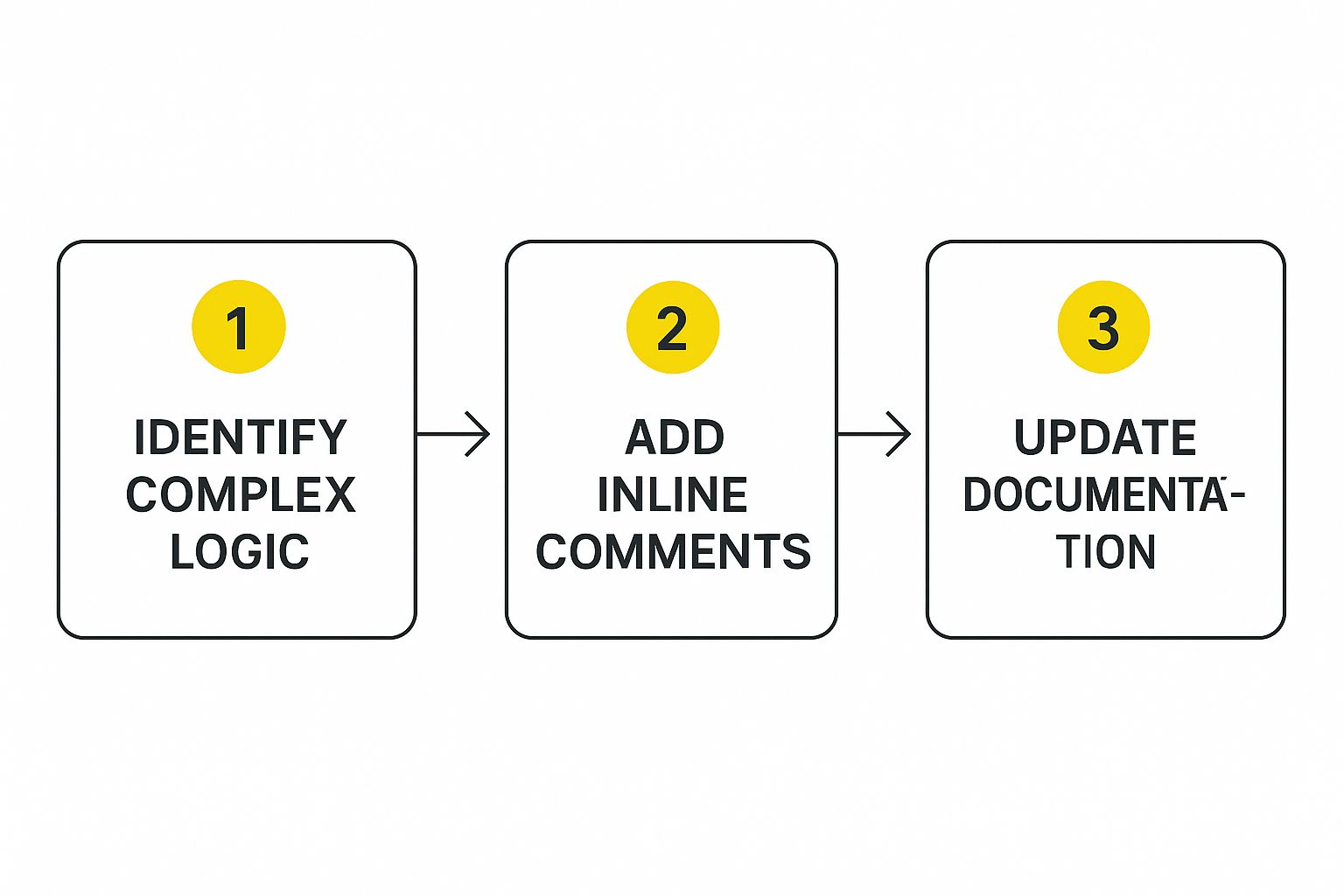
This process is straightforward: spot the tangled code, use comments to clarify what it's supposed to do, and then update your documentation. This little bit of housekeeping pays huge dividends down the line.
Break Down Large Functions into Helpers
Another classic problem is the "god function"—one massive JavaScript function trying to do everything at once. You might have a function that handles variant selection, updates the UI, checks inventory, and manages the add-to-cart button state. That’s just asking for trouble.
The fix is simple: break it down into smaller, focused helper functions. Each helper should do one specific job, and only one.
A function should do one thing, and do it well. Sticking to this makes your functions way easier to test, reuse, and understand. Plus, a small, focused function has far fewer places for bugs to hide.
Let's say you have a JavaScript function that updates the product page when a shopper selects a new variant.
The All-in-One Monolith:
function onVariantChange(variant) {
// 1. Update the price display
const priceEl = document.querySelector('.price');
priceEl.textContent = formatMoney(variant.price);
// 2. Update the 'add to cart' button
const button = document.querySelector('.add-to-cart');
if (variant.available) {
button.disabled = false;
button.textContent = 'Add to Cart';
} else {
button.disabled = true;
button.textContent = 'Sold Out';
}
// 3. Update the product image
const imageEl = document.querySelector('.product-image');
imageEl.src = variant.featured_image.src;
}
It works, but it's juggling three separate tasks. Now let's refactor it into dedicated helpers.
Refactored with Helper Functions:
function updatePrice(price) {
document.querySelector('.price').textContent = formatMoney(price);
}
function updateAddToCartButton(isAvailable) {
const button = document.querySelector('.add-to-cart');
button.disabled = !isAvailable;
button.textContent = isAvailable ? 'Add to Cart' : 'Sold Out';
}
function updateProductImage(image) {
document.querySelector('.product-image').src = image.src;
}
// The main function is now just a clean coordinator
function onVariantChange(variant) {
updatePrice(variant.price);
updateAddToCartButton(variant.available);
updateProductImage(variant.featured_image);
}
This version is so much cleaner. The onVariantChange function now reads like a simple to-do list. If there’s a bug with the button, you know exactly which function to check: updateAddToCartButton. This modular approach also makes it easier to pinpoint performance bottlenecks, which is a big part of our website speed optimization services.
This structured approach pays off in a big way. Some studies show developers can spend around 32 hours fixing bugs during development and another 10 days on post-release fixes, mostly due to messy code. Adopting a "clean as you code" mindset can drastically slash that time. By taking a moment to simplify logic as you go, you're building a more resilient and maintainable Shopify theme for the long haul.
Adopt a Continuous Improvement Mindset
Writing clean code isn't a one-and-done task; it's a discipline. A project is never truly "finished" the moment it goes live. That’s just the starting line for the next bug fix, feature request, or Shopify platform update. The real difference between a theme that ages gracefully and one that crumbles into a tangled mess is a commitment to continuous improvement.
This isn't just about good habits—it's about protecting the long-term value of your work. It means weaving clean coding practices into the fabric of your team's daily routine, making quality an everyday habit instead of a heroic, one-time cleanup effort. The idea is to make tiny, consistent improvements that build on each other, stopping technical debt before it even has a chance to take root. To really get this culture going, it helps to understand the core principles of continuous improvement.
Embrace the Boy Scout Rule
A fantastic guiding principle for this is the "Boy Scout Rule." It's simple: always leave the code cleaner than you found it.
This doesn't mean you need to rewrite an entire file every time you open it. The power of this rule is in its small, manageable scale.
Let's say you're fixing a small bug in a Liquid snippet. While you're in there, you spot a variable with a confusing name or a comment that no longer makes sense. You spend an extra 30 seconds renaming the variable to something clear and deleting the outdated comment. That's all it takes. You’ve just made a small, meaningful improvement.
This approach works wonders because it spreads the responsibility of maintaining the codebase across the whole team and throughout the project's life. It turns every little task into an opportunity to chip away at chaos.
The Boy Scout Rule transforms maintenance from a chore into a proactive quality-assurance process. Each small cleanup prevents a larger problem from taking root, ensuring the codebase remains healthy and manageable.
Integrate Regular Refactoring and Reviews
To make this mindset a reality, you need to build processes around it. Waiting for a "spring cleaning" sprint to refactor your theme is a recipe for failure. By the time you get to it, the problems are often too big and tangled to deal with.
Instead, build small, regular refactoring sessions directly into your workflow. Did you come across a clunky function while building a new feature? Block out an hour next week to simplify it. Noticed some duplicated CSS? Add a ticket to your backlog to create a reusable class. These small, planned efforts are far more effective than a massive, disruptive overhaul down the road.
The other crucial piece of the puzzle is the code review. A good code review is a collaboration, not a confrontation. It's about sharing knowledge and spotting potential issues early on.
Here’s what we focus on in our reviews:
- Clarity: Is it obvious what this code is trying to do? Could a new developer figure it out?
- Consistency: Does it stick to our team's established naming conventions and formatting?
- Simplicity: Is there a more straightforward way to get the same result?
- Safety: Does it introduce any potential bugs or performance hits?
Automate Quality Checks with Tooling
Finally, let automation do the heavy lifting. We humans are great at creative problem-solving, but computers are far better at spotting consistent, predictable mistakes. This is where a tool like Shopify Theme Check becomes invaluable.
Theme Check is a linter that automatically scans your theme for common errors, performance bottlenecks, and anything that goes against Shopify's own best practices.
Integrating it into your development process creates an instant feedback loop. It flags "code smells" long before they ever get merged into your main branch. Think of it as an automated partner that never gets tired. It helps enforce quality standards across the board, which frees up your human code reviews to focus on the things that really require a human brain, like logic and architecture.
Putting it all together—the Boy Scout Rule, regular refactoring, collaborative reviews, and automated checks—creates a powerful system that makes clean code a sustainable, team-wide reality.
To help put these ideas into practice, here's a simple checklist you can run through every day. It's a quick gut check to keep quality at the forefront of your mind.
Your Daily Clean Code Checklist
| Check | Description | Why It Matters |
|---|---|---|
| Did I leave it cleaner? | Tidied up at least one small thing (renamed a variable, removed a comment, simplified a line). | Prevents small messes from snowballing into major technical debt. |
| Is my code self-explanatory? | Used clear names for variables, functions, and CSS classes that describe their purpose. | Reduces the need for comments and makes the code easier for others (and future you) to understand. |
| Did I repeat myself? | Checked for any duplicated code that could be turned into a reusable snippet, function, or class. | Following the "Don't Repeat Yourself" (DRY) principle makes the code easier to update and maintain. |
| Does it follow our style guide? | Ensured my formatting, naming, and structure align with the team's conventions. | Consistency across the codebase makes it predictable and much faster to navigate. |
| Did I run the linter? | Ran Shopify Theme Check or other linters to catch automated errors before committing. | Catches common mistakes and enforcement of best practices automatically, saving time in code reviews. |
Sticking to a simple checklist like this helps turn good intentions into ingrained habits. It’s the small, daily actions that ultimately lead to a robust, maintainable, and high-quality Shopify theme.
Got Questions About Clean Code?
When you start applying clean code principles to Shopify development, a few common questions always seem to pop up. The way Liquid, JavaScript, and CSS all interact on the platform can throw a few curveballs. Let's tackle some of the most frequent hurdles I see developers run into.
This isn't just about theory; it's about solving the real-world problems you face when you're deep in theme development.
How Small Should a Function or Snippet Be?
Ah, the classic question. There's no magic number of lines, but the best rule of thumb is the Single Responsibility Principle. Simply put, a function or a Liquid snippet should do one thing, and do it really well.
A dead giveaway that a function is doing too much? You feel the need to write comments to explain what different parts of it are doing. That's your cue to break it apart.
For example, a single JavaScript function shouldn't fetch product data, update the UI, and handle user input. That's a recipe for confusion. Split it up into dedicated functions:
fetchProductData()renderProductUI()handleUserInput()
The same logic applies to Liquid snippets. Your product-card.liquid snippet should focus entirely on rendering that card. The logic for what collection it's a part of? That belongs somewhere else. The goal is focus, not just brevity.
Is a Little Code Duplication Really That Bad?
We've all heard "Don't Repeat Yourself" (DRY) a thousand times. It's a fantastic guideline, but sometimes taking it to the extreme causes more problems than it solves. Forcing every similar-looking piece of code into one complex, tangled abstraction is a common mistake.
Honestly, a little bit of duplication can be the cleaner choice.
Before you rush to merge two pieces of code, ask yourself: do they just look the same right now, or do they represent the exact same rule? If they are tied to different business needs that could easily change down the road, keep them separate. If you don't, a simple tweak for one feature could unexpectedly break another.
The real goal of clean code is clarity and maintainability, not just zealously hunting down every duplicate line. Sometimes the most maintainable path forward is accepting a small amount of repetition to keep unrelated logic from getting tangled up.
How Should I Deal With Big Third-Party Libraries?
Most Shopify themes lean on third-party JavaScript libraries for carousels, image zoom, and other fancy features. It's incredibly tempting to just sprinkle calls to these libraries wherever you need them, but that creates a major headache for future you. What happens when you want to switch from one slider library to another? You'll be digging through your entire theme, changing every single call.
Here’s a much smarter way: wrap the library in your own custom module. Create a single file—let's call it slider.js—and make it the only place in your theme that talks directly to that external library.
Your theme code will call your slider.js module, not the library. This creates a buffer. If you decide to ditch Slick Slider for Swiper.js, you only have to update the code inside slider.js. The rest of your theme doesn't even know a change happened. This small bit of planning makes your theme flexible and saves you a world of refactoring pain later on.
At E-commerce Dev Group, we live and breathe this stuff. We build Shopify themes on a foundation of clean, maintainable, and high-performing code because we know it's what drives results. If you’re looking for a partner who builds for the long haul, let’s talk. Visit us at https://scaleshopify.com to see how expert development can make a real difference for your business.
