


Moving your online store from Magento to Shopify means transferring your entire business—your products, customer history, and order data—from a self-hosted platform to Shopify's all-in-one ecosystem. For many businesses, this isn't just a technical switch; it's a strategic decision to simplify how they operate, cut down on maintenance costs, and get back to focusing on growth instead of technical upkeep.
Why a Magento to Shopify Migration Makes Sense
Making the jump from Magento is a big decision, and it’s rarely about a single missing feature. It’s usually about the slow, steady drain on your time, budget, and energy. If you feel like you’re in a constant battle with software updates, security patches, and calling a developer for every minor tweak, you know exactly what I'm talking about.
That kind of dependency can really hold a business back. Imagine wanting to launch a new promo, but you're stuck waiting on a developer just to build a simple landing page. Or worse, a critical security flaw forces you into an expensive, unplanned update, eating up the budget you had set aside for marketing or new inventory. These aren't just minor frustrations; they actively get in the way of running an agile, profitable business.
Easing Operational Headaches
One of the biggest wins of a Magento to Shopify migration is simply making life easier. Magento is incredibly powerful, no doubt. But with that open-source power comes a ton of responsibility. You're the one in charge of hosting, security, performance, and updates. It’s like owning a high-performance race car—it’s amazing when it works, but the maintenance is constant and requires a specialized pit crew.
Shopify flips that model on its head. As a SaaS (Software as a Service) platform, it takes care of all that behind-the-scenes work for you. Hosting, security, and core updates are all baked into your monthly plan. This shift is a game-changer. Suddenly, you’re not spending your time managing servers; you're focused on what actually grows your business: marketing, product development, and connecting with customers.
Studies have shown that moving from Magento can slash operational costs by up to 3x and improve administrative efficiency by around 90%. This is because Shopify's integrated system streamlines backend tasks and boosts site speed without needing a dedicated tech team. You can dive deeper into these migration benefits by reviewing the data.
Before we get deeper into the costs, it's helpful to see a direct comparison of the two platforms. This isn't about which one is "better" in a vacuum, but which one is a better fit for a business looking to simplify and scale efficiently.
Magento vs Shopify: A Quick Comparison for Migrators
This table highlights the key differences businesses should consider when planning a migration from Magento to Shopify, focusing on aspects that directly impact operations and cost.
| Feature | Magento (Open Source) | Shopify |
|---|---|---|
| Hosting & Security | Self-managed. You're responsible for finding, paying for, and securing your own hosting. | Fully managed. Shopify provides secure, high-performance hosting as part of your monthly plan. |
| Ease of Use | Complex. Requires technical expertise for setup, customization, and daily management. | User-friendly. An intuitive interface allows non-technical users to manage the store easily. |
| Maintenance | High. Regular manual updates, security patches, and bug fixes are required. | Low. Shopify handles all core software updates and security automatically in the background. |
| Total Cost | Variable and unpredictable. Costs include hosting, developer fees, and paid extensions. | Predictable. A fixed monthly subscription fee plus transaction fees and costs for premium apps. |
| Support | Community-based. Relies on forums and paid support from third-party developers. | 24/7 direct support. Access to Shopify's dedicated support team via chat, email, and phone. |
Looking at this, you can see how the fundamental approach of each platform leads to a very different experience for the store owner. Magento offers ultimate control at the cost of complexity, while Shopify prioritizes simplicity and predictability.
Reclaiming Your Budget and Resources
The true cost of running a Magento store is rarely just the initial setup. The real expenses are often hidden in the day-to-day operations. If you're on Magento now, these probably sound familiar:
- Hosting Fees: Getting reliable, speedy hosting can cost hundreds, if not thousands, of dollars every month, especially when you factor in traffic spikes during sales.
- Developer Retainers: Most stores need an agency or freelancer on retainer just to handle maintenance, apply security patches, and make small changes. This is a major, ongoing cost.
- Extension Costs & Conflicts: Many Magento extensions have annual subscription fees. Even worse, installing a new one can break an old one, leading to hours of expensive developer time to fix the conflict.
- Upgrade Projects: A major Magento version upgrade is a massive undertaking. It often feels more like rebuilding the entire site from scratch and requires a significant budget and timeline.
Moving to Shopify rolls most of these scattered, unpredictable expenses into one clear monthly bill. This makes financial planning much easier and frees up cash you can put back into the business. For example, the money you save on a developer retainer could be used to fund a new Google Ads campaign or pay for professional product photography—both of which drive actual revenue. For many successful brands, this strategic shift in resources is the number one reason they make the switch.
Your Pre-Migration Planning Checklist
Let's be honest: a successful Magento to Shopify migration doesn’t just happen. It's the direct result of careful, methodical planning. Think of it as mapping out a cross-country road trip before you even put the key in the ignition. A solid plan is what stops you from getting lost, running out of gas, or realizing you left your wallet 500 miles back.
This planning phase is all about creating a realistic framework for your timeline and budget, based on the unique complexities of your current store.

First things first, you need to do a deep audit of your Magento store. This isn't just a quick glance at your data; it’s about truly understanding its structure, its quirks, and its value. You have to figure out exactly what needs to come along for the ride. This process ensures you don't clutter your shiny new Shopify store with outdated junk or, even worse, forget a critical piece of your business.
Audit Your Magento Data and Features
Before you even think about moving a single file, you need a complete inventory. Start by pinpointing the core data that makes your business tick. This means digging into not just the obvious stuff, but also all the custom configurations you've probably spent years building.
- Essential Data Review: Don't just count your products. Get into the weeds. Look at every product, including all its variants and SKUs. Pull together your customer accounts—names, emails, physical addresses—and, of course, your complete order history. This is the lifeblood of your operation.
- Custom Feature Identification: What makes your Magento store unique? Do you have a custom-built product configurator? A special B2B ordering portal? Maybe some specific integrations with your ERP? You need to list every single custom feature and third-party extension. For each one, you'll have to find a Shopify app or a custom-coded solution to replace it.
- Content and SEO Assets: It's easy to forget about your blog posts, "About Us" page, and other static content, but they matter. Even more critical is your SEO data. You must inventory your meta titles, descriptions, and URL structures. These are absolutely vital for protecting your search rankings post-migration.
Once you have this comprehensive list, you can start making some tough decisions. Is that extension you installed three years ago still pulling its weight? Can a native Shopify feature replace a clunky, expensive customization? This audit is your golden opportunity to clean house and simplify your tech stack.
Map Your URLs and Protect Your SEO
One of the biggest—and most common—disasters in any platform migration is watching your hard-earned SEO authority vanish overnight. If Google can't find your new pages after the switch, your organic traffic can plummet. This is exactly why a URL redirect map is your most important tool in this whole process.
A redirect map is really just a spreadsheet. In one column, you list every important URL on your Magento site. In the next column, you put its new corresponding URL on Shopify. This map becomes the blueprint for setting up 301 redirects, which are permanent signals that tell search engines and users where a page has moved. Trust me, this is non-negotiable if you want to keep your rankings.
Creating a detailed redirect map is like giving search engines a change-of-address form for your entire website. Skipping this step is one of the most common and damaging mistakes I see people make during a migration.
Assemble Your Team and Set a Timeline
A migration is rarely a one-person show. You need to clearly define roles and responsibilities from the start. Your team might include your in-house marketing manager, a developer, and maybe an external migration expert or agency. When everyone knows who is handling the data export, who's in charge of theme customization, and who's running the final tests, you avoid a world of confusion and delays.
Setting a realistic timeline is just as important. The time and cost of a Magento to Shopify migration can vary wildly. For smaller stores with straightforward data, you might be looking at a 5 to 7 day process. But for larger, enterprise-level stores with tons of data and custom features, you should budget for a 4 to 6 week project to ensure nothing is missed.
Finally, you have to pick the right Shopify plan. Your choice between Shopify Basic, Shopify, Advanced, or Shopify Plus depends on your sales volume, the kind of reporting you need, and whether you want advanced tools like automation and checkout customization. Choosing the right plan from the get-go means you'll have the power you need to grow without having to do another platform shuffle a year down the road.
For a more granular look at all these moving parts, check out our comprehensive Shopify migration checklist that breaks down these steps and a whole lot more.
How to Handle Your Data Migration
Alright, with the planning phase behind you, it’s time to roll up your sleeves and tackle the real technical heart of your Magento to Shopify migration: the data transfer. This is the moment where your most valuable assets—products, customer histories, and past orders—make the big move. I’ve seen this go incredibly smoothly and I’ve seen it turn into a nightmare, and the difference always comes down to a methodical approach.
The good news? Most of your core data can come along for the ride. The real challenge is making sure it all lands in the right place within Shopify’s ecosystem. But before you even think about moving a single byte, you have to clean house. It’s crucial to implement essential data cleaning techniques first. Getting rid of old, irrelevant customer accounts or fixing messy formatting now will save you from massive headaches down the line. Trust me on this.
Choosing Your Migration Method
You've got three main ways to get your data from point A to point B. The right choice really depends on your store's complexity, your budget, and how comfortable you are with the technical side of things.
- Manual CSV Import: This is the most hands-on route. You can use Shopify's built-in tools to upload product and customer data via CSV files. It’s a solid option for smaller stores with a straightforward product catalog and not a lot of historical orders to worry about.
- Third-Party Migration Apps: The Shopify App Store has some fantastic tools like Matrixify or LitExtension that act as a bridge between your two stores. They automate the transfer of a much wider set of data, including tricky things like orders, reviews, and even blog posts.
- Hiring Migration Experts: For big, complex stores with years of order history or heavy customization, bringing in a Shopify Expert or a specialized agency is often the smartest play. They live and breathe this stuff, managing the entire process and troubleshooting the inevitable hiccups.
If you want to get into the nitty-gritty of what data can and can't be moved, our Shopify data migration guide is a great resource.
This image gives you a bird's-eye view of the fundamental process: exporting from Magento, reformatting, and importing into Shopify.
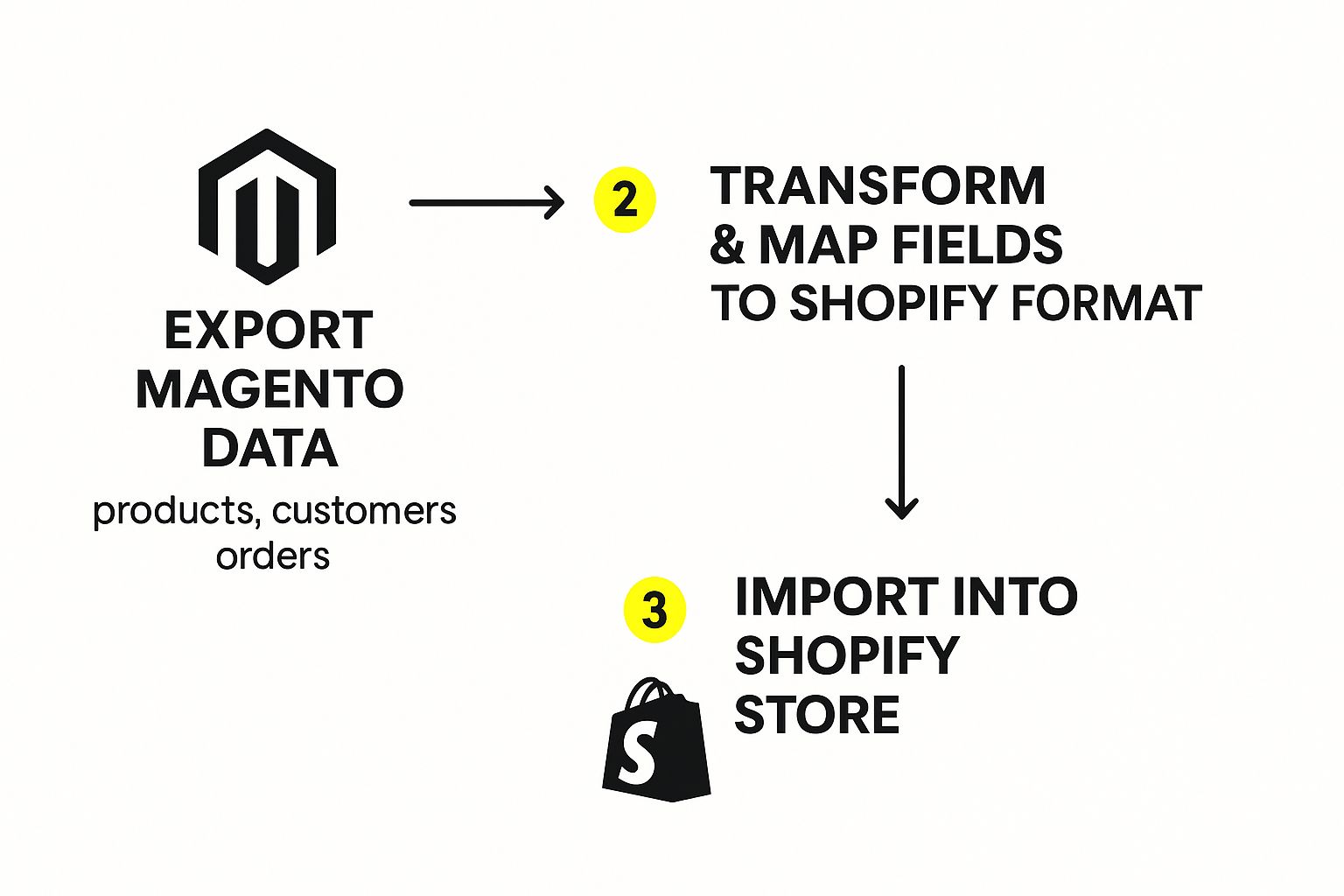
Pay close attention to that middle step—transforming and mapping the data. From my experience, that’s where things go sideways if you're not careful.
What Data Can You Migrate?
Most of the information that makes your business tick can be transferred. Think of these as the foundational elements of your store.
Here's what typically makes the cut:
- Products: Your SKUs, descriptions, prices, weights, and inventory levels. Product images can also be moved, though this often means re-linking URLs.
- Product Categories: Your well-organized Magento categories can be recreated as Shopify Collections.
- Customers: You can bring over customer names, email addresses, and their shipping and billing info.
- Order History: All the historical data—what was bought, when, and by whom—can be migrated.
- CMS Pages: Static content from pages like "About Us" or your return policy can be transferred over.
- Reviews: This is crucial social proof, and you can definitely migrate product reviews, usually with a dedicated app.
That said, not everything can be packed up and moved directly. Some data just doesn't translate because of how differently Magento and Shopify are architected.
Key Insight: You absolutely cannot migrate customer passwords. The encryption methods are completely different, making it a security impossibility. The standard workaround is to migrate the customer accounts themselves and then send a friendly email campaign inviting everyone to create a new password on the new Shopify site.
Navigating Common Data Challenges
Even with the best tools, you should expect a few bumps. A classic one I see all the time is dealing with custom fields from Magento. If you have unique product attributes or specific customer data points, you’ll need to map them to Shopify’s metafields. This is how you give that specialized data a proper home in the new system.
Another frequent headache is product variations. A single configurable product in Magento—say, a t-shirt with different sizes and colors—needs to be carefully broken down into Shopify's variant structure. That one Magento t-shirt might become 12 different Shopify variants, each with its own specific SKU and inventory count.
Finally, and this is a big one: Magento extensions do not migrate. Any feature you had from a third-party module, whether it's a loyalty program or a complex product builder, has to be replaced with an app from the Shopify App Store. That audit you did during the planning phase will be your best friend here, giving you a clear shopping list of the functionality you need to replicate.
Rebuilding Your Store on Shopify
Alright, with your data successfully moved over, it's time for the fun part: bringing your brand back to life on Shopify. This isn't just a copy-paste job. Think of it as a chance to build the store you always wanted, but on a much better foundation. You get to rethink the entire customer experience from the ground up.

First things first: your Magento theme can't come with you. This is actually a good thing! It’s a clean slate to embrace a modern, mobile-first design that’s built to convert from day one.
Choosing and Customizing Your New Theme
Head over to the Shopify Theme Store, where you’ll find a huge selection of free and premium options. Don't just get distracted by a pretty layout. You need to think about how a theme truly reflects your brand and showcases your products. A store selling sleek, minimalist furniture will need a completely different vibe than one selling quirky, colorful apparel.
Once you’ve found "the one," the real work begins. Shopify's theme editor is your new best friend—it's incredibly intuitive, especially if you're used to wrestling with Magento's backend.
- Homepage Design: This is your digital front door. Make a great first impression with high-quality images and clear calls-to-action.
- Color Palette and Fonts: Stick to your brand guidelines. Consistency is key to building trust and recognition.
- Product Collections: Recreate your old Magento categories as Shopify collections. This makes browsing a breeze for your customers.
The goal here is to simplify. Create a clean, focused navigation that makes it dead simple for shoppers to find what they're looking for.
Your theme is so much more than just a pretty face. A well-chosen, performance-optimized theme directly impacts your site speed and, ultimately, your conversion rates. I can't stress this enough—it's one of the most critical decisions you'll make in this process.
Replacing Magento Extensions with Shopify Apps
One of the biggest hurdles I see people face is figuring out what to do with their old Magento extensions. Your loyalty program, advanced search functionality, and custom product options won't magically appear in Shopify. You'll need to find their Shopify equivalents.
This is where you'll get to know the Shopify App Store intimately. With over 8,000 apps, there’s a solution for pretty much every feature you had—and probably a few new ones you hadn't even thought of.
Common Replacements to Look For:
- Loyalty and Rewards: Apps like Judge.me or Yotpo are fantastic for migrating reviews and setting up new loyalty programs.
- Advanced Search: If your Magento store had a robust search, a dedicated search app can replicate that powerful experience.
- Custom Fields: For all that unique product data, you'll be using Shopify metafields, often managed with an app like Matrixify.
As you start piecing your store back together, you'll also need to connect Shopify to your other business tools. A good webhook integration guide can be a lifesaver here, showing you how to ensure all your systems are communicating seamlessly. This is how you build a powerful, modern tech stack.
Configuring Your Store's Core Settings
With your design falling into place, it's time to tackle the operational nuts and bolts. We're talking about payments, shipping, and taxes—the things that need to work flawlessly to turn visitors into happy customers.
Start by setting up your payment gateways. Shopify Payments is the easiest and most integrated option, but you can also add third-party providers like PayPal or Stripe. Whatever you choose, test it thoroughly. A broken checkout is a conversion killer.
Next up is shipping. Get your shipping zones configured, define your rates (flat-rate, weight-based, etc.), and sort out your shipping labels. Shopify's native tools are pretty solid, but apps can add more advanced rules if your logic gets complicated.
Finally, set up your taxes. This is one area where you'll breathe a sigh of relief. Shopify handles most of the heavy lifting, often calculating taxes automatically based on your location and your customer's address. It's a world away from the complexities of Magento's tax configuration.
This entire rebuilding phase is a crucial part of the journey. For an in-depth look at every step involved, you might be interested in our guide to migrate Magento to Shopify, which covers this and other key phases.
Putting Your New Store Through Its Paces Before Launch
You’re in the home stretch. The data has been moved, your theme looks fantastic, and the apps are all installed. It’s incredibly tempting to just flip the switch and go live, but trust me on this one—this final testing phase is what separates a smooth, professional launch from a chaotic mess of angry customer emails. This is your last chance to catch any gremlins before your shoppers do.
The mission here is to act like a brand-new customer. Forget everything you know about your store. Land on the homepage and try to break things. Click every link you can find, test every button, and give every page a critical eye. Does everything feel right? Is it all where it should be?
First Things First: Check Your Data and Content
Your top priority is making sure all that painstaking data migration work actually paid off. Don't just assume everything transferred perfectly; you need to manually spot-check the results. A tiny mapping error during an import can create huge, store-wide headaches later.
- Product Pages: Grab a dozen or so products at random to review. Make sure to include some of your more complex items with multiple variants. Are the right images, descriptions, prices, and inventory levels showing? Critically, add each variant to the cart to make sure that function works as expected.
- Customer Accounts: If you brought over customer data, log in as a few of them. Is their contact info and address history correct? Remember, your customers will have to reset their passwords, so double-check that this process is clear and easy to follow.
- Order History: Confirm that past order data is showing up and linked to the right customer accounts. This isn't just for show; your customer service team will rely on this information from day one.
This detailed review ensures the very foundation of your store is solid. Finding a pricing error on one product now is a quick fix. Finding it after you've processed dozens of incorrect orders is a nightmare.
A critical part of any Magento to Shopify migration is not just moving data but ensuring it improves the business. For instance, some retailers have seen a 30% increase in conversion rates after switching, driven by Shopify's faster performance and more intuitive user experience. Learn more about how a successful migration can boost your key metrics from this comprehensive guide.
Walk a Mile in Your Customer's Shoes
Once you're confident the data is solid, it's time to walk through the entire sales funnel. This is where you test the actual mechanics of your store—from browsing to buying and everything that comes after. I highly recommend pulling in a few team members to get fresh eyes on the process; they'll spot things you've become blind to.
Your Pre-Launch Testing Checklist:
- The Full Checkout: Use a real credit card or Shopify’s Bogus Gateway to place several test orders. Go through the entire flow. Test different shipping options, apply a discount code, and even try abandoning a cart to see if the recovery email system kicks in correctly.
- Transactional Emails: After you place a test order, jump over to your inbox. Did the order confirmation email arrive promptly? Does it look professional and on-brand? Check all the other automated emails, too, like shipping updates and account creation notices.
- App Functionality: Test every single app you installed. Does your reviews app show up where it's supposed to on product pages? Does the loyalty program work as advertised? A broken app can easily derail a key part of your customer's experience.
- Links and Redirects: This is a big one. Click on every navigation link, footer link, and any internal links you've added to your content. Most importantly, test a healthy sample of the 301 redirects you set up from your old Magento URLs. You need to be sure they land on the correct new pages on Shopify.
Even with the most careful planning, sometimes a newly launched store can be slow to appear in search results. It’s a good idea to know what to do ahead of time and troubleshoot if your website is not showing up on Google. Having this knowledge in your back pocket is key to maintaining your SEO momentum and giving you the peace of mind you need to finally go live.
Common Migration Questions Answered

Even with the best-laid plans, a big move like a Magento to Shopify migration is bound to stir up some questions. That's completely normal. I've been through this process countless times with clients, and I've found that the same worries tend to pop up again and again.
Let's walk through some of the most common concerns I hear from merchants. My goal is to give you clear, straightforward answers to help you feel much more confident about the entire project.
Will I Lose My SEO Rankings After Migrating?
This is the big one, isn't it? It's probably the most nerve-wracking question for any established store owner. The short answer is: you shouldn't, as long as it's done correctly. While losing your hard-earned SEO authority is a real risk, it's also entirely preventable.
The most critical task by far is setting up 301 redirects for every single important URL on your old Magento site. Think of a 301 redirect as filing a permanent change-of-address form with Google. It tells search engines exactly where each page has moved, ensuring you pass its ranking power over to the new Shopify URL.
But it doesn't stop there. You also have to bring over all your SEO metadata, including:
- Page Titles: The headlines that show up in search results.
- Meta Descriptions: The little summaries that appear under the titles.
- Image Alt-Text: The descriptions that help search engines understand what your images are about.
A thorough SEO migration plan is your best defense. Once you go live, you'll also want to run an audit to catch any broken links or redirect errors right away.
What Is the Biggest Migration Challenge?
In my experience, the toughest hurdle is almost always dealing with custom code and Magento extensions. Many Magento stores are heavily customized to handle unique business rules or features, and none of that bespoke work will transfer over automatically.
You have to perform a careful audit of every single customization. For each one, you’ll need to decide if it's still essential and then figure out how to replicate it on Shopify. This usually means:
- Finding a similar app in the Shopify App Store.
- Seeing if Shopify’s built-in features can now do the job.
- Hiring a developer to build a private app for truly unique functionality.
Things like complex B2B features or one-of-a-kind product configurators require the most planning and can easily become the most time-consuming part of the migration.
Can I Migrate My Customer Passwords?
The answer here is a firm no. You absolutely cannot migrate customer passwords from Magento to Shopify. It’s not a limitation of the tools; it’s a security feature. Each platform uses different, incompatible encryption to protect user data, and trying to move passwords would create a massive security vulnerability.
The best practice is to migrate the customer accounts—names, emails, addresses, and order history. Then, you can run a targeted email campaign inviting your customers to activate their accounts on the new Shopify store by creating a new password. This approach keeps their data secure while making sure you hold onto your invaluable customer list.
Should I Use an App or Hire an Agency?
This really comes down to three things: your store's complexity, your budget, and how comfortable your team is with the technical side of things.
For a small, pretty standard Magento store with a simple product catalog and very few custom features, a high-quality migration app like Matrixify can be a fantastic, budget-friendly option. These tools can automate a huge chunk of the work.
However, if you're running a medium-to-large store with tons of data, years of order history, or critical custom functionality, hiring a Shopify expert or a migration agency is a wise investment. A professional team can navigate the complexities, guarantee your data makes it over intact, implement all the SEO redirects flawlessly, and solve problems quickly. It just leads to a much smoother and less risky transition.
Navigating a Magento to Shopify migration can be complex, but you don't have to do it alone. The experts at E-commerce Dev Group specialize in seamless, professional migrations that protect your data, preserve your SEO, and set you up for growth. Let us handle the technical details so you can focus on your business.
