


If you're running a store on Magento, you've probably asked yourself this question more than once: am I spending more time managing my website than actually growing my business?
It’s a common frustration. Moving from Magento to Shopify has become a well-trodden path for merchants who are tired of high maintenance bills and being tethered to developers. They're looking for simpler operations and a much lower total cost of ownership. This isn't just about switching platforms; it's about reclaiming your time and resources.
Why Moving from Magento to Shopify Just Makes Sense
Let's be honest, the conversation around switching from Magento isn't just a feature-for-feature comparison. It's about the real-world headaches that come with a powerful but complex platform.
Magento is a beast. It's incredibly customizable, but that power comes at a steep price. Many business owners find themselves caught in a never-ending cycle of security patches, software updates, and calling a developer for what should be a simple change. This technical debt doesn't just eat into your budget; it paralyzes your ability to adapt and innovate.
What starts as the dream of open-source flexibility often becomes a nightmare of escalating maintenance fees and sluggish performance. Need to update a landing page or launch a quick sale? That often turns into a costly project. This reliance on developers creates a massive drag on your business, pulling your focus away from what really matters: marketing, customer service, and building great products.
Shifting Your Focus from Tech Headaches to Business Growth
The real reason to migrate from Magento to Shopify is to strategically pivot from platform maintenance to business growth. As a fully hosted SaaS (Software as a Service) platform, Shopify takes care of all the technical heavy lifting for you.
Here’s what that actually means for your day-to-day:
- Less Reliance on Developers: Your marketing team can finally take the reins. With Shopify’s drag-and-drop editor and intuitive backend, adding products, updating content, and running promotions become simple tasks you can handle in-house. No more waiting days for a developer to free up.
- A Predictable, Lower Total Cost: Magento might be "free," but the costs for hosting, security, patches, and developer hours add up fast. Shopify’s straightforward monthly subscription almost always results in a significantly lower total cost of ownership.
- Rock-Solid Performance and Security: Shopify manages server uptime, security, and performance. Your store stays fast, secure, and online, especially during high-traffic events like Black Friday, without you ever having to think about server configurations or urgent security updates.
This shift empowers your team to move faster and manage daily operations without friction. Shopify Plus, the enterprise-level solution, is built on providing this kind of reliable, scalable foundation that major brands trust to handle massive sales volume.
The image above highlights how global brands rely on Shopify Plus, proving it can handle high-volume sales without the technical overhead you're likely used to with a self-hosted platform like Magento.
To put it in perspective, let's look at the core differences from a merchant's point of view.
Magento vs Shopify: A Quick Comparison for Migrating Merchants
For anyone considering the switch, understanding the fundamental differences in philosophy and operation is key. This table breaks it down.
| Aspect | Magento (Self-Hosted) | Shopify (Hosted SaaS) |
|---|---|---|
| Hosting & Security | You are responsible for finding, paying for, and managing your own hosting and security. | Included in your monthly plan. Shopify handles all server maintenance, security, and uptime. |
| Ease of Use | Requires technical expertise or a dedicated developer for setup, customization, and daily tasks. | Designed for non-technical users. An intuitive interface makes daily management simple. |
| Customization | Nearly limitless customization potential, but it requires deep coding knowledge and development work. | Highly customizable through a vast ecosystem of apps and themes, with options for custom code. |
| Total Cost | "Free" open-source software, but hidden costs (hosting, developers, security, extensions) add up quickly. | A predictable monthly subscription fee covers hosting, support, and the core platform. App fees are extra. |
| Maintenance | You are responsible for all software updates, security patches, and bug fixes. This is often complex and time-consuming. | Automatic. Shopify manages all updates and security patches seamlessly in the background. |
| Support | Relies on community forums or paid support from third-party developers and agencies. | 24/7 expert support is included with all plans via phone, email, and live chat. |
Ultimately, the choice reflects what you want your team to focus on—technical upkeep or strategic growth.
The Proof is in the Results
This isn't just talk; it's a proven strategy for thousands of businesses.
Take, for example, a mid-sized wellness brand that we saw make the switch. They were initially attracted to Magento's customization but quickly got bogged down by slow site speeds and soaring development costs. After they decided to migrate from Magento to Shopify, the results were stunning. The retailer saw a 30% increase in conversion rates and a massive improvement in page load times. You can get more insights on how migrations deliver real results by exploring this case study on Laconica.com.
The decision often comes down to one simple question: Do you want to be in the business of managing software, or in the business of selling products? Shopify lets you focus completely on selling.
Creating Your Pre-Migration Game Plan

I’ve seen it happen time and again: a merchant gets excited about moving to Shopify and dives headfirst into data exports, only to get tangled in a mess of missed deadlines and surprise costs. The truth is, a smooth Magento to Shopify migration is 90% planning and 10% execution. This initial planning phase is where you lay the groundwork for a transition that doesn’t disrupt your business.
Before you move a single piece of data, you need to do a serious audit of your current Magento store. Be ruthless. Just because a feature or a page exists doesn't mean it has earned its spot on your new site. Think of this as your one chance to shed the technical debt and clutter that’s likely piled up over the years.
It’s like moving to a new house. You wouldn't just shovel everything from your old garage into boxes. You’d sort through it—deciding what’s valuable, what’s junk, and what you’d rather replace. The same logic applies perfectly here.
Auditing Your Current Magento Setup
Your best friend for this task is a simple spreadsheet. Start creating an inventory of everything you need to evaluate, breaking it down into a few key areas.
- Data and Content: What's truly essential? Do you really need to migrate customer accounts and order histories from five years ago, or would the last two years of data be enough? Decide what product data, customer records, and order information is critical for day-to-day operations.
- Extensions and Custom Code: Don't just look for a Shopify equivalent for every Magento extension you have. Instead, ask yourself, "What problem does this extension solve?" You'll often discover that a single, modern Shopify app can do the job of several old extensions, and do it better.
- Design and UX: This is your golden opportunity to improve, not just copy. Your old design might be familiar, but is it effective? Analyze what's working and what isn't, especially on mobile, where modern Shopify themes really shine.
As you get into the weeds, it helps to adopt the mindset needed to build a winning software project development plan. This approach elevates the project from a simple data-copying exercise to a strategic upgrade for your entire business.
Key Takeaway: The goal isn’t to perfectly replicate your Magento store on Shopify. It’s to build a better store by being selective about what you bring over and what you leave behind.
Choosing Your Migration Path
Once you have a clear picture of what you're moving, you can figure out how you're going to move it. You generally have three paths to get from Magento to Shopify, each with its own trade-offs in terms of cost, time, and the technical skill required.
| Migration Method | Best For | Technical Skill | Cost |
|---|---|---|---|
| Manual Export/Import | Small stores with simple data (few products, no complex variants). | High. Requires comfort with CSV files and data mapping. | Low (mostly your time). |
| Migration Apps | Most small to medium-sized businesses with standard data sets. | Medium. Familiarity with app configuration is needed. | Moderate (app fees). |
| Shopify Experts | Large stores, complex data, or businesses wanting a hands-off, guaranteed process. | Low. The experts handle everything. | High (agency fees). |
Setting a realistic timeline from the start is absolutely critical. For a smaller store, you might be looking at a 5 to 7 day process. For larger, enterprise-level businesses with huge inventories and a lot of custom functionality, a migration can easily stretch to 4 to 6 weeks.
For anything beyond a very basic store, bringing in an expert can save you a world of headaches, especially when it comes to correctly handling complex data like customer passwords, order histories, and detailed product variants. Our comprehensive guide on the Shopify store migration process offers a much deeper dive that can help you make the right call.
With a solid plan, a realistic budget, and the right migration method chosen, you're setting yourself up for a flawless launch on your new platform.
Getting Your Data Across Cleanly
Alright, with your plan in place, it’s time to tackle the big one: moving your data. This is often where people get nervous, but with a bit of methodical work, you can migrate from Magento to Shopify without leaving critical business info behind. Don't think of this as just a data dump. It's a careful transfer of your store's most valuable assets—your products, your customers, and your order history.
The real secret to a smooth migration is doing the prep work. A classic mistake I see all the time is exporting everything from Magento and trying to jam it straight into Shopify. This almost always ends in a mess of errors, mismatched data, and hours of frustrating cleanup. A much better approach is to treat your exported data like a rough draft that needs a good edit before it's ready to go live.
Prepping Your Data for the Big Move
Before you even think about importing anything into Shopify, you need to clean up and format your data exports. Your best friends for this task are simple spreadsheet programs like Google Sheets or Microsoft Excel. When you export your products, customers, and orders from Magento, they'll come out as CSV (Comma-Separated Values) files.
Opening these files is your chance to do a "data audit." This is where you can spot inconsistencies and clean things up before they become a problem.
- Standardize your product tags. Make sure your casing and spelling are consistent. For example, merge "Mens" and "men's" into a single "Men's" tag.
- Check your product descriptions. Look for and remove any weird HTML formatting that's a leftover from Magento’s editor.
- Hunt for missing info. Fill in any blank SKU fields or incomplete product data. These gaps are a common cause of import errors.
A few hours spent cleaning up your CSV files now can genuinely save you days of headaches later. A clean import means you can focus on the fun stuff, like designing your new store, instead of fixing broken product listings.
How to Handle Your Core Data
Each piece of your store's data has its own quirks. Products are usually the most complex, but customers and orders have their own important details that need careful attention to ensure your shoppers have a seamless experience.
Products and All Their Variants
Your product catalog is the heart and soul of your store. Shopify has a very specific CSV structure it needs for product imports, so you'll have to map your Magento export columns (like name, description, sku) to Shopify's columns (Title, Body (HTML), Variant SKU).
This diagram breaks down the basic steps for a clean product data migration.
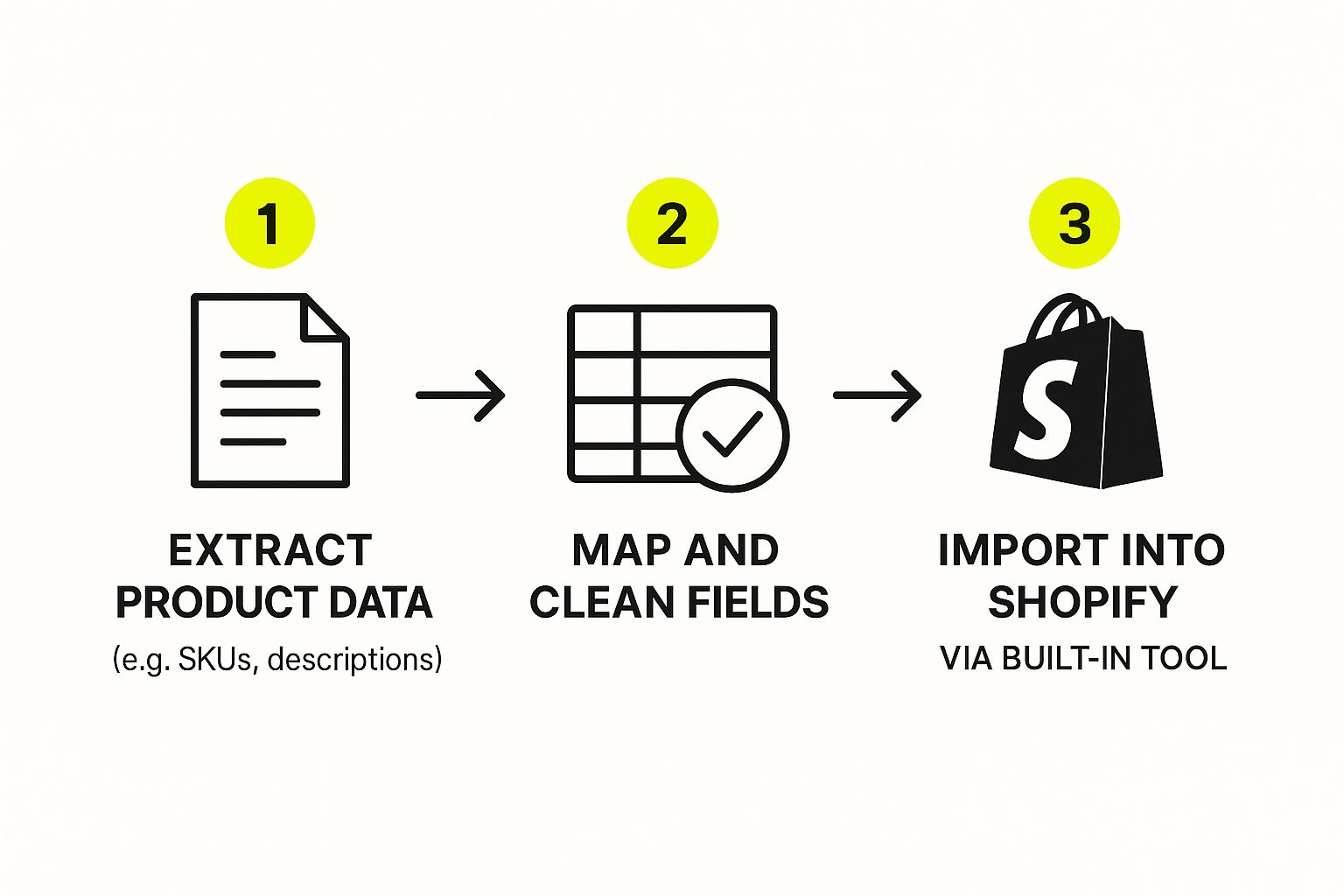
As you can see, the key is mapping and cleaning your data before you import. This is the single best way to prevent errors.
One of the biggest hurdles is often product images. Your CSV file only contains the image URLs. You have to make sure these images are live and publicly accessible on the web during the import. If they aren't, Shopify can't download them and link them to the right products.
Customer Data (and That Password Problem)
Moving customer information over is pretty straightforward, with one massive exception: you cannot migrate passwords. Because of different, incompatible encryption methods, there’s no way to transfer customer passwords from Magento to Shopify. It's a security thing.
So, after you migrate the customer list (names, emails, addresses), you'll need to invite everyone to create a new password for their account on your shiny new Shopify store. Don't worry, Shopify has built-in tools that make it easy to send these account activation emails out in bulk.
Order History
You can import your historical order data, but it’s really just for reference. You won't be able to manage refunds or exchanges on old Magento orders through the Shopify admin. The real benefit is giving your customers access to their past purchases and giving your support team some valuable context if questions come up.
Choosing How You'll Import Everything
When it's time to get your clean data into Shopify, you've got a couple of solid options.
- Shopify's Built-In Importer: For products and customers, you can use the CSV import tool right in your Shopify admin. It's free and works great for simpler stores with straightforward data.
- Third-Party Migration Apps: For more complex migrations that include orders, blog posts, or product reviews, a dedicated migration app from the Shopify App Store is your best bet.
Apps like Cart2Cart or LitExtension are built specifically to handle the messy details of moving between platforms. They often automate the data mapping, which can slash the manual work and reduce the risk of human error, especially if you have a massive, complex store. While this guide is focused on Magento, looking at resources on migrating from WooCommerce to Shopify can offer some great general insights into the challenges you'll face with any platform switch.
Rebuilding Your Storefront and Functionality
Now that your core data is in Shopify, we can get to the fun part: building the storefront your customers will actually see and use. When you migrate from Magento to Shopify, it's tempting to try and perfectly replicate your old design. I've seen it time and again, and it's almost always a mistake.
Your goal isn't to copy the past. It's to build a faster, more effective, and more intuitive future for your brand. Think of this as a much-needed refresh. You're moving away from a platform that was likely heavy on developer involvement for a reason. Shopify lets you build and manage a beautiful store without a team of coders on speed dial, so this is your chance to shed clunky designs and embrace a theme built for modern e-commerce.
Choosing a Theme That Converts
Your Shopify theme is the backbone of your customer experience. It feels like a design choice, but it has a massive impact on everything from page speed to mobile usability—two things that directly affect your bottom line. Instead of hunting for a theme that just looks like your old Magento site, focus on finding one that truly fits your brand and is built for performance.
The Shopify Theme Store is your new best friend, packed with free and paid options that are mobile-first and optimized right out of the box.
- Prioritize Speed and Simplicity: A theme overflowing with features might look impressive, but every fancy animation can drag down your site speed. A clean, fast theme will almost always convert better than a slow, bloated one.
- Check for Mobile Excellence: Don't just glance at the desktop preview. Pull out your phone and put the theme's demo through its paces. Is the navigation easy? Is checkout a breeze? This is where a huge chunk of your sales will come from.
- Read the Reviews: See what other merchants are saying. Are they raving about the theme's flexibility and the developer's support? Or are they stuck dealing with bugs and slow response times?
Your new theme is more than a fresh coat of paint. It's a golden opportunity to fix all those little usability issues you tolerated on Magento and give your customers a genuinely better shopping experience.
Mapping Functionality from Extensions to Apps
One of the biggest operational shifts from Magento to Shopify is the move from extensions to apps. Magento extensions can be a nightmare—they often require complex installations and can conflict with one another, causing site instability. The Shopify App Store, on the other hand, is a plug-and-play ecosystem where apps are simple to install, manage, and update.
Your job here isn't to find a direct replacement for every single Magento extension. Instead, you need to audit the functionality your business truly needs and then find the best Shopify app for the job.
Here's a real-world example: Let's say your Magento store had a custom-coded module for customer loyalty points. It was clunky and required a developer every time you wanted to tweak something. On Shopify, you can replace that entire headache with a polished, powerful app like Smile.io or Yotpo. You get more features, a better user experience, and zero maintenance headaches.
This is the heart of the migration. You're moving from a self-hosted, developer-dependent setup to a fully managed SaaS solution where platform updates and security are handled for you. For most stores, the entire Magento to Shopify migration timeline can span from 4 to 12 weeks, depending on how complex your data and design are. You can get a deeper dive into the strategy and timelines in this comprehensive 2025 migration guide on ecommercepro.com.
Upgrading your tech stack this way dramatically simplifies your day-to-day operations. By choosing modern, well-supported apps, you free up your team to focus on what really matters—marketing and growth—instead of constantly putting out technical fires. That's the real power of the Shopify ecosystem.
Protecting Your Hard-Earned SEO Rankings
https://www.youtube.com/embed/P7gWoUXNKUc
Let’s talk about one of the biggest fears that keeps merchants up at night during a replatforming project: watching years of hard-earned search engine traffic vanish overnight. It's a completely valid concern. But with the right strategy, you can protect and even improve your SEO standing.
The key isn’t to avoid all turbulence—some is inevitable—but to manage it proactively.
It all starts with accepting a simple fact: your URL structure is going to change. Magento and Shopify have fundamentally different ways of organizing product and category pages. This means your old links will break. Ignoring this is the fastest way to tank your Google rankings and send potential customers straight to a "404 Not Found" page.
Mastering the Art of 301 Redirects
The single most critical tool in your SEO arsenal for this migration is the 301 redirect. Think of it as a permanent change of address notice for search engines and browsers. It tells them, "Hey, the page you're looking for has moved for good to this new address." Most importantly, it passes the vast majority of your old page's authority—often called "link juice"—to the new one.
To get through the switch from Magento to Shopify without wrecking your search visibility, a solid effective SEO migration plan isn't just nice to have; it's essential. The first real task is to crawl your entire Magento site using a tool like Screaming Frog. This gives you a complete inventory of every single URL that currently exists.
With that list in hand, you need to meticulously map each old Magento URL to its new Shopify equivalent. Yes, it can be tedious work, but it's absolutely non-negotiable.
Here's what that looks like in practice:
- Old Magento Product URL:
yourstore.com/catalog/product/view/id/123/s/cool-blue-shirt/ - New Shopify Product URL:
yourstore.com/products/cool-blue-shirt - Old Magento Category URL:
yourstore.com/men/shirts.html - New Shopify Collection URL:
yourstore.com/collections/mens-shirts
Your best bet is to create a simple spreadsheet with two columns: "Old URL" and "New URL." This becomes your master redirect map. Once it's complete, you can use a Shopify app like Matrixify or the platform's built-in redirect manager to import all these rules in bulk.
Pro Tip: Don't get lazy and redirect everything to the homepage. Each old URL must be mapped to the most relevant new page. Sending a specific product page to a generic category page creates a bad user experience and can be flagged by Google as a "soft 404," which kills its SEO value.
Bringing Your On-Page SEO Elements Along for the Ride
Redirects handle the technical plumbing, but what about the actual content that search engines read? You have to migrate your core on-page SEO elements for every important page, too.
This includes things like:
- Page Titles (Meta Titles): These are the headlines that show up in search results and browser tabs. They are a massive ranking factor.
- Meta Descriptions: While not a direct ranking signal, a compelling description is your sales pitch in the search results and can dramatically boost your click-through rate.
- Image Alt Text: This text describes your images to search engines and screen readers. It's crucial for grabbing traffic from image searches.
As you're prepping your data for migration, make sure these fields are exported from Magento and mapped correctly into your Shopify import files. Losing this metadata is like tearing out the table of contents and chapter titles from your book—it makes it incredibly difficult for Google to understand what your pages are all about.
Your Post-Launch SEO Health Check
Your SEO job isn't finished the moment you flip the switch. For the first few weeks after going live, you need to be vigilant.
- Submit Your New Sitemap: Head straight to Google Search Console and submit your new
sitemap.xmlfile. Shopify automatically generates this for you atyourstore.com/sitemap.xml. This prompts Google to come crawl your new site structure right away. - Hunt for 404 Errors: Use the "Coverage" report in Google Search Console to find any broken links that slipped through the cracks. Fix them immediately with fresh 301 redirects.
- Monitor Your Rankings: Keep a close eye on your keyword rankings and organic traffic. A small, temporary dip can be normal as Google processes the changes, but a sustained drop signals a problem with your redirects or content that needs immediate attention.
Finally, remember that site speed is a huge ranking factor. Once the dust settles, a thorough site audit is a very smart move. For a deep dive, check out our guide to Shopify performance optimization to ensure your new store is blazing fast.
Your Go-Live Checklist for a Flawless Launch

The moments right before you launch a new Shopify store are a mix of pure excitement and raw nerves. This is it—where all your planning and hard work come together. A solid go-live checklist isn't just a nice-to-have; it's your best friend for preventing launch-day chaos and making sure the switch is seamless for you and your customers.
Before you get anywhere near pointing your domain to Shopify, you need to do one last, thorough round of testing. I'm not talking about a quick glance. This is a deep dive into every critical function of your new store. You have to walk through the entire customer journey, from landing on the homepage to checking out.
Final Checks Before You Flip the Switch
Run through these final checks on your password-protected Shopify store one last time. Trust me, finding a small glitch now is infinitely better than having a customer discover a major one when the site is live.
- Place a Test Order: Use Shopify's Bogus Gateway or a live payment gateway in test mode to run a complete transaction. Does the order confirmation email arrive promptly? Do inventory levels drop as they should? Can you see the order correctly in your admin panel?
- Check App Integrations: Make sure your essential apps are working. If a customer signs up for your newsletter, does your email marketing app actually capture their info? Is your reviews app showing up on product pages?
- Test Customer Accounts: If you migrated customer data, try logging in with a test customer account. Is their order history there (if you imported it)? Does the whole "activate your account" process work smoothly?
The goal here is simple: you need to move from "I think it works" to "I know it works." That confidence is what you need before you officially migrate from Magento to Shopify and open the doors.
Once your final tests are green-lit, it’s time for the main event. Pointing your domain to Shopify is the technical step that makes your new store live. This involves updating your domain’s A record and CNAME record in your domain provider’s settings to point to Shopify’s servers.
Post-Launch Monitoring and Fine-Tuning
Once the switch is flipped, your job isn't quite done. The first 24 to 48 hours are crucial. You need to be on high alert.
Keep a close eye on your analytics. Are there any sudden, sharp drops in traffic? That could point to a redirect or SEO issue that needs immediate attention.
Also, monitor your customer service channels like a hawk. Your customers will be the first to find the little bugs you might have missed. Be ready to jump on their feedback, fix any lingering problems, and make sure your launch is the success it deserves to be.
Answering Your Top Magento to Shopify Migration Questions
Making a big move like switching from Magento to Shopify always comes with a lot of questions. Let's tackle some of the most common ones we hear from merchants so you can get the clear, straightforward answers you need.
What's the Real-World Cost?
This is the big one, and the honest answer is: it depends.
For a smaller store with a simple product catalog and no wild customizations, you might get away with a few hundred dollars using a solid migration app. But for a large-scale business with years of data, custom-coded features, and complex requirements, you're likely looking at an agency-led project. These can range anywhere from $5,000 to over $50,000. The final price tag really comes down to the amount of data you have, how complex your design is, and how many custom functions need to be rebuilt on Shopify.
Can I Just Move My Magento Theme Over?
Unfortunately, no. Your Magento theme can't be directly transferred to Shopify. They're built on completely different technologies—Magento uses PHTML, while Shopify runs on its own language called Liquid.
Think of this as a blessing in disguise. It’s the perfect opportunity to give your brand a fresh look and, more importantly, a massive mobile experience upgrade with a fast, modern theme from the Shopify Theme Store.
Do My Customer Passwords Get Migrated?
For security reasons, customer passwords will not transfer over. Magento and Shopify use different, incompatible encryption methods to protect user data, and this wall between them is a good thing.
Once the migration is done, your customers will need to create a new password. The process is pretty smooth, though. Shopify lets you send out bulk account activation emails, prompting them to reset their password and access their account on your new site.
For larger brands, managing thousands of customer accounts can be a bigger challenge. Exploring Shopify Plus solutions often uncovers more powerful tools designed for handling customer reactivation at scale.
