

Trying to boost sales on your Shopify store without data is just a guessing game. That's where conversion rate optimization (CRO) comes in. It's the disciplined process of refining your online store to get more visitors to actually buy something, and it all begins with a solid, data-driven foundation.
Building Your Shopify CRO Foundation
Before you tweak a single button color or rewrite a product description, you need to get an honest look at your store’s current performance. Jumping straight into A/B testing without understanding your baseline is like starting a road trip without a map—you might be moving, but you have no idea if you're going in the right direction.
This first step is all about establishing the benchmarks that will steer every optimization decision you make from here on out. Think of it as your store's annual physical. The goal is to collect the vital signs that show you what’s working, what’s broken, and where the biggest opportunities are hiding. Without this data, you can't measure the impact of your changes or prove you're getting a return on your efforts.
Identify Your Core Metrics
First things first, you need to cut through the noise and zero in on the metrics that actually matter. While you can track dozens of data points, a few key performance indicators (KPIs) will tell you most of the story.
You can find all of this right inside your Shopify Analytics dashboard and Google Analytics.
- Baseline Conversion Rate: This is your North Star. It’s simply the percentage of visitors who complete a purchase. Calculate it by dividing your total number of orders by your total unique visitors, then multiply by 100.
- Average Order Value (AOV): How much does a customer typically spend in a single transaction? Knowing your AOV helps you understand the immediate financial impact of your CRO work. Even a small lift in conversions can mean big revenue if your AOV is high.
- Cart Abandonment Rate: What percentage of people add products to their cart but bail before paying? A high rate here (anything over 70% is a red flag) usually points to friction in your checkout process.
- Bounce Rate: This is the percentage of visitors who land on a page and leave without clicking anywhere else. A high bounce rate, especially on key pages like product or category pages, often signals a disconnect between your ads and your landing page, or just a poor user experience.
Getting a handle on these numbers gives you an initial diagnosis. For a deeper look at your store's performance, check out our guide on getting the most out of your Shopify analytics dashboard.
Set Realistic Goals and Benchmarks
Once you have your numbers, the natural next question is, "So… is that good?" This is where benchmarking comes into play. The average conversion rate for Shopify stores worldwide hovers around 1.4%. But get this: the top 10% of stores are hitting a 4.7% conversion rate. That's a huge gap between average and excellent.
Of course, your industry, price point, and how you get your traffic all affect what a "good" rate really looks like for you. A store selling high-end furniture is going to have a different conversion rate than one selling quirky socks.
This simple flow chart breaks down how to think about analyzing, benchmarking, and setting goals for your CRO strategy.
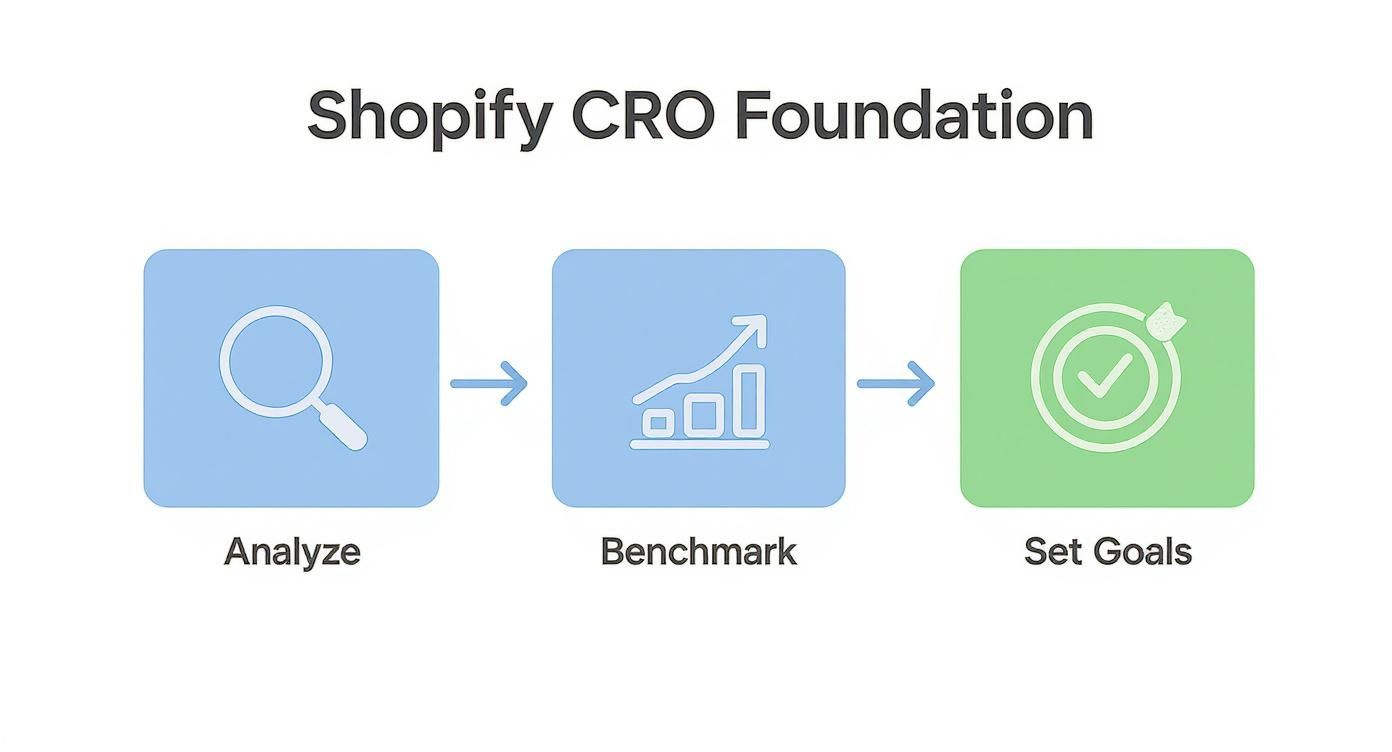
Following a clear workflow like this keeps your efforts organized and grounded in real data from day one.
Your goal isn't to match the industry average overnight. The real win is achieving consistent, incremental improvement over your own baseline. A jump from 1.5% to 2.0% is a 33% increase in conversions—a massive victory.
To really solidify your CRO foundation, exploring the top AI marketing tools for DTC brands can give you a serious leg up. These tools can help automate your analysis, personalize customer experiences, and make better predictions, allowing you to gather and act on data way more efficiently.
With your baseline established and realistic goals in place, you're ready to start digging into the why behind your numbers.
How to Find Hidden Conversion Blockers

Your analytics can tell you what's happening—like a high cart abandonment rate—but they almost never explain why. To really move the needle on your Shopify conversion rate, you have to get out of the spreadsheets and into your customers' shoes. It’s time to find those invisible friction points that are quietly killing your sales.
Think of yourself as a detective. Your job is to stop guessing and start gathering real evidence of what's frustrating your visitors. This process will give you a list of actual problems to solve, making sure your conversion rate optimization Shopify efforts are spent on changes that matter.
Start with a Heuristic Analysis
Before you even think about complex tools, start with a simple but powerful audit: a heuristic analysis. All this means is walking through your own store like you're a first-time customer. You have to forget everything you know about how things are supposed to work on the backend.
Seriously. Grab a coffee, open an incognito browser window, and try to buy something. Your mission is to spot anything that feels clunky, confusing, or just a little bit shady.
As you click around, keep these questions in mind:
- Clarity: Is it dead simple to know what I'm supposed to do on this page? Is the value proposition on the homepage crystal clear?
- Relevance: Does this product page actually match the ad I just clicked on? Are these "recommended products" even remotely related to what I'm looking at?
- Friction: Why are there so many steps to check out? Am I really being forced to create an account? Is the shipping policy buried somewhere?
- Trust: Does this site look legit? Can I easily find reviews, security seals, and a clear return policy?
This simple walkthrough almost always uncovers low-hanging fruit. You'll find glaring issues like broken links, confusing navigation, or missing trust badges that you can fix in an afternoon.
Watch How Real People Use Your Store
A heuristic analysis is a fantastic starting point, but it's still based on your perspective. The real breakthroughs happen when you watch what actual visitors do on your site—where they click, where they get stuck, and where they finally give up.
This is where user behavior analytics tools come in, and the good news is, some of the best ones are completely free.
Pro Tip: Don't just watch one or two recordings. You're looking for patterns. If you see ten different people repeatedly struggling with the same dropdown menu on their phone, you've just found a major conversion killer that needs to be fixed yesterday.
A tool like Microsoft Clarity is a no-brainer. It's 100% free and incredibly easy to install on any Shopify store. It gives you two game-changing features:
- Heatmaps: These are visual maps layered on top of your site pages. They show you exactly where people click, move their mouse, and how far they scroll. You can instantly see if visitors are clicking on things that aren't links (a classic sign of bad design) or completely ignoring your main call-to-action button.
- Session Recordings: This is the goldmine. It's like watching a screen recording of a user's entire visit. You can see them browse, add items to the cart, and try to check out. Keep an eye out for "rage clicks"—when someone frantically clicks the same spot over and over. That's pure user frustration, and it's a clear signal that something is broken.
When you combine the gut-check insights from your own walkthrough with the hard evidence from heatmaps and recordings, you're no longer just guessing. You now have a data-backed hit list of problems, creating the perfect foundation for your conversion rate optimization Shopify testing plan.
Optimizing Product Pages to Drive Purchases
Your product page is the final handshake. It's where a casual browser decides to become a paying customer, and it’s arguably the most important real estate in your entire Shopify store.
Think of it as your best salesperson, working 24/7. To turn this page into a conversion machine, every single element has to work in harmony to build desire, answer unspoken questions, and completely erase any doubt. Visitors who land here are already interested; your job is to make the purchase feel inevitable.
Craft Descriptions That Tell a Story
Let’s be honest: nobody wants to read a dry list of technical specs. Your product description needs to do more than just describe—it needs to sell. The best descriptions don't just talk about the product; they talk about the customer. They tap into their problems and dreams, painting a vivid picture of how your product will make their life better.
It's all about translating features into real-world benefits.
- Instead of: "Water-resistant coating."
- Try this: "Caught in an unexpected downpour? No problem. Our water-resistant coating keeps your gear bone-dry, so a little rain never has to ruin your day."
See the difference? We've shifted the focus from what the product is to what it does for the customer. Use short, punchy paragraphs and bullet points to make the best parts easy to scan and absorb.
Leverage High-Impact Visuals
Online shoppers can't touch, feel, or try on your product, so your visuals have to do all the heavy lifting. This is non-negotiable.
Invest in professional photos that show your product from every conceivable angle, in different real-life settings, and with crisp, detailed close-ups. But don't stop there. User-generated content (UGC) is pure gold. Seeing photos and videos from real customers makes your product feel more authentic and relatable.
Video is especially powerful for showing a product in action, demonstrating its scale, or highlighting its texture. You can even take it a step further. Tools that offer a Shopify video shopping cart integration allow you to make your videos instantly shoppable, closing the gap between inspiration and purchase.
Build Unshakeable Trust with Social Proof
Right at that critical moment of decision, trust is everything. Shoppers are actively looking for reassurance that they’re making a smart, safe choice. This is where social proof becomes your secret weapon.
Get those customer reviews, trust badges, and testimonials placed strategically right near your "Add to Cart" button.
I've seen it time and time again: it’s not just about the star rating. The number of reviews is what builds massive credibility. A product with 4.8 stars from 1,200 reviews feels infinitely more trustworthy than one with a perfect 5 stars from just 3 reviews.
Here are a few things to weave into your page to build that confidence:
- Customer Reviews: Use a good Shopify app to display a mix of text and photo reviews. Bonus points if you let customers filter reviews to find the feedback most relevant to them.
- Trust Badges: Make sure your secure checkout, money-back guarantee, and accepted payment method logos (like Shop Pay or PayPal) are clearly visible.
- Expert Endorsements: If you’ve been featured in the media or have a nod from an industry expert, show it off! Those logos add a layer of third-party validation that’s hard to beat.
Enhance the User Experience with Interactive Features
Making your product pages more engaging and informative isn't just a nice-to-have; it directly impacts your sales. Things like interactive color swatches that instantly change the main product image can boost conversion rates by around 19%.
Similarly, for products where the little things matter—like jewelry or electronics—a high-quality zoom function can increase conversions by 14%. These thoughtful touches remove friction and help customers feel more confident in their decision, making it that much easier for them to click "buy."
Designing a Frictionless Checkout Process
Getting a customer to click "Add to Cart" feels like a win, but the real test is still ahead. The checkout is often the single biggest leak in a Shopify store's funnel, where even the most interested shoppers can drop off. This is where your CRO efforts truly make or break a sale.
Every unnecessary field, surprising fee, or confusing step introduces friction. It gives your customer a reason to pause, and that pause is all it takes to lose them. Our job isn't just about aesthetics; it's about systematically dismantling every barrier between a full cart and a confirmed purchase.
Diagnose and Eliminate Common Friction Points
First, we need to play detective and figure out what’s tripping customers up. Most of the time, the culprits are small, seemingly insignificant annoyances that pile up to create a frustrating experience.
Forcing account creation before a purchase is a classic conversion killer. Nobody wants to create yet another username and password just to buy a single item. It’s a huge, unnecessary hurdle.
Then there are the surprise costs. A customer is ready to buy a $50 product, but when they hit the final screen and see a $15 shipping fee tacked on, it feels dishonest. That last-second sticker shock is one of the top reasons people abandon their carts.
Streamline the Path to Purchase
Once you know where the roadblocks are, you can start clearing the path. The goal is to make the entire process feel so smooth and obvious that the customer barely has to think.
Here are a few things you can do right away to cut down on friction:
- Make Guest Checkout the Default: Let people buy without signing up. You can always invite them to create an account after the purchase is complete, pitching it as an easy way to track their order.
- Embrace Express Payment Options: This is non-negotiable today. Offering one-click checkouts like Shop Pay, Apple Pay, and Google Pay is essential for shoppers who prioritize speed and convenience.
- Show a Progress Bar: A simple visual indicator showing steps like "Shipping > Payment > Review" helps manage expectations. It lets customers know exactly where they are and how close they are to finishing, which makes the whole thing feel less daunting.
If you want to go deeper on this, our guide to Shopify checkout optimization covers more advanced tactics and technical tweaks.
Key Takeaway: The best checkout is one your customer doesn't even remember. It should be so effortless that all their attention stays on the excitement of their new purchase, not the mechanics of paying for it.
Build Trust at the Final Hurdle
Even the most streamlined checkout needs to feel secure. This is the moment a customer trusts you with their payment details, so building confidence is everything.
Small visual cues can have a huge impact. Prominently displaying security badges (like SSL certificates) and the logos of accepted payment methods provides immediate reassurance. It’s also smart to have a clear link to your return policy right on the checkout page. This helps squash any last-minute doubts about what happens if the product isn't right for them.
The data backs this up. Adding express checkout options alone can lift conversion rates by 0.3 to 0.5 percentage points. Trust signals are just as critical; stores with 50 or more reviews often see a 15% higher conversion rate compared to those with none. These small touches provide a powerful dose of confidence right when it counts.
Implementing a Smart A/B Testing Strategy
The most successful Shopify stores don't run on gut feelings or the latest design trends—they test everything. After digging through your data and completing a heuristic audit, you've likely got a list of potential conversion killers. The next step is to prove your solutions work.
This is where a smart A/B testing strategy comes in. It turns your conversion rate optimization Shopify efforts from a guessing game into a reliable engine for growth.
A/B testing (or split testing) is simple in principle: you compare two versions of a webpage to see which one performs better. You show your current page (the "control") to one group of visitors and a new version (the "variation") to another. By measuring how each group behaves, you can make decisions backed by real data, not just assumptions.
From Observation to Hypothesis
Every great A/B test starts with a strong hypothesis. This isn't just a random idea; it's a specific, testable statement connecting an observation from your audit to a proposed change and a predicted outcome. Without a clear hypothesis, your test is just noise. You won't learn anything meaningful, whether you win or lose.
A solid hypothesis usually follows this structure: "If I change [X], then [Y] will happen, because of [Z]."
Let's walk through a real-world Shopify scenario. Imagine you're watching session recordings and notice people hesitating on product pages. They scroll up and down near the "Add to Cart" button, then leave. You suspect they're feeling anxious about the purchase.
- Observation: Users seem hesitant to buy, possibly due to a lack of trust signals right at the point of decision.
- Hypothesis: If we add a "30-Day Money-Back Guarantee" badge directly below the "Add to Cart" button, then the add-to-cart rate will increase, because it will reduce purchase anxiety at the critical moment.
See how focused that is? It's specific, measurable, and directly tied to a business goal.
Choosing Your A/B Testing Tools
You don't need a Ph.D. in statistics to get started. The Shopify ecosystem is packed with tools that make setting up and running experiments surprisingly straightforward.
Many page builder apps or personalization tools come with basic A/B testing features built-in, which are perfect for simple tests on headlines or button colors. For more complex experiments, dedicated platforms like VWO or Optimizely integrate seamlessly with Shopify.
For a complete look at your options, our guide on how to run A/B tests on Shopify for better conversions is a fantastic place to start.
Actionable A/B Testing Ideas for Your Shopify Store
To get the biggest bang for your buck, start testing on your highest-traffic, highest-impact pages. Even a tiny lift on a product page or in the checkout can lead to a significant boost in revenue.
To spark some ideas, here's a quick rundown of A/B tests you can run on key pages of your Shopify store.
A/B Testing Ideas for Key Shopify Pages
| Page Type | Element to Test | Example Variation |
|---|---|---|
| Product Page | Call-to-Action (CTA) | Change button text from "Add to Cart" to "Buy It Now". |
| Product Page | Social Proof Placement | Move customer reviews from the bottom of the page to directly below the product title. |
| Product Page | Product Imagery | Replace a static image gallery with a product video as the first piece of media. |
| Collection Page | Product Grid Layout | Test a 3-column grid against a 2-column grid with larger images. |
| Checkout | Guest Checkout | Make the "Continue as Guest" option a prominent button instead of a small text link. |
| Checkout | Trust Badges | Add a row of security seals (e.g., SSL, secure payment logos) near the payment fields. |
| Homepage | Headline & Sub-headline | Test a benefit-driven headline ("Look Your Best") vs. a feature-driven one ("Shop Our New Collection"). |
These are just starting points. The key is to find what uniquely resonates with your audience.
Key Insight: Never stop at one winning test. The insights from one experiment should fuel the hypothesis for the next. If a new headline increases clicks by 5%, your next question should be, "Can we get another 5% by testing the sub-headline?" This creates a powerful cycle of continuous improvement.
Remember to let each test run long enough to reach statistical significance. This usually means at least two weeks to smooth out any daily or weekly traffic fluctuations. By building a disciplined testing culture, you replace assumptions with certainty and build a stronger, more profitable Shopify store—one validated win at a time.
Your Shopify CRO Questions, Answered
When you start digging into conversion rate optimization, a ton of questions pop up. I get it. To help you out, I've put together some quick, no-fluff answers to the most common questions Shopify merchants ask. Think of this as your cheat sheet for making smarter CRO decisions.
What Is a Good Conversion Rate for a Shopify Store?
This is the million-dollar question, and the honest answer is: it depends. I know, not what you wanted to hear, but it's the truth.
While the global average for Shopify stores tends to hover around 1.4%, that number is almost meaningless without context. A "good" rate for your store depends entirely on your industry, product price point, and how people find you.
For instance, a store selling custom-built furniture will naturally have a lower conversion rate than one selling trendy phone cases for $15. The former has a much higher average order value, so they don't need as many sales to hit their goals.
The only benchmark that truly matters is your own. Instead of getting hung up on industry averages, focus on consistently improving your current numbers. Moving your store's conversion rate from 1.5% to 2.0% isn't just a small bump—it's a massive 33% increase in sales.
How Long Should I Run an A/B Test?
This isn't about picking a random number of days. The goal is to run the test long enough to reach statistical significance, which is a fancy way of saying you're confident the results aren't just a fluke.
A good rule of thumb for most Shopify stores is to run a test for at least two full business cycles. That usually means two weeks. Why? Because you need to capture the different shopping behaviors of a weekday versus a weekend. People browse and buy differently on a Tuesday morning than they do on a Saturday night.
If you have a ton of traffic, you might get a clear winner in just a few days. On the flip side, if your store is just starting out or has lower traffic, you might need to let it run for a month or more to collect enough data. Before you launch any test, plug your numbers into an A/B test duration calculator to get a realistic timeline.
What Are the Most Important CRO Tools?
You don't need a massive, expensive tech stack to get started. In fact, a simple, powerful toolkit is often more effective. It keeps you focused on what matters.
Here’s the bare-bones setup I recommend for getting real, actionable insights:
- Web Analytics: Google Analytics is the industry standard. It tells you what is happening on your store—your conversion rate, bounce rate, where people are dropping off, etc.
- Behavioral Analytics: A tool like Microsoft Clarity (which is completely free) or Hotjar is a game-changer. These platforms give you heatmaps and session recordings, showing you why things are happening by letting you watch how real users interact with your site.
- A/B Testing Platform: You need a way to prove your ideas actually work. Many Shopify page builder apps have this functionality built-in. For more complex tests, a dedicated tool like VWO is an excellent choice.
How Much Does Site Speed Affect Conversions?
More than you probably think. Site speed isn't just some technical thing for developers to worry about; it's a core part of the customer experience. We live in an "I want it now" world, and a slow website is one of the fastest ways to lose a customer.
The data doesn't lie. Study after study shows that even a one-second delay in page load time can tank your conversions by 7% to 10%. On mobile, where people are even less patient, that impact is even greater.
A slow site means visitors will bounce before they even see your amazing products. It’s that simple. Use a free tool like Google's PageSpeed Insights to see where you stand. It'll give you a clear list of things to fix, like optimizing your images or cutting back on clunky apps.
Ready to turn these insights into action and build a high-converting Shopify store? The expert team at E-commerce Dev Group specializes in designing and developing optimized e-commerce experiences that drive real results. Let's build your success story together.
