


Shopify checkout optimization is all about making that final step—the purchase—as smooth and easy as possible for your customer. Think of it as removing every little roadblock, like a confusing form or a surprise shipping fee, that might make someone think twice. When you get it right, you turn more of those "just browsing" visitors into actual buyers.
Why Your Checkout Flow Is Costing You Sales
Let's get straight to the point: a clunky checkout is a silent killer for your revenue. This is the moment of truth, where an excited customer can instantly become a frustrated, abandoned cart statistic. We pour so much energy into beautiful product pages and clever ads, but if the final hurdle is a nightmare, all that effort goes to waste.
Picture this: a customer has their credit card out, totally ready to buy your product. But then they hit a snag. Maybe the form is too long, the shipping costs are a shock, or the page is just spinning and won't load. That’s not a small hiccup; it's a direct blow to your sales. Every single one of those abandoned carts is money you almost had.
The Staggering Cost of Cart Abandonment
The scope of this issue is genuinely huge. Based on extensive research from the Baymard Institute, the average cart abandonment rate sits at a painful 69.99%. That means for every ten customers who add a product to their cart, seven of them walk away without buying. Your checkout is where your sales funnel is springing its biggest leak.
This visual really drives home what's at stake and what you stand to gain by fixing it.
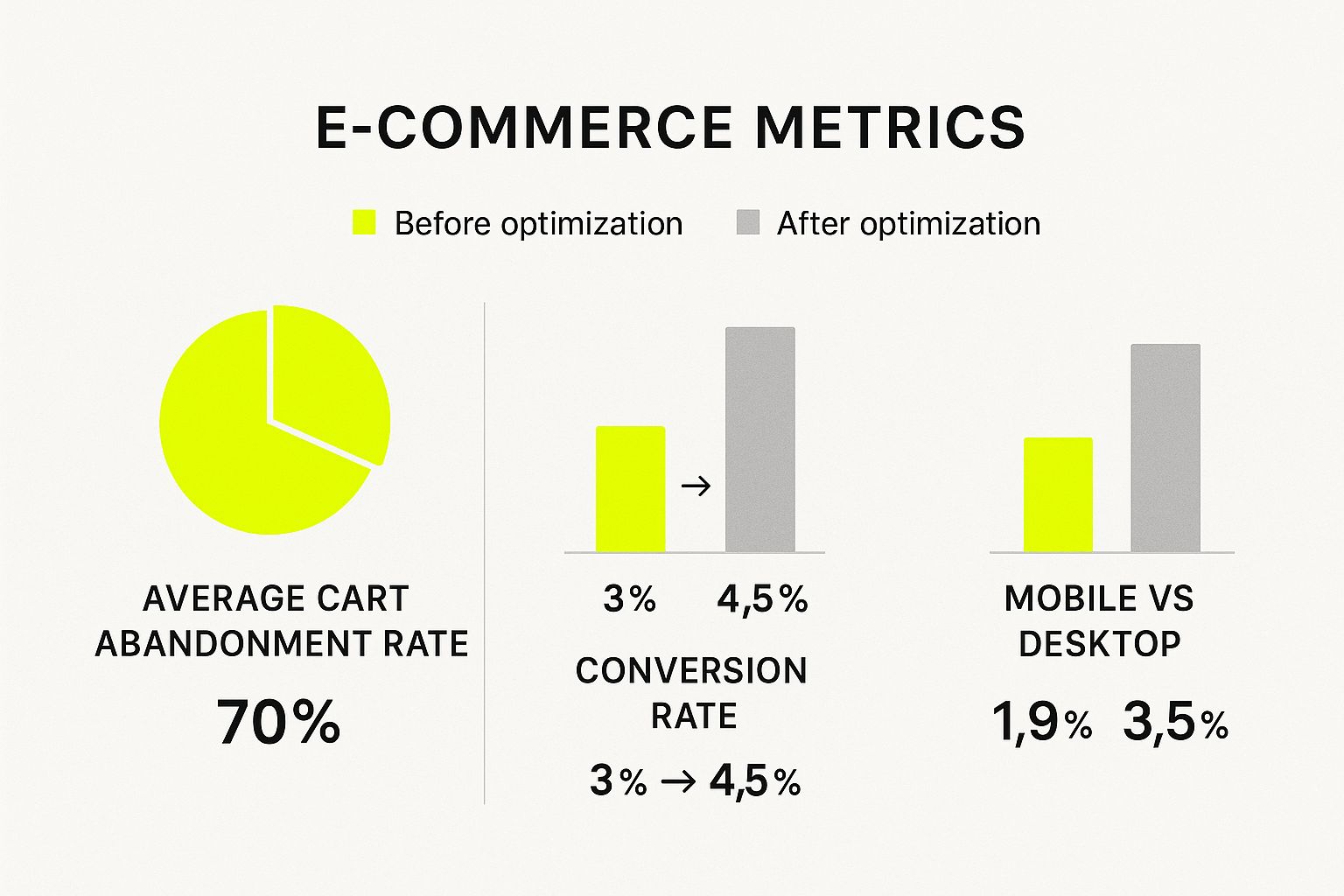
The numbers don't lie. A seemingly small bump in your conversion rate, say from 3% to 4.5%, can lead to a massive increase in revenue. It also shines a light on a critical goal for many stores: closing the gap between mobile and desktop conversion rates.
Common Friction Points That Drive Customers Away
So what are these deal-breakers? Thankfully, the reasons people abandon their carts aren't some big secret. They’re usually small, totally preventable issues that stack up and create a terrible experience.
"A customer's decision to abandon their cart is rarely impulsive. It's usually the result of a series of small frustrations that build up, making the purchase feel like more trouble than it's worth."
Getting a handle on these common hurdles is the first step. Every bit of friction erodes the trust and excitement you worked so hard to build on the front end of your site.
To get started, it's helpful to see the main culprits laid out clearly. This table breaks down the most common friction points and the corresponding strategies we'll be diving into.
Common Checkout Friction Points and Their Solutions
| Friction Point | Impact on Customer | Core Optimization Strategy |
|---|---|---|
| Unexpected Costs | Causes sticker shock and feelings of mistrust. | Offer transparent pricing and shipping costs upfront. |
| Forced Account Creation | Creates an unnecessary barrier and commitment. | Enable a seamless guest checkout option. |
| Long or Confusing Forms | Leads to frustration and feels like a chore. | Simplify forms and use autofill features. |
| Slow Page Load Speed | Kills momentum and tests patience. | Optimize images, apps, and code for speed. |
| Lack of Payment Options | Customer can't use their preferred, trusted method. | Integrate multiple payment gateways and digital wallets. |
| Security Concerns | Creates doubt about the safety of personal data. | Display trust badges and security seals prominently. |
By addressing these core issues, you're not just plugging leaks; you're building a better, more trustworthy experience for every customer who lands in your checkout.
Here are a few of the biggest offenders I see time and time again:
- Surprise Costs: High shipping fees, taxes, or duties that only pop up at the very end are the #1 reason people leave. It feels like a bait-and-switch.
- Forced Account Creation: Nobody wants to create a new username and password just to buy one thing. This is a massive conversion killer.
- A Slow, Complicated Process: Too many steps, too many fields to fill out, and slow-loading pages will sap a buyer's motivation in seconds.
The good news is that these are all fixable problems. If you're ready to dig deeper into why customers leave, check out our guide on the 10 reasons for cart abandonment on Shopify. By tackling these issues head-on, you can turn your checkout from a leaky bucket into a high-powered conversion machine.
Crafting a Checkout Experience That Just Works
Let's be honest, the best checkout process is one your customers barely notice. They add an item to their cart, breeze through to the confirmation screen, and don't think twice. That's the dream. It’s about creating an invisible, intuitive path that turns a "maybe" into a definite sale.
Think of your checkout like the express lane at a grocery store. It's built for speed and efficiency, designed for the person who knows what they want and is ready to pay. Every extra form field, every confusing question, is like getting stuck behind someone with a cart full of items who decides to write a check. It just kills the momentum.
Cut the Clutter and Ditch Unnecessary Hurdles
If there's one thing that will absolutely tank your conversions, it's friction. And the biggest point of friction I see time and time again is forcing customers to create an account before they can buy anything.
This is a massive, self-inflicted wound. Research shows that 26% of shoppers will ditch their cart if they're forced to create an account. Think about that. You're potentially losing one out of every four customers right at the finish line.
The fix is surprisingly simple: always offer guest checkout. Let people buy from you with just the essentials—email, shipping info, and payment. You can always invite them to create an account on the "thank you" page after you've secured the sale. Frame it as a benefit for them, like easier order tracking for their new purchase.
Another common mistake is a cluttered checkout page. This is not the place for social media links, pop-ups, or recommendations for other products. Keep this space sacred. The only goal here is to get the customer to complete their order.
Leverage One-Click Payments and Smart Autofill
In today's world, speed is everything. This is where one-click payment options stop being a "nice to have" and become a necessity for any serious Shopify store.
Integrating digital wallets like Shop Pay, Apple Pay, and Google Pay directly addresses this need for speed. These tools securely store a customer's payment and shipping details, letting them check out with a single tap. This is especially critical for mobile shoppers, who have very little patience for typing on tiny keyboards.
Pro Tip: Shop Pay is a powerhouse. It can boost conversions by up to 50% compared to a standard guest checkout because it pre-fills everything for the customer. The entire process is reduced to a single click.
On a similar note, enable address autofill. As someone starts typing their address, smart suggestions pop up, saving them time and, just as importantly, preventing typos that lead to costly shipping errors. It’s a small touch that makes the whole experience feel remarkably smoother.
Show Customers the Finish Line with Visual Cues
A long, multi-page checkout can feel like a marathon with no end in sight. Customers start to wonder, "How many more steps are there?" This uncertainty breeds anxiety and is a common reason people abandon their carts. The solution? A simple progress bar.
By showing the key stages of your checkout—like Information > Shipping > Payment—you give your customers a clear roadmap.
- It sets clear expectations by showing them exactly where they are.
- It builds momentum, as seeing the bar move forward encourages them to finish.
- It reduces anxiety by removing the mystery of how much is left to do.
This one visual element can transform a tedious chore into a guided, manageable journey.
The impact of these kinds of thoughtful optimizations is real and measurable. While the average Shopify store sees a checkout conversion rate between 1.5% and 2.5%, I’ve seen well-optimized stores consistently hit 3-4%. The top-tier stores? They often push past 5% by creating this exact kind of frictionless experience. You can dig deeper into these numbers with these Shopify checkout conversion rate benchmarks.
Building Unshakeable Trust at the Final Step
When a customer gets to your checkout, they're about to give you their sensitive financial information. This is where their internal alarm bells are ringing the loudest, scanning for any red flag that might make them question your store's credibility. Making them feel secure isn't just a nice-to-have; it's a non-negotiable part of a high-converting Shopify checkout.
The psychology is pretty straightforward. If a shopper feels even a hint of doubt about their data's safety, they're gone. It's a fact that 25% of shoppers will ditch their carts simply because of security worries. That hesitation is what you're up against, and your checkout page is the battleground.
Strategically Displaying Trust Signals
The quickest way to soothe a customer's security fears is with visual cues—what we call trust signals. Think of them as the digital version of a clean, well-lit storefront. But be careful. Just plastering logos all over the page can look cluttered and, frankly, a bit desperate. The real trick is putting them in the right place.
Your goal is to have these trust signals pop up exactly where the customer feels most vulnerable—right next to the fields where they enter their personal and payment info.
- Payment Logos: Show the logos for the payment methods you take (Visa, Mastercard, PayPal, Shop Pay, etc.) right under the credit card fields. This instantly shows you're working with reputable companies.
- SSL Certificates: Shopify already secures your checkout, but a visual badge like a Norton or McAfee seal can really drive the point home. I like to place one near the "Complete Order" button for one last shot of reassurance before they click.
An uncluttered checkout with one or two recognizable security seals will always outperform a page littered with a dozen. The goal is confidence, not chaos.
Think of it like this: a single, clear security camera sign on a building is more reassuring than a wall covered in random "BEWARE" posters. Your trust badges should feel professional and intentional, not like a frantic attempt to prove you're legit.
Making Information Accessible and Transparent
Trust isn't just about security logos; it's also about being upfront and transparent. Customers get antsy when they can't find answers to simple questions. If you bury your policies in a hard-to-find footer link, you're forcing them to leave the checkout to go on a hunt. That's a journey many won't return from.
The solution is to bring that crucial information right into the checkout flow, answering their questions before they even have to ask.
Essential Information for Your Checkout Page
| Information Type | Why It Builds Trust | Example Implementation |
|---|---|---|
| Clear Contact Info | It shows a real business with real people behind it. | Add a simple line like "Questions? Call us at…" or link to a live chat. |
| Return Policy Summary | This lowers the perceived risk of buying, especially for new customers. | A quick sentence like "Easy 30-day returns" near the payment area works wonders. |
| Shipping Details | It manages expectations and stops them from wondering about delivery times. | Display estimated delivery dates next to shipping options, not just "Standard Shipping." |
Reinforcing the Purchase with Social Proof
Finally, you can use a touch of social proof to reinforce their decision. By this point, they already want the product; they just need a final nudge to feel good about their choice.
Steer clear of long, distracting testimonials here. Instead, go for a short, powerful snippet of social proof that doesn't break the flow. For instance, you could add a small star rating with a customer count like "4.8/5 stars from 1,200+ reviews" near the top of the page. This tiny element is a powerful nod of approval, telling the shopper that plenty of others have bought this and were happy. By weaving trust into every touchpoint, your Shopify checkout becomes a secure gateway that encourages completion, rather than scaring people away.
Optimizing Checkout for Speed and Mobile Users
In e-commerce, speed isn't just a nice-to-have; it's everything. A slow checkout page is more than an annoyance—it's a conversion killer. Think about it: a customer is excited about their purchase, ready to hand over their money, and then they hit a loading screen. Every second they wait is an opportunity for doubt to creep in, and for them to abandon their cart entirely.
This problem is amplified tenfold on mobile. Shoppers on their phones are often dealing with spotty data connections and are notoriously impatient. A page that loads in a blink on a desktop can feel like an eternity on a smartphone, which is a disaster when a huge chunk of your traffic is coming from those very devices.
Simply put, a fast checkout keeps the buying momentum going. Slow it down, and you're creating friction that directly costs you sales. This is one of the most fundamental parts of Shopify checkout optimization you can focus on.
Identifying and Fixing Speed Bottlenecks
So, where do you start? Your first mission is to play detective and figure out what’s actually slowing you down. You don't need to be a developer to get to the bottom of this.
A fantastic, free tool for this job is Google's PageSpeed Insights. Just plug in your store’s URL, and it will give you a performance score and a laundry list of specific, actionable recommendations.
Here’s a glimpse of what that report looks like:
The report breaks down performance for both mobile and desktop, pinpointing the exact culprits. Don't get hung up on chasing a perfect score of 100. Instead, focus on tackling the big, red-flag issues it points out, like "Reduce initial server response time" or "Eliminate render-blocking resources."
From my experience, the usual suspects slowing down a Shopify checkout are:
- Bloated Third-Party Apps: Every app you install can add its own code (JavaScript and CSS) that needs to load. Be ruthless. Do a regular app audit and ask yourself if each one is truly essential. If it’s not pulling its weight, uninstall it.
- Heavy, Unoptimized Images: Large image files are absolute speed demons. This isn’t just about your product photos—it includes your logo, promotional banners, and trust badges. Use a tool like TinyPNG to shrink file sizes before you upload them.
- A Slow Theme: Not all Shopify themes are built the same. Some are loaded with flashy features that look amazing but drag down performance. When you're picking a theme, make speed a top priority. Look for themes marketed as lightweight and fast.
Mobile-First Design Is Non-Negotiable
Optimizing for mobile means more than just having a "responsive" site that doesn't look broken on a small screen. It's about designing the entire checkout journey with the mobile user in mind from the very beginning. It's no secret that mobile shoppers have the highest cart abandonment rates, and a clunky, slow checkout is a huge part of the problem.
Page speed during Shopify checkout is a critical optimization factor that directly influences conversion rates and customer satisfaction worldwide. Studies have shown that even small delays in page loading times cause significant friction, increasing the risk of cart abandonment at the very last step. Given that mobile traffic constitutes the highest share in e-commerce but also faces the highest abandonment rates due to slower or inconsistent mobile performance, optimizing the Shopify checkout page speed for mobile devices is especially crucial. Discover more about how page speed impacts sales on Omnisend's blog.
A truly mobile-friendly checkout has large, easy-to-tap buttons, simple forms that don’t require a ton of typing, and leverages mobile-native features like digital wallets. To really dig into this, we've put together a complete guide on how to optimize your Shopify mobile checkout for higher conversions.
Actionable Steps for a Faster Checkout
You can start making a real difference today. Here are some practical steps to get your checkout running faster, especially for your mobile visitors.
- Choose a Lightweight Theme: If you’re just starting out or planning a redesign, put speed at the top of your checklist. A fast theme is the foundation for everything else. Look for themes that are explicitly advertised as being performance-focused.
- Compress Every Single Image: This is such a quick win. Go through your media library and compress everything. Make it a non-negotiable rule for your team for all future uploads. This simple housekeeping task has a massive impact.
- Perform a Ruthless App Audit: Seriously, go to your Shopify admin and look at every app you have installed. For each one, ask: "Is this app absolutely critical, and does the value it brings outweigh the performance hit?" If the answer is no, or even a hesitant "maybe," it's time to say goodbye.
- Limit Custom Fonts and External Scripts: That cool custom font or extra tracking script might seem harmless, but they all add to the load time. Be minimalist. Stick to a couple of standard web fonts and only use tracking scripts that are truly essential for your marketing and analytics.
Add Value After the Sale with Post-Purchase Offers
The moment a customer hits "Pay Now" isn't the finish line—it's actually the starting block for another opportunity. Smart Shopify checkout optimization goes beyond just the payment form. This is your prime time to boost your average order value (AOV) and kickstart a genuine customer relationship, all without bogging down the main purchase.
The trick is to use the digital real estate after the payment is already locked in. This space is gold. You're presenting a compelling, relevant offer to a customer who is already in a buying mood and has just placed their full trust in your brand.
The Magic of the Post-Purchase Upsell
A post-purchase offer shows up on its own dedicated page right after the original order is completed, but just before the final thank-you screen. The timing here is everything. Because the customer has already punched in their payment and shipping info, they can grab this new offer with just a single click. No friction, no hassle.
A well-timed post-purchase offer feels less like a hard sell and more like a helpful tip. You’re not interrupting their original shopping mission; you're simply adding value after they've already completed it.
The best post-purchase offers are hyper-relevant and feel like a no-brainer. Just think about what someone just bought and what the perfect add-on would be.
- Complementary Gear: If they just bought a new camera, offering a discounted memory card or a protective case is a natural fit.
- A "Try Me" Size: Did they buy a full-size bottle of your best-selling serum? Offer a travel-size version of a different, popular product for a small price.
- Peace of Mind: For expensive electronics or delicate items, a warranty or protection plan is an incredibly easy and valuable upsell.
The beauty of this is its simplicity. It’s a low-pressure way to bump up your AOV without ever putting the initial sale at risk. If you want to dig deeper into improving your store's overall financial health, check out our guide on holistic Shopify store optimization.
Don't Neglect Your Thank-You Page
Your thank-you page is so much more than a digital receipt. Too many brands treat it like a dead end, but it's some of the most valuable real estate on your entire site. This is the moment your customer feels the best about their purchase—harness that positive energy!
A great thank-you page does more than just say "thanks." It should confirm the order, set clear expectations for what happens next, and invite the customer to connect more deeply with your brand.
Must-Haves for a High-Impact Thank-You Page
| Element | Why It Matters | A Real-World Example |
|---|---|---|
| Clear Order Confirmation | Immediately reassures the customer their purchase went through. | "Your order #12345 is confirmed!" |
| Shipping Expectations | Manages post-purchase excitement and cuts down on "Where's my order?" emails. | "Heads up! Your order will ship in 1-2 business days. We'll email you the tracking info." |
| Social Connection | Turns happy customers into brand advocates and community members. | "Follow us on Instagram for styling tips! @YourBrand" |
| Account Creation Prompt | Makes it easy for them to track orders and opt-in for future marketing. | "Create an account to easily track your order and get exclusive perks." |
By optimizing this final screen, you’re actively turning a one-time buyer into a loyal, repeat customer.
Making Offers People Actually Want
Let's be honest: not all offers hit the mark. The post-purchase strategies that truly work are rooted in relevance and real value. A generic, out-of-place offer can feel cheap and instantly sour the great experience you just provided.
Here are a few quick tips I've seen work time and time again for crafting irresistible offers:
- Make It a One-Time Deal: Nothing creates urgency like scarcity. Use phrases like, "Exclusive post-purchase deal" or "Add this for 25% off, only on this page."
- Keep It Simple: Don't throw the kitchen sink at them. A single, highly relevant product almost always outperforms a page full of choices. Too many options lead to decision fatigue, and they'll just click away.
- Offer a Genuine Discount: The value has to be obvious and real. A tiny discount on an already low-cost item just isn't exciting enough to earn that impulse click.
When you start treating the post-purchase flow as a crucial part of your sales funnel, you'll see a real lift in customer lifetime value and build a stronger brand—all while giving your customers a fantastic final impression.
Your Shopify Checkout Optimization Questions Answered
When it comes to optimizing the Shopify checkout, things can get confusing fast, especially with all the recent platform updates. I talk to merchants all the time who are asking the same things: What can I actually change? What really works? And where should I even start?
Let's clear up some of that confusion. Here are straight answers to the most common questions I hear about getting the most out of that critical final step in your customer's journey.
Can I Still A/B Test My Shopify Checkout?
This is the big one, and the answer has changed. Since Shopify rolled out Checkout Extensibility, the old ways of A/B testing the core checkout pages—information, shipping, and payment—are pretty much gone for most stores. You can no longer inject scripts to test different layouts or button colors. Shopify did this to lock things down for better security and stability, which is a good thing, but it changes our approach.
So, does that mean testing is over? Not at all. It just means we have to be smarter about it. The focus has shifted to testing everything around the checkout itself. You can (and should) still be testing:
- Your Cart Page: Try out different calls-to-action, add trust signals, or experiment with how you display shipping incentives. This is your last chance to influence the buyer before they hit the formal checkout.
- The Post-Purchase Page: Once the sale is made, test different upsell offers or thank-you messages. This is prime real estate for increasing customer lifetime value.
- Abandoned Cart Emails: A classic for a reason. Test everything—subject lines, email copy, discount offers—to see what brings shoppers back.
The main checkout is now a standardized, high-speed machine. But the path to it and from it is still wide open for optimization.
What Is the Difference Between the Cart and Checkout?
It's easy to mix these two up, but they're completely different stages with their own rules for optimization.
The Shopify Cart is where a customer looks over everything they've decided to buy. It's their shopping basket, and you have a ton of control over it. On any Shopify plan, you can use your theme editor to add features like upsells, free shipping progress bars, or trust badges to nudge them toward completing the purchase.
The Shopify Checkout is what happens after they click that "Checkout" button. This is the secure, step-by-step process for entering shipping and payment info. To keep it fast and secure for everyone, Shopify puts more restrictions on what you can customize here.
Think of it this way: the cart is where you persuade and encourage, while the checkout is where you guide and reassure. Your strategy for each should be completely different.
Should I Use Checkout Apps or Upgrade to Shopify Plus?
This is a huge decision that really comes down to your store's size and what you need to accomplish.
For most businesses on standard Shopify plans, third-party apps are the way to go. Built with the new Checkout Extensibility framework, these apps let you add things like trust badges, custom fields, or post-purchase surveys without touching a line of code.
However, if you're looking for deep, fundamental changes—like a completely unique one-page checkout, complex shipping rules, or a totally redesigned layout—then Shopify Plus is your only option. It unlocks the full power of the platform, letting developers build a truly custom experience.
To make it clearer, here's how they stack up.
Shopify Checkout Apps vs. Shopify Plus Customization
This table should help you decide whether third-party apps are enough or if it's time to consider the advanced customization that Shopify Plus offers.
| Feature | Shopify Apps (Standard Plans) | Shopify Plus (checkout.liquid) |
|---|---|---|
| Core Functionality | Adds features like trust badges, surveys, and basic upsells. | Allows for complete UI/UX overhaul, custom logic, and layout changes. |
| Cost | Typically a monthly subscription fee per app. | A significantly higher monthly platform fee for the entire plan. |
| Technical Skill | No-code to low-code installation; easy for most merchants to manage. | Requires a skilled Shopify developer to implement and maintain custom code. |
| Ideal For | Merchants who need specific, plug-and-play enhancements. | Large-scale businesses needing a fully unique, branded checkout experience. |
My advice? Start with apps. They solve most common problems. If you find you're consistently hitting a wall and the standard checkout is holding back your growth, then it's probably time to have a serious conversation about upgrading to Shopify Plus.
Ready to turn your checkout from a leaky bucket into a conversion machine? The experts at E-commerce Dev Group specialize in custom Shopify design, development, and optimization that drive real results. Whether you need to streamline your checkout with strategic apps or build a fully custom Shopify Plus experience, we have the expertise to help you grow. Start your project with us today!
