

So, what's the real cost to get a Shopify store off the ground? The short answer is: it depends. A simple store might cost a few thousand dollars, while a complex, custom-built site for a major brand could easily top $20,000. The final price tag all comes down to what you need your store to do.
A Realistic Look at Shopify Store Costs
Figuring out the true cost of a Shopify store can feel a bit like trying to hit a moving target. There are just so many variables, from your monthly Shopify plan to the nitty-gritty of custom coding.
Think of it like building a house. You could start with a straightforward, pre-designed floor plan, or you could hire an architect to design a custom mansion from scratch. Both are houses, but the budget, timeline, and process are worlds apart. It's the same with e-commerce.
Your journey will dictate the final price. Are you a brand-new startup just trying to get a product out there? Or are you an established business moving over from another platform? The answer changes everything. For a really great breakdown of the numbers, check out this guide on how much it costs to start a Shopify store.
Breaking Down the Budget Tiers
To make this easier, let's group the costs into three common business stages. Each one comes with its own needs for design, apps, and development work.
- Startup Tier: This is for new entrepreneurs who need to launch fast and test an idea. The focus here is on using affordable tools, like a great premium theme and a handful of essential apps, without diving into complex custom work.
- Growing Business Tier: This is for stores that already have steady sales and are ready to level up. We're talking more powerful app integrations, some theme customizations, and a more polished brand look to really nail the customer experience.
- Enterprise Tier: Reserved for high-volume sellers (often on Shopify Plus) who need completely unique solutions. This budget covers custom-coded features, complex integrations with other business systems (like inventory or CRM), and a totally bespoke design.
This infographic gives a nice visual summary of what to expect at each level.
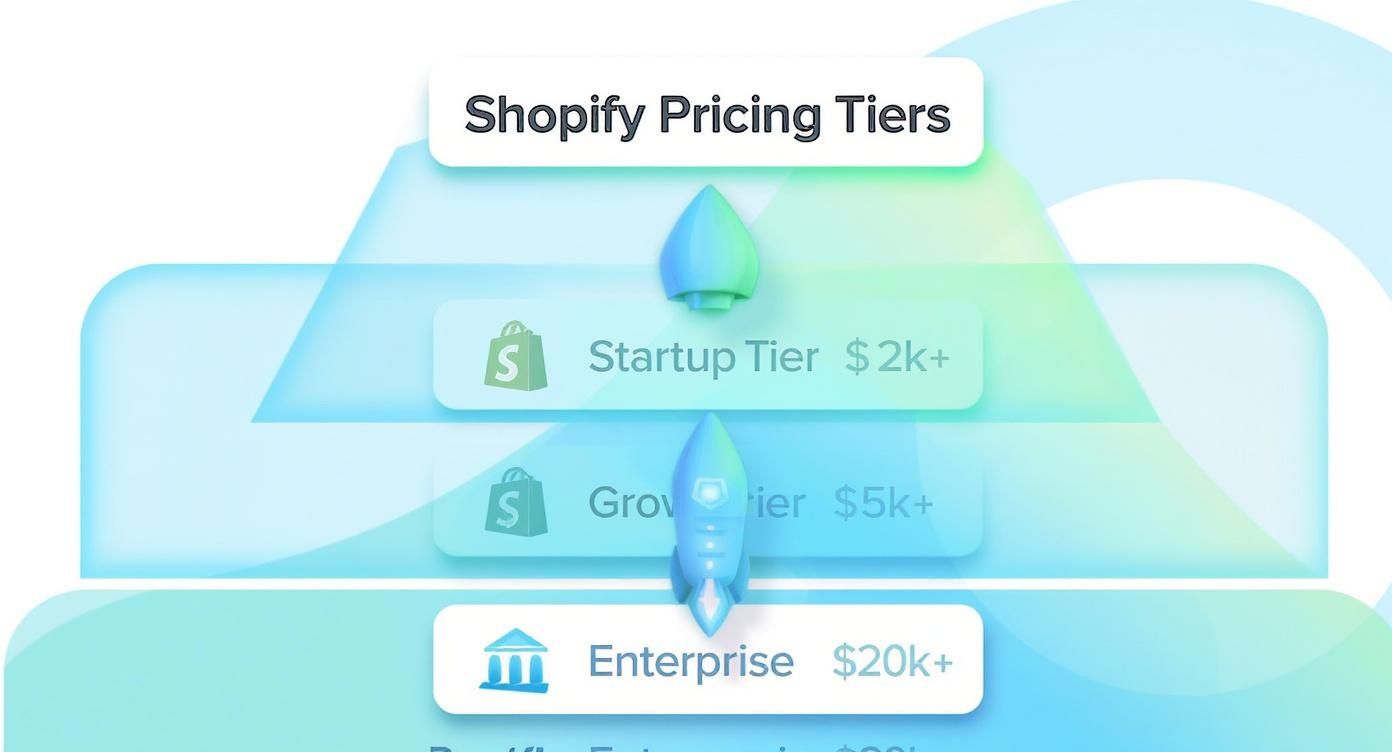
As you can see, the investment ramps up as a business grows and its needs get more sophisticated. To give you a clearer picture, let's look at some typical budget ranges.
Estimated Shopify Store Development Costs by Business Tier
This table provides a snapshot of typical one-time development costs for different types of Shopify stores, from basic startups to large enterprises.
| Business Tier | Estimated One-Time Cost | What's Typically Included |
|---|---|---|
| Startup / Small Business | $2,000 – $5,000 | Premium theme setup, basic app integration, branding implementation, product setup. |
| Growing Business | $5,000 – $15,000 | Custom theme modifications, advanced app setups (e.g., subscriptions, loyalty), light custom coding. |
| Enterprise (Shopify Plus) | $15,000 – $35,000+ | Fully custom theme design, bespoke feature development, API integrations with external systems, migration support. |
These figures show that while a simple setup can be quite affordable, scaling up requires a more significant upfront investment in the platform's capabilities.
All told, a typical Shopify build falls somewhere between $2,000 and $20,000. A basic store can often be done for $1,500 to $2,500, but most growing brands find themselves in the $5,000–$10,000 range. For big players on Shopify Plus, it’s not uncommon to see development costs push from $7,000 to $35,000 or even higher.
Understanding Your Foundational Platform Costs
Before we get into the exciting parts—like design, cool features, and marketing—we have to talk about the absolute basics. Every single Shopify store has foundational costs. These are the non-negotiable, recurring bills that form the bedrock of your online store's budget.
Think of it like renting a brick-and-mortar shop. You have to pay the lease every month just to keep the lights on, long before you start thinking about paint colors or what to put on the shelves.
This core investment is your Shopify subscription plan. It's the very first line item in your shopify store development cost and directly shapes what's possible. Each plan is built for a different stage of business, so picking the right one is your first big step toward building a realistic budget.
Choosing Your Shopify Subscription Tier
Shopify has a few different pricing tiers, and moving up the ladder gets you more powerful features. This choice isn't just about picking the cheapest option; it's about matching the platform’s toolkit to your business needs and sales volume.
- Basic Shopify: Perfect for new businesses just getting their feet wet. It gives you everything you need to launch a real, working online store—product pages, a secure checkout, and the essential reports.
- Shopify: This is the go-to for growing businesses. Once you start seeing consistent sales, this plan makes sense. It offers better reporting, lower transaction fees, and cheaper shipping rates, which helps your bottom line.
- Advanced Shopify: For established businesses that are really starting to scale. This tier unlocks the best reporting tools, real-time shipping rate calculations from third parties, and the lowest transaction fees you can get without jumping to Shopify Plus.
So, what’s the damage? The Basic Shopify plan starts at $39 per month, making it a really accessible entry point. The Shopify plan is $105 per month, and the Advanced Shopify plan comes in at $399 per month. For the big players, Shopify Plus starts around $2,000 per month. Keep in mind, these prices don't include other small costs like your domain name.
For high-volume sellers, deciding between Advanced and Plus is a huge decision. If you're nearing that point, our guide on Shopify Plus vs Shopify is a must-read.
Choosing the right plan is a balancing act between today's needs and tomorrow's goals. A smart, common strategy is to start small and upgrade as you grow. It keeps your initial costs down while giving you room to expand.
Demystifying Transaction and Processing Fees
Okay, on top of the monthly subscription, you also need to factor in the small percentage Shopify takes from every sale. It might not seem like much, but these fees are a real operational cost. They come in two flavors: payment processing fees and transaction fees.
Payment Processing Fees are what the payment gateway (like Shopify Payments, PayPal, or Stripe) charges to securely handle a customer's credit card. The rate you pay depends entirely on your Shopify plan—the higher the plan, the lower the fee. So, a sale on the Basic plan gets hit with a slightly higher fee than the exact same sale on the Advanced plan. This is a key detail: as your sales grow, upgrading your plan can actually save you money on fees, often enough to cover the higher monthly cost.
Transaction Fees are an extra charge from Shopify, but they only apply if you decide not to use their built-in Shopify Payments system. If you stick with Shopify Payments, you don't have to worry about these at all. For most store owners, this is a huge reason to use it.
Let's make this real. Imagine you sell a $100 product.
- On the Basic plan with Shopify Payments, you might pay around 2.9% + 30¢, which works out to $3.20.
- On the Advanced plan, that fee drops to 2.4% + 30¢, which is $2.70.
That 50-cent difference seems tiny, right? But if you're processing hundreds or thousands of orders, it adds up to a serious chunk of change over the course of a year.
How Themes and Design Shape Your Budget

Your store's design is its digital handshake—the very first impression you make. It's a powerful one, too. Studies show it takes a visitor a jaw-dropping 0.05 seconds to decide if they like your site, and that split-second judgment is all about the visuals. This is the first place your theme and design choices start dictating your Shopify store development cost.
Think of it like finding a place to live. You've got three main paths, each with a different price tag and level of creative control. You could move into a standard apartment (a free theme), buy a customizable new-build home (a premium theme), or hire an architect to design your dream house from the ground up (a fully custom theme). All three give you a roof over your head, but the experience and investment are worlds apart.
The Three Paths of Shopify Design
Your budget and how unique you want your store to feel will steer you down one of these three roads. Let’s look at what each one really costs and what you get for your money.
1. Free Shopify Themes (The Standard Apartment)
Shopify gives you a handful of solid, free themes right out of the box. They’re perfect for getting a new store off the ground quickly. They look good on mobile, load fast, and tick all the essential e-commerce boxes.
- Cost: $0
- Best for: Startups and anyone testing a new business idea on a tight budget.
- The trade-off: Customization is pretty limited. Since they're popular, your store might look like a lot of others out there.
2. Premium Shopify Themes (The Customizable New-Build)
This is the sweet spot for most growing businesses. Buying a theme from the Shopify Theme Store or a trusted developer like Out of the Sandbox gives you a much bigger creative toolbox. These themes come packed with more features, flexible design options, and dedicated support from the people who built them.
- Cost: $100 – $500 (a one-time purchase)
- Best for: Businesses ready to create a more distinct brand identity and unlock more advanced features.
- The trade-off: It’s a one-time investment, and you might still need to hire a developer for any highly specific tweaks that aren't built-in.
3. Custom-Built Themes (The Dream House)
When your brand has a very specific vision or needs features you just can't find off-the-shelf, a custom build is the way to go. This means hiring a developer or an agency to construct a theme from scratch, tailored perfectly to your brand. It gives you total creative freedom but comes with the highest price tag.
- Cost: $5,000 – $20,000+
- Best for: Established brands with unique functional requirements or those wanting a one-of-a-kind user experience.
- The trade-off: This is a major investment in both time and money, and it requires ongoing developer support.
Your theme isn't just a pretty face for your store; it's the entire foundation of the customer experience. A great theme makes shopping easy, builds trust, and directly boosts your sales. It’s one of the most critical investments you'll make.
Factoring in Professional Design Help
Even if you buy a fantastic premium theme, you might want an expert's touch to make it perfect. This is where designers and developers come in, and their services are a separate cost from the theme itself. They help polish the final product and ensure your brand looks professional and cohesive.
Hiring a Shopify expert can help with things like:
- Theme Customization: Got an idea that the theme editor can't handle? A developer can jump into the code to build unique sections, alter layouts, or integrate special functions. If you're curious about what's possible, our guide shows you how to customize Shopify themes.
- Branding Implementation: A designer ensures your logo, brand colors, and fonts are applied flawlessly across every page, creating a strong and memorable identity.
- User Experience (UX) Tweaks: An expert can fine-tune your site’s navigation and checkout process, removing friction points to help turn more visitors into buyers.
Costs here can really vary. A freelance developer might charge $500 – $1,500 for a basic theme setup and a few tweaks. A full-service agency, however, could be anywhere from $5,000 to $20,000 for a complete design and branding project. It all comes down to complexity. At the end of the day, paying for good design isn't just an expense—it's an investment in building a brand that people trust.
The True Cost of Shopify App Integrations

If your Shopify theme is the storefront, then apps are the tools and special features that make it hum. They’re the engine behind everything from your marketing campaigns to your customer service, adding powerful functions that Shopify doesn't include out of the box.
A great way to think about it is like getting a new smartphone. It’s a slick piece of hardware, but its real magic comes alive when you head to the app store. You grab an app for email, another for your calendar, and one for social media. Each one solves a problem, and before you know it, your phone is a custom-built machine that fits your life perfectly. The Shopify App Store is exactly the same for your business.
These apps handle all the crucial jobs: recovering abandoned carts, gathering customer reviews, managing loyalty programs, and offering product subscriptions. They're non-negotiable for a modern e-commerce store, but they also represent a significant—and often overlooked—part of your Shopify store development cost.
Understanding App Pricing Models
Just like on your phone, Shopify apps come with all sorts of price tags. It’s rarely a simple, one-size-fits-all deal, so getting a grip on the different pricing structures is the key to keeping your monthly budget from spiraling out of control.
Most apps you’ll find fall into one of these buckets:
- Free Apps: Plenty of developers offer a free version of their app. These are awesome for getting started, but they usually have limits on features, the number of times you can use them, or the level of customer support you get.
- One-Time Fee: Some smaller tools or theme add-ons charge a single fee right at the start. You buy it once, you own it forever. This is great for keeping your budget predictable.
- Recurring Subscriptions: This is the big one. The most powerful and essential apps almost always charge a monthly fee. These costs can be anywhere from $5 to $100+ per month, often tiered based on your sales volume or the number of customers you have.
A classic mistake I see new store owners make is completely underestimating how quickly app subscriptions add up. Sure, $15/month for one app seems like nothing. But once you add five or six "essential" apps, you've suddenly tacked an extra $100-$200 onto your monthly bill.
Budgeting for Essential App Categories
To build a realistic budget, you need to think about what kinds of apps you’ll need from day one. Every store is different, of course, but most successful businesses run on a core set of apps to handle key operations. Planning for these ahead of time will give you a much clearer idea of your real ongoing expenses.
Let’s break down what that might look like with a few examples:
- Email & SMS Marketing: You absolutely need a tool like Klaviyo or Omnisend to talk to your customers. An email marketing solution like Klaviyo is a cornerstone of any serious store; this detailed Klaviyo Integration Step-by-Step Guide can walk you through the setup. Costs often start free but grow with your subscriber list, easily hitting $50-$150/month.
- Customer Reviews: Apps like Judge.me or Loox are crucial for building trust through social proof. Plans typically go from free to around $30/month.
- Shipping & Fulfillment: Need advanced shipping rules, better order tracking, or a smooth returns process? An app like ShipStation could run you $25-$70/month.
- Upselling & Cross-selling: These apps are a smart investment designed to increase your average order value. If you want to know which tools actually move the needle, our guide to the best Shopify apps to increase sales has you covered. Expect to budget $20-$60/month here.
When you add it all up, a realistic starting budget for essential apps is often between $75 and $200 per month for a new but serious store. And keep in mind, this number will almost certainly grow as your business scales and your needs get more sophisticated.
When It's Time to Invest in Custom Development
While themes and apps get you incredibly far, there's often a point where "off-the-shelf" solutions just can't keep up with your vision. This is where custom development comes in. Think of it as the difference between buying a suit off the rack and getting one tailored just for you—the result is a perfect fit that’s one of a kind.
Custom development means hiring a developer or an agency to write code specifically for your store. We're not talking about small tweaks here. This is about building brand-new features, powerful integrations, or a unique user experience that you simply can't get from a pre-built tool. It’s a major factor in your total Shopify store development cost, but for the right business, it’s an investment that can completely change the game.
So, when does it make sense to bring in the pros? Usually, it's when your brand's vision or your operational needs have pushed past the limits of what the Shopify App Store can offer.
Scenarios Where Custom Code is a Must
Some business models need functionality so specific that no existing app can quite nail it. In these cases, investing in a custom solution isn't a luxury; it's a necessity for growth.
Here are a few common situations where custom development is the smartest move:
- Unique Product Configurators: Imagine you sell custom furniture. Your customers need to choose the fabric, leg style, and dimensions, and see their creation in real-time. A standard theme just can't handle that kind of complex, interactive shopping experience.
- Integrating Proprietary Software: Maybe your business runs on a custom-built inventory system, a unique CRM, or a specialized accounting platform. A developer can build a secure API connection so your Shopify store talks perfectly with these essential internal tools.
- Specific Checkout Modifications (Shopify Plus): If you're on Shopify Plus, you have the power to customize the checkout. You might need to add a custom field for delivery instructions, offer unique local payment options, or create a branded post-purchase upsell that flows seamlessly.
- Bespoke User Experiences: Maybe you want a visually stunning, animation-heavy storefront that tells a powerful brand story. Or perhaps a unique quiz that guides shoppers to their perfect product. These immersive experiences demand custom code to work just right.
Custom development is your answer when you find yourself saying, "I just wish my store could do this." It's what closes the gap between the platform's standard features and your unique business needs.
Breaking Down the Cost of Hiring Help
Once you decide to go custom, the next big question is who to hire. The cost and experience can vary wildly, so it helps to think about it in a "good, better, best" framework.
| Tier | Who You Hire | Typical Cost Range | Best For |
|---|---|---|---|
| Good | Freelance Developer | $500 – $5,000 | Small, well-defined tasks like a specific feature tweak or a minor app integration. |
| Better | Small Shopify Agency | $5,000 – $20,000 | Comprehensive projects like a full theme customization, custom app development, or a big new feature. |
| Best | Shopify Plus Partner Agency | $20,000 – $100,000+ | Large-scale enterprise projects, complex migrations, and building mission-critical solutions. |
A freelance developer, often found on marketplaces like Shopify's Partners, is perfect for targeted fixes. An agency, on the other hand, brings a whole team—project managers, designers, and developers—which means a more structured approach for bigger, more complex projects.
Ultimately, choosing to invest in custom development is about removing limitations. It gives you the power to build the exact store your business needs to run smoothly and offer an experience that makes you stand out. While the upfront cost is higher, the long-term return from better conversions and streamlined operations often makes it one of the smartest investments a growing brand can make.
Don't Forget to Budget for What Comes After Launch
Getting your store live is a huge moment, but it's really just the starting line. Your initial Shopify store development cost is what gets you into the race, but the ongoing expenses are the fuel that keeps you going, month after month. It's a classic mistake for new entrepreneurs to pour everything into the build, only to be caught off guard by what comes next.
Think of it like buying a new car. You focus on the big sticker price, but you know you also have to pay for gas, insurance, and oil changes to actually use it. Your Shopify store works the same way; it needs a steady investment to run properly and bring in customers long after you've popped the champagne on launch day.
These aren't just "nice-to-haves." These recurring costs are the essential services that protect your investment, bring people to your site, and keep you in the game. If you ignore them, you could end up with a beautiful store that no one ever sees, or worse, one that breaks down because it wasn't looked after.
Common Recurring Costs to Put in Your Plan
Once your store is up and running, your job shifts from building to maintaining and growing. This means a new set of monthly or annual bills that are absolutely critical for your long-term success. A realistic budget accounts for these right from the get-go.
Here are the most common ongoing costs you need to have on your radar:
- Website Maintenance: Expect this to be anywhere from $50 to $800 a month. This isn't just for show; it covers critical security updates, fixing bugs that pop up, making sure your apps aren't slowing things down, and other small tweaks to keep your site fast and secure.
- SEO and Marketing: A great store is useless if no one can find it. Professional SEO services to help you climb the ranks on Google can run from $500 to $1,500 per month. On top of that, you'll have your ad budget for platforms like Google or Meta, which depends entirely on your strategy.
- Content Creation: Fresh product photos, interesting blog posts, and consistent social media content are the lifeblood of your brand. You need to budget for professional photography, a good copywriter, or a content creator to keep your marketing engine running.
- Premium Tools: As your business grows, you'll likely need more sophisticated tools. This could mean advanced analytics software, a customer service helpdesk, or premium backup services, all of which add to your monthly overhead.
A sustainable business is one that budgets for its entire lifecycle, not just its launch. These ongoing costs are investments in your store's health, visibility, and profitability, preventing costly surprises down the road.
Answering Your Top Shopify Cost Questions
When you're mapping out your e-commerce budget, a few key questions always seem to pop up. We've gone through the big-picture costs, but let's drill down into the specifics that merchants ask about most often. Think of this as your quick-reference guide for those nagging cost uncertainties.
Getting these details sorted out from the start is the key to building a realistic budget. It helps you avoid any nasty surprises down the road and lets you put your money where it will really count for your new store.
Can I Build a Shopify Store for Free?
The short answer is no, not really. While Shopify offers a free trial, it's designed for you to build and test things out behind the scenes. The moment you want to open your doors and actually start selling to customers, you’ll need to pick a paid monthly plan.
So, what's the absolute bare-minimum cost to get up and running? You're looking at the Basic Shopify plan, which runs about $39/month, plus any transaction fees on your sales. You can definitely keep your initial outlay low by sticking to a free theme and only using free apps, but that monthly subscription is the one cost you can't avoid.
How Much Should I Budget for Shopify Apps?
This is a great question. For a new store that's serious about growth, setting aside $50 to $150 per month for apps is a solid starting point. This range usually covers the essentials that don't come built into Shopify, like a good email marketing tool, a system for collecting customer reviews, or an app to help you upsell products.
Be prepared for this number to climb as your business grows. Once you're ready for more powerful tools—think marketing automation, live chat for customer support, or loyalty programs—your monthly app bill could easily reach $200-$500 or more.
A smart way to think about app costs is to tie them to your revenue. As your sales grow, investing in better tools isn't just an expense; it's an investment that fuels more growth and makes your operations more efficient.
Is Shopify Plus Worth It for a Small Business?
Honestly, for most small businesses, Shopify Plus is overkill. It's a powerhouse platform, but with a starting price tag of $2,300 per month, it’s built for enterprises and high-volume sellers—we're typically talking about businesses pulling in over $1 million a year.
The main draws of Plus, like much lower transaction fees and a highly customizable checkout, only start making financial sense when you're processing a massive number of orders. For a small business, everything you need to launch, grow, and thrive is already packed into the standard Basic, Shopify, or Advanced plans for a tiny fraction of the cost.
Ready to build a Shopify store that not only looks professional but is engineered for growth? At E-commerce Dev Group, we specialize in creating custom Shopify solutions that fit your budget and business goals. Let's build your success story together.
