

So, what exactly is cross browser testing? It's the process of making sure your website or web app looks and behaves the same for everyone, no matter what browser, device, or operating system they're using.
Think of it this way: you want every single visitor to have a great experience, whether they’re browsing on Chrome from their laptop, Safari on an iPhone, or Firefox on a tablet.
Your Website Works Perfectly, Right? Not So Fast.
Imagine you’ve just launched your beautiful new e-commerce site. It looks fantastic on your Chrome browser, so you pop the champagne and call it a day. But what you don't see is that for nearly half of your potential customers on Safari, Firefox, or Edge, the site is a jumbled, unusable mess. This is the exact, and costly, problem that cross browser testing is designed to prevent.
It helps to think of your website's code as a set of instructions and each web browser as a unique translator. While they all try to follow the same web standards, each one has its own little quirks and interpretations. One browser might display a button perfectly, while another shoves it to the side of the screen or makes it completely unclickable.
A Google report found that 53% of users will abandon a website if it doesn’t display properly on their browser. That’s more than half your potential audience lost over an issue that could have been prevented.
From Minor Glitch to Major Problem
These differences aren't just small visual annoyances; they can completely break your site's core features and hit your revenue hard. A bug that seems tiny can stop a customer from completing their purchase, leading to a terrible experience and a lost sale.
Without a solid testing plan, you're essentially gambling with your user experience and leaving a huge chunk of your audience behind. The fallout can be serious:
- Lost Sales: If the "Buy Now" button doesn't work on Safari for mobile users, that's revenue walking right out the door.
- Damaged Brand Reputation: A buggy, inconsistent website makes your business look unprofessional and untrustworthy. That erodes customer confidence fast.
- Frustrated Users: People who run into problems on your site are not likely to come back. Worse, they might tell their friends about their bad experience.
This guide will walk you through everything you need to know about cross browser testing. We'll show you how to catch and fix these issues, making sure every visitor sees your website exactly as you designed it.
How Different Browsers Can Break Your Website
You've spent countless hours designing the perfect online store. Everything looks pixel-perfect on your screen. But have you ever stopped to wonder if your customers see the exact same thing? The hard truth is, they probably don't.
This is where cross-browser testing comes in. It’s the process of making sure your website works and looks great for everyone, regardless of the browser they’re using.

Think of your website’s code (HTML, CSS, JavaScript) as a musical score. Each web browser—like Chrome, Safari, or Firefox—is a different orchestra. Even with the exact same sheet music, each orchestra will interpret and perform the piece slightly differently. One might play the violins a touch louder, while another takes a passage a bit faster.
In the same way, one browser might display your "Add to Cart" button perfectly, while another pushes it off-screen or makes it unclickable. These small differences can have a huge impact on your user experience and, ultimately, your sales.
The Code Interpreters: Rendering Engines
The root cause of these differences comes down to something called a "rendering engine." This is the core piece of software inside every browser that reads your website's code and draws it onto the screen.
Because these engines are built by different companies (Google, Apple, Mozilla), they don't always interpret the rules of the web in the exact same way. This is what leads to those frustrating cross browser compatibility issues. For a closer look, you can read our guide on the most common cross-browser compatibility issues and how to fix them.
Here's a quick look at the main players and the engines they use:
Major Browsers and Their Rendering Engines
This table shows the primary rendering engines that power the most popular web browsers, which explains why websites can appear differently across them.
| Browser | Rendering Engine | Common Compatibility Notes |
|---|---|---|
| Google Chrome | Blink | The most widely used engine; often sets the standard for new features. |
| Microsoft Edge | Blink | Adopted Blink in 2020, so it behaves very similarly to Chrome now. |
| Safari (Apple) | WebKit | Powers all browsers on iOS and macOS. Can lag in adopting new features. |
| Mozilla Firefox | Gecko | Known for its strong commitment to web standards and privacy. |
Understanding which engine powers which browser helps you anticipate where problems might crop up. A feature that works perfectly in Chrome and Edge (both Blink) might break completely in Safari (WebKit).
Why You Can't Just Test On Chrome
It's tempting to just test on Google Chrome and call it a day. After all, it's the most popular browser, right? While that's true, relying only on Chrome is a surefire way to lose customers.
Don't fall into the "it works on my machine" trap. While Google Chrome holds 62-66% of the global market share, Apple's Safari is used by 20-23% of people, and Microsoft Edge has about 6%. That’s a massive chunk of your audience you’d be ignoring.
And here’s another critical stat: over 58% of all internet traffic now comes from mobile devices. If you’re not testing how your site looks on a phone, you're already behind. Neglecting Safari, for example, means you're likely giving a broken experience to a huge segment of mobile shoppers using iPhones and iPads.
You can learn more about these trends and why testing is so essential by checking out the full report on browser diversity.
Why Ignoring Browser Differences Is a Silent Business Killer
It's one thing to know that browsers render code differently, but it's another thing entirely to see how those tiny differences can punch a hole in your bottom line. Skipping cross-browser testing isn't just a technical oversight—it's a direct risk to your sales, your brand, and even your visibility on Google.
Think about it from a customer's perspective. Someone lands on your e-commerce store, ready to buy. They’re on their iPhone, they find the perfect product, and they tap the "Add to Cart" button. Nothing happens. A simple JavaScript bug, specific to Safari, just cost you a sale. That customer isn't going to troubleshoot their phone; they're going to your competitor. This isn’t just a bad dream for developers; it happens all the time.
The Real-World Cost of a Broken Site
Seemingly small bugs can quickly spiral into major business headaches. A checkout form that’s busted on Firefox or a product image gallery that won’t load on Edge means one thing: abandoned carts and lost money. The financial hit is real, immediate, and completely avoidable.
But it gets worse. Beyond the immediate loss of a sale, a buggy website chips away at something far more valuable: brand trust. When a visitor sees a messed-up layout or a button that doesn’t work, they don't think, "Oh, my browser must be incompatible." They think your company is unprofessional. That negative impression can stick, turning a potential loyal customer away for good.
A broken experience is a massive business risk. A study from the Baymard Institute revealed that 15% of online shoppers abandon their carts because of website errors or crashes. Many of these are simple browser-specific bugs.
The Ripple Effect on SEO and User Experience
Search engines like Google are obsessed with user experience. They pay close attention to signals like bounce rate—how fast people leave your site after arriving. If a huge chunk of your visitors using Safari hit the back button in frustration, Google notices. Over time, this can sink your search rankings, making it that much harder for new customers to even find you in the first place.
When you look at the browser market, the need for testing becomes crystal clear. Sure, Chrome is the giant, with over 66% of the desktop market share. But Safari accounts for over 22% and Edge holds a significant slice too. Ignoring them means you’re essentially telling millions of potential customers that you don't want their business. You can dig deeper into why this is such a critical strategy by exploring insights on cross-browser testing.
At the end of the day, cross-browser testing isn't just another box to check on a QA list. It's a fundamental investment in your company's growth and stability. It's about making sure every single person who visits your site has the smooth, professional experience they expect, protecting your revenue and building a brand people trust.
Choosing Your Testing Approach: Manual vs. Automated

When you get down to the nuts and bolts of cross browser testing, you have two main paths you can take: doing it by hand or letting machines handle the heavy lifting. This is the classic manual vs. automated debate.
Understanding the difference is crucial for building a smart testing strategy. There's no single "best" choice here; the right answer depends entirely on your team, your budget, and what you're trying to accomplish.
Manual Testing: The Human Touch
Think of manual testing like a chef taste-testing a new dish. They aren't just checking if the ingredients are present; they're evaluating the flavor, texture, and overall experience. A human tester does the same for your website.
They click through your store, add products to the cart, and go through checkout—not just as a robot following a script, but as a real user would. This approach is fantastic for catching those subtle, human-centric problems.
A few areas where manual testing really shines:
- User Experience (UX) Issues: Is a button technically working but awkwardly placed? Is an animation smooth or jarring? An automated script can't tell you that, but a person can.
- Exploratory Checks: It’s perfect for freely poking around a new feature to see what might break, without the overhead of writing a formal test script.
- Getting Started Quickly: You don't need a programming background to start. If you have a keen eye for detail, you can jump right in.
Automated Testing: Speed and Scale
Now, imagine you had to test that every single ingredient in your kitchen was measured correctly for 1,000 recipes. You wouldn't do that by hand. You'd use a machine. That’s automated testing.
Automation is all about handling repetitive tasks at a massive scale and lightning speed. You write scripts that command a program to perform specific actions—like logging in, searching for a product, or completing a purchase—and it can run those tests on hundreds of browser combinations at once.
The real magic of automation is its ability to give you massive test coverage, fast. It’s your safety net, ensuring that new code updates don’t accidentally break something important.
It's the perfect tool for regression testing, which is just a fancy way of saying, "Let's make sure our latest changes didn't mess up anything that used to work."
Manual vs. Automated Cross Browser Testing
So, which one should you pick? It’s rarely an either/or decision. The best strategies almost always blend both. This table breaks down the key differences to help you decide where each fits into your workflow.
| Aspect | Manual Testing | Automated Testing |
|---|---|---|
| Best For | Usability, UX, and exploratory testing. Finding "human" issues. | Repetitive tasks, regression tests, and large-scale coverage. |
| Speed | Slow and methodical, especially for large sites. | Extremely fast; can run hundreds of tests simultaneously. |
| Initial Cost | Lower setup costs, but higher long-term labor costs. | Higher initial setup (tools, script development), but cheaper to run over time. |
| Accuracy | Prone to human error and fatigue, especially on repetitive tasks. | Highly consistent and precise. Never gets tired. |
| Flexibility | Very flexible. Testers can deviate from the plan to explore issues. | Rigid. Only tests what it’s been programmed to check. |
| Maintenance | No scripts to maintain, but requires ongoing human effort. | Test scripts must be updated whenever the website changes. |
Ultimately, a hybrid approach gives you the best of both worlds. You can lean on automation to handle the monotonous, wide-reaching checks that ensure your core features are always working. Meanwhile, you can save your team's valuable time for manual testing that focuses on what matters most: ensuring your customers have a genuinely great experience.
If you want to dive deeper into building your own process, our guide on testing a website on different browsers provides some great, actionable tips.
Finding the Right Tools for the Job
Trying to manually test your website on every single browser and device out there is a fool's errand. It’s like trying to inspect every car on the highway by yourself—you just can't keep up. Thankfully, we have a whole arsenal of tools that make comprehensive cross-browser testing not just possible, but incredibly efficient, even if you're a small team on a tight budget.
These tools generally fall into a few different buckets, each fitting a specific need in your development cycle.
The heavy hitters are cloud-based testing platforms. Think of services like BrowserStack or LambdaTest as your own personal device lab, but massive and living in the cloud. Instead of buying and maintaining dozens of phones, tablets, and computers, you get immediate access to thousands of real browsers on real devices. This means you can instantly test your site on a specific version of Chrome on a Mac, Safari on an old iPhone, or Firefox on a Windows machine.
This is the kind of dashboard you'd see on one of these platforms. It's a library of browsers and devices, ready to go at a moment's notice.
What's important here is the sheer scale. This is a level of variety that would be wildly impractical, if not impossible, for most companies to manage in-house.
Free and Built-In Options
You don't always have to reach for a paid service, especially for quick spot-checks. The developer tools already built into browsers like Chrome, Firefox, and Edge are surprisingly powerful. They come with responsive design modes that let you simulate different screen sizes and emulators for various devices.
These are your first line of defense. They're perfect for catching obvious layout problems early on, long before they become a real headache.
The Power of Automation Frameworks
When you need to test at scale and with repeatable precision, automation is the answer. Open-source frameworks like Selenium and Cypress are the go-to choices for this. They allow you to write scripts that do the work for you—logging in, adding products to a cart, filling out a form, and completing a checkout.
Combine these scripts with a cloud platform, and you can run your automated tests across hundreds of browser combinations at the same time. It's the best way to catch bugs with incredible speed and accuracy.
The rise of automation is a game-changer for quality assurance. AI-powered tools can now analyze thousands of browser-device combinations in minutes, spotting tiny UI misalignments and glitches that a human tester might miss or take weeks to find.
When you're looking at how different browsers display your site, being able to capture and compare what you see is crucial. Learning the ropes of taking snapshots of web pages is a fundamental skill for finding and documenting those visual bugs.
Building a Smart Cross Browser Testing Strategy
Having the right tools is a great first step, but a smart strategy is what really makes the difference. It separates the teams that are always putting out fires from the ones who can ship new features with confidence. The good news is, building a solid cross-browser testing plan doesn't have to be a huge, complicated undertaking. It’s all about working smarter by focusing your energy where it matters most.
To get started on the right foot, it helps to see how browser testing fits into the bigger picture. Thinking about it within a larger quality framework, like the one described in a comprehensive guide to the Quality Assurance testing process, can provide some valuable context.
The first move is simple: stop guessing and start looking at your data. Jump into your website's analytics and find out which browsers, devices, and operating systems your actual customers are using. If you discover that 90% of your mobile traffic comes from Safari on iOS and Chrome on Android, then that’s exactly where you should focus your most intensive testing efforts.
Prioritize Critical User Journeys
Let's be realistic—you don't need to test every single page on every single browser. That’s a recipe for burnout. Instead, identify the critical paths customers take on your site, the ones that directly affect your bottom line.
A good test plan should always put these user journeys first:
- User registration and login: Can new people sign up easily? Can existing customers log in without a hitch?
- The complete checkout process: This is a big one. Can a customer add an item to their cart and complete the purchase smoothly?
- Core product interactions: Does your search bar actually work? Can users filter products the way they expect to?
- Key marketing pages: Are your most important landing pages and lead-gen forms displaying correctly for everyone?
By focusing on these high-impact areas, you ensure that the most important parts of your store work for the vast majority of your visitors. If you need a more granular list of what to check, our website quality assurance checklist is a great resource to get you started.
Test Early and Build for Consistency
Bugs found moments before a big launch are always the most stressful and expensive to fix. The secret is to weave testing into your development process right from the very beginning.
Best Practice: Don’t save cross-browser testing for the very end. Make it a regular part of your routine. Developers should be doing quick checks in the main browsers as they build new features. This way, you catch small rendering quirks before they snowball into major headaches.
This infographic gives you a great visual of how to pick the right tools for different stages of your workflow.
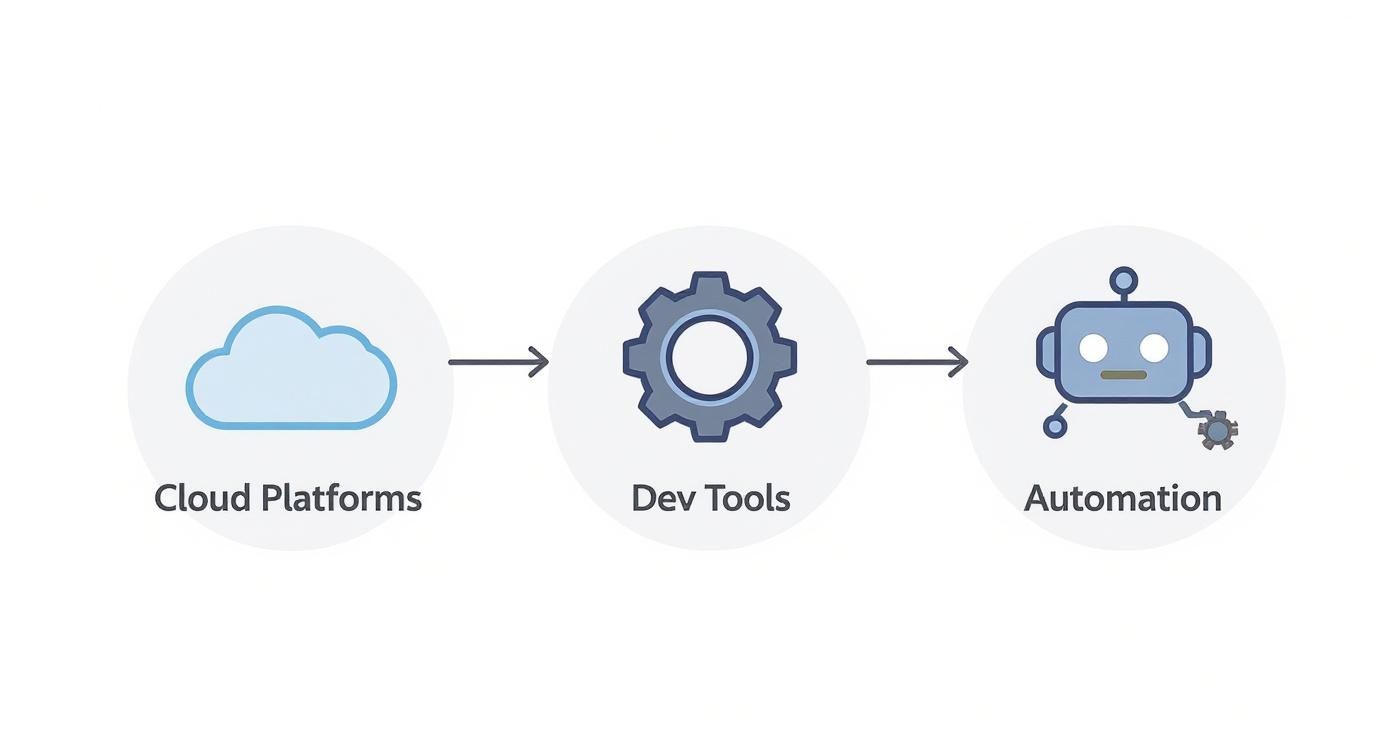
As you can see, the process involves using different tools at different times—developer tools for quick initial checks, cloud platforms for wider coverage, and automation to keep an eye on things long-term.
Still Have Questions About Cross Browser Testing?
Even with a solid plan, it's natural to have a few questions about how cross browser testing works in the real world. Let's tackle some of the most common ones we hear.
How Often Should I Be Doing This?
Think of cross browser testing as an ongoing part of your development process, not a one-off task you check off a list.
For big moments like a major feature launch or a site redesign, you absolutely need to do a deep dive before pushing anything live. For smaller, routine updates, you can lean on automated tests that check your most critical user journeys, like the path from the homepage to checkout.
A good rule of thumb? Run a full regression test suite before every single release. This is your safety net to ensure that new code hasn't accidentally broken something that was working perfectly on a key browser.
Catching issues early and often is always faster and cheaper than fixing them after they've already impacted your customers.
Which Browsers Should I Focus On?
You don't need to test every single browser in existence. That would be a huge waste of time. The smart move is to focus your energy where it counts the most.
Start by digging into your website's analytics. Where is your traffic actually coming from? Your data will tell you which browsers and devices your real customers are using. Most of the time, your go-to list will include the latest versions of:
- Google Chrome: It's the king of browsers, holding the largest market share by a long shot.
- Apple Safari: If you have customers on iPhones, iPads, or Macs, testing on Safari is non-negotiable.
- Mozilla Firefox: Still a major player with its own unique rendering engine, making it a crucial test case.
- Microsoft Edge: As the default browser on Windows, it's essential for reaching a huge chunk of desktop users.
If your audience includes a lot of enterprise clients or users in specific regions, you might also need to keep a few older browser versions on your radar.
I Already Have a Responsive Design. Isn't That Enough?
Nope, not quite. This is a common point of confusion, but they actually solve two different problems.
Responsive design is all about making sure your layout looks good and adapts to different screen sizes—from a tiny phone to a huge desktop monitor. Cross browser testing, on the other hand, makes sure your website's features and styles actually work correctly across different browser engines.
You could have a site that looks beautiful and responsive on Chrome, but that same site might have a completely broken "Add to Cart" button on Safari. The two work together to create a seamless experience, but one can't replace the other.
At E-commerce Dev Group, we build Shopify stores with rock-solid code that’s rigorously tested for reliability and efficiency across all major browsers. Contact us to ensure every customer gets a flawless experience.
