

When you start mapping out your Shopify website development cost, the numbers can swing wildly. You could be looking at as little as $200 for a simple DIY setup, or you might find yourself budgeting well over $25,000 for a custom enterprise-level build. The final tally really comes down to how complex you need your store to be, your design ambitions, and whether you're rolling up your sleeves or bringing in the pros.
Deconstructing the Real Cost to Build a Shopify Website
Thinking about what it costs to build a Shopify website is a bit like planning to build a house. You could go with a prefabricated kit (a Shopify theme), which gets you up and running quickly and affordably. Or, you could hire an architect and a full construction crew (designers and developers) to build a completely custom home from the ground up. There's no right or wrong answer—it's all about what fits your needs and your wallet.
One of the first big decisions you'll make is weighing a Shopify vs. Custom Website built from scratch. Shopify gives you an incredible, structured foundation to build on. A fully custom site, on the other hand, offers total freedom but comes with a much steeper price tag upfront. Getting clear on this trade-off is the first real step to setting a budget you can stick to.
Understanding the Investment Tiers
To give you a clearer picture, let's break down the typical costs into a simple table. This will help you see how the path you choose directly impacts your initial investment.
Shopify Website Cost At a Glance
| Development Path | Initial Setup Cost Range | Best For |
|---|---|---|
| DIY (Do-It-Yourself) | $200 – $1,500 | Startups, small businesses, or anyone on a tight budget with time to learn. |
| Hiring a Freelancer | $1,500 – $5,000 | Businesses needing a professional touch without the full agency price tag. |
| Hiring an Agency | $5,000 – $25,000+ | Established businesses looking for custom design, complex features, and ongoing support. |
This table shows that the approach you take—whether you do it yourself, hire a freelancer, or partner with an agency—is the single biggest factor shaping your initial spend. Each option offers a different blend of cost, time, and hands-on expertise.
The infographic below breaks these three tiers down even further, showing how the budget grows as your project gets more complex.
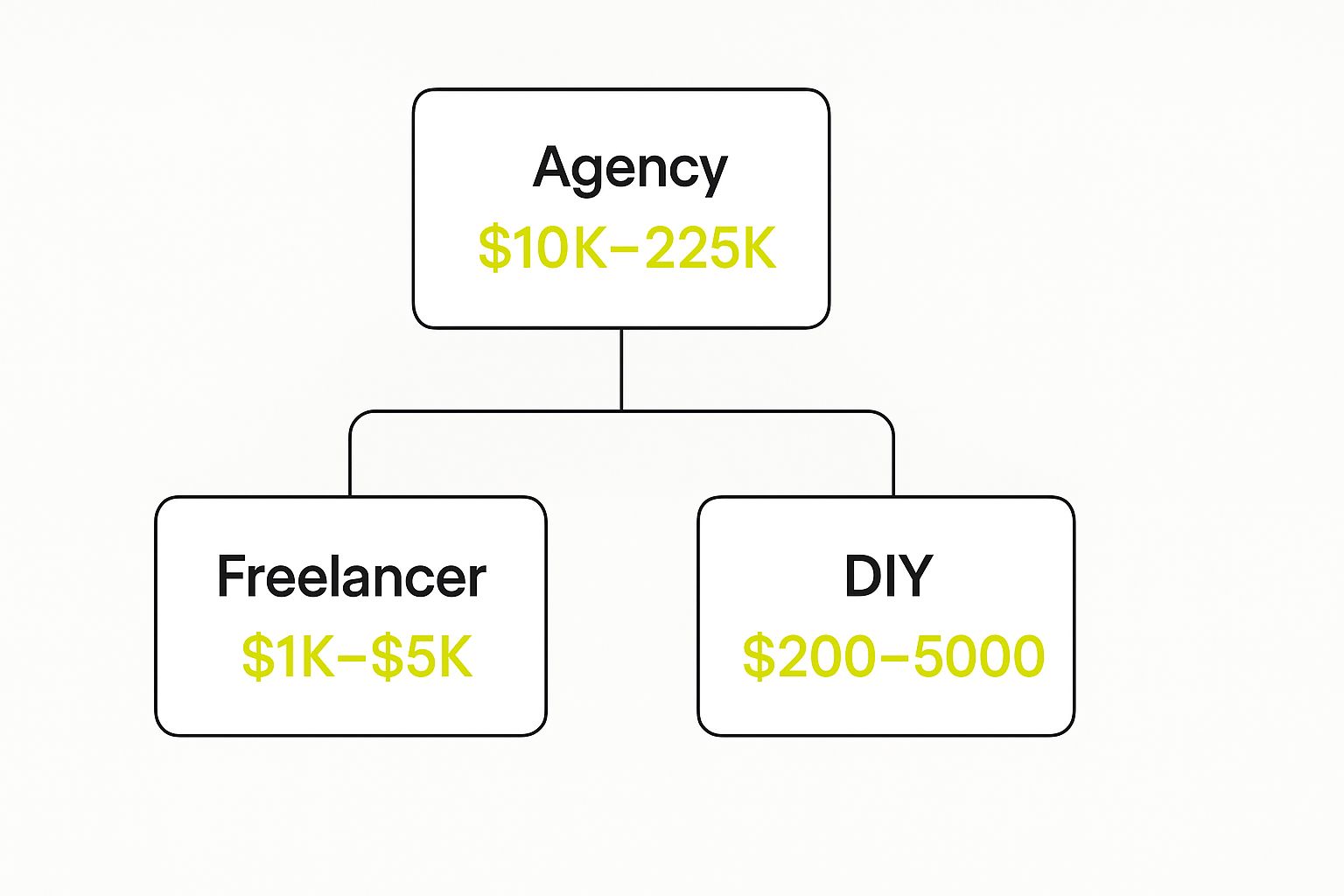
As you can see, what you pay is directly tied to who you work with. Your choice here sets the entire financial tone for the project.
Key Factors That Shape Your Budget
Your final cost isn't a single line item. It's actually a mix of several different expenses that come together. Before we get into the nitty-gritty, it helps to know what these main cost drivers are.
Here are the primary things you'll need to budget for:
- Shopify Subscription Plan: This is your monthly fee to use the platform itself. Different tiers unlock more advanced features.
- Theme Selection: Will you use a free theme, buy a premium one, or invest in a completely custom design? Each has a very different price point.
- App Integrations: Most stores need apps to add extra functionality, and many of these come with their own monthly subscription fees.
- Professional Services: This is the cost of hiring help, whether it's a freelancer or an agency for design, development, or marketing tasks.
Key Takeaway: Building a Shopify store isn't a one-time purchase. It’s a mix of initial setup costs and ongoing operational expenses. Understanding each piece of the puzzle helps you budget smarter and avoid any nasty financial surprises down the road.
Understanding Shopify's Core Platform Costs
Before we even get into custom designs or fancy features, let's talk about the ground-level costs. These are the unavoidable expenses that come with using the Shopify platform itself—the foundation of your entire budget.
Think of it like leasing a physical storefront. You have to pay the rent before you can even think about what color to paint the walls or what kind of shelves to install.
Choosing the Right Shopify Subscription
The biggest fixed cost you'll face is your Shopify subscription plan. It's the monthly fee that gets you access to all of Shopify's core e-commerce tools, secure hosting, and support. Shopify has a few different tiers, and each one is built for businesses at different stages of their journey.
Picking the right plan is a bit like choosing a mobile phone contract. You don't want to pay for unlimited data if you only ever send a few texts. Each Shopify plan comes with different features, transaction fees, and reporting tools, so it’s important to find the one that fits what you need right now.
Here’s a quick snapshot of the main plans Shopify offers.

The best part about Shopify's pricing is that it’s designed to grow with your business. The Basic Shopify plan, which runs about $39 per month, is the perfect starting point for anyone just launching or testing out a new idea. It gives you everything you need to build a functional store and get basic sales reports.
As your sales pick up, you can easily jump up to the Shopify plan or the Advanced plan to unlock lower transaction fees and much more detailed analytics.
Expert Tip: Don't overthink it at the start. Begin with the Basic plan. You can upgrade with a couple of clicks as your sales grow and you actually need those more advanced features. This keeps your initial investment nice and low.
For the big players doing serious volume, there’s Shopify Plus. This enterprise-level plan starts around $2,000 per month and is a whole different beast, offering massive customization potential, a dedicated support team, and tools built for complex, high-growth operations. If you're deciding between the standard plans and the enterprise solution, our deep dive into Shopify Plus vs Shopify is a must-read.
Your Domain Name: The Digital Address
Next up is your domain name. This is your store’s unique address on the web (like yourcoolbrand.com), and it's a huge part of your brand identity. It's how people will find you and remember you.
- Cost: A standard domain name will usually set you back $15 to $20 per year.
- Where to Buy: You can grab one directly through Shopify when you sign up, which is super convenient, or you can use a third-party registrar like GoDaddy or Namecheap.
It’s a small price to pay, but having a professional domain is non-negotiable. It instantly makes your business look more credible.
The Cost of a Shopify Theme
The last piece of the core cost puzzle is your theme. The theme is essentially the design template that controls the entire look and feel of your online store. The Shopify Theme Store has a ton of options, so you can find something that fits your budget and brand.
Your choice here has a real impact on both your startup costs and what you might spend on development down the line.
- Free Themes: Shopify offers a handful of fantastic free themes. They’re well-coded, mobile-friendly, and perfect for getting started without spending a dime.
- Premium Themes: These are paid themes that typically cost between $150 and $350 as a one-time purchase. For that price, you get more advanced features, much more design flexibility, and direct support from the people who built the theme.
Honestly, investing in a premium theme is often a smart move. While it adds an upfront cost, a good theme can save you thousands in custom development later. Many come with powerful, built-in features—like mega menus, advanced product filters, or quick-view popups—that you’d otherwise have to pay a developer to build from scratch.
Choosing Your Path: Design and Development Costs

This is where your Shopify website development cost can really swing one way or the other. The choices you make right here in the design and development phase will have the single biggest impact on your total budget. It's the difference between a project costing a few hundred dollars and one that commands a five-figure investment.
To simplify things, think of it like taking care of your car. You've got three main choices, each with its own mix of cost, time, and skill. You can change the oil yourself (the DIY route), call a trusted local mechanic for a specific repair (hiring a freelancer), or take it to the dealership's full-service center for a major overhaul (partnering with an agency).
Let's break down what each of these paths looks like for your Shopify store.
The DIY Approach: A Budget-Friendly Start
The Do-It-Yourself path is hands-down the most affordable way to get your store online. It's perfect for startups and solo entrepreneurs working with a tight budget. When you go this route, you wear all the hats—you're the designer, the developer, and the project manager.
Your main costs will be your Shopify plan, a domain name, and maybe a premium theme. You'll lean heavily on Shopify’s user-friendly drag-and-drop editor and the built-in customization options that come with your theme.
- Total Estimated Cost: $200 – $1,500
- Time Commitment: High. Be ready to block out significant time for learning and building.
- Best For: New businesses, simple stores with standard features, and founders who have more time than money.
Going the DIY route is incredibly empowering, but what you save in cash, you pay for with your own time. If you're excited to learn and have a clear vision for a straightforward store, this is a fantastic way to begin.
Hiring a Freelancer: The Expert for Specific Jobs
When you need a professional touch but aren't ready for a complete overhaul, hiring a Shopify freelancer is the perfect middle ground. A freelancer is your specialist—the expert you bring in for specific tasks that are just a bit beyond your comfort zone.
This could be anything from tweaking your theme's code and setting up a tricky app integration to designing a standout brand logo. You get laser-focused expertise without the high overhead of a big team. This path strikes a great balance between professional quality and controlled spending.
Key Insight: Freelancers are at their best with targeted, well-defined tasks. The secret to success is giving them a crystal-clear brief. Know exactly what you need them to do before you even start looking.
Freelancers usually charge by the hour (from $45 to $150+) or on a per-project basis.
- Total Estimated Cost: $1,500 – $5,000
- Time Commitment: Medium. You'll still need to manage the project and communicate your vision effectively.
- Best For: Businesses with a solid foundation that just need help with specific technical or design hurdles.
This approach gives you access to specialized talent to elevate your store beyond a basic template, making it a popular choice for growing businesses. If you're curious about the technical side, our guide on how to build a Shopify theme offers a great look into what's involved.
Partnering with an Agency: The All-In-One Strategic Solution
For established businesses aiming for a truly custom, high-performance e-commerce machine, partnering with a Shopify agency is the top-tier option. An agency isn't just a developer; they're a strategic partner who brings a full team of experts to the table.
This team typically includes:
- Project Managers to keep everything on schedule and within budget.
- UI/UX Designers to craft a beautiful and intuitive customer journey.
- Developers to build custom features and guarantee rock-solid performance.
- SEO Specialists to make sure your store is built for visibility from day one.
An agency takes a 30,000-foot view of your business goals, building a store that isn’t just visually stunning but is also fine-tuned for conversions and built to scale. They handle everything from the initial strategy sessions to post-launch support. This comprehensive service comes at a premium, but for businesses ready to grow, the return on investment can be huge.
- Total Estimated Cost: $5,000 – $25,000+
- Time Commitment: Low to medium. Your main role is to provide feedback and make key decisions.
- Best For: Serious, high-growth brands and enterprise-level businesses that need a custom, end-to-end solution.
Ultimately, choosing between these paths comes down to a simple trade-off between time, money, and expertise. The DIY route demands your time, a freelancer requires your management, and an agency needs your budget. If you're honest about your resources, you can confidently pick the path that aligns perfectly with where your business is headed.
How Shopify Apps and Integrations Affect Your Budget

If your Shopify theme is the storefront, then apps are the engine that makes everything run. They add all the cool features and powerful functionality that turn a basic site into a selling machine. Think of your store like a brand-new smartphone—it works great right out of the box, but you only unlock its real power once you start downloading apps.
The problem is, just like with a phone, those app costs can sneak up on you and become a huge hidden expense in your overall Shopify website development cost.
This is a classic trap for new store owners. You log into the Shopify App Store, see over 8,000 apps, and start installing tools for everything from pop-ups to loyalty programs. Before you know it, you’ve got "app bloat"—a dozen subscriptions that slow your site to a crawl and drain your bank account every month.
Each app adds another line item to your monthly bill. A few dollars here and there might not seem like much, but it all adds up. The smart move is to be ruthless about the return on investment (ROI) for every single app you even consider.
Understanding App Pricing Models
To get a grip on your budget, you first need to know how these apps make their money. Most fall into one of three buckets.
- Free: These apps cost nothing to use and typically solve one simple problem, like adding social media icons. While the price is right, you still want to be careful not to install too many, as they can weigh down your site's performance.
- Freemium: This is probably the most common model you'll see. The app gives you a free plan with basic features, hoping you'll upgrade to a paid tier once you need more power. A good example is an email app that’s free for your first 500 subscribers but requires a paid plan as your list grows.
- Paid (Monthly Subscription): The most powerful apps usually run on a monthly subscription. Fees can be as low as $10 per month for a simple utility or climb to $200+ per month for sophisticated systems like enterprise-level loyalty programs.
Key Takeaway: Treat every app like a business investment. Before you click "install," ask yourself: "Will this tool actually help me make more money, save time, or make my customers happier?" If the answer isn't a clear "yes," it’s probably a want, not a need.
Budgeting for Essential Integrations
Your app budget shouldn't be random; it should be built around a core set of tools that actively grow your business. Every store is different, but certain types of apps consistently deliver a clear return, making them a no-brainer for your spending.
Focus your money on functionality that directly impacts your bottom line. To give you a head start, our guide on the best Shopify apps to increase sales breaks down some of the top performers in this space.
Don't forget about payment gateways, either. Shopify Payments is great, but you might need other options for different markets. A good payment gateway fees comparison is crucial for figuring out which one will be the most cost-effective for your specific business.
Here are a few app categories that are almost always worth the money:
- Email & SMS Marketing: Tools like Klaviyo let you talk directly to your customers, building relationships and driving repeat sales with automated campaigns.
- Customer Reviews: Apps like Judge.me or Loox build trust and social proof. Nothing sells a product better than seeing other happy customers.
- SEO Optimization: Getting your search engine rankings up is the key to driving organic, "free" traffic to your store for years to come.
- Upsell & Cross-sell: These apps are fantastic for boosting your average order value (AOV) by suggesting relevant products to shoppers as they check out.
By focusing your budget on these high-impact areas, you can make sure your monthly app spend is an investment, not just an expense.
Planning for Ongoing Maintenance and Growth Costs
Getting your Shopify store live is a huge achievement, but it’s really just the starting line. Too often, I see entrepreneurs pour everything into the initial Shopify website development cost, only to forget about budgeting for what comes next. The real secret to making it in e-commerce is planning for the ongoing costs that keep your store healthy, secure, and actually growing.
Think of it like buying a new car. The sticker price gets you the keys, but you still need gas, insurance, and regular oil changes to keep it running smoothly. Your online store is no different. These recurring expenses aren't just bills; they're investments in your store's future.
The Non-Negotiable Recurring Fees
Some costs are just part of doing business on Shopify. These are the fixed, predictable expenses you’ll see month in and month out. Getting caught off guard by these can sink a new business fast.
There are three big ones to always keep in mind:
- Your Shopify Subscription: This is the basic rent for your spot on the internet. It covers your hosting, security, and all the core platform tools.
- Monthly App Fees: Those handy apps you added for special features? Many of them come with their own monthly subscriptions.
- Payment Processing Fees: For every single sale, a small slice goes to the payment processor for securely handling the customer's money.
It’s so important to track these. A few dollars for an app here and a percentage point there might not seem like much, but they can easily add up to a hefty monthly bill if you’re not watching closely.
Budgeting for Maintenance and Updates
On top of the fixed fees, you have to plan for general upkeep. The digital world changes constantly, and your store needs to keep up. This means updating your theme to fix security holes, sorting out app conflicts that pop up, or making small design changes to improve how customers experience your site.
Expert Insight: I always recommend setting aside a small monthly retainer for a developer or agency. Having an expert on call means you can get problems fixed right away without a massive, unexpected invoice. It’s peace of mind that keeps your store running without a hitch.
The long-term cost of running a Shopify store is a mix of these predictable and variable expenses. Your base Shopify plan can be anywhere from $39 to over $2,000 a month. Then, you can expect to add another $100 to $500 per month for essential maintenance like layout tweaks and security updates. You can discover more insights about this cost breakdown and see how these figures stack up in a real-world scenario.
Fueling Your Growth with Marketing and SEO
Here’s the thing: a perfect store is worthless if no one ever sees it. This is where your growth budget comes in, and frankly, it's the most critical ongoing investment you'll make. You need a consistent plan to find new customers and keep your current ones coming back for more.
This part of your budget is all about driving traffic and making sales.
- Digital Marketing: This is your paid advertising on platforms like Google, Facebook, or Instagram. It's the quickest way to get your products in front of the right people.
- Search Engine Optimization (SEO): SEO is the long game. It’s all the work you do to make your site rank higher in Google search results, which brings in a steady flow of free, high-quality traffic over time.
- Content Creation: Things like writing blog posts, creating social media content, and sending out email newsletters are vital for building your brand and connecting with your audience.
These aren't optional add-ons; they are the engine of your business. Without setting aside a real budget for marketing and SEO, even the most beautiful store will struggle to get off the ground. By planning for these costs from day one, you’re setting yourself up not just to launch, but to actually succeed.
Smart Tips to Keep Your Shopify Development Spend in Check
Managing your Shopify website development cost isn't about being cheap; it's about being smart. With a solid game plan, you can launch a killer store without your budget spiraling out of control. The whole point is to make every dollar count, investing in things that will actually help you make sales and grow your business.
It’s all about getting the most bang for your buck right from the start.
Start Lean with a Great Theme
One of the easiest ways to keep those initial costs down is to start with a high-quality free theme from Shopify. Seriously, many of them are fantastic. They're built well, look great on mobile, and have all the core features you need to get your store off the ground.
Think of it like building a house. You start with a solid foundation before you worry about the fancy Italian marble countertops. You can always upgrade to a premium theme or hire a designer for custom work later, once you're making money and have a better feel for what your customers actually want. This approach keeps you from blowing your budget on fancy features you might not even need.
Only Add Apps with a Clear ROI
The Shopify App Store is like a candy store—it’s tempting to grab everything. But be careful, because those monthly fees can add up fast. You need to be ruthless about which apps you install. Only choose tools that have a direct, measurable impact on your bottom line.
Pro Tip: Before you click "install" on any paid app, ask yourself: "Will this tool pay for itself through more sales or by saving me a ton of time?" If you can't give a confident "yes," then it's a "no" for now.
For example, focus your budget on apps that deliver real value, like:
- Cart Abandonment Tools: These are a no-brainer. They exist purely to win back lost sales, giving you an immediate return on your investment.
- Email Marketing Integrations: Building your email list is one of the most powerful things you can do. It's how you get customers to come back again and again.
- Customer Review Platforms: Good reviews build trust and convince people on the fence to buy. This social proof is proven to boost conversion rates.
Nail Down Your Content and Project Scope
Finally, two of the best financial decisions you can make happen before a developer writes a single line of code. First, invest in top-notch product photos and persuasive copywriting. These assets do the heavy lifting when it comes to turning browsers into buyers. Great content can make even a basic theme look amazing and perform like a champ.
Second, if you're hiring a developer, write out a crystal-clear project scope. Define exactly what you need built. This prevents "scope creep"—that slow trickle of "can you just add this one more thing?" that ends up doubling your final bill. A detailed brief gets everyone on the same page and keeps your project on time and, most importantly, on budget.
Got Questions? We've Got Answers
Thinking about the money side of building a Shopify store can feel a bit overwhelming. Let's clear up some of the most common questions so you can move forward with confidence.
What's the Real Cost to Get a Basic Shopify Store Off the Ground?
If you're willing to roll up your sleeves and do the work yourself, you can get a basic Shopify store up and running for as little as $200 to $500.
That initial budget usually covers your first month on the Basic Shopify plan, a solid premium theme, and your own domain name. Just remember, this DIY route means you're in charge of everything—from the initial setup and design to uploading all your products.
Is it Cheaper to Hire a Freelancer or a Shopify Agency?
For smaller, more specific tasks, a freelancer is almost always the more budget-friendly choice. You can expect to pay anywhere from $500 to $5,000 for things like theme customizations or setting up a few apps.
An agency, on the other hand, provides a full-service experience—strategy, design, development, and a project manager to keep it all on track. Their prices reflect this, typically starting around $5,000 and climbing past $25,000 for highly custom, complex projects. Your best bet depends entirely on how big your project is and how much hands-on support you need.
Think of it this way: a freelancer is your specialist for a specific job. An agency is your strategic partner for the entire journey.
Can I Change My Shopify Plan Later?
Absolutely. Shopify is built for flexibility, making it incredibly easy to switch your subscription plan whenever you need to.
A lot of new businesses start with the Basic plan to keep those initial costs low. Once your store starts picking up steam and sales are growing, you can easily upgrade to the 'Shopify' or 'Advanced' plans to unlock better features, like in-depth reporting and lower transaction fees.
Ready to build a Shopify store that not only looks incredible but actually gets results? The team at E-commerce Dev Group is here to make it happen. Get a free quote today and let's start building your e-commerce success story together.
