

Getting started with Shopify SEO means setting up your store to rank higher in search engines like Google. The whole point is to attract free, organic traffic from people who are already looking for what you sell. It’s about turning your store into a long-term asset, not just a temporary stop for paid ad clicks.
Building Your Shopify SEO Foundation
Let's get real for a second. If you're only running paid ads, you're essentially renting traffic. The moment you turn off the ad spend, the visitors vanish. Search Engine Optimization (SEO) is a totally different game. It's about building a powerful, free customer acquisition machine that brings ready-to-buy shoppers to your store, day in and day out.
Think of SEO as teaching Google what your store is all about. When a search engine clearly understands that your page is dedicated to "Handmade Leather Wallets," it's far more likely to show it to someone typing that exact phrase into the search bar. This guide is here to pull back the curtain on that process and break it down into simple, actionable steps.
The Three Pillars of Shopify SEO
To really succeed with SEO, you need to nail three core areas. Each one has a specific job in helping search engines find, understand, and ultimately rank your store. Getting these fundamentals right from the beginning is the key to sustainable growth.
Let's quickly break down these pillars so you know exactly where to focus your energy.
Your Shopify SEO Pillars at a Glance
| SEO Pillar | What It Means for Your Store | Your First Action Item |
|---|---|---|
| On-Page SEO | Optimizing the content on your actual pages—product titles, descriptions, images, and blog posts. It's all about clarity. | Start with solid keyword research to find what your customers are searching for. |
| Off-Page SEO | Building your store's authority and reputation off your website. Think of backlinks from other sites as votes of confidence. | Identify a few relevant blogs or influencers in your niche to connect with. |
| Technical SEO | The "under the hood" stuff that helps search engines crawl your site. This includes site speed, mobile-friendliness, and a clean URL structure. | Run a quick mobile-friendly test to ensure your store looks great on all devices. |
These three pillars work together to build a strong foundation. You can't just focus on one and expect amazing results; they all support each other.
This infographic gives you a great visual of how these pieces fit together.
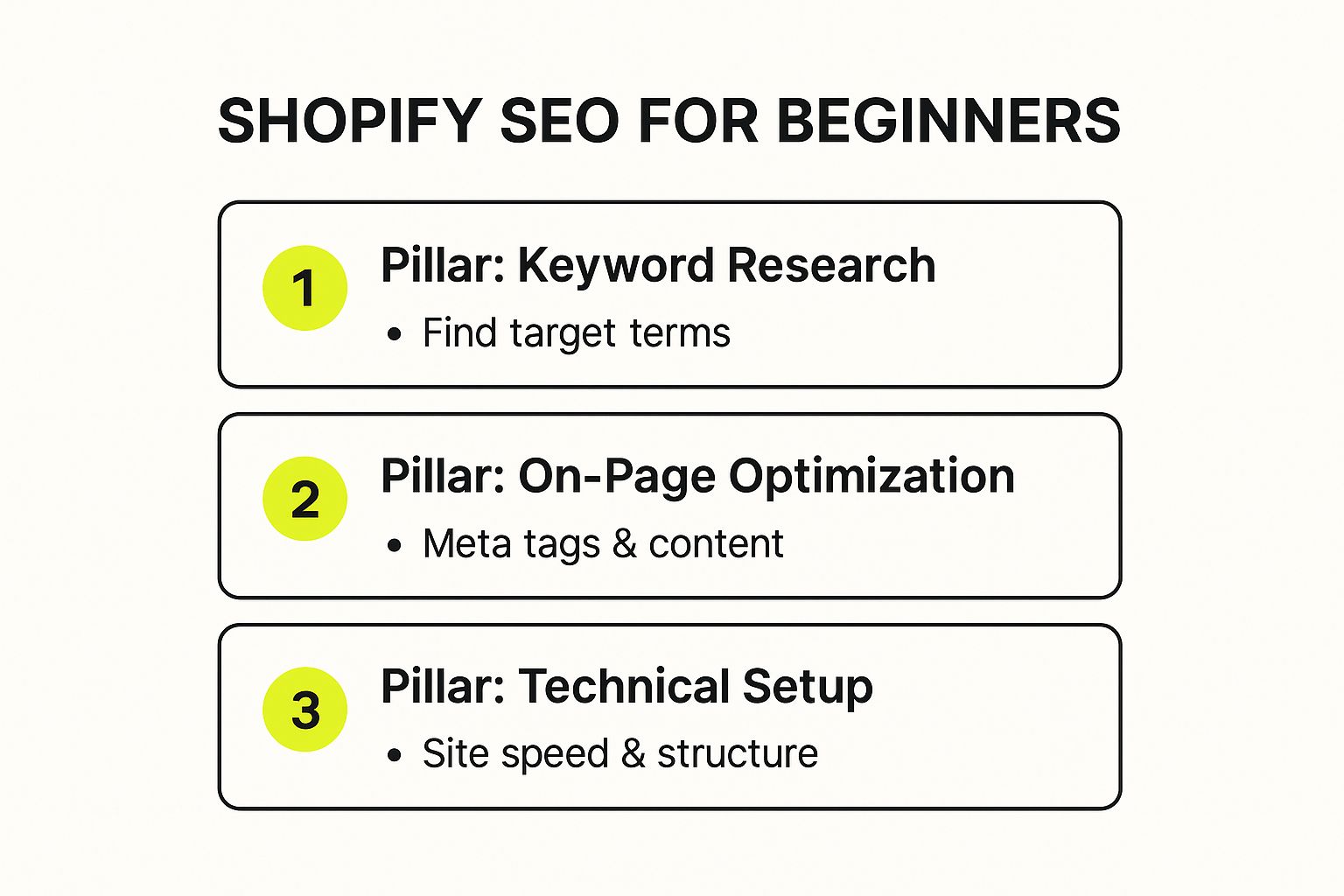
As you can see, your first moves should always be figuring out your keywords, tweaking your on-page elements like meta titles, and making sure the technical side of your shop is in good shape.
The real magic of SEO is that it brings in visitors who are ready to buy. A person searching "buy non-slip cork yoga mat" has a much higher purchase intent than someone just scrolling through social media. That's why organic traffic is so valuable.
The numbers back this up. In 2025, SEO continues to be a massive channel for e-commerce. Just look at the data: Shopify stores collectively saw a staggering 135 million visits in September 2024 alone, and organic search drove 13.81% of that traffic. That's a huge audience of potential customers who are actively looking for products. To make sure you're capturing your share, following a detailed Shopify SEO checklist is the best way to start.
Finding Keywords That Actually Drive Sales
Let’s get one thing straight: keyword research is the absolute foundation of your Shopify store's SEO. It's not about guessing or picking phrases that sound popular. It's about getting inside your customer's head and figuring out the exact words they type into Google when they're ready to buy something.
If you nail this part, you'll attract a steady stream of shoppers who are already looking for what you sell. But it's about more than just traffic. We need to understand why someone is searching. Are they just browsing for ideas, or are they ready to pull out their wallet? That difference is everything.
Uncovering High-Intent Keywords
The real money is in keywords with high commercial intent. These are the phrases people use when they have a strong urge to buy. Put yourself in their shoes—what would you search for if your credit card was already on your desk?
Imagine you sell eco-friendly yoga mats. You’d want to go after terms like:
- "non-slip cork yoga mat for sale"
- "buy sustainable TPE yoga mat"
- "best eco yoga mat under $50"
See the pattern? These are transactional. They often include words like "buy," "sale," or "discount," and might even specify features like a color or material. Someone searching this way isn't just kicking tires; they're in the final stages of making a decision. These are your product page keywords, plain and simple.
Tapping into Informational Keywords
Now, what about the people who aren't quite ready to buy? They’re using informational keywords to find answers and advice. While these searches don’t lead to immediate sales, they are pure gold for building your brand's authority. This is where your blog comes in.
For that same yoga mat store, these keywords might look like:
- "how to clean a cork yoga mat"
- "benefits of a TPE yoga mat"
- "what to look for in a yoga mat"
By creating genuinely helpful blog posts that answer these questions, you become a trusted expert. This content attracts a much wider audience and gives you the perfect chance to link back to your product pages, guiding visitors from learning to buying.
I see so many new store owners chasing "buy now" keywords exclusively. That’s a mistake. You need to build a sales funnel that captures people at every stage, not just the finish line. Answering questions with your content is how you do that.
Brainstorming Your Seed Keywords
Okay, let's get practical. The first thing to do is jot down a "seed list" of your core product terms. Don't overthink it. Just list all the basic ways you'd describe what you sell.
If you were selling handmade leather wallets, your seed list might be as simple as:
- leather wallet
- men's wallet
- bifold wallet
- cardholder wallet
- handmade leather goods
This list is your launchpad. From here, we'll use some simple tools to uncover all the long-tail variations your actual customers are searching for.
Using Free Tools to Find Gold
You absolutely do not need to pay for expensive software right away. Google itself provides some of the most powerful research tools out there, and they're completely free.
- Google Autocomplete: Type a seed keyword into the search bar but don't hit enter. Pay close attention to the suggestions that appear—those are real, popular searches happening right now.
- "People Also Ask" Section: Look for this box in the search results. It’s a fantastic source of questions your audience has, making it a goldmine for blog post ideas.
- Related Searches: Scroll all the way to the bottom of the search results page. Google lists a handful of related terms that can reveal some hidden gems and long-tail keywords you hadn’t considered.
Before you go too deep, a smart move is to see what’s already working for your competitors. This comprehensive guide to website competitor analysis is a great resource for learning how to see what your rivals are ranking for. Why reinvent the wheel? By seeing which keywords already drive traffic in your niche, you can find gaps in their strategy and carve out your own space.
Optimizing Your Product and Collection Pages
Alright, you've done your keyword research. Now it's time to put those words to work where it really counts: your product and collection pages. These pages are the bread and butter of your store, and optimizing them is the fastest way to get search traffic to actually buy something.
This isn't about clumsily stuffing keywords into every nook and cranny. It's about being smart and strategic, signaling to both Google and your customers precisely what you're selling.
Think of it this way: each product page is a specific answer to a customer's question. When someone searches for a "handmade leather bifold wallet," they expect to land directly on that product, not your homepage. Nailing this is a cornerstone of good Shopify SEO for beginners.
The screenshot above gives you a peek at a standard Shopify product template. You can see the key areas—title, description, images—where we're going to focus our efforts. Every single one of these elements is a chance to tell Google what you’re about and convince a visitor to click "add to cart."
Writing Titles That Get Clicked
Your product title is often the very first thing a potential customer sees in the search results. On your page, it also serves as the H1 tag, which is a huge signal to Google about the page's main topic. The goal here is simple: be clear and be relevant.
A solid formula I've used time and again is: Primary Keyword + Key Feature/Benefit + Brand Name
Let’s put it into practice. A generic title like "Yoga Mat" is forgettable. But what about "Eco-Friendly Cork Yoga Mat | Non-Slip Grip | YourBrand"? This version is miles better. It tells searchers exactly what the product is, highlights a major benefit, and reinforces your brand.
Crafting Compelling Meta Descriptions
While Google says the meta description isn't a direct ranking factor, I can tell you from experience it's your 160-character sales pitch in the search results. A great one makes people click your link over the three others on the page.
Here are a few quick tips for writing effective meta descriptions:
- Weave in your primary keyword. This makes your link look more relevant to the searcher.
- Highlight a unique selling point. Do you offer free shipping? A lifetime warranty? Mention it!
- End with a call to action. Simple phrases like "Shop Now" or "Discover the Difference" work wonders for click-through rates.
This is your chance to stand out. Don't just let Shopify auto-generate it—take a minute to write a custom one for your most important products.
The Power of Unique Product Descriptions
Here’s where so many store owners drop the ball. They just copy and paste the manufacturer's description. That's a massive mistake. Not only does duplicate content risk hurting your rankings, but it's a completely wasted opportunity to connect with your customers.
Your product description needs to be unique, persuasive, and genuinely helpful. Don’t just list features; sell the experience. Instead of saying, "Made from 100% cotton," try something like, "Crafted from breathable, 100% organic cotton for cloud-like comfort all day long."
For a deeper look into writing copy that sells, our guide on SEO for product descriptions is packed with advanced techniques.
Think like a copywriter, not just a store owner. Get inside your customer's head. What questions do they have? What problem does your product solve for them? Answer those questions before they even have to ask.
There’s a reason SEO is still a top growth channel. Paid ads can give you a quick spike, but solid SEO builds a long-term, sustainable asset. In fact, research for 2025 shows that the very first result in Google gets a whopping 27.6% of all clicks. That statistic alone shows why every bit of optimization matters for Shopify merchants. You can see more on why SEO is the number one driver of Shopify sales on bluesoftdesign.com.
Optimizing Your Images for Visual Search
Images are obviously vital for e-commerce, but they’re an often-missed SEO opportunity. Google can't "see" your photos, so you have to give it some context using alt text (alternative text).
Alt text is just a short, descriptive sentence that explains what's in the image. It does two things: it makes your site accessible to visually impaired users, and it tells search engines what your image is about, which can help you rank in Google Images.
So, for a product photo, a good alt text would be:
"Hand-stitched brown leather bifold wallet with six card slots open on a wooden table."
That’s so much more descriptive and useful than a blank alt tag or a default filename like "IMG_1234.jpg". Whenever it makes sense, naturally include your keywords in the alt text. It's a simple step, but it's a quick and easy win.
Making Technical SEO Simple on Shopify
The phrase "technical SEO" often makes people nervous, but I've got good news: Shopify handles most of the heavy lifting for you. You don’t need to be a developer to get this right. Your job is to focus on a few key areas that will give your store a serious edge over the competition.
Our goals here are simple: make your store fast, ensure it works perfectly on mobile, and make it incredibly easy for Google to find and understand your pages. These aren't just minor tweaks; they're the foundation for everything else you'll do to rank higher.
Checking Your Mobile-Friendliness and Speed
First things first: pull out your phone and browse your own store. Shopping on mobile isn't a "trend" anymore—it's how most people buy things. Google knows this and gives a massive boost to sites that deliver a smooth mobile experience.
Thankfully, every theme in the Shopify Theme Store is already built to be mobile-responsive. Still, you need to test it yourself.
- Load your site on your phone. Does it pop up quickly? Is the text readable, or do you have to pinch and zoom?
- Try the navigation. How easy is it to jump between collections and find specific products?
- Walk through the checkout process. Is it a breeze, or is it frustrating on a small screen?
Beyond just looking good, your store has to be fast. A slow website doesn't just annoy visitors; it actively hurts your ranking. Just a one-second delay in page load time can cause a 7% drop in conversions.
A great way to check your performance is with Google's PageSpeed Insights. It’s a free tool that analyzes your site and gives you actionable feedback, like flagging large images that need to be compressed—a task you can easily handle with a simple Shopify app.
Giving Google a Map to Your Store
Before Google can rank your products, it needs to find them. The most direct way to help is by submitting your sitemap, which is exactly what it sounds like: a map of all the important pages on your website.
Shopify automatically creates this for you. All you have to do is go to yourstore.com/sitemap.xml to see it.
Once you have that link, you'll want to submit it to Google Search Console. This free tool is non-negotiable for any serious store owner. It's your direct line of communication with Google, letting you monitor your site's health, see what keywords people are using to find you, and tell Google when you’ve added new content.
Think of submitting your sitemap as handing Google the blueprints to your house. You're showing it exactly where all the rooms (pages) are, making it much easier and faster for it to explore and understand everything you have to offer.
Demystifying Structured Data and Rich Snippets
Ever notice those search results that have star ratings, prices, or "in stock" info right on the Google page? Those are called rich snippets, and they’re powered by something called structured data (also known as schema markup).
This little bit of code helps Google understand the context of the information on your page. It tells Google, "Hey, this number here is the price," or "This is the average review rating."
Having this data makes your listings far more eye-catching in a crowded search page, which can dramatically boost your click-through rate. Shopify themes already include basic product schema, but you can take it even further. To really make your products stand out, check out our guide on how to add schema markup to Shopify.
Essential Shopify SEO Apps for Beginners
To wrap this up, let's talk about tools. The Shopify App Store is packed with apps that can automate many of these technical tasks for you. You don't need a huge budget; in fact, many of the best ones have free plans that are perfect for getting started.
Here’s a quick comparison of user-friendly apps to help you manage key technical and on-page SEO tasks.
| App Name | Key Feature | Best For |
|---|---|---|
| Booster SEO | All-in-one tool for image optimization, broken link fixes, and meta tags. | Beginners who want a single app to handle multiple core SEO tasks. |
| Avada SEO Image Optimizer | Automatically compresses images and adds alt text to improve page speed. | Store owners with lots of product images who need a "set it and forget it" solution. |
| Judge.me | Collects product reviews and automatically adds review schema to get star ratings in search. | Anyone looking to build trust and get those eye-catching rich snippets for their products. |
Using an app or two can take a lot of the work off your plate, freeing you up to focus on what really matters: your products and your customers. By handling these simple technical steps, you're building a rock-solid foundation for your store's long-term success.
Building Authority with Content and Links
Alright, we’ve nailed the on-page and technical stuff for your product pages. But if you really want to climb the search rankings and stay there, you need to build genuine authority. This is where creating truly helpful content and earning links from other websites come into play.
Think of it this way: Google wants to recommend the best, most trustworthy experts. Great content and links are how you prove you're one of them. This is less about your checkout button and more about becoming the go-to resource in your space.
Create Content People Actually Want to Read
Your blog is one of the most powerful tools you have. It's your chance to answer the questions your customers are already asking, solve their problems, and show them you know your industry inside and out. We're not talking about generic, keyword-stuffed articles. We're talking about creating real value.
Put yourself in your customer's shoes. What do they struggle with? If you sell high-quality kitchen knives, they're probably wondering how to keep them razor-sharp. Boom. That's a blog post right there.
Here are a few content ideas that work time and time again:
- In-Depth Buyer's Guides: Don't just list products; help people choose. A guide titled "The Ultimate Buyer's Guide to Cast Iron Skillets" can walk a beginner through the pros and cons of different sizes and styles, positioning you as an expert advisor.
- Practical How-To Tutorials: Show your products in action. A post on "How to Brew the Perfect Pour-Over Coffee"—complete with links to your beans and gear—is incredibly useful and builds a ton of trust.
- Creative Gift Guides: Curate product lists for specific holidays or people. A "Top 10 Father's Day Gifts for the Grill Master" guide is a fantastic way to capture seasonal search traffic from people ready to buy.
Every piece of content is another door into your store, giving you a chance to rank for new keywords and connect with people at every stage of their shopping journey.
Don’t just sell products—sell solutions. Your content is the bridge that connects a customer's problem to your product. When you solve that problem for free, they're far more likely to trust you when it's time to make a purchase.
The Power of a Good Backlink
Now for one of the most important ranking factors in all of SEO: backlinks. A backlink is just a link from someone else's website pointing to yours. Google sees each of these links as a "vote of confidence."
When a respected website links to your store, it's basically telling Google, "Hey, this site is legit. Their stuff is valuable." The more high-quality, relevant backlinks you get, the more authority your store builds, and the higher you're likely to rank.
But here’s the key: quality beats quantity, every single time. One good link from a major blog in your niche is worth more than a hundred links from spammy, irrelevant websites. Earning links is about building a great reputation, not just collecting URLs.
How to Start Earning Your First Links
"Link building" sounds complicated, but it doesn't have to be. It really boils down to creating things people want to share and building genuine relationships.
Here are a few straightforward ways to earn those first valuable backlinks:
- Collaborate with Niche Bloggers: Find bloggers whose audience is a perfect match for your products. Send them a free product for an honest review or see if they’d be open to co-creating a guide. A real review from a trusted voice can drive both traffic and authority.
- Get Featured in Gift Guides: Around any holiday, tons of publications and blogs are scrambling to create gift guides. Reach out, pitch your best products, and explain exactly why they’re a perfect fit for their list.
- Create "Link-Worthy" Content: Remember that awesome buyer's guide you wrote? It’s not just for your customers. It's a resource that other websites might want to link to when they need to reference something helpful for their own audience.
As you start building authority, you'll want to see who is linking to you and your competitors. You can learn how to find backlinks on Google to uncover these opportunities and shape your strategy.
By weaving together valuable content with a smart backlink strategy, you create an SEO powerhouse that doesn't just rank—it builds a brand that customers trust and return to again and again.
Your Shopify SEO Questions Answered

When you first dive into Shopify SEO, it's easy to feel overwhelmed. There's a lot of jargon and conflicting advice out there, and you probably have a ton of questions. That’s totally normal.
Let's clear the air. I've put together some straightforward answers to the questions I hear most often from store owners just like you. My goal is to help you sidestep the confusion and focus on what actually moves the needle.
How Long Does Shopify SEO Take to Work?
This is the million-dollar question, isn't it? The honest, no-fluff answer is that SEO is a long game. It’s a marathon, not a sprint. While you might see a few flickers of progress in the first month or two, you should plan on it taking 4-6 months to see substantial, meaningful results in your traffic and rankings.
Think of it this way: you're building trust with Google. That doesn't happen overnight. But with steady, consistent effort—publishing great content, optimizing your pages, and building your site’s authority—you'll see that investment pay off. Consistency is everything.
Do I Need an Expensive App for Shopify SEO?
Definitely not, especially when you're just getting started. There are some powerful paid apps out there, but you can get amazing results by just mastering the basics with Shopify's built-in features.
Before you spend a dime on an app, make sure you've nailed these fundamentals:
- Smart Keyword Research: You can find great keywords for free just by using Google's own "People Also Ask" section and paying attention to autocomplete suggestions.
- Solid On-Page SEO: Write compelling, unique titles, meta descriptions, and image alt text right inside your Shopify admin. It's all there.
- Helpful Content: Focus on creating genuinely useful product descriptions and blog posts that answer your customers' real questions.
Once you have that solid foundation in place, you can look at apps to help you scale your efforts. But they're a "nice-to-have," not a "need-to-have," for success.
Is Blogging on Shopify Good for SEO?
Yes, a thousand times yes! A blog is one of the most powerful SEO assets you can have. It's your secret weapon for attracting shoppers who are still in the research phase and aren't quite ready to pull out their credit cards.
Here’s what a good blog really does for you:
- Targets "Question" Keywords: It helps you show up for searches like "how to choose the right running shoes" instead of just "men's running shoes."
- Builds Your Authority: You become the go-to expert in your niche, which builds incredible trust.
- Earns You Backlinks: Great content gets shared and linked to by other websites, which is pure gold for SEO.
- Creates a Path to Purchase: You can naturally guide readers from an informative article directly to a relevant product page.
Every blog post is a new hook in the water, giving Google another reason to send qualified traffic your way.
If you're just starting out, focus all your energy on two things: solid keyword research and on-page optimization for your core product and collection pages. Getting these right will give you the biggest bang for your buck and create a strong foundation for everything else you do. Don't get bogged down with advanced tactics until these are dialed in.
Getting these fundamentals right is your clearest path forward on your Shopify SEO for beginners journey.
At E-commerce Dev Group, we specialize in transforming Shopify stores into powerful sales machines through expert design, development, and SEO. If you're ready to scale your business and dominate your market, we're here to help. https://scaleshopify.com
