


A proper website audit is a full-on health check for your online store. It's about systematically digging into your site's technical health, on-page SEO, performance, user experience, and security. Think of it as a deep diagnosis to find problems and, more importantly, spot opportunities to boost your rankings and keep visitors happy.
Your Starting Point For a Powerful Website Audit
Before you get lost in the technical details, let’s get our heads in the right space. A website audit isn’t just a hunt for broken stuff. It’s a strategic game plan for unlocking your site's hidden potential. This is how you turn your website from a digital brochure into a powerful sales machine.
This guide will walk you through the audit process using five core pillars. This framework gives you a clear path, so you're not just randomly fixing links or changing page titles. You'll be making smart, data-backed decisions that actually drive sales, generate leads, and build your brand.
The Five Pillars of a Website Audit
To get real, measurable results from your audit, you need to focus your energy on five critical areas. I've found that breaking it down this way keeps the process organized and ensures nothing important gets missed.
The table below summarizes these five pillars, outlining the main goal for each and the key things you'll be looking at.
| Audit Pillar | Primary Goal | Key Areas to Check |
|---|---|---|
| Technical SEO | Ensure search engines can easily find, crawl, and index your site's content. | Crawlability, indexation, sitemaps, robots.txt, schema markup. |
| On-Page SEO | Optimize individual pages to rank higher and earn more relevant traffic. | Keyword usage, title tags, meta descriptions, content quality, internal links. |
| Performance | Deliver a fast, seamless experience to every visitor on any device. | Page load speed, Core Web Vitals, mobile-friendliness, image optimization. |
| User Experience (UX) | Make the site intuitive, easy to navigate, and conversion-friendly. | Site navigation, call-to-action placement, mobile usability, checkout process. |
| Security | Protect user data and build trust with visitors and search engines. | HTTPS implementation, SSL certificate validity, vulnerability scans. |
Looking at the audit through these five lenses helps you connect the dots between technical fixes and business outcomes.
The image below gives you a sense of just how common some of these issues are. From technical errors to missing meta descriptions, these small oversights can add up to a big negative impact.
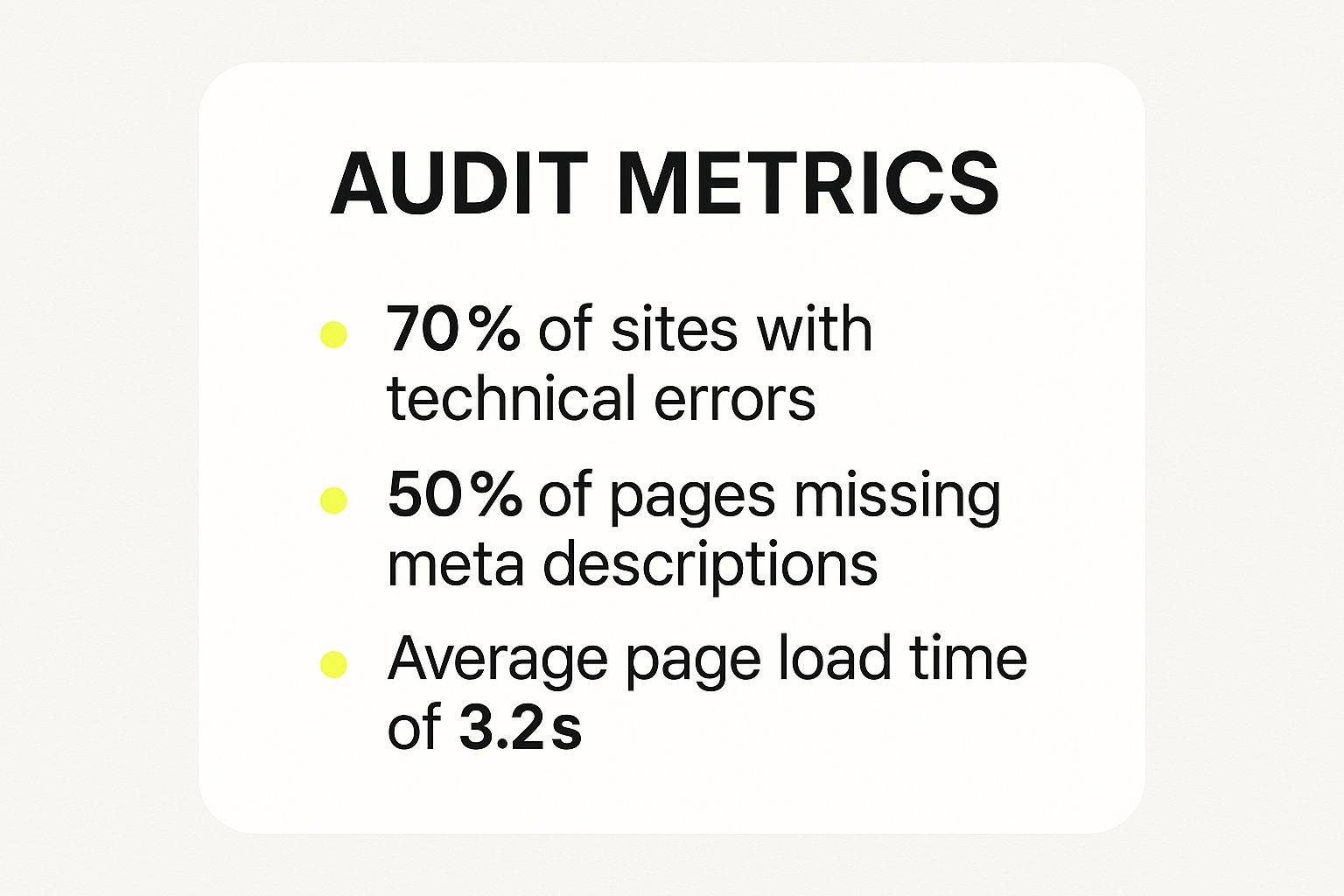
These numbers really drive home why you can't just "set it and forget it" with your website. Regular audits are non-negotiable.
The growing demand for this kind of work speaks for itself. The global market for website audit services was already valued at around $691 million in 2022 and is only expected to climb. This isn't just a trend; it shows that smart businesses see audits as a fundamental part of their strategy.
Before you roll up your sleeves and dive into the practical steps, it helps to have a solid grasp of the 'why' behind the 'how'. This piece on SEO Audits: What They Are And Why Your Ecommerce Store Needs Them is a great primer.
Building a Rock-Solid Technical SEO Foundation
Technical SEO is the invisible framework holding your entire website together. It’s all the behind-the-scenes stuff that lets search engines like Google find, understand, and rank your pages. If you get this wrong, even the best products and blog posts will be lost in the digital ether.
Think of it this way: your content is the cargo, but your technical SEO is the road network. If the roads are full of potholes and dead ends, that cargo is never going to reach its destination. Let's make sure your digital highways are clear for search traffic.
Directing Traffic with Robots.txt and Sitemaps
Your first stop should be checking how you're communicating with search engine crawlers. Two simple files are in charge here: robots.txt and your XML sitemap. They’re basically the instruction manuals you hand over to the search bots when they visit.
The robots.txt file tells search engines which parts of your site they shouldn't crawl. This is super important for blocking off sensitive areas like admin pages, customer carts, or internal search result pages that provide zero value in Google's index. A classic mistake I see all the time is accidentally blocking CSS or JavaScript files, which stops Google from properly seeing what your page looks like.
On the flip side, your XML sitemap is an open invitation. It gives Google a clean, organized list of all the pages you want it to crawl and index. A solid sitemap helps search engines discover your key product pages and collections much faster, especially if your internal linking isn't perfect yet.
My Takeaway: Get your
robots.txtfile right to keep low-value pages out of the index, and use a comprehensive sitemap to make sure your best pages get found. Messing up either one can cause serious indexing headaches down the line.
Hunting Down Crawl Errors and Broken Links
Nothing kills the user experience—or a bot's crawl—faster than a dead end. Broken links and crawl errors are those digital potholes we talked about. The best place to start this hunt is inside your Google Search Console account, specifically in the "Pages" report. It will literally give you a list of every URL Google had trouble with.
You'll probably run into a few common culprits:
- 404 Not Found Errors: These pop up when a link points to a page that doesn't exist anymore. Maybe it was an old product you deleted or a blog post where you changed the URL.
- Soft 404s: This is a tricky one. It’s when a non-existent page incorrectly reports a "200 OK" status code, essentially lying to Google that the page is fine when it's not.
- Server Errors (5xx): These are bigger problems, indicating your server is down or broken, blocking everyone—bots and humans—from accessing the page.
Fixing these is a huge priority. For any 404 errors, you need to set up a 301 redirect to send that traffic and any ranking power over to the most relevant live page. Letting 404s pile up is a clear signal to Google that your site isn't well-maintained.
Taming Duplicate Content and Canonicalization
Duplicate content is a massive issue for Shopify stores, and it often happens without you even knowing. It’s when the same—or nearly identical—content shows up on multiple different URLs. For instance, a product might be accessible through several collection pages or with weird tracking parameters tacked onto the end of the URL.
This just confuses search engines. They don't know which version is the "real" one, so they might split your ranking potential across all of them. The fix is the canonical tag. It’s a small snippet of code in your page’s header that points to the one "master" version of the page you want Google to index.
So, if a product can be found at these two URLs:
yourstore.com/products/cool-shirtyourstore.com/collections/new-arrivals/products/cool-shirt
The canonical tag on the second URL should point to the first one. This consolidates all your SEO juice into one place. Getting this right is a game-changer.
Evaluating Site Architecture and Structure
A logical site structure makes it easy for both people and search engines to find their way around. Think about a well-organized department store—everything is clearly labeled and you can get from the entrance to the specific aisle you need without a map.
Good site architecture is usually shallow. Your most important pages should never be more than three clicks away from the homepage. A standard, effective structure for a Shopify store is:
Homepage → Collection Pages → Product Pages
This clean hierarchy helps pass "link equity" (or ranking power) from your strong homepage down to your money-making product pages. As part of your audit, try to map out your site's flow. Are your key collections easy to find? Are you using breadcrumbs so people know where they are? A maze-like structure is a major red flag.
For a deeper dive into store optimization, our complete Shopify SEO checklist breaks down even more actionable steps.
Implementing Structured Data for Rich Results
Alright, let's talk about making your search results stand out. Structured data, also known as schema markup, is extra code you add to your pages that gives search engines more context about your content. This is what unlocks those eye-catching "rich results" in Google—things like star ratings, prices, and stock levels appearing right under your link.
For any Shopify store, these are non-negotiable:
- Product Schema: To show price, availability, and review ratings.
- Review Schema: To display those powerful aggregate star ratings.
- FAQ Schema: Creates a dropdown of common questions and answers right in the search results.
Rich results aren't just for show; they can seriously boost your click-through rate. A link with shiny gold stars is just way more tempting than a plain blue one, giving you an immediate edge over the competition.
Diving Into Your On-Page and Content Performance
Alright, with the technical stuff sorted, your site is officially running smoothly. Now it's time to shift our focus from the engine room to the actual storefront—the content and on-page elements that your customers and Google see. This is where we make sure every single page is pulling its weight and perfectly aligned with what people are searching for.
Great on-page SEO is so much more than just stuffing keywords onto a page. It’s really about creating genuinely useful, high-quality content that nails the user’s search query. This is where your solid technical foundation starts to pay off, as we optimize the visible parts of your site to boost rankings and, ultimately, drive sales.
Find Hidden Gold with a Content Gap Analysis
Before you start messing with your existing pages, it’s a brilliant move to figure out what you’re missing. A content gap analysis is just a fancy term for finding out what your competitors are ranking for that you aren’t. Think of it as finding a treasure map showing all the customer questions you're not yet answering.
Tools like Ahrefs or Semrush make this surprisingly easy. You can pop in a few of your main competitors' websites and see a list of keywords they rank for that are completely off your radar. This instantly highlights holes in your content strategy and shows you proven topics that your audience is already looking for.
For instance, you might see a competitor is getting a ton of traffic from a detailed guide on "how to care for wooden furniture." If you sell wooden furniture, that’s a massive sign telling you to create an even better, more helpful guide to grab a piece of that action.
By finding these content gaps, you stop guessing what to write about. You start making smart, data-driven decisions based on what's already working in your niche, which gives your content a much higher chance of succeeding.
Nailing the Core On-Page SEO Elements
Once you have some ideas for new content, it’s time to double-check that your existing pages are set up for success. This means getting into the nitty-gritty of the fundamental on-page elements that search engines rely on to understand what your content is all about.
Here’s a quick checklist of what to audit on your most important pages:
- Title Tags: This is your big, blue, clickable headline in the search results. Is it catchy? Does it have your main keyword near the front? Every page needs a unique title that tells people exactly what they're about to click on.
- Meta Descriptions: While this won’t directly affect your rankings, a great meta description is your ad copy. It needs to be compelling enough to convince someone to click your link over everyone else's. Try to include a call to action.
- Header Tags (H1, H2, H3): Headers give your content structure, which is great for both human readers and search engine bots. You should only ever have one H1 tag per page—that's your main headline. Use H2s and H3s to break up the content into logical sections.
- Image Alt Text: Alt text is a simple description of an image. It's crucial for accessibility (for visually impaired users) and helps search engines "see" what your images are about. Make sure every important image has descriptive alt text.
These basics are the absolute backbone of good on-page SEO. I’ve seen so many sites with fantastic content fail to rank simply because they overlooked these simple things.
Building a Strong Internal Linking Web
Internal linking is easily one of the most powerful—and most overlooked—parts of on-page SEO. It’s simply the act of linking from one page on your own website to another. When done right, it accomplishes two critical things: it guides your visitors to other relevant content, and it spreads ranking power (often called "link equity") throughout your site.
When you link from a strong page, like your homepage or a blockbuster blog post, to a newer page, you're essentially vouching for it. This sends a signal to search engines that the page you're linking to is also important and deserves attention.
Here’s a real-world example:
Let's say you have a blog post on "The 5 Best Shopify Apps for Marketing" that ranks on the first page of Google. Inside that article, you should absolutely be linking to your own product pages or service offerings that solve those marketing problems. This creates a natural, helpful path for a reader to go from learning something to becoming a customer.
As you go through your audit, keep an eye out for these opportunities. Use a tool like Ahrefs' "Top Pages" report to find your most authoritative pages. Then, comb through that content and find logical places to add links to other pages you want to give a boost. It’s a simple tactic that can make a huge difference.
Gauging Your Store’s Performance and User Experience
Let's be honest. A technically sound website that loads at a glacial pace is like a gorgeous shop with a jammed front door. It looks great, but nobody's getting in. Performance and user experience (UX) are deeply connected; you can't have one without the other. In fact, research shows that 40% of users will bounce if a site takes longer than three seconds to load.
This part of the audit is all about shifting your perspective from what Google sees to what your customers feel. We're going to dive into the nuts and bolts of what makes a Shopify store fast, easy to use, and mobile-friendly so you can stop losing sales to simple frustrations.
It All Starts with Speed
First things first: you need a baseline. And I don't mean just loading the site on your super-fast office Wi-Fi. We need cold, hard data. The best place to start is PageSpeed Insights, a free tool from Google that gives you both lab diagnostics and real-world performance data from actual visitors.
When you plug your store's URL into the tool, zero in on the Core Web Vitals. Google uses these three key metrics to measure how a page feels to a user:
- Largest Contentful Paint (LCP): In simple terms, how fast does the main content (like a hero image or big block of text) show up? You want this to be under 2.5 seconds.
- Interaction to Next Paint (INP): When someone clicks a button or taps an image, how quickly does the page react? A good INP score means your site feels responsive and not laggy.
- Cumulative Layout Shift (CLS): Have you ever tried to click something, only to have it jump out of the way as an ad loads? That's CLS. This metric checks that your page is visually stable.
These aren't just for show—they directly impact your search rankings and, more importantly, whether people stick around. If your scores are in the red, you’ve got some work to do. For a more detailed look at performance testing, this guide on how to audit your digital experience platform performance is a great resource.
Creating a Smooth User Journey
Speed is only half the battle. A truly great user experience should feel completely natural, guiding shoppers from one step to the next without them even having to think about it.
Take a hard look at your site’s navigation. Is your main menu a jumbled mess, or is it clean and logical? If a brand-new visitor landed on your homepage, could they find your best-selling product category in two or three clicks?
Next, put your calls-to-action (CTAs) under the microscope. Every single page should have a clear goal, whether that’s getting someone to buy a product, sign up for your email list, or request a quote.
Your CTA buttons need to pop. They should use strong, action-focused words like "Shop the Collection" or "Get 10% Off Now" and be placed right where your customer's eyes are likely to go. If your "Add to Cart" button is buried below the fold or the same color as your background, you’re throwing money away.
Finally, accessibility can't be an afterthought. A modern UX audit has to ensure your store is usable by everyone, including people with disabilities. Check your color contrast, make sure every image has descriptive alt text, and try navigating your store using only your keyboard. A welcoming, inclusive experience isn't just good for business; it's the right thing to do.
Nailing the Mobile Experience
These days, a "mobile-first" mindset isn't optional. Most of your traffic is probably coming from smartphones, and just shrinking your desktop site down won't cut it. The experience has to be built for thumbs and small screens.
Start with Google's Mobile-Friendly Test for a quick checkup on any glaring problems. But don't stop there. Grab your phone and actually use your site.
- Are the buttons and links big enough to tap without accidentally hitting something else?
- How annoying is it to fill out your checkout forms on a tiny keyboard?
- Do you have to pinch and zoom just to read the product descriptions?
A clunky mobile experience is a deal-breaker. A frustrated shopper will just hit the back button and find a competitor whose site actually works on their phone. This audit is your chance to find those friction points and fix them before they cost you another sale. If you want to dig deeper into this, have a look at our complete guide on how to test website performance.
Diving Into Your Site's Security and Backlink Health
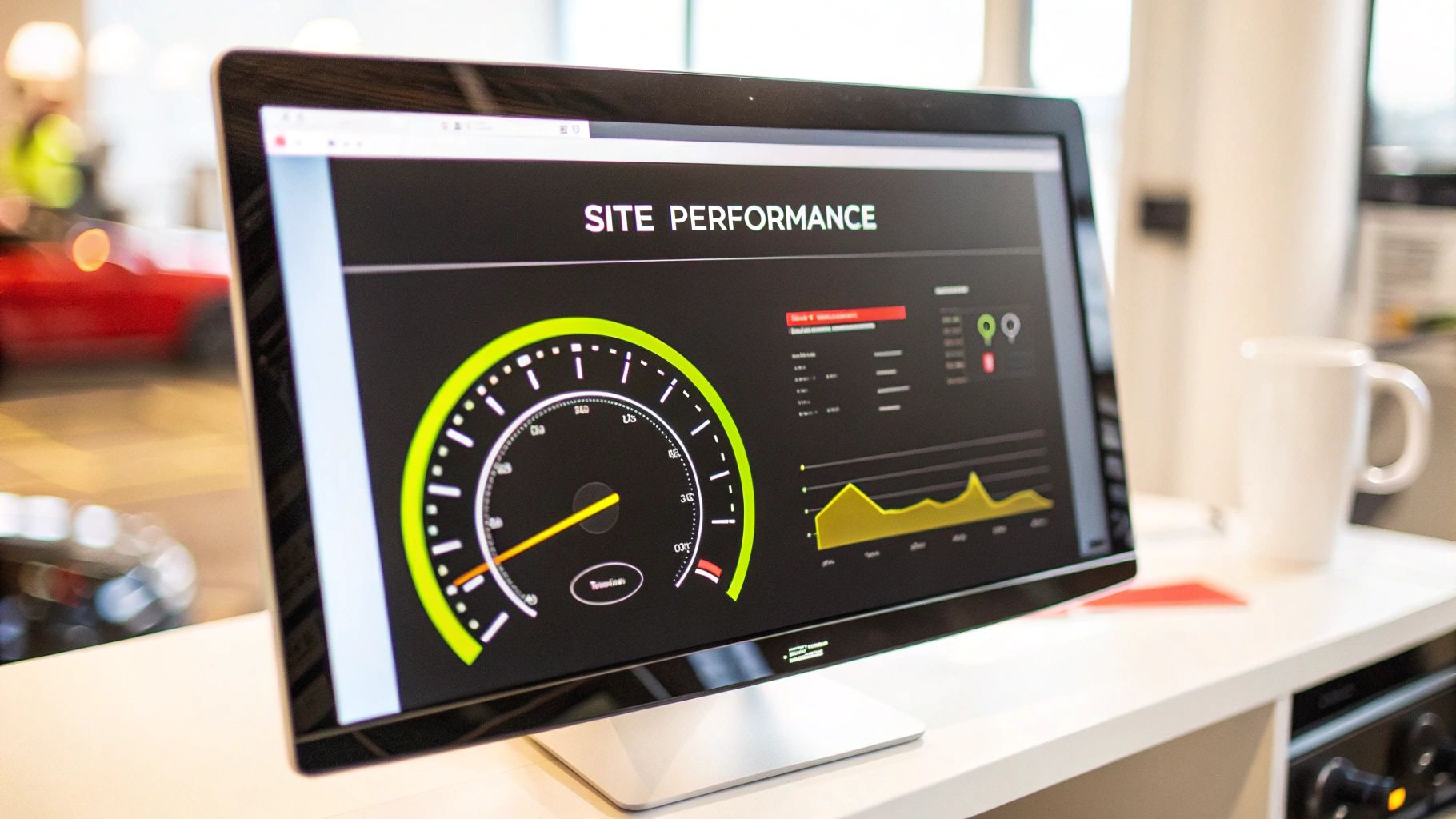
Trust is the currency of the internet. A customer will never punch in their credit card number on a site that feels off, and Google isn't going to send traffic to a domain it doesn't trust. Your site's security and its backlink profile are two of the biggest factors that build that trust, signaling to both people and search engines that you’re credible and safe.
So far, we've focused on what's on your website. Now, we’re shifting gears to look at the external signals that shape your site's reputation. We’ll kick things off with some essential security checks before wading into the world of backlinks—the good, the bad, and the ones you need to get rid of.
Starting With Basic Security Checks
You don't need to be a cybersecurity guru to handle the basics. The absolute non-negotiable for any Shopify store is a valid SSL certificate. This is what powers the encrypted HTTPS connection and puts that little padlock icon in the browser's address bar. It’s a universal sign of safety.
If your store is somehow still on HTTP, you need to fix that. Yesterday. It's a massive red flag for Google and an instant deal-breaker for shoppers. Shopify handles this for you out of the box, but it never hurts to double-check that every single page on your site is secure.
Beyond that, a quick, free scan can give you peace of mind. I often point people to tools like Sucuri SiteCheck to look for common vulnerabilities, malware, or blacklisting issues. Also, make it a habit to keep your Shopify apps updated—it’s one of the simplest ways to patch potential security holes. For a deeper dive, our guide on website security best practices will help you lock things down even further.
Getting a Handle on Your Backlink Profile
Think of a backlink as a vote of confidence from another website. When a reputable, high-authority site links to one of your product pages or blog posts, Google sees that as a powerful endorsement. It’s a signal that your content is valuable, which can do wonders for your search rankings.
But here’s the thing: not all links are created equal. A single link from a well-respected industry blog is worth more than a hundred links from spammy, low-quality directories. The game isn’t about getting the most links; it’s about earning the best ones.
To see what you're working with, you’ll need a tool like Ahrefs or Semrush. These platforms show you every single website that links to you. During an audit, I’m always looking for answers to a few key questions:
- How many different websites (referring domains) link to my store? This is a much better metric than the total number of links.
- What’s the quality of these linking sites? These tools provide metrics like "Domain Authority" or "Authority Score" to help you gauge this at a glance.
- Is the anchor text relevant? The clickable text in the link should actually relate to the page it’s pointing to.
A healthy backlink profile is one that looks natural. It’s diverse, with links coming from a variety of relevant, authoritative sources, and it grows steadily over time—not all at once. If your profile is just a mess of links from unrelated sites, that's a problem.
Spotting and Cleaning Up Toxic Backlinks
Just as good links can lift you up, bad ones can drag you down. Toxic backlinks are links from spammy sites, link farms, or sketchy networks built purely to manipulate search rankings. Get enough of these pointing at your store, and you risk a Google penalty that can tank your traffic overnight.
So, how do you spot them?
- Look for total irrelevance. If you sell handmade leather bags and get a link from a Russian casino site, that's a huge red flag.
- Check for spammy anchor text. A sudden influx of links with aggressive, keyword-stuffed anchor text like "buy cheap leather bags online" is a classic sign of manipulation.
- Actually look at the linking site. Does it look like a real website run by real people? Or is it just a page filled with random links and terrible content? Trust your gut.
When you find these sketchy links, you have two moves. The first is trying to contact the site owner to ask for removal, which rarely works. The far more effective option is to use Google's Disavow Tool. This allows you to upload a list of domains you want Google to completely ignore when evaluating your site, essentially neutralizing their negative impact.
Using Modern Tools and AI for a Smarter Audit
Let's be honest, trying to manually audit a website with hundreds, let alone thousands, of pages is a recipe for disaster. It's just not practical. This is where modern audit platforms are non-negotiable. Tools like Ahrefs, Semrush, and Screaming Frog do the heavy lifting for you, crawling your entire site to sniff out technical glitches, broken links, and on-page SEO blunders in a fraction of the time it would take a human.
But the game is changing, and the real leap forward is coming from artificial intelligence. AI-powered tools are taking audits to a whole new level. They don't just find problems; they analyze complex user behavior patterns to give you smart, specific recommendations for improving user experience. Some can even predict issues before they start costing you sales. This shift is making audits faster, more intelligent, and far more proactive.
By 2025, the role of AI and machine learning in the audit process became absolutely central. These technologies are now the standard for scanning websites with incredible speed and accuracy, flagging everything from broken links to critical SEO gaps.
What this means in practice is that AI-driven analytics can now process how users interact with your site in real time. From there, it can suggest specific optimizations that boost both user satisfaction and your search rankings. This move has completely changed the traditional website audit, automating once-tedious checks and allowing us to get ahead of problems instead of just reacting to them. You can get a deeper understanding of these website audit trends to see just how much the process has evolved.
Popular Website Audit Tool Comparison
Choosing the right tool can feel overwhelming, as each has its strengths. Some are all-in-one powerhouses perfect for agencies, while others are specialized crawlers beloved by technical SEOs. The key is to match the tool's capabilities to your specific audit goals and budget.
| Tool | Best For | Key Features | Pricing Model |
|---|---|---|---|
| Ahrefs | All-in-one SEO and competitor analysis | Site Audit, Rank Tracker, Site Explorer, Keyword Explorer | Subscription |
| Semrush | Comprehensive marketing and SEO toolkit | On-Page SEO Checker, Backlink Audit, Position Tracking | Subscription |
| Screaming Frog | In-depth technical SEO crawling | Finds broken links, analyzes page titles, generates XML sitemaps | Freemium/One-time license |
| Google Search Console | Essential performance and indexing insights | Performance reports, Core Web Vitals, mobile usability checks | Free |
Ultimately, many professionals use a combination of these tools. Google Search Console is a must-have for everyone, providing foundational data directly from the source. From there, you can layer in a more powerful crawler like Screaming Frog for deep technical dives or an all-in-one suite like Ahrefs or Semrush for a holistic view of your site's health and competitive standing.
A Few Common Website Audit Questions Answered
Even with a step-by-step guide, jumping into a full website audit can feel a little daunting. Let's clear up some of the most common questions I get from store owners so you can get started on the right foot.
How Often Should I Be Doing This?
This is probably the first question everyone asks. While there's no single magic number, a good rule of thumb is to perform a deep, comprehensive audit at least once a year.
For a dynamic Shopify store with constant product updates and marketing campaigns, I strongly recommend a lighter "health check" every quarter. This proactive approach helps you spot and fix small problems before they grow into major headaches.
How Long Is This Going to Take?
Honestly, it depends. The timeline for a proper audit can vary wildly based on the size and complexity of your store.
If you have a small site with a few dozen pages, you could probably knock out a thorough analysis in a few days. But for a large e-commerce store with thousands of SKUs and years of blog content, you could easily be looking at several weeks of work to do it right.
The key is not to rush it. A hurried audit always misses critical details. It's far better to take four weeks to build a solid, prioritized action plan than to rush through it in one week and get a half-baked report.
Remember, the goal isn't just to find what's broken. It's to understand why it's broken and which fixes will actually move the needle for your business.
Should I Hire Someone or Do It Myself?
This is the big one, and the answer comes down to time, resources, and expertise.
A DIY audit is absolutely possible, especially for smaller stores. If you're comfortable getting your hands dirty with tools like Google Search Console and PageSpeed Insights, it’s an incredible way to learn the nuts and bolts of your own website.
However, bringing in an outside expert or agency provides a fresh, unbiased perspective. They don't have the "owner's bias" you might have, and they often come equipped with more powerful tools and years of experience spotting patterns you might miss. If your initial check-up reveals serious technical issues, an expert can be worth their weight in gold.
At E-commerce Dev Group, we live and breathe this stuff. Our team of Shopify experts specializes in digging deep, turning audit findings into tangible growth, and building clear strategies that boost your store's performance. Find out how we can help at https://scaleshopify.com.
