

If you want to drive consistent, high-quality traffic to your Shopify store without pouring money into paid ads, SEO is your answer. It’s not about finding a magic bullet. It's about building a real, long-term asset that pulls in customers naturally, turning your store into a go-to name in your niche.
Why Shopify SEO Is Your Most Valuable Asset
In a packed ecommerce space, relying only on paid ads is a losing game. The cost to get a new customer keeps climbing, and people are getting tired of seeing the same ads over and over. This is where getting your Shopify SEO right really changes things. You're building a reliable, profitable channel that works for you around the clock.
Think about it: a paid ad disappears the second you stop paying for it. But a well-ranked product page or a helpful blog post can bring in customers for months, sometimes even years. This is the difference between "renting" your traffic and "owning" it, and it's why smart brands invest so much into their organic search presence.
The Real Power of Organic Traffic
When people need something, their first stop is usually Google. They aren't just looking for a product; they're looking for an answer. Showing up at the top of their search results puts your store right in their path at the perfect moment, building instant trust.
This approach delivers some serious wins:
- Better Leads: People coming from a search engine already know what they want. They're far more likely to buy than someone who just stumbled upon an ad while scrolling.
- Stronger Brand Trust: A top Google ranking is like a stamp of approval. It tells shoppers that you're a serious, respected brand in your field.
- Long-Term Growth: Every piece of optimized content and every backlink you get adds up. Over time, you build a competitive advantage that’s incredibly difficult for others to overcome.

With ad costs on the rise, more and more Shopify store owners are turning to SEO to boost their organic traffic. The most successful merchants are combining solid on-page, technical, and off-page SEO to climb the ranks in Google's search results.
The goal isn’t just to get more traffic; it’s to get the right traffic. SEO delivers visitors who are already searching for what you sell, making the sales process smoother and more profitable from the very first click.
If you’re looking for a deeper dive, learning from the best in the business is a great way to level up your strategy. Checking out the work of Top Shopify SEO Experts can show you what a high-level plan looks like in action.
This guide will give you a clear roadmap to get started. Let’s build a plan for real, lasting growth.
Get Your Technical SEO Foundation Right
Before you even think about keywords or content, you need to make sure search engines can actually find and understand your Shopify store. Think of it as building a house—you wouldn't start putting up walls without a solid foundation. In the world of SEO, that foundation is technical. Without it, even the most amazing products and blog posts will be invisible to your potential customers.
First things first: you need to open a direct line of communication with Google. The best way to do that is with Google Search Console, a free and incredibly powerful tool. Getting your store verified in Search Console gives you a backstage pass to see how Google views your site, from performance data to any crawling or indexing problems it's running into.
Once you’re connected, the next step is to hand Google a map of your store. Shopify makes this easy by automatically creating a sitemap for you (you can find it at yourstore.com/sitemap.xml). Submitting this to Google Search Console is like giving Google a clean, organized blueprint of all your important pages, ensuring it can efficiently discover your products, collections, and blog posts.
Fine-Tuning Your Store’s Structure
A clean, logical site structure is a win-win: it helps both search engines and your customers navigate your store. While Shopify handles a lot of the heavy lifting, a few tweaks on your end can make a huge difference. One of the most common hiccups I see is how Shopify handles product variants, which can accidentally create duplicate content issues.
For instance, if you sell a t-shirt in five different colors, Shopify might generate a unique URL for each one. To stop Google from seeing these as five identical pages, Shopify uses a clever bit of code called a canonical tag. This tag tells search engines which URL is the "master" version, consolidating all your SEO juice into one place and keeping you out of any duplicate content penalty box.
Key Takeaway: Technical SEO isn't some dark art meant to trick search engines. It's all about making your site as clear, fast, and easy for them to understand as possible. A well-organized site with clean signals, like canonical tags, helps Google reward you with better visibility.
Also, a quick but crucial check: make sure your SSL certificate is active. Shopify includes this for free, but it's always worth a double-take. That little "https://" at the start of your URL is a signal of trust for both users and search engines, and it’s a confirmed (though small) ranking factor. For a full rundown of all these elements, our complete Shopify SEO checklist will walk you through everything, step by step.
The Critical Role of Site Speed
In ecommerce, speed isn't a luxury—it's everything. A slow store doesn't just annoy visitors; it actively hurts your search rankings. Google wants to send its users to sites that provide a great experience, and page speed is a massive part of that. A delay of just a single second can send your bounce rate through the roof and tank your conversions.
Your first line of defense is choosing the right theme. Shopify gets this, offering over 100 themes optimized for performance. In fact, its popular Dawn theme is used by about 25% of stores for a reason—it’s built to be lightweight and fast. Beyond themes, you have a massive arsenal in the Shopify App Store, with over 13,000 apps ready to help, many designed specifically to compress images, clean up code, and get your load times down. You can learn more about how the Shopify ecosystem is built for growth from this detailed breakdown of Shopify statistics.
To get a quick speed boost, start with these three areas:
- Image Optimization: Large, uncompressed images are the number one cause of slow Shopify stores. Use an app like TinyIMG or Crush.pics to automatically shrink your product photos without sacrificing quality.
- App Management: Be ruthless with your apps. Every app you install adds code that can weigh your site down. Do a regular audit and get rid of anything you aren't actively using.
- Lazy Loading: This is a game-changer. Lazy loading tells the browser not to load images and videos until a user actually scrolls down to them. This makes the initial page load feel lightning-fast.
The infographic below shows how these technical elements lay the groundwork for everything else.
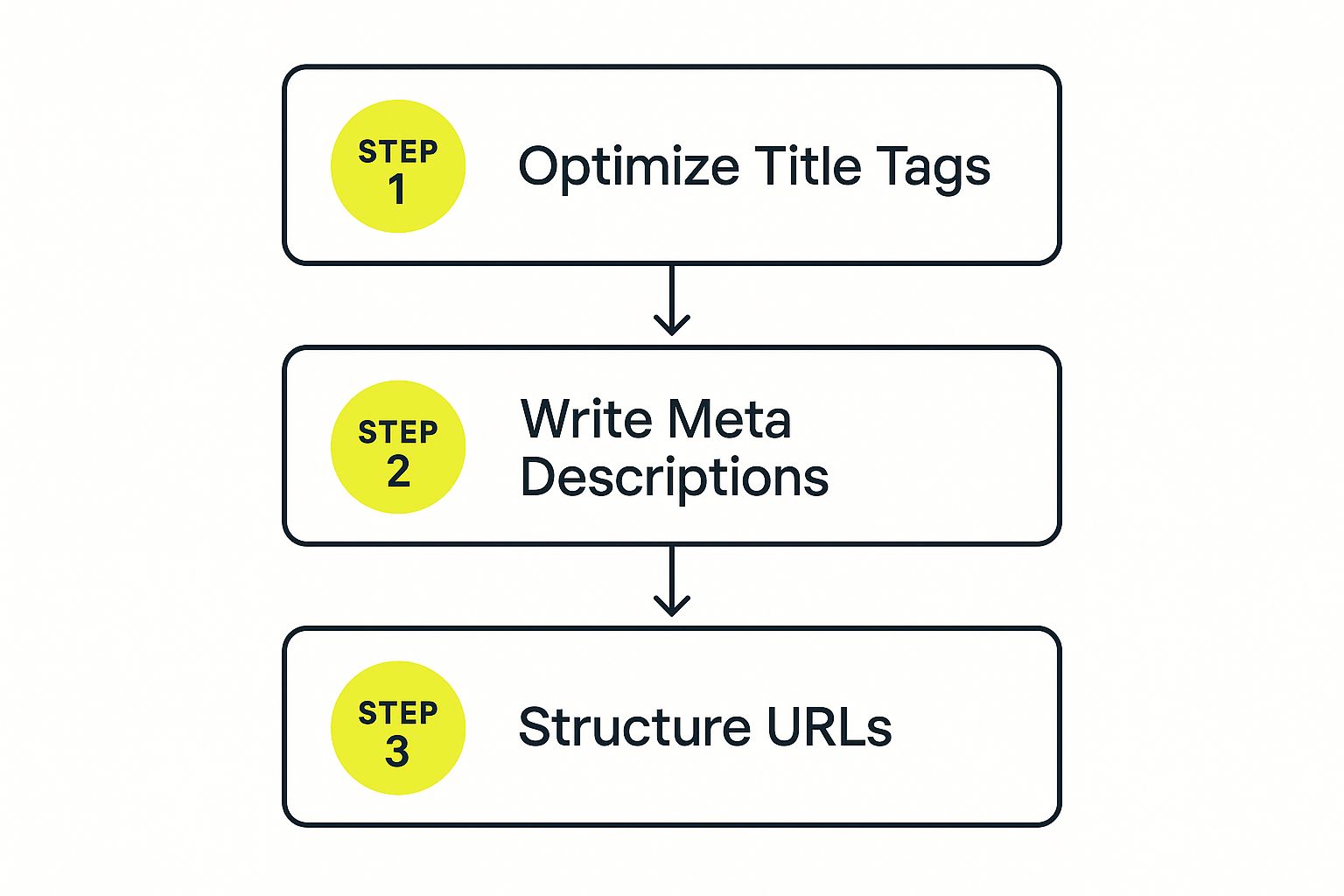
While the graphic focuses on on-page SEO, notice how a clean URL structure—a direct result of good technical setup—is the starting point. Nailing your technical SEO makes every other effort, from content to link building, that much more powerful.
Shopify Technical SEO Health Checklist
Before diving deeper, it’s a good idea to run a quick health check on your store’s technical foundation. This simple table will help you spot any immediate issues that need attention.
| Checklist Item | Status (Pass/Fail) | Action Required |
|---|---|---|
| Google Search Console Verified | Verify your domain with GSC. | |
| Sitemap Submitted to GSC | Find your sitemap and submit it. | |
| SSL Certificate Active (HTTPS) | Check your Shopify settings. | |
| Canonical Tags in Place | Inspect product variant pages. | |
| No Major Crawl Errors in GSC | Review the "Coverage" report. | |
| Mobile-Friendly Design | Use Google's Mobile-Friendly Test. | |
| Page Speed (Core Web Vitals) | Run a PageSpeed Insights report. |
Completing this checklist gives you the confidence that your store is technically sound and ready for more advanced optimization.
Optimizing Product and Collection Pages That Sell
Alright, let's talk about the pages that actually make you money: your product and collection pages. While your blog is great for bringing people in, these are the pages that seal the deal. Nailing the SEO here is a direct path to more sales because you're targeting shoppers who already have their wallets out.
This all starts with getting inside your customer's head and figuring out exactly what they're typing into Google. We need to move past the obvious, super-competitive keywords and dig up the longer, more specific phrases that scream, "I'm ready to buy!"
Uncovering High-Intent Keywords
For e-commerce, keyword research isn't a volume game. It's an intent game. Someone searching for "running shoes" is just window shopping. But the person searching for "men's waterproof trail running shoes size 11"? They're on a mission.
Your job is to find those golden long-tail keywords. Here’s how I usually tackle it:
- Spy on Your Competitors: Use an SEO tool to see what keywords are sending traffic to their product pages. You'll quickly spot patterns in how they name and describe things.
- Let Google Be Your Guide: Type your main product term into the Google search bar and just watch the autocomplete suggestions. Those aren't random guesses; they're real, popular searches that can spark some great ideas.
- Mine the "People Also Ask" Box: This little section in the search results is a goldmine. It tells you the exact questions your customers are asking. Answer them on your product pages, and you'll attract some seriously qualified visitors.
Once you’ve got a solid list, you can start weaving these terms into your pages.
Crafting Titles and Meta Descriptions That Win Clicks
Think of your page title and meta description as your shop's front window in the search results. A boring one gets ignored. A compelling one invites people inside, boosting your click-through rate (CTR) even if you aren't ranked #1.
A solid formula for product page titles often looks like this:
Primary Keyword | Key Benefit or Feature | Your Brand Name
So, instead of just "Hiking Backpack," you get:Waterproof Hiking Backpack | 40L with Laptop Sleeve | TrailPeak Gear
The meta description is your quick sales pitch. It needs to expand on the title, mention your main keyword, and give people a reason to click. I've found that keeping titles under 60 characters and metas around 155 characters is a safe bet to avoid them getting awkwardly cut off by Google.
Quick tip: Write for a human first, Google second. A title stuffed with keywords but no clear benefit won't get clicked. Your goal is to be descriptive, compelling, and quick to the point.
Writing Unique Product Descriptions That Convert
This is a big one. One of the worst SEO mistakes you can make on Shopify is using the manufacturer's default product descriptions. If you do that, you have the exact same content as hundreds of other stores, which is a huge red flag for Google.
Taking the time to write your own unique descriptions is non-negotiable.
A great description does two things at once: it uses your keywords naturally and it convinces the customer to buy. The key is to stop listing features and start explaining benefits.
Don't just say:
- Made with Gore-Tex fabric.
Instead, try:
- Stay bone-dry on the trail with our fully waterproof Gore-Tex fabric, engineered to shrug off any downpour.
Use bullet points, short paragraphs, and bold text to make your descriptions easy to scan. A better user experience is a huge part of modern SEO for Shopify stores.
The Untapped Power of Image SEO
Every e-commerce store has images, but so many merchants miss out on easy SEO wins here. Google can't see your photos, so you have to give it clues with descriptive file names and alt text.
Before you even upload an image, change the file name from IMG_8432.jpg to something clear and descriptive like mens-blue-trail-running-shoes.jpg.
Then, add descriptive alt text. This is what shows up if an image breaks and what screen readers use for visually impaired users. It's also another perfect spot for your keywords.
- Bad Alt Text:
shoes - Good Alt Text:
A pair of men's blue waterproof trail running shoes on a rocky path.
This simple habit can get your products showing up in Google Image Search, which is a whole other stream of traffic you don't want to miss.
Turning Collection Pages into SEO Hubs
Your collection pages are more than just a grid of products. They're powerful assets for targeting those broader, high-volume keywords. A single product page might target "women's black leather tote bag," but the collection page can go after the much bigger prize: "leather tote bags."
To get your collection pages to rank, they need some unique content. Add a short, descriptive paragraph at the top or bottom of the page. Use this space to:
- Introduce the collection and highlight what makes it unique.
- Work in your main category keywords in a natural way.
- Link to a few best-selling products or relevant sub-collections.
By treating each collection page like its own mini-landing page, you build its authority and give it a real shot at ranking. To go even further, check out the latest Shopify SEO best practices to see how all these pieces fit together to grow your store.
Create a Content Strategy That Attracts Buyers
Your product and collection pages are great for people who are ready to buy right now. But what about everyone else? A smart content strategy is what pulls in shoppers while they're still just browsing and researching, building trust long before they even think about clicking "add to cart."
This isn't about churning out random blog posts. It's about building a system that answers your customers' real questions, solves their problems, and subtly shows them how your products are the answer. Great SEO for Shopify stores is all about meeting people wherever they are in their buying journey.
Choosing Content That Actually Drives Sales
For an ecommerce store, some content types work way better than others. The goal is to create assets that don't just get clicks but also have a clear path to a purchase. Let's skip the generic stuff and focus on what’s proven to work for online stores.
Here are a few high-impact formats to get you started:
- Detailed Buying Guides: These are fantastic for comparing products or helping a customer pick the right option. For instance, a shop selling coffee gear could write "The Ultimate Guide to Choosing Your First Espresso Machine," breaking down features, price points, and what's best for beginners versus pros.
- How-To Tutorials: This kind of content solves a problem your product was made for. A skincare brand could publish a guide on "How to Build a Morning Skincare Routine for Oily Skin," and naturally, their cleanser, toner, and moisturizer would be the stars of the show.
- Inspirational Lookbooks or Galleries: Visuals sell. A fashion brand can create a "Summer Style Lookbook" showing off complete outfits from their new collection, with each item in the photo linking directly to its product page.
Each one of these positions you as a helpful expert, not just another seller. You're providing real value, which makes a future purchase feel like the next logical step for the customer.
Brainstorming Topics Your Customers Care About
Coming up with ideas can feel like a chore, but your best topics are usually hiding in plain sight—in your customers' search queries and questions. You don't need a bunch of expensive tools to find them. You just need to listen.
A simple but powerful trick is to start with a "seed" keyword for your product. Let's pretend you sell high-quality, sustainable yoga mats.
- Check Google Autocomplete: Start typing "sustainable yoga mat" into the search bar and see what suggestions pop up. You'll likely see things like "sustainable yoga mat for hot yoga" or "how to clean a sustainable yoga mat." These are real searches from real people.
- Mine the "People Also Ask" Box: This section is an absolute goldmine. For our yoga mat example, you might see questions like, "What is the most eco-friendly material for a yoga mat?" or "Are cork yoga mats better?" Boom. Instant article ideas.
- Read Your Own Customer Questions: Dive into your support emails, DMs, and product reviews. What do people ask over and over? If you’re constantly getting questions about whether your mats are slippery, that's the perfect topic for a detailed blog post.
This process guarantees you’re creating content people are actually looking for. To keep your publishing schedule organized and strategic, it's a good idea to use an editorial calendar. You can find some great free editorial calendar templates to get started.
Pro Tip: Your goal isn't just to answer the question. It's to create the single best answer on the internet. Make your guide more thorough, more helpful, and more visually appealing than anything currently ranking on page one.
The Art of the Internal Link
Okay, so you've created an amazing piece of content. That's only half the job. The final—and most critical—step is to strategically link from that new blog post back to your relevant product and category pages. This is how you turn a reader into a customer.
Think of internal links as bridges connecting your helpful content to your products. They pass SEO authority, help Google understand your site’s structure, and, most importantly, guide your visitors smoothly toward a purchase. The key is to make these links feel natural, not forced.
For example, in that post on "How to Clean a Sustainable Yoga Mat," you could add a sentence like this:
"For a deeper clean, using a gentle, all-natural cleaner is key. Our plant-based mat spray is designed specifically to disinfect without damaging the natural cork."
The bolded text links directly to the mat spray product page. It’s a perfectly contextual, non-salesy way to lead the reader to a relevant product. This is the move that turns your content from a simple blog into a powerful sales engine for your store.
Build Authority and Trust with Strategic Links

Think of it this way: search engines want to send their users to the best, most trustworthy stores. While solid content and a clean site build the foundation, high-quality backlinks are the ultimate vote of confidence from the rest of the web.
Every link you get from a reputable site is like a professional referral, telling Google that your store is a legitimate, authoritative voice in your industry. This isn't about spammy tricks; it's about building real relationships and creating things people want to share. For any Shopify store, this is how you build domain authority and start climbing the ranks for those really competitive keywords.
Earning Links Through Collaboration and Outreach
One of the most reliable ways to secure powerful links is by partnering with other people in your space. This isn't about paying for a shoutout—it's about offering genuine value in exchange for a little exposure. A great place to start is by identifying influential bloggers, niche publications, and even complementary brands whose audience looks a lot like yours.
Here are a few strategies I've seen work time and again:
- Authentic Product Reviews: Find creators who genuinely fit your brand's vibe. Send them a product to test out and review honestly. A single in-depth review on a respected blog can send you qualified traffic and a valuable backlink.
- Guest Posting: Look for industry blogs that accept guest articles. Pitch them a topic that solves a real problem for their readers. You get to link back to your store in your author bio, positioning you as an expert while building your link profile.
- Gift Guide Inclusions: As holidays or big shopping seasons approach, publications are scrambling to create "best of" lists and gift guides. Don't wait for them to find you—proactively reach out to journalists and editors and pitch your product.
These collaborations do more than just improve your SEO for Shopify stores; they build a network of advocates for your brand.
Creating Your Own Link-Worthy Assets
Instead of just asking for links, you can create content so damn good that other sites can't help but link to it. This approach completely flips the script, turning your store into a go-to resource that others want to cite. You need to create something that goes far beyond a standard product description or blog post.
My takeaway: The most sustainable way to build links is to become an indispensable resource. When you create genuinely useful, original content, the links will start coming to you.
Consider developing one of these types of assets:
- Original Data or Research: Survey your customers or analyze industry trends to create a unique report. A pet supply store, for instance, could publish a study on "The Top 10 Most Popular Dog Breeds in 2025." Journalists and bloggers absolutely love citing fresh stats.
- A Killer Infographic: Take a complex topic and distill it into a beautiful, easy-to-share visual. An infographic showing the "farm-to-cup" journey of your coffee beans is way more linkable than a dense paragraph of text.
- An Ultimate Guide or Tool: Aim to create the single best resource on the internet for a specific topic in your niche. This could be a comprehensive how-to guide or a free online calculator that helps your customers make a smart buying decision.
Don't underestimate the power of referrals. The Shopify.com domain itself saw a staggering 190 million visits in a recent month, with a huge chunk of that traffic coming from other websites. This Shopify statistics breakdown highlights just how interconnected great content is. Building links is how you tap into that same powerful principle.
The Power of Social Proof and Reviews
Finally, never forget the authority-building power of your own customers. While reviews on your product pages aren't traditional backlinks, they build immense social proof and trust—and search engines are paying more and more attention to these signals.
Encourage your customers to leave detailed reviews on your site and on third-party platforms. Widespread positive feedback reinforces your brand's credibility, making both new shoppers and search engines more confident in your store. To get the full picture of your site's health, it's always a good idea to perform a complete review. You can learn more about this in our guide to auditing your e-commerce SEO.
Common Questions About Shopify SEO
Jumping into the world of SEO can feel like learning a new language, especially when you're busy running your business. Let's clear up some of the most common questions and concerns I hear from Shopify merchants all the time.
How Long Does It Take for Shopify SEO to Work?
This is the million-dollar question, and the honest-to-goodness answer is: it depends. SEO is a long game, not a light switch you can flip for instant results.
While you might see a small bump from quick technical fixes within a few weeks, you should realistically expect it to take four to six months of consistent, smart work before you see significant, measurable growth in organic traffic and sales.
A few things can speed this up or slow it down:
- How Tough Your Niche Is: Trying to rank for "women's shoes"? That's going to be a tougher, longer climb than ranking for something more specific like "handmade vegan leather wallets." The more competition, the more time and effort it takes.
- Your Store's Starting Point: A brand-new store is starting from square one with no authority. An existing store that already has some history and a few backlinks has a bit of a head start.
- Your Consistency: This is the big one. SEO rewards persistence. Publishing one blog post and then going silent for three months won't do much. You build real momentum with a steady rhythm of optimization, content creation, and link building.
Think of it like getting in shape. You won't have a six-pack after one trip to the gym, but with consistent effort, you'll see real, lasting results.
Are Shopify SEO Apps Necessary to Rank Well?
Not strictly necessary, no. But they can be a massive help. You can absolutely rank a Shopify store without spending a dime on SEO apps, but a good one can save you an incredible amount of time and headache.
Apps like Yoast SEO or SEO Manager handle a lot of the technical grunt work. They can automatically generate structured data (schema markup) so your product ratings show up in Google, or they can scan your site for broken links. They simplify the process so you can focus on what you do best: creating great products and content.
My Advice: Start by mastering Shopify's built-in SEO features and getting comfortable with Google's free tools like Search Console. Once you start to grow, a dedicated SEO app can be a powerful investment to scale your efforts without needing to become a technical expert.
What Is the Biggest SEO Mistake Shopify Store Owners Make?
Hands down, the most common and damaging mistake I see is using the generic product descriptions straight from the manufacturer or dropshipping supplier. This is a giant red flag for Google because it creates a massive duplicate content problem.
When search engines see the exact same text on your site and a hundred others, they don't know which one is the original. This confusion can lead them to rank none of you well.
You absolutely must write 100% unique, compelling descriptions for every single product you sell. I know it's a lot of work upfront, but it's non-negotiable for real, long-term SEO success. The second-biggest mistake? Ignoring site speed. A slow store frustrates users, kills conversions, and directly hurts your rankings.
Should I Focus on Product Page SEO or Blog Content?
You need both. They work together, targeting customers at different points in their buying journey. It's not an either/or situation. For a solid foundation on these core ideas, I'd recommend checking out a beginner's guide to ranking higher with SEO.
Here’s how I suggest tackling it:
First, nail your product page SEO. These pages are for people who are ready to buy right now. They're at the bottom of the sales funnel, searching for specific items.
Once those pages are in great shape, start building out your blog. Your blog is for attracting a much wider audience—people who are still researching and aren't ready to buy yet. You can then use smart internal links to guide those readers from an informative blog post directly to a relevant product page, turning your content into a powerful sales funnel.
Ready to turn your Shopify store into an SEO powerhouse? The experts at E-commerce Dev Group specialize in custom Shopify design, development, and optimization that drives real growth. Let's build a store that ranks.
