

If you're just starting out, the best ecommerce platform for a small business is often Shopify. It's famous for being an all-in-one package that’s both simple and powerful. But if your website is already built on WordPress, WooCommerce gives you total control and customization. For businesses aiming for the big leagues, BigCommerce stands out with its rich feature set and zero transaction fees, making it perfect for rapid scaling.
Ultimately, the right choice really boils down to your budget, how comfortable you are with technology, and where you see your business going.
How to Choose Your Ecommerce Platform
Picking your ecommerce platform is one of the most critical decisions you'll make. Think of it as the foundation of your online store—it impacts everything from how you manage daily tasks to your ability to grow down the line. Let's cut through the jargon and create a clear path to finding the perfect fit for your business.
This isn't about jumping on a bandwagon. It's about matching a platform's strengths to your unique needs. With the global ecommerce market expected to reach an incredible $6.88 trillion by 2025, your platform choice is what positions you to claim your piece of the pie.
Key Factors in Your Decision
To pinpoint the best platform for your small business, you need to weigh four essential factors:
- Your Budget: Look beyond the monthly price tag. Factor in transaction fees, and the cost of any apps or plugins you'll need to run your store effectively.
- Technical Skill Level: Be honest with yourself. Do you want a system like Shopify that handles all the technical heavy lifting? Or are you comfortable managing your own hosting and updates, like you would with WooCommerce?
- Business Model: What are you selling? The needs for physical products, digital downloads, and services are all different. If you have a brick-and-mortar store, you'll need a platform that syncs online and in-person inventory seamlessly.
- Growth Plans: A platform that feels like a bargain today could become a major headache tomorrow if it can't keep up with your success. Choose a solution that can grow with you.
Quick Look At Top Ecommerce Platforms
To get started, here’s a high-level comparison of the leading contenders. This table will give you a quick feel for where each platform shines and who it's built for.
| Platform | Best For | Pricing Model | Technical Skill Required |
|---|---|---|---|
| Shopify | Beginners & All-in-One Simplicity | Monthly Subscription + Fees | Low |
| WooCommerce | Full Customization & WordPress Users | Free Plugin (Hosting Costs) | Moderate to High |
| BigCommerce | Rapidly Scaling Businesses | Monthly Subscription | Low to Moderate |
After you've reviewed the basics, you'll have a much better idea of which platform aligns with your business goals.
When you're comparing options, don't forget to look at their built-in SEO tools. Understanding the fundamentals of ecommerce SEO best practices will help you evaluate which platform gives you the best chance to rank in search results.
Key Insight: There’s no single "best" platform for everyone. The right choice is a balancing act between ease of use and the level of control your business needs. Focus on your immediate requirements, but always keep your five-year plan in mind.
This screenshot of Shopify’s homepage perfectly captures its appeal. The clean, inviting interface is a huge reason why so many small business owners flock to it.
Everything about the design screams simplicity and speed, reinforcing its reputation as the best way for entrepreneurs to get online quickly without a technical background.
Why Shopify Is the All-In-One Solution
If you're looking to get an online store up and running without the technical drama, Shopify is often the first and last stop. It’s earned its reputation as the best ecommerce platform for small businesses that need a powerful, yet simple, tool. Everything you need—hosting, security, and a whole suite of sales features—is baked right in. This lets you worry about what actually matters: your products and your customers.
The magic of Shopify really starts with its dashboard. It’s clean, intuitive, and guides you through every step, from adding your first product to kicking off a marketing campaign. For a new business owner, this hand-holding approach can mean the difference between launching and giving up.
A Seamless and Integrated Ecosystem
Where Shopify truly shines is how all its pieces fit together. It’s not just a collection of features; it’s a fully integrated system designed to make your life easier.
Take Shopify Payments, for instance. It’s the platform’s built-in payment processor, which means you can start accepting credit cards right away without the headache of setting up a third-party account. It simplifies your bookkeeping by keeping all your sales data in one spot.
This seamless integration is even more valuable if you have a physical store. Shopify POS (Point of Sale) is a lifesaver for boutiques, market stalls, or any business selling both online and in person. It keeps your online and offline sales, inventory, and customer data perfectly in sync.
Real-World Scenario: Imagine a local gift shop using Shopify POS on an iPad. When they sell an item in-store, the website’s inventory is updated instantly. This simple action prevents the dreaded "oops, we just sold an out-of-stock item online" moment, keeping your records accurate and customers happy.
Shopify’s market dominance isn't just hype; it's backed by numbers. It holds 10.32% of the global market, but in the United States, it’s the undisputed leader, powering roughly 29% of all ecommerce sites. With around 3 million active stores in the U.S. alone, it's clear the platform works for American businesses. You can dig into more detailed statistics about Shopify's market position to see the full story.
Limitless Customization Through the App Store
Shopify’s built-in features are great, but the Shopify App Store is where you can truly make the platform your own. It's like a giant toolbox that lets you plug in specialized features with just a few clicks.
Want to add customer reviews? Launch a loyalty program? Step up your email marketing game? There’s an app for that. This flexibility means you can start lean and add functionality as your business grows and its needs evolve.
The image below gives you a sense of the sheer variety available in the Shopify App Store, which is packed with tools to help you run your business more effectively.

This massive library ensures you can find the right tools for your specific industry or business model, without needing to hire a developer for every little thing.
Understanding the Total Cost of Ownership
Shopify’s pricing looks straightforward at first glance, but it’s smart to think about the total cost of ownership before you commit.
Here’s a realistic breakdown of what you might pay:
- Monthly Subscription: Your base plan fee, whether it's Basic, Shopify, or Advanced.
- Transaction Fees: If you opt out of Shopify Payments, you’ll be charged a small percentage on every sale.
- App Subscriptions: Many of the best apps come with their own monthly fees, which can add up.
- Theme Costs: You can find great free themes, but a premium theme is often a one-time purchase that can elevate your brand.
Down the road, as your business grows, you might need even more power. Our guide comparing Shopify Plus vs Shopify can help you figure out when it’s time to make that leap.
For the vast majority of small businesses, the all-in-one convenience and robust support make the investment in Shopify well worth it. It provides a reliable foundation to build on, making it a top contender for any entrepreneur aiming for serious growth.
WooCommerce for Full WordPress Control
If your business already runs on WordPress, then WooCommerce isn't just another option—it’s the most logical next step. Think of it less as a separate platform and more as a powerful plugin that turns your existing site into a full-blown online store. This approach puts you completely in the driver's seat, giving you total control over every detail of your ecommerce business.
That said, all this freedom comes with a different kind of price. With a self-hosted solution like WooCommerce, you're the one in charge of finding web hosting, locking down security, and keeping the software updated. It's a trade-off that sits at the heart of the WooCommerce decision.
Embracing Total Creative Freedom
The biggest reason people flock to WooCommerce is the limitless customization. You're not stuck with a platform's built-in themes or locked-down features. If you can dream it up, chances are you can build it—whether that's a one-of-a-kind product configurator for custom orders or a checkout process that perfectly mirrors your brand's unique vibe.
This kind of control is a game-changer for businesses with niche requirements that don't fit neatly into the boxes provided by hosted platforms.
Real-World Scenario: A popular blogger wants to start selling branded merch. Instead of sending their loyal audience to a separate site, they use WooCommerce to build a shop right into their existing WordPress blog. This keeps the brand experience seamless, holds onto their traffic, and allows them to use their blog posts to drive sales directly.
The Financial Upside of Open-Source
The cost structure is another major win for WooCommerce. The plugin itself is free. Since you host it yourself, you also get to skip the monthly platform fees and transaction fees that other platforms charge on every sale. Your main ongoing costs are just web hosting and any premium themes or plugins you choose to buy.
Over time, this model can save you a serious amount of money, especially as your sales grow. You’re building an asset you own, not just renting space on someone else's server.
Extensions: The WooCommerce Superpower
The real magic of WooCommerce lies in its massive ecosystem of extensions. Between the official WooCommerce Marketplace and countless third-party developers, you can find thousands of plugins to add just about any feature imaginable. Need advanced shipping calculators? Done. Want to set up a subscription service? There are multiple options for that.
The image below gives you a peek into the official WooCommerce Extensions store, showing just how many tools are available to build out your store’s functionality.
This modular approach means you only pay for the features you actually need, letting you build a lean, powerful store that’s perfectly suited to your business.
Navigating the Technical Responsibilities
While the freedom is fantastic, the technical side of WooCommerce can be a steep learning curve for some. When you run your own store, you’re the one responsible for:
- Choosing Reliable Hosting: Your site’s speed and reliability are entirely dependent on your hosting provider. It's smart to go with a managed WordPress or WooCommerce host who specializes in this stuff.
- Implementing Security: You'll need to set up an SSL certificate and use security plugins to protect your store and your customers' data from online threats.
- Performing Updates: Keeping WordPress, WooCommerce, and all your plugins up-to-date is non-negotiable for security and smooth operation.
These tasks require more hands-on effort compared to a platform like Shopify, where all of that is taken care of behind the scenes.
WooCommerce’s impressive market share shows just how appealing it is. By 2025, the platform is projected to power over 3.5 million websites, claiming about 20.1% of the global ecommerce market—second only to Shopify. This popularity is fueled by entrepreneurs who demand custom features without being locked into the recurring fees of hosted platforms. You can dig deeper into WooCommerce's market position on mobiloud.com.
For the right kind of person—someone who's already comfortable in WordPress and values deep customization over plug-and-play convenience—WooCommerce is hard to beat. It provides a scalable, cost-effective, and powerful foundation to build an online store that is 100% yours.
Comparing Features and Costs Head-to-Head
Choosing the right e-commerce platform isn't just about ticking boxes on a feature list. It’s about finding a partner for your business—one whose core design matches how you want to work, spend your budget, and grow in the future.
Let's cut through the noise and compare Shopify, WooCommerce, and BigCommerce on the things that actually matter for a small business.
H3: Ease of Use and Initial Setup
When you're just starting out, getting your store online quickly is a huge win. This is where Shopify really shines. Its setup process is like a guided tour, designed to take you from a great idea to your first sale with almost zero friction. They handle all the technical stuff like hosting and security, so you can just focus on your products.
BigCommerce is also an all-in-one platform, but it feels a bit more robust right from the start. The dashboard is packed with features, which can feel a little overwhelming for a true beginner. However, if you're the type who wants more powerful tools built-in from day one, you'll appreciate what it offers.
WooCommerce is a totally different beast. It's a plugin that runs on WordPress, which means you're in the driver's seat. You'll need to sort out your own domain, find a good hosting provider, install WordPress, and then get WooCommerce configured. It’s not rocket science, especially if you've used WordPress before, but it's definitely a more hands-on, technical process. Deciding between a managed platform and a self-hosted one is a classic fork in the road for new stores. For a closer look, this guide on Shopify vs WordPress breaks it down well.
H3: Design Flexibility and Customization
Your store's design is your digital handshake. Shopify gives you a fantastic selection of professional, mobile-friendly themes that look great out of the box. You can easily tweak colors and layouts with their editor, but if you want to make major structural changes, you’ll either need to learn their "Liquid" coding language or hire a pro.
With WooCommerce, the sky's the limit. Because it lives inside the massive WordPress ecosystem, you have access to thousands of themes and amazing page-builder plugins like Elementor. You have total freedom to create a one-of-a-kind shopping experience. The trade-off? You're responsible for making sure all those moving parts play nicely together.
BigCommerce finds a nice sweet spot in the middle. It offers modern themes and a built-in page builder that gives you more creative control than Shopify's basic plans, but without the technical upkeep that comes with WooCommerce.
Key Differentiator: WooCommerce is for the creative perfectionist who wants total control over their brand's look and feel. Shopify is for the entrepreneur who values speed and reliability, delivering a professional-looking store without the technical headaches.
H3: Payment Processing Options and Fees
Getting paid is the whole point, right? Shopify makes this simple with its own Shopify Payments. The rates are competitive, and it’s all integrated. But here’s the catch: if you decide to use an outside payment gateway like Stripe or Authorize.net, Shopify will charge you an extra transaction fee of 0.5% to 2% on every sale, depending on your plan.
This is where BigCommerce really stands out. It charges zero transaction fees on all of its plans, no matter which payment gateway you use. As your business grows, those little percentages add up fast, so this can translate into serious savings.
WooCommerce also frees you from platform-level transaction fees. The only fees you’ll ever pay are the standard ones from your payment processor (like Stripe or PayPal). For small businesses watching every penny, this simple, transparent approach is incredibly appealing.
This image really puts the long-term cost differences into perspective.
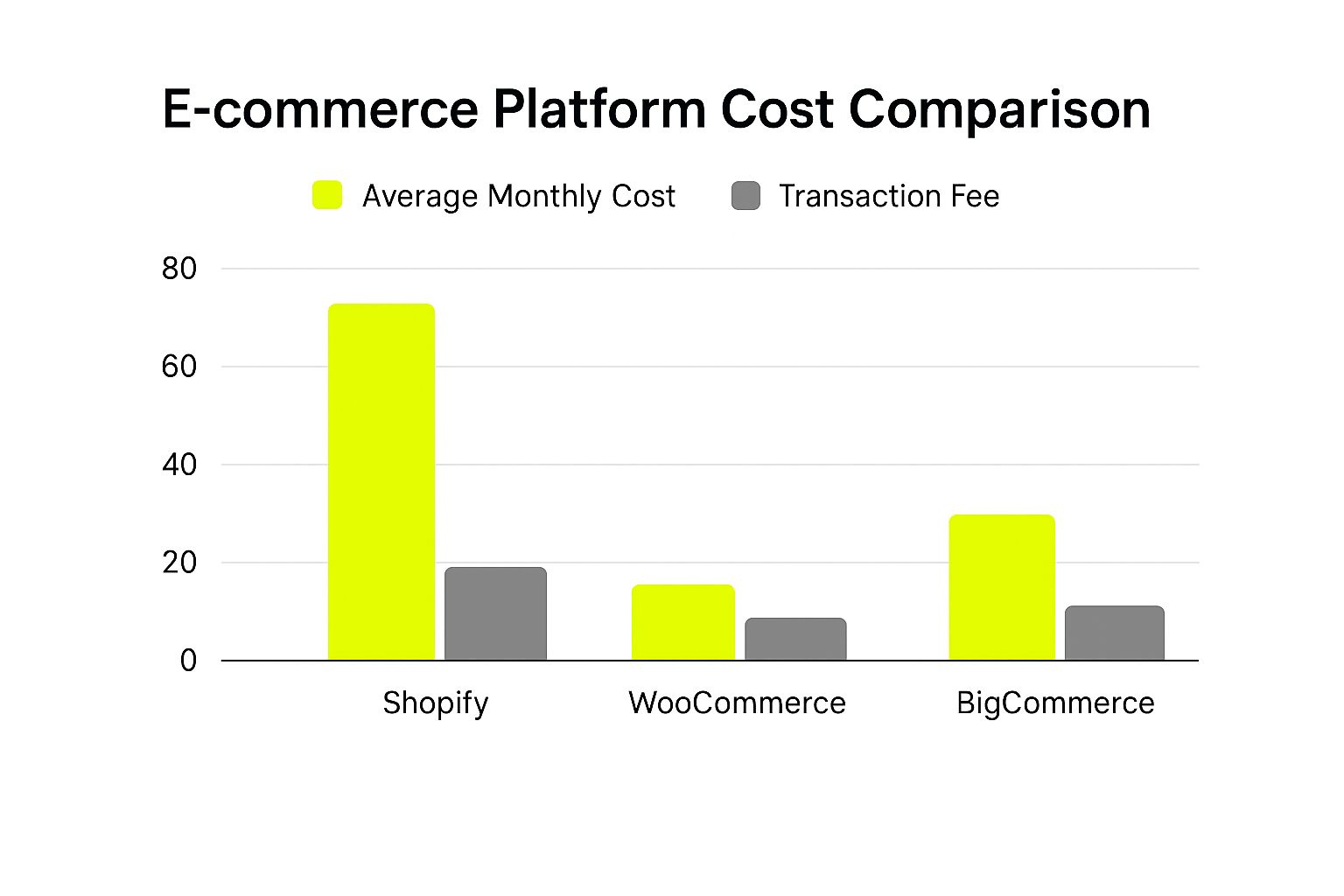
As you can see, the 0% transaction fee model from BigCommerce can make a huge difference to your bottom line as your sales climb.
This table provides a more granular look at how the platforms' core features compare side-by-side.
Detailed Platform Feature Comparison
An in-depth look at how Shopify, WooCommerce, and BigCommerce stack up across key small business criteria.
| Feature/Criteria | Shopify | WooCommerce | BigCommerce |
|---|---|---|---|
| Setup Time | Very Fast. Guided setup gets you selling in hours. | Slower. Requires hosting setup, WordPress install, and configuration. | Fast. All-in-one solution, slightly more complex dashboard than Shopify. |
| Technical Skill | Beginner-friendly. No coding or server management required. | Intermediate. Requires managing hosting, updates, and potential plugins. | Beginner to Intermediate. No server management, but more built-in settings. |
| Transaction Fees | 0.5% to 2.0% if not using Shopify Payments. | None. You only pay your payment processor's standard fees. | None. Zero platform transaction fees on all plans. |
| Built-in Features | Strong. Core commerce, marketing, and analytics tools are included. | Lean Core. Relies heavily on plugins to add functionality. | Extensive. Often has more built-in features than Shopify at similar tiers. |
| Customization | Good. Excellent themes, but deep changes require coding (Liquid). | Excellent. Near-limitless control with themes and page builders. | Very Good. Strong theme editor and a built-in page builder. |
| Monthly Cost | Starts at $39/month plus potential transaction fees. | Varies widely based on hosting, themes, and premium plugins. | Starts at $39/month with no transaction fees. |
This breakdown shows there's no single "best" platform—the right choice depends entirely on your budget, technical comfort level, and long-term goals.
H3: Built-In Marketing and SEO Tools
A great store is useless if no one can find it. Shopify gives you a solid SEO foundation, letting you edit meta tags and providing a sitemap automatically. Its marketing dashboard also makes it easy for beginners to launch basic email campaigns or social media ads.
BigCommerce often gets the nod for having more powerful SEO tools right out of the box. It gives you more granular control over things like URL structures, which can be a bit locked down on Shopify.
But when it comes to SEO, WooCommerce is in a league of its own. Running on WordPress, it's an absolute powerhouse. Just install a free plugin like Yoast SEO, and you get meticulous control over every single aspect of your site’s optimization. You have to put in the work, but the potential is unmatched.
For a deeper dive into how these platforms stack up across the board, our complete ecommerce platform comparison offers even more detail.
H3: Scalability and Performance
Finally, you need a platform that won't crumble as you succeed. Shopify and BigCommerce are built to handle growth. As fully hosted platforms, their teams manage all the complex server-side stuff to keep your site fast and secure, even during a massive traffic spike on Black Friday. You never have to think about it.
The scalability of a WooCommerce store is entirely in your hands—it all comes down to your hosting. If you start on a cheap, shared hosting plan, your site will likely slow down as traffic picks up. But, if you invest in a quality managed hosting provider, a WooCommerce store can handle just about anything you throw at it. This flexibility is powerful, but it makes choosing the right host a critical business decision.
Taking a Look at Other Strong Contenders
Shopify and WooCommerce get most of the attention, but tunnel vision can cause you to miss the perfect platform for your business. The e-commerce world is bigger than just the top two, with several other powerful competitors that shine in specific areas. Let's explore three fantastic alternatives built for different kinds of small business owners.
Sometimes, the best fit is found just past the most obvious choices. Getting to know these platforms will help you make a truly well-rounded decision.
BigCommerce for Scalable Growth
If you're starting out but have big dreams of scaling up, BigCommerce was built with you in mind. It goes head-to-head with Shopify but offers one huge advantage for growing stores: zero transaction fees on all of its plans. That's a big deal, as it means you keep more of your money as your sales climb.
BigCommerce also bakes more advanced features directly into its core platform. You get things like detailed product options, built-in multi-channel selling, and powerful SEO tools right from the get-go. This makes it a fantastic choice for businesses with large, complex inventories.
Who's it for? BigCommerce is for the serious entrepreneur planning for rapid expansion. If you expect to manage a massive catalog and don't want transaction fees cutting into your profits, this is your platform.
Squarespace for Visually Driven Brands
For artists, designers, photographers, or any brand where looks are everything, Squarespace is often the answer. It’s famous for its award-winning, stunning templates that put your products in the spotlight. Think of it as an all-in-one solution where beautiful design is the top priority.
Squarespace lets you build a polished, professional store with zero coding or design skill. Its drag-and-drop editor is super intuitive, and the built-in blogging and marketing tools help you create a strong brand presence. While its e-commerce engine isn't as deep as BigCommerce's, it has more than enough power for businesses selling a curated collection of products.
Wix eCommerce for Ultimate Ease of Use
Wix is another fantastic all-in-one platform that champions simplicity and creative freedom, especially for beginners. Its drag-and-drop editor is one of the most flexible out there, letting you put anything anywhere on the page. This is perfect for a business owner who wants total visual control without ever touching a line of code.
With hundreds of templates and a decent app market, Wix gives new online stores a solid start. It’s a very approachable option if more complex platforms feel a bit overwhelming.
While this section highlights some key alternatives, the choice for many still boils down to the two giants. For a direct comparison, our guide on Shopify vs WooCommerce and which platform fits your business can offer more insight.
How to Make Your Final Platform Decision
Alright, we've walked through the heavy hitters. Now it's time to land the plane and pick the right e-commerce platform for your small business. There's no magic answer here—the "best" platform is simply the one that clicks with your specific goals, budget, and how comfortable you are with the tech side of things.
This isn't just about picking features off a list. It’s about matching a tool to your ambition. Let's cut through the noise with some straightforward, real-world scenarios to help you find your perfect fit.
Find Your Fit
-
Go with Shopify if… you just want to get up and running, fast. If your main goal is to launch a beautiful, professional-looking store without getting bogged down in technical weeds, this is your ticket. It's built for speed and simplicity.
-
Go with WooCommerce if… you're already on WordPress and want total control. This is for the business owner who needs to build a highly customized, content-rich shopping experience and isn't afraid to get their hands a little dirty to make it happen.
Go with BigCommerce if… you're building an empire and can't stand the thought of transaction fees. Its built-in features are seriously powerful, making it a great choice for businesses that plan to scale up quickly and want a platform that can grow with them.
Ultimately, this decision is less about today and more about tomorrow. Take a minute and ask yourself: "Where do I realistically see my business in the next three years?" Once you have an honest answer to that question, the right platform choice will become crystal clear.
Still Have Questions? Let's Clear Things Up.
Diving into e-commerce always brings up a few last-minute questions. I get it. Here are some straightforward answers to the things small business owners ask me most often.
What’s the Real Monthly Cost?
Don't just look at the subscription price. Your actual monthly expense is a mix of that base fee, payment processing fees (which usually hover around 2.9% + 30¢ for every sale), the one-time cost of a premium theme, and any apps you pay for monthly.
Keep in mind that with platforms like Shopify, hosting is included. But if you go with a self-hosted option like WooCommerce, you’ll have a separate, ongoing bill for your web hosting.
Can I Just Switch Platforms Later On?
Technically, yes, you can. But I'll be honest—it's a real pain. Moving your product catalog, customer data, and past order information is a complex job. It can eat up a lot of your time and might even cost you a fair bit if you have to hire a developer to handle it.
My Advice: Try to pick a platform that you can grow into, not out of. Thinking about where you want to be in a few years can save you from a massive migration headache later.
Choosing a platform with room to scale is one of the smartest moves you can make when looking for the best ecommerce platform for your small business.
Which Platform Is a Real Powerhouse for SEO?
If you want to get your hands dirty and have total control, WooCommerce is hard to beat. Combine it with a top-tier WordPress plugin like Yoast SEO, and you can fine-tune every last detail of your site's search engine optimization.
But that doesn't mean the others are slouches. Both BigCommerce and Shopify come with fantastic built-in SEO tools that give most businesses everything they need to rank well without needing a developer on speed dial.
Ready to build a store that doesn't just look good, but actually converts? The team at E-commerce Dev Group lives and breathes high-performance Shopify stores built around specific business goals. Start your project with us today and let's build the store you've been picturing.
