


Choosing an e-commerce platform is one of the most foundational decisions you'll make for your business. This isn't just about picking a tool; it's about setting the stage for your store's flexibility, growth, and day-to-day operations. Get it wrong, and you could be facing frustrating limitations or a costly migration down the road. That’s why a real, hands-on comparison is so important for your long-term success.
Choosing the Right Ecommerce Foundation
Think of your e-commerce platform as the central hub of your entire retail operation, not just a place to list products. It dictates everything—from how you manage orders and run marketing campaigns to whether your site can handle a massive traffic spike on Black Friday.
A one-size-fits-all solution just doesn't exist. The ideal platform for a small business selling handmade goods is completely different from what a multinational brand with a complex inventory needs. This guide cuts through the noise of simple feature lists to give you a more nuanced look. We'll explore the critical factors you need to consider, helping you match a platform’s strengths to your budget, business goals, and how comfortable you are with technology.
SaaS vs. Open-Source Platforms
Your first big decision is whether to go with a Software-as-a-Service (SaaS) platform or an open-source one. Each approach comes with its own set of benefits and challenges.
-
SaaS Platforms: Think of services like Shopify or BigCommerce. You pay a monthly fee for a comprehensive package that covers hosting, security, and customer support. They're built for ease of use, making them a fantastic choice for merchants who want to get online fast without worrying about the technical backend.
-
Open-Source Platforms: With options like WooCommerce, the software itself is free to download. However, you’re on the hook for everything else: finding your own hosting, handling security, and performing maintenance. This route offers incredible customization, but it demands more technical skill or a budget for a developer.
Getting this fundamental difference straight is the first step. If you want to see a head-to-head battle between the biggest players in each camp, check out our guide on Shopify vs WooCommerce.
The real question isn't, "Which platform is the best?" It's, "Which platform is best for my business?" The right answer depends entirely on your resources, technical skills, and vision for the future.
To make this clearer, let's break down how the two models stack up against key business needs.
Foundational Model Comparison
| Criteria | SaaS Platform (e.g., Shopify) | Open-Source Platform (e.g., WooCommerce) |
|---|---|---|
| Ease of Use | High. Designed for non-technical users with intuitive dashboards and 24/7 support. | Low to Medium. Requires technical know-how for setup, customization, and ongoing maintenance. |
| Initial Setup Speed | Fast. You can get a basic store live in a few hours or days. | Slow. Setup means sourcing hosting, installing software, and configuring the store from the ground up. |
| Total Cost | Predictable. Fixed monthly subscription plus any app and transaction fees. | Variable. The software is "free," but costs for hosting, plugins, themes, and development can add up fast. |
| Customization | Good to Excellent. Lots of flexibility within the platform's framework and its app store. | Unlimited. You have total control to change every single line of code and element of the design. |
| Maintenance | Minimal. The provider takes care of all server management, security patches, and software updates. | High. You are 100% responsible for all security, updates, and fixing things when they break. |
Comparing Core Features and Usability
It’s easy to get bogged down in feature checklists when you're comparing e-commerce platforms. But what truly matters is how those core features actually work day-to-day. A long list of tools is useless if they’re clumsy to use or don’t fit into how you run your business.
The e-commerce world is exploding. Projections show that retail e-commerce sales are on track to hit a staggering $6.42 trillion worldwide by 2025, which is a 6.86% increase from the year before. With that kind of growth, you need a platform that makes your job easier, not one that adds friction to your workflow.
This analysis goes beyond the glossy brochures to look at how the leading platforms really handle the tools you'll be using every single day.
Diving Into Product and Inventory Management
Let's be honest—managing products and inventory is the heart and soul of any retail operation. The right platform can save you hours of manual work, while the wrong one can become a source of constant frustration.
Shopify is famous for its clean, intuitive interface. Adding new products, creating variants like different sizes or colors, and keeping an eye on stock levels is incredibly straightforward. It's built for merchants who need to get products online fast without a huge learning curve.
BigCommerce, on the other hand, comes packed with more advanced inventory features right out of the box. You can manage a massive number of product variants—up to 600 per product—without needing to install a single app. This is a game-changer for stores with complex catalogs. The trade-off? Its dashboard is a bit more complex and can take some time to get used to.
The real difference often comes down to product options. Shopify's built-in limit of 3 options and 100 variants per product means you'll likely need an app for more complex setups. BigCommerce builds this extensive capability right into its core platform.
Core Feature and Usability Comparison
To see how these platforms stack up at a glance, it helps to compare their core functionalities side-by-side. The following table breaks down how each one handles the essentials and what that means for a non-technical user trying to get things done.
| Feature | Shopify | BigCommerce | WooCommerce |
|---|---|---|---|
| Product Variants | Simple to set up but limited to 3 options/100 variants. Requires apps for more. | Powerful native support for up to 600 variants. Ideal for complex catalogs. | Highly flexible but requires extensions for advanced variant management. |
| Inventory Tracking | Clean, straightforward, and easy to manage for most stores. | Robust, with multi-location support built-in on higher plans. | Relies on plugins. Basic functionality is there, but advanced features cost extra. |
| Storefront Editor | Excellent drag-and-drop editor. Very easy for non-technical users to build pages. | Good visual editor, though slightly less intuitive than Shopify's. | Entirely dependent on your WordPress theme and page builder (e.g., Elementor). |
| Order Management | Streamlined and efficient. Fulfilling orders is quick and logical. | Comprehensive dashboard with detailed order statuses and actions. | Functional but can feel clunky. Often improved with—you guessed it—plugins. |
| Overall Ease of Use | The gold standard for simplicity. Perfect for beginners and growing brands. | More of a learning curve, but powerful once you're familiar with it. | Requires comfort with the WordPress ecosystem. Can be complex. |
Ultimately, this comparison highlights a key theme: Shopify prioritizes simplicity, BigCommerce focuses on built-in power, and WooCommerce offers ultimate flexibility at the cost of simplicity.
The User Experience and Daily Workflow
Usability isn't just about a nice-looking dashboard; it's about efficiency. How many clicks does it take to fulfill an order? How quickly can you launch a flash sale? These little things add up and define your daily experience.
This infographic shows just how important usability is when making a decision.
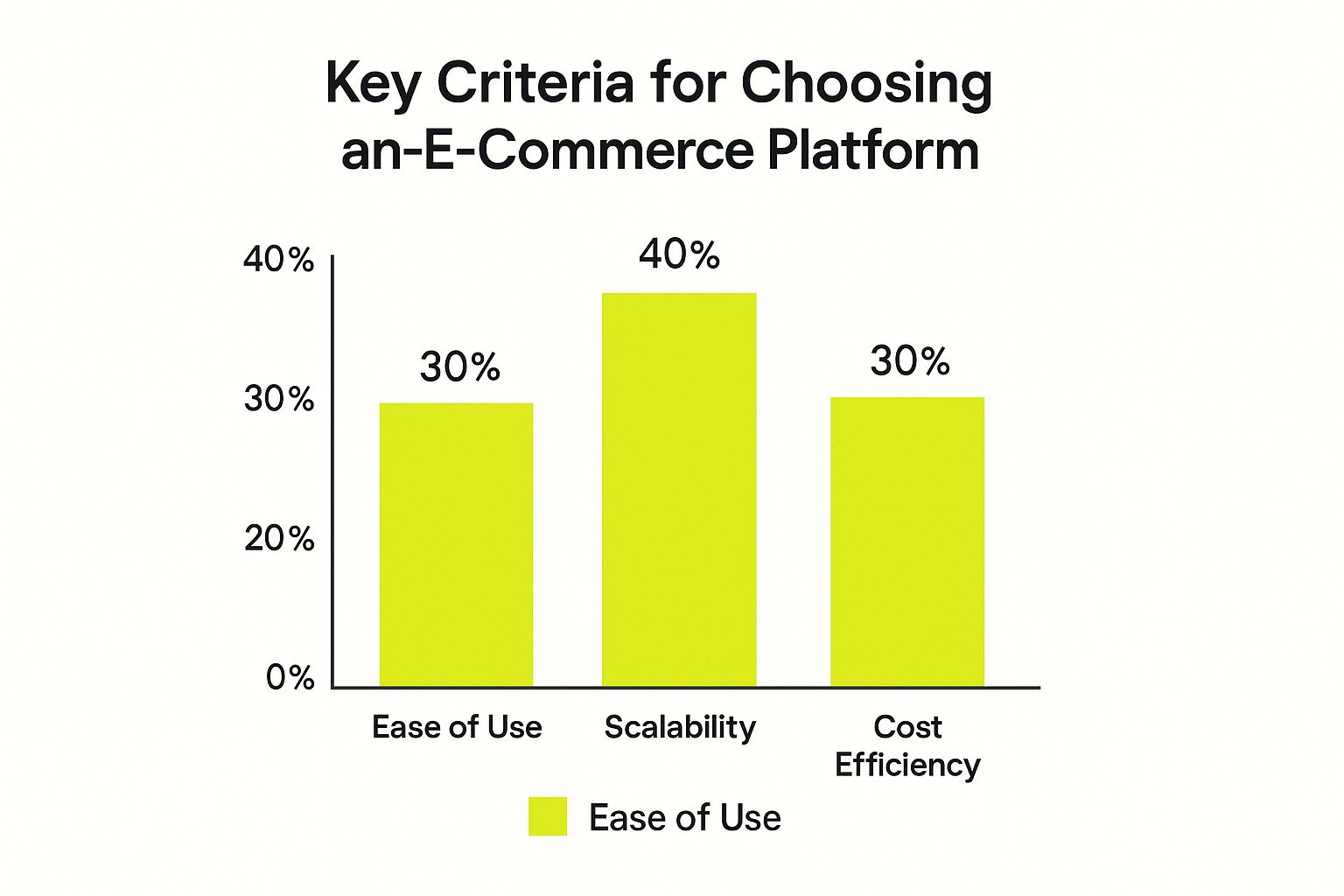
As you can see, while scalability is the top concern at 40%, ease of use is tied with cost as the next most important factor (30%). It drives home the point that a powerful platform is worthless if your team can't use it effectively.
When you look at the major players like Shopify, it’s easy to see why its usability is so highly rated. The drag-and-drop editor and logical menu layout mean new team members can get up to speed in no time.
WooCommerce offers a completely different world. Because it’s a plugin for WordPress, its usability hinges on your comfort level with the WordPress admin panel. This gives you incredible freedom, but it also means that what should be a simple task might require you to find, install, and configure a separate plugin.
Comparing Built-in Marketing and SEO Tools
Having a beautiful store with great products doesn't mean much if customers can't find you. Strong, native marketing and SEO tools are essential for driving traffic and making sales.
Here’s how each platform stacks up:
-
Shopify: You get a solid, user-friendly set of SEO features from day one. Editing meta titles, descriptions, and URLs is simple. It also has a built-in blog and basic email marketing tools, though most merchants quickly turn to the app store to expand these capabilities.
-
BigCommerce: This is where BigCommerce really shines. It offers more advanced and granular SEO options without needing apps, including customizable URLs and built-in AMP (Accelerated Mobile Pages) for product pages. It’s a great fit for marketers who want more control.
-
WooCommerce: The SEO potential here is practically unlimited, thanks to incredible plugins like Yoast SEO. The catch? It relies almost entirely on these add-ons. The out-of-the-box SEO features are minimal, so the responsibility falls on you to build and manage your own marketing stack.
In the end, the "best" platform really depends on your team's skills and your business priorities. Do you value the all-in-one simplicity of Shopify, the built-in power of BigCommerce, or the complete customizability of WooCommerce? Answering that question will point you directly to the right choice.
Understanding Your True Cost of Ownership
The price you see on the tin is rarely what you actually end up paying. When you’re comparing e-commerce platforms, the real number to watch is the total cost of ownership (TCO). It’s a fancy term for a simple idea: adding up every single expense needed to run your store well. So many merchants get this wrong, and it's a costly mistake.
Your monthly subscription fee is just the starting point. It’s the hidden costs that creep up on you—things like transaction fees, the cost of a good-looking theme, and the essential apps you can't live without. A cheap plan can quickly become a serious financial headache if you're not careful.
Deconstructing Platform Pricing Models
Every platform has its own way of charging you, and this directly affects your monthly bills. Shopify is pretty straightforward with its tiered plans, so you generally know what you’re in for. On the other hand, BigCommerce uses revenue-based tiers. Once your sales hit a certain number, they automatically bump you up to the next plan, and your bill goes with it.
Then you have WooCommerce, which is famously "free." But free software doesn't mean a free store. You're on the hook for everything else: web hosting, security certificates, a domain name, and very often, a developer to piece it all together. Those costs can add up fast, often exceeding what you'd pay for a platform that handles it all for you.
This is a look at Shopify’s pricing page, which lays out their tiers clearly.

As you can see, the features and transaction fees change as you move up, giving you a clear path to follow as your business grows.
Calculating Costs for Different Business Stages
Let's get practical and see how these costs look in the real world for three different types of businesses. This helps put the numbers into perspective.
1. The Startup Brand (Annual Revenue: $60,000)
When you're just starting, you need something that's easy to use and doesn't break the bank.
- Shopify: The "Basic" plan is usually the go-to. If you use Shopify Payments, the transaction fees are manageable. You'll probably want a few apps for marketing or product reviews, which will add a bit to your monthly total.
- BigCommerce: Their "Standard" plan is the equivalent. A huge plus here is that it comes with zero transaction fees. The platform itself can feel a bit more complex initially, which is something to keep in mind.
- WooCommerce: The "free" aspect is tempting for a startup. But once you pay for good hosting, a professional theme, and crucial plugins, you're easily looking at $50-$100 per month—and that’s before you hire anyone to help set it up.
2. The Growing Brand (Annual Revenue: $400,000)
At this stage, you're paying a lot more attention to transaction fees and whether the platform can keep up with your growth.
- Shopify: Moving to the "Shopify" plan makes sense. It drops your transaction fees and gives you better reporting. This is also when you start spending more on apps for things like loyalty programs or better inventory management.
- BigCommerce: This is often where BigCommerce starts to really make sense for some stores. Their "Plus" plan caps out at $180,000 in revenue, so a brand this size would be on the "Pro" plan. The monthly fee is higher, but paying 0% in transaction fees could save you a serious amount of money.
- WooCommerce: The costs start to climb steeply here. You'll need more powerful (and expensive) hosting to handle the traffic, more premium plugins, and probably ongoing developer support. For a closer look at managing a growing store, check out our guide on Shopify store optimization.
For a growing business, the decision often comes down to a simple calculation: will the monthly savings from BigCommerce's zero transaction fees outweigh its higher subscription cost and potentially larger app budget compared to Shopify?
3. The Enterprise Operation (Annual Revenue: $2,000,000+)
When you hit this level, TCO includes developer salaries, agency retainers, and enterprise-level security. The game changes completely.
- Shopify Plus: You get a predictable, flat fee that usually starts around $2,000/month and dedicated support. The platform’s APIs are robust, allowing for custom solutions that mean you aren’t so reliant on a pile of third-party apps.
- BigCommerce Enterprise: Pricing is customized for your business. It’s particularly strong on B2B features right out of the box, which can save you a fortune on the custom development you might need on another platform.
- WooCommerce: It’s possible to run a store this big on WooCommerce, but it's rare. The complexity and cost of managing your own security, performance, and infrastructure become a massive operational challenge.
By thinking through these scenarios, you can pick a platform that fits your budget not just for today, but for where you're headed tomorrow.
Evaluating Scalability and Performance

Let's talk about the moment that every store owner dreams of and dreads: a viral product launch or a Black Friday sale that explodes. Will your platform handle that massive surge of excited customers, or will it buckle under the pressure? This is where scalability and performance stop being technical jargon and become the bedrock of your business.
Your platform's ability to grow alongside your brand and stay reliable during those make-or-break moments is everything. It's the difference between a record-breaking sales day and a reputation-damaging crash.
Hosted vs. Self-Hosted Performance
The first major fork in the road for performance is choosing between a hosted SaaS solution and a self-hosted, open-source platform. This decision determines who’s on the hook for keeping your store online and lightning-fast.
- Hosted Platforms (SaaS): Think of Shopify and BigCommerce. They manage all the heavy lifting—server maintenance, security, and performance tuning—behind the scenes. This is a huge win for merchants who'd rather focus on marketing and product, not server configurations.
- Self-Hosted Platforms (Open-Source): With an option like WooCommerce, you're in the driver's seat. You pick the hosting, you manage the updates, and you're responsible for performance. While that gives you total control, it also means if your site goes down during a traffic spike, the buck stops with you.
Performance isn't just a tech stat; it's a critical part of your customer experience. A mere one-second delay in page load time can slash your conversions by 7%. For a store pulling in $100,000 a day, that's a $7,000 loss… every single day.
Analyzing Core Performance Metrics
To truly gauge a platform's scalability, you have to look past the marketing fluff and get into the real numbers. These are the metrics that show you how a platform will behave when things get serious.
Server Response Times and Uptime
Hosted platforms like Shopify pour millions into their global infrastructure to ensure their servers respond in a snap. They back this up with uptime guarantees of 99.9% or better, which is essential for protecting your revenue and customer trust.
On the flip side, a WooCommerce store is only as fast as the hosting you buy for it. A cheap, shared hosting plan might work when you're starting out, but it will choke as your traffic grows, leading to slow pages and outages.
Content Delivery Network (CDN) Capabilities
A Content Delivery Network (CDN) is non-negotiable for fast, global e-commerce. It works by storing copies of your site in data centers worldwide, ensuring customers in London get the same quick experience as customers in Los Angeles.
- Shopify and BigCommerce bake a world-class CDN directly into all of their plans. Your international customers get a fast site right out of the box.
- WooCommerce leaves this up to you. You'll need to find, configure, and often pay for a separate CDN service, adding another layer of cost and complexity.
As you plan for growth, it's smart to look at the costs and benefits of leveling up within your chosen ecosystem. A deep dive into a Shopify Plus vs. Shopify comparison can be incredibly insightful.
Scaling for Global Ecommerce Growth
Scaling isn't just about handling more traffic—it's about reaching new markets. The global e-commerce market is enormous. With platforms like Shopify now powering over 6.6 million live websites, the underlying technology has to be ready for international expansion.
Consider that China alone accounts for nearly 50% of all online retail sales worldwide. That's a massive opportunity. A platform built on a robust, global infrastructure is simply better equipped to help you capture a piece of that growth.
Customization and Apps: Where Your Brand Comes to Life
Let's get down to what really separates one platform from another: how much you can truly make it your own. Your ability to create a unique storefront and plug in the right tools is what will set your brand apart. This is where a platform's design flexibility and app ecosystem become the most critical factors in your decision.
The right platform gives you the freedom to express your brand's personality without becoming a technical nightmare. It’s all about finding that sweet spot between powerful built-in features and the creative space to build something that is uniquely yours.
The Design Freedom Spectrum
When we talk about design, platforms fall on a spectrum. On one end, you have structured control; on the other, you have complete creative freedom.
Shopify lands firmly on the structured side, and that's by design. It provides a polished, secure environment using its proprietary templating language, Liquid. While this means you're customizing within a defined framework, it also protects you from accidentally breaking your site. There's still plenty of room to create a stunning, on-brand store, but with guardrails in place.
On the complete opposite end is WooCommerce. Since it's built on the open-source WordPress platform, the potential for customization is nearly limitless. If you can code it, you can build it. This is a massive advantage for brands with developers who want to create a truly bespoke shopping experience from scratch, but it also means you're responsible for every single technical detail.
It really boils down to a difference in philosophy. Shopify gives you a curated, secure sandbox to play in, prioritizing stability and ease of use. WooCommerce hands you a blank canvas and a full set of tools, prioritizing absolute control but demanding more technical skill and maintenance.
A Tale of Two App Stores
No single platform does everything perfectly out of the box. The real magic often happens in the app marketplace, where you can add new functionality for everything from email marketing to complex inventory management. The size, quality, and cost of these app stores are huge differentiators.
It’s no surprise that the biggest platforms have the best app stores. As of 2025, Shopify holds a 26.2% market share of all e-commerce sites, with WooCommerce close behind at 20.1%. This popularity attracts huge communities of developers, which means more and better apps for merchants like you.
-
The Shopify App Store: Think of it as a curated boutique. With over 8,000 apps, Shopify is known for its strict quality control. Every app is vetted for security and performance, so you can trust what you're installing. Most operate on a subscription basis, but they integrate flawlessly. Our guide on the 10 essential Shopify apps for scaling your store is a great place to start finding the right tools.
-
The WooCommerce Plugin Repository: This is more like a massive, sprawling flea market. With tens of thousands of plugins, you can find a tool for almost any function imaginable, and many are free. The downside? Quality is a mixed bag. A poorly coded plugin can slow down your site or, even worse, create security holes.
Ultimately, your choice here depends on your technical confidence and creative ambition. If you want a rock-solid, secure platform with a high-quality app ecosystem that just works, Shopify is tough to beat. But if you have access to development talent and need absolute control to build a one-of-a-kind store, WooCommerce gives you the keys to the kingdom.
Making Your Final Platform Decision
So, you've seen the features, crunched the numbers, and weighed the performance. Now comes the hard part: making the final call. This isn't just about picking the platform with the longest feature list; it's about finding the one that feels like a natural fit for your business right now—and for where you want to go.
Let's move beyond the spec sheets and get down to what really matters. We’ll translate all that data into straightforward advice, helping you pick a partner for your growth, not just a piece of software.
Recommendations for Your Business Stage
Every business is different. Are you a one-person show wearing all the hats, or are you a growing team obsessed with shaving down transaction fees? Your answer will point you straight to the right platform.
Let’s break it down based on real-world business scenarios.
-
For the Startup Founder and Solopreneur
Your time is your most precious resource. You need to get your store online and start selling, not wrestle with technology. For this, Shopify is the clear frontrunner. Its setup process is incredibly straightforward, and because it handles all the hosting and security, you can focus on your products. The time you save by not having to think about server updates is worth its weight in gold. -
For the Growing Brand Focused on Features
Once you start scaling, you'll find yourself needing more muscle. This is where a platform's built-in tools become critical to avoid "death by a thousand apps." This is BigCommerce's sweet spot. It comes loaded with powerful features right out of the box, like complex product options, and—crucially—zero transaction fees on its own plans. If you're hitting a wall with a basic plan and need more power, BigCommerce is a fantastic next step.
The decision often comes down to a simple trade-off: Do you want the plug-and-play simplicity and massive app store of Shopify, or the powerful native features and fee-free structure of BigCommerce? Answering that one question can make your choice a lot easier.
-
For the Enterprise with B2B Needs
When you get to the enterprise level, especially with B2B or complex wholesale models, you need serious horsepower. Both Shopify Plus and BigCommerce Enterprise are excellent choices here. BigCommerce often has a slight advantage with its native B2B features, whereas Shopify Plus is legendary for its rock-solid reliability and flexible API that lets you build almost anything. -
For the Technically-Savvy Brand with a WordPress Site
If your brand is already built around a WordPress site and you're comfortable with the technical side of things, then WooCommerce is the logical move. It gives you complete, unparalleled control over every single aspect of your store. But be warned: that freedom means you're now in charge of everything—hosting, security, updates, and performance. This isn't a small task, so it's best for those who truly prioritize total control over convenience.
Got Questions? We've Got Answers
When you're comparing e-commerce platforms, a lot of questions can pop up. It's totally normal. Here are some straight-to-the-point answers to the most common things we hear from merchants trying to make the right call.
Which E-commerce Platform Is Best for Beginners?
If you're just starting out, Shopify is almost always the answer. It's built from the ground up to be incredibly user-friendly, and its 24/7 support is a lifesaver when you're learning the ropes.
Shopify is a fully hosted platform, which is a fancy way of saying they handle all the tricky technical stuff—like servers, security, and updates. This frees you up to concentrate on what actually grows your business: creating awesome products and getting the word out.
Our Take: For a beginner, the best platform is the one that gets you selling the fastest without a massive learning curve. Ease of use is far more valuable than endless customization options when you're just trying to get off the ground.
Can I Switch E-commerce Platforms Later?
Technically, yes, you can switch. But it’s a serious undertaking. Migrating your store isn't like just moving to a new apartment; it's a complex, time-consuming, and often expensive project.
Think about all the data that has to come with you:
- Every single product, including all its variations.
- Your complete customer database and their account details.
- Full order histories for every transaction you've ever processed.
Getting this wrong can be a disaster. You'll likely need to hire a migration expert or a developer to make sure nothing gets lost or broken. It’s much, much smarter (and cheaper) to put in the research now and choose the right platform from the start.
Is a "Free" Platform Like WooCommerce Really Free?
The short answer is no. While the core WooCommerce plugin is free to download, that's just the starting point. The "free" part is a bit misleading.
With WooCommerce, you're on the hook for all the other costs of running a website. This includes things like web hosting, your domain name, and an SSL certificate for security. Beyond that, to get the kind of polish and functionality you see on other platforms, you'll almost certainly need to buy premium themes and paid plugins. These "hidden" costs can easily add up to more than a standard monthly plan on Shopify or BigCommerce.
Which Platform Has the Lowest Transaction Fees?
If transaction fees are your main concern, BigCommerce is the clear winner here. They charge zero transaction fees on all of their standard plans, which can save you a ton of money, especially as your sales grow.
Shopify, on the other hand, only waives its transaction fees if you use their in-house payment processor, Shopify Payments. WooCommerce doesn't have its own platform fees, but you'll still pay the standard rates charged by whatever payment gateway you use, like Stripe or PayPal.
Ready to build a store that not only looks incredible but also performs flawlessly? The experts at E-commerce Dev Group are here to help. As a dedicated Shopify partner, we do everything from custom theme development to performance optimization, making sure your business is set up for serious growth.
