


In the fast-paced world of e-commerce, a single bug in your Shopify store's checkout process can cost you thousands in lost revenue. A broken product page or a malfunctioning discount code can erode customer trust instantly. This is where a robust testing strategy moves from a "nice-to-have" to a core business necessity. While manual testing catches obvious issues, it's slow, expensive, and prone to human error. Automated testing is the key to delivering a seamless, high-quality shopping experience consistently.
This guide moves beyond generic advice to provide a clear, actionable roadmap. We will break down eight critical automated testing best practices that directly impact the stability and performance of your Shopify store. You'll learn how to structure your tests for maximum efficiency, integrate them into your development pipeline, and manage test data effectively. We'll cover everything from implementing the Page Object Model (POM) to leveraging a "shift-left" approach for catching bugs earlier.
While our focus is on e-commerce websites, the principles of quality assurance are universal. For a broader perspective on quality assurance in the mobile domain, delve into these 7 essential mobile app testing best practices for 2025. This article, however, is your deep dive into building a resilient, bug-free Shopify experience that protects your brand and your bottom line. Let’s get started.
1. Test Pyramid Strategy
The Test Pyramid is a foundational framework for structuring your automated tests. It visually represents an ideal distribution that balances speed, cost, and reliability, making it one of the most crucial automated testing best practices to implement. The core idea, popularized by experts like Mike Cohn and Martin Fowler, is to have a large base of fast, simple tests and a small top layer of slow, complex ones.
This strategy helps teams catch bugs early in the development cycle, reduce feedback time, and lower maintenance costs associated with brittle tests. For an e-commerce platform like Shopify, where a seamless user experience is paramount, a well-balanced test suite ensures stability without slowing down innovation.
How the Test Pyramid Works
The pyramid is divided into three distinct layers, each serving a specific purpose and having a recommended allocation within your overall test suite.
- Unit Tests (70%): These form the wide base of the pyramid. They test individual functions or components in isolation. For a Shopify store, this could mean testing a single function that calculates shipping costs based on weight or a component that formats product prices. They are incredibly fast to run and pinpoint exact failures, making them the most efficient type of test.
- Integration Tests (20%): The middle layer verifies that different components or services work together correctly. An example would be testing if your product inventory system correctly updates when a third-party logistics (3PL) API sends new stock levels. These tests are slower than unit tests but are essential for catching issues at the boundaries between system parts.
- End-to-End (E2E) UI Tests (10%): At the narrow peak are E2E tests, which simulate a complete user journey through the application's interface. For a Shopify store, a typical E2E test would involve a script that adds a product to the cart, proceeds to checkout, enters payment details, and confirms the order. While valuable for validating the entire workflow, these tests are the slowest, most expensive, and most fragile.
The following diagram illustrates the ideal distribution of tests according to this strategy.
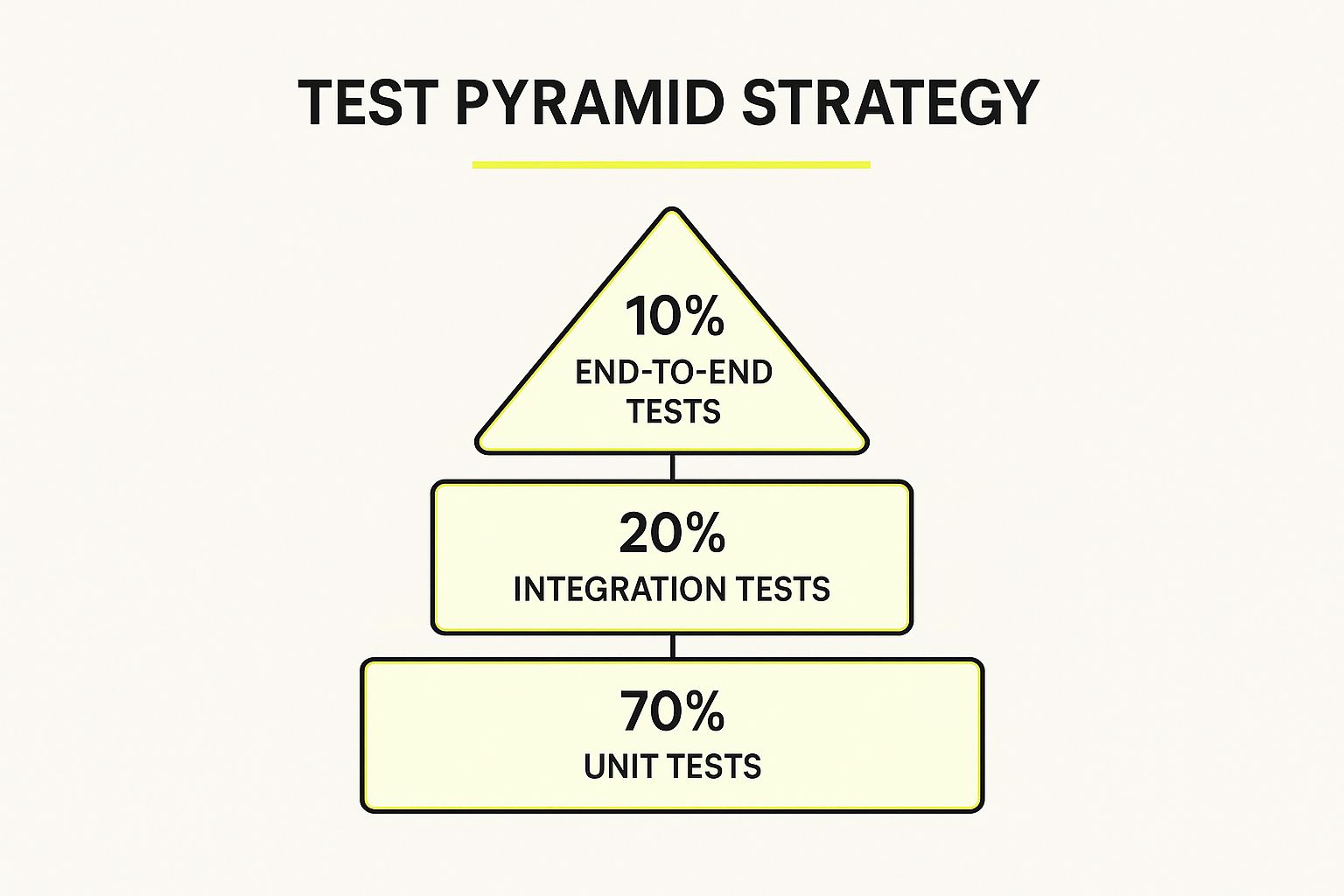
This hierarchy emphasizes building a solid foundation with numerous unit tests to ensure that the majority of your code is verified quickly and reliably. By limiting slow and brittle E2E tests to only critical user paths, you create a more stable and maintainable testing suite.
2. Continuous Integration and Continuous Testing
Continuous Integration (CI) and Continuous Testing (CT) are interconnected practices that form the backbone of modern, agile software development. This approach involves automatically building and running your test suite every time a developer commits code to a shared repository. This rapid feedback loop is one of the most impactful automated testing best practices for maintaining high-quality code and accelerating release cycles.
By integrating and testing code changes frequently, teams can identify and fix bugs almost immediately, preventing them from escalating into larger, more complex problems. For a Shopify Plus merchant managing custom apps or themes, a CI/CT pipeline ensures that new features or updates don't unexpectedly break critical functionalities like the checkout process or third-party integrations.

How CI/CT Works
A CI/CT pipeline is a series of automated steps triggered by a code change. The goal is to create a reliable and repeatable process for verifying code quality.
- Trigger and Build: A developer pushes code changes to a version control system like Git. This action automatically triggers the CI server (e.g., GitHub Actions, Jenkins, GitLab CI/CD) to pull the latest code and build the application.
- Automated Testing: The server then executes the automated test suite. This typically starts with fast unit tests, followed by integration tests, and sometimes a small set of critical end-to-end tests. This is where Continuous Testing comes into play, ensuring quality is checked at every stage.
- Feedback and Reporting: If all tests pass, the build is considered successful. If any test fails, the pipeline stops, and the development team is immediately notified. This instant feedback allows developers to address the issue while the context is still fresh in their minds.
Implementing a CI/CT pipeline transforms testing from a separate, manual phase into an integral part of the development workflow. This ensures that your Shopify store remains stable and reliable, even as you continuously add new features and customizations to enhance the customer experience.
3. Page Object Model (POM) Pattern
The Page Object Model (POM) is a widely adopted design pattern that significantly improves the maintainability and readability of UI tests. It’s an essential part of any robust suite of automated testing best practices, especially for complex applications like a Shopify storefront where UI elements are frequently updated. POM encourages separating test logic from UI interaction logic by creating an object repository for web elements.
This pattern treats each page of your application as a separate class, which is responsible for finding UI elements and performing actions on them. By doing this, you centralize the logic for interacting with the UI, which means if a selector for an element changes, you only need to update it in one place instead of across multiple test scripts. This drastically reduces maintenance effort and makes your test suite more resilient to change.

How the Page Object Model Works
Implementing POM involves creating a class for each page or significant component of your web application. These classes contain locators for the UI elements on that page and methods that represent the user interactions available.
- Element Locators: Each page object class holds the selectors (like CSS selectors or XPaths) for all interactive elements on that page. For a Shopify product page, this would include locators for the "Add to Cart" button, quantity selector, and product variant options.
- Action Methods: The class also contains public methods that encapsulate user actions. For example, a
ProductPageobject might have methods likeaddToCart()orselectSize(String size). These methods hide the underlying Selenium or Playwright commands, making the test scripts read like plain English. - Test Scripts: The test scripts then use these page objects to perform actions. A test for adding a product to the cart would instantiate the
ProductPageobject and call theaddToCart()method. This keeps the test focused on verifying outcomes rather than the mechanics of clicking buttons.
By abstracting away the implementation details of the UI, your tests become cleaner, more understandable, and far easier to maintain over time. This separation of concerns is a cornerstone of scalable and effective test automation.
4. Test Data Management and Environment Isolation
Reliable automated tests depend heavily on consistent and predictable data. Test Data Management and Environment Isolation is the practice of creating controlled, separate environments where test data is carefully managed to prevent tests from interfering with each other. This is one of the most critical automated testing best practices for achieving repeatable and dependable results.
This approach ensures that each test run starts from a known, clean state, eliminating "flaky" tests that pass or fail unpredictably due to data changes made by previous tests. For a dynamic Shopify store, where product inventory, customer data, and order statuses are constantly in flux, isolated environments prevent a test for a new promotional code from failing simply because another test already "purchased" the last item in stock.

How Data and Environment Isolation Works
This practice focuses on two key components: creating predictable data for tests and ensuring the environment where tests run is pristine and unaffected by other processes. The goal is to make every test execution independent and self-contained.
- Test Data Management: This involves strategies for generating, provisioning, and cleaning up data. Instead of using a shared, static database that becomes messy over time, teams use techniques like data factories or builders to create specific data sets needed for a test. For instance, you could generate a synthetic customer profile with a specific order history just for a "returns processing" test.
- Environment Isolation: This ensures that tests do not collide. A common method is using containerization technologies like Docker, where each test suite can run in its own fresh, isolated container with a dedicated database. This is similar to how giants like Amazon use AWS infrastructure to spin up temporary, containerized environments for testing, guaranteeing no two test runs can influence each other's outcome.
- Data Cleanup: A crucial final step is returning the system to its original state after a test completes. This can be achieved by using database transactions that are rolled back after the test or by running cleanup scripts. This ensures the next test starts with the exact same baseline conditions, making your test suite stable and trustworthy.
5. Behavior-Driven Development (BDD) and Living Documentation
Behavior-Driven Development (BDD) is an agile software development practice that uses natural, human-readable language to describe a system's behavior. It bridges the communication gap between business stakeholders and developers, making it one of the most collaborative automated testing best practices. The core idea, pioneered by Dan North, is to create "living documentation" where requirements are also executable tests.
This approach ensures that development efforts remain laser-focused on actual business needs. For an e-commerce business using Shopify, BDD helps guarantee that features like a custom loyalty program or a complex discount engine behave exactly as the marketing and sales teams intended, directly tying test outcomes to business value.
How BDD Works
BDD uses a simple, structured language format called Gherkin to define user scenarios. These scenarios are then linked to code that executes the corresponding test steps, turning your documentation into an automated test suite.
- Feature Files: BDD starts with a plain-text file (a
.featurefile) that describes a feature from a user's perspective. It uses aGiven-When-Thensyntax to outline scenarios. For example, a Shopify feature file might describe the behavior of a "buy one, get one free" promotion. - Step Definitions: Each line in the
Given-When-Thenscenario is mapped to a "step definition," which is a block of code that the test automation framework executes.Givensets up the initial state,Whendescribes the action taken, andThenverifies the outcome. - Living Documentation: Because the feature files are written in plain English and are directly tied to the automated tests, they serve as up-to-date, verifiable documentation. If a test passes, the documentation is confirmed to be accurate. For example, when a new payment gateway is added to a Shopify store, a BDD scenario can confirm it appears at checkout, and this test becomes the official record of that functionality.
By focusing on behavior, BDD ensures that your tests validate what the system should do for the user, rather than just how it is implemented. This alignment between business requirements, documentation, and testing creates a more reliable and purposeful development process.
6. API-First Testing Strategy
An API-First Testing Strategy shifts the focus of testing from the graphical user interface (GUI) to the application programming interface (API) layer. This approach prioritizes validating the core business logic, data handling, and service integrations before the UI is even built, making it a powerful automated testing best practices model for modern, service-driven architectures.
Adopting this strategy is particularly effective for headless e-commerce setups, where the frontend and backend are decoupled. For a Shopify Plus store using a custom storefront, an API-first approach ensures that the underlying services that handle inventory, orders, and customer data are robust and reliable, regardless of the user-facing interface. This leads to faster feedback cycles and more stable, less brittle tests.
How API-First Testing Works
This strategy involves testing the API endpoints directly to verify their functionality, performance, and security. Instead of simulating user clicks, tests send HTTP requests to the API and validate the responses, ensuring the backend operates as expected.
- Contract Testing: This is a core component where you ensure that services (like a payment gateway and an order management system) communicate correctly. Tools like Pact help verify that both the consumer and provider of an API adhere to a shared contract, preventing integration failures.
- Functional and Logic Testing: You can use tools like Postman or REST Assured to create automated test suites that verify business logic. An example for a Shopify store would be an API test that confirms applying a discount code correctly reduces the total order value in the response data.
- Schema and Data Validation: These tests check that the API responses consistently adhere to a defined structure or schema (like OpenAPI or JSON Schema). This prevents issues where the frontend breaks because of an unexpected change in the data format from the backend. For more details on maintaining stable API contracts, you can learn more about Shopify API versioning best practices.
By concentrating tests at the API layer, teams can identify and fix critical bugs in the core business logic much earlier and more efficiently than waiting for slow, complex UI tests to run.
7. Flaky Test Detection and Management
A flaky test is one that passes and fails intermittently without any changes to the underlying code, eroding team confidence in the entire test suite. Flaky test detection and management is one of the most critical automated testing best practices for maintaining a reliable CI/CD pipeline. This practice involves systematically identifying, quarantining, and resolving these unpredictable tests.
Ignoring flaky tests leads to "test result fatigue," where developers start to distrust failures, potentially letting real bugs slip through. For an e-commerce store built on Shopify, where a failed deployment could mean lost sales, having a trustworthy and stable test suite is non-negotiable. Major tech companies like Google and Microsoft have invested heavily in infrastructure to automatically detect and manage flaky tests.
How to Manage Flaky Tests
A systematic approach to handling flaky tests ensures they don't disrupt development workflows while still being addressed properly. The process involves detection, isolation, and resolution.
- Detection and Monitoring: The first step is to identify them. This is typically done by tracking the execution history of each test. A test that flips between pass and fail across several runs on the same code commit is flagged as flaky. Tools within platforms like Azure DevOps or custom scripts can automate this monitoring.
- Quarantine and Analysis: Once a test is flagged as flaky, it should be temporarily removed or "quarantined" from the main CI pipeline that blocks deployments. This prevents the flaky test from holding up development. The quarantined test is then analyzed to find the root cause, which could be timing issues, race conditions, or external dependencies.
- Resolution and Reintegration: The final step is to fix the underlying issue. This might involve rewriting the test to be more resilient, such as using explicit waits instead of fixed delays, or mocking external services. Once fixed and proven stable, the test is reintegrated into the main CI pipeline.
This structured approach ensures that development velocity is maintained while the integrity of your automated testing suite is preserved. To dive deeper into a common source of flakiness, explore our guide on testing a website on different browsers.
8. Shift-Left Testing and Early Quality Gates
Shift-left testing is a transformative approach that integrates quality assurance activities earlier in the development lifecycle. Instead of treating testing as a final phase before release, this practice embeds it from the very beginning, making it one of the most effective automated testing best practices for modern development teams. The goal is to identify and resolve defects when they are cheapest and easiest to fix: during the coding and design stages.
This proactive strategy helps prevent bugs from ever reaching the main codebase, leading to higher-quality software, faster delivery cycles, and reduced development costs. For a Shopify Plus store managing complex customizations and app integrations, catching an issue in a developer’s local environment is vastly preferable to finding it in production during a high-traffic sales event.
How Shift-Left Testing Works
Shift-left testing involves moving quality checks and automated tests as early as possible in the workflow, often before code is even committed. It relies on a series of "quality gates" that code must pass to advance.
- Static Code Analysis: Automated tools like SonarQube or ESLint analyze source code without executing it to find potential bugs, security vulnerabilities, and code smells. This can happen in real-time within a developer's IDE or as a pre-commit hook. For instance, a static analyzer can flag an inefficient Liquid code snippet before it impacts storefront performance.
- Unit and Component Testing: Developers are responsible for writing unit tests alongside their features. A quality gate can be set up in the CI/CD pipeline to ensure new code meets a minimum test coverage threshold and that all unit tests pass before a pull request can be merged.
- Peer Code Reviews: While a manual process, code reviews are a critical part of the shift-left culture. They are often supported by automated checks, ensuring that reviewers can focus on logic and design rather than syntax or style errors. Tools like GitHub's branch protection rules can enforce that at least one peer review is completed.
By implementing these early gates, teams create a culture where quality is a shared responsibility, not just the QA team's job. This approach aligns perfectly with a comprehensive strategy for quality assurance. To dive deeper, you can learn more about quality assurance best practices on scaleshopify.com.
Automated Testing Best Practices Comparison
| Strategy / Practice | Implementation Complexity 🔄 | Resource Requirements ⚡ | Expected Outcomes 📊 | Ideal Use Cases 💡 | Key Advantages ⭐ |
|---|---|---|---|---|---|
| Test Pyramid Strategy | Medium – requires discipline and balance across test types | Moderate – investment in unit and integration test frameworks | Faster execution, reliable tests, cost-efficient | Projects needing fast feedback and maintainability | Balanced test coverage, lower maintenance |
| Continuous Integration & Continuous Testing | High – setup of pipelines and test automation infrastructure | High – requires CI servers, test environments | Early bug detection, consistent quality, fast releases | Teams aiming for continuous delivery and collaboration | Fast feedback, improved code quality |
| Page Object Model (POM) Pattern | Medium – initial overhead to design page objects | Low to moderate – mainly development effort | Maintainable, readable UI tests, reduced code duplication | UI-heavy automation with frequent UI changes | Easier UI test maintenance, code reuse |
| Test Data Management & Environment Isolation | High – involves infrastructure and environment setup | High – costs for parallel isolated environments | Consistent and reliable tests, reduced flakiness | Complex integration or parallel test runs | Stable test results, parallel execution |
| Behavior-Driven Development (BDD) & Living Documentation | Medium to high – requires adoption of natural language specs | Moderate – tooling and cross-team collaboration | Better communication, aligned requirements, living docs | Projects with cross-functional teams and domain focus | Improved collaboration, traceable requirements |
| API-First Testing Strategy | Medium – requires API design and contract frameworks | Moderate – API testing tools and expertise | Faster, more stable tests focusing on core logic | Microservices and API-centric development | Early business logic validation, stable tests |
| Flaky Test Detection and Management | High – requires monitoring and root cause analysis | Moderate to high – needs tools for tracking and quarantine | Improved CI reliability, reduced false failures | Teams struggling with unstable tests | Increased test trustworthiness, reduced noise |
| Shift-Left Testing & Early Quality Gates | Medium to high – cultural change and tooling setup | Moderate – static analysis and early test effort | Reduced defect cost, earlier feedback | Projects emphasizing quality integration in development | Lower fix costs, faster developer feedback |
Building a Bulletproof Shopify Store with Smart Automation
Embarking on the path of automated testing can seem daunting, but as we've explored, the journey from manual checks to a sophisticated, automated quality assurance pipeline is a series of deliberate, strategic steps. It's not about flipping a switch; it's about fundamentally changing how you approach quality and development for your Shopify store. By embracing these best practices, you move from a reactive state of fixing bugs to a proactive state of building a resilient, high-performing e-commerce machine.
Weaving the Practices into a Cohesive Strategy
The true power of these automated testing best practices emerges when they are woven together. Adopting the Test Pyramid provides the foundational structure, ensuring your efforts are efficient and stable. Integrating this with a CI/CT pipeline transforms testing from a manual chore into an automated, always-on quality gatekeeper that protects your store with every code change.
Simultaneously, implementing the Page Object Model (POM) brings order and maintainability to your test code, preventing it from becoming a tangled mess as your store grows. This structured approach, combined with a robust test data management strategy, ensures your tests are reliable, repeatable, and run in isolated environments, mimicking real-world scenarios without corrupting production data. The result is a testing suite you can trust, one that delivers clear signals instead of noisy, unreliable failures.
Elevating Quality with Advanced Approaches
Moving beyond the fundamentals, adopting concepts like Behavior-Driven Development (BDD) closes the gap between your business goals and your technical implementation. It turns tests into living documentation that everyone, from developers to marketers, can understand. An API-first testing strategy complements this by validating core business logic at its source, catching critical bugs faster and more efficiently than UI tests ever could.
Finally, a mature testing culture actively hunts down and manages flaky tests and embraces the Shift-Left mindset. By integrating quality checks early and often, you empower your developers to build better code from the start, dramatically reducing the cost and effort of fixing defects later. To implement smart automation effectively, a deep understanding of proven automated testing best practices is essential for any modern development team looking to accelerate their release cycles without sacrificing quality.
Ultimately, mastering these principles is an investment in your brand's reputation and your customers' trust. It ensures that whether you're launching a new feature, running a flash sale, or simply performing routine maintenance, your Shopify store remains a stable, reliable, and delightful place for customers to shop.
Ready to implement these best practices with an expert team that lives and breathes Shopify Plus? At E-commerce Dev Group, we build and maintain high-performance e-commerce stores by integrating sophisticated automated testing from day one. Learn how our development expertise can bulletproof your Shopify store.
