


So, how much does Shopify actually take from each sale you make? Let's get straight to it.
For a new store on the Basic Shopify plan, the most common answer is 2.9% + 30¢ for every online transaction. This fee is a blend—a percentage of the total sale plus a small, fixed amount.
Your Quick Answer to Shopify Sale Fees

Think of it like renting a booth at a popular market. You pay a monthly fee for your spot (that’s your Shopify subscription), but you also give the market owner a small commission on every sale you make. That commission is Shopify's transaction fee.
But here’s the thing: that percentage isn't set in stone. It’s directly linked to the Shopify subscription plan you choose. As your business grows and you upgrade to a higher-tier plan, Shopify rewards you with lower transaction rates. It’s a smart system that incentivizes you to scale, since you get to keep more of your money on each sale as your volume increases.
A Quick Fee Comparison by Plan
The transaction fees you pay depend entirely on your pricing plan, which is a huge factor in how much Shopify takes from every sale. As of 2025, if you're on the Basic plan, you're looking at 2.9% + 30¢ for online sales when you use Shopify Payments.
Move up to the standard Shopify plan, and that rate drops to 2.6% + 30¢. If you're doing enough volume for the Advanced plan, it goes down even further to 2.4% + 30¢. For a deeper dive into these numbers, you can explore additional details on how Shopify's fee structures work.
Key Takeaway: The single biggest factor determining your per-sale cost is the combination of your subscription plan and your payment processor. For the vast majority of stores, sticking with Shopify Payments is the most straightforward and cost-effective option.
To make this crystal clear, let's break down the online credit card rates for each plan in a simple table.
Shopify Payments Online Transaction Fees at a Glance
This table gives you a quick snapshot of the online credit card fees you can expect with each of the main Shopify plans.
| Shopify Plan | Online Credit Card Rate |
|---|---|
| Basic Shopify | 2.9% + 30¢ per transaction |
| Shopify | 2.6% + 30¢ per transaction |
| Advanced Shopify | 2.4% + 30¢ per transaction |
As you can see, the savings start to add up as you move up the ladder. This is a critical piece of the puzzle when you're figuring out your store's profitability.
Understanding Shopify's Core Fee Structure
When you're trying to figure out how much Shopify actually takes from each sale, you need to look at two separate costs that work together: your monthly subscription plan and the transaction fees. Getting a handle on this duo is the key to seeing your store's finances clearly.
Think of your monthly subscription like the rent you pay for your digital storefront. It’s a fixed, predictable cost that unlocks Shopify’s powerful platform, all its features, and their support. This fee stays the same whether you sell one thing or a thousand.
Transaction fees, on the other hand, are totally different. These are variable costs, meaning they go up and down with your sales. This is the percentage Shopify takes every time someone buys something from you, and it directly nibbles away at your profit margin on every single order.
Fixed vs. Variable Costs Explained
It’s crucial to understand this split. Your fixed subscription is the foundation, while your variable transaction fees grow right alongside your business.
- Monthly Subscription (Fixed Cost): This is your predictable price of admission. It covers the software, hosting, and all the core tools you need to run your store.
- Transaction Fees (Variable Cost): This is the cost of actually making a sale. It’s mostly for credit card processing but can sometimes include extra platform fees.
This two-part structure means your total monthly Shopify bill isn't just your plan's price tag. It's your subscription plus all the transaction fees from that month’s sales combined.
Once you master the relationship between your fixed subscription and variable transaction fees, you can nail down your profit margins and make much smarter financial decisions as your store grows.
What’s Inside a Transaction Fee?
So, what exactly makes up that percentage fee on every sale? It’s almost entirely the credit card processing fee.
Every time a customer swipes, taps, or types in their card details, a small percentage is charged by banks and payment networks to handle the transaction securely. For a really deep dive into these charges, this guide on understanding Shopify credit card charges is a fantastic resource.
Shopify makes this simple by rolling all of those complex charges into one clear rate if you use their own gateway, Shopify Payments. It takes a bunch of confusing little fees and turns them into a single, easy-to-understand number, making it much easier to predict your costs. This is the bedrock for building a profitable pricing strategy.
Shopify Payments vs. Third-Party Payment Gateways
Deciding how you'll accept payments is one of the most important financial choices you'll make for your store. You've really got two main paths: stick with Shopify’s built-in system, Shopify Payments, or bring in an outside processor like PayPal or Stripe, which are called third-party payment gateways.
This choice directly affects the slice Shopify takes from every sale.
Think of Shopify Payments as the "in-house" special. When you use it, you're paying one straightforward, combined fee that covers both the credit card processing and Shopify's platform fee. It's clean and simple.
But if you go with an external gateway, Shopify tacks on an extra fee on top of whatever your chosen processor charges. This is a detail that trips up a lot of new store owners. This extra fee is basically Shopify's way of covering the cost and security of integrating a system that isn't its own.
The Real Cost of Using External Gateways
Shopify’s extra transaction fee for using a third-party gateway isn't small. It starts at a hefty 2.0% on the Basic plan and goes down to 0.5% on the Advanced plan.
Remember, this is on top of the fees from your actual payment provider (like PayPal's standard 2.9% + 30¢).
That extra percentage can take a serious bite out of your profit margins. With over 4.8 million stores on the platform as of 2025, Shopify has a clear incentive to keep merchants inside its ecosystem. By making Shopify Payments the most cost-effective option, they encourage you to stick with their native solution.
The chart below lays out the standard online transaction rates for Shopify Payments. You can see how the fees get better as you move up the plan ladder.
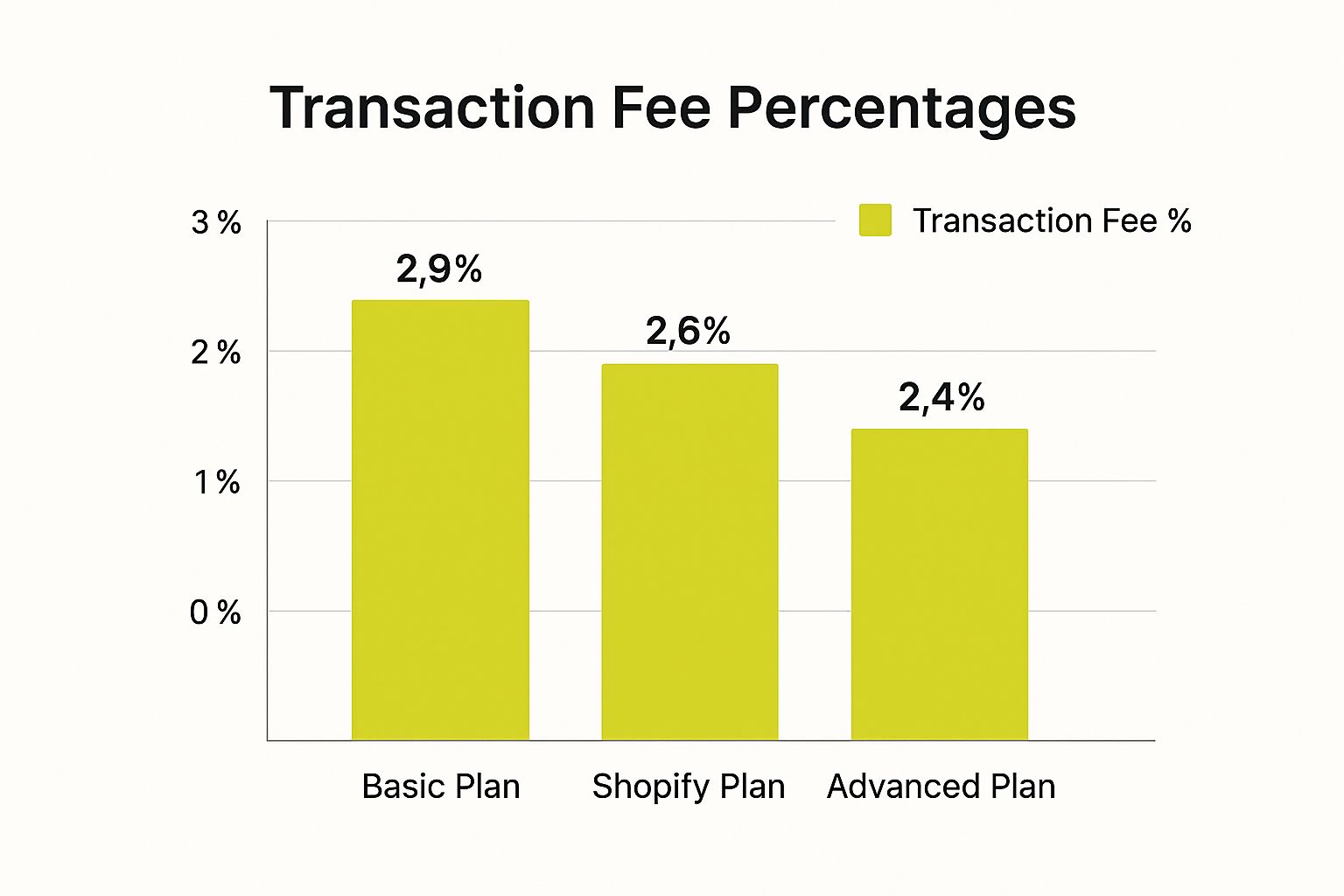
It’s pretty clear from this visual that staying within the Shopify ecosystem rewards you with better rates as your business scales.
Cost Comparison Shopify Payments vs Third-Party Gateway (Basic Plan)
So, what does this look like in the real world? Let’s put some numbers to it. The table below breaks down the total fees on a $100 sale for a store on the Basic Shopify plan, comparing the two payment options.
| Fee Type | Shopify Payments | Third-Party Gateway (Example) |
|---|---|---|
| Processor Fee | $3.20 | $3.20 (e.g., PayPal) |
| Shopify's Additional Fee | $0.00 | $2.00 (2.0% of $100) |
| Total Cost Per Sale | $3.20 | $5.20 |
As you can see, using an external gateway costs you an extra $2.00 on that single $100 sale. That might not sound like much, but imagine that over hundreds or thousands of transactions. It adds up to a huge chunk of lost profit.
While some businesses might have a specific reason to use a third-party gateway (like needing a processor for a high-risk industry), most stores will find that Shopify Payments makes the most financial sense.
Of course, it's always smart to do your own homework. It's a good idea to compare payment gateways to see the full landscape of options. For a deeper dive, check out our guide right here: https://scaleshopify.com/2025/07/23/payment-gateway-comparison/
How Your Shopify Plan Affects Your Fees

Think of your Shopify plan as more than just a monthly bill with a list of features. It’s one of the biggest levers you can pull to manage your costs. Choosing the right plan isn't just about unlocking new tools; it’s a critical business decision that directly affects your profit on every single sale.
The relationship between plans is pretty straightforward: as you move up to a higher-tier plan, your fixed monthly subscription gets more expensive, but the transaction fee you pay on each sale goes down. This creates a really interesting balancing act.
If you're just starting out, the lower monthly cost of the Basic plan makes perfect sense. But for a store doing serious volume, sticking with that plan means you're leaving a lot of money on the table.
This creates a financial "tipping point" for your business. At a certain amount of monthly sales, the money you save from lower fees on a more expensive plan completely cancels out its higher subscription cost. If you've passed that point, you're literally losing money by not upgrading.
Finding Your Break-Even Point
Figuring out this tipping point isn't as complicated as it sounds. All you need to do is compare the difference in the monthly subscription cost and the difference in the transaction fee percentage between two plans.
Let's walk through it by comparing the Basic and standard Shopify plans.
- Difference in Subscription: The standard Shopify plan costs more each month than the Basic plan.
- Difference in Transaction Fee: But, it also gives you a 0.3% lower online credit card rate (2.6% vs. 2.9%).
To find your break-even sales volume, you just divide the monthly cost difference by the fee difference. Once your monthly sales climb past that number, it’s time to upgrade.
The decision to upgrade your Shopify plan shouldn't be based on features alone. It should be a data-driven choice based on your sales volume to ensure you're maximizing your profit margin on every transaction.
A Practical Example
Let’s say the price difference between the Basic and Shopify plans is $30 per month. The fee savings you get by upgrading is that 0.3% (which is 0.003 as a decimal).
The math is simple: $30 / 0.003 = $10,000.
What does that number mean? It means that as soon as your store is consistently hitting over $10,000 in online sales each month, the money you save on fees is more than the extra $30 you're paying for the plan. At that point, staying on the Basic plan is actively costing you money.
As your store continues to grow, the next step is understanding the jump to an enterprise-level plan. Our detailed comparison of Shopify Plus vs Shopify breaks down what that looks like for a scaling business.
By keeping an eye on your sales and running this quick calculation, you can turn your plan choice from a simple expense into a smart financial strategy. It’s all about making sure you keep as much of your hard-earned revenue as possible.
The Hidden Costs Beyond Transaction Fees
https://www.youtube.com/embed/tsobMoaO3Vs
Figuring out how much Shopify takes per sale isn't just about looking at the transaction fee on your receipt. To really get a grip on your store's profitability, you have to see the whole picture, and that includes several costs that often catch new merchants off guard.
Think of these extra expenses like the small, unseen currents beneath the water's surface. If you're not paying attention, they can quietly pull your profits off course. They are the real, day-to-day costs of running a professional ecommerce store.
Unpacking Additional Operational Costs
Your subscription and transaction fees are just the starting point. Several other expenses can add up fast, and they'll hit your bottom line every single month.
Here are some of the most common "hidden" costs to watch out for:
- Currency Conversion Fees: Selling to international customers? Shopify applies a currency conversion fee to process payments in their local currency. This gets tacked on top of your regular transaction rate.
- Chargeback Fees: When a customer disputes a charge and a chargeback is filed, you get hit with a penalty. Not only do you lose the sale, but you also have to pay an extra fee, which is $15 per chargeback in the U.S.
- Monthly App Subscriptions: The Shopify App Store is full of amazing tools, but most come with a monthly price tag. A simple reviews app might cost $20/month, but an advanced marketing automation tool could easily add $100 or more to your bill.
On top of the standard fees, you absolutely need to be aware of chargebacks. You can learn more about Shopify chargeback rates and fees and see how they can seriously impact your expenses. If you don't manage them carefully, they will eat away at your profits.
These aren't one-time expenses. They're recurring operational costs that you must factor into your pricing strategy and monthly budget to keep your profit margins healthy.
The Cumulative Effect on Your Profitability
Fee transparency is a big deal for store owners. Shopify's pricing structure, with all its different tiers and fees, can sometimes make it confusing to know what each sale truly costs you. While Shopify’s credit card processing fees are pretty competitive—usually in the same ballpark as Stripe's 2.7% to 3.5% plus a fixed fee—it's these additional expenses that really make a difference.
For instance, if your store depends on multiple paid apps to function, those recurring costs can inflate your overhead in a hurry.
Think of it this way: if your business needs three different apps that each cost $30 a month, that’s an extra $90 you have to cover before you even start calculating your profit. These hidden costs give you a much more realistic answer to the question, "how much does Shopify take per sale?" because they show you the total investment required to run your store well.
Practical Strategies to Lower Your Shopify Fees

Knowing what the fees are is one thing, but actively finding ways to shrink them is where you can really boost your store's profitability. Instead of just letting fees eat into your revenue, you can take smart steps to keep more of every dollar you earn.
The single biggest lever you can pull is matching your Shopify plan to your sales volume. As your store starts to take off, it’s easy to stick with the Basic plan out of habit. But you need to do the math. Upgrading to a higher-tier plan might cost more upfront each month, but the lower transaction fees can save you a ton of money in the long run.
Actionable Cost-Saving Tactics
Beyond just picking the right plan, there are a few other clever ways to chip away at your costs. A little focus on how you operate and using the tools Shopify gives you can make a real difference to your bottom line.
Here are a few things you can do right away:
-
Take Advantage of In-Person Rates: Do you sell at pop-ups, markets, or a physical store? Using Shopify POS for in-person sales gives you much lower transaction rates. It’s a simple way to pocket significant savings if you blend online and offline selling.
-
Get a Handle on Chargebacks: A chargeback isn't just a lost sale—it's a $15 penalty fee on top of it. You can fight back by using solid fraud detection apps and offering top-notch customer service to prevent disputes before they even start.
-
Focus on Growing Your Sales: Sometimes the best defense is a good offense. The more you sell, the faster it makes financial sense to upgrade to a plan with better rates. If you need some ideas, check out our guide on conversion rate optimization strategies to get more visitors to click "buy."
When to Consider Shopify Plus
For stores doing serious volume, even the advanced plans start to feel restrictive. Once your sales are consistently hitting high numbers, it’s probably time to look at graduating to Shopify Plus.
Key Insight: Shopify Plus is built for big players. It moves you into a world of custom, negotiated transaction rates. For a large-scale business, this is the ultimate way to slash those per-transaction costs and maximize your margins.
By shifting your mindset from simply paying fees to actively managing them, you take back control of your store's financial health and build a stronger foundation for the future.
Common Questions About Shopify Fees
Let's tackle a few of the questions I hear all the time from store owners about how much Shopify really takes from each sale. Getting these details straight can save you a lot of headaches down the road.
Do I Get Transaction Fees Back on Refunds?
This is a big one. You've processed a return and given the customer a full refund. So, what happens to those initial transaction fees you paid?
Unfortunately, you don't get them back. When you refund an order, the credit card processing fee charged by Shopify Payments (or any other gateway) is not returned to you. The payment provider keeps that fee to cover the cost of the original transaction, meaning you take a small loss on every return. It’s a crucial detail to bake into your financial forecasts.
Are There Fees on Manual Payments?
What about orders paid for with cash on delivery (COD), a bank transfer, or another method handled outside of Shopify's online checkout?
Good news here: Shopify doesn't charge transaction fees on these types of manual payments. Since the payment isn't processed through an online system, there are no credit card networks involved, and therefore, no processing costs to pass on. This makes manual options a great, fee-free way to handle things like local pickups or B2B invoices.
Don't forget about international sales—they come with their own set of costs. Shopify adds currency conversion and cross-border fees when you sell to customers in other countries. These are layered on top of your standard transaction rates, but they’re what allow you to sell globally while still getting paid in your own currency.
Ready to build a high-performance Shopify store that converts visitors into loyal customers? The experts at E-commerce Dev Group specialize in custom design, development, and optimization to help your business thrive. Visit us at https://scaleshopify.com to learn how we can help you scale.
