

Trying to pin down the exact cost of a Shopify store is a bit like asking, "How much does it cost to build a house?" Are you thinking of a simple tiny home or a custom-built mansion? The final price tag depends entirely on what you build. Your store could be a lean, DIY setup for a few hundred dollars, or it could be a professionally designed powerhouse costing several thousand.
Your Quick Answer to Shopify Store Costs
The best way to think about your Shopify budget is to break it down into three main pieces: your monthly subscription plan, your store's design (the theme), and any extra features you add (the apps). Every decision you make in these areas will shape your total cost, which gives you the flexibility to start small and invest more as your business takes off.
For anyone just starting out, the biggest costs are usually the initial setup and the ongoing subscription. A basic, professionally set-up Shopify store often starts around $1,500 for the initial design and configuration, and that's before you factor in the monthly fees.
Shopify’s main plans are:
- Basic: $39/month
- Shopify: $105/month
- Advanced: $399/month
For larger businesses, there's also Shopify Plus, which is an enterprise-level solution starting at $2,000/month. If you want a deeper dive into these startup costs, this guide on building a Shopify store from scratch is a great resource.
Visualizing Your Core Shopify Expenses
To get a better handle on how these costs fit together, take a look at this breakdown. It shows how everything starts with your subscription plan, with the theme and app costs layered on top.
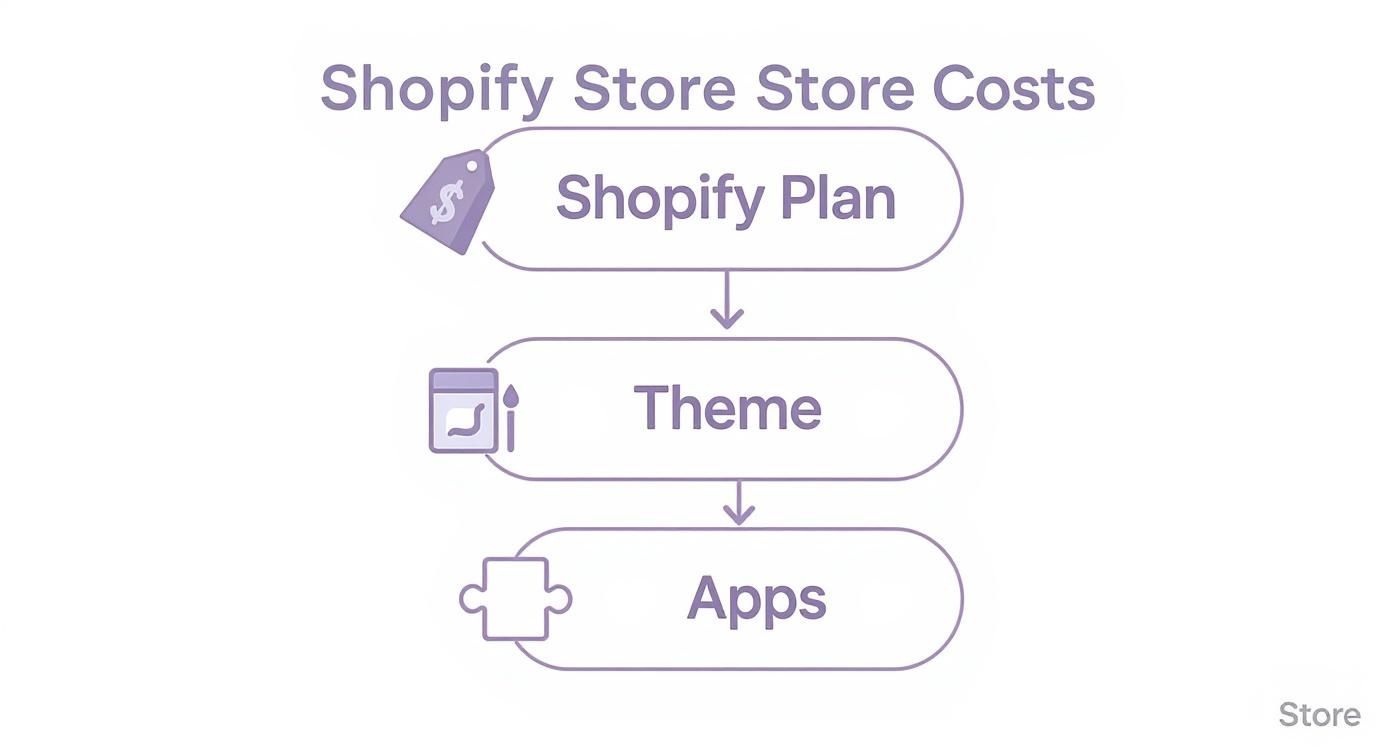
As you can see, your Shopify plan is just the foundation. The theme and apps are what really bring your store's look, feel, and functionality to life.
A Snapshot of Shopify's Main Plans
To give you a clearer picture of those foundational costs, let’s quickly compare the three main subscription tiers. Each plan comes with different features and, more importantly, different transaction fees. Those fees might seem small, but they can have a huge impact on your profit margins as you start making more sales.
Think of your Shopify plan as an investment in your store's engine. Upgrading to a higher tier might feel like a big jump, but it can easily pay for itself with lower transaction fees and better reporting tools.
Here’s a simple table to help you see the monthly prices and transaction fees for each of the main plans. This should help you figure out which one makes the most sense for where your business is right now.
Shopify Monthly Subscription Plans at a Glance
| Plan Name | Monthly Price | Online Transaction Fee |
|---|---|---|
| Basic | $39/month | 2.9% + 30¢ |
| Shopify | $105/month | 2.6% + 30¢ |
| Advanced | $399/month | 2.4% + 30¢ |
This gives you a side-by-side look at the recurring costs you can expect. Notice how the transaction fee drops as you move up to a higher plan? That’s why upgrading often becomes a no-brainer for growing stores. Now that we've covered the monthly foundation, let's get into the one-time setup costs you'll build on top of it.
Calculating Your Initial Shopify Setup Costs
Beyond the monthly plan, you've got your initial setup costs—the one-time investments to get your store up and running. Think of it like moving into a new house. The mortgage is your monthly fee, but you still need to buy furniture, paint the walls, and hang some art to make it feel like home. These upfront costs are what will turn a generic template into a brand that people remember.
So, what's the damage? It can vary wildly. If you're scrappy and doing it all yourself, you might get away with spending just a few hundred dollars. But if you want a polished, professional store right from the start, it's easy to spend several thousand. It all comes down to your choices for your domain, theme, and branding.
Securing Your Digital Address: Your Domain Name
First things first, you need a custom domain name. This is your store's unique address on the web (like yourcoolbrand.com). You could stick with the default Shopify URL (yourstore.myshopify.com), but a custom domain is absolutely non-negotiable if you want to build a credible brand that customers actually trust.
Expect to pay somewhere between $15 and $20 per year for a standard .com domain. You can grab one directly through Shopify, which makes setup a breeze, or use a third-party registrar. It’s one of the smallest expenses you’ll have, but it's one of the most important when figuring out how much your Shopify store will really cost.
Choosing Your Storefront: The Shopify Theme
Your theme is the visual foundation of your store. It's the layout, the style, the first impression—and it has a huge impact on whether people stick around or bounce. You've got two main paths you can take here: free or premium.
- Free Themes: Shopify offers a handful of really solid, high-quality free themes. They're perfect for new stores, with clean designs, mobile-friendly layouts, and all the essential features you need to get selling. It’s a fantastic way to launch without breaking the bank.
- Premium Themes: Paid themes usually come with a one-time fee of $200 to $400. For that price, you get more advanced features, deeper customization options, and often, designs built for specific industries. A premium theme can make your store feel unique and high-end right out of the box.
A free theme is like a solid, move-in-ready apartment—it looks good and gets the job done. A premium theme is like hiring an interior designer; you get a more distinctive style with specialized features tailored to your needs. If you want a hand with these early decisions, our guide on setting up a Shopify store walks you through it.
Building Your Brand Identity: Logo and Visuals
Your brand is more than just a logo—it's the whole vibe that makes you different. But a professional logo is definitely the cornerstone of that identity. The cost here can be all over the map.
You could use a free online logo maker for a basic design, which is a great starting point if you're bootstrapping. Or, you could hire a freelance designer on a platform like Fiverr or Upwork for anywhere from $50 to $500. If you're looking for a complete branding package from an agency, you're talking thousands.
Your theme and your branding work together to create an impression in seconds. Investing even a little bit in a clean logo and cohesive visuals tells visitors you're trustworthy and professional, which makes them want to stick around and shop.
So, what's the bottom line for getting started? You can definitely get off the ground for under $500 if you go lean with a free theme and minimal branding. However, for a more serious launch, it’s smart to budget between $2,000 and $3,000 to cover a premium theme, professional branding, and some essential apps right from day one. These initial costs lay the foundation, but the next layer of expenses comes from the tools that really power your store's day-to-day functions.
Budgeting for Essential Shopify Apps and Plugins
A brand-new Shopify store is a powerful starting point, but the real magic happens in the Shopify App Store. Think of it like a new smartphone. Out of the box, it can make calls and send texts. But it’s the apps you install—for directions, social media, or banking—that truly make it your own indispensable tool.
Shopify apps work the same way. They add critical features that the core platform doesn't handle on its own, like email marketing, customer reviews, advanced shipping rules, and SEO tools. While many apps offer a free starting plan, the features that actually move the needle for your business almost always come with a monthly subscription.
Those small monthly fees can add up faster than you think, often becoming one of the most significant ongoing expenses for a store. For many merchants, the total cost of apps can even end up being more than their Shopify plan itself.
Why Apps Are a Non-Negotiable Expense
When you're just starting out, it’s tempting to try and get by with only free apps to keep your costs down. The problem with that approach is that it can seriously stunt your growth. You simply can't compete without the right tools.
Things like building an email list, collecting social proof with customer reviews, or making sure your store shows up in Google searches are absolutely fundamental to finding and converting customers.
Investing in the right apps isn't just an expense; it’s an investment in your store's ability to perform. An email marketing app gives you a direct line to your audience, and a good review app builds the trust needed to convince a new visitor to buy. To get a better sense of what's out there, check out our guide on the best Shopify apps to increase sales: https://scaleshopify.com/2025/07/03/best-shopify-apps-to-increase-sales/.
Common App Categories and Their Costs
To create a realistic budget, you need to know what you’re shopping for. Most stores will need at least one paid app from several of the following categories to run smoothly and stay competitive.
Here are a few of the most common app types and a ballpark of what they might cost:
- Email Marketing & Automation: Tools like Klaviyo or Omnisend are essential for sending newsletters and recovering abandoned carts. Pricing is usually based on your subscriber count, often starting around $20-$50/month.
- Customer Reviews & Social Proof: Apps such as Yotpo or Loox help you gather and display customer reviews and photos. Building that trust is key, and these apps typically run $15-$100/month.
- SEO & Site Performance: If you want to rank on Google, you'll need a tool to manage your metadata, fix broken links, and optimize images. An app like SEO Manager often costs about $20-$30/month.
- Subscriptions & Recurring Payments: Thinking of offering subscription boxes? You'll need an app like ReCharge to handle the recurring billing, which can cost anywhere from $50 to over $100/month.
- Shipping & Fulfillment: For anything beyond basic shipping, you’ll need an app for real-time carrier rates or printing labels. Expect to pay somewhere between $15-$60/month.
Diving into the best Shopify marketing apps is a great way to see how specific tools can directly boost your bottom line.
Building a Realistic Monthly App Budget
So, what’s the magic number? For a new or small store, a good starting point is to budget at least $50-$150 per month. This should comfortably cover 3-5 essential paid apps without breaking the bank.
As your store grows and your needs get more complex, that budget will naturally grow with it, likely landing somewhere in the $200-$500+ per month range.
Remember, the goal isn't to collect the most apps—it's to have the right ones. Every app you pay for should solve a specific problem or deliver a clear return on your investment.
To give you a clearer picture, here’s a sample budget showing how these costs might break down.
Example Monthly Budget for Essential Shopify Apps
This table outlines a few common app categories, popular examples, and what you can expect to pay for each.
| App Category | Example App | Average Monthly Cost |
|---|---|---|
| Email Marketing | Klaviyo (Growth Plan) | $20 – $150+ |
| Customer Reviews | Loox (Beginner Plan) | $9.99 – $99.99 |
| SEO Optimization | SEO Manager | $20 |
| Upselling & Cross-selling | ReConvert | $4.99 – $29.99 |
| Shipping Rules | Advanced Shipping Rules | $9 – $99 |
| Page Builder | Shogun Page Builder | $9 – $149 |
By planning for these costs from day one, you’ll avoid any nasty surprises down the road and build a much more sustainable business. App fees are a core, unavoidable part of running a modern Shopify store.
Crunching the Numbers on Shopify Transaction and Payment Fees
Every time a customer clicks "buy," a tiny piece of that sale goes to the payment processor. It's just a standard cost of doing business online, but getting a handle on these fees is absolutely essential for pricing your products and protecting your profit margins.
Think of it as the toll you pay for a system that securely and instantly accepts money from anyone, anywhere in the world. The fee structure can feel a little confusing at first, mostly because there are two different ways to go about it—using Shopify's built-in system or bringing in an outside provider.

The big decision you'll make is whether to stick with Shopify Payments or use a third-party payment gateway. This single choice has a direct impact on the fees you'll pay on every single sale you make.
Shopify Payments: The All-in-One Solution
For most people starting out, Shopify Payments is the no-brainer choice. It’s Shopify’s own payment processor, powered by the reliable engine of Stripe, and it’s ready to go from the moment you launch your store. You can accept all major credit cards without any complicated setup or extra monthly gateway fees. It just works.
When you use Shopify Payments, you’re charged a straightforward, all-in-one rate for credit card processing. This rate is a percentage of the sale plus a small fixed fee.
Here’s the breakdown of their standard online credit card rates by plan:
- Basic Shopify: 2.9% + 30¢ per transaction
- Shopify Plan: 2.6% + 30¢ per transaction
- Advanced Shopify: 2.4% + 30¢ per transaction
See the pattern? The more you pay for your monthly plan, the less you pay on each transaction. This is a huge reason why successful stores eventually upgrade—the savings on processing fees can easily cover the higher subscription cost as your sales volume grows.
Using a Third-Party Payment Gateway
What if you have a special relationship with another processor like PayPal or Authorize.net, or just prefer to use something else? You can absolutely do that. But there’s a catch.
If you choose not to use Shopify Payments, Shopify will charge you an additional transaction fee on top of whatever your chosen payment gateway charges you.
This extra fee is Shopify’s way of covering the costs of integrating their platform with an external service. It's a critical number to factor into your budget when you’re trying to figure out the true cost of running your store.
These extra platform fees break down like this:
- Basic Shopify: An extra 2.0% per transaction
- Shopify Plan: An extra 1.0% per transaction
- Advanced Shopify: An extra 0.5% per transaction
Let’s be clear: this means if you’re on the Basic plan and use a third-party gateway that charges a standard 2.9% + 30¢, your total fee per sale balloons to a whopping 4.9% + 30¢. For a deeper dive, our payment gateway comparison walks through the pros and cons of different providers.
How Fees Impact a Real Sale
Let's make this real. Imagine you sell a product for $100.
Here’s what you actually take home on that sale using Shopify Payments with each plan:
| Shopify Plan | Fee Calculation | Total Fee | Your Revenue |
|---|---|---|---|
| Basic | ($100 * 0.029) + $0.30 | $3.20 | $96.80 |
| Shopify | ($100 * 0.026) + $0.30 | $2.90 | $97.10 |
| Advanced | ($100 * 0.024) + $0.30 | $2.70 | $97.30 |
The difference on a single sale might look like pocket change, but it adds up fast. For a store doing $20,000 in monthly revenue, jumping from the Basic plan to the Shopify plan would save over $60 a month on fees alone—almost paying for the plan upgrade itself. Getting comfortable with these numbers is the first step to really understanding and forecasting your store's profitability.
Forecasting Your Ongoing Marketing and Operations Budget
Getting your Shopify store live is a huge step, but it’s really just the beginning. Think of it as the starting line, not the finish. A beautiful store doesn't do much good if nobody knows it's there. Now, your focus has to shift from building the store to building an audience—and that's where your marketing and operations budget comes in.
Imagine you've just opened a fantastic new boutique, but it's tucked away on a quiet side street. Without any signs, flyers, or buzz, potential customers will just walk right by. Your marketing budget is what pays for the billboards, runs the local ads, and gets people talking. It’s what turns that quiet side street into a bustling destination.
This budget isn't an "extra" or something to think about later. It’s a fundamental cost of doing business, just as critical as your inventory or your monthly Shopify plan. Skipping this step is one of the most common—and most costly—mistakes a new store owner can make.
Core Components of Your Marketing Budget
So, where does the money actually go? Your marketing spend is all about driving traffic, capturing leads, and turning those visitors into paying customers. For most online stores, the budget gets split across a few key areas that work together to build momentum.
To get a handle on this, it's a good idea to familiarize yourself with the available Shopify advertising tools, which can help you manage your efforts across different platforms.
Your main expenses will likely fall into these buckets:
- Digital Advertising: This is your direct line to customers. It includes pay-per-click (PPC) campaigns on platforms like Google Ads and social media ads on Facebook, Instagram, and TikTok. It's the fastest way to get your products in front of the right people.
- Content Creation: This is the fuel for your marketing engine. It means writing blog posts, shooting product photos, creating videos, and designing graphics for social media. Great content builds your brand's personality and supports all your other efforts.
- Email Marketing Software: We touched on app costs earlier, but your email platform (like Klaviyo or Mailchimp) is a direct marketing expense. As your email list grows, so will the cost of the software.
- SEO Tools: To play the long game of attracting free traffic from Google, you'll need tools. Subscriptions to platforms like Ahrefs or Semrush are essential for tracking keywords, spying on competitors, and finding opportunities.
Marketing isn't just about spending money; it's about investing in visibility. Every dollar you allocate should be aimed at bringing qualified traffic to your store and turning that traffic into revenue.
Sample Monthly Budgets by Business Stage
The real question behind "how much does a Shopify store cost?" goes way beyond the setup fees. Your marketing spend will be a huge part of the ongoing answer, and it will change as you grow. Here are three realistic scenarios to help you map it out.
1. The Bootstrapped Startup (Monthly Budget: $300 – $800)
You're just starting out, and every penny counts. The goal here is to get the most bang for your buck with low-cost, high-impact activities to see what sticks.
- Spending Focus: A small, highly targeted social media ad budget ($200-$500) aimed at a very specific niche.
- Operations: You’re doing it all yourself. This means DIY content creation with your smartphone and free tools like Canva, plus a lot of organic posting on social media.
- Goal: To test your product, make your first sales, and start building that all-important email list.
2. The Scaling Business (Monthly Budget: $1,500 – $5,000)
You've got consistent sales coming in, and it's time to pour some of that profit back into the business to fuel growth. You can now afford to expand your reach and get more sophisticated.
- Spending Focus: Ramping up ad spend on the channels that are already working ($1,000-$3,500), testing out new platforms like Google Shopping, and maybe hiring a freelance writer or photographer.
- Operations: You're subscribing to key SEO and analytics tools to make smarter, data-driven decisions instead of just guessing.
- Goal: To accelerate customer acquisition, improve your website's conversion rate, and build a more recognizable brand.
3. The Established Brand (Monthly Budget: $10,000+)
Your business is a serious player in its market. Your budget is no longer just about getting by; it's a major investment designed for aggressive growth and market domination.
- Spending Focus: Large-scale advertising campaigns running across multiple platforms ($7,000+), hiring an in-house marketing manager or a dedicated agency, and investing in high-quality content like professional video shoots.
- Operations: Using advanced marketing automation and analytics software to fine-tune every single step of the customer journey.
- Goal: To become a leader in your niche, maximize the lifetime value of each customer, and start exploring new markets.
Common Questions About Shopify Store Costs
Alright, let's tackle some of the biggest questions that come up when you're trying to budget for a new Shopify store. The answer to "how much does it all cost?" isn't always a single number, but we can break it down so you know exactly what to expect.
Can I Really Start a Shopify Store with Less Than $100?
Yes, you absolutely can, but you have to be scrappy and willing to do everything yourself. To pull this off, you'll start with Shopify's free trial to get your store built, then jump onto the Basic plan when it's time to go live.
The key is keeping every other cost at zero. That means using one of Shopify’s excellent free themes and designing your own logo with a free tool like Canva. You’d also stick exclusively to free apps from the Shopify App Store for any extra features. In this lean-and-mean scenario, your only real cost is a custom domain, which usually runs about $15-$20 for the year.
Just be realistic about what this budget can do. It leaves nothing on the table for inventory or, more importantly, marketing. It's a fantastic way to test the waters with an idea, but you’ll need to invest more to actually drive traffic and start seeing real sales.
What Is the Biggest Unexpected Cost for New Store Owners?
Hands down, the thing that catches most new store owners by surprise is the monthly app bill. When you're looking at one app, $10, $20, or $30 a month doesn't sound like much. The problem is, those small subscriptions stack up fast.
You might grab an app for email marketing, another for customer reviews, one for better shipping options, and another to help with SEO. Before you know it, your monthly app fees can easily creep up and even surpass the cost of your Shopify plan itself.
The other big one? Marketing. So many entrepreneurs focus all their time and money on building a beautiful store, but they forget to budget for actually getting people to see it. You can build the best store in the world, but if no one knows it exists, you won't make any sales.
When Does It Make Sense to Hire a Shopify Developer?
Hiring a developer is the right move when your vision for your store grows beyond what you can achieve with standard themes and apps. When you start thinking, "I wish it could just do this," it's probably time to talk to a professional.
Think about hiring a developer if you:
- Need a truly custom theme design that makes your brand completely unique and stands out from the crowd.
- Require specific functionality that no off-the-shelf app provides, like a complex product builder or a custom wholesale portal.
- Want to integrate your store with complex back-end systems, such as a custom inventory management tool or an Enterprise Resource Planning (ERP) system.
It's a significant investment, for sure. But a good developer can save you from countless hours of technical headaches and build a highly-optimized store that actually converts better, paying for itself in the long run.
Is Shopify Cheaper Than a Platform Like WooCommerce?
This is the classic debate, and the honest answer is: it depends on your technical skills and how you value your time. The two platforms have completely different ways of handling costs.
With Shopify, you're paying for an all-in-one solution. Your monthly plan covers hosting, security (that SSL certificate), and support. This makes your costs predictable and easy to manage. For most people just starting out, Shopify often feels cheaper and simpler because everything you need is included right out of the box.
WooCommerce, on the other hand, is a free plugin for WordPress. The software itself is free, but you're on the hook for everything else. That means paying separately for web hosting, a domain name, security plugins, and any premium themes or apps you need to get the same features Shopify includes.
If you're tech-savvy and comfortable managing your own server and troubleshooting issues, WooCommerce can be cheaper as you grow. But it requires a lot more hands-on work. When you factor in the value of your own time, Shopify’s simplicity and predictable pricing often make it the more cost-effective choice for most merchants.
Ready to build a Shopify store that not only looks incredible but is also engineered for growth? The experts at E-commerce Dev Group specialize in creating high-performance, custom Shopify solutions that drive sales and set you apart from the competition. Whether you need a stunning new design, custom app development, or ongoing optimization, our team is here to help you succeed. Learn more and get started today at scaleshopify.com.
