


In today's competitive online market, every millisecond of loading time directly impacts your business. A slow website is more than just an annoyance for visitors; it actively drives away potential customers, leading to higher bounce rates, diminished search engine rankings, and a direct hit to your conversion rates. For Shopify merchants and business owners, mastering web performance optimization techniques has transitioned from a technical task to a fundamental business requirement. A faster site delivers a superior user experience, which is crucial for building customer loyalty and maximizing revenue.
This guide moves beyond theory and dives straight into actionable strategies. We've compiled a comprehensive list of the most effective methods to significantly boost your site's speed. You will learn practical, proven approaches that cover the full spectrum of optimization, from front-end rendering to back-end efficiency. We will explore essential topics such as implementing a Content Delivery Network (CDN), advanced image compression, and effective caching strategies.
Each technique is broken down into simple, clear steps with real-world examples, ensuring you can apply these insights directly to your e-commerce store. We’ll cover critical areas like code minification, lazy loading for media-heavy pages, and optimizing database queries to reduce server response times. Get ready to transform your website’s performance and gain a decisive edge over your competition.
1. Content Delivery Network (CDN)
A Content Delivery Network, or CDN, is a fundamental web performance optimization technique that drastically reduces latency by closing the physical gap between your web server and your end-users. Instead of serving all content from a single, central server, a CDN uses a geographically distributed network of proxy servers to cache and deliver content from a location physically closest to each visitor. This simple principle significantly cuts down data travel time, leading to faster page loads and a smoother user experience.
For an e-commerce store, this means a customer in London can load product images from a server in the UK, while a customer in Tokyo loads them from a server in Japan, all from the same website. This geographic distribution is key to delivering a consistently fast experience to a global audience.

Why It's a Top-Tier Technique
A CDN is non-negotiable for any business with a diverse or international audience. It provides immediate benefits by offloading traffic from your origin server, which reduces server load and protects against traffic spikes. Major players demonstrate its power: Netflix uses AWS CloudFront to stream terabytes of video data seamlessly, and e-commerce giants rely on CDNs to handle massive flash sales without crashing.
Key Insight: Implementing a CDN is one of the highest-impact, lowest-effort changes you can make. It not only boosts speed but also enhances reliability and security by distributing your site's assets.
How to Implement a CDN Effectively
Getting started is often as simple as changing your domain's DNS settings to point to the CDN provider. However, optimizing its performance requires more strategic configuration.
- Choose the Right Provider: Select a CDN like Cloudflare or AWS CloudFront based on where your customers are. Analyze their network maps to ensure they have Points of Presence (PoPs) in your key regions.
- Configure Cache Rules: Set appropriate cache-control headers. Static assets like images, CSS, and JavaScript files can be cached for long periods, while dynamic content may need shorter cache times or specific rules.
- Monitor Your Cache Hit Ratio: A high cache hit ratio means the CDN is serving most of your content, which is the goal. Regularly check your analytics to ensure your CDN is working efficiently. If the ratio is low, your caching rules may need adjustments.
- Plan Your Invalidation Strategy: When you update a file, you need to tell the CDN to fetch the new version. Implement a clear cache invalidation (or purging) process to ensure users always see the most up-to-date content.
2. Image Optimization
Image optimization is the process of reducing the file size of your images as much as possible without sacrificing acceptable visual quality. Since images often make up the largest portion of a web page's total size, often 60% or more, this is one of the most critical web performance optimization techniques. By compressing images, choosing the right formats, and serving appropriately sized versions, you can dramatically decrease page load times and improve user experience.
For an e-commerce brand, this means product photos load almost instantly, preventing potential customers from bouncing while waiting for a high-resolution image to appear. Optimized images create a snappy, professional feel that builds trust and encourages conversions.

Why It's a Top-Tier Technique
Unoptimized images are one of the most common causes of slow websites. Addressing them delivers immediate and measurable improvements to key performance metrics like Largest Contentful Paint (LCP). For instance, Zillow improved its LCP by 22% simply by focusing on its image delivery strategy, and Pinterest reduced its image payload by 40% by adopting the modern WebP format. These gains directly impact user engagement and SEO rankings.
Key Insight: Optimizing images is a high-impact task that directly reduces page weight. It’s a foundational step that provides a significant performance boost with relatively low technical complexity.
How to Implement Image Optimization Effectively
Effective image optimization goes beyond just running files through a compression tool. A comprehensive strategy involves format selection, responsive delivery, and intelligent loading.
- Use Modern Formats: Serve images in next-gen formats like WebP or AVIF, which offer superior compression compared to traditional JPEG and PNG. Always provide a JPEG or PNG fallback for older browsers.
- Implement Responsive Images: Use the
<picture>element or thesrcsetattribute on<img>tags. This allows the browser to download an image size appropriate for the user's screen resolution, preventing mobile devices from loading large desktop-sized images. - Compress Intelligently: Use tools like TinyPNG or ImageOptim to compress images before uploading. Aim for a quality setting around 80-85%, which typically provides a great balance between file size and visual fidelity.
- Leverage Lazy Loading: For images that are not visible until a user scrolls down ("below-the-fold"), use the
loading="lazy"attribute. This instructs the browser to defer loading these images until they are needed, speeding up the initial page render. Learn more in our guide to improving Shopify site speed.
3. Minification and Compression
Minification and compression are two powerful, related web performance optimization techniques that reduce the size of your site's text-based files, like HTML, CSS, and JavaScript. Minification is the process of removing all unnecessary characters from source code without changing its functionality. This includes stripping out whitespace, comments, and line breaks. Compression, typically done with algorithms like GZIP or Brotli, then takes these smaller files and uses data compression to shrink them even further for transport over the network.
The impact is significant. For example, the popular Bootstrap CSS framework shrinks from over 150KB to just 20KB when minified and compressed. This drastic reduction means less data for the user to download, leading to faster rendering times and a quicker path to an interactive page.

Why It's a Top-Tier Technique
Minification and compression are standard practice in modern web development because they offer a huge performance gain with minimal effort. Every byte saved is time saved for the end-user. Production builds for JavaScript libraries like React.js automatically use tools like Terser to minify code, often reducing bundle sizes by 70% or more. This is not a "nice-to-have" but an essential step for any production-ready website or application.
Key Insight: Combining minification with a modern compression algorithm like Brotli can reduce text-based file sizes by up to 80-90%. This directly translates to faster load times, especially for users on slower mobile networks.
How to Implement Minification and Compression Effectively
Most modern build tools and server configurations make this easy to set up. The key is to automate the process and ensure it's applied correctly across all relevant assets.
- Automate with Build Tools: Integrate minification into your development workflow using tools like Webpack, Vite, or Gulp. These can automatically minify HTML, CSS, and JavaScript files whenever you create a production build.
- Enable Server-Side Compression: Configure your web server (e.g., Nginx, Apache) to automatically apply GZIP or Brotli compression to text-based assets. Prioritize Brotli, as it offers better compression ratios and is supported by all modern browsers.
- Use Tree-Shaking: For JavaScript, enable tree-shaking in your bundler. This is a form of dead-code elimination that removes unused functions and modules from your final bundle, further reducing its size before compression.
- Generate Source Maps: When minifying JavaScript, always generate source maps. These files map the minified code back to the original source, making it possible to debug issues in a production environment without having to work with unreadable code.
4. Lazy Loading
Lazy loading is a powerful web performance optimization technique that defers the loading of non-critical resources until they are actually needed. Instead of loading every image, video, and iframe when a page first loads, this strategy prioritizes the content visible in the user's viewport (“above the fold”) and loads the rest as the user scrolls down. This significantly reduces initial page load time, conserves bandwidth, and makes the site feel faster.
For a product-heavy e-commerce store, this means only the hero banner and the first few product images load initially. The rest of the product grid loads progressively as the customer scrolls, preventing a sluggish initial experience. This approach is used extensively by platforms like Instagram and YouTube to manage massive amounts of media content without sacrificing performance.
The concept map below illustrates the core process: viewport detection triggers the loading of deferred resources, prioritizing the initial view.
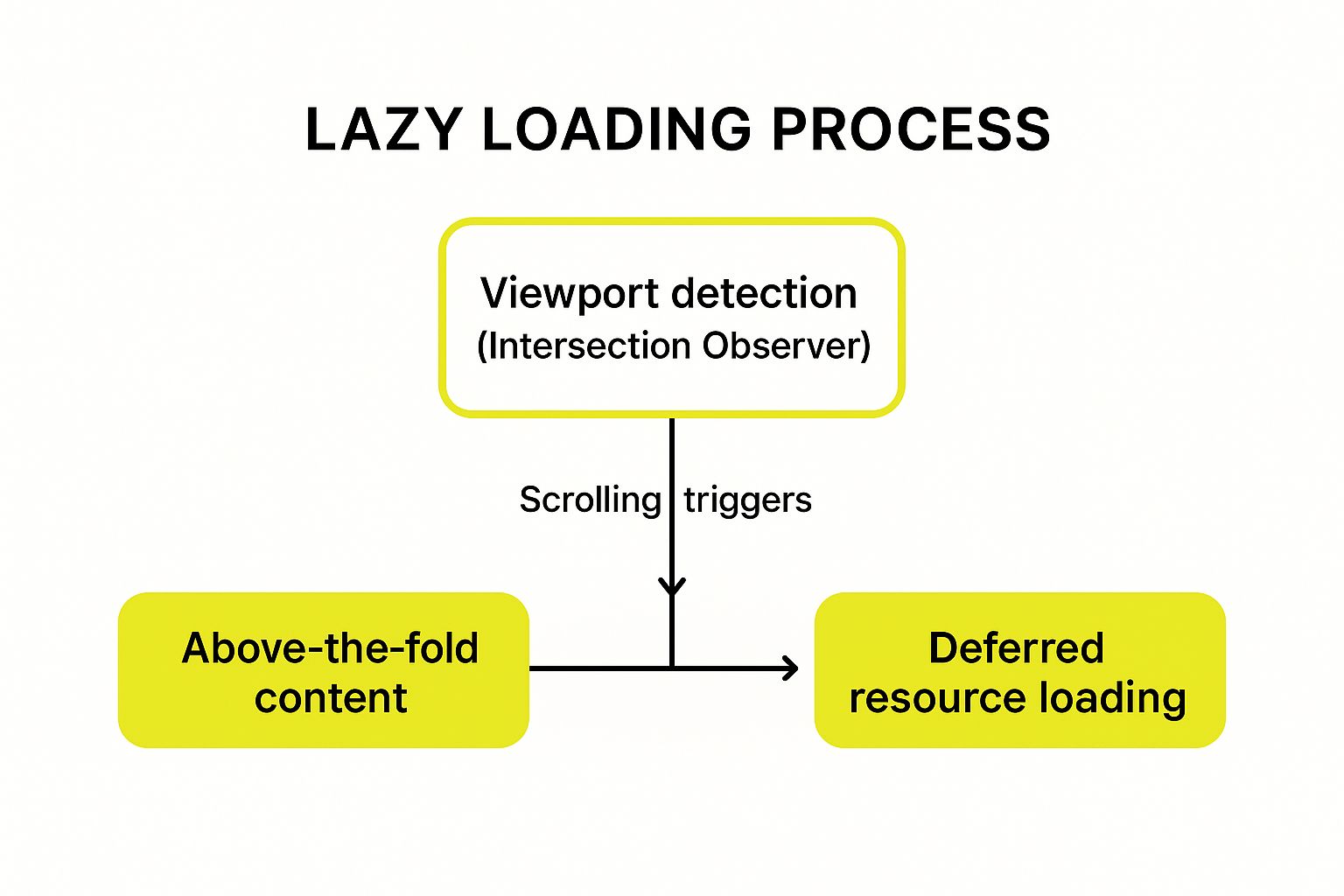
This visualization highlights how the browser's ability to detect the viewport is the central mechanism that makes lazy loading work.
Why It's a Top-Tier Technique
Lazy loading directly impacts key performance metrics like First Contentful Paint (FCP) and Time to Interactive (TTI) by reducing the initial payload. By loading fewer resources upfront, the browser can parse and render the critical, visible part of the page much faster. This is especially crucial for mobile users who may have slower network connections. It’s a standard practice for media-rich sites because it delivers a vastly improved user experience without a complex implementation.
Key Insight: Lazy loading turns long, content-heavy pages into lightweight, fast-loading experiences. It prioritizes what the user sees first, delivering immediate value and improving perceived performance.
How to Implement Lazy Loading Effectively
Modern browsers have made basic implementation incredibly simple, but fine-tuning is key to maximizing its benefits without harming user experience.
- Use Native Lazy Loading: For images and iframes, the easiest method is to add the
loading="lazy"attribute directly in your HTML. This tells the browser to handle the logic for you. - Prevent Layout Shift: Always specify
widthandheightattributes for your images. This allows the browser to reserve the correct amount of space, preventing content from jumping around as lazy-loaded images appear. - Implement for Custom Content: For content other than images, use the Intersection Observer API. This JavaScript API provides an efficient way to detect when an element enters the viewport, allowing you to trigger custom loading logic.
- Use Placeholders: Employ lightweight placeholders like blurred images or skeleton screens. This improves the user experience by indicating that more content is coming and avoids empty white spaces while assets load.
5. Caching Strategies
Caching is a powerful web performance optimization technique that involves storing copies of frequently accessed data in a temporary storage location, or cache, so it can be served more quickly on subsequent requests. Instead of regenerating or re-fetching data from its source every time a user visits a page, the server can deliver the stored version almost instantly. This dramatically reduces server load, minimizes database queries, and cuts down latency for the end-user.
For an e-commerce site, this means a returning visitor's browser can load product images, CSS, and logos directly from its local cache instead of re-downloading them. On the server side, a popular product page's data can be cached so it doesn't need to query the database for every single view, making the site feel fast even during peak traffic.
Why It's a Top-Tier Technique
Effective caching is one of the most impactful strategies for reducing server response times and handling high traffic volumes gracefully. It works at multiple levels: browser, CDN, and server. Industry giants demonstrate its power: Facebook caches everything from profile data to API calls, and Wikipedia's multi-layered caching system allows it to serve millions of articles with incredible speed. Without robust caching, these platforms couldn't operate at their current scale.
Key Insight: Caching is about doing the work once and reusing the result many times. A well-designed caching strategy is the backbone of a scalable, high-performance web application.
How to Implement Caching Effectively
A multi-layered approach is key to leveraging caching. This involves setting up rules at the browser, CDN, and application levels for different types of content.
- Set Strong HTTP Cache Headers: Use headers like
Cache-Controlto instruct browsers how long to store assets. Static files like images, CSS, and fonts can often be cached for a year (Cache-Control: public, max-age=31536000). - Implement Cache-Busting: When you update a static file (like a CSS stylesheet), change its filename (e.g.,
style-v2.cssorstyle.a8b3f.css) to force browsers to download the new version, bypassing the old cached one. - Leverage In-Memory Caching: Use tools like Redis or Memcached to cache the results of expensive database queries or API responses directly on your server. This prevents your database from becoming a bottleneck.
- Use the stale-while-revalidate Directive: For content that can be slightly outdated, this
Cache-Controldirective allows the cache to serve a stale (old) version immediately while it revalidates and fetches a fresh version in the background.
6. Code Splitting and Bundle Optimization
Modern websites often rely on large JavaScript files, which can block rendering and delay user interaction. Code splitting is a powerful web performance optimization technique that solves this by breaking down a large JavaScript bundle into smaller, more manageable chunks. Instead of forcing users to download the entire application's code upfront, you can load only the necessary code for the initial page view and then load other chunks on-demand as the user navigates or interacts with the site.
This approach significantly reduces the initial payload size and improves critical metrics like Time to Interactive (TTI). For example, an e-commerce site can load the core code for its homepage first, and only load the JavaScript for the checkout process when a user clicks the "checkout" button. This ensures the initial experience is fast and lightweight.
Why It's a Top-Tier Technique
Code splitting directly targets one of the biggest performance bottlenecks: monolithic JavaScript bundles. By delivering code in a more intelligent, piecemeal fashion, you can dramatically improve perceived performance. This technique is a cornerstone of modern front-end development, popularized by bundlers like Webpack and Vite. Gmail famously loads features progressively as users access them, and Airbnb successfully used code splitting to slash its initial JavaScript bundle size by over 50%.
Key Insight: Don't make users pay the performance price for code they don't need yet. Code splitting aligns your application's code delivery with actual user behavior, making the initial load feel instantaneous.
How to Implement Code Splitting Effectively
Most modern front-end frameworks and bundlers have built-in support for code splitting, making implementation more accessible than ever. The key is to be strategic about where you create these "split points."
- Split at Route Boundaries: This is the most common and effective strategy. Use dynamic
import()statements to load the code for a specific page or route only when the user navigates to it. - Separate Vendor Libraries: Group third-party libraries (like React or Lodash) that change infrequently into a separate "vendor" chunk. The browser can cache this chunk for long periods, improving load times on subsequent visits.
- Use a Bundle Analyzer: Tools like
webpack-bundle-analyzercreate a visual map of your bundle, helping you identify large modules that are prime candidates for splitting or optimization. - Preload Likely-Needed Chunks: If you can predict a user's next action with high confidence, you can use
<link rel="preload">to start fetching the next required chunk in the background, making the subsequent navigation feel instant.
After implementing these changes, it's crucial to measure their impact. You can learn more about how to test website performance to validate that your bundle optimization efforts are improving key metrics.
7. Critical CSS and Resource Prioritization
Critical CSS is a powerful web performance optimization technique that dramatically speeds up how quickly your page appears usable to visitors. Instead of making the browser download the entire CSS file before rendering anything, this method identifies the minimal CSS needed to style the "above-the-fold" content. This small, critical chunk of CSS is then placed directly within the HTML, while the rest of the stylesheet is loaded later without blocking the page from rendering.
For an e-commerce site, this means the main navigation, hero banner, and top product grid can appear almost instantly. The user sees a visually complete page right away, even while less important styles for the footer or modals are still loading in the background. This significantly improves perceived performance and key metrics like First Contentful Paint (FCP).
Why It's a Top-Tier Technique
In a browser's rendering process, CSS is a "render-blocking" resource. The browser won't paint any pixels until it has downloaded and parsed all the CSS it knows about. Critical CSS directly addresses this bottleneck. Its impact is proven: The Guardian used this method to improve FCP by 1.2 seconds, and Smashing Magazine reduced its render-blocking CSS by a staggering 85%. These are not minor tweaks; they are transformative changes to the user experience.
Key Insight: Prioritizing how resources are loaded is as important as reducing their size. Critical CSS ensures the most important visual elements render first, giving the impression of an instantaneous load.
How to Implement Critical CSS Effectively
Automating the process is key to successfully implementing and maintaining this technique. Manually identifying critical styles is impractical, especially for complex or frequently updated websites.
- Automate CSS Extraction: Use tools like Critical or various plugins available for bundlers like Webpack and Vite. These tools analyze your pages and automatically generate the critical CSS for you, streamlining the workflow.
- Keep It Lean: The goal is to keep the inlined critical CSS as small as possible, ideally under 14KB. This ensures it can be delivered in the first network roundtrip, maximizing its speed benefit.
- Prioritize Other Key Resources: Use resource hints to support your strategy. For example, use
<link rel="preload" as="style">for the full stylesheet and<link rel="preload" as="font">for important web fonts to tell the browser to fetch them with a higher priority. - Test Across Viewports: The "above-the-fold" content is different on a desktop than on a mobile device. Ensure your tooling generates critical CSS that provides a good experience across all key viewport sizes.
8. Database Query Optimization
While front-end tweaks get a lot of attention, one of the most powerful web performance optimization techniques happens on the back end: optimizing your database queries. An inefficient query can force your server to sift through millions of records, adding precious seconds to your page load time. By refining how your application requests data, you can drastically reduce server response time and improve the overall user experience.
This process involves structuring your data, writing efficient queries, and managing database connections effectively. For an e-commerce platform like Shopify, a slow query could mean a customer waiting for product search results to load, a delay that often leads to abandoned carts. Optimizing queries ensures data is retrieved almost instantly, keeping the user journey smooth and fast.
Why It's a Top-Tier Technique
Database optimization is critical because it addresses the root cause of many performance bottlenecks. A single slow query can hold up the entire page rendering process. Stack Overflow famously reduced some response times by over 2000% by rewriting critical queries, and Shopify has seen improvements of up to 50x just by adding the right database indexes. These are not minor gains; they are transformative changes that directly impact scalability and user satisfaction.
Key Insight: Optimizing database queries is like clearing a traffic jam at the source. It doesn't just speed up one car; it allows the entire system to flow more freely, directly reducing Time to First Byte (TTFB).
How to Implement Database Optimization Effectively
Efficient database performance isn't accidental; it requires deliberate strategy and ongoing maintenance. For a deeper dive into ensuring your data layer is performing optimally, explore these essential database management best practices.
- Add Indexes Strategically: Indexes act like a book's index, allowing the database to find data without scanning every row. Apply them to columns frequently used in
WHEREclauses,JOINconditions, andORDER BYstatements. - Analyze Your Query Plans: Use tools like
EXPLAIN(in SQL databases) to see how the database executes your query. This plan will reveal inefficiencies, such as full table scans, that you can then address. - Implement Connection Pooling: Establishing a new database connection for every request is resource-intensive. Connection pooling maintains a cache of database connections that can be reused, saving significant overhead.
- Cache Expensive Query Results: For queries that are run frequently but whose results don't change often, cache the output in a fast in-memory store like Redis. This prevents the database from doing the same work over and over. Learn more about how database performance directly impacts e-commerce speed to see this in action.
9. HTTP/2 and Protocol Optimization
HTTP/2 is a major revision of the HTTP network protocol and a cornerstone of modern web performance optimization techniques. It introduces fundamental improvements over its predecessor, HTTP/1.1, by changing how data is framed and transported between the server and the browser. Key features like multiplexing allow multiple requests and responses to be sent in parallel over a single TCP connection, eliminating the "head-of-line blocking" problem that slowed down older sites.
This protocol enhancement means browsers can download assets like CSS, JavaScript, and images simultaneously and more efficiently. Instead of opening multiple connections, which adds overhead, HTTP/2 uses one to handle everything. For an e-commerce store, this results in a visibly faster and more responsive experience, as all the small components that make up a product page can load at once.
Why It's a Top-Tier Technique
Upgrading your protocol is a server-side change that delivers immediate front-end benefits without altering your code. It makes many old optimization hacks, like domain sharding (splitting assets across different hostnames), obsolete and even detrimental. The proof is in the data: Google reported a 7.5% improvement in page load times, while Facebook saw a 10-15% reduction after adopting HTTP/2. It's a foundational upgrade that boosts speed and efficiency at the transport layer.
Key Insight: Adopting HTTP/2 is a server-level upgrade that fundamentally modernizes your site's data transfer capabilities, providing a significant performance boost with minimal development effort.
How to Implement HTTP/2 Effectively
Most modern hosting providers and CDNs enable HTTP/2 by default, but you should always verify and optimize your configuration. This is a critical step in any web performance optimization strategy.
- Enable HTTP/2 on Your Server: Ensure your web server (like Nginx or Apache) and hosting environment support and have HTTP/2 enabled. This typically requires an SSL/TLS certificate, as modern browsers only support HTTP/2 over encrypted connections (HTTPS).
- Stop Using Old Hacks: If you previously implemented domain sharding to get around HTTP/1.1's connection limits, remove it. With HTTP/2's multiplexing, this practice can actually harm performance by creating unnecessary TCP connections.
- Use Server Push Sparingly: HTTP/2 allows the server to "push" resources to the browser before it even requests them. While powerful, this can backfire if you push unnecessary assets. Use it cautiously for critical CSS or fonts and measure the performance impact.
- Consider HTTP/3: The next evolution, HTTP/3, is built on the QUIC protocol and offers even more improvements, especially for users on unreliable or mobile networks. Many providers, like Cloudflare, already offer it as an option.
Web Performance Optimization Techniques Comparison
| Technique | Implementation Complexity 🔄 | Resource Requirements ⚡ | Expected Outcomes 📊 | Ideal Use Cases | Key Advantages ⭐💡 |
|---|---|---|---|---|---|
| Content Delivery Network (CDN) | Moderate – involves third-party setup, cache management | High – requires subscription and network resources | Significant latency reduction, global load time improvement | Websites with global user base, streaming, large content delivery | Fast global delivery, built-in security, bandwidth savings |
| Image Optimization | Moderate – requires configuration of compression and formats | Low to moderate – processing power for compression | Reduced image sizes, faster page loads, better mobile UX | Image-heavy sites, e-commerce, media platforms | Improved load times, bandwidth savings, better Core Web Vitals |
| Minification and Compression | Moderate to high – build pipeline integration needed | Low – CPU during build process, server config for compression | Smaller files, faster downloads, reduced bandwidth use | All web projects using CSS, JS, HTML assets | Dramatic size reduction, faster parsing, better mobile performance |
| Lazy Loading | Low to moderate – simple native implementation or JS work | Low – mainly browser support and minimal JS | Faster initial load, bandwidth saving, improved perceived performance | Content-heavy pages with many images/resources | Faster loads, reduces server strain, better UX on slow connections |
| Caching Strategies | High – requires cache control at several layers and invalidation strategies | Moderate to high – storage across browser/server/CDN | Reduced server load, faster repeat visits, offline access | High-traffic apps, dynamic content, API-heavy sites | Server load reduction, improved scalability, bandwidth savings |
| Code Splitting and Bundle Optimization | High – complex build and dependency management | Moderate – build tooling and monitoring overhead | Faster initial loads, better interactive times | SPA, large JS apps, frameworks like React, Angular | Smaller bundles, better caching, progressive loading |
| Critical CSS and Resource Prioritization | High – requires tooling and ongoing maintenance | Moderate – build time and asset management | Eliminates render-blocking, faster first paint | Sites needing improved perceived performance | Faster FCP, better mobile UX, reduced render blocking |
| Database Query Optimization | High – needs DB expertise and ongoing tuning | Moderate – indexing and caching consume resources | Faster query response, scalability improvement | Database-intensive applications and backends | Massive server response improvements, cost savings |
| HTTP/2 and Protocol Optimization | Moderate – server configuration and deployment | Low – mostly server and network config | Improved multiplexing, lower latency, better prioritization | All web servers aiming for protocol-level speedups | Multiplexing requests, reduced overhead, compatibility |
From Theory to Traffic: Putting Your Optimization Plan into Action
You have now journeyed through a comprehensive arsenal of web performance optimization techniques, from foundational front-end adjustments to powerful back-end refinements. We've demystified everything from leveraging a Content Delivery Network (CDN) to accelerate global content delivery, to the nuanced art of image optimization that balances quality with file size. We explored how minification and compression shrink your code, while lazy loading ensures users only download what they see, dramatically improving initial page load times.
The key takeaway is that a faster website is not the result of a single magic bullet. Instead, it’s the cumulative effect of many strategic, incremental improvements. Caching strategies, for instance, prevent redundant server requests, while code splitting and bundle optimization ensure your JavaScript is lean and efficient. By implementing Critical CSS, you can deliver a visually complete experience in milliseconds, even before the full stylesheet has loaded. These front-end tactics, combined with back-end power plays like database query optimization and adopting modern protocols like HTTP/2, create a holistically fast and resilient user experience.
Crafting Your Strategic Optimization Roadmap
The sheer volume of techniques can feel overwhelming, but the path forward is a strategic one, not a chaotic sprint. The most crucial first step is to diagnose before you prescribe. You cannot fix what you don't measure.
Start with a thorough performance audit using tools like Google PageSpeed Insights, GTmetrix, or WebPageTest. These tools will act as your roadmap, highlighting the specific bottlenecks that are slowing your site down. Your audit will likely reveal some "low-hanging fruit" opportunities that offer the highest impact for the least effort. For many e-commerce sites, especially those built on platforms like Shopify, this often means starting with:
- Image Optimization: Are your product images unnecessarily large? Compressing them and serving them in next-gen formats like WebP can yield immediate, significant gains.
- Caching Implementation: Ensure browser and server-side caching are properly configured to minimize load times for repeat visitors.
- Minification: Are your CSS, JavaScript, and HTML files as small as they can be? Running a simple minification process is a quick win.
Once these foundational elements are addressed, you can move on to more advanced strategies. Prioritize based on what your audit reveals. If your Time to First Byte (TTFB) is high, focus on back-end issues like database query optimization. If your site is heavy on interactive JavaScript, then code splitting and bundle analysis should be your next priority. As you move from understanding the theory to implementing a robust optimization plan, explore additional effective website speed optimization tips to further enhance your site's performance.
Beyond a One-Time Fix: The Continuous Journey
Ultimately, mastering these web performance optimization techniques is about adopting a new mindset. Performance is not a project with a start and end date; it is an ongoing commitment to your users and your business. A faster website directly translates to a better user experience, higher conversion rates, improved SEO rankings, and a stronger brand reputation. Each millisecond you shave off your load time is a direct investment in customer satisfaction and your bottom line.
Regularly monitor your Core Web Vitals, test changes before deploying them to production, and stay curious about emerging technologies. By treating performance as a core feature of your digital presence, you build a sustainable competitive advantage that delights customers and drives unstoppable growth.
Ready to transform your Shopify store's performance but need an expert partner to lead the way? E-commerce Dev Group specializes in implementing these advanced web performance optimization techniques to build lightning-fast, high-converting e-commerce experiences. Contact us today to see how we can unlock your store's true potential.
