

Before a single line of code is ever written, the fate of your project is already being sealed. I’ve seen it time and time again: the best web development project management isn't about the fanciest software or the most rigid methodologies. It’s about building a rock-solid foundation of clarity, communication, and shared understanding before you even think about development.
Building a Rock-Solid Project Foundation
A strong start is your best defense against late-stage chaos. So many teams, eager to get their hands dirty with design and code, rush through the initial planning. It’s a classic mistake that almost always leads to scope creep, busted budgets, and frustrated stakeholders down the road.
This initial discovery phase isn’t just a box-ticking exercise; it’s the most critical part of the entire project.
Skipping this groundwork is a recipe for disaster. The data doesn't lie: poor project performance wastes 11.4% of investment on average. Even more telling is that a staggering 37% of project failures trace back to a lack of clear goals. If you want to dive deeper, you can explore more of these project management statistics and see how they impact team success.
Moving Beyond a Simple Checklist
Truly effective project management starts by asking the right questions. It's about digging deeper than what a client says they want to unearth what their business really needs to succeed. This is where you shift from being a task-doer to a strategic partner.
This process involves a few key activities that form the bedrock of your project:
- Defining Goals: Get past vague requests like "we need a new website." What does that actually mean? Is the real goal to boost qualified leads by 20%? Or maybe it's to slash customer support tickets by building out a knowledge base. You need specific, measurable outcomes.
- The Discovery Phase: Put on your detective hat. This is where you dissect the client's business model, get to know their target audience inside and out, and size up the competition. You have to understand the "why" behind every single feature request.
- Stakeholder Alignment: Get everyone—from the CEO to the marketing intern—on the same page about the project's objectives and how you'll measure success. One misaligned stakeholder can throw a wrench in the works months later.
A project foundation isn’t just a document; it’s a shared agreement. It’s the single source of truth that aligns your team, the client, and the project's ultimate goals, protecting against the ambiguity that leads to failure.
Defining User Personas and Journeys
To build a website that actually works, you have to know who you're building it for. This is where user personas and journey mapping become indispensable tools in your project management toolkit.
User personas are essentially fictional characters you create to represent your key user types. These aren't just dry demographic data; they capture motivations, goals, and pain points. For an e-commerce site, you might create "Busy Brian," a 35-year-old professional who values a speedy, seamless checkout far more than browsing for deals.
Once you have your personas, you can map out their user journeys. This is a visual representation of the path a user, like Brian, takes to achieve a goal on your site. By mapping his journey from a Google search to a completed purchase, you can spot potential friction points and find opportunities to create a much better experience.
Creating the Functional Specification Document
The culmination of all this foundational work is the functional specification document (FSD). This is the master plan that translates the project's goals and user needs into concrete, technical requirements. It’s the blueprint your developers will follow to build the website.
A solid FSD leaves no room for guesswork. It's the definitive guide for the entire project, ensuring everyone is building the same thing.
Key Elements of a Project Foundation
Before your team jumps into development, make sure you have these core components locked down. This table summarizes the essentials that form the bedrock of a well-planned project.
| Component | Objective | Key Deliverable |
|---|---|---|
| Site Structure | To define the overall architecture and navigation flow. | A detailed sitemap showing all pages and their hierarchy. |
| Feature List | To detail every function the website must perform. | A prioritized list of features with descriptions (e.g., user login). |
| Technical Specs | To outline the technology stack and integrations needed. | A list of required languages, frameworks, and APIs. |
This document becomes your shield. When a new feature request inevitably pops up mid-sprint, the FSD is your first point of reference. It allows you to assess whether the request fits the agreed-upon scope, preventing uncontrolled project bloat and keeping everything on track.
Choosing Your Project Management Methodology
Picking the right framework for your web development project is a lot like choosing the right tool for a job. You wouldn't try to drive a screw with a hammer, right? In the same way, the methodology you choose—be it Waterfall, Agile, Scrum, or Kanban—has to fit your project's unique needs, your team's vibe, and what your client expects.
It can feel like a big decision, but it boils down to one thing: are you following a detailed, turn-by-turn map, or are you using a flexible GPS that can reroute on the fly? Neither is inherently better. Their real value depends entirely on where you're going and what the road looks like. A project with a locked-in scope and budget will do great with a rigid plan, but one with features that are likely to evolve needs room to breathe.
The Classic Approach: Waterfall
Waterfall is the old-school, linear way of managing projects. You tackle each phase one at a time—requirements, design, development, testing—and you have to finish one completely before you can even think about starting the next. It’s a one-way street, just like the name suggests.
This approach really shines when the project requirements are crystal clear from day one and aren't expected to change. Think of a simple brochure website with a fixed number of pages and basic functions. The client knows exactly what they want, the scope is tight, and there are very few surprises. Waterfall provides a clear, predictable path from start to finish.
But that rigidity is also its biggest flaw. What happens if the client has a brilliant new idea halfway through development? With Waterfall, you might have to go all the way back to the drawing board, which means serious delays and budget blowouts. There's almost no room for feedback or changes until the very end.
The Agile Revolution: Flexibility First
Agile completely flipped the Waterfall model on its head. Instead of one long, drawn-out process, Agile carves the project into small, manageable cycles called sprints. The whole point is to embrace change and keep the conversation flowing between the team and the stakeholders.
Agile isn't just a set of rules; it's a mindset. It's about valuing the ability to respond to change over blindly following a plan. This ensures the final product is something people actually need, even if those needs shift along the way.
This adaptability makes Agile a perfect fit for complex web projects where you know the requirements will evolve. Imagine you're building a new social media feature. You could launch a basic version, see how users react, and then improve it over several sprints based on real feedback. It’s a fantastic way to build something people will love.
However, making Agile work well is harder than it looks. A surprising 47% of Agile projects are reported to be late, over budget, or leave clients unhappy, which just goes to show how tricky managing its fluid nature can be. For more context on these numbers, check out these common project management challenges.
Scrum and Kanban: Two Flavors of Agile
Within the Agile family, Scrum and Kanban are two of the most popular frameworks. They're built on the same principles but give you different ways to organize the work.
Scrum is the more structured of the two. Everything revolves around fixed-length sprints, usually lasting two to four weeks. A "Scrum Master" keeps the process running smoothly through regular events like daily stand-up meetings, sprint planning sessions, and end-of-sprint reviews. This is great for big, complex projects that need a steady, predictable rhythm of delivery and feedback. A corporate website redesign, for example, could be broken down perfectly into sprints for the homepage, product pages, and blog.
Kanban, on the other hand, is all about visualizing your workflow and limiting how much work is in progress at any one time. You use a Kanban board with columns like "To Do," "In Progress," and "Done." There are no sprints; tasks just flow from one stage to the next as your team has the capacity to take them on. This makes Kanban a lifesaver for teams handling a constant stream of tasks, like a support team fixing bugs or a startup pushing out small, frequent updates.
For those running an online store, figuring out how these methods apply to retail is key. You can dive deeper into this in our guide to ecommerce project management.
Ultimately, the best methodology comes down to your project's DNA. Take a hard look at its complexity, how involved your client wants to be, and your team's work style. That's how you'll find the right approach to guide you to a successful launch.
Assembling Your Development Dream Team

Let’s be honest: a project is only ever as good as the people behind it. You can have the most brilliant plan in the world, but without a skilled and cohesive team, it’s just a document. At its heart, web development project management is all about people—getting the right skills in the right seats and creating an environment where everyone can do their best work.
Your first move is to figure out who you actually need on the team. Every project has its own unique demands, but a typical web development team is made up of a few key specialists. Think of it like assembling a crew for a heist movie; each person has a distinct, critical role to play.
You'll almost always need these core players:
- UI/UX Designer: This is the architect of the user journey. They map out how the site flows and feels, creating the wireframes and visual mockups that act as your project's blueprint.
- Front-End Developer: They take the designer’s vision and bring it to life in the browser. Using HTML, CSS, and JavaScript, they build everything the user actually sees and clicks on.
- Back-End Developer: The engineer working behind the curtain. They build the server, database, and APIs—all the complex machinery that makes the website actually work.
- QA Tester: Your quality champion. This person meticulously hunts for bugs, checks for performance bottlenecks, and ensures the site works flawlessly across different browsers before it ever sees the light of day.
Structuring Your Team for Success
Once you know the roles you need to fill, you have to decide how to fill them. Are you hiring in-house staff, bringing on freelancers, or partnering with a full-service agency? This decision will shape your budget, timeline, and day-to-day management, so it’s a big one. There's no magic formula here; it all comes down to what makes sense for your specific project and company.
An in-house team is great for long-term, complex projects because they are fully dedicated to your brand. The downside? It’s a major financial and operational investment.
Freelancers, on the other hand, offer amazing flexibility. Need a Shopify expert for a three-month e-commerce build? A freelancer is a perfect fit. The challenge is managing multiple contractors and making sure they all work together smoothly. Specialized help can make a huge difference, so for platform-specific projects, looking into dedicated Shopify web development services can give you that expert edge.
Your team structure isn't just an operational detail; it's a strategic decision. It directly influences your project's agility, cost-effectiveness, and the level of specialized expertise you can bring to the table. Choose the model that best aligns with your project's goals and your company's resources.
Fostering a Culture of Collaboration
Just putting talented people in the same Slack channel doesn't guarantee success. The real work is in building a culture where people genuinely collaborate. This starts with setting up crystal-clear communication channels from the very beginning.
It helps to assign specific tools for specific jobs. For instance, use Slack for quick chats and day-to-day questions, but keep official tasks and progress updates in a project management tool like Asana or Jira. This simple step prevents crucial details from getting buried.
It’s also important to have realistic expectations. Most web development teams have around 6 to 10 members, and it's no surprise that over 85% of project managers are juggling more than one project at a time. Getting familiar with typical project management demands can help you prepare for the reality of the role.
Finally, master the art of the effective meeting. Daily stand-ups should be quick and to the point. Each person answers three simple questions: What did I do yesterday? What am I doing today? Are there any roadblocks? This keeps everyone aligned, surfaces problems early, and empowers the team to keep things moving forward.
Finding the Right Project Management Software
Trying to manage a web development project without a central command center is, frankly, a recipe for chaos. It’s like your team is trying to build a complex engine, but everyone is in a different workshop with a different set of blueprints. This is where good project management software comes in—it unifies your team, clarifies the workflow, and becomes the single source of truth for everyone.
Choosing the right platform is a big decision, but it’s absolutely essential for keeping things on track and making real progress. It's less about ticking off a list of features and more about finding a tool that genuinely fits how your team works.
Aligning Tools with Your Team's Needs
The first step is to match the software to your project’s DNA. A small team using a simple Kanban board for bug fixes has completely different needs than a large enterprise team using Scrum for a massive website overhaul.
- For Agile and Scrum Teams: If you live and breathe sprints, you need tools with strong backlog management, sprint planning features, and burndown charts. Jira is the undisputed champion here, built specifically for software development with incredibly detailed issue tracking.
- For Visual and Kanban-Focused Teams: Does your team work best when they can see the workflow? Tools like Trello or Asana are fantastic. Their intuitive card-based boards make it simple to track what's in the queue, what's being worked on, and what’s complete—perfect for a continuous delivery model.
- For All-in-One Collaboration: If you’re looking for a single hub that mixes task management with file sharing and team chat, Asana often hits the sweet spot. It's flexible enough to adapt to different methodologies while keeping project conversations tied directly to the work itself.
I've seen teams get bogged down by overly complex software they were told they should use. The best project management tool is the one your team will actually open every day. Always prioritize simplicity and a clean interface that removes friction, rather than adding it.
What Features Actually Matter?
While every tool is different, a few features are non-negotiable for any serious web development project. Before you commit, make sure the platform delivers in these key areas.
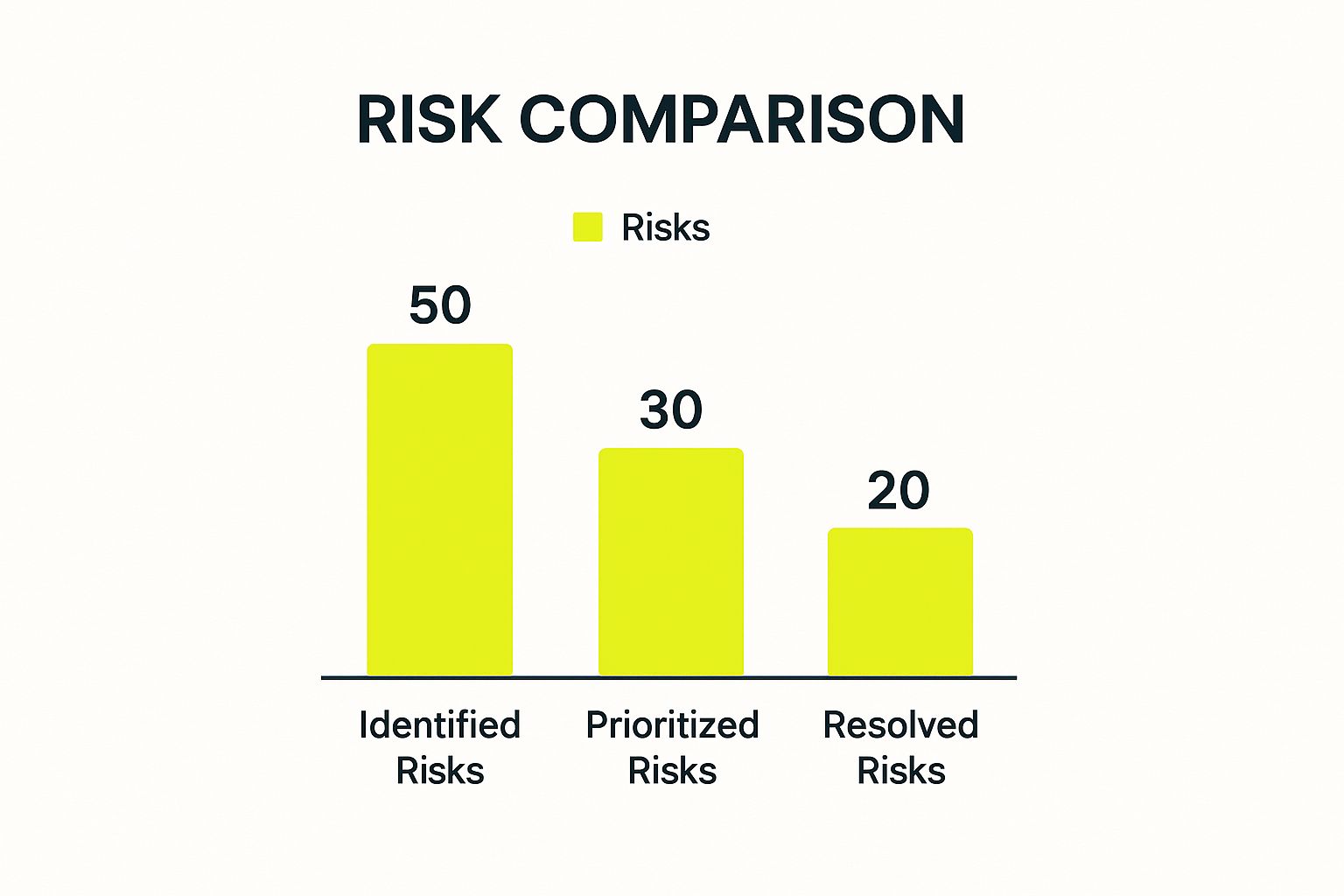
This image gives a great example of at-a-glance project data. You can instantly see that while many risks are being identified, only a fraction are actually being resolved. This immediately points to a potential bottleneck in the team's process. Your software should give you these kinds of quick, actionable insights into your project’s health.
Project Management Tool Comparison
Choosing a tool can feel overwhelming, so I've put together a quick comparison to help you match a platform to your team's style.
| Tool | Best For | Key Feature | Typical Team Size |
|---|---|---|---|
| Jira | Agile/Scrum software development teams | Advanced issue tracking & reporting | 10 – 100+ |
| Asana | Teams needing a blend of tasks and collaboration | Flexible list, board, and timeline views | 5 – 500+ |
| Trello | Visual thinkers and Kanban workflows | Simple, intuitive card-based boards | 1 – 50 |
| Notion | Highly customizable, all-in-one workspaces | Integrated docs, databases, and tasks | 1 – 100+ |
This is just a starting point, of course. The best way to know for sure is to sign up for a free trial and see how it feels for your team's specific workflow.
Making It Work: Implementation and Integration
Just picking a tool isn’t enough—you have to set it up in a way that truly helps your team.
Start by creating a project board that perfectly mirrors your workflow. Create columns for each stage, like "Backlog," "In Development," "Code Review," and "Done." This visual map is your foundation.
Then, create templates for common tasks like bug reports or new feature requests. A solid bug report template, for instance, should have dedicated fields for steps to reproduce, expected behavior, and actual behavior. This simple step saves a ton of time and ensures you get the information you need right from the start.
But the real magic happens with integrations. Your project management tool shouldn't be an island. Connecting it to tools like GitHub or GitLab lets you link code commits directly to their corresponding tasks, giving you an unbreakable audit trail. Hooking it up to Slack can push automated notifications, keeping everyone in the loop without them having to constantly check another app.
There's a reason this software market is booming—it's expected to jump from $7.24 billion in 2025 to $12.02 billion by 2030. A staggering 82% of companies are already using these tools to work more efficiently.
Looking ahead, the role of AI in project management is set to grow, automating more of the administrative work and freeing up managers to focus on what really matters: leading their teams.
Executing the Project with Precision and Care
This is where the rubber meets the road. All that careful planning—the roadmaps, the wireframes, the technical specs—now has to survive contact with reality. The execution phase is the heart of any web development project management effort, where your team breathes life into the strategy and builds something real.
Success here isn't about being a drill sergeant. It’s about creating momentum, being smart when challenges pop up, and getting the team into a productive rhythm. Without clear daily goals and open communication, even the best developers can get lost in the weeds.
Running Productive Sprints and Stand-Ups
If you're running an Agile shop, sprints are your engine. These are short, focused bursts of work—usually about two weeks—where the team commits to tackling a specific batch of tasks from the backlog. The most important rule? Protect the sprint. Once it’s underway, the goals need to be locked down so your developers can actually focus and get things done.
The daily stand-up meeting is the heartbeat of every sprint. I've seen these go wrong, turning into long, rambling status reports for a manager. That’s not the point. These should be fast, 15-minute syncs for the team.
Everyone quickly answers three simple questions:
- What did I get done yesterday?
- What am I working on today?
- What’s getting in my way?
This format is brilliant because it brings problems to the surface immediately. If a developer is stuck on something, the team can jump in to help before a small hiccup becomes a massive delay. It keeps everyone in the loop without anyone feeling micromanaged.
Managing the Backlog and Prioritizing Tasks
Your project backlog is a living, breathing list of every feature, bug fix, and update. Think of it as your project's single source of truth. Grooming this backlog isn't a one-and-done task; it's a constant process. As the project manager, you'll work with the product owner to make sure this list is always clean, estimated, and prioritized based on what brings the most value to the business.
So, what happens when the CEO has a "brilliant new idea" that just has to be in the next release? Don't let it blow up your current sprint. The right move is to guide that request into the backlog. This creates space for a rational conversation about its true priority. Is this new feature really more important than what's already planned? This approach is your best defense against scope creep.
To ensure your web development project runs smoothly and efficiently, consider adopting established IT project management best practices.
After years of managing projects, I’ve learned that a huge part of execution is knowing what to say "no" to—or, more diplomatically, "not right now." Your backlog is the best tool you have for these conversations.
Weaving Quality Assurance in from Day One
Please, don't leave testing until the end. I've seen projects go off the rails because Quality Assurance (QA) was treated as an afterthought. The best teams integrate testing right from the very beginning.
Instead of a frantic "testing phase" just before launch, QA should happen in parallel with development. This means your developers are writing unit tests as they code, and the QA team is already building out test plans the moment a feature is defined.
Catching a bug early is cheap and easy to fix. Finding a fundamental architectural flaw a week before launch? That's a nightmare for your budget and timeline. This "test-as-you-go" method leads to a far more stable and high-performing site—a critical factor for success. In fact, our comprehensive guide on Shopify performance optimization explains just how much a fast, reliable website impacts user experience and sales.
Navigating User Acceptance Testing and Final Feedback
Before you can call it a wrap, the site has to pass User Acceptance Testing (UAT). This is when you hand it over to the client or a select group of actual end-users to test in a real-world (but not yet live) environment. Your job is to make this process as smooth as possible. Give them clear instructions, a simple way to report bugs, and a definite timeline.
The key is to structure the feedback you get. A vague comment like "I don't like the checkout page" isn't helpful. You need to push for specifics. "What part of the process was confusing? What did you expect to happen when you clicked that button?" This turns fuzzy opinions into actionable tasks your team can actually work on.
This focus on process truly makes a difference. High-maturity organizations—those with solid, repeatable processes—meet their project goals 77% of the time, compared to just 63% at less mature companies. By managing this final feedback loop with care, you set yourself up for a smooth launch and a client who feels heard and happy.
Frequently Asked Questions
When you're deep in the trenches of managing a web project, certain questions come up time and time again. It doesn't matter if you're the project manager, a developer on the team, or the client—everyone runs into the same hurdles. Let's tackle some of the most common ones I hear.
How Do You Handle Scope Creep in a Web Development Project?
Dealing with scope creep is less about fighting fires and more about fire prevention. Your absolute best defense is a rock-solid, incredibly detailed project scope document. Get the client to review and sign off on it before a single line of code is written. Think of it as your project's constitution.
When a client inevitably asks for "just one more thing" mid-project, don't just shut them down. Instead, guide them through a formal change request process. Document the request, have your team estimate the real-world impact on the timeline and budget, and then present it to the client. This transforms the conversation from a simple request into a clear business decision they can own.
If you're running Agile, you already have a great system for this. New ideas aren't rejected; they're welcomed and added to the product backlog. From there, they can be prioritized for a future sprint, which keeps the current work on track while still valuing the client's input.
What Are the Most Critical KPIs to Track?
It’s easy to get lost in a sea of metrics. In my experience, you only need to focus on a handful of key performance indicators (KPIs) to get a true pulse on your project's health.
- Budget vs. Actual Cost: The most basic financial check-in. It tells you instantly if your spending is getting out of hand.
- Schedule Variance: This shows if you're ahead, behind, or right on schedule. It's an essential early warning sign for potential delays.
- Velocity (for Agile teams): Tracking how much work your team knocks out per sprint is crucial for accurately forecasting future work and managing expectations.
- Cycle Time: How long does it take for a task to go from "in progress" to "done"? If this number starts climbing, you've likely got a hidden bottleneck somewhere in your workflow.
- Critical Bugs: Once you go live, the number of high-priority bugs is a direct reflection of your product's quality and stability.
My two cents? Keep your KPI dashboard clean. If a metric doesn't directly help you make a decision or take action, it's just noise. Focus on the data that helps you steer the ship.
How Is Managing a Web Project Different from a Software Project?
While they're cousins, managing a web project isn't the same as managing a traditional software project. The biggest differences really boil down to their pace, how often they're deployed, and the tech involved.
Web projects live on much shorter timelines with far more frequent updates. The tech stack is also a revolving door of JavaScript frameworks, CMS platforms, and third-party APIs that change constantly.
On top of that, a web project manager has to juggle things that aren't always front-and-center in back-end software development. I'm talking about user experience (UX) design, search engine optimization (SEO), and making sure the site works on every browser imaginable. You have to be a master coordinator, balancing the creative, technical, and marketing goals all at once.
Can a Non-Technical Project Manager Succeed?
Absolutely, and I've seen it happen many times. A non-technical PM can be incredibly successful by leaning into their core strengths: communication, organization, and facilitation. Your job isn't to write the code; it's to clear the path for the people who do.
Your real value lies in being the bridge between the technical team and the stakeholders. You don't need to be an expert, but you do need to learn the basic lingo to follow conversations and ask smart questions about risks and dependencies. You'll rely on your technical lead for the nitty-gritty estimates and solutions.
Think of yourself as the chief translator. You turn client needs into clear tasks for your developers, and then you report technical progress back to the client in plain English they can actually understand. That role is priceless.
At E-commerce Dev Group, we don't just understand the web development process—we live and breathe it every day. Our expert Shopify designers and developers are here to bring your e-commerce vision to life. Get in touch with us today and let's build something great together.
