


Ecommerce project management is the art and science of guiding an online store from a simple idea to a thriving, fully operational business. It’s the structured approach needed to plan, execute, and fine-tune all the moving parts of a digital retail operation. Think of it as being both the architect and the general contractor for your online store.
What Is Ecommerce Project Management Anyway?
Imagine you’re building a new brick-and-mortar shop. You wouldn’t just show up with a pile of lumber and start nailing boards together, right? You'd need a clear blueprint for the store’s layout (your website design), a smart system for stocking shelves (product data and inventory), a secure way to take money (payment gateways), and an efficient backroom operation (order fulfillment and logistics).
Ecommerce project management takes that same disciplined thinking and applies it to the digital world. It’s all about coordinating the right people, technology, and resources to bring an online business to life. This isn't just about checking tasks off a list; it's about skillfully steering the entire project to avoid common pitfalls like chaotic launches, blown budgets, and features that nobody actually wants.
It’s More Than Just a Website Launch
While launching a new site is a huge milestone, that's just one piece of the puzzle. True ecommerce project management is an ongoing process that supports the entire lifecycle of an online store, ensuring every initiative—big or small—is tied directly back to your business goals.
For example, this discipline is crucial when tackling major strategic projects, like implementing a comprehensive digital retail transformation. These massive undertakings demand absolute precision in planning and execution to have any chance of success. In a market this competitive, the stakes are incredibly high.
At its core, ecommerce project management is about creating order out of potential chaos. It transforms a complex vision into a tangible, profitable, and scalable online business by ensuring every detail is managed, from initial concept to post-launch optimization.
To truly grasp its scope, it's helpful to break down the key areas an ecommerce project manager oversees. These are the foundational pillars that hold up any successful online store.
Core Pillars of Ecommerce Project Management
| Pillar | Core Responsibilities | Example Task |
|---|---|---|
| Strategy & Planning | Defining project goals, scope, budget, and timeline. Conducting market and competitor research. | Creating a project roadmap for a new product category launch. |
| Design & User Experience (UX) | Overseeing the creation of wireframes, mockups, and the overall user journey to ensure it's intuitive and engaging. | Running A/B tests on the checkout page design to improve conversion rates. |
| Technology & Development | Managing the technical build, platform selection (Shopify, Magento, etc.), and third-party app integrations. | Coordinating the development team to build a custom shipping calculator. |
| Content & Marketing | Planning and executing the creation of product descriptions, photos, blog posts, and marketing campaigns. | Managing the content calendar for an upcoming holiday sales promotion. |
| Operations & Fulfillment | Setting up systems for inventory management, payment processing, shipping, and customer service. | Integrating a new warehouse management system with the ecommerce platform. |
Mastering these pillars is what separates a smooth, successful project from a stressful, chaotic one.
Why It Is Absolutely Critical Today
The need for this discipline has skyrocketed right alongside the explosive growth of online retail. With the global e-commerce market projected to hit $7.4 trillion by 2025, the pressure to get things right the first time has never been more intense. A market of this size isn't just an opportunity; it's a battleground where a structured approach is a non-negotiable requirement for survival.
Without a solid project management framework in place, your online store is likely to run into serious trouble:
- Costly Delays: Missing deadlines doesn't just push back your launch; it means lost revenue and a head start for your competitors.
- Poor User Experience: A site that’s confusing, slow, or buggy will send potential customers running to a competitor in seconds.
- Team Misalignment: When designers, developers, and marketers aren't on the same page, the final product feels disjointed and ineffective.
- Wasted Resources: Pouring time and money into features that don’t actually solve a customer problem or drive sales is a direct hit to your bottom line.
Ultimately, strong ecommerce project management is the foundation that supports not just a successful launch, but the sustained growth and profitability you need to compete. It provides the structure, clarity, and control required to build an online store that doesn't just survive—it thrives.
Choosing the Right Project Management Approach
Picking a project management methodology isn't just a process choice; it’s about finding the right tool for the job. How you manage your ecommerce project dictates how your team works together, responds to unexpected changes, and ultimately, gets the job done. In the fast-paced world of online retail, making the right choice here is critical.
Think of it like building a custom car. You could follow a classic, detailed blueprint where every single part is chosen and designed before anyone even picks up a wrench. Or, you could take a more modular approach, building and testing the engine, then the chassis, then the interior, making improvements as you go based on real-world performance. Both paths can lead to a fantastic car, but they're suited for very different goals.
The Traditional Blueprint: Waterfall
The Waterfall methodology is that classic, step-by-step blueprint. It's a linear process where you have to finish one phase completely before moving on to the next. You gather all the requirements upfront, then lock them in. After that, you move to design, then development, testing, and finally, launch.
This rigid structure actually works well for projects with rock-solid goals and very little uncertainty. Let’s say you’re migrating from one ecommerce platform to another with a fixed, non-negotiable feature set. Waterfall can provide the predictability and clear documentation you need. Its main strength is its simplicity and heavy emphasis on planning everything out from day one.
But that rigidity is also its greatest weakness in ecommerce. If a competitor suddenly drops a game-changing feature or customer tastes shift halfway through your project, changing direction in a Waterfall model is like trying to turn a tanker on a dime—slow, difficult, and expensive. It just doesn't have the flex most online stores need today.
The Flexible Power of Agile
This is where Agile comes in. It’s more like building with a set of LEGOs. Instead of one massive, unchangeable plan, you work in small, quick cycles to build and improve your store piece by piece. This approach is built for continuous feedback and rapid adjustments, focusing on delivering real value to your customers at every step.
The Agile mindset is a natural fit for ecommerce project management because it doesn't just tolerate change—it expects it. The online marketplace demands that you pivot quickly, whether you’re reacting to a new trend, incorporating user feedback, or integrating a new payment gateway.
An Agile approach helps teams deliver higher-quality work, faster. In fact, organizations that adopt Agile methodologies report a 60% growth in revenue and profit. This shows it’s not just a process; it's a powerful driver for business results.
Under the Agile umbrella, two frameworks are especially popular with ecommerce teams: Scrum and Kanban.
Scrum: Sprints Toward Goals
Scrum carves up a big project into short, focused bursts of work called "sprints." These sprints are typically one to four weeks long, and each one is a mini-project with a clear goal—like producing a working, testable piece of the final product. For an online store, one sprint might focus on building a new product filter, while the next might tackle streamlining the checkout flow.
- Key Roles: A Scrum team consists of a Product Owner (who champions the project's vision), a Scrum Master (who keeps the process running smoothly), and the Development Team (the experts who build the thing).
- Benefits: This creates a steady rhythm of progress, sparks genuine team collaboration, and ensures you’re always moving forward in a way you can actually measure.
Kanban: Visualizing the Workflow
Kanban is all about visualizing your workflow to see exactly what’s going on. It uses a simple board (digital or physical) with columns that represent stages of a task—think "To Do," "In Progress," "In Review," and "Done." Tasks, represented by cards, move from left to right across the board as they get completed.
Unlike Scrum's structured sprints, Kanban is a continuous flow. This makes it absolutely perfect for managing the kind of ongoing work that every ecommerce store deals with, such as:
- Fixing bugs as they pop up.
- Updating product descriptions or images.
- Handling customer support tickets that need a developer's eye.
Its biggest advantage is its flexibility and how it instantly highlights bottlenecks. If a bunch of cards gets stuck in the "In Review" column, the whole team can immediately see where the roadblock is and work to clear it.
Finding a Middle Ground: The Hybrid Model
For many ecommerce businesses, going all-in on one method isn't the answer. The sweet spot is often a Hybrid model that strategically blends the upfront planning of Waterfall with the iterative flexibility of Agile.
For instance, you could use a Waterfall-style approach to set the big-picture project scope, budget, and major deadlines. Then, you can let your development team use Agile sprints to actually build the features within that larger structure.
This gives stakeholders the clear, predictable roadmap they need, while giving the team on the ground the freedom to adapt and innovate as they go. It's truly the best of both worlds, providing structure without killing agility—a fantastic choice for many complex ecommerce projects.
The Five Essential Phases of Ecommerce Projects
Every ecommerce project, whether it's a small boutique launching its first site or a massive enterprise overhauling its platform, follows a predictable path. Thinking about this journey in distinct phases helps turn what feels like a monumental task into a series of smaller, more manageable steps. It’s a framework that keeps your team aligned and ensures nothing crucial falls through the cracks.
Breaking a big project down this way brings much-needed clarity and control. To really get a handle on the complexities of building and launching your store, you need a solid roadmap. For a deeper dive into that journey, check out this strategic guide to launching an online store.
Phase 1: Initiation
This is where the magic begins—the "aha!" moment when a brilliant idea starts to feel real. The initiation phase is all about defining the what and the why of your project. You're not building anything yet; you're validating the concept, figuring out who needs to be involved, and creating a strong business case to get the green light.
During this stage, your focus is on:
- Defining the Core Idea: Get crystal clear on the project's main goal. Are you launching a brand-new store, redesigning an old one, or maybe adding a major feature like a subscription service?
- Identifying Stakeholders: Who has a say in this? Pinpoint everyone with a vested interest, from the CEO and marketing leads to the developers and customer service reps who will live with the final product.
- Creating a Project Charter: This is the formal document that outlines the project's goals, scope, and initial requirements. Think of it as the official permission slip to move forward.
Phase 2: Planning
Once the project is a go, it's time to build the master plan. Honestly, this is the most critical stage of them all. A great plan can save you from scope creep, busted budgets, and missed deadlines. If you skimp on planning, you’re practically inviting chaos later.
This is where you create the detailed blueprint. You’ll set a realistic budget, map out a timeline with key milestones, and choose the right technology to build on. It’s no surprise the project management software market, valued at $7.24 billion, is projected to hit $12.02 billion by 2030. These tools are the backbone of solid planning and execution.
The workflow for modern project management is pretty straightforward, as this image shows.
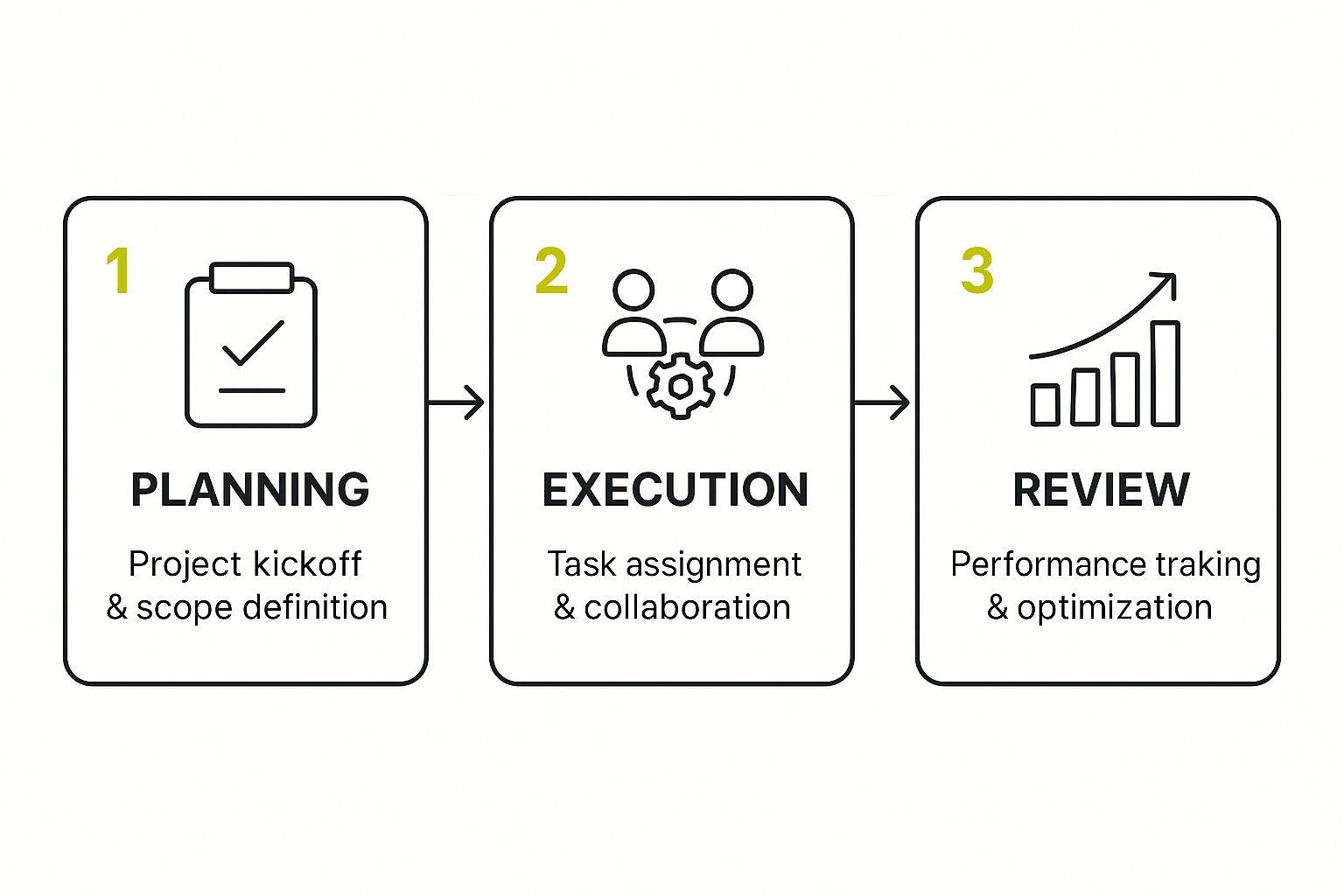
It’s a cycle: you plan, you execute, you review, and then you use what you’ve learned to improve the next cycle.
Phase 3: Design and Development
Now we get our hands dirty. This is the building phase, where your vision finally starts to take shape on a screen. Design and development teams work in tandem, turning wireframes and mockups into a real, functional online store. The user interface (UI) gets polished, the user experience (UX) is refined, and the code brings it all together.
This phase is a delicate dance between creativity and technical execution. The goal isn't just to build a website that works, but to create an intuitive and engaging experience that guides customers effortlessly from browsing to purchase.
Phase 4: Testing and Deployment
Before you pop the champagne, it’s time for some serious quality control. The testing phase is your last line of defense against bugs, glitches, and bad user experiences. QA testers and developers team up to hunt down any issues, testing everything on different browsers and devices and checking for security holes.
Key testing activities usually include:
- Functionality Testing: Does the "add to cart" button actually work? Is the checkout process seamless?
- Performance Testing: How fast does the site load, especially when a lot of people are on it?
- Usability Testing: Can real users navigate the site easily and find what they’re looking for?
Once the site passes every test with flying colors, it’s time for deployment—the official launch. This is the moment you move the site from a private development server to a live one, making it open for business.
Phase 5: Post-Launch Optimization
Your work isn't done when the store goes live. In many ways, it's just beginning. The post-launch phase is all about listening and learning. You monitor performance, gather real-world feedback from actual customers, and make continuous improvements.
This is where you dive into the data, identify what can be done better, and roll out updates to increase conversions and keep shoppers happy. This ongoing cycle of improvement is what separates successful stores from the ones that fizzle out. If you want to learn more about keeping your store in top shape after launch, our guide on https://scaleshopify.com/shopify-performance-optimization/ is a great place to start.
By treating your launch as the starting line, not the finish line, you set your business up for growth that lasts.
Building Your Ecommerce Project Dream Team

Here’s a hard truth: an e-commerce project is never a one-person show. Success comes down to having the right crew of specialists, with each person owning their specific piece of the puzzle. Think of it like a film production—you need a director, camera operators, set designers, and marketers all working together to make a blockbuster.
Putting this team together is one of the most critical parts of managing an e-commerce project. It doesn't matter if you're hiring in-house, bringing on freelancers, or partnering with an agency. You have to understand who does what to get a smooth, successful build.
Core Roles on Your Ecommerce Team
Every person brings a unique skill to the table. On smaller projects, one person might wear a few different hats, but these core functions always need to be covered to get a professional-grade store off the ground.
Here are the key players you'll want on your roster:
-
The Project Manager: This is the conductor of the orchestra. They’re the one keeping the entire project on track, from timelines and budgets to communication. A good PM ensures the designers, developers, and marketers are all pulling in the same direction.
-
The UI/UX Designer: The architect of the customer journey. This person designs the look and feel (UI) and the overall flow (UX) of the site. Their job is to make your store not only beautiful but dead simple for customers to navigate and buy from.
-
The Developers: These are the builders who turn the designs into a functioning website. This role is usually split into two key areas:
- Frontend Developers build everything the customer sees and clicks on—the buttons, menus, and product pages.
- Backend Developers build the store’s "engine." This includes the database, server logic, payment gateways, and all the behind-the-scenes magic that makes it work.
A project team is like a high-performance engine. Each part must work perfectly with the others. If the designer creates a stunning layout that the developers can't build, or the marketers promise a feature that doesn't exist, the entire project stalls.
Essential Supporting Roles for Growth
Beyond the core build team, a few other roles are absolutely crucial for launching your store and actually growing it. These are the people who turn a functional website into a money-making business.
-
The QA Analyst: This is your detail-obsessed inspector. Before you even think about going live, the Quality Assurance (QA) analyst clicks every link, tests every button, and tries to break everything. They hunt for bugs across different browsers and devices, saving you from embarrassing—and expensive—launch-day mistakes.
-
The Content Strategist: Your brand’s storyteller. This person crafts your brand's voice through compelling product descriptions, blog posts, and website copy. They make sure your messaging is consistent and, most importantly, persuasive.
-
The Digital Marketing Specialist: The expert who gets people to your store. Once the site is live, they take the wheel. They're responsible for everything from SEO and paid ads to email campaigns and social media, all with the goal of attracting customers and driving sales.
Pulling together a team with this kind of deep expertise is a major task, especially for businesses on more complex platforms. Many enterprise-level stores find it easier to work with specialized agencies that already have a dream team in place. You can see how expert teams manage large-scale projects by exploring dedicated Shopify Plus solutions. At the end of the day, great e-commerce project management is all about getting these different talents to work together seamlessly to bring your vision to life.
Your Essential Ecommerce Project Management Toolkit

The right set of tools can be the difference between a smooth launch and a chaotic mess. Think about it: a carpenter wouldn't build a house with just a hammer. In the same way, a modern ecommerce team needs a well-rounded tech stack to build, launch, and grow an online store. These tools are the central nervous system for your entire operation, making sure everyone is connected and pulling in the same direction.
At the core of any successful ecommerce project, especially with teams spread out everywhere, are top-notch remote project management tools. They’re no longer a "nice-to-have"—they're the command center where your strategy actually comes to life.
So, let's break down the key categories of tools that high-performing ecommerce teams rely on every day.
Project and Task Management Hubs
Think of these platforms as the digital blueprint for your project. This is where you track every single task, assign it to a team member, and watch its progress toward the deadline. Without a central hub like this, details fall through the cracks, communication gets messy, and timelines start to slip.
These tools create a single source of truth. Everyone, from developers to marketers, knows exactly what they need to do and when.
- Asana: A fantastic choice for its clean interface and visual timelines. It’s great for seeing how all the different parts of a project connect.
- Jira: This is the heavyweight champion for software development teams. It offers powerful features for tracking bugs and managing agile workflows like Scrum and Kanban.
- Trello: Known for its simple, drag-and-drop card system, Trello is perfect for visualizing workflows, especially for smaller teams or less complex projects.
Communication and Collaboration Platforms
Clear, instant communication is the glue that holds a project together. Just waiting on an email reply can bring everything to a grinding halt. Modern collaboration platforms create a space where questions get answered in minutes, not hours, and decisions can be made on the fly.
These tools break down information silos and help build a more connected team culture.
The real goal here is to get conversations out of cluttered email inboxes. Move them into dedicated channels where they can be seen, searched, and acted on by the right people at the right time.
Platforms like Slack or Microsoft Teams are popular for a reason. They integrate smoothly with your other project tools, creating a single, unified workspace for chats, file sharing, and video calls. For instance, a developer can get immediate feedback on a new feature from a designer in a project-specific channel, keeping the momentum going.
Design and Version Control Systems
You have to see the final product long before you write a single line of code. Design and prototyping tools like Figma or Adobe XD allow your UI/UX designers to build interactive mockups of the website. Stakeholders can actually click through a realistic simulation of the store, which helps catch issues early and prevents expensive redesigns down the road.
At the same time, your developers need a foolproof way to manage code. That's where version control systems like GitHub come in. They track every change to the codebase, so multiple developers can work on the same project without accidentally overwriting each other's work. This is absolutely critical for complex technical jobs, as you can see when you read up on a professional Shopify store migration.
Analytics and Customer Insight Tools
Launching your store is really just the beginning. The real work starts when you begin to understand how actual customers are using your site. Analytics tools are your eyes and ears on the ground, telling you what’s working and what’s falling flat. This data is the lifeblood of every decision you make after launch.
And the competition is only getting tougher. By 2025, ecommerce sales are projected to hit 20.1% of all global retail sales, up from 18% in 2017. Tools like Google Analytics and Hotjar provide the insights you need to capture your piece of this growing pie.
Common Questions About Ecommerce Project Management
Let's face it, diving into ecommerce project management can feel like you're trying to juggle a dozen things at once. Whether you're just starting out or have a few projects under your belt, the same kinds of questions and roadblocks tend to pop up. Here, we'll answer some of the most common ones to give you a clearer path forward.
A question I hear all the time is about scope. How do you stop a project from ballooning into something unmanageable? The secret is to lock down your scope from day one. In the planning stage, you need to write down every single feature and deliverable, then get everyone important to sign off on it. That document becomes your single source of truth—if it's not in there, it's not in the project. Simple as that.
How Do We Choose Between In-House and Agency Teams?
This is a big one: do you build your own team or hire an outside agency? It’s a classic dilemma.
Going with an in-house team means you get people who live and breathe your brand. They’re fully invested in your company’s long-term vision. The downside? Finding, hiring, and training the right people can be a slow, expensive process.
An agency, on the other hand, gives you a team of specialists ready to go from day one. They've seen it all working with different clients, so they can move fast and bring new ideas to the table. The catch is that you might have less direct, minute-to-minute control, and the invoices can be higher. A lot of businesses land on a hybrid approach—using an agency for the heavy lifting of a site launch or redesign, then having a smaller in-house team handle the day-to-day stuff.
There's no magic formula here. The right move comes down to your budget, your timeline, and what you want to achieve in the long run. The best choice is the one that fits your unique situation.
What Is the Single Biggest Cause of Project Failure?
If you trace most failed projects back to their roots, you'll almost always find one culprit: poor communication. It's the number one project killer.
When your team, your boss, and your clients aren't on the same page, chaos is inevitable. People misunderstand goals, work gets redone, deadlines get blown, and you end up with a website that nobody is happy with. This happens when updates are rare, goals are fuzzy, or there’s no single place for conversations.
To prevent this, you have to make clear communication your top priority. Here's how:
- Daily Stand-ups: Hold quick, daily meetings to talk about what's done, what's next, and what's stuck.
- Centralized Platform: Keep all project talk in one spot using a tool like Slack or Asana. No more hunting through emails.
- Clear Reporting: Send out regular progress reports that are easy for anyone to understand.
At the end of the day, great ecommerce project management is about building a system where information flows smoothly and everyone knows exactly what they need to do to win together.
Ready to build an online store that not only looks great but performs flawlessly? The team at E-commerce Dev Group offers expert Shopify design, development, and support to help your business thrive. Learn more about our customized solutions at scaleshopify.com.
