


Think of your store’s search bar as a digital sales assistant. It's the first person a customer with a specific need turns to, and its job is to guide them directly to the product they want, fast. It’s far more than just a box you type in; it's a critical tool that connects your most motivated shoppers with the right items instantly.
When optimized correctly, your site search acts as your store's most effective salesperson.
Why Site Search Is Your Most Powerful Sales Tool
Picture your online store as a massive, sprawling warehouse filled with thousands of products. A customer walks in, wallet in hand, knowing exactly what they want. But there's no one to help them, no signs to point the way. After wandering aimlessly, they get frustrated and leave. That’s precisely what happens when an ecommerce store has a bad search function.
Your site search is that helpful guide. It’s not just a passive feature; it's an active digital salesperson ready to serve your most valuable visitors. Customers who head straight for the search bar are on a mission—they have a high intent to buy and are literally telling you what they’re looking for.
From Simple Box to Revenue Driver
A basic search box just matches keywords. A truly powerful search experience, however, anticipates customer needs, forgives typos, and guides users to a successful purchase, significantly boosting your bottom line. It's no surprise that studies show 30-60% of users will use the search box, and these visitors often convert at double the rate of those who just browse. You can dig into more insights about ecommerce statistics to see the full picture.
Take a look at Amazon's search bar. It's impossible to miss.

Its prominent placement and clear call-to-action practically invite engagement, turning a simple thought into a direct path to purchase. This kind of visibility is essential for capturing high-intent shoppers the moment they arrive.
An optimized search is like having a personal shopping assistant for every visitor. It removes friction, builds customer loyalty, and transforms a potentially frustrating hunt into a seamless journey, directly increasing revenue.
Let's break down how a great search experience directly impacts your key metrics.
Impact of Site Search on Key Ecommerce Metrics
This table gives a quick overview of how an effective site search function can dramatically influence crucial business outcomes.
| Metric | Without Effective Search | With Effective Search |
|---|---|---|
| Conversion Rate | Low. Shoppers get frustrated by irrelevant results or "no results found" pages and leave. | High. Users find exactly what they want in seconds, leading to a quick and easy purchase. |
| Average Order Value | Lower. Customers only find the specific item they searched for, with no upsell or cross-sell opportunities. | Higher. Smart search shows relevant product suggestions, bundles, and alternatives, encouraging more spending. |
| Customer Loyalty | Weak. A clunky, unhelpful experience makes customers unlikely to return for future purchases. | Strong. A smooth, intuitive search builds trust and makes your store the go-to place to shop. |
| Bounce Rate | High. Visitors who can't find what they need on their first try will often leave immediately. | Low. Relevant, fast results keep users engaged and exploring your product catalog. |
Ultimately, investing in a great search experience leads to a virtuous cycle of higher conversions, happier customers, and invaluable data that helps you make smarter business decisions.
Essential Features of a High-Converting Search Bar
A simple search box just sits there and waits for a command. But a truly high-converting site search for ecommerce is an active guide, practically reading your customer's mind. It's the difference between a clumsy keyword lookup and a smart system built to drive sales.
Certain features are non-negotiable if you want to turn that search bar into a revenue engine. These aren't just flashy add-ons; they're critical tools that eliminate friction in the buying process, steering shoppers away from dead ends and directly toward the checkout.
Autocomplete and Predictive Search
What if your search bar could finish your customer's sentences? That’s exactly what autocomplete, or predictive search, does. The moment a shopper starts typing, it serves up a list of popular search terms and even specific products, which dramatically speeds up the whole discovery process.
This is more than just a time-saver. It actively prevents spelling mistakes and nudges shoppers toward products they might not have known how to phrase. For instance, a search for "light" might instantly suggest "vanity light" or "pendant lights." In that split second, you've helped the user refine their search, leading them to better results and a much smoother experience.
Typo Tolerance and Synonym Recognition
Let's be real—people make typos. A shopper in a hurry might type "blakc dress" or "sleepsuif." A basic search tool would hit them with the dreaded "no results found" page, which is a one-way ticket to bouncing off your site. Typo tolerance, or autocorrection, is the safety net that catches these errors and serves up the right products anyway.
On top of that, people use different words for the same thing. Someone from the UK might search for a "jumper," while an American looks for a "sweater." An intelligent search needs to understand that these synonyms mean the same thing and show the same products. You can’t afford to lose a sale over a simple vocabulary difference.
A great search experience never punishes the user for being human. It accommodates misspellings and understands varied terminology, ensuring the path to a product is always clear, regardless of the query's imperfections.
This kind of forgiveness is crucial. A frustrated shopper is a lost customer, plain and simple. When your search understands intent instead of just matching exact keywords, you keep people on your site who would have otherwise given up and left.
Faceted Search and Filters
Okay, so the shopper has searched and landed on a results page. Now what? Showing them thousands of "floral wallpapers" is just overwhelming. This is where faceted search and filters come in to save the day. They give customers the power to drill down into the results based on what matters to them.
Think of filters as a digital shopping assistant, helping customers sort through a massive catalog without breaking a sweat. Some of the most effective filters include:
- By Price: A slider or input boxes for a min/max price range.
- By Category: Letting them choose "Men's," "Women's," or "Kids'."
- By Brand: A must-have for any store that stocks multiple brands.
- By Attributes: Crucial details like size, color, material, or customer rating.
By putting these tools in place, you transform a passive search into an interactive discovery experience. Every click on a filter gets the shopper one step closer to finding their perfect item, which in turn seriously boosts your chances of making a sale.
Actionable Best Practices for Search Optimization
Having a powerful search engine is a great start, but true optimization is what turns that potential into profit. It’s all about fine-tuning the search experience to guide shoppers from their initial query to the checkout page as smoothly as possible.
And it all begins with making your search bar impossible to miss.
Seriously. Studies show that a whopping 69% of consumers head straight for the search box when they land on an online store. Your search bar needs to be prominent and instantly visible on every single page—especially on mobile, where screen real estate is at a premium. A sticky header that keeps the search bar in view as users scroll is a fantastic way to ensure it’s always within reach.
Design a Results Page That Sells
Once a customer hits "enter," the search results page becomes your new storefront. A huge mistake I see all the time is just showing a simple grid of product names. You have to do better than that. You need to provide rich, helpful information that empowers shoppers to make quick, confident decisions.
Think of your results page as a mini-catalog. It absolutely must include:
- High-quality images: Visuals are everything in ecommerce. Shoppers need to see clear, crisp thumbnails of the products they’re looking for.
- Key product details: Don't make them click to find out the basics. Always show the price, customer star ratings, and any sale or discount information right there.
- An 'Add to Cart' button: Let customers add items to their cart directly from the search results. This removes an extra step, reduces friction, and makes buying that much easier.
Failing to provide a clear path forward here can be incredibly costly. The quality of your site's search directly impacts whether a customer sticks around or leaves for good. In fact, industry benchmarks show that about 27% of users will bounce immediately if their search comes up empty.
Use Search Analytics to Uncover Insights
Your site search for ecommerce analytics is a goldmine of customer data. It tells you exactly what your audience is looking for, using their own words. Diving into this data regularly helps you understand demand, spot gaps in your product catalog, and make much smarter merchandising decisions.
Think of your search query data as a direct line to your customers' thoughts. They are literally telling you what they want to buy. Listening and acting on this information is one of the most effective ways to boost sales.
Pay very close attention to any searches that return "no results." These are huge clues. They either point to a product you don't carry (but maybe should) or a term your search engine simply doesn't recognize. If you see lots of people searching for an item you don’t stock, it could be a massive product opportunity. If they're searching for something you do have but using a different name or a synonym, it’s a clear sign to update your product tags and descriptions.
Beyond these specific search tips, remember to tie your efforts into broader potent conversion rate optimization strategies. When you start treating your search function as a core strategic asset—not just a simple utility—you create a far more intuitive shopping experience that can drive significant revenue growth.
How AI and Personalization Create Smarter Search
Think of traditional site search like a basic librarian. If you don't know the exact title of the book you're looking for, they can't help you much. The next wave of site search for ecommerce, however, is a whole different beast. It's more like a personal shopping concierge—one that knows what you want even before you do. This is all thanks to Artificial Intelligence (AI).
AI is what turns a simple search bar into a smart, dynamic assistant. A key piece of this puzzle is Natural Language Processing (NLP), which gives the search engine the ability to understand how real people talk, not just a list of keywords.
For example, a customer can type in something conversational like "women's hiking boots under $150." An NLP-powered search gets it. It understands the category (hiking boots), the intended shopper (women's), and the budget (under $150). This completely removes the annoying step of searching first and then applying filters, getting the customer to the right product much faster.
The Power of Predictive Personalization
Beyond just understanding what you type, AI is a master of personalization. It quietly learns from a shopper's behavior—what they've browsed, what they've bought, and even what they've just clicked on—to predict what they’re likely to buy next. This means the search results can be instantly re-ordered to fit each specific person.
Let’s say two different customers search for "running shoes."
- Customer A has a history of buying trail running gear.
- Customer B has only ever browsed road running sneakers.
An AI-driven search will intelligently put trail-running shoes at the top for Customer A, while Customer B sees road-running options first. This kind of relevance is a huge driver for conversions. If you want to dig deeper, exploring proven tactics for online shopping personalization can really elevate the customer experience. You can also see some great website personalization examples to get a feel for how these strategies work in the wild.
The infographic below really drives home the difference between basic keyword search and a smarter, AI-powered approach.
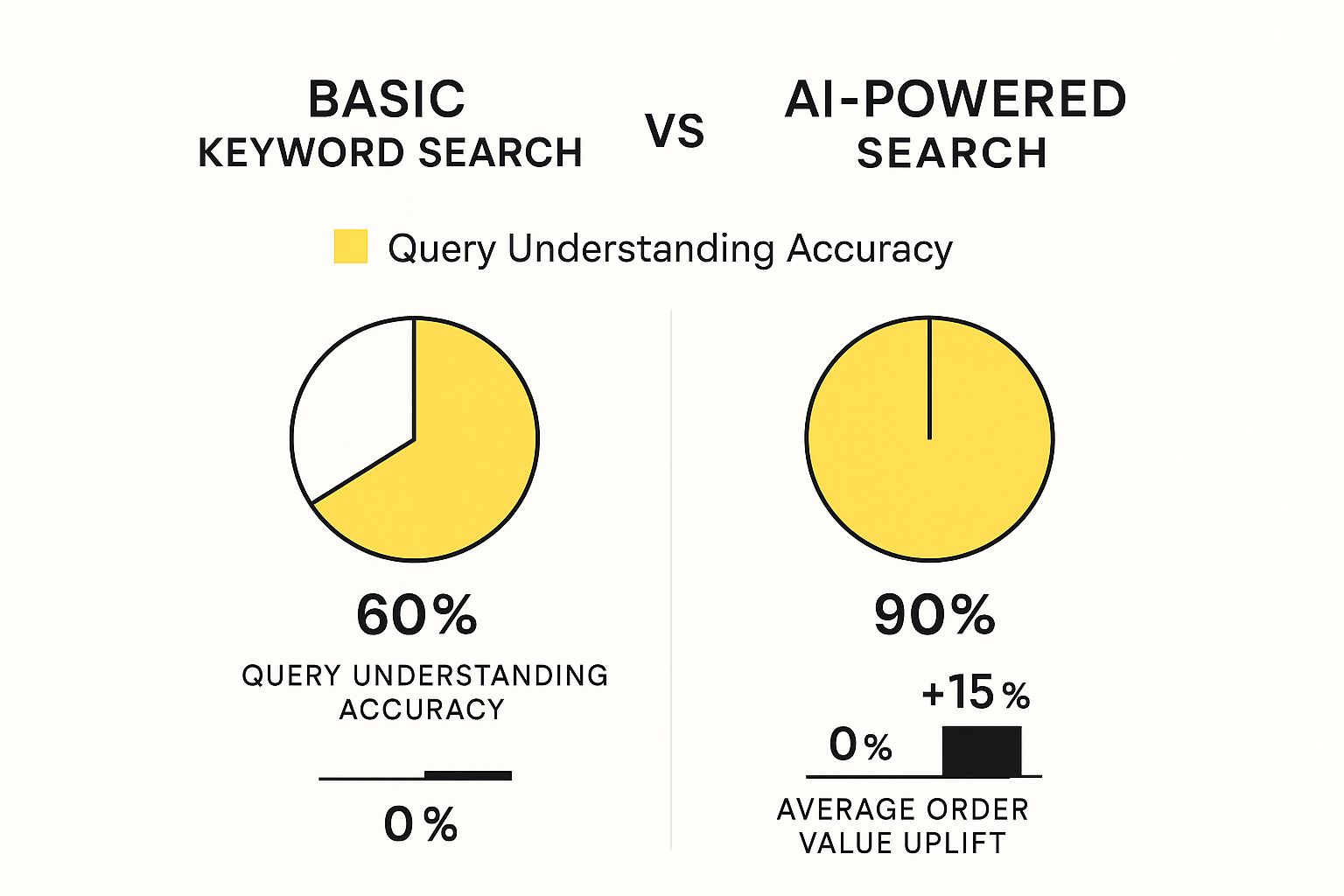
The numbers speak for themselves. AI doesn't just understand queries with 90% accuracy (compared to 60% for basic search), it also has a real impact on the bottom line, delivering a +15% uplift in Average Order Value.
By learning from user behavior, AI search engines not only improve conversion rates but also increase revenue by making smarter, more relevant product recommendations that encourage shoppers to spend more.
In the end, these smart systems do more than just find products; they create a guided shopping journey. They make every search feel like it was designed just for that one customer, building loyalty and driving real, measurable growth for your store.
Choosing the Right Shopify Search Solution
When you're running a Shopify store, you’ll eventually hit a fork in the road with your site search. Shopify's built-in search gets the job done when you’re starting out, but it's not built for scale. Think of it like a stock lens on a camera—it's functional, but to get those truly sharp, professional shots, you need specialized glass.
The native search often stumbles over typos, doesn't understand that a "sofa" is also a "couch," and gives you very little say in how results show up. If you have a deep product catalog or customers who search in creative ways, they'll start hitting that dreaded "no results" page. That’s more than just an inconvenience; it’s a lost sale waiting to happen. It's the moment you realize you've outgrown the basics.
Evaluating Third-Party Search Apps
Switching to a dedicated search app is like upgrading from that kit lens to a pro-level zoom. These tools are purpose-built to tackle the messy realities of ecommerce site search. But with a sea of options in the Shopify App Store, how do you know which one is right for you? It really comes down to focusing on a few key areas.
First, let's talk about the non-negotiables. Any app worth its salt should nail the fundamentals:
- Typo Tolerance: It has to be smart enough to know that "yelloe sweter" should bring up yellow sweaters.
- Synonym Recognition: It needs to understand that your customers might call a "beanie" a "cap" or a "handbag" a "purse."
- Advanced Filtering: Shoppers expect to slice and dice results by size, color, brand, price—you name it.
- Analytics and Reporting: You need to see what people are searching for, what they're finding, and—most importantly—what they're not finding.
These aren't just fancy add-ons. They're the building blocks of a search experience that genuinely helps people buy.
Choosing a search app isn't just a technical upgrade; it's a strategic investment in your customer experience. The right solution should not only find products but also provide valuable insights that help you sell more effectively.
Key Factors for Your Decision
Beyond the core features, you need to think about what it will be like to live with this app day-to-day. How easy is it to use? The last thing you want is an app that requires a developer on speed dial just to tweak a search rule. Look for a clean, intuitive dashboard that lets you control your merchandising.
Pricing is, of course, a huge piece of the puzzle. You'll find everything from flat monthly fees to plans that scale with your product count or search volume. Make sure the model makes sense for your current business and won't break the bank as you grow.
And never, ever underestimate the value of good customer support. When something goes wrong (and eventually, it will), a responsive and knowledgeable support team is worth its weight in gold. A powerful search tool is just one part of a winning tech stack. To see how it fits into the bigger picture, check out our guide on the best Shopify apps to increase sales.
Comparing Native Shopify Search vs. Third-Party Apps
To put it all in perspective, deciding whether to stick with Shopify's default search or upgrade really depends on your store's complexity and your ambitions for growth. A side-by-side look can make the choice crystal clear.
| Feature | Native Shopify Search | Advanced Third-Party Search App |
|---|---|---|
| Typo Tolerance | Basic, often misses common mistakes. | Highly advanced, corrects complex misspellings. |
| Synonym Handling | Manual setup required, very limited. | AI-powered and customizable synonym libraries. |
| Filtering & Facets | Limited to basic product tags. | Dynamic, multi-select filters (size, color, brand, etc.). |
| Merchandising | No direct control over result ranking. | Full control to pin, boost, or hide products in results. |
| Analytics | Very basic search term reports. | In-depth dashboards on queries, clicks, and conversions. |
| Speed | Can slow down with large catalogs. | Optimized for lightning-fast results, regardless of catalog size. |
| "No Results" Page | A dead end for the shopper. | Customizable page with product recommendations. |
| Personalization | None. Same results for everyone. | Tailors search results based on user behavior. |
Ultimately, if you’re serious about converting searchers into buyers and using data to guide your decisions, an advanced third-party app isn't a luxury—it's a necessity.
Optimizing Site Search for Mobile Shoppers

Let’s face it, most of your customers are shopping on their phones. This means a mobile-first mindset for site search for ecommerce isn't just a good idea—it's absolutely critical. On a small screen, every pixel and every tap matters, and a clunky search experience is a guaranteed way to lose a sale.
Think about it from your customer's perspective. They're on the go and don't have time to pinch, zoom, or fight with a tiny interface. You need a big, obvious search icon and a results page that's clean and simple. The little things make a huge difference, like making sure the on-screen keyboard doesn't cover up the "search" button.
We know that over 60% of ecommerce traffic now comes from mobile devices, yet conversion rates on mobile often fall short. It's a huge disconnect. You can discover more ecommerce visitor statistics that really highlight this gap.
Here's a powerful stat: Mobile users who use your site search are 2-3 times more likely to convert. That makes a smooth mobile search one of the most impactful improvements you can possibly make.
Key Mobile Search Enhancements
The name of the game is reducing friction. You want to make finding products so easy and fast that it feels completely effortless for your mobile shoppers.
Here are a few practical tips to get you started:
- Make Search Obvious: Put your search icon in a sticky header so it’s always visible as customers scroll. No hunting around.
- Design for Thumbs: All of your buttons, links, and filter toggles need to be large enough for a thumb to tap easily.
- Embrace Voice Search: More and more people are using their voice to search. Adding this feature can be a game-changer for customers who would rather speak than type on a tiny keyboard.
Improving your mobile search is a big piece of a much larger puzzle. For a complete walkthrough, take a look at our full mobile optimization guide for Shopify stores.
A Few Common Questions About Ecommerce Site Search
Let's be honest, figuring out the best way to handle your store's search can bring up a lot of questions. Getting straight answers is the best way to figure out where to put your time and money for the biggest impact.
How Much Does a Good Site Search Solution Cost?
The price tag for a site search solution is all over the map. On one end, you have the free, built-in search that platforms like Shopify offer. It's a starting point, but it often stumbles on basic things like typos.
Your next best bet is a third-party app. These can start as low as $20 a month for a small shop and climb into the hundreds or even thousands for big-league stores that need powerful AI features. A good rule of thumb is to let your catalog size and traffic guide your budget.
You don't need the most expensive tool on the market. What you do need is a tool that fixes your customers' biggest search headaches. A smart investment here will absolutely pay for itself in more sales and happier shoppers.
How Do I Know if Improving My Site Search Is Actually Worth It?
Great question. You absolutely need to measure the return on your investment. The key is to track a few specific metrics before you make any changes, and then compare them to the numbers after you've upgraded your search.
Keep your eye on these three main indicators:
- Conversion Rate for Search Users: Of the people who use your search bar, are more of them actually buying something?
- Search Exit Rate: Are fewer people getting frustrated and leaving your site right after a search?
- Average Order Value (AOV): Are the people who find products through search spending more money per order?
Luckily, most of the better search tools come with their own analytics dashboards, which makes keeping tabs on this stuff pretty straightforward.
Can I Make My Search Better Without Buying an App?
You can definitely make some solid improvements on your own, but you'll eventually hit a ceiling. The best place to start is with your product data. Think about writing crystal-clear product titles packed with relevant keywords, creating rich, detailed descriptions, and using smart, accurate tags.
Cleaning up your data gives your store's built-in search engine much better information to work with, which can lead to better results. That said, for the really advanced stuff—like AI-powered personalization or near-perfect typo correction—you're almost always going to need a dedicated app.
Ready to turn your Shopify store's search bar into your most powerful sales tool? The experts at E-commerce Dev Group live and breathe this stuff. We specialize in custom development and app integrations that create the kind of shopping experiences customers love. Learn how we can optimize your store today.
