


Product recommendations are more than just a nice feature on your Shopify store; they're an automated sales assistant working for you 24/7. Think of sections like ‘Customers also bought’ or ‘You might also like’—they’re designed to show customers other items they'll probably love, which is a fantastic way to boost your average order value.
Why Smart Recommendations Are Your Best Sales Tool
Let's cut through the jargon. Smart product suggestions aren't about just filling empty space on a product page. They're about turning a standard shopping trip into a personalized, guided experience for your customers. When you get this right, it becomes one of the most powerful sales tools you have, quietly working to lift your revenue and build real customer loyalty.
The psychology behind it is straightforward but incredibly effective. A "Customers also bought" section is pure social proof. It tells a new shopper, "Hey, other people like you bought this and loved it." At the same time, a "You might also like" suggestion piques curiosity and helps them discover more of what you offer, keeping them on your site longer.
The Real Impact on Your Bottom Line
Good product recommendations have a direct and measurable effect on your key e-commerce metrics. The main goal is always to increase your Average Order Value (AOV) by tempting shoppers to add just one more thing to their cart. A single, perfectly placed recommendation can easily turn a $50 sale into an $80 sale, all without you spending another dime on marketing.
Here’s what that looks like in practice:
- Higher Conversions: When you show shoppers exactly what they might want next, you remove the guesswork and make it easier for them to click "Add to Cart."
- A Better Customer Experience: Personalization makes people feel seen. It shows you understand their style or needs, which makes shopping with you far more engaging than a generic, one-size-fits-all experience.
- Boosted Product Discovery: Many of your customers have no idea about your full catalog. Recommendations are the perfect way to introduce them to new arrivals, complementary accessories, or hidden gems they would have otherwise missed.
A great recommendation strategy does more than just sell stuff; it builds a connection. It tells your customer, "We get you," and that’s the foundation for long-term brand loyalty.
The data doesn't lie. A massive 31% of e-commerce site revenue comes directly from personalized product recommendations. It’s a huge chunk of potential sales you can’t afford to ignore.
This is what a basic product recommendation section looks like right out of the box in the Shopify theme customizer.
Even this default setup gives you a clean, visual way to feature related items right on the product page—prime real estate for influencing a buying decision.
Common Recommendation Types and Their Impact
Not all recommendations are created equal. Different algorithms are designed to achieve different business goals. Understanding the "why" behind each type helps you choose the right app and strategy for your store.
| Algorithm Type | How It Works | Primary Business Goal |
|---|---|---|
| Customers Who Bought X Also Bought Y | Analyzes past purchase data to find items frequently bought together in the same order. | Increase Average Order Value (AOV) through cross-selling. |
| Frequently Bought Together | Groups complementary products into a bundle that can be added to the cart with one click. | Simplify bundling and increase units per transaction. |
| You Might Also Like | Uses product attributes (color, style, category, brand) to suggest visually or functionally similar items. | Enhance product discovery and keep shoppers engaged. |
| Trending/Best-Selling Products | Showcases the most popular items across the entire store based on recent sales data. | Leverage social proof and guide new visitors to proven sellers. |
| Recently Viewed | Displays a history of products the specific shopper has recently looked at. | Re-engage shoppers and make it easy to return to items of interest. |
Choosing the right mix of these algorithms across your site—like bundling on product pages and showing best-sellers on the homepage—is key to a successful strategy.
From Simple Suggestions to a Sales Engine
The real magic happens when you move from just listing a few items to building a strategic sales engine. It’s all about understanding what to show, where to show it, and why.
For example, a "Frequently Bought Together" bundle on a product page serves a very different purpose than a "Trending Products" carousel on the homepage. The first is a direct upsell opportunity, while the second is all about discovery for new visitors.
This level of strategic thinking is where you'll see the biggest returns. By tailoring the type of recommendation to the shopper's context, you create a far more compelling and helpful experience. There are countless website personalization examples you can look at for inspiration. Ultimately, the goal is to turn passive browsing into active buying.
Don't Overlook Shopify's Built-In Recommendation Tool
Before you rush off to the Shopify App Store, let’s talk about a powerful tool you probably already have. Most modern Shopify themes come with their own product recommendation feature, and frankly, it's a fantastic starting point. It’s clean, fast, and often surprisingly effective at getting the right products in front of your customers.
The magic behind it is a smart but simple algorithm. Shopify looks at your store’s sales history to see which products are frequently bought together. It also scans product descriptions and collections to find related items, ensuring the suggestions make sense.

What's great about using the built-in feature is how seamless it is. Since it's baked right into your theme, you don't have to worry about clashing code or performance hits that can sometimes pop up with third-party apps. Think of it as the perfect way to test the waters and see how recommendations can boost your sales.
Getting It Up and Running
The good news is you won't need to touch a single line of code. Everything is handled right inside the Shopify theme editor you're already familiar with.
The main goal is to add a “Product recommendations” section to your key pages. While the exact wording might differ slightly depending on your theme (like Dawn, Impulse, or Prestige), the process is nearly identical across the board.
Here's the typical workflow:
- From your Shopify admin, head to Online Store > Themes.
- Find the theme you're using and click the "Customize" button.
- Once the editor loads, use the dropdown menu at the top to go to Products > Default product. This will pull up your standard product page template.
- In the left sidebar, find an option like "Add section" or "Add block". Click it, and a list of available sections will appear. Select "Product recommendations".
- Now you can just drag and drop this new section wherever you want it. A great spot is usually right under the main product info or just before the footer.
Don't stop there. You can repeat this process on other high-traffic pages, like adding a similar block to your cart page to catch last-minute upsells.
Making It Your Own
Once the section is live, you can start tweaking its appearance to match your brand. This is a crucial step; you want the recommendations to feel like a natural part of the shopping experience, not a clunky add-on.
Most themes give you some solid customization options:
- Headline: Ditch the generic "You may also like." Try something more engaging like "Complete the Look," "Pairs Perfectly With," or "Spotted in Our Showroom."
- Layout: You can usually control how many products show up. I’ve found that a two-across grid on mobile works best to prevent endless scrolling.
- Vendor Info: If you run a multi-brand store, you can choose whether to display the product's vendor.
- Quick Add Button: Some themes offer a "Quick Add" feature. This is a game-changer, letting customers add an item to their cart without ever leaving the page they're on.
A simple change in your heading can have a real impact on how many people click. The goal is to make the section genuinely helpful and easy to use.
If you get comfortable with these built-in tools and want to push your product pages even further, you can explore more advanced designs. To see what's possible, check out our guide on how to create custom product page layouts in Shopify.
Knowing When It's Time to Upgrade
Shopify’s native tool is a workhorse, but it has its limitations. The algorithm is based on past sales and product data, not on an individual shopper’s real-time behavior. It's good, but it's not deeply personalized.
You'll know you're ready to explore a dedicated app when you find yourself wanting to:
- Create “Frequently Bought Together” bundles that customers can add to their cart in one click.
- A/B test different recommendation strategies to see which ones actually drive more revenue.
- Get deep analytics on how your recommendations are performing—think click-through rates, conversion lifts, and total revenue generated.
- Set up specific rules, like automatically hiding out-of-stock items or hand-picking recommendations for a new collection launch.
By starting with Shopify's built-in feature, you get a solid baseline for what works. That hands-on experience makes it so much easier to choose the right third-party app when you're ready to take your Shopify product recommendations to the next level.
Choosing the Right Product Recommendation App
Shopify’s built-in recommendation tool is a decent starting point, but let’s be honest—it’s the dedicated apps that turn a simple suggestion into a high-powered sales engine. When you’re ready to get serious about personalization, dig into analytics, and deploy smarter selling strategies, the Shopify App Store is your best friend.
But wading through hundreds of options can feel overwhelming.
The secret isn't finding the single "best" app; it's about finding the best app for your store. A startup with 50 products has completely different needs than a big brand juggling thousands of SKUs. Your choice should be a strategic one, based on your business goals, catalog size, and how hands-on you want to be.
The proof is in the numbers. Implementing personalized recommendations gives a serious boost to click-through rates, conversions, and average order value.
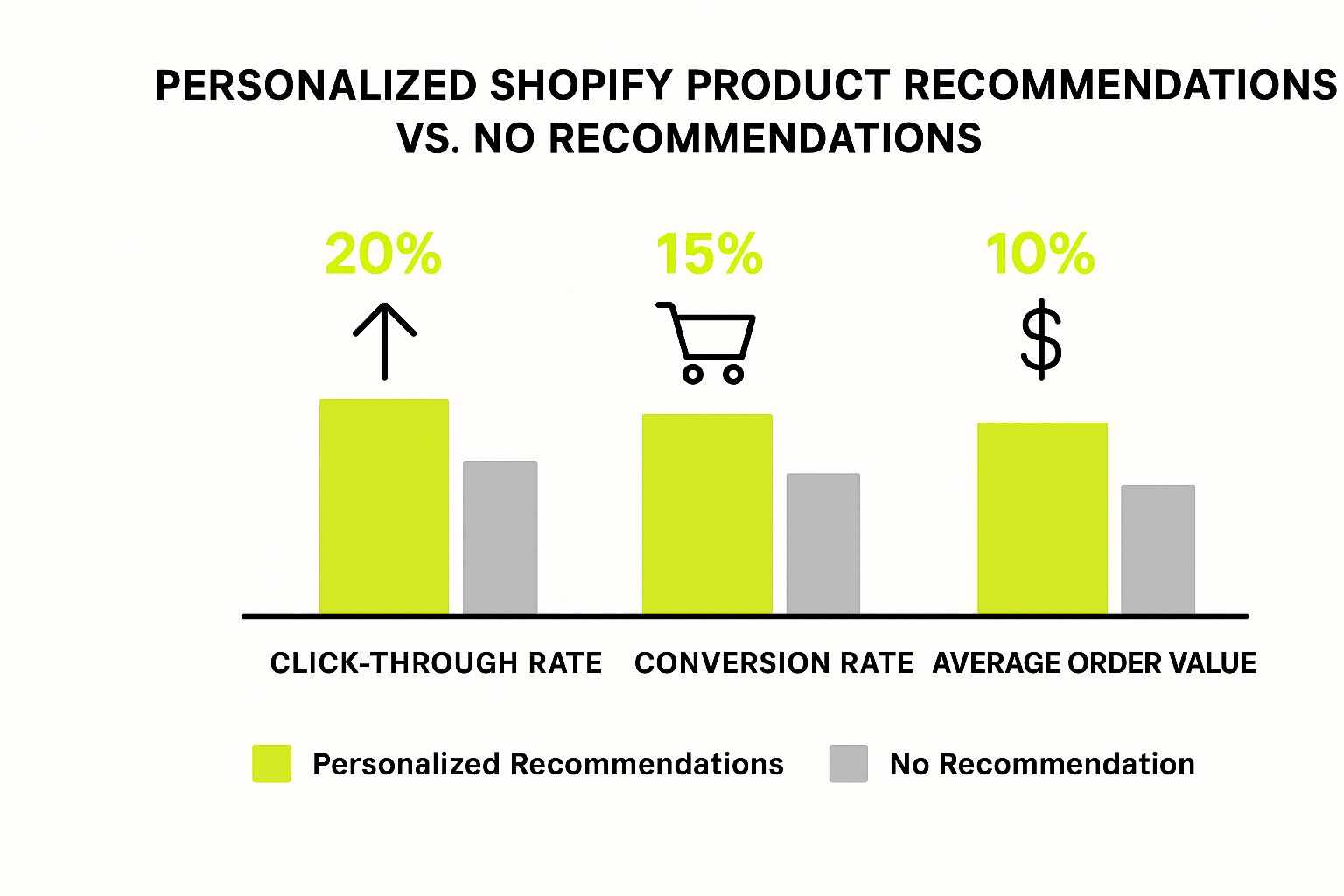
As you can see, this isn't just a "nice-to-have" feature. The right app is an investment that directly translates into more revenue.
Core Features You Cannot Ignore
Before you get distracted by slick dashboards and flashy promises, make sure any app you’re considering has the fundamentals locked down. These are the non-negotiables that form the backbone of any solid recommendation strategy.
-
Diverse Algorithm Support: The app needs to do more than just show "related products." Look for a variety of recommendation types, like “Frequently Bought Together,” “Best Sellers,” “New Arrivals,” and “Recently Viewed.” The more options you have, the better you can tailor suggestions for different pages and customer journeys.
-
Customizable Widget Design: Your recommendations should feel like a natural part of your store, not some clunky, third-party add-on. A good app will give you full control over the widget’s colors, fonts, layout, and buttons, ensuring it matches your brand’s aesthetic perfectly.
-
Robust Analytics and Reporting: If you can’t measure it, you can’t improve it. You need a clear dashboard that shows key metrics like click-through rate (CTR), conversion rate, and—most importantly—the actual revenue generated by each widget.
Leveling Up Your Strategy with Advanced Capabilities
Once the basics are covered, it's time to look for the features that will truly elevate your sales. This is where you move from generic suggestions to a highly personalized and optimized shopping experience.
A game-changer here is the ability to create ‘Frequently Bought Together’ bundles. This is an incredibly powerful upselling tool that lets customers add a curated set of complementary products to their cart with a single click. For example, if you sell cameras, you could bundle a camera body, a lens, and a memory card. It’s a simple way to drive up the average order value.
A truly effective app doesn't just show products; it creates opportunities. It anticipates what the customer needs next and makes it incredibly easy for them to buy it.
Look for these advanced features to really make an impact:
- A/B Testing: This is absolutely critical for optimization. Can you test different headlines, layouts, or even entire algorithms against each other to see what performs best? Data-driven decisions will always beat guesswork.
- Advanced Filtering and Rules: You need to be in control. Look for the ability to create rules like "exclude out-of-stock products," "only show items from the same collection," or "hide products under $20." This keeps your recommendations relevant and clean.
- Manual Curation: Algorithms are smart, but sometimes your own expertise is better. The ability to manually override suggestions or create hand-picked carousels for new product launches or promotions is a must-have for strategic merchandising.
For a wider view of what's out there, you might want to explore some of the best website personalization tools, as many of the same principles apply.
Comparing Top Shopify Recommendation Apps
To help you visualize how different apps stack up, here’s a quick comparison of some popular options. This isn’t an exhaustive list, but it highlights how features can differ based on an app's primary focus.
| App Feature | App A (e.g., Wiser) | App B (e.g., ReConvert) | App C (e.g., LimeSpot) |
|---|---|---|---|
| Primary Focus | AOV Boosting & Bundles | Post-Purchase Upsells | AI-Driven Personalization |
| 'Bought Together' Bundles | Yes, core feature | Limited, focused on checkout | Yes, AI-powered |
| A/B Testing | Yes | Yes | Advanced, multi-variant |
| Manual Curation | Yes | Limited | Yes |
| Analytics | Strong | Good | Deep, customer-level |
| Best For | Stores focused on bundling | Maximizing value per order | Large & complex catalogs |
Ultimately, this table shows there's no single "winner." The best app is the one that aligns with your specific sales strategy, whether that’s boosting AOV with bundles, capturing post-purchase revenue, or delivering hyper-personalized experiences at scale.
Matching an App to Your Business Model
The right choice really comes down to your store's unique profile. Let's walk through a few common scenarios.
-
For Stores with Large, Complex Catalogs: If you’re managing thousands of products, you need a powerful, AI-driven engine. An app like LimeSpot is built for this, using machine learning to analyze huge amounts of data and find connections you'd never spot manually.
-
For Niche Brands Focused on Curation: A smaller, curated brand might get more value from an app like ReConvert. It excels at post-purchase upsells and one-click offers that appear in the cart and on the thank-you page, focusing on maximizing the value of each confirmed order.
-
For Merchants Prioritizing Bundles and Upsells: If your main goal is to increase AOV through creative bundling, an app like Wiser is a fantastic choice. It offers specialized widgets for "shop the look" and product bundles, making it easy to build compelling offers.
Choosing an app is a big decision, but it's not the only way to grow. For more ideas, check out our comprehensive guide to the best Shopify apps to increase sales.
By thinking through these features and scenarios, you can confidently pick a tool that lines up with your goals and gives you the power to turn casual browsers into loyal customers.
Where to Place Recommendations for Maximum Impact
Having a recommendation engine is one thing; making it impossible for your customers to ignore is something else entirely. The real magic happens when you get strategic about where you place these suggestions. It’s all about understanding what a shopper is doing and thinking at every step, then delivering the perfect recommendation at just the right moment.
Simply slapping a "You might also like" section on your product page is yesterday's news. We need to weave these suggestions seamlessly throughout the entire shopping experience. The goal is for them to feel less like an ad and more like a helpful personal shopper guiding the way. This means looking at every touchpoint, from your homepage all the way to unexpected places like your 404 error page.

Match the Recommendation to the Moment
A one-size-fits-all approach just doesn't cut it. The type of recommendation that works wonders on a product page might fall completely flat on the homepage. Context is everything.
Think about it: a customer looking at a specific product is in a high-intent mindset. They are actively considering a purchase. This is the perfect time to show them a "Frequently Bought Together" bundle—a direct, relevant upsell.
But a visitor just landing on your homepage? They're in discovery mode. They might not even know what they want yet. Hitting them with specific upsells is way too soon. Instead, this is the prime spot for a "Trending Now" or "Our Bestsellers" section. It uses social proof to gently guide them toward products people already love.
The most successful stores don't just show recommendations; they anticipate the shopper's next move. They use different recommendation types as tools to guide, upsell, and delight at every stage of the buying process.
Prime Real Estate: The Must-Have Placements
Let’s walk through the key spots where your recommendation widgets will drive the most engagement and, ultimately, more revenue.
-
Product Detail Page (PDP): This is the classic, and for good reason. I always suggest two placements here: a "You Might Also Like" widget below the product details to encourage more browsing, and a "Frequently Bought Together" bundle right above the "Add to Cart" button for an irresistible upsell.
-
Homepage: This is your store's welcome mat. Use this space for broad-appeal recommendations like "New Arrivals" to create excitement or "Bestsellers" to build instant trust with new visitors.
-
Cart Page or Drawer: The cart is the final decision point. A shopper here is this close to buying. It's the perfect spot for small, high-value add-ons under a title like "Complete Your Order" or "Don't Forget These!" Think accessories, batteries, or cleaning kits.
-
Post-Purchase Thank You Page: The sale isn't over when they click "buy." The thank you page is a golden opportunity to bring them back for more. Showcase "What's New" or a personalized "Recommended For You" section based on what they just bought to keep the shopping momentum going.
Unconventional Placements That Really Convert
Now, let's think outside the box. Some of the most effective placements are in places you might not expect—turning a potential dead end into a new sale.
-
Your 404 Error Page: A "page not found" error is usually a frustrating dead end. You can completely transform this experience by adding a product recommendation widget. Showing your "Top Sellers" or "Trending Products" gives them an immediate, engaging path back into your store.
-
Within Blog Content: If you have a blog, you're sitting on a goldmine. Embedding relevant products directly within your articles is incredibly powerful. Writing about a 10-step skincare routine? Embed the exact products you mention. It’s no longer just a suggestion; it's an editorially-backed recommendation.
-
Post-Purchase Emails: Your transactional emails (like order confirmations) have some of the highest open rates of any message you send. Add a personalized recommendation block in these emails. For instance, if a customer just bought a coffee maker, your confirmation email could suggest your bestselling coffee beans. It’s relevant, timely, and incredibly effective.
Fine-Tuning with Advanced Tactics
To truly get the most out of your recommendations, you need to go beyond placement and start setting some smart rules. This is where you can smooth over common friction points and create perfect selling moments.
Rule 1: Always Hide Out-of-Stock Items
There's nothing more annoying for a customer than clicking on an exciting product only to find it's sold out. It kills the mood. Most quality recommendation apps let you create a rule that automatically hides any product with zero inventory. This is a simple but critical fix that prevents disappointment and keeps the shopping experience positive.
Rule 2: Manually Curate for Your Top Products
Algorithms are great, but they don't know your marketing calendar or your profit margins. For your absolute best-selling products, it often pays to take manual control. I’ve seen huge success from creating hand-picked carousels that feature high-margin accessories or complementary items. For example, if your top seller is a leather handbag, manually curate a recommendation widget that shows a matching wallet and a leather care kit. This kind of strategic curation often outperforms a purely algorithmic approach, giving you more control over the upsell.
Measuring What Matters and Optimizing Performance
Flipping the switch on your Shopify product recommendations is a great start, but that’s not where the real work—or the real growth—happens. The true magic comes from digging into the data, learning what resonates with your customers, and making smart, iterative tweaks. This is how you turn a simple feature into a powerhouse that consistently drives revenue.
Think of it as creating a feedback loop. You look at the data, the data informs your next move, and your recommendations get smarter and more effective over time.
Decoding Your Analytics Dashboard
Your recommendation app’s analytics dashboard is your new best friend. Don't let the numbers overwhelm you; instead, focus on the few key metrics that tell you the real story. These are the KPIs that matter most.
- Click-Through Rate (CTR): This is simple: out of everyone who saw a recommendation, what percentage actually clicked? If your CTR is low, it could mean your headlines are boring, the product photos aren't grabbing attention, or the suggestions are just plain irrelevant.
- Conversion Rate (from Recommendations): This one tracks how many clicks on a recommended product turn into a sale. It’s the ultimate test of how persuasive your recommendations are.
- Revenue Attributed to Recommendations: This is the big one—the total dollar amount your recommendation widgets have earned. This metric proves their value and shows you which placements are pulling the most weight.
Watch out for a high CTR paired with a low conversion rate. That's a classic red flag. It means you're getting the click, but something is falling apart on the product page, causing them to lose interest.
Keep an eye on these numbers week over week. You might quickly spot a trend, like discovering that your "Frequently Bought Together" bundle on product pages generates twice the revenue of the "Bestsellers" widget on your homepage. Now that’s an insight you can act on.
Running Simple A/B Tests for Big Wins
Once you know your baseline numbers, it’s time to start experimenting. A/B testing is just showing two different versions of your recommendation widget to see which one performs better. You don't need a degree in data science to do this effectively.
Start small. Sometimes the tiniest changes can lead to surprisingly big results.
Here are a few A/B test ideas you can run right away:
- Test Your Headlines: Try a classic title like "You Might Also Like" against something more creative, like "Complete The Look."
- Experiment with Placement: Does your widget get more action below the product description, or does it work better right under the "Add to Cart" button? There's only one way to find out.
- Vary the Number of Products: Is a clean row of three products better than a carousel showing six? Test it and see what your customers prefer.
Let’s walk through a real-world example. Imagine a fashion boutique is testing two versions on their product pages. Version A shows a generic "Related Products" widget. Version B shows a hand-picked "Style With These" widget. After just two weeks, they find Version B has a 25% higher CTR and boosted their average order value by 10%. That’s a decisive win.
This cycle of measuring, testing, and optimizing is what separates the good from the great. To take a broader look at improving your store's performance, check out these conversion rate optimization tips that work hand-in-hand with what you're doing here. By constantly refining your strategy based on actual customer behavior, you’ll ensure your Shopify product recommendations are always working hard for your business.
Common Questions About Shopify Recommendations
Whenever I talk to store owners about adding product recommendations, the same few questions always pop up. It’s smart to get these sorted out before you dive in, so you can feel confident you’re setting your store up for success. Let's walk through the most common ones.
Can I Manually Select Which Products Get Recommended?
Absolutely. In fact, you should. The algorithm is great at finding connections you might miss, but your own insights as a store owner are priceless. Good recommendation apps will always give you the power to override or create your own rules.
This kind of manual control is a game-changer for specific situations:
- Launching a new line: The products have zero sales history, so you need to put them in front of people yourself.
- Moving old inventory: Pair those overstocked items with your bestsellers to clear them out faster.
- Curating a look: Manually create a "Shop the Outfit" bundle to show customers how to style a popular dress or jacket.
Look for this feature in apps. Tools like Wiser or LimeSpot let you build "hand-picked" carousels, giving you full control over key cross-sells and upsells on your most important product pages.
Will a Recommendation App Slow Down My Store?
This is probably the most critical question of all, and for good reason. Site speed kills conversions. The last thing you want is an app that drags your whole site down.
Thankfully, the best recommendation apps are built for speed. They use a method called asynchronous loading. Think of it this way: your core page content, like the product photo and the "Add to Cart" button, loads first. The recommendation widgets load a split-second later, in the background. This means the customer can interact with the page immediately, so from their perspective, there’s no slowdown at all.
A fast-loading site is non-negotiable. I always recommend running a speed test with a tool like Google PageSpeed Insights before and after installing any new app. You need to know for sure that it isn't hurting performance.
How Long Until the Algorithm Starts Working?
The time it takes for an algorithm to "learn" really depends on two things: the type of algorithm and your store's traffic.
If you're using a 'frequently bought together' recommendation, the algorithm needs sales data. For a store with thousands of orders a day, it might start making solid suggestions within hours. For a newer store, it could take a couple of weeks to gather enough data to be truly effective.
But here’s the good news: most modern apps don't make you wait. They start on day one by analyzing product information—things like tags, collections, and vendor—to find similar items. They use these content-based recommendations right away and then layer in the behavioral data as it comes in. This hybrid approach means you're never showing empty or irrelevant suggestions, even right after you install.
Ready to stop leaving money on the table and start maximizing every order? The team at E-commerce Dev Group specializes in building high-converting Shopify experiences, from theme customizations to strategic app integrations. Let us help you implement a product recommendation strategy that drives real revenue. Get in touch with a Shopify expert today!
