


Pairing WordPress with Shopify is a smart move I’ve seen work wonders for businesses. You're essentially taking the world's most powerful content platform and plugging in a world-class e-commerce engine. The result? A content-rich shopping experience that’s far more effective than what either platform could offer on its own.
This isn't just about adding a "buy" button to a blog. It’s a strategic decision to build a hybrid site that capitalizes on WordPress's incredible content flexibility and Shopify's rock-solid, secure checkout process.
Why Integrate Shopify With WordPress?
So, why go through the trouble of merging two massive platforms? It really boils down to getting the best of both worlds. You let WordPress do what it does best—content, SEO, and custom design—while letting Shopify handle the heavy lifting of e-commerce.
Think about a brand that built its audience through amazing content. They might run a popular blog with tutorials, in-depth guides, or compelling case studies. By integrating Shopify, they can place products right inside that content, catching readers at the exact moment they’re most engaged and ready to buy. It turns a content site into a seamless selling machine.
Unlocking a Powerful Combination
The real magic here is specialization. WordPress was born for content creation, giving you total design freedom and a massive advantage in SEO. On the other hand, Shopify was built from the ground up for commerce, masterfully handling everything from inventory and payments to taxes and shipping with top-notch security.
By bringing them together, you sidestep the classic problem of forcing one platform to do something it wasn't designed for. No more clunky e-commerce plugins on WordPress or wrestling with Shopify's limited blogging features. This is especially relevant as the global e-commerce market is expected to hit a staggering $6.86 trillion in sales by 2026.
The big win is separating your content from your commerce. Your marketing team can go wild in WordPress, publishing content and tweaking designs, without ever having to log into the Shopify backend. This creates a much safer and more efficient workflow.
Making an Informed Decision
To really get why this hybrid approach is so powerful, it helps to see their core strengths side-by-side.
Shopify vs WordPress Core Strengths
This table breaks down the core strengths of each platform to show why they work so well together.
| Feature | WordPress | Shopify |
|---|---|---|
| Primary Function | Content Management & SEO | E-commerce & Sales |
| Design Flexibility | Virtually limitless with thousands of themes and page builders. | Structured and optimized for conversion, but with more design constraints. |
| Ease of Use | Steeper learning curve, but offers complete control. | Extremely user-friendly for store management. |
| E-commerce | Relies on third-party plugins (e.g., WooCommerce), can be complex. | Built-in, robust, and secure e-commerce functionality. |
| SEO | Unmatched SEO capabilities with plugins like Yoast SEO. | Good SEO features, but less granular control than WordPress. |
| Content Management | The industry standard for blogging, articles, and custom post types. | Basic blogging features, not ideal for content-heavy strategies. |
| Cost | Open-source (free), but costs for hosting, themes, and plugins add up. | Monthly subscription fee, plus transaction fees. |
Ultimately, this integration gives you the best of both. You use WordPress for its superior brand storytelling and search engine dominance, which you can learn more about in this detailed Shopify vs WordPress comparison guide.
This approach is a perfect fit for a few specific types of businesses:
- Content-Heavy Brands: Companies that rely on blogs, video tutorials, and educational articles to attract and convert customers.
- Complex Website Needs: Businesses that need custom features like membership areas, forums, or intricate page layouts that are tough to build on Shopify alone.
- Established WordPress Sites: Anyone with a successful WordPress site who wants to add e-commerce without a painful, full-scale migration.
And remember, the integration doesn't have to stop with just products. You can extend the functionality even further. If you're curious about what else is possible, our guide on leveraging various Shopify app integrations is a great place to start exploring.
Preparing for a Smooth Integration

Before diving into plugins and code, a little prep work will save you a world of frustration later. Trust me, I've seen integrations go sideways because of simple things that were overlooked. Think of this as your pre-flight checklist. Getting your ducks in a row on both WordPress and Shopify is the key to a painless integration.
First up, your Shopify store needs to be more than just an account—it needs to be ready for business. This means having your core e-commerce setup dialed in. You should have at least a handful of products loaded up with compelling descriptions, sharp images, and correct pricing.
The absolute must-have? Your payment gateways. They need to be fully configured and tested. What’s the point of a slick integration if your customers can't actually buy anything? Double-check that your shipping zones and rates are set up too, as this data is essential once those orders start rolling in from your WordPress site.
Fortifying Your WordPress Foundation
Once Shopify is ready to sell, it's time to look at your WordPress setup. The success of this whole endeavor really hinges on how stable and quick your WordPress site is. Your hosting is the absolute foundation here, so this isn't the time to be cheap. Go with a reputable hosting provider that’s known for solid performance and uptime. A sluggish host will only slow down your content and your embedded Shopify products.
Before you even think about connecting the two platforms, you absolutely have to lock down your WordPress site. A security breach could put your content and, more importantly, your customer data at risk. This is non-negotiable. Taking the time to learn how to secure your WordPress site is a critical first step.
The final piece of the WordPress puzzle is your theme. Not all themes play nicely with embedded code from other platforms. You'll want to choose a theme that is:
- Well-coded and frequently updated: This dramatically reduces the chances of conflicts with plugins or the Shopify scripts.
- Lean and minimalist: Overly styled or bloated themes often fight with the CSS from your embedded products, creating a visual mess.
- Responsive by design: Your Shopify products have to look good everywhere. That starts with a theme built for a mobile-first world.
Think of it this way: a clean, lightweight theme acts as the perfect canvas. It lets your Shopify products shine and blend in seamlessly, giving you a professional and cohesive look across your entire website.
Choosing Your Integration Method
So, you want to bring your Shopify products into your WordPress site. Smart move. But connecting them isn't a one-size-fits-all deal. The right approach really boils down to what you're trying to achieve, how comfortable you are with a bit of tech, and your budget.
You've got two main paths to choose from: the simple Shopify Buy Button or a more powerful, dedicated WordPress plugin.
The Shopify Buy Button is the most direct route. It's fantastic for dropping individual products right into your content. Let's say you've written a killer blog post reviewing a new gadget. You can slap a Buy Button at the end to catch readers while they're most interested. It's fast, dead simple, and requires almost no technical know-how.
But what if you want more than just a few buttons? If you're looking to build out a full-fledged storefront right on your WordPress site, you'll need something with more muscle. That's where dedicated plugins enter the picture.
When a Plugin Is the Right Call
For a truly seamless and feature-rich store, a plugin is the way to go. These tools are built to sync your entire product catalog from Shopify over to WordPress. This means you can create a proper "Shop" page, product grids, and individual product pages that all live on your WordPress domain.
The big win here is SEO. Each product page becomes part of your WordPress site, ready to be indexed and optimized. There's a solid ecosystem of plugins that bridge the two platforms. For example, ShopWP lets you do everything from adding customized buy buttons to building complex storefronts, all managed from your WordPress dashboard while Shopify handles the secure checkout. It’s a hybrid approach that gives you the design freedom of WordPress with Shopify’s rock-solid commerce engine. You can find more details on this powerful combination in this Crocoblock article about using Shopify with WordPress.
The bottom line: The Buy Button is for strategically placing a product or two within your content. A full integration plugin is for building an entire, SEO-friendly storefront inside WordPress. Choose based on whether you need to sell a few things or run a whole store.
To make it even clearer, this decision tree can help you visualize which path to take based on your budget and technical confidence.
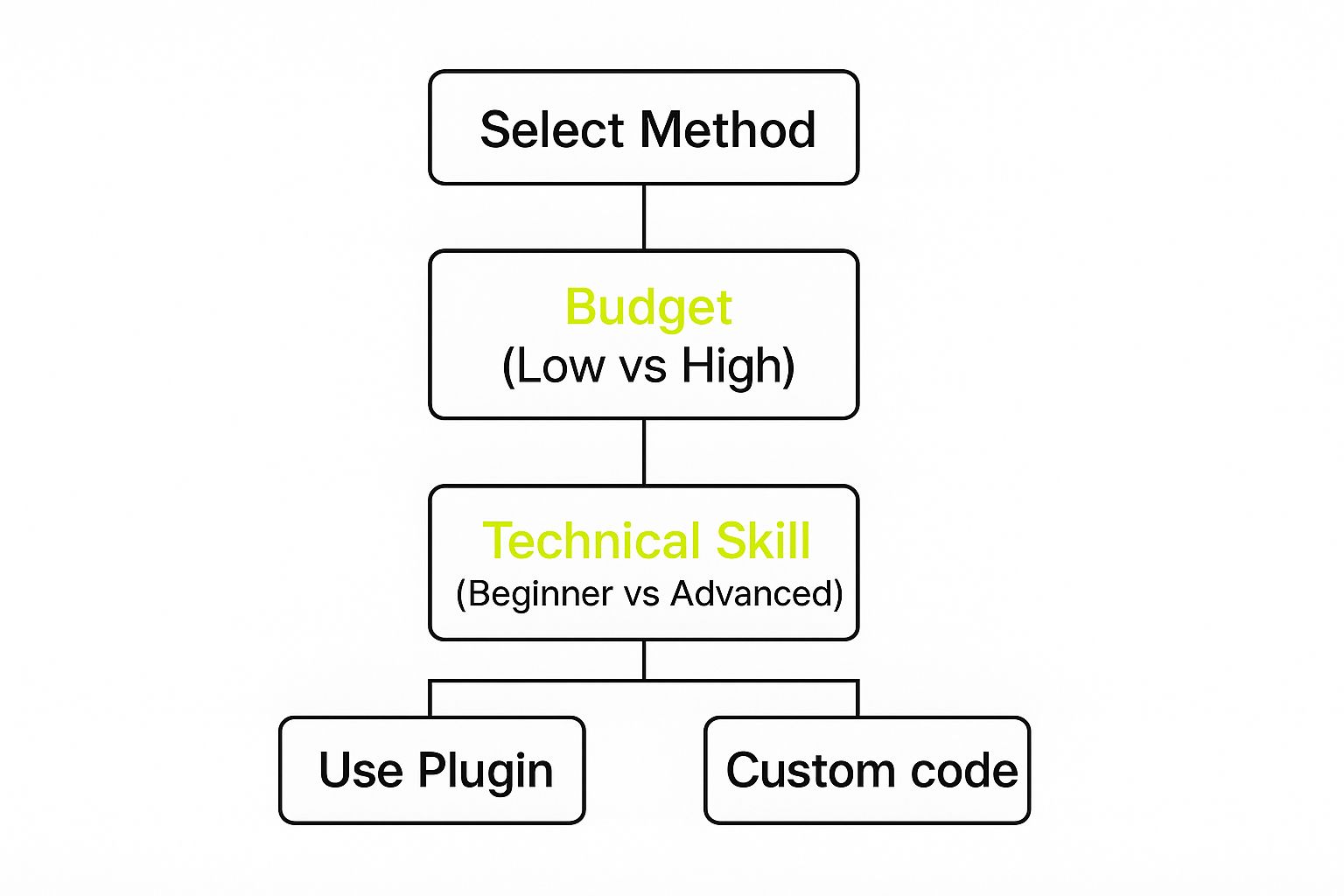
As the infographic shows, while money is part of the equation, your comfort level with the tech side of things is just as important in picking the best integration method for you.
Comparing Integration Methods: Buy Button vs. Plugin
Let's put these two methods head-to-head. This table breaks down the key differences to help you decide which approach best fits your business goals and technical skills.
| Feature | Shopify Buy Button | Integration Plugin (e.g., ShopWP) |
|---|---|---|
| Best For | Adding single products to blog posts or pages. | Building a full, multi-product storefront on WordPress. |
| Technical Skill | Beginner-friendly. Just copy and paste code. | Intermediate. Requires plugin setup and configuration. |
| SEO Impact | Minimal. Product pages are not created on your site. | High. Creates indexable product pages on WordPress. |
| Customization | Limited to button colors, size, and layout. | Extensive control over product layouts and store design. |
| Cost | Included with your Shopify plan. | Often requires a paid plugin for full features. |
Ultimately, choosing how to integrate Shopify with WordPress really comes down to your primary goal. Are you a content-focused site aiming to monetize specific articles? The Buy Button is your friend. Are you a brand that wants to build a unique shopping experience using WordPress's unmatched design flexibility? Then a dedicated plugin is the clear winner.
Getting Started with the Shopify Buy Button
If you're looking to dip your toes into selling on your WordPress site without committing to a full-blown ecommerce plugin, the Shopify Buy Button is your best friend. It’s hands-down the simplest way to connect Shopify and WordPress. All it takes is copying a small piece of code and pasting it wherever you want a product to show up on your blog posts or pages.
This method works especially well for sites that are heavy on content. Let's say you've just published an in-depth review of a new gadget or a tutorial that uses a specific tool. You can drop a Buy Button right there in the article. This catches your readers when they're most engaged and interested, turning your blog into a surprisingly effective sales engine.
How to Create Your First Buy Button
Your journey starts in your Shopify admin dashboard, not in WordPress. Shopify has made this process incredibly straightforward. The first thing you'll need to do is add the Buy Button sales channel to your Shopify account. With that enabled, you can start generating buttons for any product you sell.
Pick a product, and Shopify will instantly show you a live preview along with a bunch of customization options. This is your chance to make the button look like it truly belongs on your WordPress site.
You get to control all the important details:
- Layout Style: Do you want just a simple button? Or the classic view with an image and price? You can even go for a full view that includes the product description.
- Button Action: You can decide what happens when someone clicks. Should it add the product to a pop-out cart right on the page, or take them straight to the Shopify checkout?
- Appearance: This is where you fine-tune the look. Tweak the colors, fonts, and button size to match your WordPress theme perfectly.
Getting these details right makes the product feel like a natural part of your content instead of a clunky, third-party ad.
From my experience, the real magic of the Buy Button is its adaptability. You can create different button styles for different situations. A low-key button works great for a quick mention in a list post, while the full-view layout is perfect for a dedicated product spotlight page. It's all about tailoring the experience.
Putting the Code on Your WordPress Site
Once you’re happy with how your button looks, Shopify gives you a small snippet of HTML code. Just copy that code, and pop over to your WordPress editor.
Here’s a look at the Shopify interface where you'll be doing all the customization before you get the code.

As you can see, the panel is really intuitive. You can adjust everything from the layout to what the button says before ever touching your WordPress admin.
Now, in the WordPress block editor (Gutenberg), find the spot where you want the button to go and add a "Custom HTML" block. Paste your code right in there. If you're still using the Classic Editor, just switch over to the "Text" tab and paste the code where it needs to be.
Hit "Update" or "Publish," and that's it! Your Shopify Buy Button is now live on your site, ready to start processing orders. It’s a beautifully simple way to start making money directly from the content you're already creating.
Building a Storefront with a WordPress Plugin
Sometimes, you need more than just a product dropped into a blog post. That's when a dedicated plugin becomes your best friend. For anyone serious about building a full-blown, feature-rich storefront right inside their WordPress site, this approach gives you a level of power and flexibility you just can't get otherwise.
Think of it this way: instead of just placing a few items here and there, a plugin builds a bridge between Shopify and WordPress. It pulls your entire Shopify catalog—all your products, collections, and even your inventory levels—and syncs it directly into your WordPress site. The result is a completely native shopping experience for your customers, all on your own domain.
Getting the Two Platforms Talking
So, how do you make this happen? It usually starts by installing a plugin like ShopWP from the WordPress repository. The setup process is typically straightforward; it'll ask for your myshopify.com domain to create a secure API connection with your Shopify store. This is the handshake that lets the two systems communicate.
Once connected, the plugin gets to work pulling in all your product data. This isn't a one-and-done import, which is the really cool part. It creates an ongoing sync. Add a new product in Shopify or watch an item's stock level drop? Those changes automatically show up on your WordPress site. This means you only ever need to manage your products in one place: your Shopify dashboard.
This is a massive time-saver. You're essentially tapping into Shopify's powerful and reliable backend—a system that supports 4.82 million websites globally and handled about 199 million orders a month in 2023. You can read more about Shopify's impressive scale on RedStag Fulfillment's blog. It's a proven strategy: use Shopify for what it does best (e-commerce management) and WordPress for what it does best (content and customization).
Unlocking Serious Control and SEO Advantages
The real magic of using a plugin is the incredible control it gives you. Your products aren't just isolated widgets anymore; they become native WordPress content, just like a blog post. This opens up a ton of possibilities.
- Massive SEO Boost: Every product gets its own unique, indexable page on your WordPress domain. Now you can unleash powerful SEO plugins to fine-tune every title, meta description, and URL for maximum search visibility.
- Seamless Theme Integration: Your products will automatically inherit the styles of your active WordPress theme. This creates a cohesive, professional look that perfectly matches the rest of your site's branding.
- Endless Layout Customization: Want to break free from cookie-cutter e-commerce layouts? You can use page builders or create custom templates to design truly unique product grids and detail pages.
- True Content Commerce: Effortlessly weave products into your articles and guides. You can build rich, shoppable content that guides customers from discovery to purchase in a way that’s simply not possible with a standard Shopify theme.
Key Takeaway: When you use a plugin, your store's front-end lives entirely in the flexible WordPress ecosystem. This separation is a game-changer. It empowers your marketing team to build unique customer journeys and landing pages in WordPress without ever needing to log into the Shopify backend.
As you start adding products to your new WordPress storefront, remember that visuals are everything. Amazing photos build trust and make your products irresistible. If you want to take your store to the next level, investing in professional Shopify product photography can have a huge impact on your conversion rates.
Ultimately, this hybrid approach gives you the best of both worlds. And if you ever decide to go "all-in" on Shopify, your product data is already set up and ready to go. For anyone thinking about that path, we have a great guide on how to handle a smooth Shopify store migration that walks you through every step.
Answering Your Top Questions About This Integration

It’s completely normal to have questions when you’re thinking about connecting two major platforms like Shopify and WordPress. After all, getting the integration of Shopify with WordPress right is crucial for your business. Let's walk through some of the most common things people ask, so you can move forward with confidence.
What About My Site's SEO?
This is probably the biggest question on everyone's mind. The short answer is: it depends entirely on how you do it.
If you just use the simple Shopify Buy Button, the SEO impact is pretty minimal. The product pages themselves aren't actually on your WordPress site, so there’s nothing for Google to index there. But if you use a dedicated plugin to build out a full storefront on WordPress, that's a game-changer for SEO. You get individual, indexable product pages right on your domain, letting you work your magic with tools like Yoast to optimize every last detail.
Will This Slow My Website Down?
Performance is another valid concern. No one wants a sluggish site. The good news is, it doesn't have to slow things down.
Shopify’s checkout process is hosted on their own blazing-fast servers, so that part is already taken care of. The speed of your WordPress site, on the other hand, comes down to your setup.
That’s why choosing quality hosting and a lightweight theme is non-negotiable. A properly optimized WordPress site won't even break a sweat handling the Shopify integration scripts.
A common mistake I see is people blaming the integration for a slow site when the real issue is a bloated theme or cheap hosting. A fast WordPress site will stay fast. A slow one will only get slower.
Is It a Headache to Manage Two Platforms?
Finally, how hard is it to juggle two separate systems? It’s actually more efficient than you might think, as long as you have a clear plan.
Your workflow splits into two distinct roles:
- Shopify: This becomes your command center for commerce. Think product management, inventory, pricing, and all order fulfillment.
- WordPress: This is your content and marketing hub. You’ll manage your blog, website design, and SEO from the familiar WordPress dashboard.
This clean separation is a huge plus, not a drawback. It means your content team can work their magic in WordPress without ever needing to touch the sensitive backend of your e-commerce engine.
For bigger businesses, you can streamline this even further. Our guide on Shopify Plus solutions digs into the advanced options available for scaling up. This approach lets your content and commerce operations run at their best, without getting in each other's way.
At E-commerce Dev Group, we live and breathe this stuff. We build seamless, high-performance e-commerce sites that are built for growth. If you're ready to create a powerful integrated site, visit us at E-commerce Dev Group and see how our expert developers can make it happen.
