


Understanding Shopify Liquid Fundamentals
To create a truly custom Shopify experience, you first need to understand the core engine that controls your theme's appearance and functionality. This engine is Shopify Liquid, an approachable yet powerful templating language developed by Shopify. Think of it as the vital link between your store's static HTML structure and the dynamic data from your Shopify admin, such as product titles, prices, and inventory levels. It enables a single template file to generate unique pages for countless different products using a simple, human-readable syntax.

The Three Pillars of Liquid
At its core, Liquid is built on three fundamental components that work together. A solid grasp of these pillars is the first step toward mastering any Shopify Liquid cheat sheet:
- Objects: These are placeholders that output data directly from your store's backend. They are wrapped in double curly braces, like
{{ product.title }}, and are used to pull specific pieces of information. - Tags: These components create the logic and control the flow of your templates. Encased in curly braces with percentage signs, such as
{% if product.available %}, they manage conditionals (if/else statements) and loops. - Filters: These are used to modify the output of objects or variables. They are applied with a pipe character (
|), as seen in{{ product.price | money }}, to format data without altering the original source information.
Why Liquid Is Essential
Liquid's power comes from its server-side processing. It dynamically builds web pages with your store's data before they are sent to a user's browser, which results in a fast and personalized shopping experience. It is the foundation for customizing storefronts and themes, allowing developers to load content using flexible and logical rules. This makes the e-commerce experience highly adaptable without needing complex programming frameworks.
This structure provides incredible flexibility, from showing a simple "Sold Out" badge on a product page to building intricate, nested navigation menus based on your collections. For those just getting started, our Shopify Liquid syntax beginners guide offers a more detailed introduction to these foundational concepts. Mastering this foundation is crucial for effectively applying the more advanced techniques covered in this guide.
Complete Liquid Objects and Properties Reference
To build dynamic storefronts, you need to access and show data from your Shopify store. This is done using Liquid objects, which act as containers for all your store's information, from product details to the items in a customer's shopping cart. Think of objects as the nouns in a sentence; they hold the data you want to display. Each object has specific properties you can call to retrieve information, such as product.title or cart.item_count.
Understanding how Liquid's main components—Objects, Tags, and Filters—work together is essential. The diagram below illustrates this core relationship.
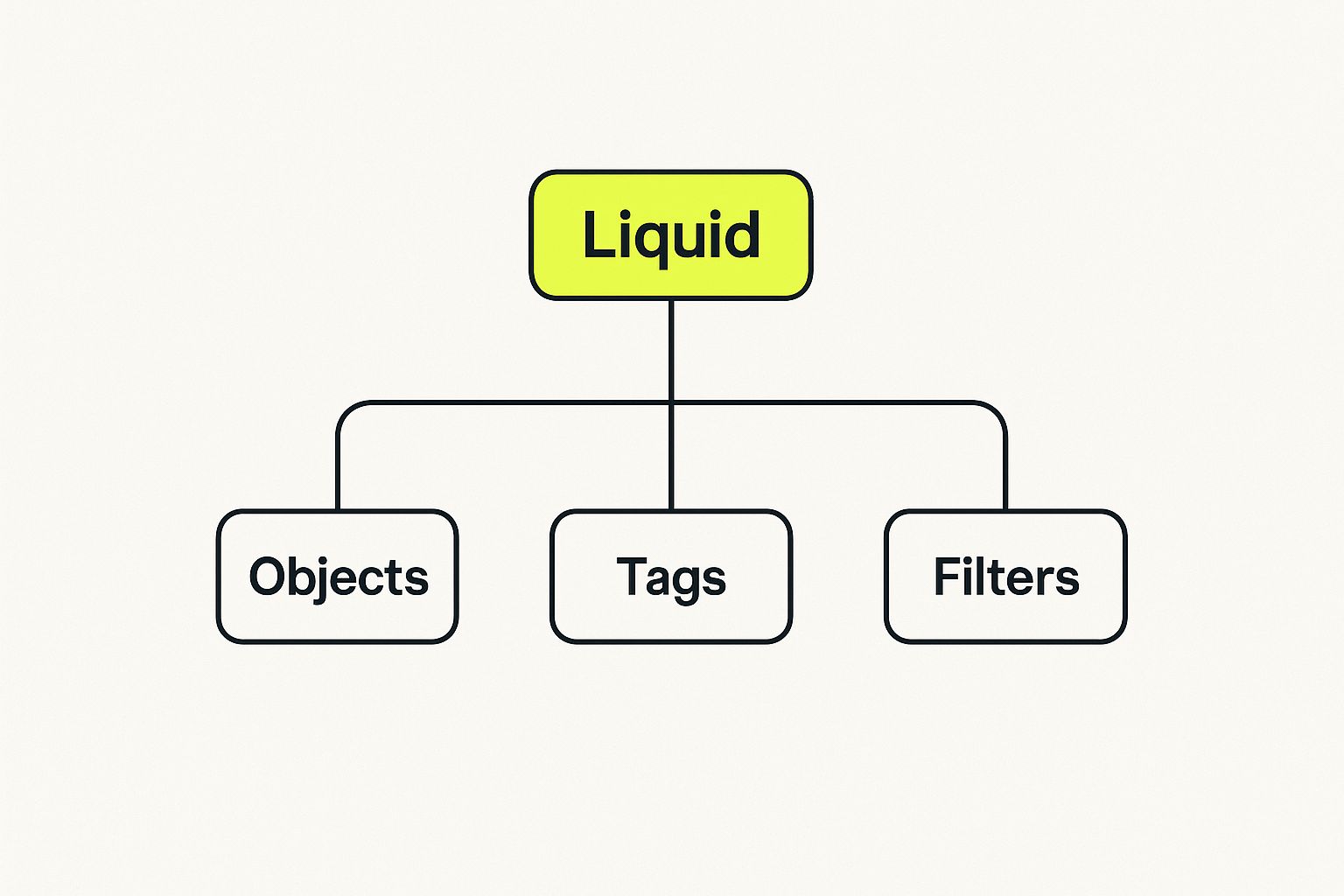
This structure shows that objects provide the data, tags control the logic for how that data appears, and filters format the final output. This separation makes Liquid a powerful and organized templating language. If you need to review the basic syntax, you can learn more about how these elements create a foundation for theme development in our guide on what Liquid syntax is in Shopify.
Key Global and Contextual Objects
Liquid objects fall into two main categories: global objects and contextual objects. Global objects, like shop and cart, are accessible from nearly any template file in your theme. They contain information that is always relevant. For instance, {{ shop.name }} will consistently output your store’s name, no matter the page.
On the other hand, contextual objects are only available on specific templates. The product object, for example, is only accessible on product-related pages (like product.liquid). The template must be on a specific product page to populate the object's properties. Trying to call {{ product.title }} on a generic page like the homepage would not return any data.
The table below provides a quick reference to the most commonly used objects in this Shopify Liquid cheat sheet, detailing their key properties and the contexts where they are available.
Core Shopify Liquid Objects Quick Reference
This table outlines essential objects, their key properties, and common use cases to help you quickly find the right data for your templates.
| Object | Key Properties | Common Use Cases | Context Required |
|---|---|---|---|
product |
.title, .price, .images, .variants, .description |
Displaying product details on product pages or in collection grids. | Yes (e.g., product.liquid) |
collection |
.title, .products, .image, .description |
Listing products within a collection, showing collection titles. | Yes (e.g., collection.liquid) |
cart |
.item_count, .total_price, .items |
Showing the number of items in the cart, displaying a cart summary. | No (Global) |
shop |
.name, .currency, .domain, .url |
Displaying the store name, currency, and other general store info. | No (Global) |
customer |
.first_name, .email, .orders, .tags |
Personalizing the user experience on account pages, showing order history. | Yes (Customer must be logged in) |
page |
.title, .content, .author |
Displaying content from a custom page created in the Shopify admin. | Yes (e.g., page.liquid) |
This quick-reference format helps you identify the object you need for a specific task and ensures you're working within the correct template context. Mastering these objects and their properties is the key to unlocking the full potential of your Shopify theme customization, preventing errors, and developing more efficiently.
Essential Liquid Tags for Dynamic Control Flow
While Liquid objects supply the data for your theme, Liquid tags are the components that put that data into action. These tags, always enclosed in {% raw %}{% ... %}{% endraw %}, represent the programming logic of your theme. They control what content is displayed and how it is organized, allowing you to create dynamic and responsive storefronts. Mastering these tags is a key step in moving beyond simple static pages.
Conditional Logic: If, Unless, and Case
Conditional tags let your theme adapt to various conditions. For instance, you can show a "Sale" badge only when a product's price is reduced or display a personalized welcome message to a logged-in customer.
{% raw %}{% if %}{% endraw %}: This tag executes a block of code only when a specified condition is true. It can be paired with{% raw %}{% elsif %}{% endraw %}and{% raw %}{% else %}{% endraw %}to build more complex decision-making structures.- Example:
{% raw %}{% if product.available %}<button>Add to Cart</button>{% else %}<button disabled>Sold Out</button>{% endif %}{% endraw %}
- Example:
{% raw %}{% unless %}{% endraw %}: Acting as the inverse ofif, this tag runs a block of code if a condition is false. It is often used to make code easier to read.- Example:
{% raw %}{% unless product.tags contains 'new-arrival' %}<p>Part of our classic collection.</p>{% endunless %}{% endraw %}
- Example:
{% raw %}{% case %}{% endraw %}: This tag offers a clean way to manage multiple specific conditions, functioning similarly to a switch statement in other programming languages.- Example:
{% raw %}{% case product.type %}{% when 'Shirt' %}Display shirt size chart.{% when 'Shoes' %}Display shoe size chart.{% endcase %}{% endraw %}
- Example:
Iteration and Loops: For, Cycle, and Tablerow
Iteration tags, also known as loops, are used to repeat a block of code for every item in a collection or array. A common use case is displaying all products within a specific collection.
{% raw %}{% for %}{% endraw %}: This is the most frequently used loop. It iterates over each element in an array, such ascollection.products.- Example:
{% raw %}{% for product in collection.products %}<h3>{{ product.title }}</h3>{% endfor %}{% endraw %}
- Example:
{% raw %}{% cycle %}{% endraw %}: This tag cycles through a list of strings or variables each time it is called inside a loop. It is ideal for alternating styles, like applying different colors to odd and even rows in a list.- Example:
{% raw %}{% cycle 'odd', 'even' %}{% endraw %}
- Example:
{% raw %}{% tablerow %}{% endraw %}: This is a specialized loop designed to generate HTML table rows. It automatically wraps items from a collection in<tr>and<td>tags, simplifying table creation.
Complete Liquid Filters Library with Practical Examples
After accessing data with Liquid objects and setting up logic with tags, Liquid filters are your next step for shaping how that data appears on your storefront. You apply a filter using the pipe (|) character. These are powerful functions that modify the output of strings, numbers, and objects without altering the original data.
Filters are the final touch that converts raw information into a clean, user-friendly presentation. For example, a simple filter like {{ product.price | money }} can take a raw number like 1999 and correctly display it as $19.99 based on your store's settings.
This section of our Shopify Liquid guide serves as a detailed reference for these essential functions, organized by the type of data they handle. Getting comfortable with filters is key for everything from simple text formatting to managing arrays, often saving you from writing more complex code.
String Filters for Text Manipulation
String filters are among the most common tools you'll use. They help you manage text capitalization, remove extra whitespace, or shorten lengthy descriptions. Using them is fundamental to keeping a consistent and polished appearance across your e-commerce site.
upcase/downcase: These filters change a string to be all uppercase or all lowercase. This is useful for standardizing display text like headers or tags.- Example:
{{ 'Welcome to our store!' | upcase }}outputs "WELCOME TO OUR STORE!"
- Example:
truncate: This shortens a string to a specific number of characters, automatically adding an ellipsis (...) at the end. It's ideal for creating uniform product descriptions on collection pages.- Example:
{{ product.description | truncate: 25 }}might output "The best t-shirt ever…"
- Example:
handleize: This filter transforms a string into a URL-friendly format known as a "handle." It removes special characters, converts the text to lowercase, and replaces spaces with hyphens.- Example:
{{ "My New Blog Post!" | handleize }}outputs "my-new-blog-post".
- Example:
split: Use this to break a single string into an array of smaller strings based on a separator you define. It is very effective for working with product tags that are stored as a single, comma-separated string.- Example:
{% assign product_tags = product.tags | split: ', ' %}turns a string like "Shirt, Cotton, Blue" into a usable array.
- Example:
Number and Money Filters
Properly displaying prices and quantities is a critical part of any online store. Money filters are particularly important, as they automatically format numbers according to your store's currency settings, which guarantees both accuracy and a professional look for your customers.
money: This is the standard filter for formatting a number as a price. It correctly adds the currency symbol and decimal places as defined in your Shopify admin panel.- Example:
{{ 2450 | money }}displays as "$24.50".
- Example:
times: Performs multiplication on a number.- Example:
{{ 3 | times: 4 }}outputs 12.
- Example:
plus/minus/divided_by: These filters execute basic arithmetic. They are useful for simple calculations directly within your templates, such as modifying quantities or totals.- Example:
{{ cart.item_count | plus: 1 }}calculates a value one greater than the number of items currently in the cart.
- Example:
The table below offers a quick-lookup reference for many of the most common filters, categorized by their primary function. This helps you find the right tool for the job, whether you're working with text, numbers, or arrays.
Liquid Filters by Category and Function
Comprehensive filter reference organized by data type and common use cases
| Filter Name | Category | Input Type | Output Example | Common Use |
|---|---|---|---|---|
upcase |
String | String | HELLO WORLD |
Standardizing text for titles or tags. |
truncate |
String | String | This is a short... |
Shortening product descriptions for grids. |
handleize |
String | String | my-new-product |
Creating URL-friendly handles from titles. |
split |
String | String | ['tag1', 'tag2'] |
Converting a string of tags into an array. |
money |
Number | Number | $49.99 |
Displaying product prices in the store's currency. |
times |
Number | Number | 20 |
Performing multiplication, like {{ 5 | times: 4 }}. |
plus |
Number | Number | 11 |
Adding a value, like {{ 10 | plus: 1 }}. |
minus |
Number | Number | 9 |
Subtracting a value, like {{ 10 | minus: 1 }}. |
divided_by |
Number | Number | 2 |
Performing division, like {{ 10 | divided_by: 5 }}. |
join |
Array | Array | one, two, three |
Combining array elements into a single string. |
sort |
Array | Array | [1, 2, 5, 10] |
Ordering items in an array numerically or alphabetically. |
size |
Array/String | Array or String | 3 |
Counting the number of items in an array or characters in a string. |
This table covers a core set of filters that address many daily development tasks in Shopify. By understanding how to apply them based on the data type, you can write cleaner and more efficient Liquid code.
Professional Liquid Techniques and Development Best Practices
Moving beyond the basic application of objects, tags, and filters is what distinguishes a proficient developer from an expert. When you adopt professional techniques, your code becomes more powerful, easier to maintain, and higher performing—all essential qualities for any serious Shopify theme development project. This involves a focus on creating reusable components, handling data efficiently, and following robust coding standards.
Creating Reusable and Scalable Code
A central principle in professional development is to avoid repeating yourself. In Liquid, you can achieve this mainly through reusable snippets and sections. For example, instead of writing the same product card code on the collection page, homepage, and search results, you can create a single product-card.liquid snippet and include it wherever it's needed.
- Snippets (
{% render %}or{% include %}): Use snippets to encapsulate UI elements that appear multiple times, such as icons, product cards, or custom form fields. Therendertag is generally preferred because it offers better performance and keeps variable scopes isolated, preventing unintended side effects. - Dynamic Variable Assignment (
assign,capture): Theassigntag is useful for creating new Liquid variables to make your logic cleaner and more readable. Thecapturetag is perfect for building complex strings or blocks of content that you can use later in the template. This is helpful for generating dynamic meta descriptions or constructing intricate HTML structures.
Optimizing for Performance
Writing efficient code is vital for creating fast-loading stores, which directly influences user experience and conversion rates. A slow theme can often be linked to inefficient Liquid loops or excessive data processing. Knowing how to write performant code is a key part of any Shopify Liquid cheat sheet. For more detailed strategies, you can review this guide on Liquid code optimization tips for Shopify.
In 2025, the Shopify ecosystem supports various technologies for storefront development, including Liquid and the newer Hydrogen framework. Liquid continues to be the foundation of Shopify's theme architecture as a server-side templating language, making it an excellent choice for stable, high-performing storefronts. You can find more details about Liquid's role compared to newer technologies on praella.com.
Alongside specific Liquid techniques, a solid understanding of how to document code effectively is a critical skill for any developer. To learn more, you can explore this complete guide on code documentation best practices.
Liquid in Today's Evolving Shopify Development Landscape
Understanding Liquid’s place in the broader development world is key for making smart technology choices. While newer frameworks like Shopify Hydrogen offer headless commerce options, Liquid remains a fundamental part of the Shopify platform. It is still the most direct and reliable method for building and customizing themes, offering deep integration with the platform's core features.
For many projects, Liquid is the best choice, especially when the goals are rapid development, cost-effectiveness, and simple maintenance. Its server-side rendering delivers strong performance and dependability without the added complexity of managing a separate frontend architecture.
The Hybrid Approach: Combining Strengths
Many developers are not choosing one technology over the other; instead, they are combining them. Using Shopify’s Storefront API, it is possible to build hybrid solutions. These solutions can feature Liquid-powered themes for the main site while integrating custom React or Vue components for specific, highly interactive features.
This method gives you the stability of a traditional theme along with the dynamic user experience of a modern frontend stack. A key part of building a successful store is understanding what drives performance. Analyzing the best converting Shopify themes provides valuable insights, as most of them are built on a solid Liquid foundation.
Liquid’s Continued Relevance and Future
The steady growth of the Shopify platform highlights Liquid's ongoing importance. As of early 2025, Shopify supports over 2.5 million active stores, showing a 6% year-over-year increase. You can read more about this in a Shopify statistics report on softpulseinfotech.com. This large user base depends on the stability and flexibility that Liquid provides.
For developers, being skilled with a Shopify Liquid cheat sheet is about more than just maintaining old themes. It means mastering a technology that is essential to one of the world's top e-commerce platforms. Explaining this value to clients helps position Liquid as a practical and dependable investment for their business's future.
Battle-Tested Code Patterns and Quick Reference Tables
Moving from theory to practice is where this Shopify Liquid cheat sheet becomes a key daily tool. To help speed up your development, we have collected proven code patterns and organized reference materials for quick lookups. These solutions handle common e-commerce needs, from dynamic product displays to customer account features.
For example, a common task is to display a list of product variants as selectable options. Instead of hard-coding them, you can build a strong loop that works for products with one or many variants.
Displaying Product Variants
This code pattern loops through a product's variants to create a dropdown menu. It's a fundamental feature for any product page that offers choices like size or color.
{% raw %}
{% endraw %}
Quick Reference for Syntax
Visual guides and official documentation are your most reliable resources for checking syntax quickly. The official Liquid documentation presents a clean, organized summary of important concepts.
This layout clearly separates objects, tags, and filters, making it simple to find specific syntax rules. It reinforces the core structure of Liquid, which is important for creating templates that are both powerful and easy to read.
A solid understanding of these patterns and quick-reference materials helps you build professional, feature-rich themes more effectively. For projects needing deep customization and expert work, our team offers specialized design and development services. Explore our custom Shopify solutions today and discover how we can help you build a high-performing storefront.
