


Why Your Ecommerce Onsite Search Is Secretly a Revenue Goldmine
That little search box on your ecommerce site is way more than just a navigation tool—it's a high-intent signal flare. Visitors who use it aren’t just browsing; they are actively telling you exactly what they want to buy. This distinction is what separates casual window shoppers from customers with their wallets already out.
Think about your own shopping habits. When you land on a site and immediately head for the search bar, it’s because you have a specific need. You aren't there to wander; you're on a mission. This mission-driven behavior makes ecommerce onsite search users your most valuable visitors. They arrive with a clear purpose, and if you can help them achieve it quickly, they are far more likely to convert.
A casual browser might be thinking, "I need a new jacket," while a search user is typing, "men's waterproof winter parka black medium." The level of intent is worlds apart. They've moved past discovery and into the purchase stage of their journey.
The Undeniable Impact on Conversions
Ignoring the power of search users is like leaving a pile of cash on the table. The data consistently shows a massive gap in performance between those who search and those who don't. Up to 30% of ecommerce visitors use the internal site search, and these individuals are 2 to 3 times more likely to convert.
The impact is so big that conversion rates from onsite searches can be up to 50% higher than the site average. Major retailers see this effect amplified; Amazon’s conversion rate reportedly jumps sixfold when a visitor uses search. Despite these staggering numbers, a shocking 72% of ecommerce sites still fail to meet user expectations for search performance. This creates a huge opportunity for stores that get it right. You can find more details in this comprehensive breakdown of ecommerce site search statistics.
To really see the difference, check out this comparison of how search users behave compared to regular visitors across different platforms.
| Platform | Regular Visitor Conversion Rate | Search User Conversion Rate | Conversion Multiplier |
|---|---|---|---|
| Shopify | 1.4% | 4.6% | 3.3x |
| BigCommerce | 1.2% | 3.9% | 3.25x |
| Magento | 1.1% | 4.1% | 3.7x |
| General Ecommerce | 1.8% | 5.5% | 3.1x |
As the numbers show, visitors who use search don't just browse; they buy. Across the board, they convert at rates that are three times higher or more, making them a crucial segment to focus on.
The infographic below paints an even clearer picture of why these users are so important.
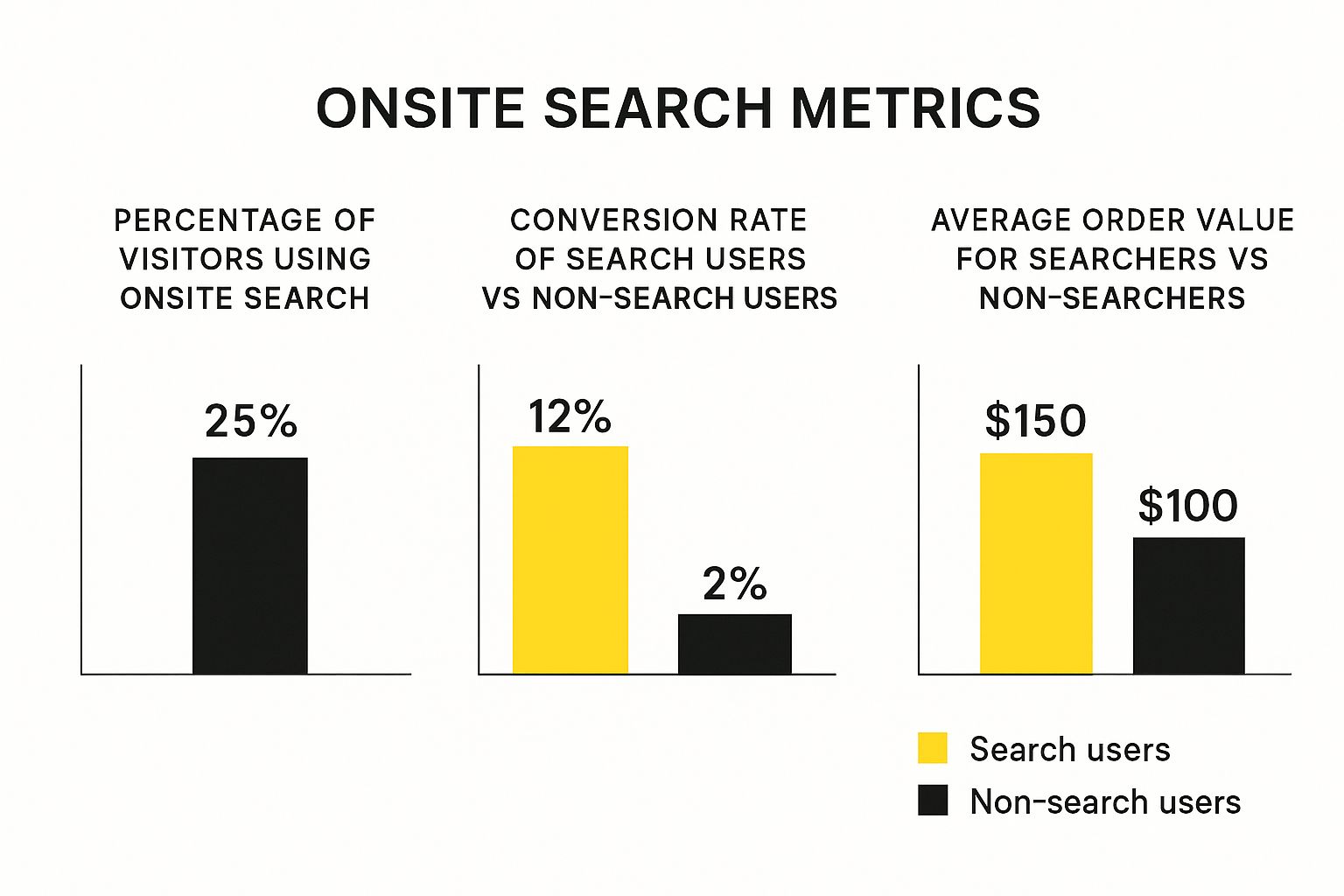
As the data clearly illustrates, users who engage with search not only convert at a much higher rate but also tend to have a higher average order value.
Why Most Stores Miss This Opportunity
So, if search is such a powerful tool, why do so many stores neglect it? Often, it's treated as a default feature—a box that needs to be ticked—rather than a strategic asset. Many ecommerce platforms come with a basic search function that is slow, inaccurate, and unable to handle simple typos or synonyms. Business owners get caught up in visual design and marketing campaigns, forgetting that the most direct path to a sale for many customers is through that search bar.
This oversight is a basic misunderstanding of the customer journey. Just as you work to optimize your presence on large platforms for external visibility, optimizing your internal search is key to capitalizing on the traffic you already have. Understanding principles like Marketplace SEO can further highlight the importance of search visibility for driving sales, whether on your own site or another. By shifting your perspective and viewing your onsite search as a primary conversion tool, you can unlock a revenue stream that has been hiding in plain sight.
Building Your Search Foundation That Actually Works
Let's get practical. A good ecommerce onsite search isn’t something you just switch on and forget; it’s a system you build with purpose. The goal is to create an experience that genuinely helps your customers, not one that sends them running to a competitor. Your journey starts with taking a good, hard look at what you’re working with right now.
Many Shopify store owners begin with the platform's native search function. While it’s a decent starting point, it often boils down to basic text matching. This can create frustrating dead ends. For instance, if a customer searches for "sofa" but your product is listed as a "couch," they might get zero results—a missed sale right there. Research shows that 41% of ecommerce sites have search usability problems, which directly translates to lost revenue. So, the first real decision is figuring out if your current setup can handle these simple, yet critical, user behaviors.
Evaluating Your Current Platform and Future Needs
Before you even browse the app store or think about custom code, get to know your store’s specific context. A shop selling five types of handmade candles has very different search needs than a fashion retailer with thousands of SKUs, sizes, and colors. The structure of your product catalog heavily influences how well your search can perform. A well-organized catalog filled with rich product data—like tags, detailed descriptions, and attributes—gives any search tool, basic or advanced, more to work with.
Try to anticipate the questions your customers will ask. Are they looking for technical specs, like "waterproof hiking boots size 8," or are they searching for solutions, like "winter foundation"? Answering this helps you identify which features are truly worth the investment. Many popular third-party search apps on Shopify are great at understanding natural language, correcting typos, and offering synonyms straight out of the box. These aren't just fancy features; they are direct solutions to common search problems that tank conversions.
Here’s an example of how a well-integrated search can look on a clean Shopify homepage, inviting users to start their journey.

This prominent and clean placement makes it immediately clear where users should go to find what they need, removing friction from the very first click.
Mobile Optimization and Common Setup Mistakes
Here’s a rule that’s not up for debate: your search must work perfectly on mobile. With 65% of "I-want-to-buy" moments happening on a smartphone, a clunky mobile search experience is a major problem. The search bar needs to be easy to tap, autocomplete suggestions must be readable, and the results pages can't require endless pinching and zooming.
A common setup mistake is not checking how your theme interacts with your search tool. A beautiful theme might have a search bar that’s hidden away or doesn't play well with a powerful search app's features, like visual autocomplete. This can sometimes require small tweaks to your theme's code. For anyone looking to get their hands dirty with this, our guide on Shopify theme customization offers some practical tips.
Another frequent error is failing to properly manage "zero result" pages. This is the ultimate dead end. Instead of just showing a blank page, a good search setup will offer alternative suggestions, display popular products, or even provide a link to customer service. Turning this point of frustration into a helpful interaction is a sign of a strong search foundation. By focusing on these practical details—from your catalog structure to mobile usability—you can build a realistic plan for a search system that actually drives sales.
Designing Search Experiences That Guide Customers to Purchase
Once your search is technically sound, it's time to shift your focus to the customer experience. A great ecommerce onsite search does more than spit out a list of products; it guides, reassures, and gently persuades shoppers toward making a purchase. This is how you turn a simple search bar into one of your most effective sales assistants. Think about it: customers who use search are on a mission, and your goal is to make that mission as smooth and successful as possible.
The experience starts the second a user clicks into the search bar. This is your first chance to guide them. An intelligent autocomplete feature isn't just a nice-to-have anymore; it's what shoppers expect. As someone starts typing, predictive suggestions should pop up, showing popular searches, specific product names, and maybe even thumbnail images of top items. This does more than just save a few keystrokes. For instance, if a user types "red dress," showing autocomplete options like "red cocktail dress size 8" or "red floral maxi dress" helps them clarify what they want on the fly, pointing them toward a more specific—and often higher-converting—result. A well-implemented autocomplete can boost sales by as much as 24% by removing friction and showing relevant options right away.
Structuring Search Results Pages for Conversion
After the customer hits "Enter," the search results page is where the real action happens. A blank page or a mess of unrelated products is a surefire way to lose a sale. A great results page is clean, visually engaging, and, most importantly, easy to narrow down. Applying good customer experience design principles here is key, as it ensures the layout feels natural and user-friendly.
The secret to a high-performing results page is giving users control through smart filtering, often called faceted search. These are the dynamic filters you see on the side of the results, letting shoppers slice and dice their options by:
- Category: (e.g., Men's, Women's, Kids')
- Attributes: (e.g., Size, Color, Material)
- Price Range: (A slider often works better than fixed price brackets)
- Brand:
- Customer Ratings: (e.g., 4 stars & up)
These filters shouldn't be one-size-fits-all. A search for "laptops" should bring up filters for RAM and screen size, while a search for "running shoes" should show options for brand and terrain type. This kind of contextual filtering makes the experience feel smart and personalized. It shows you respect the shopper's time by not cluttering their screen with useless options.
The way you display each product on this page also has a huge impact. Each result should be a mini-advertisement, giving just enough info to encourage a click. To get a clearer picture, here's a breakdown of the most critical elements and the impact they have on the shopper's decision.
| Feature | Implementation Difficulty | Conversion Impact | User Satisfaction Boost |
|---|---|---|---|
| Autocomplete Suggestions | Medium | High | High |
| Visual Search & Thumbnails | High | Medium | Very High |
| Faceted Search (Filters) | Medium | Very High | Very High |
| "No Results" Suggestions | Low | Medium | High |
| Mobile-First Design | Medium | Very High | High |
| Personalized Results | High | High | High |
These features work together to create an experience that feels less like a database query and more like a helpful conversation. The goal is to make finding the right product feel effortless.
Tackling Mobile Search Challenges
Finally, every single part of your search design needs to be considered from a mobile perspective. Mobile commerce isn't a trend; it's the standard. With mobile accounting for 65% of "I-want-to-buy" moments, a clumsy mobile search directly hurts your bottom line.
The search bar must be front and center, easy to tap without fumbling. Autocomplete suggestions need to be large enough to read and select without accidentally clicking the wrong one. Filters should be collapsible or presented in a way that doesn't overwhelm a small screen. My advice? Test your entire search flow on an actual phone—not just a desktop emulator—to catch those frustrating little glitches that can cause a shopper to give up and leave. A smooth mobile search experience isn't just a best practice; it's essential for survival.
Advanced Optimization Tactics That Separate Winners from Wannabes
This is where leading brands really pull away from the pack. A basic, functioning search bar is just the beginning, but a truly optimized ecommerce onsite search engine becomes a competitive weapon. It's about creating an intelligent and forgiving experience that feels like it was built just for that individual shopper.
The most successful stores understand their search box is a direct conversation with a high-intent customer. They don't just return results; they anticipate needs, correct mistakes, and guide users toward the best possible outcome—for both the customer and the business.
From Simple Matching to Understanding Intent
An advanced search system does more than just match keywords. It understands what your customers mean, not just what they type. Two features are fundamental to making this happen:
- Typo Tolerance: People make mistakes. They misspell brand names, fat-finger keys on mobile, or just type in a hurry. A search for "Nkie runing shoos" shouldn't lead to a dead end. Smart search automatically corrects these errors and shows the right products, preventing the user from getting frustrated and leaving. This simple act of forgiveness can salvage countless sales.
- Synonym Recognition: Different people use different words for the same thing. Is it a "sofa" or a "couch"? A "handbag" or a "purse"? Your search engine must recognize these synonyms and treat them as the same query. This ensures you show a complete set of results, regardless of the customer's vocabulary. Without it, you’re effectively hiding products from shoppers who are actively looking for them.
These features make your search feel more human and intuitive, which builds trust and reduces friction. To really get ahead, you can implement advanced features like semantic search capabilities that deliver spot-on results by understanding the context and intent behind queries.
Turning "No Results" into an Opportunity
One of the biggest blunders in ecommerce is the dreaded "zero-results" page. It’s a dead end that screams, "We don't have what you want." But it doesn’t have to be. Winning brands transform this moment of potential frustration into a new discovery path. Instead of a blank page, a smart search experience will:
- Offer alternative products based on parts of the query.
- Suggest related categories or popular items.
- Provide helpful links to customer service or buying guides.
- Display recently viewed products to re-engage the shopper.
Remember, shoppers who use search are 2.5 times more likely to convert, but only if you actually show them something. An empty page is a guaranteed exit. For stores on premium platforms, handling these scenarios is often a core feature. Our team has plenty of experience building these kinds of tailored experiences through our Shopify Plus solutions.
Merchandising Within Search Results
Finally, advanced search isn't just about relevance; it's also about strategy. You can use your search results to subtly guide customers toward specific outcomes that benefit your business—a practice known as search merchandising. This means strategically promoting certain products within the results page. You might boost high-margin items, promote products with excess inventory, or feature a new collection at the top of relevant search queries.
The key is balance. The results must stay genuinely relevant to the user's search to maintain trust. However, by giving a slight nudge to more profitable items, you turn your search function from a passive tool into an active driver of your business goals. These are the kinds of nuanced tactics that move the needle from just making sales to maximizing profitability.
Tracking Performance and Making Data-Driven Improvements
Trying to optimize your ecommerce onsite search without tracking its performance is like driving with your eyes closed. You might be moving, but you have no idea if you’re heading in the right direction. Your search analytics tell a rich story about what your customers want, and learning to read that story is how you turn good search into a great revenue driver. It's about looking past simple metrics and zeroing in on what actually grows your business.
A solid measurement plan doesn't have to be complicated. It just needs to link search activity to real business results. While many platforms offer analytics, you’ll want to make sure you can answer the basic questions that prove your efforts are paying off.
Identifying the KPIs That Actually Matter
The first move is to stop guessing and start measuring. A few key performance indicators (KPIs) can give you a clear picture of your search health. Instead of getting lost in dozens of data points, focus on the ones that directly signal success or problems. Only 53% of retailers with advanced search capabilities have even defined KPIs for it, which gives you an immediate advantage if you do.
Here are the essential metrics you should be watching:
- Search Usage Rate: What percentage of your visitors use the search bar? This shows you how much your customers rely on search to find their way around and discover products.
- Conversion Rate from Search: This is the big one. How often do searches end in a purchase? This metric is the most direct signal of search effectiveness and is vital for calculating your return on investment.
- Search Exit Rate: How often do users leave your site right after a search? A high exit rate is a major red flag, pointing to irrelevant results or a frustrating experience.
- Zero Results Rate: How often do searches come up empty? This metric uncovers gaps in your product catalog, missing synonyms, or problems with typo tolerance. Every "no result" query is a potential lost sale.
Setting up a dashboard in a tool like Google Analytics can help you monitor these trends over time. For example, a custom report can show you how your search exit rate drops after you add a new synonym library.
This dashboard view gives you a quick understanding of how search interactions are changing, letting you spot worrying trends like a sudden spike in the exit rate.
From Data to Decisions: A/B Testing and Beyond
With your core metrics in place, you can start making improvements based on real data. This is where A/B testing becomes so important. You can test different search setups—like changing how filters are displayed or tweaking your ranking algorithm—to see what actually leads to better engagement and more sales. For instance, you could test showing four product results per row versus three to see which layout gets a higher click-through rate on mobile devices.
The insights from your search data go far beyond just tweaking the search bar. The queries themselves are a goldmine of information. Are customers suddenly searching for "linen shirts"? That’s a clear signal of a seasonal trend. Are they frequently looking for a brand you don’t carry? That’s a potential inventory opportunity. By analyzing what your highest-intent customers are searching for, you can make smarter decisions about merchandising, marketing, and even product development. For an even deeper dive into connecting data with results, our guide on Shopify performance optimization offers some great strategies.
Solving Problems and Staying Ahead of User Expectations

Even a perfectly set up ecommerce onsite search isn't a one-and-done deal. Your product catalog evolves, customer habits change, and new trends pop up all the time. Being proactive is what keeps your search a powerful sales tool instead of a frustrating dead end for your shoppers. The good news is that you can spot and fix common problems quickly, preventing lost sales before they become a real issue.
You don't need a team of data scientists to keep your search running smoothly. The first step is learning to recognize the warning signs of poor performance. A sudden jump in your search exit rate is a massive red flag. It means people are searching, not liking what they see, and leaving your site immediately. Another key metric to watch is your "zero results" rate. If customers are often searching for terms that return nothing, it could mean your synonym library is lacking or your search isn't forgiving enough with typos.
Conducting Regular Search Audits
A great habit to get into is performing regular audits of your search function. Think of it as a routine health check-up for one of your store's most important features. You can do this by putting yourself in your customers' shoes and testing common search behaviors.
Here’s a simple checklist to get you started:
- Test for common misspellings: Try searching for your most popular products but with a few letters swapped or missed. Does your search engine figure it out and serve up the right items?
- Check for synonyms: Search for products using different but related words (e.g., "puffer jacket" vs. "down coat"). Are the results just as good for both queries?
- Review your top "no result" searches: Dive into your analytics and find the most common searches that are hitting a brick wall. This is a goldmine for discovering demand for products you might want to stock or for finding popular terms you need to add as synonyms.
- Test long-tail queries: Use a super-specific, multi-word phrase like "women's waterproof hiking boots size 8." Can your search handle that level of detail and still return relevant products?
Staying Ahead of Customer Expectations
Going beyond just fixing what's broken, the best online stores anticipate what their customers will want next. One of the easiest ways to do this is by collecting user feedback. A simple, non-intrusive survey on the search results page asking, "Did you find what you were looking for?" can give you incredibly valuable insights.
When deciding what to fix first, focus on the changes that will have the biggest business impact. For instance, fixing a synonym issue for a search term that gets thousands of hits a month will deliver a much better return than tweaking a term that gets only a handful. Also, remember that your search will be under more pressure during seasonal peaks or big sales. Make sure your system can handle the extra traffic without slowing down—even a one-second delay can kill conversions.
When you do roll out improvements, try to do so incrementally. Making small, frequent updates is much less likely to disrupt the customer experience than a massive, one-time overhaul. This approach ensures your ecommerce onsite search continuously improves along with your customers, helping you solve their problems and keeping them coming back for more.
Your Roadmap to Search Success That Actually Gets Results
All the features and strategies we’ve covered are powerful, but let's be real—it can feel like a lot to take on. The secret isn't to do everything at once. It's about creating a smart, prioritized plan that works for your store, your budget, and your goals. Let’s turn those abstract ideas into concrete actions and build a roadmap that moves the needle on your ecommerce onsite search and, more importantly, your sales.
Your first move is to get honest about where you are right now. Are you a small shop with limited tech skills, or a bigger brand with a dedicated development team? Your answer will dictate what you tackle first.
Phase 1: The Low-Hanging Fruit (Weeks 1-4)
This phase is all about getting the biggest bang for your buck with the least amount of effort. Think of these as the quick wins that stop customers from hitting a wall and leaving your site.
- Audit Your "No Results" Pages: Jump into your analytics and find the top 10-20 search terms that lead to a dead end. This is your most urgent to-do list. Fix these by setting up redirects, adding synonyms, or making sure the products are tagged correctly. This step alone can rescue a surprising number of sales.
- Check for Basic Typos & Synonyms: Grab a coffee and manually test your most popular products with common misspellings (like "sweatshirt" vs. "swetshirt") and synonyms ("handbag" vs. "purse"). If your current search can't handle these, it's a huge red flag that you need a better solution.
- Evaluate Mobile Search Usability: Pick up your phone and try to shop on your own store. Is the search bar easy to find and tap? Are the results readable without pinching and zooming? A clunky mobile search is a deal-breaker, especially when 65% of "I-want-to-buy" moments happen on a phone.
Phase 2: Building Momentum (Months 2-3)
With the most glaring issues fixed, it's time to build a smarter, more helpful search experience. This is where you might start looking at a third-party search app or dedicating more resources to optimization.
- Implement Smart Autocomplete: Go beyond simple text suggestions. An autocomplete that shows actual product images and prices can boost sales by up to 24%. It guides shoppers directly to what they want, shortening their path to purchase.
- Introduce Basic Faceted Search: Give your customers the power to filter results by essentials like size, color, and price. This is one of the most-requested features from online shoppers and makes a massive difference in how easily they can find the right product.
- Set Up KPI Tracking: You can't improve what you don't measure. If you haven't already, start tracking your core search KPIs: conversion rate from search, search exit rate, and your zero-results rate. This data will tell you exactly what's working and what isn't.
When to Call for Help vs. DIY
Knowing your limits is key. You can probably handle most of the tasks in Phase 1 by digging into your Shopify analytics and making some content tweaks. But when you start moving into Phase 2 territory—especially if it means messing with theme code or integrating advanced apps—it might be time to call in an expert.
If you find yourself spending more time fighting with technology than actually running your business, that's your cue. An experienced team can implement these improvements faster and more effectively, making sure they’re set up for long-term success.
This phased approach keeps the process from becoming overwhelming and ensures you see steady improvements. Your ecommerce onsite search will transform from a basic search box into a strategic tool that consistently drives revenue.
Feeling ready to move beyond the basics but not sure where to start? The team at E-commerce Dev Group specializes in turning standard Shopify stores into high-converting powerhouses. Let's build a search experience that truly gets results.
