


Why Your Generic Theme Is Costing You Sales
Let's be real, how many times have you landed on a Shopify store and thought, "Haven't I seen this before?" It's because a lot of merchants stick with the basic, off-the-shelf look of popular themes. And that's a missed opportunity. I've seen firsthand how customizing a Shopify theme can be a game-changer. For example, I worked with a small jewelry business that saw a 30% jump in conversions just by redesigning their product page and adding a few custom design touches.
Before we get into the nitty-gritty of customization, it's worth revisiting why you chose Shopify in the first place. Check out these Shopify benefits as a refresher. Customizing your theme takes those benefits even further, letting you build a brand experience that’s truly your own. Think of it like this: Shopify gives you the basic structure, but customization is what brings your brand’s personality to life, attracting the right customers.
Now, this isn’t just about making things look pretty. It's about creating a competitive edge. A unique visual identity helps you stand out from the crowd. It's also about building trust. A polished, professional-looking store tells customers you’re serious about your business and the quality of your products. With Shopify's growing popularity – stores increased by 6% year-over-year as of early 2025 – standing out is more critical than ever. This growth, reflected in the wider e-commerce market, underscores the importance of a customized theme for a better user experience and higher conversion rates. Here’s some more data to back that up. A well-designed theme, through improved UX and interface design, can even boost conversions by up to 200%.
Bottom line: customizing your theme is an investment in your brand. It's about creating an engaging shopping experience that not only attracts your target audience, but also encourages them to buy. In the next section, we'll cover how to understand your theme's structure before making any changes.
Understanding Your Theme's DNA Before You Customize
Before you even think about customizing your Shopify themes, it's crucial to grasp their structure. Think of it like renovating a house – you wouldn't just start tearing down walls without knowing where the pipes and wires are, right? The same principle applies to Shopify themes. You need to know what's going on under the hood before you start making changes. Your theme is a toolbox, and knowing where to find the right tools (files) is the key to efficient customization.
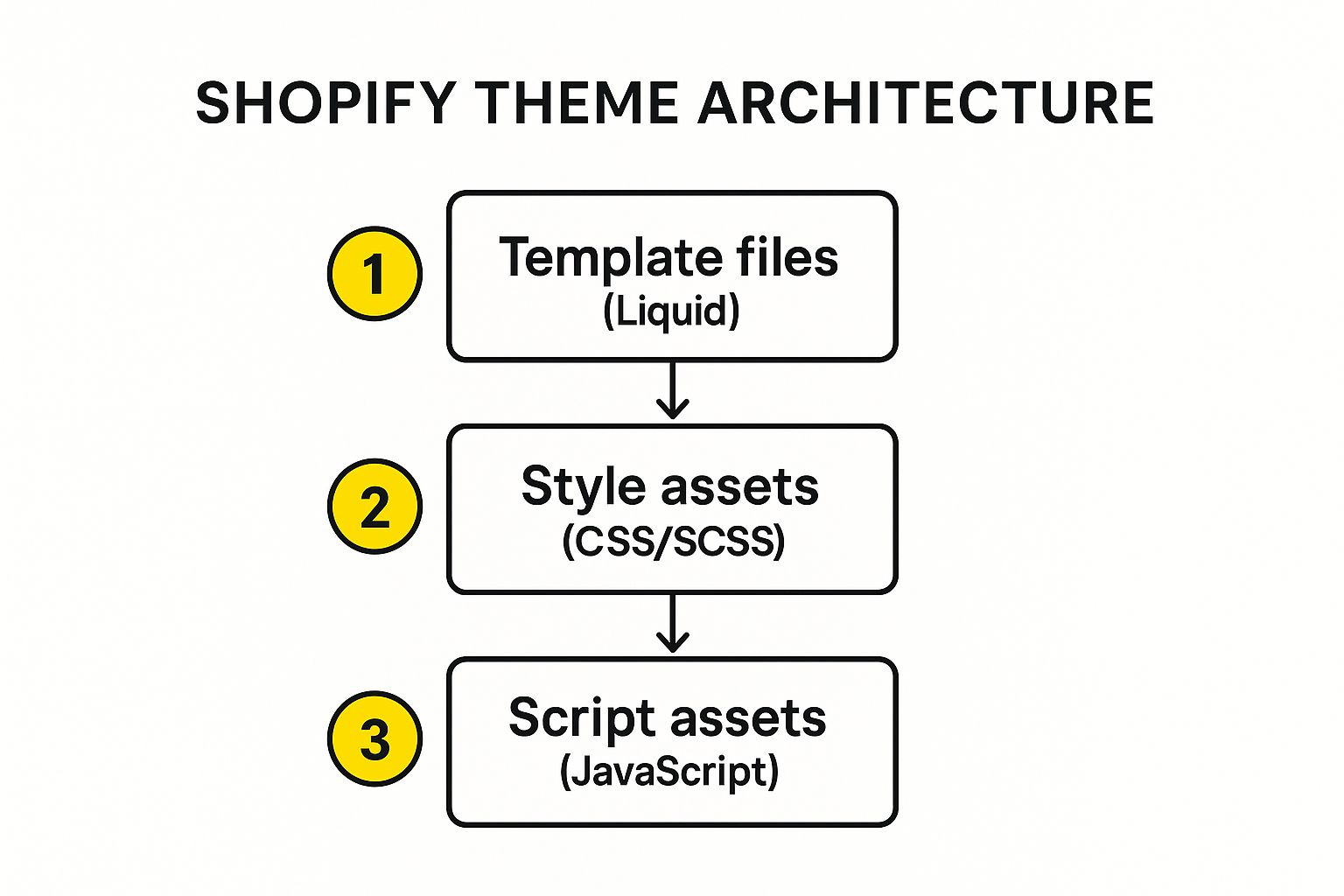
This infographic shows you the architecture of a Shopify theme, visualizing the flow from your template files (which use Liquid) to your style files (CSS/SCSS) and finally to your script files (JavaScript). It really highlights how these components interact to build the dynamic storefront your customers see. Liquid builds the foundation, CSS styles the look and feel, and JavaScript adds those interactive sprinkles.
Decoding Liquid: The Language of Shopify Themes
Liquid is Shopify’s own templating language. It's the magic that lets you dynamically pull content from your store's database and display it on your storefront. Think product titles, descriptions, prices, images – all that good stuff appears without you having to manually update each page. Pretty cool, huh? Liquid works in harmony with HTML, CSS, and JavaScript. HTML provides the structure of your store, CSS dictates the design, and JavaScript handles the interactive elements. Liquid is the glue that binds it all together by bringing in the dynamic data.
Navigating Your Theme’s File System
When you peek inside your theme's code, you'll find a few different types of files, each with a specific role:
- Templates: These are the blueprints for the overall layout of your different pages, like your homepage, product pages, and collection pages.
- Sections: Think of sections as modular building blocks of content that you can reuse and rearrange on your pages. This gives you tons of flexibility when designing your store.
- Snippets: These are small, reusable chunks of code that you can insert within templates or sections. Perfect for things like header elements, footer elements, or social media icons – anything you want to use repeatedly.
Understanding how these pieces fit together is absolutely fundamental to customizing your Shopify themes effectively. Knowing which file controls what part of your store allows you to make targeted changes with confidence and avoid any unexpected consequences.
To help you navigate, here's a handy table summarizing the key file types:
Shopify Theme File Structure Overview
A breakdown of essential theme files and their purposes for customization
| File Type | Purpose | Common Customizations | Difficulty Level |
|---|---|---|---|
Templates (*.liquid) |
Define the overall layout of pages (e.g., product, collection, homepage) | Modifying page structure, adding/removing sections, integrating apps | Beginner – Intermediate |
Sections (*.liquid) |
Modular blocks of content reusable across templates | Changing layout, adding features, styling individual content blocks | Beginner – Intermediate |
Snippets (*.liquid) |
Reusable code chunks for elements used across templates/sections | Updating header/footer, adding social media icons, custom forms | Beginner |
Assets (.css, .js, .scss) |
Style and functionality enhancements | Modifying colors, fonts, layout, adding interactive elements | Beginner – Advanced |
Config (settings_data.json, settings_schema.json) |
Theme settings and customization options | Adjusting colors, fonts, layout options via the theme editor | Beginner |
Locales (.json) |
Language files for translating theme text | Adapting the theme to different languages | Beginner – Intermediate |
This table provides a clear overview of what each file type does and how you might typically customize them. This will be your go-to guide as you start exploring your theme's file system.
Safety First: Backups and Testing
Before you change a single line of code, always back up your theme. Trust me, this is a lifesaver. If something goes sideways, you can quickly revert to the previous version without any headaches. I always duplicate my theme and make changes on the copy, leaving the original untouched. This gives you a safe sandbox to experiment in. From personal experience, backups have saved me countless hours of frustration and prevented some potentially catastrophic mistakes. Remember, a cautious approach to customization is the key to a successful online store.
Visual Customizations That Actually Boost Conversions
This is where the magic happens with Shopify themes. We're not just making your store look pretty – we're building a conversion powerhouse. I've spent a lot of time looking at high-converting Shopify stores, and there's a definite pattern. They aren't just slapping up nice images; they're using visual cues like seasoned pros to guide customers straight to that "add to cart" button.
CSS: Your Secret Weapon For a Standout Storefront
CSS (Cascading Style Sheets) is your best friend for theme customization. It's the language that controls everything you see on your store, from fonts and colors to layout and how it looks on different devices. With CSS, you can build amazing product galleries that show off your items in the best possible light, and you can design mobile-responsive layouts that feel slick and professional no matter what someone's using to browse. Let's be real: a smooth mobile experience isn’t a nice-to-have anymore, it’s essential.
I worked with a client recently who had a pretty basic product gallery. Just by adding some custom CSS, we turned it into a dynamic carousel highlighting key features. The result? Way more product clicks and, you guessed it, higher sales.
The Psychology of Visual Persuasion
The best merchants out there know that visual design isn’t just about aesthetics. It’s about psychology. They use color to evoke specific emotions, leave strategic white space to give a sense of calm, and use typography to draw the eye to the most important info. These little things add up to a shopping experience that feels trustworthy and well-designed. Think about your favorite brands – their visual identity is a huge part of their success.
Optimizing Key Conversion Points
Product pages need special attention. This is where buying decisions happen, so make that experience as frictionless and convincing as possible. Crystal-clear product images, detailed descriptions, and obvious call-to-actions are a must. But don't stop there. Your cart and checkout flow need love too. These are make-or-break moments in the customer journey.
Beyond individual pages, overall site speed is critical. The average Shopify theme loads in about 2.5 seconds, which is much faster than the average e-commerce site (around 15.3 seconds on mobile!). Some themes, like Prestige and Masonry, even load in under a second! This speed isn’t just about user experience; it directly affects conversions and SEO. Learn more about Shopify theme performance.
Avoiding Visual Pitfalls
Just like some visual elements help conversions, others can kill them. Confusing navigation, a clunky mobile experience, and generic trust badges can send customers running. Think about it – haven’t you left a website because it was just too hard to use? I know I have. For more details on Shopify theme customization, check out this guide. By understanding these common pitfalls and avoiding them, you’ll create a shopping experience that’s both beautiful and effective.
Bringing Your Store to Life With Smart Functionality
Now comes the exciting part: adding those little touches that make your Shopify theme truly unique and perfectly suited to you and your customers. It’s like giving your online store superpowers. Honestly, I’ve seen firsthand how even small functional changes can make a huge difference to the shopping experience and boost sales.
Personalizing The Shopping Journey With Liquid
Liquid, Shopify’s own templating language, is your secret weapon for a personalized shopping experience. It lets you pull information from your store and display it dynamically. Think about showing products based on a customer’s browsing history — that’s Liquid’s magic. You can also build custom filtering to help shoppers find exactly what they need, or create product recommendations that feel natural and helpful. And while we're on the topic of enhancing visuals, don't underestimate the impact of professional product photography. A great resource I often recommend is Shopify product photography. It can make a real difference.
Real-World Examples of Liquid in Action
Let me share a few real-world examples. I once worked with a clothing store that needed different size charts for various product categories. With Liquid, we built a system that automatically displayed the correct size chart depending on what product the customer was viewing. This simple change drastically cut down on sizing questions to customer service. Another time, I helped a client add a “Low Stock” warning to hot-selling items. This little tweak created a sense of urgency and drove sales.

This screenshot from the Shopify developer docs shows some basic Liquid code. See those {% if %} and {% endif %} tags? They control what appears on the page. That logical structure is what lets you create those smart, dynamic features.
JavaScript: Adding Interactive Flair
Liquid and JavaScript are a fantastic combination for boosting your store's interactivity. Think smooth, eye-catching animations, quick product previews that show details without a new page load, or dynamic cart updates that make shopping feel modern and responsive. JavaScript adds that extra polish and a bit of magic. My philosophy is always about practical solutions you can actually use and maintain, so the customizations work for you, not the other way around. Just a touch of JavaScript can make your store feel top-notch.
Advanced Techniques That Scale With Your Business
So, you’ve got the basics of Shopify theme customization down. Awesome! Now, let's take it up a notch. Think pro-level strategies that set you up for real, long-term growth. We're not just talking quick fixes here; this is about building a storefront that’s both powerful and flexible, ready to adapt as your business evolves. This means focusing on maintainability, performance, and future-proofing all your hard work.
Structuring Your Customizations For Long-Term Maintainability
I've seen it countless times: people dive headfirst into Shopify theme customization without a plan. It’s like building a house without blueprints – chaos guaranteed. You end up with a tangled mess of code that's a nightmare to update or debug later.
Version control, using platforms like Git, is essential. It’s like having a safety net. You can track every change, rewind to older versions if something breaks, and even collaborate with others smoothly. Seriously, version control is a life-saver. I can't tell you how many clients have come to me with sites built on spaghetti code; fixing those messes is way more painful (and expensive) than setting up version control from the get-go.
Another key strategy is modular coding. Break down your customizations into smaller, independent chunks – like building with Lego bricks. This makes updating a single element much easier and safer, minimizing the risk of accidentally breaking the entire structure.
Optimizing Performance While Customizing
Great customization doesn't have to mean sacrificing performance. You can have both! Even with complex customizations, there are ways to keep things running smoothly. Minifying your CSS and JavaScript files shrinks their size, leading to faster loading times. Lazy loading images – only loading them when they’re actually visible on the screen – is another great performance booster.
Speaking of boosting things, adding apps can really enhance your Shopify store. Check out these 7 Must Have Shopify Apps To Grow Your Online Store. You might also be interested in learning more about Shopify Performance Optimization.
Let’s talk numbers. In 2025, a Shopify theme developer could earn around $11,000 per year per theme. That speaks volumes about the demand for well-designed, customizable themes. And the best part? Most themes are a one-time purchase, no recurring subscription fees. Want to learn more? Discover more insights.
Comprehensive Testing and Documentation
Testing is non-negotiable. I can't emphasize this enough. Test everything thoroughly, across different devices, browsers, and user scenarios. A broken layout on a particular phone can cost you sales.
And documentation? Just as crucial. Think of it as a gift to your future self (or any other developer working on your store down the line). Clear documentation makes updates smoother and prevents headaches.
Before we wrap up, let's look at the investment and potential return of different customization approaches. This table gives you a clearer idea of what to expect:
Customization Investment vs. Returns Comparison
Analysis of different customization approaches and their potential impact on business results
| Customization Type | Time Investment | Technical Difficulty | Business Impact | ROI Timeline |
|---|---|---|---|---|
| Minor CSS tweaks (e.g., changing colors, fonts) | Low (hours) | Low | Low to Medium (improved brand consistency) | Short (weeks) |
| Adding/Modifying theme sections (e.g., new product display, homepage carousel) | Medium (days) | Medium | Medium (enhanced user experience, potentially higher conversion rates) | Medium (months) |
| Custom app integration (e.g., loyalty program, reviews) | Medium to High (days to weeks) | Medium to High | Medium to High (added functionality, improved customer engagement) | Medium to Long (months to a year) |
| Major theme overhaul (e.g., completely redesigned storefront) | High (weeks to months) | High | High (significant changes to user experience, branding, and functionality) | Long (months to years) |
As you can see, the level of customization you choose impacts the time, resources, and potential return. Choosing the right approach is key for success.
By adopting these advanced techniques, you’re not just customizing your Shopify theme; you’re building a scalable, sustainable platform for your business’s future.
Troubleshooting Like a Pro When Things Go Wrong
Let's be honest, even when you've planned everything perfectly, customizing Shopify themes can still throw you a curveball now and then. But don’t worry, knowing how to troubleshoot effectively is like having a secret weapon. It'll save you tons of time, frustration, and potentially lost sales. Think of yourself as a digital detective, hunting down the gremlins in your store's code.
Using Your Browser's Developer Tools
Your browser’s developer tools are your absolute best friend in this process. Seriously, I can’t stress this enough. They let you peek under the hood of your website, see the code in action, and usually pinpoint the exact line that’s causing the problem.
For example, imagine a button on your site just refuses to work. With the developer tools, you can inspect that button's code and see if there's a JavaScript error or maybe a CSS conflict preventing it from doing its job. It’s like having x-ray vision for your website.
Shopify itself also provides error messages. Learning to understand these messages is key. They often point you directly to the problematic file and even the line number, making your troubleshooting much, much faster.
Identifying the Source of the Problem
The core of troubleshooting is all about isolating what’s causing the issue. Is it a recent change you made? A conflicting app? Maybe a theme update? Or something else entirely? This is where your detective skills really come in handy.
One trick I often use is systematically disabling recent changes or apps, one by one, to see if the problem magically disappears. This process of elimination can be surprisingly effective.
I remember this one time a client’s product page layout completely exploded after what seemed like a tiny CSS tweak. Turns out, a single typo in the CSS had a ripple effect, messing everything up. Using the browser's developer tools, I quickly found the bad code, fixed the typo, and boom, everything went back to normal.
Backup and Rollback Strategies
Backups are like insurance for your theme. Always, and I mean always, back up your theme before making any customizations. This lets you quickly revert to a working version if things go south. It’s basically an "undo" button for your entire store.
Using version control, like Git, is also a lifesaver. It tracks your changes and manages different versions of your theme. Rolling back to a specific point in your customization process becomes simple and safe.
Proactive Maintenance and Testing
Preventing problems in the first place is always better than fixing them after they happen. Regularly checking your theme code for potential conflicts and keeping your apps up to date can prevent a lot of headaches.
A solid testing process before launching any customizations is also essential. This means testing on different devices, browsers, and even different user scenarios. Think about how different people might use your store, and test for that.
Finally, know when to call in the professionals. While many issues are solvable with some DIY troubleshooting, sometimes it's more efficient to bring in an expert. This is especially true for complex customizations or when you’re short on time. For example, the E-commerce Dev Group specializes in helping merchants tackle these kinds of Shopify challenges.
Your Customization Action Plan That Actually Works
So, you’ve learned a lot about customizing Shopify themes. Great! Now, let’s figure out how to actually use that knowledge. Forget getting lost in the technical details for now; this is about creating a roadmap that works for your business and your skills.
Prioritizing Customizations for Maximum Impact
Let’s be honest, some customizations are way more important than others. Focus on the ones that directly fix your current problems or have the biggest potential to improve things. For example, if people are bouncing off your product pages like crazy, that’s where you need to focus your energy to improve things and get more sales. Don’t waste time on tiny tweaks before fixing the major issues.
It’s like renovating a house – you fix the leaky roof before repainting the guest room, right?
Realistic Timelines and Checklists
Be honest with yourself about how long things will take. Changing a color? Easy peasy. Completely redesigning your theme? That’s a whole different story. Create a timeline that makes sense for each task, and break down big projects into smaller, more manageable steps. Checklists are invaluable – they’ll keep you organized and make sure you don’t miss anything important.
DIY vs. Professional Help: Knowing Your Limits
Sometimes, doing it yourself is the best way to go. Other times? It's smarter to call in the experts. If you're comfortable with code like HTML, CSS, and JavaScript, knock yourself out! But if you’re not, don’t be afraid to get some professional help. Seriously, it can save you a ton of time, frustration, and potentially expensive mistakes. Remember, your time is valuable too! You might want to check out Shopify Custom Development if you need a hand.
Measuring Success: Metrics That Matter
How do you know if your customizations are actually working? Data! Track important metrics like conversion rates, bounce rate, average order value, and how long people are spending on your site. These numbers tell you the real story of how your changes are impacting your business. Don’t just guess – use real data.
Planning Your Customization Journey
Having a good plan is half the battle. Think about your business goals, the customizations that will help you achieve them, and how you’ll measure your success. Here’s a simple way to think about it:
- Goal: (e.g., Increase conversion rate on product pages by 10%)
- Customizations: (e.g., Improve product images, simplify the add-to-cart process, add customer reviews)
- Timeline: (e.g., 2 weeks)
- Metrics: (e.g., Conversion rate, add-to-cart rate)
This keeps you focused and on track. By following these tips and creating a realistic plan, you’ll be well on your way to making your Shopify store a unique, high-converting machine. Need some expert help? Check out the E-commerce Dev Group for Shopify design, development, and support. They can help with everything from theme customization and app integration to performance optimization – building a store that not only looks great but actually gets results.
