


Understanding What Actually Drives Checkout Success
So, you're looking to customize your Shopify checkout. That's great! But before diving into the technical how-to’s, let’s explore the why – the underlying principles that elevate a checkout from average to amazing. Many merchants get caught up in superficial tweaks, but real checkout success comes from understanding what motivates customers to click that "Buy Now" button.
The Psychology of Checkout Completion
Think about your own online shopping habits. What makes you complete a purchase? Is it a sleek design, a certain payment method, or something else altogether? Usually, it's a blend of factors that creates a smooth and reliable experience. Customizing your Shopify checkout isn’t just about looks; it's about optimizing for customer psychology.
For example, consider adding a progress bar to your checkout. This simple element can significantly boost conversions. It gives customers a sense of progress and reduces uncertainty, encouraging them to finish the process. Likewise, displaying security badges and guarantees can ease concerns about payment information, building trust and boosting confidence.
Identifying Friction Points
Optimizing your checkout requires identifying friction points – those annoying little snags that make customers abandon their carts. These range from unexpected shipping costs and complex forms to limited payment options. Customizing your Shopify checkout is crucial for tackling cart abandonment, a major issue in ecommerce. It’s estimated that 1 out of 5 customers abandons a purchase due to a long or complicated checkout process. Find more detailed statistics here. Addressing these problems directly with smart customizations can greatly improve your conversion rates.
The Three Pillars of Checkout Success
Checkout success rests on three core principles: Clarity, Convenience, and Confidence. Clarity ensures customers understand each step, from shipping costs to return policies. Convenience streamlines the checkout flow, minimizing the effort needed to buy. Confidence instills trust and security, reassuring customers that their information is safe.
Building a Better Checkout
By focusing on these three pillars, you can strategically customize your Shopify checkout to create a positive customer experience. This means optimizing your checkout flow for both desktop and mobile, offering diverse payment gateways (PayPal, Stripe), and clearly displaying all important information. Also, consider adding trust badges and customer testimonials to build credibility. In the following sections, we'll explore specific customization strategies and show you how to apply these principles to maximize your sales.
High-Impact Features That Actually Convert Browsers Into Buyers
Beyond simply changing colors and fonts, let's explore Shopify checkout features that truly make a difference. By examining successful implementations, we'll discover the customizations that offer the best return on investment (ROI) and why some merchants might be focusing on the wrong things. This isn't about chasing trends; it's about understanding what works for your customers and encourages them to complete their purchase.
Optimizing For Speed and Simplicity
One of the most important aspects of checkout customization is streamlining the process. A clunky, complicated checkout is a guaranteed way to increase cart abandonment. This means optimizing for speed and simplicity.
For example, consider features like guest checkout and express payment options such as Shop Pay, which boasts a 91% higher conversion rate on mobile and a 4X faster checkout experience. These features cater to customers who value speed and convenience, letting them purchase without creating an account or repeatedly entering payment information.
Leveraging The Power of Trust Signals
Another impactful area for customization is building trust. Customers are more likely to buy if they feel confident their information is secure and the store is legitimate. This is where trust signals are key.
Displaying security badges, guarantees, and customer testimonials can significantly reassure customers. Clearly displaying contact information and return policies can also alleviate concerns.
Customizing For Your Specific Needs
While basic customizations like branding and fonts are important, using features that address your specific business needs can be even more effective. The following table shows the usage rates of several key checkout.liquid customization features.
Let's take a look at the data in the table below to see which features are most commonly used by merchants.
Checkout Customization Features Comparison
| Feature | Implementation Difficulty | Conversion Impact | Cost | Timeline |
|---|---|---|---|---|
| Basic Branding (Logo, Colors) | Easy | Low | Low | Short |
| Script Editor Access | Medium | Medium | Low | Short-Medium |
| Custom Field Additions | Medium-High | High | Medium | Medium |
| Advanced Logic & Integrations | High | High | High | Long |
This table helps illustrate how various customization options can affect your checkout process and conversions. Notice how higher implementation difficulty often correlates with higher conversion impact. While basic branding is simple to implement, it may not dramatically boost conversions. However, features like custom field additions, while more complex, can have a greater impact.
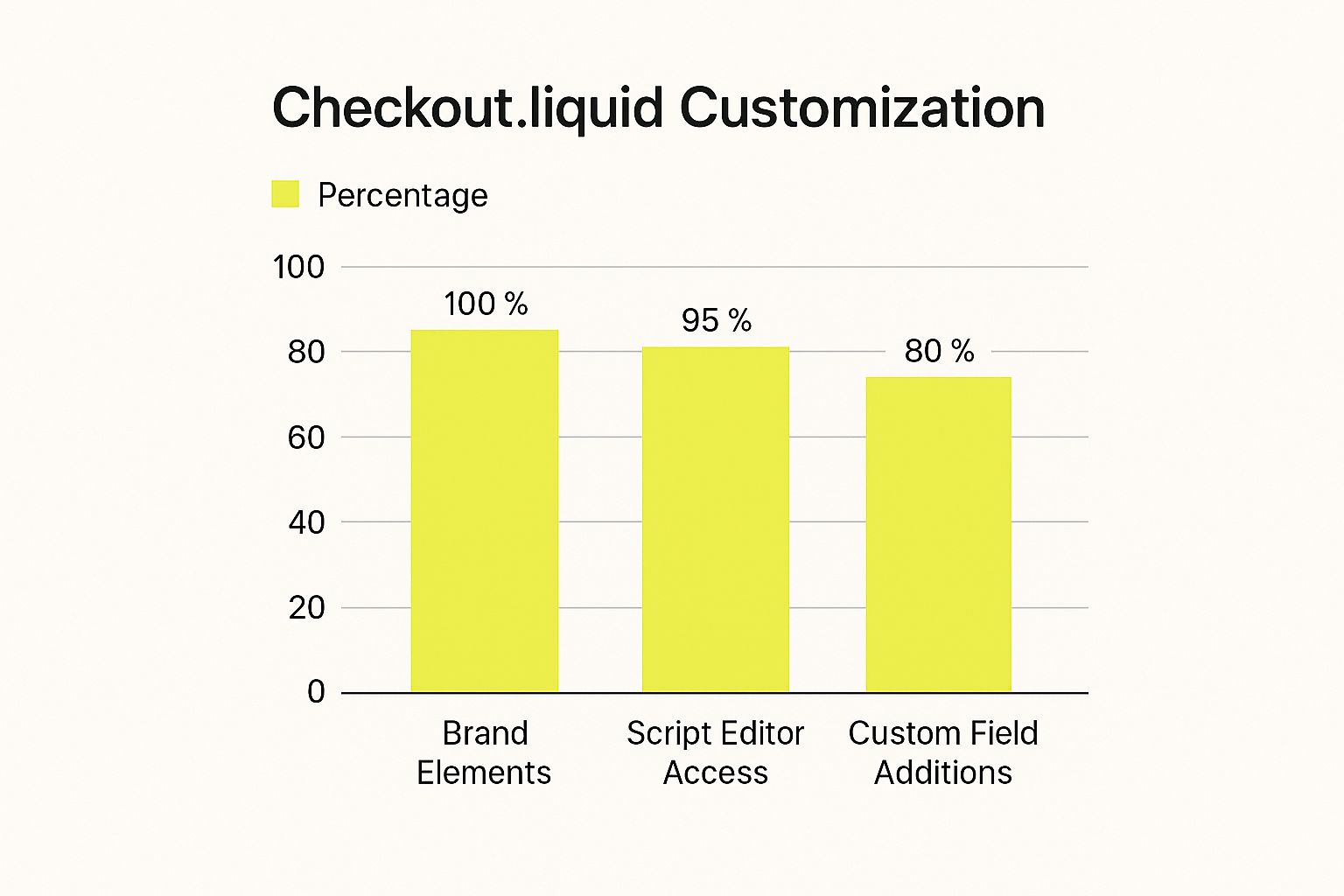
This data shows that while most merchants use basic brand elements and the script editor, many haven’t used custom fields. For example, if you sell perishable goods, adding a delivery date field directly within the checkout can reduce customer service inquiries and improve order accuracy. This targeted customization tailors the checkout experience to your products and customers.
Collecting Essential Information Strategically
Collecting extra information, like birthdays or preferences, can be valuable for marketing. However, it’s important to balance gathering useful data with overwhelming customers with long forms.
Strategically using custom fields lets you collect essential information to enhance the customer experience and improve your business, thereby improving conversion rates without adding friction. For example, if you offer personalized products, a custom field for engraving instructions streamlines ordering and reduces errors.
Implementing Post-Purchase Upsells and Offers
Finally, don't forget the post-purchase experience. This is a great opportunity to increase average order value and build customer loyalty. By integrating post-purchase upsells and offers, you can capitalize on a completed purchase and encourage additional spending.
This could be offering related products, discounted add-ons, or even loyalty program enrollment. Customizing this final checkout stage can maximize revenue and build strong customer relationships.
Mastering Mobile Checkout Without Losing Your Mind
Mobile commerce is booming. If your Shopify checkout isn't optimized for smartphones, you're losing potential sales. This isn't just about aesthetics; it's about understanding mobile shopping habits and tailoring the experience. This means prioritizing thumb-friendly design, streamlined forms, and mobile-compatible payment options.
Thumb-Friendly Design: Making It Easy to Tap
Consider the physical limitations of a smartphone. Buttons need to be large enough for easy thumb-tapping. Forms should be concise, avoiding tiny input fields. Navigation should be intuitive, minimizing effort. A frustrating mobile experience quickly leads to abandoned carts.
Page load speed is also essential. Mobile users are often on-the-go and expect fast loading. Optimize your images and minimize unnecessary code for a lightning-fast checkout. This can involve compressing images, leveraging browser caching, and minimizing redirects.
Streamlined Forms: Less Is More
Mobile users crave speed and simplicity. Request only essential information. Pre-fill fields whenever possible using autofill. Consider dropdown menus instead of free-text fields to minimize typing. Lengthy forms can easily overwhelm mobile users.
For instance, offering express checkout options like Shop Pay allows customers to complete purchases quickly. Pre-filled information and streamlined payment processing significantly reduces friction, boosting conversions, especially for returning customers.
Mobile Payment Methods: Embrace the Future
Not all payment methods are mobile-friendly. Embrace mobile wallets like Apple Pay and Google Pay. These options offer seamless and secure payments, eliminating manual card entry. A variety of mobile-friendly payment options caters to diverse preferences, increasing purchase completion. You might be interested in: How to master Shopify store migrations.
Testing and Optimization: The Key to Success
Rigorously test your mobile checkout on various devices and operating systems. Use a range of screen sizes and network conditions for a consistent experience. Regularly analyze your mobile checkout data to identify areas for improvement. The global ecommerce market is projected to reach $4.8 trillion by 2025, highlighting the need for effective checkout optimization. Explore this topic further. Mobile optimization is crucial, given the significant portion of ecommerce transactions occurring on mobile devices. Continuously testing and optimizing maximizes conversions and keeps you ahead of the curve. This ongoing process ensures your checkout remains effective and adapts to changing user behavior.

Unlocking Shopify Plus Advanced Customization Power
For enterprise-level merchants, customizing the checkout experience is paramount. It's about more than just aesthetics; it's about creating a seamless and on-brand journey for your customers. Shopify Plus offers a suite of powerful customization options not available on standard Shopify plans, enabling you to build a truly unique checkout flow tailored to your business needs. This can lead to increased conversions, reduced cart abandonment, and a stronger brand presence. But understanding when and how to leverage these advanced features is crucial for maximizing their impact.
Harnessing the Power of checkout.liquid
One of the biggest advantages of Shopify Plus is access to the checkout.liquid file. This gives you unprecedented control over the checkout process, allowing for complex modifications and integrations. For instance, businesses with unique shipping requirements can implement custom logic for calculating real-time rates based on product dimensions, weight, and destination. Shopify Plus Solutions from Ecommerce Dev Group can help you navigate these more complex customizations. This level of control isn't possible on standard Shopify plans, where checkout changes are restricted to pre-built options and apps.
Creating Personalized Experiences With Scripts
Shopify Scripts, exclusive to Shopify Plus, are another powerful tool for customizing your checkout. These scripts enable dynamic modifications, offering a degree of personalization not achievable with standard configurations. Think tiered discounts based on customer behavior, or dynamically adjusted shipping options based on cart contents. You could even offer a free gift with a specific product—that's the power of Shopify Scripts.
Building Sophisticated Checkout Flows
Shopify Plus allows you to create customer segment-based checkout flows. This means tailoring the experience to specific customer groups. For example, wholesale customers could have a streamlined checkout, bypassing unnecessary steps like address confirmation, creating a more efficient experience.

To better understand the different customization options available across Shopify plans, take a look at the comparison table below. It highlights the key features and capabilities you can expect from each tier.
Shopify Plan Checkout Customization Capabilities
| Feature | Basic Shopify | Shopify | Advanced Shopify | Shopify Plus |
|---|---|---|---|---|
| Access to checkout.liquid | No | No | No | Yes |
| Shopify Scripts | No | No | No | Yes |
| Customer Segment-Based Checkout Flows | No | No | No | Yes |
| Third-Party App Integrations | Limited | More Extensive | Most Extensive | Extensive, Plus Custom Integrations |
| Checkout Style Editor | Basic | Basic | Basic | Advanced + checkout.liquid access |
Key takeaways from the table: Access to checkout.liquid, Scripts, and segmented checkouts are exclusive to Shopify Plus. While other plans offer varying levels of customization through apps and the checkout editor, Plus provides the most flexibility and control.
Weighing the Investment: Advanced vs. Simple Customizations
While Shopify Plus offers significant potential, it's essential to evaluate the cost and complexity. Sometimes, simpler solutions like pre-built apps or theme editor tweaks are sufficient. If you're just looking to change button colors, the theme editor is a more efficient approach than diving into checkout.liquid.
Maintaining Performance While Adding Functionality
As you implement customizations, closely monitor checkout performance. Adding complex features can impact speed, potentially increasing cart abandonment. Thorough testing and optimization are essential. This includes regular speed tests and user experience monitoring. A fast, reliable checkout is paramount, regardless of your customization level.
Choosing Tools That Actually Improve Your Bottom Line
Navigating the world of Shopify checkout apps can be overwhelming. There are so many options, and so many promises. How can you tell the difference between the truly helpful tools and the ones that are just gimmicks? This section focuses on choosing the apps that will actually make a difference and improve your profits. This means understanding your business needs, your customer base, and your technical capabilities.
Strategic App Selection: Not Just More, But Better
Choosing apps shouldn't be a random process. Before installing anything, take a look at your current checkout process. Where are the points of friction? What are customers complaining about? For example, if you see a lot of abandoned carts because of complicated shipping calculations, look for apps that simplify that process.
Also, consider your target audience. If most of your customers shop on their phones, prioritize apps designed for mobile checkout. Focusing on mobile-first will make sure the tools you choose directly address your customers’ needs and improve their shopping experience.
Integration Best Practices: Avoiding App Conflicts
Integrating multiple apps can cause conflicts if you're not careful. Always test new apps thoroughly in a staging environment before adding them to your live store. This lets you catch any potential problems before they impact your customers. Being proactive prevents technical errors that can hurt your sales.
Cost-Benefit Analysis: Worth the Monthly Fee?
Many checkout apps have monthly fees. Carefully weigh the costs and benefits of each app you’re considering. Will the potential increase in conversions or average order value outweigh the recurring cost? This careful analysis will help you make smart decisions about which tools offer the best return on your investment. Research shows that stores strategically using checkout optimization apps see average conversion rate improvements of 23%, while stores with poorly integrated apps experience 15% slower checkout completion times. Find more detailed statistics here.
Implementation Strategies: Maintaining Checkout Performance
Even the best apps can slow down your checkout if implemented incorrectly. Optimize image sizes and minimize unnecessary scripts to keep your store loading quickly. A slow checkout process frustrates customers and leads to abandoned carts. You might find this helpful: How to master Shopify performance optimization. Maintaining a streamlined, high-performing checkout is key to converting browsers into buyers.
Avoiding App Overload: Less Can Be More
It’s easy to get excited about every app that promises more conversions. But too many apps can actually hurt your store’s performance and confuse customers. Focus on a few key apps that address your biggest challenges. This focused approach will help your checkout process stay simple and efficient.
Testing New Solutions: Don’t Disrupt Existing Sales
Before committing to a new checkout app, use A/B testing to compare it to your current setup. This lets you measure the app's true impact without risking a decrease in sales. This data-driven approach ensures that any changes you make have positive results.

By following these strategies, you can select checkout tools that genuinely improve your store's performance and boost your bottom line. This strategic approach helps you avoid costly mistakes and maximize your return on investment.
Measuring What Matters And Making Data-Driven Decisions
Customizing your Shopify checkout isn't about luck. It's about strategic, data-driven choices that have a real impact on your profits. Smart merchants know optimizing their checkout is more than just making it look nice. It needs careful tracking, analysis, and constant improvement. This means looking beyond simple conversion rates and into the metrics that truly reflect how well your checkout is performing. This means using the right analytics tools like Google Analytics, understanding the data, and testing changes effectively.
Key Performance Indicators (KPIs) Beyond Conversion Rates
While your conversion rate is important—showing how many visitors complete a purchase—it's only one piece of the puzzle. Think about your average order value (AOV). A higher AOV suggests you're doing a good job with upselling. Your customer lifetime value (CLTV) predicts how much a customer will spend over their entire relationship with your store. Finally, your cart abandonment rate shows how many people add items to their cart but don't finish buying. A high abandonment rate could mean there are problems in your checkout process.
Looking at all of these metrics gives you a more complete understanding of your checkout's performance.
A/B Testing: The Foundation of Data-Driven Optimization
A/B testing is essential for checking if your checkout customizations are working. By comparing two versions, you can see which changes have the biggest positive effect.
For example, try testing different button colors or where they are placed on the page. One version might lead to more clicks and sales. This type of testing makes sure you're making informed choices based on real results.
Identifying Checkout Bottlenecks: Where Are Customers Getting Stuck?
Finding out where customers abandon their carts is crucial for making the right improvements. Look at your form completion rates for each checkout step. Are customers getting stuck somewhere? Track exit points to see where people drop off.
If many customers leave at the shipping information step, it might be because the form is too complicated or you don't have enough delivery options. Identifying these problem areas shows you exactly what needs to be improved.
Interpreting Metrics That Matter: Turning Data into Actionable Insights
Data without interpretation is meaningless. Understand how each metric connects to your goals. If you want to increase AOV, you might focus on upselling and cross-selling. If your goal is to lower cart abandonment, you might simplify the checkout process. Aligning your metrics with your goals keeps your optimization efforts focused.
Implementing Testing Protocols: Experimenting Without Disruption
Testing new features shouldn't affect your sales. A/B testing with controlled user segments is key. For example, test a new payment method with a small group of customers. This lets you check how well it works before offering it to everyone. This approach makes sure changes are carefully evaluated.
Real-World Examples: How Data Drives Success
Many successful online businesses use data to make smart decisions. For instance, one retailer added a progress bar to their checkout and reduced cart abandonment by 15%. Another saw conversions rise by 20% after offering express checkout options like Shop Pay. These examples show how powerful data-driven improvements can be.
Tracking Checkout Performance: Measuring the ROI of Your Efforts
It’s important to track the return on investment (ROI) of your work. Track KPIs before and after making changes. See how your conversion rate, AOV, and cart abandonment rate change. If a button color change increases conversions by 5%, you know that change was effective. Measuring ROI helps you see which strategies are working and which ones need tweaking.
Need help customizing your Shopify checkout? E-commerce Dev Group is a leading Shopify design, development, and support partner. Contact us today to learn more.
