


Why Smart Businesses Are Making the Switch

Many businesses consider migrating to Shopify from platforms like BigCommerce. They might feel limited by their current platform or want features it doesn't offer. Often, the switch comes down to needing better scalability, flexibility, and a simpler user experience. Shopify is known for being easy to use, even for non-technical users. This makes day-to-day store management much smoother.
This increased efficiency frees up time and resources. Businesses can then focus on growth and other key strategies.
Enhanced User Experience and Streamlined Operations
Migrating to Shopify can simplify many tasks. For example, think about product management, order fulfillment, and customer service. Shopify's interface is designed to be intuitive. This makes it easy for teams to learn and use effectively.
The platform also offers many built-in features and integrations. These tools further streamline operations. This means businesses can manage online stores more efficiently. This can reduce overhead costs and improve overall productivity.
The Power of the App Ecosystem
One of the biggest reasons to migrate is Shopify's impressive app ecosystem. With over 8,000 apps available, businesses can significantly expand their stores' functionality. This huge marketplace covers a wide variety of needs.
Whether you need marketing automation or advanced analytics, there’s an app for that. You can also find specialized shipping solutions and tools for international selling. BigCommerce's app ecosystem, while growing, offers fewer options. This can limit a business's ability to customize and scale.
As businesses grow, this difference becomes increasingly important. They often need specialized tools to support their expansion.
Conversion Optimization and International Growth
Businesses often choose to migrate from BigCommerce to Shopify for its versatility and user-friendliness. Shopify's large app ecosystem and ease of use are especially appealing. This is especially true for businesses that want to expand their e-commerce capabilities quickly.
By 2025, 2.71 billion online shoppers are expected to be active across 26.5 million e-commerce websites. This makes the global e-commerce landscape increasingly competitive. Businesses are actively searching for platforms that offer flexibility and scalability. This makes Shopify an attractive option for businesses adapting to changing market conditions. Learn more about migrating to Shopify here.
Shopify also has robust features for international selling. These include multi-currency support and localized checkout experiences. These features empower businesses to reach a global audience. They can significantly improve conversion rates. They do this by offering a smooth and tailored shopping experience for international customers.
Moving to Shopify often leads to better customer satisfaction. It can also lead to increased sales and stronger brand loyalty.
What Migration Actually Costs (And How To Budget Smart)
Moving your online store from BigCommerce to Shopify involves more than just a simple platform switch; it requires careful budgeting. Knowing the potential costs upfront is essential for a smooth transition. This includes everything from the price of data migration tools and new theme development to often overlooked aspects like training your staff and making sure your SEO remains intact. Let's break down these components to help you build a realistic budget.
Core Migration Expenses
One of the first things to consider is the cost of moving your valuable product data. Data migration tools and services can cost anywhere from $100 to $800 depending on the size and complexity of your online store. Next, you'll need a new Shopify theme. Theme customization costs can vary significantly based on your design needs, typically ranging from a few hundred dollars for pre-made themes to $4,000+ for highly customized designs.
Integrating essential apps for features you rely on is another key expense. App integration can add up quickly, ranging from $300 to $2,000 or more depending on the apps themselves and any necessary customization. Migrating from BigCommerce to Shopify is often a significant financial investment, ranging from $500 to over $10,000 in 2025. This includes data migration, design & theme development, custom apps, SEO setup, platform setup, quality assurance & testing, and potential agency fees. Understanding these costs helps businesses budget effectively. For more detailed information, check out this helpful resource: BigCommerce to Shopify Migration Cost in 2025.
Hidden Costs to Consider
Beyond the core expenses, several hidden costs can significantly impact your budget. Staff training on the new platform requires time and resources. This might involve dedicated training or online courses. A temporary dip in productivity is also common as your team gets used to the new system. Finally, maintaining your SEO rankings requires careful redirect mapping and other technical SEO adjustments.
To help you visualize the potential costs, let's look at a detailed breakdown:
BigCommerce To Shopify Migration Cost Breakdown
| Migration Component | Minimum Cost | Maximum Cost | Typical Range |
|---|---|---|---|
| Data Migration | $100 | $800 | $200 – $500 |
| Theme Customization | $200 | $4,000+ | $500 – $2,000 |
| App Integration | $300 | $2,000+ | $500 – $1,500 |
| SEO Adjustments | $100 | $1,000+ | $200 – $500 |
| Staff Training | $50 | $500+ | $100 – $300 |
This table provides a general overview, and your actual costs may vary. It's crucial to get personalized quotes from developers and agencies.
Budgeting Frameworks and Contingency Planning
To avoid unpleasant surprises, it's vital to create realistic budgeting frameworks. These should be based on your business size and complexity. For smaller businesses with simpler setups, a budget of $1,000 to $3,000 might be enough. Larger businesses with extensive catalogs and complex integrations should anticipate a budget of $5,000 to $10,000 or more.
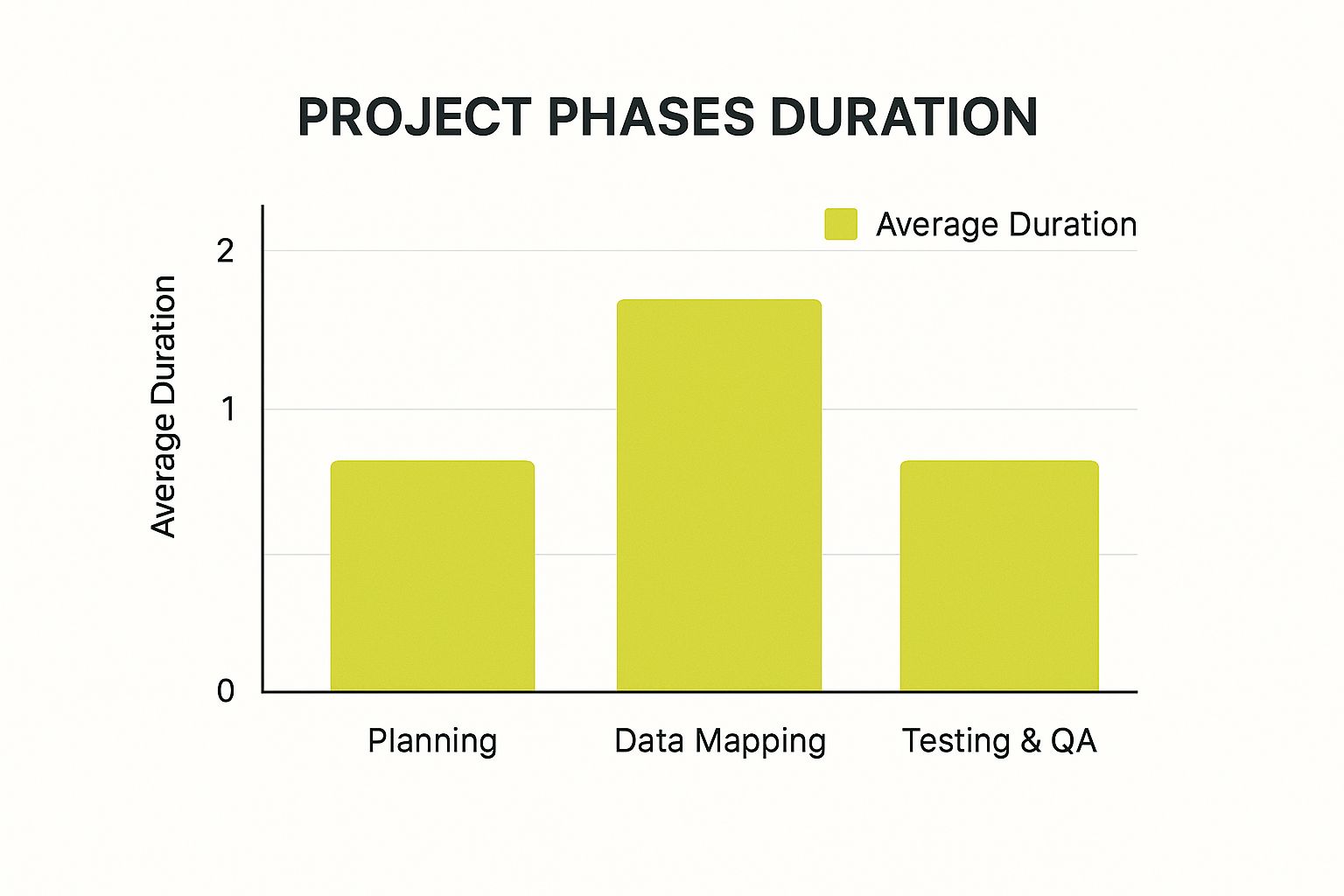
The infographic above shows the average time required for the main migration phases: planning, data mapping, and testing & QA. Data mapping usually takes the longest, around two weeks. This highlights the importance of allocating enough time and resources to data mapping to ensure a smooth data transfer.
No matter your budget, always include a contingency buffer for unexpected costs. This helps you handle unforeseen challenges without affecting your migration project. Careful planning and accurate budgeting are crucial for a successful and cost-effective migration from BigCommerce to Shopify.
Smart Planning That Prevents Migration Disasters

Moving your online store from BigCommerce to Shopify is a big step. It's about more than just moving data; it requires careful planning to ensure a smooth transition. This means understanding your current BigCommerce setup and preparing for potential bumps in the road.
Pre-Migration Assessment: Auditing Your BigCommerce Store
The first step is a thorough audit of your BigCommerce store. This involves taking stock of all your important data.
Think product information, customer details, and order history. You'll also want to document key features like your payment gateways, shipping integrations, and any custom code. This detailed inventory is the cornerstone of a successful migration.
For example, make a list of all the third-party apps you use. Then, check if they're compatible with Shopify. This helps avoid surprises later on.
Data Mapping and Functionality Preservation
After auditing your store, the next step is mapping your BigCommerce data to the corresponding fields in Shopify. This maintains data integrity and prevents information loss during the transfer. It includes mapping things like product categories, customer attributes, and order details.
Also, check if your existing customizations and third-party integrations will work with Shopify. Some might need to be rebuilt on the new platform. This careful mapping is crucial for a seamless switch.
Creating Realistic Migration Timelines
Setting realistic timelines is key to a stress-free migration. Account for the time needed for data export, setting up your Shopify store, importing data, and testing everything. Build in some buffer for unexpected delays.
Also, coordinate with your team to minimize disruptions to your daily business. Keep everyone in the loop – clear communication with stakeholders is essential. By planning ahead and working together, you'll be ready to handle the change effectively. This paves the way for a successful launch on your new Shopify store.
Your Step-By-Step Migration Roadmap
Moving your online store from BigCommerce to Shopify can seem daunting. But with a well-structured plan, it becomes much easier. This roadmap breaks down the migration into manageable phases, giving you the confidence to handle the technical details.
Phase 1: Data Export From BigCommerce
First, you need to export all your important data from BigCommerce. This includes your product catalog, customer information, and order history. Make sure to get everything, like product variations, SKUs, and detailed customer order information. This sets the stage for a smooth move to your new Shopify store. For additional guidance, you might find this resource helpful: How to master the process of Shopify store migration.
Phase 2: Shopify Store Configuration
After exporting your data, it's time to set up your Shopify store. This means choosing a theme you like, customizing the design, and setting up important functions like payment processing and shipping. Think of this as building the foundation of your new online shop.
Phase 3: Data Import and Mapping
Now that your Shopify store is set up, you can import the data you exported from BigCommerce. This step requires careful data mapping. You need to make sure the data fields from BigCommerce match up correctly with the fields in Shopify. For instance, product categories in BigCommerce should link to the right categories in Shopify. This precise approach keeps your data accurate and minimizes problems. Given the importance of data security during platform migrations, consider reviewing some data security best practices.
Phase 4: Quality Assurance and Testing
Once your data is imported, thorough testing is crucial. Check that all your product information, customer details, and order histories are correct. Also, test how everything works in your store, including the checkout process, payment gateways, and shipping integrations. This careful quality assurance helps you find and fix any issues before your store goes live.
Phase 5: Post-Migration Optimization and Refinement
Launching your Shopify store is just the beginning. Ongoing improvements are essential. Keep an eye on how your store is performing, find areas to enhance, and adjust your store’s design and functions based on customer feedback and data. These continuous improvements will keep your Shopify store competitive and provide a great experience for your customers. This careful process also helps you handle any unexpected issues and ensures a smooth transition for everyone.
Protecting Your SEO Rankings During The Move

Moving your online store from BigCommerce to Shopify is a big step. But don't let your hard-earned search engine rankings suffer in the process. Maintaining your visibility on search engines is crucial for a successful transition. This means having a solid SEO strategy that covers all the important technical details.
URL Mapping and 301 Redirects
One of the most important steps is URL mapping. This means matching each old BigCommerce URL to its new Shopify equivalent. It's a detail-oriented process, but it's how you make sure everyone lands on the right page on your new site. This includes both your customers and the search engines that drive traffic to your store.
After mapping your URLs, the next step is setting up 301 redirects. These tell search engines that your pages have permanently moved. This keeps your search rankings intact and avoids broken links. Imagine a customer clicking on a link to a product on your old BigCommerce site. A 301 redirect seamlessly sends them to the same product on your new Shopify site. This provides a smooth user experience and preserves your SEO equity.
Preserving Meta Data and Structured Markup
Don't forget about your meta data. This includes things like page titles and descriptions – the information search engines use to understand your content. Make sure this data is accurately transferred to your Shopify store. This helps search engines understand what your pages are about and rank them appropriately.
Along with meta data, remember your structured markup. Structured data gives search engines even more context about your content, which can give your search results a boost.
Handling Category Structures and Product Page Authority
Think about your category structure, too. Keep your Shopify store organized similarly to your BigCommerce store. This consistency helps maintain the flow of link equity, a key factor in how search engines rank your pages.
Keeping your product page authority strong is also essential. Techniques like internal linking and building backlinks to your new Shopify product pages are important. This helps them maintain the same authority they had on BigCommerce, keeping them visible in search results. For more help with post-migration optimization, check out resources on maximizing Shopify performance. By following these steps, you can safeguard your SEO rankings during the migration and ensure a smooth transition to your new Shopify store.
Making The Right Decision For Your Business
Migrating your e-commerce platform is a big decision. While moving from BigCommerce to Shopify might offer some advantages, like more app integrations and a potentially better user experience, it's not the right choice for every business. You need to carefully consider the pros and cons based on your specific situation. This means honestly assessing how happy you are with your current platform, your plans for future growth, and your technical needs compared to the costs and complexities of migrating.
Evaluating Your Current Platform Satisfaction
Start by thinking about how satisfied you are with BigCommerce. What's working well, and what issues are making you consider a change? Are your limitations really because of the platform itself, or could they be due to other things, like inefficient workflows or marketing strategies? Honestly answering these questions can really help you see things clearly. You might even find some helpful tips in resources like this guide on How to master Shopify Plus solutions.
Considering Growth Trajectory and Technical Needs
Next, think about your projected growth. Will BigCommerce be able to handle your expected increases in sales, product catalog size, and customers? Also, think about your technical requirements. Does your business depend on specific integrations or customizations that might be easier to manage on Shopify? If your business heavily depends on a particular integration that isn't available on Shopify, switching platforms could actually create more problems than it solves.
Weighing Migration Costs and Complexity
It’s important to be realistic about the money and time involved in migrating. The cost can be anywhere from a few hundred to thousands of dollars, depending on how complex your store is. The process also takes careful planning and execution to minimize any downtime and keep your customers happy. To help you compare the two platforms, take a look at the table below.
To help you make an informed decision, we've put together a comparison table highlighting the key differences between BigCommerce and Shopify, and how these differences might affect your migration.
BigCommerce vs Shopify Feature Comparison
Side-by-side comparison of key features to help evaluate migration benefits
| Feature Category | BigCommerce | Shopify | Migration Impact |
|---|---|---|---|
| App Integrations | Extensive, but may require custom development | Vast app store, generally easier to integrate | Potential for streamlining workflows with existing Shopify apps, but existing custom integrations may need to be rebuilt. |
| User Experience (UX) | Customizable, but can be complex | Generally user-friendly, with many themes and templates | Potential for improved user experience, but requires careful theme selection and customization. |
| Scalability | Robust scalability options | Scalable, but higher-tier plans may be required for larger businesses | Depending on your growth trajectory, migrating to Shopify might offer better scaling options, but also increased costs. |
| Cost | Varies depending on plan and features | Varies depending on plan and apps | Consider the total cost of ownership, including app subscriptions and potential development costs. |
| SEO | Built-in SEO features | Strong SEO capabilities, with numerous apps available | Migration can impact SEO, requiring careful redirection and optimization on the new platform. |
Key takeaway: While Shopify boasts a larger app ecosystem and often a smoother user experience, migrating from BigCommerce requires careful consideration of your specific needs and the potential impact on your existing integrations, scalability requirements, and overall costs.
Despite the popularity of Shopify, BigCommerce still holds a significant market share. 75% of BigCommerce merchants report customer retention rates of 50% or higher, showing the platform's ability to support long-term customer relationships. You can find more detailed information in this article on how to migrate from BigCommerce to Shopify. Ultimately, the best platform for you depends on your specific business goals and needs. While Shopify might offer more customization and app integrations, it’s important to decide if the investment in migration aligns with your objectives. Careful planning and smooth execution are essential to minimize disruption and keep your customers happy.
Maximizing Success After Your 2.0 Migration
Migrating from BigCommerce to Shopify is a big step, but the work doesn't stop when your data is transferred. Real success comes from using Shopify’s potential to grow your business and reach your goals. This means optimizing your store's performance, using Shopify’s special features, and keeping up with best practices.
Post-Migration Optimization Tasks
Right after moving from BigCommerce to Shopify, there are a few important things to do. First, test everything. Carefully check every part of your store, from product pages and checkout to payment and shipping. This will help you find any hidden problems and make sure your customers have a smooth experience. Also, check out our guide on How to master Shopify performance optimization.
Next, improve your store's performance. Shopify has built-in tools and apps to make your site faster and get more conversions. Look into Shopify’s image optimization features for faster loading and better SEO.
Leveraging the Shopify App Ecosystem
Shopify has a huge app store with lots of ways to improve your store and make things easier. Find apps that fit your business needs, like marketing automation, email marketing, or advanced analytics. But remember, too many apps can slow your store down, so choose carefully.
Conversion Optimization Techniques
Conversion Rate Optimization (CRO) is key for increasing sales and getting the most out of your investment. See how users behave on your site, find areas to improve, and try different ways to boost conversions. You could A/B test product page layouts, improve the checkout process, or personalize the customer experience.
Ongoing Maintenance and Growth Strategies
Keeping your Shopify store running smoothly takes constant work. Regularly update your themes and apps, check your site's performance, and follow security best practices. Also, create a long-term growth strategy that uses Shopify’s features and works with your overall marketing plan. This helps you get the most from your migration and achieve long-term success.
Ready to see what your new Shopify store can really do? E-commerce Dev Group offers expert Shopify design, development, and support to help you maximize your investment and achieve lasting success. Visit E-commerce Dev Group to learn more and transform your online business.
