


The Architecture Behind Stunning Shopify Themes
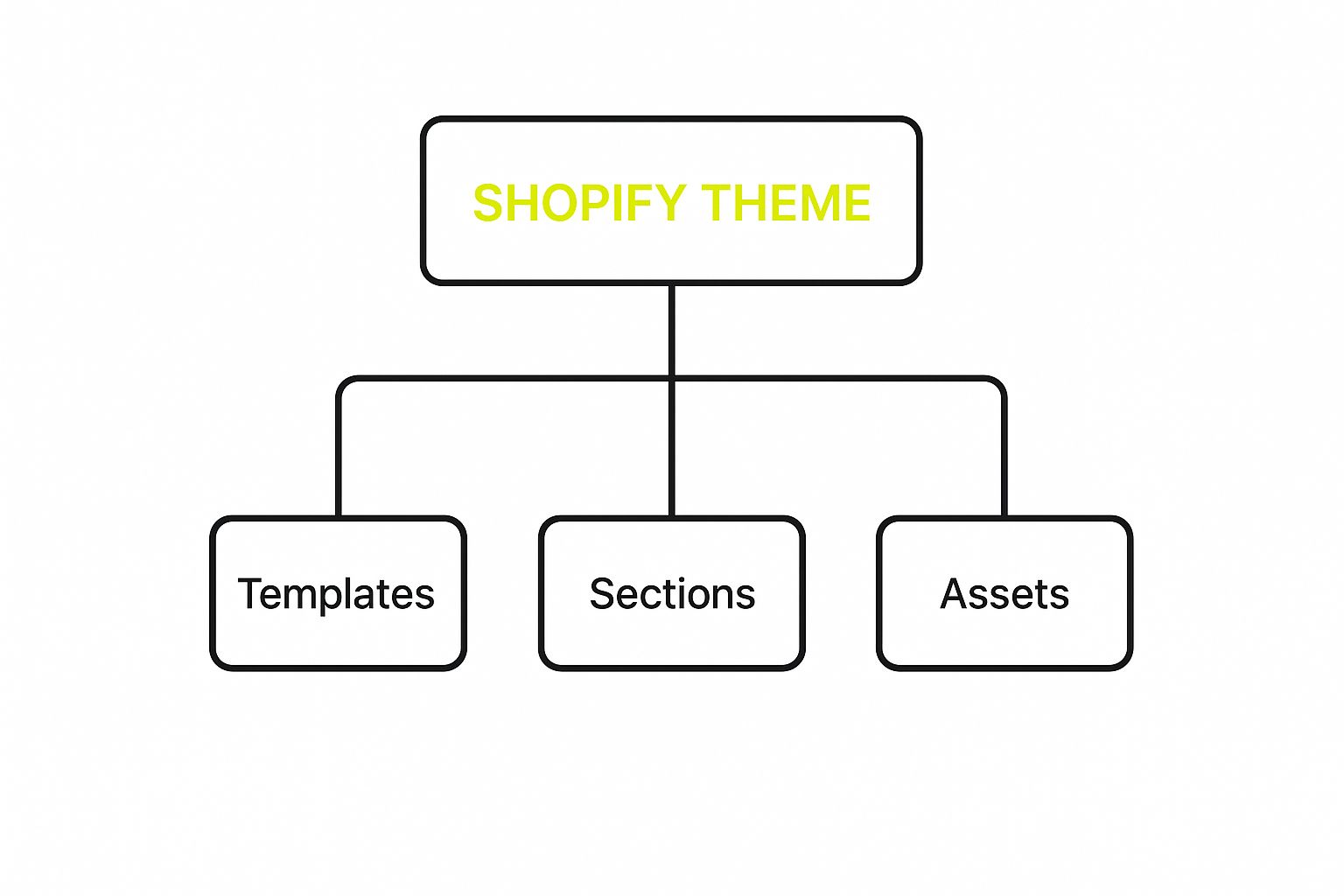
The diagram above shows the core components of a Shopify theme: Templates, Sections, and Assets. These elements work together to create the overall user experience. This structured approach helps developers efficiently manage and customize a Shopify store's look and functionality.
Building a Shopify theme requires understanding its architecture. This isn't about complex code, but rather a logical structure that determines how files interact to create the final storefront. Just as a house needs blueprints, a Shopify theme needs a clear understanding of the relationship between its key components: Templates, Sections, and Snippets.
Understanding The Building Blocks: Templates, Sections, And Snippets
-
Templates: These form the foundation of your theme, defining the structure of different page types (product pages, collection pages, homepage, etc.). Think of them as the framing of a house, setting the layout for each room.
-
Sections: Sections offer modularity and flexibility. They're reusable blocks of content placed within templates. Examples include featured product sections, newsletter signups, or image galleries. They're like furniture in a room, letting merchants arrange their store layout.
-
Snippets: Snippets are small, reusable pieces of code used within templates or sections. They reduce code duplication and ensure consistency. A snippet might contain code for a social media sharing button or a product price display. Think of these as the details within a piece of furniture, like drawer handles or table legs.
This modular approach significantly improves theme customization. By dividing the theme into smaller parts, developers can make specific changes without affecting other areas. This is crucial for creating themes that are attractive and easy to maintain. For instance, updating one section's style won't require rewriting the entire template.
To further illustrate the structure of a Shopify theme, let's look at the following table:
Shopify Theme Structure Components
This table provides an overview of the essential components and files that make up a Shopify theme.
| Component | Purpose | Key Files | Development Priority |
|---|---|---|---|
| Templates | Define the overall structure of page types (e.g., product, collection, homepage) | .liquid files within the templates directory |
High |
| Sections | Reusable blocks of content that can be included in templates | .liquid files within the sections directory |
High |
| Snippets | Small, reusable pieces of code used within templates or sections | .liquid files within the snippets directory |
Medium |
| Assets | Images, stylesheets, JavaScript files, and other static assets used in the theme | Files within the assets directory (e.g., .css, .js, .png, .jpg) |
Medium |
| Config | Settings and configurations for the theme | settings_data.json, settings_schema.json |
High |
| Layout | Defines the overall layout of the theme | theme.liquid |
High |
This table highlights the key elements and files involved in Shopify theme development, emphasizing their importance in creating a functional and customizable online store.
The Shopify Theme Ecosystem and Market Demand
Understanding this architecture is crucial due to the high demand for Shopify themes. Interest in these themes drives significant traffic to Shopify. Searches for "Shopify themes" represent approximately 0.64% of all organic traffic to the platform, making it a competitive and profitable area. Find more detailed statistics here. This demand shows the opportunities for developers to create successful themes. Themes, often priced between $120 and $200, create a vibrant marketplace with both free and paid options, allowing merchants to constantly improve their stores and emphasizing the importance of well-structured and customizable theme development.
Crafting Your Development Workspace For Success

A well-structured workspace is essential for efficient Shopify theme development. Just as a chef needs an organized kitchen, a Shopify theme developer needs a well-equipped digital "kitchen." This involves having the right tools and processes in place. This section explores setting up this environment.
Essential Tools: Shopify CLI and Theme Kit
Two crucial tools for Shopify theme developers are the Shopify CLI (Command Line Interface) and Theme Kit. These tools provide powerful ways to interact with your Shopify themes directly from your computer. The Shopify CLI helps manage themes, create new projects, and interact with Shopify services.
Theme Kit synchronizes your local theme files with your Shopify store. It acts as a bridge, constantly updating changes between your computer and your online store. This streamlined connection makes development faster and more efficient.
Version Control: Protecting Your Progress
Using a version control system (VCS) like Git is essential for professional theme development. Git allows you to track code changes, revert to previous versions, and collaborate with others. Imagine accidentally deleting an important file – with Git, recovery is easy.
This safety net is particularly important when working on live themes. You can confidently make updates, knowing you can revert if needed. This provides peace of mind and reduces the risk of errors impacting your live store.
IDE Configuration: Enhancing Your Workflow
Your Integrated Development Environment (IDE) is where you write your code. A well-configured IDE significantly boosts productivity. Features like code completion, syntax highlighting, and debugging tools streamline the process. Choosing an IDE that supports Liquid, Shopify's templating language, is important.
This is comparable to a craftsman having the correct tools. The right IDE makes development more accurate, efficient, and enjoyable. For further insights, check out our article on How to Master Custom Shopify Development.
Testing and Automation: Ensuring Quality and Efficiency
Thorough testing is vital for building a reliable theme. Testing helps identify and fix issues before they reach customers. This includes functionality testing to ensure features work correctly and performance testing to identify slow loading times.
Automation tools can handle repetitive tasks like compiling code and running tests. This frees you to focus on more creative work, like writing elegant code and developing innovative solutions. Automating these processes is like having an assistant handle the routine aspects of your work, so you can concentrate on the more complex and engaging elements. This results in a more efficient development process and a higher-quality product – crucial for success in Shopify theme development.
Becoming Fluent in Liquid: The Language of Shopify
Shopify themes use a powerful templating language called Liquid. If you're serious about developing Shopify themes that are both beautiful and functional, mastering Liquid is a must. Think of it as the bridge connecting your design vision to the dynamic content of a Shopify store.
Decoding Liquid: Beyond Basic Syntax
Understanding Liquid goes beyond simply grasping the basic syntax. It's about knowing how to use its power to create dynamic and adaptable themes. Experienced developers leverage Liquid to build storefronts that respond intelligently to different situations.
For example, imagine displaying different promotional banners depending on the season, or showing personalized product recommendations based on a customer's browsing history. This is the power of Liquid in action.
This dynamic functionality is made possible through conditional logic. Conditional logic allows themes to adapt to various merchant needs without constant code changes. A theme could automatically adjust its layout depending on the number of products in a collection, ensuring an optimal display no matter the inventory size.
Structuring Liquid Code for Maintainability and Performance
Successful developers prioritize maintainability and performance in their Liquid code. They avoid quick fixes and opt for well-organized code that's easy to update and debug. This prevents future headaches and makes updates much smoother.
Think of it like building a house. A solid foundation and well-organized wiring are essential for long-term stability and easy maintenance. Similarly, clean, structured Liquid code ensures a stable and adaptable theme.
Mastering Data Access and Dynamic Displays
Liquid allows developers to access and manipulate product data, create dynamic collection displays, and implement customization options. This is crucial for building engaging storefronts tailored to each merchant's needs.
This means you can create themes that empower merchants to easily customize their storefronts without writing any code. A theme could allow merchants to choose different color schemes, fonts, or layout options directly from the theme editor.
Shopify's global growth and the demand for adaptable themes highlight the need for developers skilled in these techniques. By Q1 2025, over 2.55 million active Shopify stores existed, showing the platform's growth and the importance of high-quality themes. Explore this topic further. For those looking to improve their workflow, consider resources from companies specializing in Shopify development. Shopify Development can be a valuable resource.
Debugging Strategies: Troubleshooting Like a Pro
Even experienced developers encounter bugs. The difference lies in their debugging skills. Effective debugging saves time and frustration.
Advanced Liquid Techniques
Beyond the basics, Liquid offers powerful features like filters and tags. Filters modify the output of variables, such as formatting dates or shortening text. Tags control logic flow, enabling you to create loops, conditional statements, and other dynamic elements.
Mastering these advanced techniques unlocks Liquid's full potential, enabling you to build truly customized and dynamic Shopify themes. This skillset sets professional theme developers apart, allowing them to create themes that shine in a competitive market.
Designing Elements That Convert Browsers to Buyers

A visually appealing Shopify theme is a great start. But the real key to success lies in designing elements that turn casual visitors into loyal customers. This means understanding how design influences buying decisions. It also involves implementing elements that encourage conversions. It’s not about flashy visuals. It's about creating a seamless user experience that guides customers smoothly through their purchase.
Product Pages That Reduce Abandonment
Effective product pages are essential for turning interest into sales. Top Shopify theme developers know that cluttered product pages lead to abandoned carts. They focus on providing clear product information, high-quality images, and easy-to-use add-to-cart buttons.
A well-designed product page should highlight key features and benefits using bullet points. It should also offer multiple product images from various angles. And the add-to-cart button should be prominently displayed "above the fold"—visible without scrolling. This provides easy access to key information and encourages immediate action.
Mobile-First Design: Converting On the Go
With the growth of mobile commerce, optimizing the mobile shopping experience is crucial. This means designing themes that are responsive, load quickly, and are easy to navigate on smaller screens. Elements like hamburger menus, large touch-friendly buttons, and streamlined checkout processes are vital for mobile conversions.
This mobile-first design recognizes that many customers shop on their phones. A poor mobile experience can send them straight to your competitors. For a deeper dive into customizing the user journey for better conversions, check out this guide: How to master Shopify Theme Customization.
Navigation: Guiding Customers Through the Buying Journey
Intuitive navigation is essential. Think of it as a roadmap that guides your customers through your online store. Clear menus, logical category organization, and a prominent search bar help customers find what they're looking for quickly and easily.
Smooth navigation reduces frustration and encourages exploration, increasing the likelihood of a purchase. A well-designed theme anticipates user needs. It makes browsing, discovering, and buying products effortless.
Persuasive Elements: CTAs, Trust Indicators, and Urgency
Strategic use of calls-to-action (CTAs), trust indicators, and urgency features can significantly improve conversion rates. But these elements must be implemented carefully to avoid a pushy or aggressive feel.
A clear CTA button, such as "Shop Now" or "Add to Cart," can encourage immediate action. Displaying security badges, customer testimonials, and guarantees builds trust and reduces purchase hesitation. Limited-time offers or low-stock notifications create urgency, prompting customers to buy now.
Data-Driven Design: Measuring and Optimizing
Shopify theme development is constantly evolving, influenced by current design and technology trends. For example, in 2025, 25.2% of Shopify stores used the Dawn theme, demonstrating its popularity and probable alignment with user preferences. You can find more detailed statistics here: Learn more about Shopify Statistics.
Successful theme developers don't just rely on intuition; they analyze data. They measure the impact of their design choices on key metrics like add-to-cart rates and checkout completion. This data-driven approach allows for continuous improvement.
By analyzing user behavior and conversion data, developers identify areas for improvement and refine their designs to boost conversions. This iterative process ensures that themes are not only visually appealing but also effective in driving sales.
Let's take a look at some popular Shopify themes:
The following table compares some popular Shopify themes and their key features. This information will help you choose the right theme for your online store.
Popular Shopify Themes Comparison
Analysis of market-leading Shopify themes and their key features
| Theme Name | Market Share | Key Features | Performance Score | Price Range |
|---|---|---|---|---|
| Dawn | High (e.g., 25.2% in 2025) | Minimalist, fast, mobile-first | Excellent | Free |
| Turbo | Medium | Advanced features, customizable | Very Good | Paid (e.g., $350) |
| Debutify | High | Focus on conversions, many add-ons | Good | Freemium (paid options available) |
| Symmetry | Medium | Grid-based layout, ideal for visual storytelling | Good | Paid (e.g., $280) |
As you can see, different themes offer various features and cater to different needs. Choosing the right one can significantly impact your store's success.
Elevating User Experience With Strategic JavaScript
JavaScript empowers developers to create dynamic and interactive Shopify themes. These engaging experiences can captivate customers and ultimately boost sales. But it's a delicate balance. Too much JavaScript can slow down your store and frustrate users. This section explores how professional theme developers use JavaScript effectively.
Creating Seamless Product Interactions
JavaScript lets you create smooth, engaging interactions on product pages. Imagine zooming in to see intricate details or switching between color options without the page reloading. These small touches enhance the browsing experience and encourage exploration.
For example, you could build an image carousel with JavaScript to showcase different product views. Or, implement an interactive size chart that gives accurate fit information. These features can significantly improve a customer’s understanding of a product, which often leads to higher conversion rates.
Implementing AJAX Cart Functionality
AJAX (Asynchronous JavaScript and XML) lets customers add items to their cart without refreshing the page. This creates a seamless shopping experience, minimizing interruptions and encouraging customers to add more products.
Think of it like shopping in a physical store. You don't leave the aisle to update your cart at the checkout every time you add an item. AJAX brings that same smooth experience online, making adding items quick and effortless.
Building Custom Features That Stand Out
JavaScript empowers developers to build custom features that set a theme apart from the competition. Consider integrating Shopify Live Chat using a solution like Social Intents to improve the user experience. This personal touch enhances customer service and builds brand loyalty.
Perhaps a merchant wants a unique product configurator or a custom animation to highlight a promotion. JavaScript gives developers the flexibility to bring these creative ideas to life. These custom features create memorable experiences, fostering customer engagement.
Performance Optimization: Preventing Slowdowns
While JavaScript adds functionality, it can also slow down page load times if not implemented carefully. Professional developers prioritize performance optimization using techniques to minimize JavaScript’s impact on site speed.
-
Minification: This removes unnecessary characters from JavaScript files, reducing file size and improving download speeds.
-
Code splitting: This breaks down large JavaScript files into smaller, more manageable chunks. The browser loads only the code needed for each page, improving initial load time.
-
Asynchronous loading: This technique ensures that JavaScript doesn’t block other page elements from loading. The page content appears first, even if the JavaScript is still loading in the background, creating a more responsive experience.
These techniques ensure the added functionality doesn't slow down the site, maintaining a positive user experience.
Modern JavaScript Organization: Maintainability and Adaptability
Professional theme developers use modern JavaScript organization practices to ensure their code is maintainable and adaptable. This includes using modules to encapsulate code into reusable components and build tools to automate tasks like code compilation and testing.
This organized approach simplifies updating and modifying the theme. It also reduces the chance of introducing bugs during updates, which is critical for long-term theme maintenance. This proactive approach ensures the theme remains stable and performs well, even as the store's needs evolve. This is essential for creating themes that are impressive today and adaptable to the future of e-commerce.
Optimizing For Speed, Search, and Sales
Having a visually appealing Shopify theme is only half the battle. Customers need to be able to find it easily and it needs to load quickly. Successful theme developers know that optimization isn't something you tack on at the end. It's a crucial part of the development process right from the start. This means thinking about how search engines will interpret the theme and how to create a fast, smooth experience for users.
Performance Optimization: The Need For Speed
Website speed has a huge impact on both user experience and conversion rates. Slow loading times lead to higher bounce rates. This means customers are leaving before the page even finishes loading. Lost sales and a negative impact on your client's business are the unfortunate results.
Optimizing images is key to improving page speed. Large image files can dramatically slow down a website. However, techniques like image compression and using the right image format (like WebP) can drastically reduce file sizes without sacrificing quality. This translates to faster loading times and happier customers.
Minimizing HTTP requests is another way to significantly improve performance. Every element on a webpage, from images and scripts to stylesheets, requires an HTTP request. Reducing these requests by combining files or using CSS sprites can make a real difference in speed.
Implementing Structured Data For Search Engines
Structured data allows search engines to better understand the content on a webpage. By providing clear information about products, prices, and other important details, you can help boost your client's search engine ranking. This can lead to increased visibility and, ultimately, more customers.
For example, schema markup enables you to include specific details about a product, such as its price, availability, and reviews. This information can then show up in search results as rich snippets, making the product stand out more to potential buyers.
Balancing Rich Media With Fast Load Times
While rich media, like videos and animations, can certainly enhance the user experience, they can also slow a website down. The challenge is to find the right balance. Use these elements strategically, optimizing them for performance to avoid negatively impacting loading times.
Lazy loading is a great technique for optimizing rich media. With lazy loading, images and videos only load when they become visible in the user's viewport. This significantly improves the initial page load time and reduces data usage, particularly beneficial for media-rich pages. Learn more in our article about How to Master Shopify Performance Optimization.
Shopify-Specific Optimization Strategies
Shopify has its own unique optimization challenges and opportunities. Understanding these nuances is essential for building successful themes. For instance, utilizing Shopify's image handling system effectively can offer optimization advantages.
International SEO is another important aspect for clients aiming for a global audience. This involves correctly implementing hreflang tags to specify the language and region of each page. By doing so, you ensure search engines display the right version of your client’s site to users in different locations, opening up access to new markets and expanding their reach. These targeted strategies contribute to excellent theme performance for audiences around the world, maximizing potential impact. Focusing on these techniques lets you create Shopify themes that are not only visually appealing but also high-performing, preparing your clients for success in today's competitive e-commerce environment.
From Testing To Launch: Delivering Professional Themes
The final stages of Shopify theme development are what often separates amateur work from a truly professional product. Delivering a polished, functional theme requires thorough testing, a smooth deployment process, and easy-to-understand documentation. This ensures a seamless transition for the merchant and a positive experience for their shoppers.
Comprehensive Testing Strategies: Catching Issues Early
Thorough testing is essential. It helps identify any problems before they affect users. Experienced developers will create a testing structure that covers all the different ways store elements and user journeys interact. This includes testing on different devices and browsers to guarantee consistent performance. Testing isn't just about finding bugs, it's about ensuring the theme works smoothly under real-world conditions.
-
Functionality Testing: Make sure all features work as they should. This includes testing add-to-cart buttons, navigation menus, search functionality, and any other interactive elements.
-
Usability Testing: Observe how real users interact with the theme. This can help you find areas that might cause confusion or friction in the user experience.
-
Performance Testing: Measure how long pages take to load and find any bottlenecks. A slow theme can negatively impact conversions and SEO.
-
Cross-Browser and Cross-Device Testing: Check that the theme looks and works correctly across different browsers like Chrome, Firefox, Safari, and Edge, and devices such as desktops, tablets, and smartphones.
Deployment Workflows: Minimizing Disruption
Deploying a new theme, or updating an existing one, should be a seamless experience. Experienced developers use workflows that minimize any disruptions to a live store. This often involves using Git for version control and tools like the Shopify CLI and Theme Kit.
-
Staging Environment: Test changes on a separate staging environment before applying them to the live store. This allows you to identify and fix any problems without affecting your live customers.
-
Version Control: Using Git lets you track changes and revert to previous versions if needed, providing a safety net for deployments.
-
Theme Kit: Theme Kit helps efficiently and reliably synchronize your local theme files with your Shopify store.
Documentation: A Seamless Client Handoff
Providing clear, thorough documentation is essential for a smooth handoff to the client. This allows the merchant to manage their theme themselves. Good documentation also reduces support requests and builds trust.
-
Theme Customization Options: Explain all the customizable settings available in the theme editor. Include how each setting changes the storefront's look and functionality.
-
Troubleshooting Guide: A troubleshooting guide can help merchants solve common issues on their own, giving them more control.
-
Code Documentation: For complex themes, provide documentation explaining the code structure and how it functions. This is especially important if the merchant has their own in-house development team.
By focusing on these final stages, developers deliver professional themes that meet the demands of a live store. This builds confidence and leads to long-term success within the Shopify ecosystem. Investing in comprehensive testing, efficient deployment, and clear documentation ensures a positive experience for both the merchant and their customers. Ready to take your Shopify store to the next level? E-commerce Dev Group offers expert Shopify design, development, and support services to help you succeed. Contact us today to learn more!
