


The Architecture Behind Winning Shopify Themes
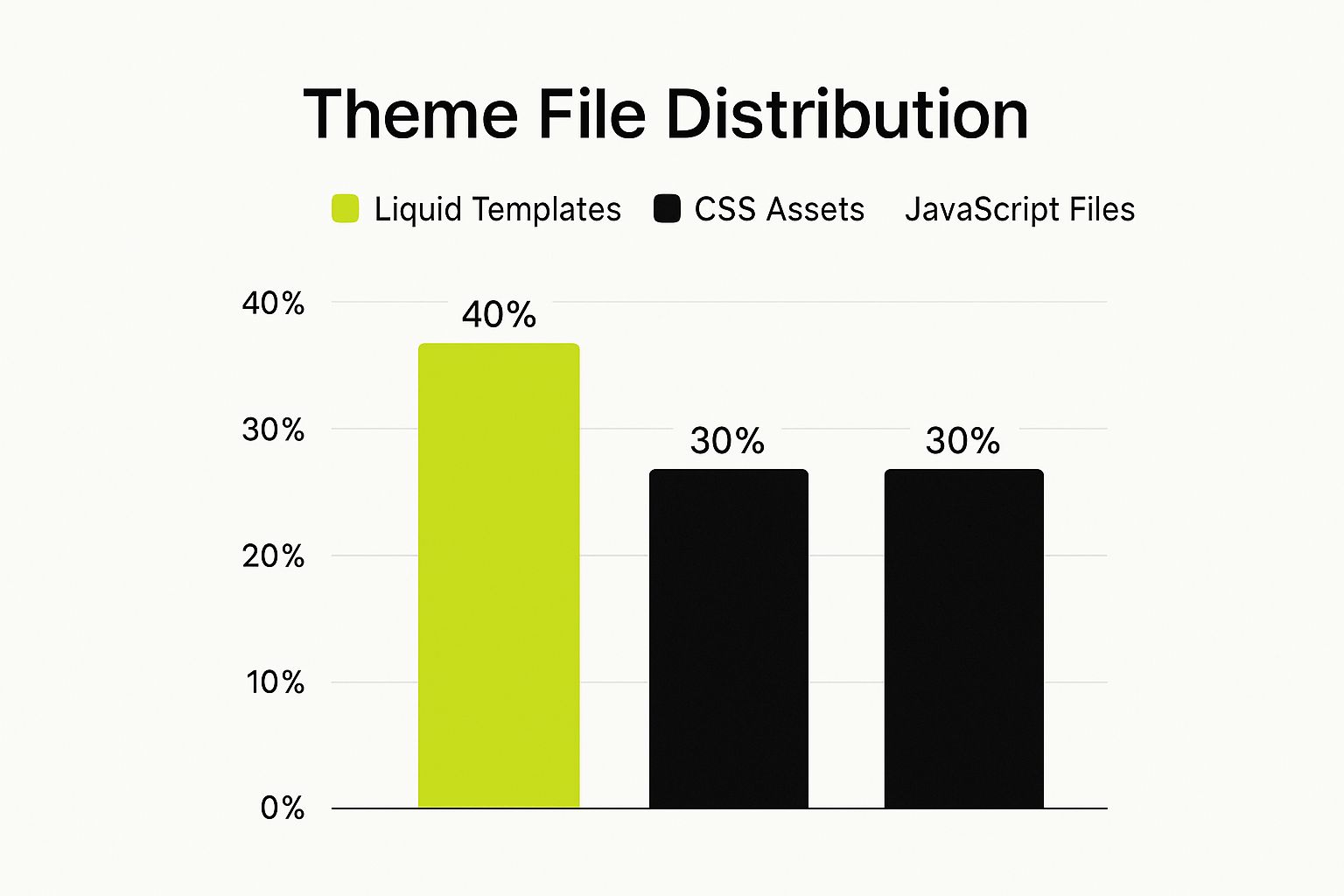
The chart above shows the typical file types within a Shopify theme. These are categorized as Liquid Templates, CSS Assets, and JavaScript Files. Liquid templates make up the largest part of a theme’s structure. This highlights how important it is to understand Liquid and its role in shaping the customer experience.
Understanding Liquid is crucial because the Shopify platform is growing rapidly. As of early 2025, there are over 2.5 million live stores. It continues to grow quarter-over-quarter and year-over-year. You can find more detailed statistics at StoreLeads. This dynamic environment, along with Shopify’s focus on off-the-shelf and custom themes, makes a well-structured theme essential.
Understanding The Building Blocks: Liquid, Sections, and Blocks
Liquid is Shopify's templating language. It’s a key element of Shopify theme development. Think of Liquid as the bridge between your store’s data and what your customers actually see. It lets you dynamically display products, collections, and other important content. For example, you can use Liquid to create a loop that shows every product in a collection, including its image, price, and description.
Shopify themes use a modular system of sections and blocks. Sections are like containers. They define the layout of your store. Think of the header, footer, or product page. Blocks are smaller components inside the sections. They control specific content like images, text, or calls to action. This makes it easier for merchants to customize their online stores.
Dissecting The Folder Structure: A Practical Look
A well-organized Shopify theme is easier to maintain and update. The way files are organized is vital for the theme to work smoothly. A clear structure makes updates and changes much simpler. Let's look at the core components.
To help you understand these core components, we've provided a table below summarizing their purpose, whether they are required, and any additional notes.
Core Shopify Theme Components: Overview of essential files and directories in a Shopify theme
| Component | Purpose | Required? | Notes |
|---|---|---|---|
theme.liquid |
The main template file; acts as the store's backbone | Yes | Includes all other templates and sets the overall structure |
templates/ |
Contains template files for different page types | Yes | Examples include product.liquid, collection.liquid, etc. |
sections/ |
Holds section files that define page layouts | Yes | Allows merchants to customize the arrangement of content |
snippets/ |
Reusable code blocks for various theme elements | No | Promotes code efficiency and consistency |
assets/ |
Contains CSS, JavaScript, and image files | Yes | Essential for styling and functionality of the theme |
config/ |
Settings for theme customization | No | Allows developers to define options for merchants |
locales/ |
Files for language translations | No | Enables multilingual support for the theme |
This organized structure keeps different parts of your theme separate. This makes development much easier. For example, if you want to change the style of your product page, you can quickly find the correct CSS file in the assets folder. Using snippets in the snippets folder helps you avoid repeating code and keeps your theme consistent.
Setting Up Your Development Workflow For Success

A smooth development workflow is essential for efficient Shopify theme development. Think of it like a well-organized toolbox: having everything readily available saves you time and reduces frustration. This section will guide you through creating a professional workflow that will streamline your theme development process.
Essential Tools: Shopify CLI, Theme Kit, and Git
Professional Shopify theme developers rely on a core set of tools. The Shopify CLI (Command Line Interface) offers a powerful suite of commands for managing themes. These commands allow you to create, preview, and deploy themes directly from your terminal, significantly speeding up your workflow. The Theme Kit is another essential tool. It keeps your local theme files synchronized with your Shopify store, so you can see your changes reflected almost instantly without manual uploads.
Git, a version control system, is critical for tracking changes and facilitating collaboration, especially when multiple developers are working on the same theme. Git helps you avoid conflicts and allows you to easily revert to earlier versions if necessary. It acts as a vital safety net for your code.
Step-by-Step: Creating Your Development Environment
While setting up your development environment might seem intimidating, breaking it down into smaller steps makes the process more manageable:
- Install the Shopify CLI: This is your primary tool for interacting with Shopify themes from your computer.
- Connect to Your Store: Authenticate with your Shopify store through the CLI. This establishes the connection between your local machine and your online store.
- Initialize a New Theme: Create a brand new theme locally or download an existing one from your store.
- Configure Theme Kit: Set up Theme Kit to automatically synchronize file changes between your local environment and your online store. This gives you almost immediate feedback as you develop.
- Initialize a Git Repository: Start using Git to track changes to your theme files and manage different versions.
Overcoming Common Pitfalls
Even seasoned developers encounter occasional roadblocks. One common issue is incorrect configuration of the Shopify CLI or Theme Kit. Double-checking your settings and consulting the official Shopify documentation can often resolve these problems. Another frequent mistake is neglecting to use Git. This can lead to losing work or making it difficult to revert to previous versions if errors occur.
Navigating Shopify's Documentation
Shopify's documentation is an invaluable resource for theme developers. It provides comprehensive information on using the CLI, Theme Kit, Liquid, and other key aspects of theme development. When facing a problem, consulting the documentation is usually the fastest way to find a solution. Exploring the documentation proactively can significantly improve your efficiency throughout the entire theme development process. Mastering these tools and techniques will empower you to create exceptional Shopify themes.
Liquid Mastery: Beyond the Basics
Liquid is the templating language behind Shopify themes. For any Shopify theme developer wanting to create dynamic and engaging online stores, mastering Liquid is essential. This section explores some advanced Liquid techniques that go beyond the fundamentals, allowing you to build highly customized and efficient themes.
Accessing and Manipulating Store Data With Liquid
Liquid gives you control over how your store's data appears. This includes products, collections, customer information, and more. You can use Liquid to create personalized product recommendations. These recommendations can be based on a customer's browsing history, providing a tailored experience.
You can also build navigation menus that change based on the current page or collection. This context-aware navigation improves the customer journey. It can also contribute to increased conversions.
You might be interested in this article about Liquid code optimization: How to master Liquid code optimization.
Advanced Liquid Techniques for Dynamic Themes
Experienced Shopify theme developers use several advanced Liquid techniques. These techniques contribute to flexible and high-performing themes. Template inheritance lets you create a base template with common elements. You can then extend it for specific pages. This promotes code reusability and ensures consistency.
Conditional rendering allows you to display different content based on set criteria. These could include the customer's location or the device they are using. Loops help you iterate through collections of data, such as product lists or blog posts, to dynamically generate content.
These techniques create richer, more personalized shopping experiences. For instance, conditional rendering can display a promotional banner only to customers in a specific region. Using loops, you can create a carousel of featured products on your homepage.
Optimizing Liquid Code for Performance
Efficient Liquid code is vital for a fast-loading storefront. This becomes especially important as stores grow and handle thousands of products and numerous pages. Complex or poorly written Liquid code can slow down page load times. This negatively affects user experience and SEO.
Troubleshooting Common Liquid Challenges
Everyone faces challenges when working with Liquid, even experienced developers. Incorrect use of filters or tags is a common issue. This can lead to unexpected outputs or errors. Another frequent problem is inefficient loops. These can significantly slow down page rendering. Understanding these common challenges and how to debug them is key to mastering Liquid.
Here’s a table summarizing some common Liquid challenges and their solutions:
| Challenge | Solution |
|---|---|
| Incorrect Filter Use | Double-check the filter syntax and parameters. Refer to the Shopify Liquid documentation for details on available filters. |
| Inefficient Loops | Limit iterations within loops, especially with large datasets. Consider pagination or filtering to reduce processed data. |
| Template Errors | Carefully review Shopify's error messages. These often pinpoint the problem's location and nature. |
| Conflicting Code | Ensure your custom Liquid code doesn't conflict with existing theme code or app integrations. Thorough testing is important for identifying these conflicts. |
By mastering these techniques and troubleshooting common issues, you can build powerful and efficient Shopify themes. Ultimately, this contributes to a better shopping experience for your customers.
Crafting Lightning-Fast, Responsive Storefronts
Today's online shoppers expect speed and responsiveness. A slow, clunky website can drive customers away. This section explores how expert Shopify theme developers build storefronts that are both beautiful and incredibly fast.
The Importance of Mobile-First Design
More and more people are shopping on their phones. This makes mobile-first design essential for Shopify themes. This means designing for mobile devices first, then adapting for larger screens. This approach ensures a consistent, smooth experience for everyone. Prioritizing mobile helps avoid issues like slow loading and poor navigation on smaller screens.
Optimizing CSS, JavaScript, and Resource Loading
How you handle your CSS, JavaScript, and resource loading greatly impacts user experience and conversion rates. Minifying and combining CSS and JavaScript files reduces the number of browser requests, making pages load faster. Using a structured CSS architecture like BEM improves code maintainability.
Let's explore how these optimizations contribute to a better shopping experience.
Leveraging Lazy Loading and Image Optimization
Lazy loading delays image loading until they're visible on screen. This dramatically speeds up initial page load times, especially on image-heavy product pages. Optimizing images by choosing the right format (like WebP) and compressing them further improves performance without impacting quality.
Utilizing Shopify’s Built-In Performance Features
Shopify provides built-in features for boosting performance. Their CDN caches your store's assets globally, reducing load times worldwide. Staying updated with Shopify's latest performance best practices is crucial.
Case Studies of High-Performing Shopify Themes
Examining successful themes reveals key trends in effective development. One clear trend is performance-driven design. Leading themes like Turbo, Booster, Fastor, and Motion aim to load in under two seconds as of 2025. They achieve this with lightweight code, optimized images, and advanced caching, which reduces HTTP requests and boosts page speed, directly influencing conversion rates. For more on Shopify's performance, see Shopify statistics.
To better understand these metrics, let's examine a comparison of some popular themes.
The following table outlines the performance of some top Shopify themes:
Performance Metrics of Top Shopify Themes
Comparison of loading times and conversion rates across popular themes
| Theme Name | Average Load Time | HTTP Requests | Conversion Rate Impact | Mobile Performance Score |
|---|---|---|---|---|
| Turbo | 1.5s | 45 | +15% | 95 |
| Booster | 1.8s | 52 | +12% | 92 |
| Fastor | 1.9s | 58 | +10% | 90 |
| Motion | 2.1s | 65 | +8% | 88 |
As you can see, themes like Turbo with lower load times and fewer HTTP requests tend to have a higher positive impact on conversion rates and better mobile performance. Optimizing these metrics is key to theme success.
Passing Core Web Vitals With Flying Colors
Core Web Vitals are Google's metrics for evaluating website user experience, focusing on loading, interactivity, and visual stability. Optimizing CSS and JavaScript, using lazy loading, and using Shopify’s performance features helps meet these vital standards.
Practical Implementation Tips
Here's how to boost your Shopify theme's performance:
- Minify and combine CSS and JavaScript files.
- Optimize images for web use.
- Implement lazy loading for images and videos.
- Use a CDN to deliver assets globally.
- Leverage browser caching.
- Regularly test your theme's performance using tools like Google PageSpeed Insights.
By focusing on these strategies, you can build Shopify themes that look great and perform well, leading to happier customers and higher sales.
Building Themes That Merchants Can Actually Customize
The true power of a Shopify theme lies in its customizability. Merchants need to easily tailor the theme to their brand and products without needing to write a single line of code. Let’s explore how developers build themes that empower merchants while maintaining a polished, professional look.
Balancing Flexibility and Usability: The Section and Block Architecture
Building a customizable theme requires a delicate balance. Too many options can overwhelm merchants, while too few can limit their creativity. The solution lies in a well-designed section and block architecture. Think of sections as the primary building blocks of a page—header, footer, product display—and blocks as the smaller components within those sections, like images, text boxes, and buttons.
For example, a product page section might include blocks for the product title, description, image gallery, and the "Add to Cart" button. Merchants can rearrange, add, or remove blocks to control how information is displayed while keeping the overall design intact.
Creating Intuitive Customization Options
The theme editor itself should be user-friendly. Clear labels and descriptions are essential for each setting. Don't overload merchants with choices. Instead, focus on impactful options, and offer more detailed settings where it makes sense. It's like interior design: you offer options for paint colors, furniture, and decor, not the ability to rearrange load-bearing walls. You provide a framework that encourages creative expression within a structured environment.
Check out our guide on Shopify custom theme development for more in-depth information.
Dynamic Sections Across Key Store Pages
Customization shouldn't be limited to the homepage. Product pages, collection pages, and blog posts also benefit from flexibility. On product pages, merchants may want to highlight specific features or variations. Collection pages might need different layouts to best showcase products.
The homepage is like a storefront window; merchants should easily update it for promotions, new products, or brand stories. This keeps the store fresh and engaging. A slow website can drive customers away, so optimizing storefront performance is key. This website speed test guide offers practical advice.
Empowering Merchants, Engaging Customers
A well-designed, customizable theme empowers merchants to create a store that reflects their brand and connects with their customers. This leads to a more engaging experience, potentially increasing sales and building customer loyalty.
Here's a quick recap of building a truly customizable theme:
- Use a structured section and block architecture.
- Provide intuitive customization options.
- Offer dynamic sections across all important store pages.
- Prioritize usability and avoid overwhelming merchants.
By following these principles, you can develop themes merchants enjoy using and that customers enjoy shopping on. This approach balances design integrity with the flexibility merchants need to build a successful online store. Remember, the goal isn't just to build a theme; it's to build a tool that empowers merchants to thrive in e-commerce.
Seamlessly Integrating Apps and Third-Party Services
In the Shopify ecosystem, apps play a vital role in extending a store's functionality. Creating a theme that integrates smoothly with these apps is a major factor in its success. This article explores strategies for building themes that work well with the apps merchants use every day. A well-integrated theme creates a cohesive user experience and unlocks a Shopify store's full potential.
Implementing Theme App Extensions and App Blocks
Theme app extensions and app blocks provide powerful ways to integrate apps into your theme. Theme app extensions let apps inject code directly into the theme itself. App blocks offer a more visual method, allowing merchants to drag and drop app features into specific theme sections. This approach enables deep integration while maintaining a consistent design.
For example, a reviews app might use a theme app extension to display reviews directly on product pages. A social media feed app could use app blocks to let merchants easily place the feed in their sidebar or footer. This flexibility is crucial for creating a truly personalized shopping experience.
Embedding Third-Party Services Without Compromising Performance
Integrating third-party services like Google Analytics or chatbots can significantly enhance a store's functionality. However, poorly implemented integrations can slow down page load times. This negatively impacts the user experience. One effective strategy is to load these services asynchronously. This allows the page to load without waiting for the third-party service to fully load first.
Another important technique is to minimize the number of external scripts and resources. Just like optimizing images and code within your theme, minimizing external dependencies is vital. This improves SEO performance and leads to happier customers.
Testing and Troubleshooting App Compatibility
Thorough testing is paramount. You should test your theme with a range of popular apps to guarantee compatibility. Consider different scenarios and edge cases. For example, test with varying numbers of products in a collection, diverse image sizes, and different app configurations. A systematic testing approach will help identify and fix potential problems before they affect merchants.
Documentation for Seamless Integration
Clear documentation is crucial for guiding merchants on how to use app integrations within your theme. Include step-by-step instructions and helpful screenshots. This empowers merchants to manage their apps effectively. Comprehensive documentation minimizes support requests and increases merchant satisfaction. For instance, if your theme integrates with a live chat app, explain clearly how merchants can customize the chat widget's look and placement.
Maintaining Flexibility in the Evolving App Landscape
The Shopify app ecosystem is constantly changing. New apps are released regularly, and existing ones are updated frequently. Designing your themes with flexibility in mind is crucial for long-term success. A robust architecture that accommodates new integrations without major modifications helps future-proof your work.
Staying current with Shopify’s latest API changes and following best practices will ensure your themes remain compatible. This proactive approach benefits both you and your merchants, providing a solid foundation for continued growth and innovation.
From Development to Deployment: Making It Live
Creating a great Shopify theme is only the first step. Launching and maintaining it is where many developers encounter difficulties. This section explores thorough testing strategies, best practices for deployment, and post-launch maintenance, ensuring your theme flourishes.
Comprehensive Testing: Catching Issues Before Your Clients Do
Before launching, rigorous testing is crucial. This means checking compatibility across various browsers (Chrome, Firefox, Safari, Edge), devices (desktops, tablets, smartphones), and user scenarios. Test vital functions like adding products to the cart, the checkout process, and site navigation. For enhanced customer interaction, consider integrating live chat features. Social Intents offers a dedicated solution for Shopify, as discussed in their Shopify Live Chat article. Don't forget essential user experience factors, such as page load speed and responsiveness. This pre-launch testing identifies and addresses potential problems before they affect your clients’ customers.
Smooth Deployments With Version Control and Shopify’s Tools
Professional theme developers utilize version control systems like Git. Git helps track changes, revert to previous versions, and efficiently manage different theme versions. Shopify's theme versioning and publishing tools ensure seamless deployments. This structured approach allows smooth updates and minimizes disruptions to live stores.
Client-Focused Documentation and Ongoing Updates
Clear, concise documentation is essential for client satisfaction. Explain how to customize the theme, manage settings, and troubleshoot common issues. Providing helpful resources, like articles on migrating themes to new stores (How to migrate a Shopify theme to a new store), can greatly benefit clients. Regularly update your themes to maintain compatibility with Shopify's platform updates. Review your theme code and implement necessary changes for optimal performance. This proactive approach prevents future problems and ensures efficient operation.
Post-Launch Analytics for Data-Driven Improvements
Integrating analytics tools, such as Google Analytics, allows you to monitor key metrics like page views, bounce rate, and conversion rates. This data offers valuable insights into post-launch theme performance, helping you make data-driven improvements. Analyzing user behavior reveals areas for refinement, such as improving navigation, optimizing product displays, or simplifying checkout. Continuous analysis and adaptation ensure your themes remain competitive.
By prioritizing thorough testing, smooth deployments, clear documentation, and post-launch analytics, your Shopify themes will not only meet but exceed client expectations. Are you ready to enhance your Shopify business? E-commerce Dev Group offers expert Shopify design, development, and support. From custom theme development and app integrations to maintenance and performance optimization, we transform online stores. Visit us at scaleshopify.com to learn more and take your Shopify business to the next level.
