


Why Liquid Powers the Most Successful Shopify Stores

In the world of eCommerce, a unique and engaging online store is crucial. This is where Shopify Liquid comes in. Liquid is a powerful, yet accessible templating language built for Shopify. It connects your store's data to what customers see. Even a basic understanding from a Shopify Liquid tutorial can significantly improve your store's performance. You can customize nearly everything, from product displays to the checkout process.
Liquid allows for dynamic content. Instead of static pages, you create templates that change based on different factors. You might show different content depending on a customer's location, past purchases, or the time of day. This personalization is key for an engaging shopping experience.
This flexibility explains Liquid's popularity. Over 2.5 million active Shopify stores worldwide used Liquid as of early 2025, making it a leading eCommerce template engine. Liquid is the backbone of Shopify storefronts. It empowers developers and store owners to build dynamic online shops without complex backend systems.
Shopify's massive scale reinforces Liquid's importance. Merchants using the platform generated over $300 billion in revenue by 2025. Despite newer options, Liquid remains a top choice for standard storefronts due to its ease of use and seamless Shopify integration. For more detailed statistics, check out this link: Learn more about Shopify's growth.
Key Advantages of Using Liquid
So, what makes Liquid so beneficial for Shopify store owners?
-
Complete Control Over Storefront Design: Liquid offers detailed control over your store's look, allowing you to create a truly unique brand. You're not stuck with pre-built themes; you can change almost anything.
-
Enhanced User Experience: By adapting the content and layout for your target audience, you can create a more intuitive and enjoyable shopping experience. This can lead to higher conversion rates.
-
Improved SEO: Liquid helps with optimized code and structured data, which can boost your store's search engine rankings.
-
Faster Loading Speeds: Well-written Liquid code leads to faster page loads. This is essential for both user experience and SEO.
How Liquid Integrates With Shopify Themes
Liquid works seamlessly with Shopify themes. Themes are pre-designed templates that determine your store's overall look. They're built using Liquid code. By understanding this code, you can customize these themes to perfectly match your brand.
Learning Liquid through a good Shopify Liquid tutorial is a smart move for any store owner. While it might seem challenging initially, many resources are available. Online tutorials and Shopify development communities can help you unlock Liquid's full potential.
Setting Up Your Liquid Development Workspace
A productive Liquid development environment is crucial for building and customizing Shopify themes effectively. Think of it like setting up a well-organized kitchen before cooking – having the right tools and workflow in place makes the entire process smoother.
Choosing Your Code Editor
A quality code editor with robust Liquid support can dramatically improve your coding experience. Popular options include VS Code, Sublime Text, and Atom. These editors offer helpful features such as syntax highlighting, autocompletion, and code snippets, which can help you write cleaner, more efficient code quickly. VS Code, for example, has extensions specifically for Liquid development that enhance syntax highlighting and autocompletion for Liquid tags and objects. Consider using a dedicated Liquid linter to catch and fix potential code errors early in the development process.
A brief overview of essential tools is provided in the table below.
| Tool/Resource | Primary Function | Best For | Learning Curve | Price |
|---|---|---|---|---|
| VS Code (Visual Studio Code) | Code Editor | All skill levels | Easy to moderate | Free |
| Sublime Text (Sublime Text) | Code Editor | Beginners to experts | Easy to moderate | Freemium |
| Atom (Atom) | Code Editor | Beginners to experts | Easy to moderate | Free |
| Theme Kit (Theme Kit) | Shopify Theme Management | All skill levels | Easy | Free |
| Git (Git) | Version Control | All skill levels | Moderate | Free |
This table summarizes some of the popular tools available for Shopify Liquid developers. Choosing the right tool depends on your individual needs and preferences.
Working with Theme Kit
Theme Kit is a command-line tool created by Shopify for managing theme files. It simplifies downloading, uploading, and syncing changes between your local development environment and your Shopify store. This means you can safely test changes locally before pushing them live, minimizing the risk of issues on your live store. Theme Kit's automated synchronization features ensure your local files and Shopify server remain consistent.
Leveraging Productivity Extensions
Several extensions can supercharge your Liquid workflow. These include tools for automatically formatting code, generating common snippets, or previewing Liquid output instantly. These extensions can significantly reduce repetitive tasks and boost your coding efficiency.
Visualizing the Liquid Workflow
The core Liquid workflow can be broken down into three simple steps: select a Liquid tag (Shopify provides about 60 built-in tags), apply a filter to modify the output (around 50 filters are available), and then render the final output.
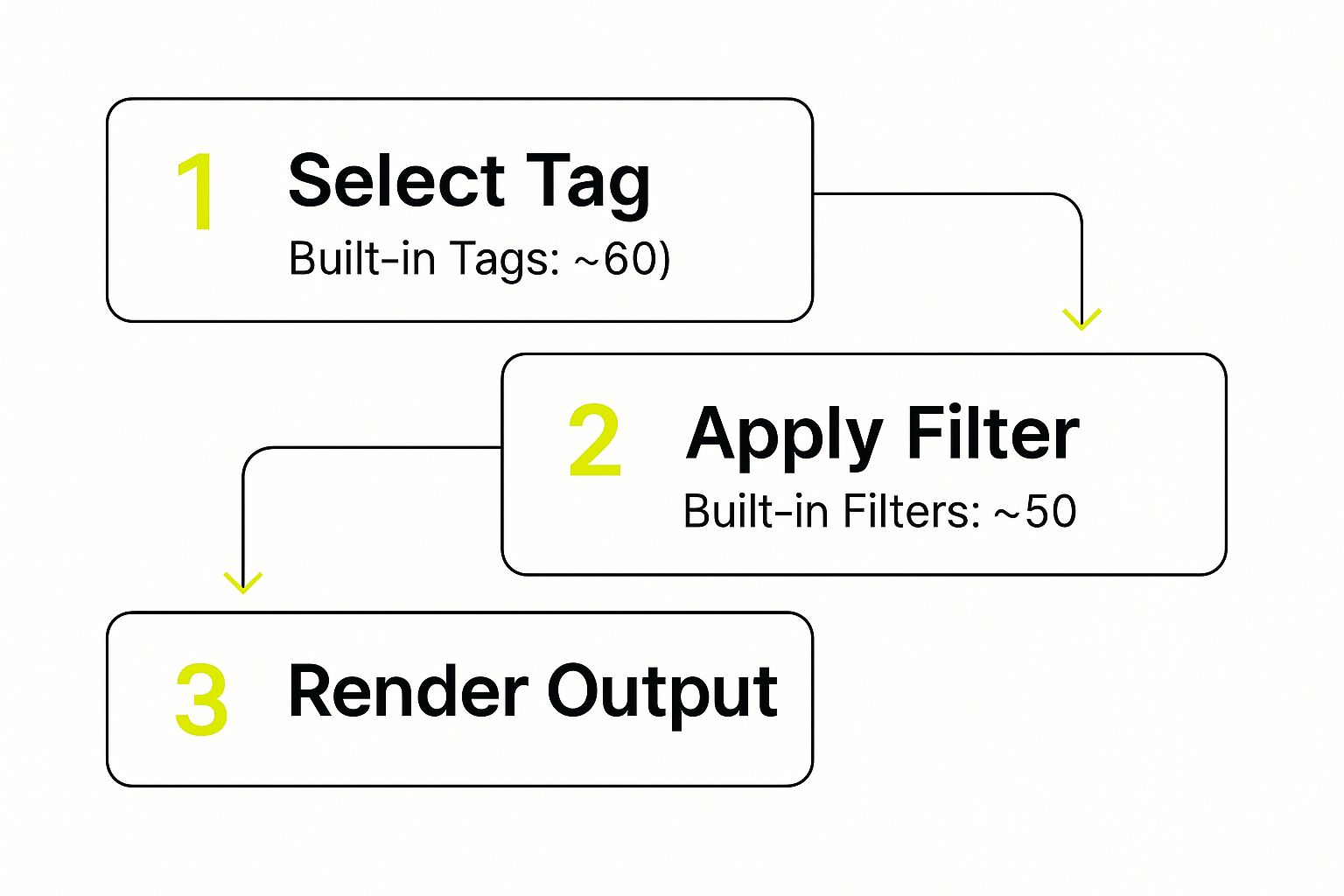
This process illustrates how Liquid transforms data into dynamic content for your Shopify store, emphasizing the interplay between tags and filters. This flow highlights Liquid’s power and flexibility. For more specialized development services, consider exploring the Shopify Development services offered by ECORN.
Implementing Version Control
Using a version control system like Git is highly recommended. Git helps you track changes to your code, revert to older versions if necessary, and collaborate with other developers effectively. This is especially valuable for larger projects or team-based development, as it prevents accidental overwrites and maintains a clear development history.
By setting up a well-equipped Liquid workspace with these tools and practices, you can streamline your workflow and maximize Liquid’s potential. This allows you to concentrate on building attractive and functional online storefronts, rather than wrestling with technical challenges.
Mastering Liquid's Powerful Syntax Structure

Shopify Liquid is a dynamic templating language that allows you to create unique online shopping experiences. It's more than just basic templating; it offers a powerful way to control how your Shopify store displays information and interacts with customers. The core components of Liquid are Objects, Tags, and Filters. These elements work together to provide developers with fine-grained control over the storefront.
Understanding Liquid Objects
Objects contain the data within your Shopify store. They hold information about products, collections, customers, and much more. You can think of them like containers storing all the vital information about your store. Accessing this information is done through a specific syntax. For example, product.title displays the product's title. Using objects is how you inject dynamic content into your templates, pulling information directly from your store's database. Need to display a product's price? Use the product.price object.
Controlling Logic with Liquid Tags
Tags control the logic and flow of your Liquid code. They are easily recognizable by their enclosing symbols: {% %}, {{- -}}, or {%- -%}. Tags perform a variety of functions. They create loops, such as when you want to display multiple products. They also establish conditional statements, allowing you to display specific content based on certain criteria. Using tags lets you create a personalized and interactive experience for your customers, like showcasing featured products in a slideshow or displaying a tailored message to logged-in users.
Transforming Output with Liquid Filters
Filters modify the output of Liquid objects. They're added to objects using the pipe symbol (|). Filters allow you to format data in numerous ways. The date filter, for instance, formats dates, while the capitalize filter capitalizes text, and the money filter correctly formats currency values. Filters are crucial for presenting data to your customers in a consistent and user-friendly way. For example, when displaying product descriptions, you might use filters to truncate long text or highlight specific keywords.
Combining Objects, Tags, and Filters for Dynamic Content
The true power of Liquid comes from combining these three elements. Let’s say you want to display a sale banner, but only for products currently on sale. You'd use an object to get the product's price, a tag to set up a conditional statement based on the sale price, and a filter to format the displayed sale percentage. You might find this helpful: How to master Shopify Liquid Syntax. This interconnectedness allows developers to build highly responsive and personalized online stores.
Practical Examples of Liquid in Action
Think of a dynamic product page that changes based on available inventory. Using objects to access inventory data and tags to implement the logic, Liquid can display a "low stock" warning when a product's quantity dips below a certain level. This keeps customers informed and might encourage them to purchase sooner.
Another example is using Liquid to personalize product recommendations. By tracking a customer's browsing history, Liquid can suggest similar items, creating a better customer experience and potentially boosting sales.
Maintaining Clean and Maintainable Code
As your Liquid code becomes more complex, writing clean and maintainable code is important. Using descriptive variable names, adding comments to clarify complex logic, and organizing code into reusable snippets will save you time and effort, especially when working on large themes or with other developers. This contributes to better website performance and a smoother development process. By starting with clean code, you'll build a strong, customizable foundation for your Shopify theme. Mastering these core concepts of Liquid allows you to create a highly engaging and personalized shopping destination for your customers.
Building Theme Templates That Convert Visitors

Creating a high-converting Shopify store requires more than just great products. It demands a well-structured and optimized theme built with Shopify Liquid. This part of our Shopify Liquid tutorial explores how professional developers structure their theme files for maximum impact. This includes understanding how templates relate to each other, building modular sections, and structuring key templates for a smooth customer journey.
Structuring Theme Files for Customization and Performance
Think of your Shopify theme like a house. Each room has a purpose, and they're all connected. Similarly, different template files in your theme, like product.liquid, collection.liquid, and cart.liquid, work together to create a cohesive shopping experience. Professional developers prioritize clean, organized code within these files, much like a well-designed blueprint. This organized structure not only boosts site performance but also makes future customization easier.
Implementing Modular Sections
Creating modular sections is a key aspect of theme development. These are reusable code blocks that can be easily added and customized on different pages.
Some examples of modular sections include:
- Featured product sections
- Testimonial sections
- Newsletter signup sections
By making these sections modular, merchants can customize their storefront without directly editing code. This flexibility significantly improves your theme's usability.
Structuring Key Templates for Conversion
Effective product, collection, and cart templates are essential for a high-converting store. Let's look at each:
-
Product Templates: A well-structured
product.liquidtemplate focuses on showcasing product details effectively. This includes high-quality images, detailed descriptions, variant selectors, and clear calls to action. -
Collection Templates:
collection.liquidtemplates should display products in a way that encourages browsing. Filters, sorting options, and visually appealing product grids are crucial elements. -
Cart Templates: The
cart.liquidtemplate is vital in the final purchasing stages. A streamlined design, clear order summaries, and prominent checkout buttons can significantly reduce cart abandonment.
By optimizing these key templates, you can guide shoppers through the customer journey, leading to a purchase. This requires careful planning and understanding customer behavior. You might be interested in: How to master Liquid Code Optimization.
The Importance of Theme Performance
Besides visual appeal and functionality, theme performance is crucial for user experience and Search Engine Optimization (SEO). Performance metrics show how well a site meets user expectations for speed and usability. For example, in September 2023, 59.5% of Shopify sites passed all Core Web Vitals (CWVs), showing strong performance compared to other platforms. Time to First Byte (TTFB) is another key metric where Shopify Liquid excels, delivering fast initial load times. Find more detailed statistics here: Learn more about Liquid performance vs. headless commerce.
A high-performing theme improves user satisfaction, reduces bounce rates, and can boost search engine rankings. By optimizing your theme's code and structure, you ensure your store loads quickly and efficiently.
Building effective theme templates is a continuous optimization process. By focusing on structure, modularity, and key template design, developers can create Shopify stores that are both attractive and effective at driving sales. This approach requires understanding both Shopify Liquid and best practices for online sales.
Creating Product Pages That Actually Sell
Product pages are the core of any successful Shopify store. They're the place where customers make the crucial decision to buy. This section will show you how to transform your product pages into high-converting sales machines. We’ll explore key elements and how to use Shopify Liquid to boost your sales.
Essential Elements of High-Converting Product Pages
Effective product pages don't just display product information; they actively encourage purchases. Here's what you need:
-
Dynamic Variant Selectors: Let customers easily choose options like size or color. Liquid lets you create selectors that update images and pricing in real time.
-
Intelligent Inventory Displays: Showing stock levels, especially low stock, can create urgency. Liquid lets you tailor messages based on inventory.
-
Persuasive Pricing Features: Highlighting sales and discounts can strongly influence buying decisions. Liquid allows for dynamic pricing displays.
-
Product Recommendations: Suggesting related products can increase average order value. Liquid makes implementing these recommendations simple.
-
Cross-Selling Opportunities: Offering complementary items can boost cart size. Liquid enables dynamic cross-selling based on categories or tags.
-
Social Proof: Reviews and testimonials build trust. Liquid can integrate these elements dynamically.
Leveraging Liquid for Enhanced Product Pages
Liquid gives you the power to build these features effectively. Here are a few practical applications:
-
Dynamically Updating Product Images: Use Liquid to instantly change the main image when a customer selects a different variant. This provides a more accurate product view.
-
Displaying Low Stock Warnings: Use Liquid’s conditional logic to display a "Low Stock" message when inventory dips below a set level. This encourages faster purchases.
-
Creating Personalized Product Recommendations: Use Liquid to recommend products based on browsing history, creating a more tailored shopping experience.
To better understand the technical implementation, let's examine the following table:
This table outlines common product page features and their Liquid implementation. Understanding these elements is key to crafting effective product pages.
| Feature | Purpose | Complexity Level | Key Liquid Objects/Tags | Performance Impact |
|---|---|---|---|---|
| Variant Selectors | Allow customers to select product options | Beginner | product.options, product.variants |
Low |
| Inventory Displays | Show stock levels | Beginner | product.available |
Low |
| Pricing Features | Display pricing and discounts | Beginner | product.price, product.compare_at_price |
Low |
| Product Recommendations | Suggest related products | Intermediate | related_products |
Moderate |
| Cross-Selling | Offer complementary products | Intermediate | collections, tags |
Moderate |
| Social Proof | Display reviews and testimonials | Intermediate | Custom apps, metafields | Moderate |
As shown in the table, many crucial features can be implemented with relatively simple Liquid code. This allows even beginners to enhance their product pages.
Maintaining Page Performance
While adding features is crucial, maintaining fast loading times is essential. Optimize your Liquid code and images. Slow pages can lead to lost sales.
By implementing these strategies with Liquid, your product pages become powerful sales tools. This section has provided a solid base for building effective product pages that resonate with customers and drive conversions.
Optimizing the Checkout Experience With Liquid
The checkout process is the last step a customer takes before making a purchase. A smooth and efficient checkout is essential for increasing sales. This part of our Shopify Liquid tutorial shows you how to use Liquid to improve this crucial stage. We'll explore ways to build trust, display clear shipping information, and offer upsells without interrupting the buying process.
Building Trust and Reducing Friction
The checkout experience can significantly impact whether a customer completes a purchase. Customers abandon their carts for several reasons, including unexpected fees or a lack of trust in the website. Showing trust signals during checkout can dramatically improve completion rates. Display security badges and guarantees to assure customers their information is secure. Clearly presenting your return policy also builds confidence and encourages shoppers to buy.
Providing Clear Shipping Information
Shipping costs are a primary reason for cart abandonment. Display shipping options and prices clearly during checkout using Liquid. Calculating and displaying shipping rates based on the customer's location increases transparency and avoids surprises. You can also offer free shipping thresholds to incentivize larger purchases.
Upselling Without Disruption
The checkout page offers an excellent opportunity for upselling. However, a poorly implemented upsell can disrupt the process and lead to abandoned carts. Liquid allows you to suggest related products or add-ons during checkout without complicating things. Offer these upsells strategically, ensuring they complement the existing cart items and don't distract the customer from completing their purchase.
Branding Your Checkout
While Shopify's checkout is secure and functional, you can personalize it with your branding using Liquid. Customizing the checkout's look and feel to match your store creates a more cohesive experience for your customers. This might include incorporating your logo, using your brand colors, or adding custom messages. This reinforces your brand throughout the customer journey. Shopify development continues to find the right balance between simplicity and customization. Shopify Liquid remains key for many stores, while newer frameworks like Hydrogen serve headless commerce needs. Learn more about this changing environment. Creators looking to sell online can check out this guide on how to Sell Courses On Shopify Your Guide To Success.
Shopify Plan Considerations
Different Shopify plans offer varying levels of checkout customization. Knowing the capabilities and limits of your plan is essential. All plans provide a secure checkout, but higher-tier plans typically give you more control with Liquid customizations. This allows for a more personalized checkout experience. Carefully consider your plan's limitations before implementing any advanced Liquid customizations. By using these techniques, you can transform your checkout into a smooth, brand-consistent experience that encourages conversions. Remember, the checkout is the final stage in a customer's purchase journey. Making it as simple and trustworthy as possible is crucial for success in eCommerce.
Troubleshooting Like a Liquid Pro
Even seasoned Shopify developers sometimes run into problems with Liquid. It’s completely normal. This part of our Shopify Liquid tutorial will give you the skills to troubleshoot these issues and keep your store running smoothly. We'll cover how to diagnose rendering problems, optimize slow code, handle large datasets, and identify problematic code.
Diagnosing Template Rendering Issues
One common issue is incorrect template rendering. This can show up as blank pages, unexpected content, or error messages. A good first step is checking your Liquid code for syntax errors. Something as small as a typo can break your whole template. For example, a missing curly brace } or an incorrect variable name can cause problems. Carefully review your code, or use a code editor with Liquid syntax highlighting to catch these errors faster.
Another possible problem is incorrect data mapping. Make sure your Liquid objects match your store's data structure. For example, if you’re trying to access product.image but the object is actually called product.featured_image, your code won't work. Double-checking these object names can prevent a lot of frustration.
Optimizing Slow-Loading Liquid Code
Slow pages hurt both user experience and SEO. Optimizing your Liquid code is key for a successful Shopify store. One common cause of slowdowns is too many database queries. Minimize how often you access your store’s database within your Liquid code. You might find this helpful: Common Liquid Code Issues Slowing Shopify Stores. Use good caching strategies whenever possible.
Another performance issue is inefficient loops and conditional statements. Check these parts of your code to make sure they’re optimized. Avoid nested loops when possible and use efficient comparison operators. This can greatly improve rendering times.
Handling Large Datasets Efficiently
Working with lots of data can strain your Liquid code. When using large collections or product lists, consider using pagination. This breaks large datasets into smaller pieces, improving page load times and user experience. Also, optimize your filters and sorting. Using efficient algorithms here can reduce processing time, keeping your code responsive.
Refactoring for Better Results
Sometimes, the best approach is to refactor your code. This means restructuring and rewriting parts of your code to make it easier to read, maintain, and perform better. Learn to recognize signs of problematic code, like really long code blocks, duplicated logic, or confusing variable names. Refactoring can greatly improve your code’s quality and prevent future problems.
Looking for help with your Shopify store? E-commerce Dev Group offers Shopify design, development, and support services. We offer many solutions, from theme customization and app integration to performance optimization. Visit us at scaleshopify.com to learn more.
