


Understanding The Shopify Theme Architecture
Customizing your Shopify theme is essential for a unique and engaging online store. Before making changes, understanding the underlying architecture is key. This knowledge helps you make informed decisions and avoid errors. Think of it like renovating a house: you wouldn't start demolition without understanding the supporting structure.
Key Components Of A Shopify Theme
Shopify themes are built on several components that work together:
-
Template files: Written in Liquid (Shopify's templating language), these files control the layout and structure of your store's pages. They're the blueprints for your homepage, product pages, collection pages, and other sections.
-
Sections: These are modular blocks of content you can arrange and customize within your theme editor. They provide flexibility in presenting information, letting you create dynamic and visually appealing pages. Imagine them as furniture in your house – rearrange them to create different looks and functions.
-
Assets: These include images, stylesheets (CSS), and JavaScript files. They contribute to the visual presentation and interactive elements of your theme. They're the paint, decorations, and appliances that give your house its personality.
-
Config files: Files like
settings_data.jsonstore your theme's settings and configurations. This allows customization without directly modifying the code.
No-Code Vs. Code Customizations
There are two main ways to customize a Shopify theme: the no-code theme editor and code-based customizations. To understand the importance of theme customization, read more about it in this article: Shopify Theme Customization. The theme editor provides a visual interface for changes without coding. It's ideal for simple adjustments like changing colors, fonts, and rearranging sections. For complex changes, you'll need to work with the code itself. This involves using Liquid, HTML, CSS, and JavaScript to modify the theme's functionality and appearance. Choosing the right approach depends on your technical skills and desired customizations.
Choosing the right theme is paramount. Selecting the right Shopify theme is crucial for e-commerce success regarding user experience, mobile optimization, and conversion rates. Mobile optimization is vital, with almost 60% of global website visits from mobile devices. A well-designed theme can boost conversion rates by up to 200%. Learn more about Shopify themes and their impact.
Liquid: The Language Of Shopify Themes
Liquid is a templating language created by Shopify for dynamically loading content into your online store. It connects your store's data and the theme files to display product information, customer details, and other dynamic content. While it may sound complex, Liquid is relatively simple to learn and provides a powerful way to customize your Shopify theme. Understanding Liquid basics opens up possibilities for tailoring your store to your specific needs. This structured approach allows for a more controlled and maintainable customization process.
No-Code Customization: Mastering the Theme Editor
Not everyone is a programmer, and that's perfectly fine. Shopify understands this and offers a powerful theme editor that lets you customize your online store without needing any coding skills. This visual tool translates your clicks and selections into actual changes, making customization easy for everyone. Think of it like redecorating a room: you can move furniture (sections), repaint the walls (color palettes), and hang new pictures (images) without needing a contractor.

Navigating The Theme Editor
The theme editor's user-friendly design lets you visually customize key parts of your Shopify theme. You can change colors, fonts, and layouts to match your brand. Plus, you can preview these changes live, seeing exactly how your store will appear to customers. Even small tweaks, like testing different color palettes, can significantly impact your brand image and how many visitors make a purchase.
Harnessing The Power of Sections
Sections are the core components of your Shopify store's layout. The theme editor lets you add, remove, and rearrange these sections to build dynamic, sales-focused pages. This modular system provides great flexibility. Imagine building with LEGOs: you can combine different bricks (sections) in countless ways to create unique structures (pages). This layout control helps you shape the customer journey, guiding them smoothly from browsing to buying.
Customizing Templates For Key Pages
Beyond overall styling, the theme editor lets you customize individual templates. This is especially helpful for product and collection pages, where thoughtful design choices can strongly influence purchasing decisions. For instance, showcasing important product features on product pages can boost sales. Likewise, making collection pages easy to navigate encourages customers to explore more items, increasing their time on your site and how much they spend on average. Learn more in this article about How to master Shopify theme customization.
Achieving Brand Consistency
With the theme editor, you can maintain a consistent brand identity across your entire store. This unified look builds customer trust and reinforces your brand. For example, using the same fonts and colors throughout your site creates a professional and polished experience. This kind of attention to detail subtly influences how customers see your brand, connecting it with quality and dependability. You can find more advanced customization tips in this resource on How to master Shopify theme customization further. It offers deeper insights into truly personalizing your store. A well-designed theme is more than just attractive—it's a key tool for strengthening your brand and driving sales.
The following table provides a helpful overview of the Shopify Theme Editor’s customization options:
Shopify Theme Editor Customization Options
This table outlines the key customization options available through Shopify’s Theme Editor and what each can modify.
| Customization Area | What You Can Change | Skill Level Required | Impact on Store |
|---|---|---|---|
| Sections | Layout, content placement, add/remove sections | Beginner | Significant – affects user experience and flow |
| Colors | Color palette, background colors, font colors | Beginner | Moderate – influences brand perception and readability |
| Fonts | Font types, sizes, styles | Beginner | Moderate – impacts readability and brand aesthetic |
| Images | Product photos, banner images, logo | Beginner | Significant – crucial for visual appeal and product presentation |
| Templates | Page layouts for product pages, collection pages, homepage | Intermediate | Significant – tailors page design for specific purposes |
In summary, the Shopify Theme Editor gives you substantial control over your store's design, allowing for a personalized and effective online presence. By understanding the various customization areas and their impact, you can make informed decisions to enhance your brand and improve your sales.
Code-Based Customization That Actually Works
Ready to go beyond your theme's default settings? This section explores how specific code changes can significantly improve your Shopify store. We'll guide you through accessing and editing your theme files directly within Shopify's code editor, with a focus on safety. This includes backing up your theme before making changes, so you can easily restore it if needed.
Accessing Your Theme's Code and Creating Backups
Before changing any code, it's important to protect your current theme. In your Shopify admin, go to "Online Store" and then "Themes." Locate the theme you're working with, click the "Actions" dropdown, and select "Duplicate." This creates a backup you can revert to if something goes wrong. Now, with your active theme, click "Actions" and choose "Edit Code." This opens the code editor, giving you access to all the theme files.
The Power of Liquid: Dynamic Content and Functionality
Liquid, Shopify's templating language, is the key to dynamic customization. Think of it as the connection between your store's data and what customers see. For example, you can use Liquid to personalize greetings. A simple {% if customer %} statement in your theme's code displays "Welcome back, {{ customer.first_name }}!" for logged-in customers and a different message for visitors. This personal touch helps build stronger customer relationships. You can also use Liquid to create product displays that change based on inventory, highlighting available items.
Transforming Visuals With CSS: Beyond Preset Styles
While Liquid manages information flow, Cascading Style Sheets (CSS) control the visual presentation. Smart CSS adjustments let you refine your store's appearance beyond the template's limits. This can be anything from small hover animations on product images to major responsive design changes for optimal viewing on all devices. For instance, you could add a CSS class to your theme that creates a smooth zoom effect when hovering over a product image, attracting attention and encouraging a closer look.
Prioritizing Performance: Speed and User Experience
Customizing your Shopify theme can significantly impact your store's performance, especially speed and user experience. Fast loading times are crucial for customer engagement and sales. Studies show that every second of load time can decrease revenue by as much as 7%. You can find more detailed statistics here. This highlights the importance of fast themes. Shopify's average theme load time of 2.5 seconds is better than the average e-commerce site, demonstrating its focus on performance. Your customizations should maintain this speed for a positive customer experience.

By mastering these code-based customizations, you gain more control over your store’s functionality and appearance, boosting engagement and conversions. Remember, well-planned changes, based on best practices, are essential for successful customization.
Conversion-Focused Element Customization
Beyond aesthetics, customizing specific elements within your Shopify theme directly influences your profits. It's not about making your store look nice; it's about making it sell. By analyzing successful Shopify stores, we can identify modifications that encourage purchases. Think of it like optimizing a physical store layout: strategically placing high-margin items and designing clear pathways. This same logic applies online. Learn more in this helpful article about How to master Shopify theme customization.
Product Page Enhancements: Showcasing Your Best
Product pages are where sales happen. Customizing these pages to be effective is essential. High-quality product galleries are a must. Showcase products from every angle with zoomable images and 360-degree views. This lets customers experience the product online. Also, consider embedding videos demonstrating product use or highlighting key features.
Another crucial customization is the add-to-cart experience. Make the button prominent and easy to find. Consider A/B testing different button colors and placements to optimize for clicks.
Collection Page Strategies: Guiding Discovery
Collection pages should balance product discovery with purchase intent. Avoid overwhelming customers with too many options. Instead, implement filtering and sorting options to help them find what they need. Also, consider a "quick view" feature to let customers preview product details without leaving the page. This reduces clicks and keeps them engaged.
Some successful stores highlight specific products within a collection to draw attention to bestsellers or new arrivals.
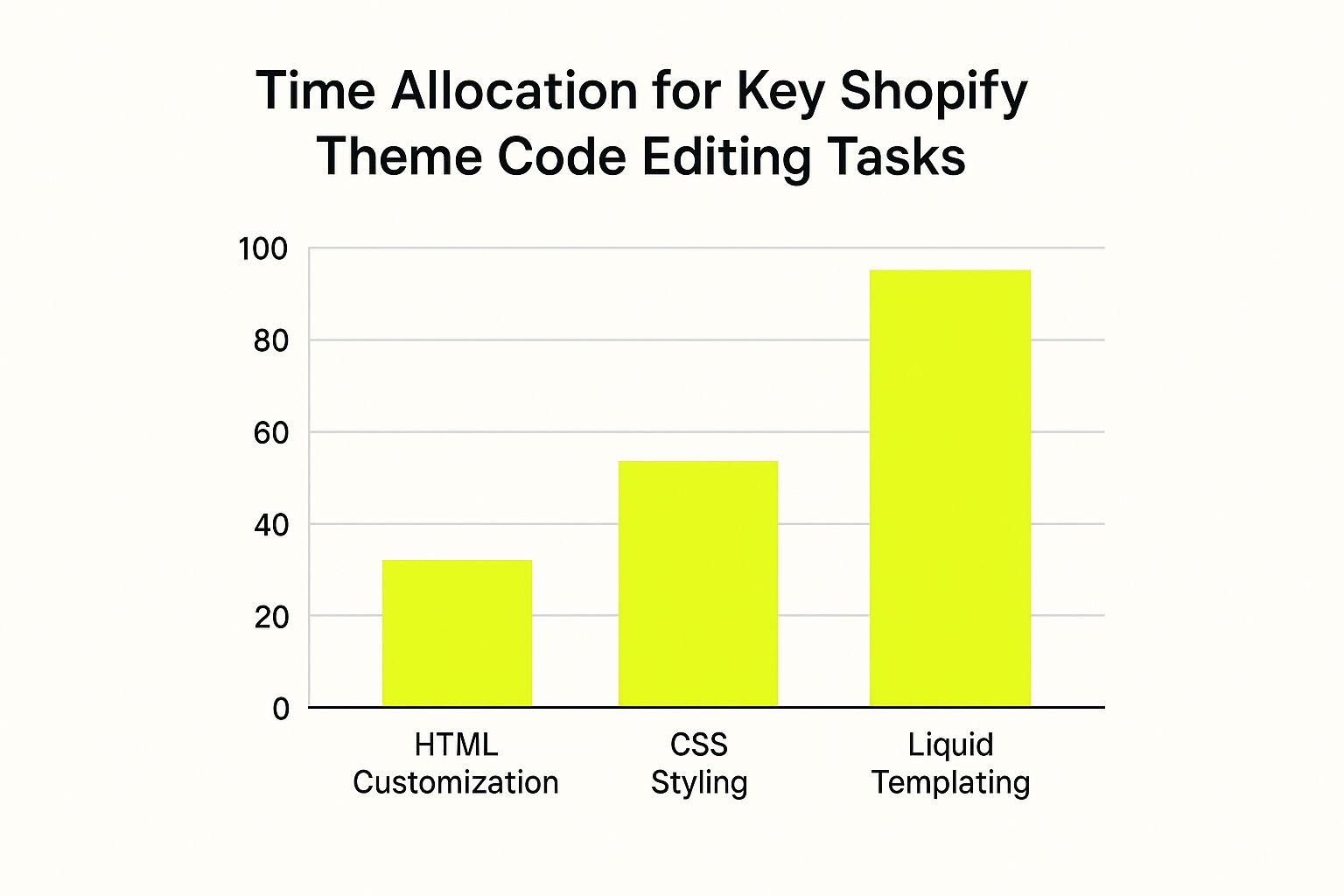
The infographic above shows the relative time spent on key Shopify theme code editing tasks. A significant portion of time is dedicated to Liquid templating. While HTML provides structure and CSS styles the appearance, Liquid connects your data to the storefront. This makes it critical for personalized experiences and conversion-focused elements.
The following table summarizes the potential impact of customizing different store elements on your conversion rates, and how difficult those customizations are to implement.
Conversion Impact of Theme Element Customizations
| Store Element | Customization Type | Potential Conversion Impact | Implementation Difficulty |
|---|---|---|---|
| Product Page | High-Quality Images/Videos | High | Medium |
| Product Page | Prominent Add-to-Cart Button | Medium | Low |
| Collection Page | Filtering and Sorting | Medium | Medium |
| Collection Page | Quick View Feature | Low | Medium |
| Checkout Page | Streamlined Checkout Process | High | High |
| Checkout Page | Trust Badges/Security Indicators | Medium | Low |
This table illustrates how seemingly small changes can have a big impact on your conversion rate. Prioritizing the easier implementations can give you a quick win, while tackling the more difficult ones can lead to significant long-term gains.
Checkout Optimization: Reducing Abandoned Carts
A streamlined checkout is key to reducing cart abandonment. 70% of online shoppers abandon their carts, often due to a complicated checkout. Minimize required fields, offer guest checkout, and display security badges to build trust.
Consider adding a progress bar to show checkout progress. This can reduce anxiety and encourage completion. Also, strategically place trust signals, like testimonials or guarantees, to reinforce the purchase decision.
Practical Customizations and the Psychology of Conversion
These customizations are backed by consumer psychology. High-quality images tap into the visual nature of online shopping. Streamlined checkouts address the desire for efficiency and security. By understanding the why, you can make customizations that resonate with your audience and drive conversions. You can find more advanced customization tips in this resource on How to master Shopify theme customization further. To improve the user experience and boost sales, consider strategies for Shopify conversion rate optimization.
Extending Your Theme With Strategic App Integration
While directly customizing your Shopify theme offers a great deal of control, sometimes using specialized tools is simply more efficient. This section explores how to strategically integrate third-party apps to enhance your theme without compromising site performance. Think of it like adding specialized tools to your workshop—you wouldn't build everything from scratch if a power tool could do the job faster and better.
Leveraging Shopify Apps for Enhanced Functionality
Shopify boasts a vast app ecosystem designed to extend your store’s capabilities. These apps cater to a variety of needs, from optimizing layouts to enhancing product displays.
- Layout builders empower you to craft unique shopping experiences tailored to your brand.
- Product display enhancers boost conversions through improved visualization.
Choosing the right apps can significantly improve your workflow and elevate the customer experience.
Evaluating App Compatibility and Avoiding Integration Issues
Before installing any app, carefully assess its compatibility with your current theme. Check user reviews and ratings to understand the app’s performance and stability.
Also, consider the app’s impact on site speed. A slow-loading store can negatively affect user experience and SEO. This is critical because a one-second delay in page load time can result in a 7% reduction in conversions.
Professional Development Tools for Streamlined Customization
For more advanced customizations, professional development tools can simplify your workflow.
- Code editors offer features like syntax highlighting and autocompletion, making coding easier.
- Version control systems like Git allow you to track changes, collaborate, and revert to earlier versions if needed.
These tools are vital for maintaining a clean and organized codebase, especially for complex projects. Check out our guide on How to master Shopify app integration.
Prioritizing Performance: Balancing Apps and Speed
While apps add valuable functionality, it’s essential to prioritize site performance. Too many apps can slow down your store, resulting in lost sales. Regularly review your installed apps and remove any that are no longer needed or are negatively impacting performance.
Optimizing images and minimizing unnecessary code can also help maintain a fast-loading store. To further refine the user experience and increase sales, consider strategies for Shopify conversion rate optimization. Remember, apps that hinder your store’s speed end up costing more than they’re worth.
Choosing the Right Apps for Your Specific Needs
The key to successful app integration is selecting tools that directly address your business needs. Consider your target audience, product offerings, and marketing goals when choosing apps.
For instance, if you sell visually driven products, a quality image gallery app might be a worthwhile investment. If you focus on social media marketing, integrating social sharing and engagement apps could be beneficial. By strategically choosing apps aligned with your overall strategy, you can maximize their impact and improve your theme customization.

Mobile Optimization: Where Most Theme Customizations Fail
With more and more people shopping on their phones, having a mobile-friendly Shopify store is no longer optional—it's crucial. In the world of e-commerce, mobile traffic now surpasses desktop traffic. Many beautifully customized themes look great on a desktop computer but fail to translate to smaller screens. This can lead to frustrated customers and ultimately, lost sales. This section will cover how to make sure your theme customizations look fantastic on any device.
Responsive Design Principles for Shopify Themes
The cornerstone of a mobile-friendly website is responsive design. This means your website automatically adjusts its layout and content to fit different screen sizes. When customizing your Shopify theme, it's vital to consider how every element will appear on a mobile device. Don't simply shrink everything; instead, redesign the layout for a seamless mobile experience. For example, a multi-column layout that works well on a desktop might be better as a single column on mobile to improve readability. Learn more in our article about How to master Shopify performance optimization.
Comprehensive Testing: Catching Mobile Issues Early
Testing is essential to identify and resolve mobile issues before they impact your customers. Thankfully, Shopify provides built-in tools for previewing your theme on different devices. You can also use external testing platforms like BrowserStack to see how your store performs across various devices and browsers. Testing should be an integral part of your customization process, not an afterthought.
Optimizing Touch Interactions for Mobile Users
Remember, mobile users interact with your store differently than desktop users. Tap targets, the areas users tap with their fingers, must be large enough to prevent accidental clicks. A good rule of thumb is to make tap targets at least 44 pixels wide and tall. Also, consider using intuitive gestures, like swiping and pinching to zoom, to make navigation feel more natural on a touchscreen.
Mobile Performance: Speed and Bounce Rates
Mobile users are often on the go and expect fast loading times. A slow mobile store can drastically increase your bounce rate, which is the percentage of visitors who leave your site after viewing only one page. Optimizing images is key for mobile performance. Compress your images to reduce load times without sacrificing quality and enhance the user experience. Even a one-second delay can negatively impact your conversion rate.
Practical Strategies for Mobile-First Customization
Think mobile-first. When customizing your theme, start by designing for the smallest screen and then scale up. This approach ensures a great mobile experience and often results in cleaner, more efficient designs for larger screens as well. By prioritizing mobile, you're ensuring that your most frequently used access point delivers a positive user experience, paving the way for increased customer engagement.
Ready to take your Shopify store to the next level? E-commerce Dev Group provides expert Shopify design, development, and support, specializing in theme customization and performance optimization. Visit us at ScaleShopify.com to learn more.
