


Why Sellers Are Rushing to Connect Shopify to Amazon

Connecting your Shopify store to Amazon presents significant opportunities for business growth. This integration is a strategic move that many sellers are using to expand their reach and boost sales. But what makes this connection so beneficial? Let's delve into the key advantages.
Expanding Your Market Reach
One of the biggest perks is tapping into Amazon's enormous customer base. Millions of shoppers actively browse Amazon, searching for products. Connecting your Shopify store is like setting up shop in this bustling online marketplace. You dramatically increase your product visibility and sales potential. This is particularly helpful for new businesses or those trying to enter new markets.
Integrating with Amazon also expands your global presence. Shopify operates in 175 countries and hosts over 5.23 million active stores worldwide. Connecting to Amazon allows sellers to leverage their global logistics network and established customer trust, streamlining the shipping process. Learn more about expanding global reach through integration here.
Diversifying Revenue Streams
Depending on a single sales channel can be risky. Connecting Shopify to Amazon helps you diversify your revenue streams, building a more resilient business model. If one platform experiences a slowdown, you have a backup channel to maintain sales. This not only mitigates risk but also creates new avenues for growth. It's like having two powerful engines driving your sales forward.
Enhancing Brand Credibility
Selling on Amazon, particularly for newer businesses, can boost your brand credibility. Amazon is known for its customer-centric approach. Associating your brand with this trusted platform strengthens customer confidence, potentially leading to higher conversion rates and brand loyalty. It acts as a powerful endorsement from a recognized leader in e-commerce.
Supporting Different Business Models
Another key advantage is the flexibility of this integration. Whether you're involved in dropshipping, selling handmade items, or managing a large inventory, connecting Shopify to Amazon adapts to various business models. You can customize the connection to match your specific needs and workflow, ensuring a seamless transition regardless of your business size or operational complexity.
Let's take a closer look at how integrating Shopify and Amazon compares to a Shopify-only approach:
To help illustrate the advantages, the following table summarizes the key benefits.
Benefits of Connecting Shopify to Amazon
This table outlines the key advantages businesses gain when integrating their Shopify store with Amazon marketplace.
| Benefit Category | Shopify-Only Approach | Shopify + Amazon Integration |
|---|---|---|
| Market Reach | Limited to your Shopify store's marketing efforts | Expands to Amazon's massive customer base |
| Revenue Streams | Reliant on a single sales channel | Diversified across Shopify and Amazon |
| Brand Credibility | Requires independent brand building | Enhanced by association with Amazon's trusted platform |
| Business Model Support | Can be limited depending on scalability | Adaptable to various models, including dropshipping and large inventory management |
| Global Reach | Requires independent international setup and logistics | Leverages Amazon's existing global infrastructure |
Connecting Shopify to Amazon provides significant benefits, particularly in expanding market reach, diversifying revenue, and enhancing brand credibility. While a Shopify-only approach can be successful, integrating with Amazon opens doors to a broader audience and creates a more resilient and scalable business.
Essential Prerequisites Before You Connect the Platforms
Connecting your Shopify store to Amazon can significantly broaden your reach. But before you begin, there are some key things you need to do to ensure a smooth transition. Taking the time to prepare will make the process much more efficient.
Account Requirements and Eligibility
The first step is to make sure you have the right account types on both platforms. For Amazon, you'll need a Professional Seller Account. This specific type of account gives you access to the features necessary for integration and inventory management. Double-check that your bank account and payment details are correct on both platforms. This will ensure timely payments and prevent any hold-ups. For more insights on managing your Shopify finances, check out this helpful resource: How to master your shopify financial reports.
Navigating Amazon's Approval System
Amazon has specific eligibility criteria that you'll need to understand. Some product categories require pre-approval. For example, health, beauty, and electronics often have stricter rules. Researching these requirements ahead of time will save you a lot of hassle down the line. Make sure all your products comply with Amazon's selling guidelines. This includes accurate product descriptions, correct categorization, and following their packaging and labeling rules. Understanding ecommerce platform integration can help illustrate why connecting Shopify and Amazon is such a strategic decision. Sellers need a Professional Seller Account on Amazon, a US bank account, and products that comply with Amazon’s guidelines. Connecting to Amazon offers huge benefits, such as reaching their vast customer base, something difficult to replicate elsewhere. Streamlined logistics through Amazon also makes shipping and delivery much simpler. For a deeper dive into these requirements and benefits, see this article: Shopify Amazon App: Why Ecommerce Sellers Need to Integrate.
Preparing Your Product Catalog and Inventory
Having a well-organized product catalog is essential for a smooth integration. Ensure all your product information, including titles, descriptions, and images, is consistent across both platforms. This creates a better customer experience and improves your product visibility on Amazon.
Review your pricing strategy and make sure it's competitive within the Amazon marketplace. Think about your inventory management system, too. Adding Amazon creates additional complexity, so your system needs to handle real-time inventory updates to avoid overselling.
Seamless Integration: Step-by-Step Connection Process
Connecting your Shopify store to Amazon might seem like a big task, but with a clear process, it becomes manageable and rewarding. This guide simplifies the connection, removing the guesswork for a smooth integration.
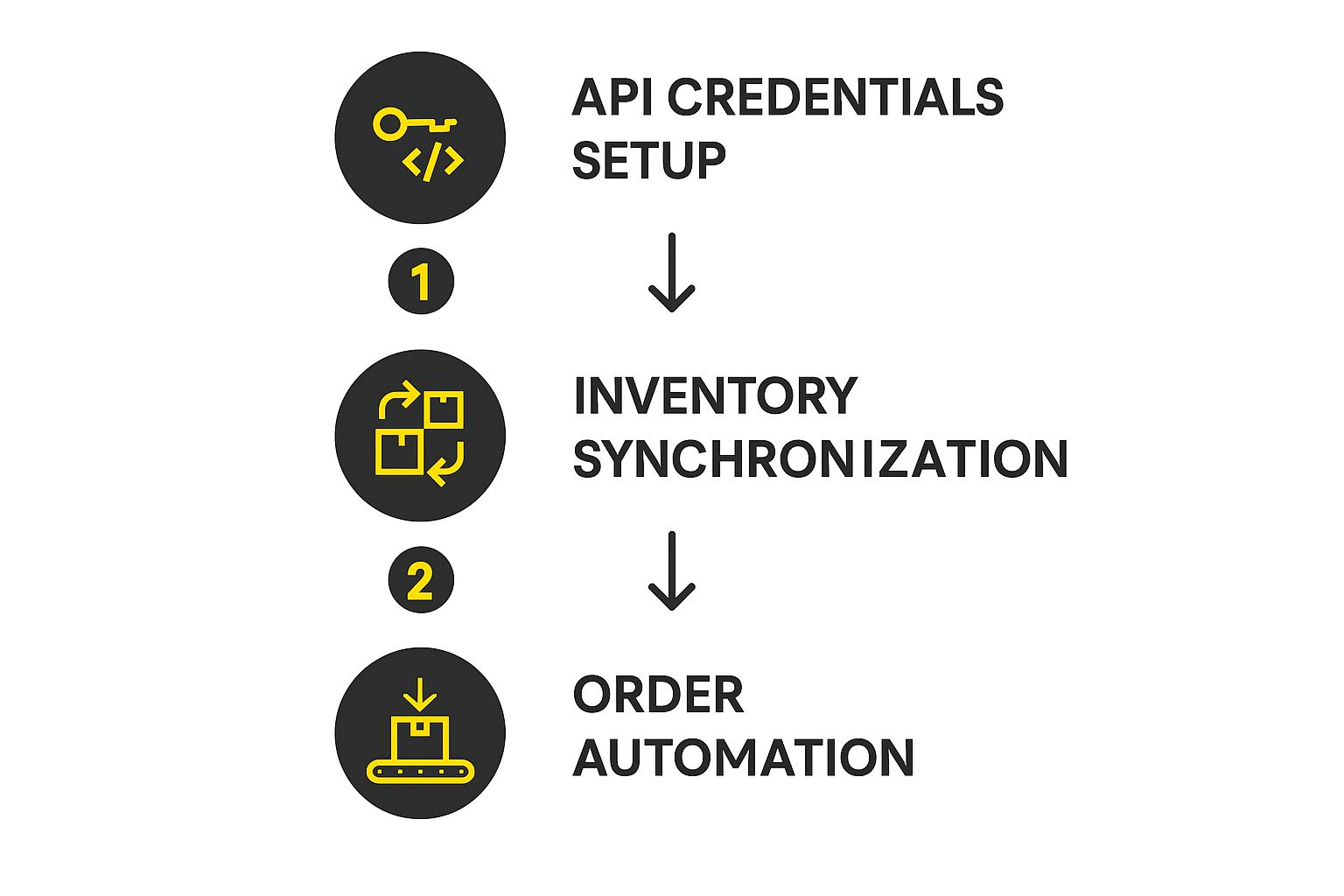
The infographic above shows the three key steps: setting up API credentials, synchronizing inventory, and automating orders. These steps are the core of the integration, ensuring efficient data flow between the two platforms.
Check For Category Approval
Before connecting, check if your products need category approval on Amazon. Some categories, like health, beauty, and electronics, may have specific requirements. Check by navigating to "Add a Product" in your Amazon Seller Central account. If approval is needed, submit the necessary documents (like certifications or invoices). This avoids potential problems later.
Optimize Your Shopify Products
Make sure your product information is optimized for both Shopify and Amazon. This means detailed and accurate product titles, descriptions, and high-quality images. Use relevant keywords to improve visibility on both platforms. This makes sure your products are ready for Amazon's marketplace from the start. For help, consider a Shopify partner like E-commerce Dev Group for optimized listings.
Connect Shopify to Amazon
Next, choose an integration app from the Shopify App Store. Search for "Amazon" and pick one with positive reviews, like Shopify Marketplace Connect. After installing, click "Connect" next to Amazon in the app. Select the correct domain for your Amazon Seller Central account and click "Next." Finally, sign in to your Amazon account and follow the prompts.
Fulfill Your Amazon Orders
Decide how you'll fulfill orders. You can use Shopify’s shipping or Fulfillment by Amazon (FBA). With FBA, Amazon handles storage, packing, shipping, customer service, and returns. While FBA has fees, it simplifies logistics and can speed up delivery, improving the customer experience. Choosing the right method is crucial for efficient order processing and customer satisfaction.
Monitor and Optimize Performance
After connecting, regularly monitor your performance using analytics on both platforms. Track key metrics like sales, customer feedback, and inventory levels. Use this data to find areas for improvement and optimize product listings, pricing, and fulfillment. Continuous monitoring is essential for long-term success.
Managing Inventory Synchronization
Keeping inventory synced between Shopify and Amazon is crucial. This prevents overselling and stockouts. Use an automated inventory synchronization system to update inventory levels on both platforms after each sale.
Addressing Common Integration Challenges
Even with planning, issues can arise. Be aware of these potential challenges:
- Synchronization Errors: Check your internet, ensure the app is updated, and verify your API credentials.
- Inventory Discrepancies: Double-check inventory settings on both platforms and ensure they’re synced. Manual adjustments might be needed.
- Order Processing Issues: Verify payment and shipping settings. Contact customer support if problems continue.
By addressing these issues, you can ensure a smoother integration.
Leveraging Advanced Strategies
Once integrated, consider advanced strategies. Explore tools for automating pricing and inventory. Analyze sales data to identify trends and improve your products. These strategies help maximize your multichannel presence and drive growth.
Connecting Shopify to Amazon offers big opportunities. By following this guide, you can navigate the integration process and unlock the full potential of selling on both platforms. For more help, contact E-commerce Dev Group to discuss your needs. They can offer personalized guidance for a successful multichannel strategy.
Mastering Cross-Platform Inventory and Order Management

Connecting your Shopify store to Amazon presents exciting opportunities. It also creates a significant challenge: managing inventory and orders across both platforms. Many sellers struggle with this, leading to overselling, stockouts, and unhappy customers. This section helps you avoid these problems and maintain smooth, efficient operations.
The Importance of Inventory Synchronization
Imagine a customer buys your product on Amazon. Your Shopify inventory hasn't updated yet. Another customer buys the same "in-stock" item from your Shopify store. Now you're oversold. This classic inventory synchronization issue can damage your reputation and profits.
Preventing this requires real-time updates between platforms. When a sale happens on either Shopify or Amazon, your inventory numbers should adjust on both platforms immediately. This constant communication prevents discrepancies and keeps your inventory accurate.
Strategies for Preventing Overselling and Delays
Effective inventory management is more than just numbers. It’s about anticipating demand and handling changes. Inventory buffers are crucial. This means keeping a small reserve beyond expected sales.
This buffer acts as a cushion for unexpected sales spikes or supply chain disruptions. It's like an emergency fund for your inventory. Clear communication with suppliers is also essential. Keeping them updated on your sales trends helps them adjust production and minimize delays.
Managing Orders Effectively
Integrating with a robust order management system is highly recommended. This system acts as a central hub for all orders, regardless of where they originate. It's like an air traffic controller for your sales, ensuring efficient processing and fulfillment.
Integrating Shopify with Amazon streamlines operations like order fulfillment and logistics. This leads to faster shipping and happier customers. In 2023, Shopify stores processed an average of 199 million orders monthly. Integrating with Amazon lets you centralize sales, inventory, and fulfillment, boosting overall efficiency. This is particularly valuable during peak seasons like Black Friday and Cyber Monday, when Shopify-powered brands saw sales hit $4.2 million per minute. For more statistics, see Shopify Statistics.
Utilizing Third-Party Tools and Workflows
Several third-party tools simplify cross-platform inventory and order management. These tools automate manual processes, reducing errors and freeing up your time. Here's a quick look at some helpful options:
- Inventory Management Software: Automates updates, tracks stock, and generates reports.
- Order Management Systems: Centralizes order processing from all sales channels.
- Multichannel Listing Software: Manage and update product listings across multiple marketplaces, including Amazon and Shopify, all from one dashboard.
To help you choose the best approach, let's compare a few common inventory management strategies:
Inventory Management Solutions for Shopify-Amazon Integration
| Management Method | Setup Complexity | Real-time Accuracy | Automation Level | Best For |
|---|---|---|---|---|
| Spreadsheet | Low | Low | Manual | Very small businesses |
| Shopify's built-in inventory | Medium | Medium | Partial | Small to medium businesses |
| Third-party inventory management software | Medium to High | High | High | Medium to large businesses |
| Custom-built integration | High | High | High | Large businesses with complex needs |
This table highlights the pros and cons of various methods. Spreadsheets are simple but prone to errors. Shopify's built-in tools are good for basic needs but may lack advanced features. Third-party software offers the best balance of features and ease of use for most sellers. Custom integrations provide maximum flexibility but require significant technical expertise.
Handling Product Variations, Returns, and Stock Levels
When connecting Shopify to Amazon, correctly managing product variations is vital. Ensure each variation (size, color, etc.) is accurately mapped between platforms to prevent mismatches.
Establish a clear returns process. Synchronize return requests and inventory adjustments between both platforms for a smooth customer experience. Finally, monitor stock levels closely. Review your inventory reports to identify slow-moving items, potential stockouts, and optimization opportunities.
By implementing these strategies and tools, you can master cross-platform inventory and order management. Turn a potential challenge into a competitive advantage. For expert help, consider partnering with a Shopify expert like E-commerce Dev Group.
Crafting High-Converting Listings for Both Marketplaces
Successfully integrating your Shopify store with Amazon is a great first step. But the real key to success lies in creating compelling product listings that attract customers and drive conversions on both platforms. This requires understanding the unique aspects of each marketplace.
Understanding the Nuances of Each Platform
While both Shopify and Amazon are e-commerce giants, they cater to different customer expectations and employ distinct search algorithms. Amazon shoppers often prioritize price and convenience, frequently using specific keywords to find products. Shopify, however, allows for more brand storytelling and a curated shopping experience, fostering a stronger connection with your brand.
Adapting Your Product Information
This difference means you need to adapt your product information accordingly. On Amazon, your product titles should be concise and keyword-rich, highlighting the essential details shoppers search for. Conversely, on Shopify, you have the freedom to craft more creative and descriptive titles that reflect your brand's unique personality.
Product descriptions should also be tailored to each platform. Amazon descriptions should succinctly highlight key features and benefits. Shopify descriptions, on the other hand, can delve deeper into the story behind your products, creating a richer, more engaging experience.
For example, a Shopify product title might be "Hand-Poured Artisan Soy Candle – Lavender Dreams," emphasizing craftsmanship and a relaxing ambiance. The corresponding Amazon listing could be "Soy Candle, Lavender Scent, 8oz, Long Burning," focusing on searchability and key product attributes. For more guidance, check out this resource: How to master your Shopify product descriptions.
Optimizing Images for Each Marketplace
Product images are another crucial element. Amazon prioritizes clear, high-quality images that accurately represent the product. Shopify offers greater flexibility, allowing for lifestyle shots and visually appealing imagery that reinforces your brand aesthetic.
Leveraging Amazon's Structure
Amazon’s category-specific requirements can be a real asset. Pay close attention to the required attributes for your product category and ensure your listings comply. This not only improves visibility in Amazon's search results but also builds customer trust. Managing inventory effectively across both platforms is also essential. Learn more about this with this helpful resource: Multi Channel Inventory Management.
Keyword Research and Customer Engagement
Conduct thorough keyword research tailored to Amazon, focusing on the terms shoppers commonly use to find products like yours. Strategically incorporate these keywords into your titles, descriptions, and backend keywords. Don't underestimate the power of customer reviews and the Q&A section on Amazon. Proactively address customer questions and leverage reviews to overcome objections, building social proof and increasing buyer confidence. This proactive engagement can be the deciding factor between making a sale and missing an opportunity. By understanding these subtle yet significant differences between Shopify and Amazon, you can create high-converting listings that resonate with shoppers on both platforms, expanding your reach and boosting sales.
Troubleshooting Your Integration: Solutions to Common Issues
Connecting your Shopify store to Amazon opens up a world of opportunity. However, even the smoothest integrations can experience some hiccups. This troubleshooting guide, based on insights from experienced multichannel sellers and tech experts, offers solutions to the most common problems, helping you maintain efficient operations. You might be interested in: Our sitemap for more Shopify resources.
Synchronization Failures: Getting Back on Track
One of the most frustrating issues is synchronization failure. This is when your product information, inventory, or orders don’t update correctly between platforms. Often, this stems from simple issues like internet connectivity problems or outdated app versions.
-
Check Your Connection: The first step is the simplest: ensure a stable internet connection. Even a temporary outage can disrupt the synchronization process.
-
Update Your Apps: Outdated integration apps can cause compatibility issues. Always use the latest version of your Shopify-Amazon integration app.
-
Verify API Credentials: Incorrect API credentials prevent platforms from communicating correctly. Double-check that your API keys and access tokens are correctly entered in both your Shopify and Amazon accounts.
Inventory Discrepancies: Maintaining Accurate Stock Levels
Another common challenge is inventory discrepancies. This occurs when the stock levels displayed on Shopify and Amazon don’t match. This can lead to overselling, disappointed customers, and logistical headaches.
-
Review Inventory Settings: Discrepancies often arise from mismatched inventory settings. Ensure consistent inventory tracking settings across both platforms.
-
Check for Manual Adjustments: Manual inventory adjustments on one platform might not be reflected on the other. Review your recent inventory changes for necessary corrections.
-
Implement Buffer Stock: Maintaining a small buffer stock on both platforms can mitigate discrepancies from synchronization delays. This safety net prevents overselling during peak sales.
Order Processing Issues: Ensuring Smooth Fulfillment
Problems with order processing can disrupt your workflow and impact customer satisfaction. Common issues include payment gateway errors, incorrect shipping information, and fulfillment delays.
-
Verify Payment and Shipping: Ensure your payment gateways and shipping settings are correctly configured on both platforms. Incorrect settings can lead to declined transactions and misdirected shipments.
-
Check Fulfillment Method: If using Fulfillment by Amazon (FBA), verify that your FBA settings are properly integrated with your Shopify store. Issues with FBA can delay order processing and frustrate customers.
-
Contact Support: For persistent order processing issues, contact the support teams of both Shopify and Amazon for tailored assistance.
Handling Platform Policy Changes and Account Suspensions
Beyond technical glitches, navigating platform policy changes and addressing account suspensions are crucial for long-term success.
-
Stay Informed: Amazon and Shopify regularly update their policies. Stay informed about these changes to ensure compliance and avoid penalties. Subscribe to their newsletters and review their policy pages.
-
Address Suspensions Promptly: If your account is suspended, take immediate action. Understand the reason for the suspension and contact support to resolve the issue quickly.
Preventative Maintenance: Staying Ahead of the Curve
The best way to troubleshoot is to prevent problems in the first place.
-
Regular Audits: Conduct periodic audits of your integration settings, inventory levels, and order processing workflows to identify and address potential issues.
-
Automated Monitoring: Implement automated monitoring tools. These tools track key metrics like inventory synchronization status, order fulfillment rates, and customer feedback, providing early warnings of potential problems.
By understanding these common issues and implementing these proactive solutions, you can effectively troubleshoot your Shopify-Amazon integration and maintain a thriving multichannel business. Don't hesitate to contact E-commerce Dev Group for expert assistance in optimizing your integration and scaling your online business.
Scaling Your Connected Business: Beyond Basic Integration

Connecting your Shopify store to Amazon is a big step. But the real advantage comes from scaling your business beyond the initial setup. This means using data effectively, automating tasks, and adapting to the constantly evolving world of e-commerce.
Leveraging Cross-Platform Data for Intelligent Decisions
Linking Shopify and Amazon unlocks a wealth of information. You can use this data to make informed business decisions. Analyzing sales patterns, customer activity, and product success across both platforms offers valuable insights.
For example, imagine a product flies off the shelves on Amazon but struggles on Shopify. Investigating this difference could highlight opportunities. You might improve product descriptions, adjust pricing, or refine marketing on your Shopify store.
Automating Operations to Reduce Overhead
Automation is crucial for efficient scaling. This involves automating things like inventory syncing, order processing, and even customer service interactions. Reducing manual work frees you to concentrate on broader strategy.
Automated inventory management, for instance, ensures stock levels are accurate on both platforms. This prevents overselling and disappointing stockouts. Automated pricing tools can also help you stay competitive and boost profits.
Fine-Tuning Your Pricing Strategy for Maximum Profitability
A solid pricing strategy is essential for success. Selling on both Shopify and Amazon means considering platform fees, competition, and what customers expect on each platform.
You could choose slightly higher prices on Shopify to protect profit margins. At the same time, you might offer more competitive pricing on Amazon to outperform rivals. This requires careful analysis and regular tweaking to find the sweet spot.
Expanding Product Lines Based on Performance Insights
Data from both platforms helps you spot opportunities to expand your product lines. Suppose certain product categories are in high demand on Amazon. You could introduce similar items to your Shopify store.
This lets you tap into current market trends and diversify your offerings. This data-driven approach minimizes risk and maximizes the chances of success.
Adapting to Market Dynamics and Maintaining a Competitive Edge
The e-commerce world is always evolving. Successful multichannel sellers adjust to algorithm changes, shifting customer preferences, and new marketplace possibilities. By monitoring industry trends and platform updates, you can stay ahead of the curve. This flexibility helps you maintain a competitive edge on both Shopify and Amazon.
For expert help scaling your Shopify-Amazon integration and optimizing your multichannel approach, contact E-commerce Dev Group today. Our Shopify experts offer customized solutions to help you achieve sustainable growth and maximize your profits.
