


Why Smart Merchants Are Making the Switch
Switching ecommerce platforms is a big decision. So why are so many merchants migrating from WooCommerce to Shopify? It comes down to wanting a simpler, more efficient way to grow a business. This means less technical hassle and more focus on sales. Let's explore the key reasons behind this trend.
Performance and Maintenance: A Tale of Two Platforms
A major factor is the difference in upkeep. WooCommerce offers flexibility but demands constant technical attention, updates, and security fixes. This often leads to higher maintenance costs and potential website downtime, which hurts sales and customer satisfaction. Shopify, however, handles all the technical stuff, letting merchants focus on selling. This fundamental difference is crucial for businesses wanting stability and growth.
Imagine a small business taking off. With WooCommerce, handling increased traffic and orders could be tough, potentially leading to site crashes and lost sales. But Shopify’s robust system lets businesses scale smoothly without technical worries. This lets them focus on growth, not troubleshooting.
By early 2025, WooCommerce had over 4.4 million active stores. Shopify's growth is clear with larger businesses who want a reliable platform with fewer technical headaches. This shows that businesses want platforms that can handle growth without sacrificing a positive user experience. The switch can be complex, but tools like Matrixify and Cart2Cart offer automated migration services. Learn more about this: WooCommerce to Shopify Migration. Companies like LaEnviro saw impressive results after switching to Shopify, with a 200% sales increase and 70% faster loading times.
This table summarizes the key differences between the two platforms and their impact on your business:
"WooCommerce vs. Shopify: What Really Matters"
"A comprehensive breakdown comparing crucial platform elements that directly impact your business operations, maintenance requirements, and growth potential"
| Feature | WooCommerce | Shopify | Business Impact |
|---|---|---|---|
| Platform Type | Open-source | SaaS (Software as a Service) | Open-source offers flexibility, but SaaS provides simplicity and ease of use. |
| Hosting | Self-hosted | Hosted by Shopify | Self-hosting requires technical expertise; Shopify handles it for you. |
| Maintenance | User responsibility | Shopify managed | User responsibility can lead to higher costs and downtime; Shopify simplifies maintenance. |
| Scalability | Requires significant effort | Easily scalable | WooCommerce scaling can be challenging during rapid growth; Shopify scales smoothly. |
| Cost | Appears cheaper initially, but hidden costs can accumulate | Predictable monthly fees | WooCommerce can have unexpected expenses; Shopify offers transparent pricing. |
The table above highlights the core differences between WooCommerce and Shopify, illustrating the advantages of Shopify's managed platform for businesses focused on growth and efficiency.
Cost Considerations: Beyond the Surface
WooCommerce seems cheaper at first because it's open-source. But long-term costs add up quickly with hosting, security, extensions, and development time. Shopify's monthly fees offer predictable, transparent pricing. The time saved on maintenance can then be spent on marketing and growth, improving your return on investment.
So, while Shopify might seem more expensive initially, the total cost can be lower over time. This is especially true for fast-growing businesses or those without in-house tech teams.
Focusing on Growth: The Ultimate Goal
Moving to Shopify lets merchants focus on growth. By handing off technical tasks, they can invest more in marketing, customer service, and developing new products. This helps build stronger brands, loyal customers, and ultimately, greater success in ecommerce. This switch is more than just a new platform; it's a strategic step towards a more sustainable business.
Pre-Migration Planning: Setting Yourself Up For Success
A successful migration from WooCommerce to Shopify requires careful planning. Think of it as moving to a new home: a solid plan makes the entire process smoother and less stressful. This means understanding your current online store, setting realistic goals, and preparing for potential bumps in the road. Before you begin, a well-defined plan is essential, and this article offers a helpful Shopify Migration Checklist to ensure a smooth transition.
Auditing Your WooCommerce Store
Begin by thoroughly auditing your existing WooCommerce store. This involves documenting all essential elements, including product details, customer data, themes, plugins, and integrations. This comprehensive record acts as your roadmap during the migration. Identify any custom code or unique functions essential to your business, as these might require extra attention during the transfer.
Defining Your Migration Scope and Timeline
After auditing your store, define the scope of your migration. Decide which data is absolutely necessary to transfer, such as product catalogs and customer information. Next, establish a realistic timeline that minimizes disruptions to your business operations. Be sure to include time for testing and troubleshooting, as unexpected issues can occur.
Addressing Potential Challenges
Think about potential data migration challenges. Data structures differ between platforms, and some customizations might not transfer seamlessly. For example, WooCommerce product variations may need to be handled differently in Shopify. Planning for these scenarios will save you time and frustration.
Communicating With Your Team and Customers
Planning your communication strategy is essential. Keep your team updated on the migration progress and address any questions or concerns. Prepare clear communication for your customers. This reassures them about the transition and builds trust. Migrating from WooCommerce to Shopify is often a strategic decision driven by a need for better operational efficiency and scalability. Shopify's user-friendly interface and reduced maintenance requirements make it appealing for growing businesses. Learn more about migrating from WooCommerce to Shopify. You might also be interested in: How to master….
Documenting Everything
Detailed documentation is key throughout the migration. Record your current store architecture, customizations, and integrations. This includes theme files, plugin settings, and any custom code. Thorough documentation is extremely valuable for troubleshooting and ensuring a smooth transition. By 2025, Shopify's market share, especially among high-revenue stores, was growing due to its increased reliability compared to WooCommerce.
Choosing Your Migration Path: Methods That Actually Work
Migrating your ecommerce store from WooCommerce to Shopify requires a well-defined strategy. Just like a road trip, there are various routes to reach your destination. Similarly, there are different ways to move your store data. Each method has its pros and cons, impacting the overall cost, time, and complexity. Choosing the right path depends on factors like your store's size, your technical skills, and your budget.
Understanding Your Migration Options
There are several ways to migrate from WooCommerce to Shopify:
-
Manual Migration: This involves manually exporting data from WooCommerce and importing it into Shopify, often using CSV files. This method is essentially free, making it the most budget-friendly. However, it is also the most time-consuming and requires some technical know-how.
-
Automated Migration Apps: Several apps are designed to automate the migration process, handling data mapping and transfer. These apps can significantly reduce the time and effort compared to manual migration, but they come with a price tag.
-
Professional Migration Services: For a hands-off approach, consider hiring Shopify experts to manage the entire migration. This is the fastest option, ensuring a smooth transition. However, it's also the most expensive option.
The infographic below highlights key decision points for exporting your data, factoring in the volume of products, customers, and orders:
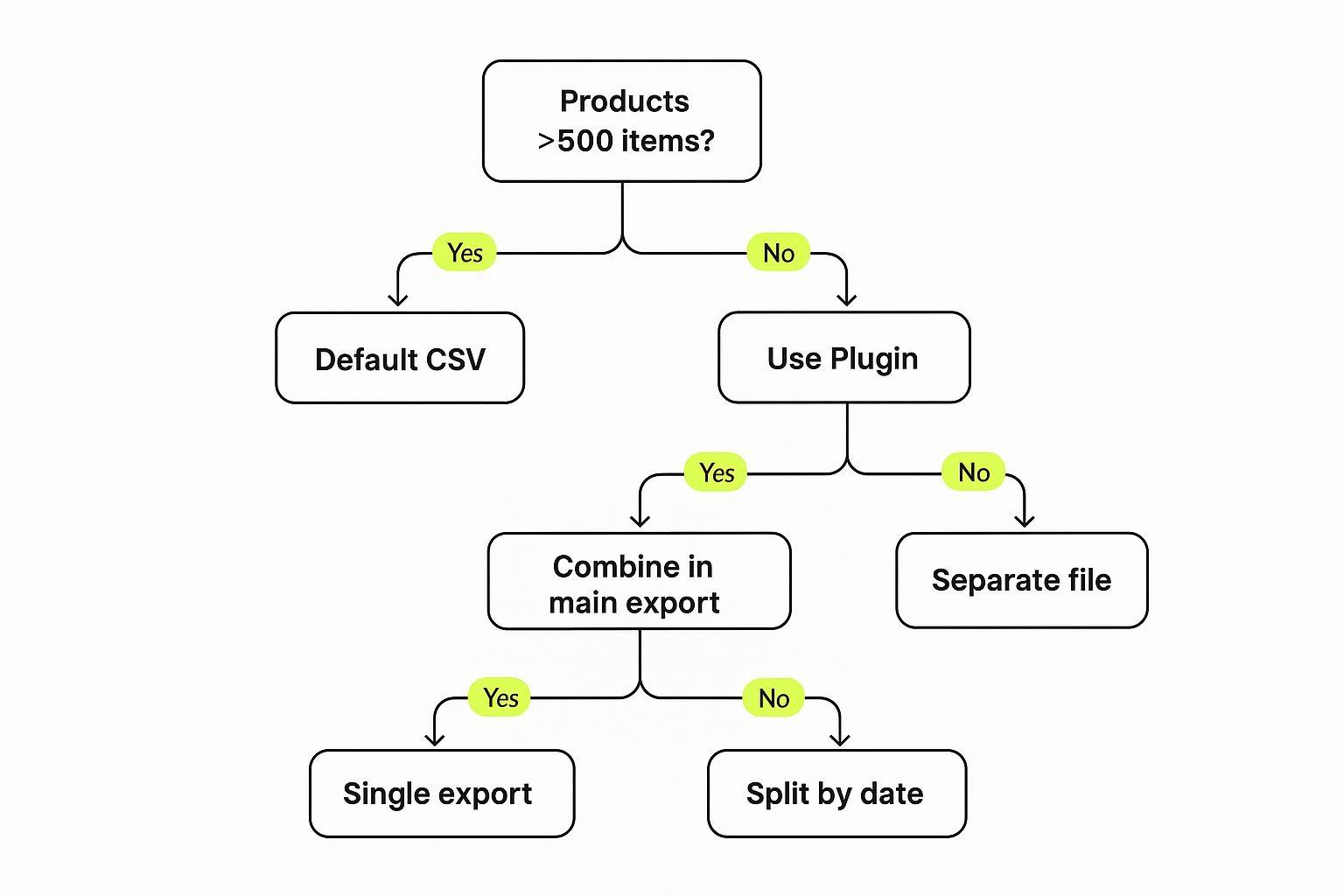
As the infographic illustrates, larger datasets often benefit from specialized plugins or breaking exports into smaller, more manageable chunks. This helps prevent errors and ensures your data remains intact.
To help you choose the best migration method, we've compiled a comparison table:
Migration Methods: Finding Your Perfect Match
A practical comparison of migration approaches based on real merchant experiences, revealing the true costs, timeframes, and skill requirements for successful transfers
| Migration Method | Cost Range | Time Required | Technical Skill Level | Best For |
|---|---|---|---|---|
| Manual Migration | Free | High (Several days to weeks) | High | Small stores with limited budgets and technical skills |
| Automated Migration Apps | $20-$50 | Moderate (Several hours to days) | Low to Moderate | Medium-sized stores seeking a balance of cost and efficiency |
| Professional Migration Services | $300-$1000 | Low (A few hours to days) | None required | Large stores or those requiring a quick and seamless transition |
This table provides a quick overview of the various migration methods. Choosing the right one depends on your specific needs and resources.
Cost and Time Considerations
Migration from WooCommerce to Shopify can vary significantly in cost and time. Manual migration is free but demands extensive editing and coding knowledge, making it a lengthy process. Using CSV files can expedite the process but might not transfer all data types. Third-party apps, like Matrixify, offer a faster migration experience for $20-$50. For a hands-off experience, hiring an expert is the fastest, but with a higher cost of $300-$1000. Cart2Cart provides automated migrations that preserve SEO and order IDs. Learn more: Learn more about WooCommerce to Shopify migration.
Choosing the Right Path For Your Business
The best migration method aligns with your specific needs. For smaller stores with limited technical resources and a tight budget, manual migration using CSV files might suffice. For larger stores with complex data, an automated app or professional service saves time and minimizes errors. The goal is to balance cost, speed, and data integrity.
Beyond The Basics: Additional Considerations
Some businesses opt for a hybrid approach, combining manual methods with automated tools. This works well for stores with moderate data and some technical expertise. For example, a store might use an app for products and customers, but manually transfer order history for greater control.
Post-Migration Preparation
Regardless of your chosen method, thorough planning is crucial for a successful migration. Back up your WooCommerce data before starting as a safety net. Consider how your new Shopify store will handle customer accounts, order fulfillment, and third-party integrations. Anticipating these factors ensures a smooth transition. Continue your Shopify journey with optimization tips from E-commerce Dev Group.
The Migration Blueprint: Your Step-by-Step Transfer Guide
This guide provides a practical, step-by-step approach to migrating your online store from WooCommerce to Shopify. We'll focus on how to preserve your important data during the move. Whether you're comfortable with technology or prefer a less hands-on approach, this guide offers helpful information to make the process smooth and efficient.
Phase 1: Setting Up Your Shopify Store
Before moving any data, you'll need a working Shopify store. Begin by signing up for a Shopify account and selecting a plan that fits your business. This lets you adjust essential settings and get familiar with the Shopify platform before migrating your data.
-
Choose a Theme: Select a theme that reflects your brand and products. This establishes the visual style of your new store.
-
Configure Settings: Customize your store settings, such as payment gateways, shipping choices, and taxes. Doing this upfront ensures a seamless checkout experience for your customers.
Phase 2: Data Migration: Products, Customers, and Orders
This phase focuses on transferring your store's data. Your chosen method (manual transfer, using an automated app, or hiring a professional service) will dictate the precise steps involved, but the overall process is generally the same.
-
Product Data: Start by exporting your product information from WooCommerce, typically as a CSV file. Carefully match WooCommerce data fields to the corresponding fields in Shopify. Pay close attention to product variations and images. For instance, WooCommerce's "Attribute 1 Name" becomes "Option1 Name" in Shopify.
-
Customer Data: Next, export your customer data. As with product migration, make sure you accurately match fields like names, email addresses, and billing details. Keeping customer data accurate is essential for personalized marketing and customer retention.
-
Order Data: Finally, export your order history. This information is vital for accounting, managing inventory, and understanding customer buying patterns. Some automated tools or professional services provide seamless order history transfer, while manual methods may require more work.
Check out our guide on categorizing your products effectively. While our guide focuses on migrating from WooCommerce, the processes and considerations for transferring data, design, and functionality are broadly similar to other platforms, such as detailed in this guide on Migrate from Magento to Shopify.
Phase 3: Data Validation and Testing
After migrating your data, thorough testing is crucial. This verifies that everything transferred correctly and that your Shopify store operates as expected.
-
Product Verification: Review product details, such as descriptions, prices, images, and variations. Make sure all information appears correctly and that product search works properly.
-
Customer Account Validation: Test customer logins and confirm that customer information is accurate and accessible.
-
Order Processing Test: Place test orders to check the entire checkout process, from adding items to the cart to processing payments and receiving order confirmations.
Phase 4: Launching Your Shopify Store
After you’ve fully tested your store, it’s time to launch! This involves finalizing settings, setting up redirects, and letting your customers know about the change.
-
301 Redirects: Set up 301 redirects from your old WooCommerce URLs to your new Shopify URLs. This maintains your search engine rankings and avoids broken links for customers who have bookmarked your old pages.
-
Final Settings Review: Double-check all important settings, including payment gateways, shipping options, and notification emails. This ensures a seamless and professional customer experience.
-
Launch Announcement: Tell your customers about the move to Shopify, highlighting any new features or advantages. This generates excitement and encourages them to check out your new store.
Troubleshooting Common Migration Challenges
Even with careful planning, issues can arise during migration. Here are some common problems and possible solutions:
-
Missing Product Variants: Double-check your data mapping during export/import. Ensure all variant details are included and properly formatted.
-
Incorrect Customer Information: Verify that customer data fields are mapped correctly and that data types are compatible between WooCommerce and Shopify.
-
Broken Links: Confirm that 301 redirects are set up properly. Test several links to make sure they point to the correct pages on your new Shopify store.
This step-by-step guide helps ensure a seamless transition from WooCommerce to Shopify, letting you take advantage of Shopify's features for increased growth and efficiency. Planning and testing are essential for a successful move.
After The Switch: Critical Post-Migration Tasks

Migrating your data from WooCommerce to Shopify is a big step. But finishing the data transfer is just the beginning. It’s like moving to a new house: you've got the boxes inside, but now you need to unpack and get settled. There are essential post-migration tasks to ensure your Shopify store runs smoothly and keeps growing your business.
Testing Your New Shopify Store
Before you welcome customers, thoroughly test your new Shopify store. This involves checking every feature to guarantee everything works seamlessly.
-
Checkout Process: Run test purchases using different payment methods, shipping options, and discount codes. A smooth checkout is essential for turning visitors into buyers.
-
Customer Accounts: Check customer logins, account information, and password resets. Make sure customers can access their orders and manage their profiles without any problems.
-
Product Search and Filtering: Test your product search bar and filtering options. Make sure customers can easily find what they're looking for.
-
Third-Party Integrations: If you're using apps like email marketing platforms or inventory management systems, make sure they connect properly with your Shopify store. This keeps your business running smoothly.
Preserving Your SEO Value With 301 Redirects
A critical post-migration task is setting up 301 redirects. These redirects guide visitors and search engines from your old WooCommerce URLs to the matching pages on your new Shopify store. This is essential for preserving your search engine rankings and preventing lost traffic. Without these redirects, visitors using old bookmarks or search engines following old links will see 404 errors, harming your SEO and user experience. For instance, a WooCommerce product page (yourdomain.com/product/blue-widget) should redirect to the same product page on Shopify (yourdomain.com/products/blue-widget).
Verifying Data Integrity and Optimizing Settings
After migrating, check that all your product information, customer data, and order history have been accurately transferred. This ensures your business runs smoothly. Also, optimize your Shopify store's settings. Configure payment gateways, shipping options, taxes, and notification emails. These improvements enhance the customer experience and streamline your operations. For instance, setting up automatic emails for abandoned carts can boost your conversion rate.
Post-Migration Checklist For Success
Here's a checklist to help you through the post-migration phase:
- Thorough Store Testing: Test everything, including checkout, accounts, and integrations.
- 301 Redirects Implemented: Direct all old WooCommerce URLs to the correct Shopify pages.
- Data Integrity Verified: Confirm that all product, customer, and order data is accurate and complete.
- Shopify Settings Optimized: Set up payment gateways, shipping, taxes, notifications, and other key settings.
- Third-Party Integrations Reconnected: Reconnect all necessary third-party apps.
- Performance Monitoring: Track your website's speed and performance.
This checklist helps you launch your new Shopify store confidently and minimize potential problems. By completing these essential tasks, you'll build a solid base for success on Shopify. Need help? E-commerce Dev Group offers expert Shopify migration support. See more here: Learn more.
Maximizing Your Shopify Potential: The Road Ahead
Moving your online store from WooCommerce to Shopify opens up exciting new possibilities. Think of it as upgrading from a cramped apartment to a spacious, well-equipped house. This section explores how to use Shopify’s features to fuel your business growth.
Unleashing Shopify’s Power: Conversion Rate Optimization
Shopify excels at helping you optimize conversions. Its built-in tools are designed to improve your store’s performance and gently guide customers towards making a purchase. This includes features like a streamlined checkout process and personalized product recommendations. One powerful example is Shopify's abandoned cart recovery emails. These automated messages remind customers about items they left behind, often leading to recovered sales and a positive impact on your profits.
Automating Your Marketing Efforts
Shopify automates many marketing tasks, freeing up your time. This includes automated email campaigns, social media integration, and targeted advertising. By automating these tasks, you can create a more efficient and effective marketing strategy, reaching a wider audience without extra effort. Imagine having a dedicated marketing assistant working 24/7 to promote your business!
Data-Driven Decisions with Shopify Analytics
Shopify's analytics dashboard offers valuable data on your store’s performance. This data empowers you to make informed decisions about marketing, inventory, and customer engagement. Track important metrics like conversion rates, average order value, and customer lifetime value. This means you can fine-tune your strategies based on real data, not just guesswork. You might be interested in: How to master….
Leveraging Shopify’s App Ecosystem
Shopify boasts a wide range of apps to enhance your store’s functionality. From inventory management to customer service, you’ll find solutions for almost any business need. However, choose your apps carefully. Too many apps can slow down your website. Select only the essential tools, much like a well-organized toolbox.
Maintaining Optimal Site Speed and Performance
Site speed is critical for user experience and SEO. Shopify is built for speed, but you also need to optimize your theme and images. A slow website can frustrate customers and lead to lost sales. Simple steps like compressing images and using a fast-loading theme can make a big difference.
Expanding Your Product Offerings and Building Loyalty
Shopify simplifies expanding your product line and implementing cross-selling and up-selling techniques. This can increase your average order value and customer lifetime value. Building customer loyalty programs is easy too. This creates a community around your brand, turning one-time buyers into loyal advocates.
The Power of a Streamlined Migration
Switching from WooCommerce to Shopify is more than just a technical change; it's a strategic move. By leveraging Shopify's features, you can optimize your store's performance, automate marketing, and make data-driven decisions that drive sustainable growth.
Ready to experience the power of Shopify for yourself? Let E-commerce Dev Group guide your migration and unlock your full ecommerce potential.
