


Mastering Your Shopify Website Manager Dashboard
The Shopify dashboard is your central hub for managing your online store. At first, it can seem a bit overwhelming, but once you understand its key parts, it becomes much easier to use. This section explains how successful Shopify store owners use their dashboards to make smart, data-driven decisions every day.
Understanding Key Dashboard Sections
The Shopify dashboard is divided into sections, each with a specific purpose. The Orders section lets you manage and fulfill orders, track shipments, and give refunds. The Products section is where you add, edit, and organize your product listings, including pictures, descriptions, and prices. You can view your customer base in the Customers section, which allows you to group customers for targeted marketing. The Analytics section provides valuable data on your store's performance, like sales, traffic, conversion rates, and customer behavior. Finally, the Marketing section lets you create and manage marketing campaigns directly within your Shopify website manager.
Customizing Your Dashboard for Maximum Efficiency
A great feature of the Shopify website manager is that you can customize it. The default dashboard offers a good overview, but you can tailor it to fit your needs. You can rearrange sections, add or remove reports, or even connect with third-party apps to add functionality. For example, if managing your inventory is a priority, you can add the Inventory app right to your dashboard. This allows you to quickly check stock levels and when to reorder. This flexibility helps you create a workspace that streamlines your daily tasks.
Monitoring Key Metrics for Data-Driven Decisions
Successful Shopify merchants know how important data-driven decisions are. The dashboard gives you lots of information, but it's important to focus on the most relevant metrics. Some key metrics to track are conversion rate, average order value, customer acquisition cost, and website traffic. Regularly checking these metrics helps you see trends, identify areas for improvement, and adjust your strategy. Just by accessing your Shopify website manager and checking these key numbers, you can make significant business decisions. Shopify has grown substantially, with 30% more merchants globally joining the platform in the first half of 2024. This growth shows Shopify's increasing popularity and strength in the ecommerce market. Find more detailed statistics here.
Streamlining Your Workflow with Shortcuts and Automation
The Shopify website manager offers built-in features and integrations to make your daily work easier. You can automate things like order fulfillment, email marketing campaigns, and social media posts. This frees up your time for more important tasks, such as developing new products and building relationships with your customers. Also, learning keyboard shortcuts within the platform can save you time on common actions like adding products or processing orders. Mastering these shortcuts and automations will make managing your Shopify store more efficient and effective.

Essential Tools That Successful Shopify Stores Can't Live Without
Running a successful Shopify store takes more than just listing products. It requires smart decisions about the tools you use. This section helps you identify the features and tools that truly boost your business, separating the essential from the merely trendy. We’ll explore how successful merchants utilize key resources within the Shopify ecosystem to maximize their efficiency and profit.
Streamlining Operations with Inventory Management and Analytics
Effective inventory management is vital for success. Running out of a popular product means losing sales and disappointing customers. Top-performing merchants use Shopify’s inventory features and apps to prevent this. These tools provide real-time tracking of stock, automated reordering, and accurate forecasting. This ensures you always have the right products in stock and in the right quantities.
Analyzing data is equally critical. Successful store owners don't just gather data; they interpret it. Understanding customer behavior, sales trends, and product performance allows them to improve marketing strategies and refine product offerings.
Automating Tasks for Increased Productivity
Many time-consuming tasks in your Shopify website manager can be automated. Think order fulfillment, email marketing, and even social media posts. Automating these tasks frees you to focus on more strategic activities, such as product development and building strong customer relationships.
This shift allows business owners to concentrate on what truly matters – the core aspects of their business that drive growth and foster customer loyalty. Instead of getting bogged down in repetitive admin tasks, you can dedicate your time to activities that directly impact your bottom line. Check out our guide on How to master your sitemaps.
The Power of Integration: Choosing the Right Tools
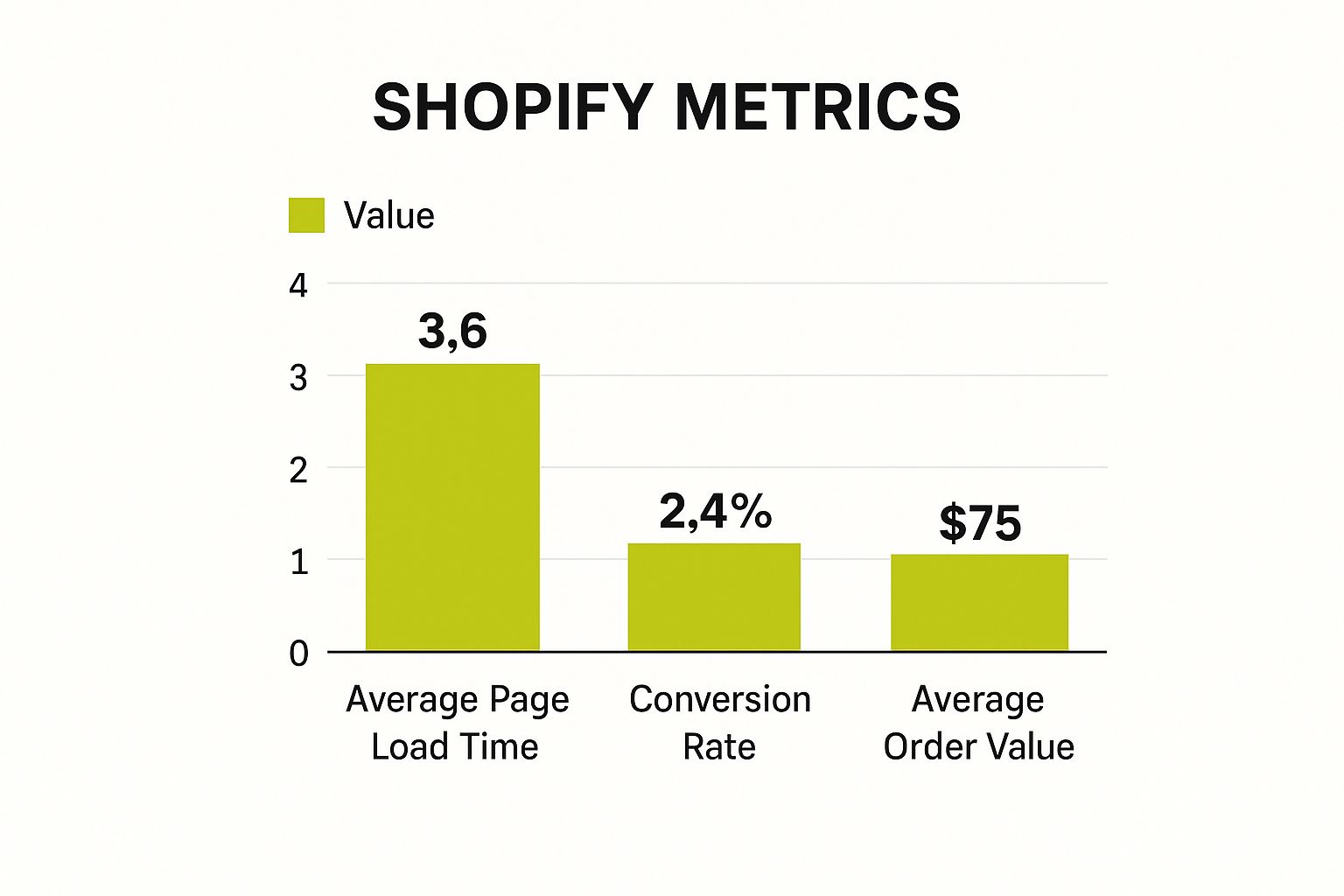
The infographic above shows key Shopify store metrics, comparing average page load time, conversion rate, and average order value. Faster page load times correlate with higher conversion rates and increased average order value. This clearly shows the impact of site speed on your profits. To learn more about creating an effective online presence, consider exploring resources on website design for small business.
Before investing in premium tools, explore free alternatives. Many free options offer surprisingly robust functionality. Choosing the right mix of free and paid apps depends on your specific needs and budget. Carefully analyze which features genuinely add value to your Shopify website manager. Don't be swayed by flashy features that offer minimal practical benefits. This analytical approach maximizes your return on investment. Experiment to find the perfect toolkit that supports your workflows and business goals.
To help you choose the right tools, let's look at a comparison of essential Shopify management tools across the different plan tiers:
To help you choose the right tools, let’s take a look at this handy table:
Power Tools in Your Shopify Website Manager Arsenal
A comparison of essential Shopify management tools across different plan tiers
| Management Tool | Basic Plan | Shopify Plan | Advanced Plan | Key Benefits |
|---|---|---|---|---|
| Abandoned Cart Recovery | ✓ | ✓ | ✓ | Recapture lost sales by automatically emailing customers who left items in their cart. |
| Discount Codes | ✓ | ✓ | ✓ | Offer promotions and incentives to drive sales. |
| Gift Cards | ✓ | ✓ | ✓ | Increase sales and build brand loyalty. |
| Fraud Analysis | ✓ | ✓ | Protect your business from fraudulent transactions. | |
| Advanced Reporting | ✓ | Gain in-depth insights into your store's performance. |
This table highlights the differences in tool availability between the Basic, Shopify, and Advanced plans. As you can see, all plans offer core features like Abandoned Cart Recovery and Discount Codes. However, more advanced tools like Fraud Analysis and Advanced Reporting are reserved for the higher-tier plans.
Choosing the right Shopify plan depends on your specific needs. While the Basic plan is a great starting point, consider upgrading as your business grows to access more powerful tools that can further optimize your operations and drive greater profitability.
Store Optimization Secrets Most Shopify Guides Won't Tell You

Optimizing your Shopify store is crucial for driving conversions and boosting revenue. Many guides offer basic tips, but we'll explore practical strategies that truly make a difference, based on data from successful Shopify merchants.
Identifying and Eliminating Friction Points
A key optimization aspect is identifying and removing friction points in the customer journey. These subtle issues can lead to abandoned carts and lost sales. A complicated checkout process or unclear shipping information can deter customers.
By analyzing user behavior and identifying these pain points, you can streamline the customer experience. This might involve simplifying the checkout, providing clear shipping details, or offering various payment options.
Analyzing Speed Metrics Beyond Basic Scores
A good overall speed score is important, but true optimization requires a deeper dive. Instead of just a general score, analyze individual page load times, especially for product and checkout pages.
Also, examine how different site elements (images and scripts) contribute to loading times. This detailed analysis can pinpoint bottlenecks and guide optimization efforts, like image compression or code minification.
Implementing Effective SEO Techniques
SEO is vital for driving organic traffic. While general SEO principles apply, some techniques are especially effective for e-commerce.
These include optimizing product descriptions with relevant keywords, using structured data markup for product information, and building high-quality backlinks to product pages. Don't forget mobile optimization, as much online shopping happens on phones.
Case Studies: Real-World Optimization Successes
Many successful Shopify stores have used these strategies with great results. Some have doubled conversion rates by adjusting product pages, improving descriptions, and adding high-quality images.
Strategic mobile optimizations, like responsive design and streamlined mobile checkout, have boosted mobile sales. Shopify's Q3 2024 revenue grew 26.14% year-over-year, reaching $2 billion. This highlights Shopify's strong market position. Find more detailed statistics here.
Checkout refinements, such as simplifying the process and offering multiple payment options, have dramatically improved cart completion rates and revenue. These examples show that even small, data-driven adjustments through the Shopify website manager can yield significant gains without major redesigns. This means more efficient resource use and faster results for your business.
Beyond Templates: Customizing Your Shopify Website Manager
A visually appealing theme is a great first step. But truly successful Shopify stores go further. They craft unique online experiences that truly resonate with their audience. This means customizing your Shopify website manager while keeping it stable and reliable.
Balancing Customization and Stability
Customizing your Shopify store can significantly improve its functionality and user experience. But too many customizations, or poorly implemented ones, can create technical debt. This makes your store hard to maintain and update. Smart store owners understand this balancing act. They prioritize customizations that offer a high return on investment (ROI) without sacrificing stability.
For example, a custom loyalty program can boost customer retention and increase average order value. But a complex, poorly coded program could slow down your site and conflict with other apps. Choosing the right customizations is key.
Effective Communication With Developers
Many customizations will need a developer's help. Clearly communicating your needs is essential. Give developers detailed specifications and examples of what you're aiming for. This helps them understand your vision and build the perfect solution for your Shopify website manager.
Testing changes on a staging site before they go live is also important. This prevents unexpected problems and protects your customer experience. For optimal visibility, implement a strong SEO strategy. A Shopify SEO Checklist can be a great guide.
Identifying Trustworthy Third-Party Solutions
Third-party apps can add powerful features to your store. But not all apps are created equal. Some might clash with your theme or other apps, leading to instability or even site crashes during Shopify updates. Look for reputable apps with good reviews and reliable support.
Choose solutions that integrate smoothly with your existing setup. For more on this topic, check out our article on sitemap management.
Implementing Custom Features Strategically
Custom features can set your store apart. Focus on features that directly address customer needs or solve their pain points. A custom product configurator, for instance, can improve the shopping experience for products with many options.
Testing and Maintaining Site Performance
After any customization, thorough testing is critical. Test on various devices and browsers to ensure compatibility and top performance. Regularly monitor your site speed and performance metrics. Quickly address any issues that arise to maintain a positive user experience.
To help you make informed decisions about customization, here’s a handy table summarizing different approaches:
Smart Customization Approaches for Your Shopify Store shows different approaches to customizing your Shopify store with their respective complexity and impact.
| Customization Method | Complexity Level | Technical Skills Required | Impact on Performance | Maintenance Needs |
|---|---|---|---|---|
| Theme edits (CSS, HTML) | Low to Medium | Basic coding knowledge | Minimal to Moderate | Low |
| Shopify App Integration | Low | Minimal | Varies depending on the app | Low |
| Custom App Development | High | Advanced coding skills | Potential for high impact, positive or negative | High |
| Private App Development | High | Advanced coding skills | Potential for high impact, positive or negative | High |
The table above outlines the various customization approaches, ranging from simple theme edits to complex app development. Each method has its own set of complexity and performance considerations.
This proactive approach helps prevent problems before they impact your customers and your bottom line. Smart customization strengthens your brand and improves the shopping experience. It's not about simply looking different. It's about building a Shopify website manager that works seamlessly for you and your customers.
Scaling Without Breaking: Your Shopify Growth Roadmap

Scaling a successful Shopify store presents exciting opportunities, but also unique challenges. This section, based on insights from merchants who've successfully scaled their businesses, explores how to adapt your Shopify approach as you grow.
Handling Increased Order Volume Efficiently
As orders increase, it's tempting to simply hire more staff. However, smarter strategies exist. Automation within your Shopify website manager can streamline fulfillment and customer service.
Think about automating order confirmations, shipping notifications, and even responses to common customer questions. This allows your team to focus on more complex tasks and strategic planning.
Maintaining Quality During Rapid Growth
Rapid growth can sometimes impact quality. Proactive steps can prevent this. Establish clear standard operating procedures (SOPs) within your Shopify website manager for key tasks.
Focus on areas like order fulfillment, customer service, and product listings. This ensures consistency and makes training new team members easier as you expand.
Implementing Secure Permission Structures
As your team grows, delegating tasks is crucial. This requires a secure approach to user permissions within your Shopify website manager. Granting access only to necessary areas enhances security.
It also prevents accidental changes or unauthorized access to sensitive data. This granular control becomes increasingly important with scale.
Anticipating and Addressing Scaling Pain Points
Scaling often reveals hidden pain points. One common issue is the rise in customer service inquiries. Investing in a robust helpdesk system integrated with your Shopify website manager can help.
Another pain point is inventory management. As sales increase, accurate forecasting and automated reordering become essential to avoid stockouts. Addressing these proactively ensures smoother growth.
Timing App Integrations and Upgrades Strategically
Adding apps to your Shopify website manager extends functionality, but too many too quickly can create complexity. Prioritize integrations based on your immediate needs.
Similarly, time major platform upgrades strategically, ideally during slower sales periods. This minimizes disruption. This measured approach prevents overwhelming your team.
Building redundancy with backup systems or alternative shipping providers also mitigates risk during peak seasons. Shopify plays a significant role in the global ecommerce landscape, projected to reach $4.8 trillion by 2025.
Shopify processed on average 199 million orders monthly in 2023. Find more detailed statistics here.
Building Operational Redundancy for Peak Seasons
Peak seasons, like Black Friday and Cyber Monday, can stress your systems. Careful planning is key. This includes load testing your Shopify website manager.
This ensures it can handle increased traffic. Optimizing your server infrastructure prevents slowdowns. Proactive preparation maximizes sales during these crucial periods while maintaining a positive customer experience. Preparing for this influx through the Shopify website manager is essential for maintaining a seamless shopping experience and maximizing sales.
Troubleshooting Like a Pro: Solving Shopify Website Manager Issues
Even seasoned Shopify store owners encounter occasional bumps in the road. This section provides a structured approach to identifying and resolving common Shopify website manager issues before they impact your sales. We'll explore how successful merchants use a methodical approach to troubleshooting and cultivate strong relationships with support resources for quicker solutions.
Diagnosing Issues Methodically
Successful merchants don't just throw solutions at a problem and hope for the best. They diagnose issues systematically. Begin by clearly defining the problem. What's going wrong, specifically? When did the issue first appear? What steps have you already tried? Documenting these details helps both you and any support team grasp the situation quickly.
Next, gather evidence. Are there any error messages? If so, take screenshots. Is the problem affecting specific products or customers? Note any recurring patterns. This information is invaluable for pinpointing the root cause. You might find this helpful: How to master sitemaps.
Creating a Safe Testing Environment
Before implementing any changes on your live store, test in a safe environment. Shopify's theme editor allows you to preview changes without affecting your customers' experience. You can also duplicate your theme to establish a dedicated testing version. This allows you to experiment freely without the risk of introducing errors on your live site.
Thorough testing prevents unexpected issues and safeguards your brand's reputation. This proactive approach cultivates customer trust and loyalty.
Building Relationships With Support Resources
Shopify offers several support avenues, including help documentation, community forums, and direct support. Nurturing a positive rapport with these resources is essential for efficient troubleshooting.
Clearly articulate your issue and provide all the necessary information. This empowers support teams to understand and resolve your problem promptly. Building these relationships can expedite resolutions and provide valuable insights.
Troubleshooting Common Technical Issues
Let's examine a few common Shopify website manager problems and their solutions:
-
Payment processing errors: Check your payment gateway settings and ensure they are configured correctly. Verify your account details with your payment provider.
-
Inventory sync problems: Review your inventory settings and connections with any third-party inventory management apps. Check for recent updates that may be causing conflicts.
-
Theme errors: Display issues often stem from theme conflicts. Try reverting to a previous version or contacting your theme developer for assistance.
Preventative Maintenance: Reducing Downtime
Troubleshooting is important, but preventing problems in the first place is even better. Regularly review your Shopify website manager settings, particularly during peak seasons. Ensure all your apps are up to date and compatible. Test your site's performance under heavy load.
These proactive measures minimize the risk of unexpected downtime and maximize your revenue during critical sales periods. Think of maintaining a healthy Shopify store like maintaining a car – regular checkups prevent major problems.
Ready to elevate your Shopify store? E-commerce Dev Group provides expert Shopify design, development, and support to help you optimize your store for maximum growth. Visit E-commerce Dev Group to learn more about our customized solutions.
