


Why Smart Businesses Are Making the Switch
Migrating from WooCommerce to Shopify is a big decision, but one that's proving advantageous for many businesses. This isn't just marketing hype; real benefits are fueling this trend, specifically in areas like platform reliability, lower maintenance, and reduced total cost of ownership. These improvements have a significant impact on a business's profitability and long-term success.
Scalability and Simplified Management
Different business models find unique advantages with Shopify. Direct-to-consumer (D2C) brands, for example, often prioritize scalability. Shopify's infrastructure lets these businesses handle growing traffic and sales without performance issues. Businesses with complex operations appreciate Shopify's simplified management. The platform's user-friendly interface and efficient workflows lessen the technical burden, allowing teams to focus on core business activities.
Addressing Pain Points
Recurring issues often push merchants away from WooCommerce. While WooCommerce's plugins offer flexibility, they can also create compatibility problems, security risks, and increased management complexity. Shopify, in contrast, offers a more integrated approach. Core features and essential apps are managed within a single ecosystem, reducing conflicts and simplifying updates. This minimizes troubleshooting, reduces potential problems, and streamlines the overall management process.
Market Leadership and User Base
Shopify’s market position is another important factor. As of 2025, Shopify holds a 26.2% market share in e-commerce, while WooCommerce holds 20.1%. This larger market share means a larger user base, a vibrant community, and access to more resources and support. Shopify powers roughly 4.65 million websites compared to WooCommerce's 3.5 million, demonstrating its popularity and broad reach. For a deeper dive into these statistics, check out this resource: Learn more about market share here
Recognizing the Signs
Is migrating the right move for your business? If you’re constantly fighting technical problems, struggling to scale, or spending too much time on maintenance, these are key indicators that a platform change could be beneficial. Carefully considering these factors can help you decide if switching from WooCommerce to Shopify aligns with your business goals and growth plans.
Preparing Your Store for a Seamless Migration
Moving your online store from WooCommerce to Shopify involves more than simply moving products. Careful preparation is essential to minimize disruptions and prevent data loss. This is where a pre-migration audit comes in.
This audit, a common practice among e-commerce professionals, involves documenting your current WooCommerce setup. This includes everything from payment gateways and shipping methods to any custom features. Think of it as creating a detailed map of your existing store.
Documenting Your Current Architecture
The first step is to thoroughly document your current WooCommerce setup. Create a complete list of all the plugins, themes, and extensions you use. Also, document your payment gateways, shipping settings, and any custom code or integrations.
This inventory will be a valuable resource during the migration. It will help you spot potential compatibility problems early on.
Cleaning and Standardizing Your Product Data
Next, address your product data. This is often the most time-consuming part of the migration, but it's also the most crucial. Clean up product descriptions, ensure consistent formatting, and standardize product attributes.
This not only makes for a clean data transfer, but also improves how your products look on Shopify. For instance, inconsistent sizing information or missing product images can hurt your success on the new platform. Fixing these issues beforehand saves time and effort later.
Communicating With Customers and Setting Timelines
Keeping your customers informed about the upcoming changes and any potential downtime is important. Transparency builds trust and manages expectations. Also, establish a realistic timeline.
The complexity of your store, the amount of data, and your resources will all affect how long the migration takes. Build in extra time for unexpected issues. This ensures you can handle them without major delays.
Services like Cart2Cart have become popular for automating data transfers from WooCommerce to Shopify. This trend started as businesses sought to benefit from Shopify's user-friendly interface and features, without losing valuable data or SEO rankings. Cart2Cart, for example, offers a step-by-step guide to migrate orders, customers, products, and other data. Learn more about WooCommerce to Shopify migration. You can also check our sitemap for more information.
Creating Contingency Plans
Finally, have backup plans. What if there are errors during the data transfer, or if your new Shopify store has unexpected downtime? Having contingency plans and alternative solutions prevents small problems from becoming major disruptions.
This proactive approach ensures business continuity and protects your revenue. By thoroughly preparing your store, you set the stage for a smooth and successful move to Shopify.
Executing Your Migration: The Proven Process
Migrating your online store from WooCommerce to Shopify requires a well-defined process. A systematic approach ensures a smooth transition and minimizes potential disruptions to your business. Let's explore the key steps involved in a successful migration.
Evaluating Migration Approaches
The first crucial step is choosing the right migration method. This decision depends on several factors, including your store's size and complexity, your budget, and your available technical expertise.
-
Manual Migration: This method involves manually exporting data from WooCommerce and importing it into Shopify. It's generally best suited for smaller stores with simple product catalogs and requires a good understanding of both platforms.
-
Automated Migration Apps: Apps like Cart2Cart automate much of the data transfer process. This option reduces manual effort and the risk of errors. It's a good choice for mid-sized stores with more complex data.
-
Professional Migration Services: For large, enterprise-level stores, hiring professional migration experts is often the best approach. These experts handle the entire migration, ensuring a seamless and efficient transition. They also minimize risk and downtime.
Choosing the right migration strategy is paramount. Before starting any migration, backing up your WooCommerce data is vital. The following infographic highlights this critical step:
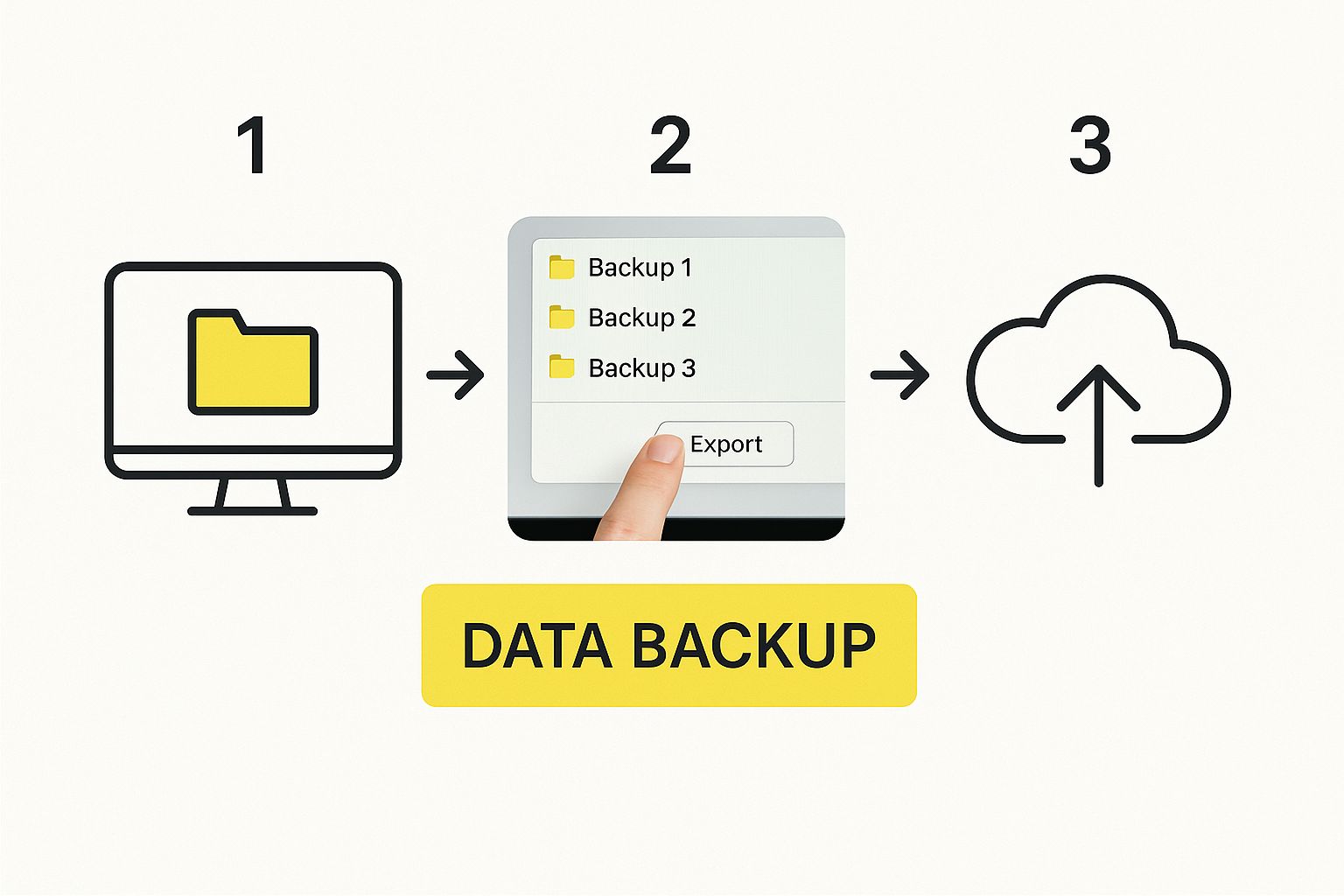
Creating a backup ensures you have a copy of your valuable data should any issues arise during the migration process. This safeguard protects your business and allows for a quick recovery if needed. It's an essential step in any migration plan.
To help you choose the best migration method for your business, take a look at the comparison table below:
WooCommerce to Shopify Migration Options Comparison
This table compares different migration methods based on complexity, cost, and suitability for different store sizes.
| Migration Method | Best For | Typical Cost | Time Required | Technical Skill Level |
|---|---|---|---|---|
| Manual Migration | Small stores with simple catalogs | Low (DIY) | High (Weeks) | High |
| Automated Migration Apps | Mid-sized stores with moderate complexity | Medium ($50-$300+) | Medium (Days) | Medium |
| Professional Migration Services | Large stores or complex setups | High ($500-$5000+) | Low (Days) | Low (handled by professionals) |
This table provides a quick overview of the different migration options available. Choosing the right method depends on your specific needs and resources. Consider factors like store size, complexity, budget and technical skills.
Establishing Your Shopify Foundation
After selecting a migration approach, you need to set up your new Shopify store. This involves selecting a suitable theme, configuring essential settings, and adding any necessary apps.
-
Theme Selection: Your store's theme determines its look and feel. Choose a theme that reflects your brand identity and resonates with your target audience.
-
Settings Configuration: Configure important settings such as payment gateways, shipping options, and tax calculations. These settings ensure your store functions correctly.
-
App Installation: The Shopify App Store offers a wide range of apps to extend your store’s functionality. Explore apps for marketing, inventory management, and other business needs.
Mapping Data and Executing Transfers
With your Shopify store set up, you'll need to map your WooCommerce data to the corresponding fields in Shopify. Accurate data mapping ensures that your products, customers, and orders transfer correctly.
Pay close attention to product categories, customer information, and order details. Accurate mapping prevents data inconsistencies after the migration. Use any automated mapping features within your chosen migration method to streamline this process.
Testing, Validation, and Maintaining Parallel Systems
Thorough testing throughout the entire migration process is critical. This allows you to identify and fix any issues before they impact your live store.
-
Data Validation: After transferring your data, verify its accuracy. Check for missing or incorrect information in product details, customer records, and order history.
-
Parallel Systems: Run both your WooCommerce and Shopify stores concurrently for a transition period. This lets you thoroughly test your new Shopify store and ensures a smooth handover when you're ready.
A phased approach, with careful planning, execution, and testing, will lead to a successful WooCommerce to Shopify migration. By following these steps, you can transition smoothly and take advantage of Shopify's features.
Protecting Your SEO Equity During Platform Transition
Migrating your e-commerce platform is a big undertaking. It's more than just moving products and data; it's about protecting your SEO equity, the value of your hard-earned search engine rankings. Losing these rankings during a switch can severely impact your online visibility and revenue. This section outlines key strategies for preserving your SEO equity when moving from WooCommerce to Shopify.
Redirect Mapping: Preserving Your Links
One of the most critical steps in maintaining SEO during a migration is redirect mapping. This process forwards your old WooCommerce URLs to their corresponding pages on your new Shopify store. It's like updating your website's address book for search engines.
-
301 Redirects: These permanent redirects tell search engines that your content has permanently moved. This preserves your existing rankings and ensures a smooth transition for users and search crawlers.
-
Comprehensive Mapping: Every product, category, and content page on your WooCommerce site needs a corresponding 301 redirect pointing to the equivalent page on Shopify. Broken links lead to 404 errors, damaging your SEO.
-
URL Structure: Try to maintain a similar URL structure whenever possible. This minimizes the risk of ranking fluctuations.
Metadata and Content Preservation
Beyond redirects, preserving your existing metadata is crucial. This includes your page titles, descriptions, and image alt text – all vital for search engine visibility.
-
Automated Transfer: Some migration tools offer automated metadata transfer. Always double-check the results to ensure accuracy and consistency with your SEO strategy.
-
Content Optimization: Migration is a great opportunity to optimize your content for Shopify. While transferring existing content is essential, review and update it to ensure it aligns with your current brand messaging and SEO keywords.
For example, LaEnviro migrated from WooCommerce to Shopify and saw impressive improvements: a 150% increase in SEO efficiency and 200% sales growth within three months. They also improved site speed by 70%, boosting user experience and conversions. Find more detailed statistics here.
Post-Migration Monitoring and Response
After migration, continuous monitoring is key. Track your organic traffic and keyword rankings to identify any unexpected drops. Shopify's built-in analytics and various SEO apps offer valuable insights into your site’s performance. You might be interested in: How to master your sitemap.
-
Regular Audits: Conduct regular SEO audits to identify any new technical issues or content gaps. Addressing problems promptly prevents long-term damage to your rankings.
-
Performance Benchmarks: Establish clear performance benchmarks before the migration to measure the success of your SEO preservation efforts. This data-driven approach helps you achieve your desired results.
By following these strategies, you can protect your SEO equity during your WooCommerce to Shopify migration, ensuring a smooth transition and continued online success. This proactive approach safeguards your investment and maximizes your return on the new platform.
Transforming Your Post-Migration Performance
Moving your online store from WooCommerce to Shopify is a big decision. But it's really just the first step. The real work begins after the migration, when you fine-tune your new Shopify store for optimal performance. This means taking advantage of Shopify's built-in features, perfecting your theme, setting up detailed analytics, and selecting the right apps to simplify your operations and increase sales.
Optimizing Your Shopify Theme
Your Shopify theme is the face of your business online. Choosing the right theme and customizing it is essential for a positive customer experience. Shopify offers a wide range of free and paid themes, making it easy to find one that matches your brand.
Here are two important factors to consider:
- Mobile-First Approach: Make sure your theme is responsive and works well on mobile devices. Many people shop online using their phones, so a smooth mobile experience is a must.
- Page Speed: A fast-loading site improves user experience, SEO rankings, and conversion rates. Shopify is designed for speed, but a poorly optimized theme can slow things down.
Enhanced Analytics and Reporting
Shopify comes with in-depth analytics tools that let you monitor important metrics like sales, conversion rates, and customer behavior. Understanding this data helps you make smarter decisions about marketing, product development, and your overall business strategy.
Shopify’s analytics platform offers the following benefits:
- Real-Time Data: See how your store is performing right now and quickly spot trends and react to changes.
- Customer Segmentation: Learn about your customers’ shopping habits and preferences. Use this data to create targeted marketing and personalized shopping experiences.
Leveraging Shopify Apps
The Shopify App Store has thousands of apps to add functionality to your store. These apps can automate tasks, improve customer support, and boost your marketing efforts. Here are some examples:
- Marketing Automation: Automate email marketing, social media posting, and other marketing tasks to save time and increase efficiency.
- Customer Service: Add live chat, help desk software, and other customer service tools to give your customers fast and helpful support.
Post-Migration Testing and Team Training
Testing is key after migrating from WooCommerce to Shopify. Test everything, including payment gateways, shipping methods, and the checkout process, on different devices and web browsers.
- Payment Gateway Testing: Ensure your payment gateways are set up correctly and process payments securely.
- Cross-Device Testing: Check that your store works perfectly on desktop computers, tablets, and smartphones.
Training your team to use Shopify is essential for a smooth transition. Give them the resources and support they need to learn the new system. Check out our guide on sitemap management.
Establishing Performance Benchmarks and Monitoring Progress
Before you migrate, set clear performance benchmarks, such as conversion rates, average order value, and customer acquisition cost. Track these metrics after the move to gauge the success of your migration and pinpoint areas for improvement. Continuously review your store's performance and adjust your strategies as needed. This ongoing optimization process will help your Shopify store run efficiently and reach your business objectives. Post-migration optimization is what truly transforms your business and maximizes your return on investment.
To help ensure you cover all the bases after migrating, use the following checklist:
A comprehensive checklist is crucial after a platform migration. The following table provides a structure for verifying key elements of your Shopify store.
| Category | Item to Check | Priority Level | Notes |
|---|---|---|---|
| Theme | Mobile Responsiveness | High | Ensure proper display on all devices. |
| Theme | Page Load Speed | High | Test and optimize for fast loading times. |
| Analytics | Sales Tracking | High | Verify accurate sales data reporting. |
| Analytics | Conversion Rate Monitoring | High | Track conversion rates for key pages. |
| Apps | Marketing Automation Integration | Medium | Test automated email campaigns and social media posting. |
| Apps | Customer Service Tools | Medium | Verify live chat and help desk functionality. |
| Testing | Payment Gateway Functionality | High | Ensure secure transaction processing. |
| Testing | Shipping Methods | High | Verify accurate shipping calculations and options. |
| Testing | Checkout Process | High | Test the entire checkout flow on different devices and browsers. |
| Training | Team Training on Shopify | High | Provide comprehensive training and documentation. |
This checklist helps confirm that your store is functioning correctly and is optimized for success on the Shopify platform. Regular review of these items will contribute to ongoing performance improvements.
Overcoming Common Migration Roadblocks
Migrating your online store from WooCommerce to Shopify can bring many benefits. However, the process isn't always smooth sailing. Even with the most careful planning, unexpected challenges can pop up. This section explores common roadblocks merchants encounter and offers solutions based on real-world experiences of those who've successfully made the switch.
Handling Inventory Discrepancies
One common hurdle is inventory discrepancies between the two platforms. WooCommerce and Shopify manage inventory differently, which can lead to mismatches during the transfer. For instance, WooCommerce might track inventory for each product variation, while your Shopify setup might track it at the product level. If not handled correctly, this can create significant discrepancies.
- Thorough Data Auditing: Before starting the migration, carefully audit your WooCommerce inventory. Make sure your data is accurate and consistent across all product variations.
- Data Mapping: Correctly map your WooCommerce inventory data to the corresponding fields in Shopify. This ensures a smooth and precise transfer.
- Post-Migration Reconciliation: Once the migration is complete, double-check your Shopify inventory against your WooCommerce records. Address any discrepancies immediately to avoid problems fulfilling orders.
Third-Party Service Compatibility
Another challenge involves ensuring compatibility with third-party services. WooCommerce often uses various plugins and extensions, some of which may not have direct Shopify counterparts. This can lead to gaps in functionality if not addressed strategically.
- Plugin Inventory: Before migrating, create a complete list of all the plugins and extensions active on your WooCommerce site. Research Shopify alternatives or consider custom solutions.
- API Integrations: Shopify's powerful API allows integration with a wide range of third-party services. Explore these options to replicate or replace the functionality you rely on from WooCommerce.
- Expert Consultation: For complicated integrations, consider consulting a Shopify expert. They can offer custom solutions to preserve or even enhance functionality after the migration.
Migrating Custom Functionality and Preserving Customer Accounts
Moving custom features developed for your WooCommerce store needs careful attention. These features might include unique checkout processes or specialized product displays. Similarly, preserving customer accounts and related data, such as order history and loyalty points, is vital for maintaining strong customer relationships.
- Code Review and Adaptation: Review the code of your custom WooCommerce features. Figure out how to adapt or rebuild them within the Shopify environment.
- Data Migration Tools: Use reliable data migration tools to transfer customer data securely and accurately. This ensures that customer accounts, order history, and other vital information are preserved.
- Phased Approach: Consider a phased approach for migrating custom functionality. Begin with core features and gradually transition less critical ones. This allows for thorough testing and validation at each stage.
Ensuring Payment Continuity and Addressing Data Inconsistencies
Maintaining uninterrupted payment processing during and after the migration is crucial for minimizing any loss of revenue. This involves configuring payment gateways and ensuring they are compatible with Shopify. In addition, addressing data inconsistencies, such as differences in product attributes or customer information, requires meticulous planning and execution.
- Payment Gateway Setup: Set up your payment gateways in Shopify well in advance of the final switch. This provides ample time for testing and validation to ensure seamless payment processing.
- Data Cleansing and Standardization: Implement a process for data cleansing and standardization. This involves removing duplicate entries, correcting errors, and ensuring consistent formatting throughout your product catalog and customer database.
- Contingency Plans: Prepare for potential problems by having contingency plans in place. This might include backup and recovery procedures, alternative payment options, and a communication strategy to inform customers about any unexpected disruptions.

By proactively addressing these potential roadblocks, you can ensure a smoother, more successful transition from WooCommerce to Shopify. This reduces disruption and allows you to fully utilize the advantages of the Shopify platform, ultimately strengthening your business and positioning it for future growth.
Migration Success Stories: Learning from the Transition Masters
Migrating from WooCommerce to Shopify can seem daunting. But learning from others who've successfully made the switch can offer valuable insights and boost your confidence. This section explores real-world examples of companies that transitioned, highlighting their challenges, strategies, and successes.
From Plugin Power to Platform Prowess: The Story of "Artisan Alley"
Artisan Alley, a handcrafted jewelry business, initially chose WooCommerce because of its integration with the WordPress environment. However, as their online presence expanded, managing multiple plugins for security, SEO, and marketing became a major headache. Their site's speed and performance suffered, negatively impacting their conversion rates. After migrating to Shopify, they experienced a 25% increase in conversion rates and a 15% decrease in bounce rate. This improvement came from Shopify's integrated platform, which eliminated the need for countless plugins, streamlining operations and boosting site performance.
Scaling Up Seamlessly: The "Eco Chic" Example
Eco Chic, a sustainable fashion retailer, experienced rapid growth that WooCommerce struggled to handle. Their increasingly complex inventory and expanding customer base required a more powerful platform. Shopify's scalable infrastructure allowed Eco Chic to manage the increased traffic and transactions without performance hiccups. They also used Shopify's advanced reporting and analytics features to gain deeper insights into customer behavior, informing their marketing strategies and driving further growth. Following the migration, Eco Chic saw a 30% increase in average order value.
Simplifying for Success: The Case of "Tech Gear Titans"
Tech Gear Titans, an online electronics retailer, found themselves constantly working on website maintenance and troubleshooting technical problems with WooCommerce. The never-ending cycle of plugin updates and compatibility checks pulled their focus away from essential business tasks. Migrating to Shopify allowed Tech Gear Titans to offload these technical burdens. The simplified management, combined with Shopify's 24/7 support, freed their team to concentrate on product sourcing, marketing, and customer service. This resulted in a 20% increase in overall productivity.
Key Takeaways from Successful Migrations
These success stories reveal some important lessons:
- Focus on Scalability: If your business is experiencing rapid growth, Shopify’s scalable infrastructure offers a solid base for future expansion.
- Streamlined Management: Shopify’s integrated platform reduces technical overhead, letting your team concentrate on core business operations.
- Enhanced Performance: Shopify’s optimized platform often results in faster site speed, a better user experience, and higher conversion rates.
- Data-Driven Decisions: Use Shopify’s robust analytics and reporting tools to understand customer behavior and refine your business strategies.
These examples show how migrating from WooCommerce to Shopify can greatly benefit businesses of all sizes and across various industries. By learning from these successful transitions, you can gain valuable knowledge and create a migration strategy that sets your business up for success.
Ready to improve your eCommerce business with Shopify? E-commerce Dev Group can guide you through a smooth migration. Our Shopify experts will handle every detail, from data migration and theme customization to SEO optimization and performance enhancements. Visit E-commerce Dev Group to learn more and discover the full potential of Shopify for your online store.
